What's inside
- Key Takeaways
- Quick Picks
- How Did We Choose the Affordable Line Without Crossing It?
- What Does “HD” Honestly Mean Across This Price Range?
- The Six Picks in Detail
- The Six, Compared by Role Rather Than by Number
- How Should You Spend a Small Budget Around the Camera?
- How Do You Equip Several Rooms Without Regretting It?
- What Is the True Total Cost of a Cheap Camera?
- Which Affordable Camera Fits Which Everyday Job?
- How Long Should an Affordable Webcam Last, and What Kills Them?
- How Should You Test an Affordable Camera Before the Return Window Closes?
- When Should You Leave the Affordable Class Behind?
- Why Is an Affordable Camera the Best Gift in This Whole Category?
- Which Mistakes Do Affordable-Webcam Buyers Make?
- Can an Affordable Camera Be Trusted With Your Privacy?
- What Happens When the Whole House Calls at Once?
- How Do Affordable Cameras Behave in Real Home Light?
- What About Sales, Seasons and the Patience Dividend?
- Final Recommendation
- Frequently Asked Questions
- Related Guides
As an Amazon Associate I earn from qualifying purchases. This post may contain affiliate links at no extra cost to you.
gizmoverdict.com is reader-supported. When you buy through links on our site, we may earn an affiliate commission.
Where to buy: each of the six is one click away, in the table or at the top of its own review section. Prices in this class move often, so judge any listing against the role described here rather than against a number you saw last month.
“Affordable” is the most abused word in the webcam aisle, so this guide begins by giving it a spine. The best affordable hd webcams are not the cheapest cameras that exist — the internet can always sell you a worse camera for less — they are the cheapest cameras that still do the whole job: a clear face, a voice that carries, behaviour that survives a year of updates, and a maker who will still exist when you need help. Below that line, savings turn fictional, because a camera that gets replaced in four months costs more than the one that should have been bought first. Above the line sits a wide, happy territory where HD — in its real-world senses of 720p, 1080p and the 2K step some value models now offer — covers everything most people ask a camera to do.
That framing shapes the six picks. This is the guide for outfitting real life at sane cost: the home office that hosts meetings but not broadcasts, the second computer, the family machine, the small business equipping four desks at once. It deliberately includes one 720p camera — labelled as such — because at the very bottom of the honest price range, HD’s original meaning still earns its keep for the right jobs. It includes 1080p cameras as the class’s centre of gravity. And it includes two 2K models that have drifted down into affordable territory, because pretending they do not exist would protect a definition instead of a reader. What it never includes is a camera whose only virtue is its price tag.
Key Takeaways
- Affordable means the cheapest tier that still does the whole job — below it, cameras become false economies that get replaced.
- HD in the wild means three things: 720p at the floor, 1080p at the centre, and 2K where value models now reach; this guide labels each pick’s true class.
- The Logitech C270 anchors the floor for spare machines and weak connections; everything above it buys clarity for main-desk duty.
- For most buyers the EMEET C960 or Logitech Brio 101 is the sweet spot — real Full HD, no software burden, household money.
- The UGREEN 2K and Anker PowerConf C200 show how far the class has stretched: extra resolution and serious microphones at still-modest cost.
- Outfitting several rooms or desks multiplies small savings into real ones — standardising on one model is the fleet buyer’s superpower.
Quick Picks
| Pick | Badge | Why it is here |
|---|---|---|
| Logitech C270 | The floor — true 720p HD | The least money that still buys a real camera from a real maker, for spares and simple jobs. |
| EMEET C960 (1080p version) | Best value Full HD | Dual microphones and a wide view lift it above the floor for very little extra commitment. |
| Logitech Brio 101 | Best simple Full HD | Automatic light balance and a privacy shutter in the most carefree package in the class. |
| Logitech C920e | Best for work fleets | Certified for the platforms employers use, built to be bought in batches and forgotten. |
| UGREEN 2K Webcam | Best resolution per coin | A 2K sensor and a very wide view from an accessories maker that prices like it wants the sale. |
| Anker PowerConf C200 | Best voice in the class | 2K picture married to a conference-grade microphone system that hears the whole table. |
How Did We Choose the Affordable Line Without Crossing It?
We set the line by failure modes rather than by a price figure, because figures rot and failure modes do not. A camera fell below the line if its microphone made callers ask for repeats, if its lens smeared faces at conversational distance, if its software story depended on a maker with no track record, or if its listing played games with resolution — the oldest trick in this aisle, where a camera’s still-photo size or an upscaled mode is dressed as its video class. Every pick here states its true video resolution in its own heading, and the one 720p model is presented as exactly that.
Above the line, we ranked by what the extra money visibly buys. The order of value in this class is remarkably stable: first a trustworthy microphone, because meetings forgive soft pictures and never forgive bad audio; then honest resolution matched to your screen; then light handling, because homes are not studios; then the small dignities — a shutter, a decent clip, a cable that reaches. Features below those, the decorative ring lights and novelty modes, were treated as what they are: garnish. Six cameras survived with distinct reasons to exist, and a reader equipping anything from a single spare laptop to a small office can stop at the row that matches the job.
What Does “HD” Honestly Mean Across This Price Range?
The term began life precisely — HD meant 720p, Full HD meant 1080p — and the market has since stretched it into an umbrella. In this guide we use the umbrella but label the weather under it. A 720p camera produces a picture that is genuinely high-definition by the original standard and genuinely modest by today’s: fine in a small window, soft on a big monitor, kind to weak connections and old processors. A 1080p camera is the current centre of the calling world, the resolution at which a face on a normal monitor looks finished rather than approximated. A 2K camera, the class’s new arrivals, adds headroom you feel mainly when you crop the frame tighter or sit in front of a large, sharp display — a luxury, but one that has become oddly affordable as sensors cheapen.
Why tolerate all three in one guide? Because affordability is relative to the job. The reader outfitting a homework laptop and the reader outfitting her own daily desk are both shopping “affordable HD”, and serving only one of them would make the guide tidier and worse. The labels do the honest work: each pick declares its class in its heading, its spec list and the comparison table, so the umbrella never hides a downgrade. If you remember one sentence, make it this — in this class, buy the resolution your screen and your connection can actually display, and spend anything left over on light and audio, where the returns are larger.
The Six Picks in Detail
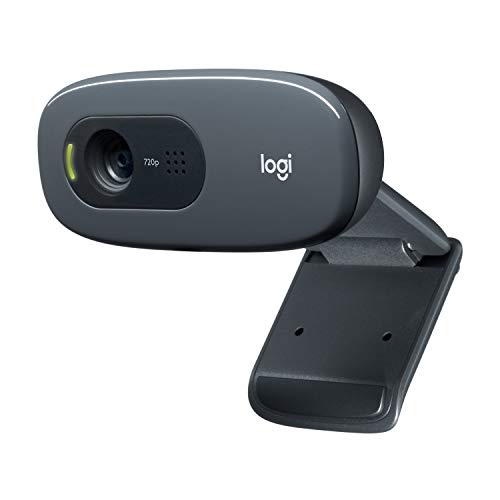
Logitech C270 — The floor: true 720p HD
Every honest affordable guide needs a floor, and the C270 is this one’s: the least expensive camera we can recommend that behaves like a product rather than a gamble. Its 720p picture is the original HD, adequate for small windows, school calls and spare machines; its single noise-reducing microphone carries a voice across a desk; its plug-and-play manners are absolute, asking nothing of any computer built this century. It has survived in production while hundreds of cheaper rivals vanished, and that survival is itself a specification — parts, listings and knowledge about it will exist next year too.
Placed at the floor of an affordable-HD guide, its role is specific. It is the camera for the machine that occasionally needs one: the homework laptop, the guest-room desktop, the old notebook in the workshop, the relative’s computer you maintain from afar. It is not the camera for your own daily desk if meetings are your living — the picks above it exist precisely for that, and the price distance is smaller than the daily difference. Buy the C270 where its virtues are the whole requirement — cheap, simple, present — and it will never disappoint you, because you will never have asked it to be something else.
- Resolution: 720p HD — the floor of this guide, labelled plainly
- Microphone: single noise-reducing unit for desk speech
- Connection: USB-A, class-compliant, nothing to install
- Light handling: automatic correction for ordinary rooms
- Role: spare machines, simple calls, weak connections
Strengths
- The lowest rung that still belongs to a reputable, lasting product line.
- Demands nothing from computer, network or owner.
- Proven across an unusually long production life.
Trade-offs
- Soft on large monitors — its class limit, openly stated.
- No shutter, no frills, no growing room.
- USB-A connection belongs to its generation.
Best for: second machines and simple calling duty bought on a strict budget. Not suited for: a professional’s main camera — climb one rung instead.
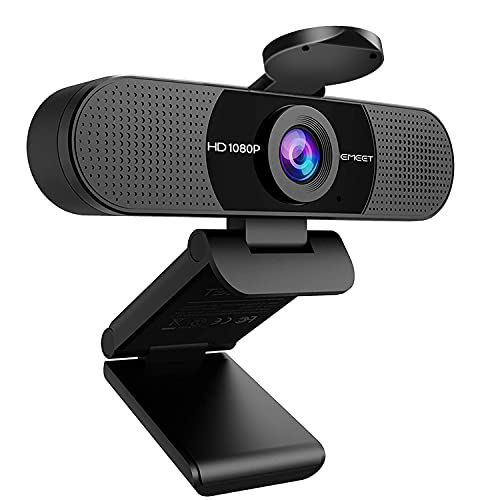
EMEET C960 (1080p version) — Best value Full HD
The C960 in its 1080p form is where the affordable class starts to feel generous. Full HD resolution moves the picture from adequate to finished on a normal monitor, and EMEET pairs it with two decisions that punch above the price: dual microphones, which steady the voice and forgive a speaker who turns toward a second screen mid-sentence, and a wide field of view, which suits the cramped geometry of real homes where the desk is close to the wall and the chair cannot retreat. Together they describe a camera designed by people who pictured an actual spare bedroom rather than a showroom.
The compromises are equally picturable. Image processing at this level favours brightness and punch over accuracy, so colours can run eager and a dim room will look brighter and softer rather than darker and truer. The build is light, which the clip forgives and your hands notice. Neither matters much in the camera’s natural habitat: daily meetings from a home desk where the owner wants to stop thinking about equipment. Among affordable cameras, the C960’s trick is balance — nothing about it is the best in this guide, and the whole of it may be the most camera the average household actually needs.
- Resolution: 1080p Full HD
- Field of view: wide, for close desks and small rooms
- Microphones: dual array — the class’s value standout
- Connection: USB plug-and-play
- Character: bright, eager processing; featherweight build
Strengths
- Full HD clarity at the class’s gentle end of the shelf.
- Dual microphones outperform the price’s expectations.
- Wide framing forgives tight rooms and close walls.
Trade-offs
- Colours lean vivid rather than faithful.
- Dim rooms trade detail for brightness.
- Feels inexpensive in the hand, even though it works well.
Best for: home workers wanting the full job done for household money. Not suited for: colour-critical recording or candlelit rooms.

Logitech Brio 101 — Best simple Full HD
The Brio 101 sells a specific peace of mind: Logitech’s current engineering, Full HD resolution, and an ownership experience with the moving parts removed. Its automatic light balance is the feature you will feel daily without ever naming it — the face stays consistent as clouds cross the window and lamps come on at dusk, the two lighting changes that make lesser budget cameras visibly fidget. Its integrated privacy shutter is the feature you will feel monthly: a physical slide that ends the low-grade background worry of a lens on your desk, settled by fingertips rather than faith in an indicator light.
Everything else about the camera is deliberate restraint. No companion software demands residence on your machine, no modes wait to be discovered and mis-set, no microphone array promises a boardroom it cannot deliver — just a clear meeting voice, a dependable clip, and a picture that looks like the meeting platforms expect. For the buyer whose affordable camera must serve a parent, a partner or a whole small team with minimal support burden, that restraint is not a lack of ambition. It is the ambition, correctly aimed. In a class full of cameras shouting features, the quiet one from the maker with the longest support record is very often the wisest money on the page.
- Resolution: 1080p Full HD
- Light handling: automatic balance that steadies mixed lighting
- Privacy: integrated sliding shutter
- Microphone: built-in, meeting-clear
- Ownership: no software obligations of any kind
Strengths
- The lowest-maintenance Full HD ownership in this guide.
- Light balance that quietly outperforms its price mates.
- A real shutter, built in, at a budget address.
Trade-offs
- Nothing to tune for enthusiasts who enjoy tuning.
- Thirty frames only — motion belongs to pricier classes.
- Plain styling that prioritises function over desk presence.
Best for: buyers equipping family members or small teams who value zero upkeep. Not suited for: creators or anyone wanting manual control.

Logitech C920e — Best for work fleets
Affordability changes meaning when you are buying twelve of something. The C920e is the fleet pick: a Full HD camera from the long-proven C920 family, formally certified and compliance-marked for the platforms employers standardise on, carrying the credentials that let it pass through procurement without a meeting about the meeting camera. For a small business, a clinic’s front office, a school district or any employer handing cameras to staff, the savings that matter are not per-unit — they are the support hours never spent because every desk behaves identically and every platform recognises the hardware without argument.
For an individual buyer the same logic applies in miniature. If your work runs on an employer’s chosen platforms and your technology choices must survive an IT policy, the C920e is the affordable camera least likely to generate friction, and its image — the family’s familiar, dependable 1080p — needs no apology in any meeting you will ever join. Its microphone is enabled and workmanlike rather than lush. Its personality is corporate rather than creative. Both are virtues in its intended habitat, and this guide places it here, rather than among consumer bargains, so that the right buyers recognise their own requirements in its description.
- Picture: Full HD, the family standard
- Credentials: platform certifications and compliance marks for managed workplaces
- Voice: a working microphone, meeting-first
- Fleet virtues: identical behaviour desk after desk
- Plug: USB, recognised by everything
Strengths
- The affordable camera employers can standardise on without drama.
- Proven family image quality at fleet pricing logic.
- Certifications remove platform surprises before they happen.
Trade-offs
- Utilitarian audio and tuning; creators should look elsewhere.
- Individual flair is not the brief it was built to.
- Stereo richness of its consumer sibling is traded for credentials.
Best for: small businesses and employees buying inside managed ecosystems. Not suited for: independent creators choosing on image character.

UGREEN 2K Webcam — Best resolution per coin
UGREEN built its name on cables and hubs — the unglamorous plumbing of every desk — and its webcam applies the same value engineering to a camera: a 2K sensor at a price point where rivals are still selling 1080p, a very wide field of view, dual microphones and a privacy cover in the box. The 2K resolution is real and usable, delivering its advantage in the two places extra pixels survive contact with reality: cropping tighter on your face without softness, and feeding large, sharp monitors where 1080p’s limits begin to show. For a buyer whose screen has outgrown Full HD but whose budget has not outgrown sense, this is the class’s most interesting arithmetic.
The honest asterisks are focus and restraint. The UGREEN uses fixed focus, set for the conversational distance its designers expected; sit at a normal desk and you are sharp, lean dramatically in or out and the design’s assumption shows. Its wide view is a blessing in a small room and a responsibility in a messy one, since more of your surroundings join the call. Neither is a flaw so much as a personality: this is a camera for a settled desk, a tidy backdrop and an owner who values resolution headroom over autofocus choreography. As an accessories maker’s camera it also lacks the deep software ecosystems of the platform brands — what you see through the standard feed is what you get, which for many buyers is exactly the deal they wanted.
- Resolution: 2K at 30 frames, 1080p modes below it
- Field of view: very wide — small rooms gain, messy rooms beware
- Focus: fixed, optimised for desk distance
- Microphones: dual, for meetings and calls
- Privacy: cover included
Strengths
- Resolution headroom rivals charge far more to offer.
- Wide view captures a natural, roomy frame at close range.
- Accessories-maker pricing discipline throughout the package.
Trade-offs
- Fixed focus assumes you sit where desk users sit.
- No deep companion software for tuning or effects.
- The wide eye includes background clutter without asking.
Best for: large-monitor owners wanting 2K headroom on an affordable leash. Not suited for: restless sitters or buyers wanting autofocus artistry.

Anker PowerConf C200 — Best voice in the class
Anker’s PowerConf line comes from conference-room hardware, and the C200 carries that ancestry in its ears. Its picture is a crisp 2K — more than this class requires and welcome on a good monitor — but its distinguishing gift is a microphone system built to hear a room: the maker’s description emphasises full-circle voice pickup and smart voice enhancement, and in practice this is the affordable camera least likely to make a caller say “sorry, you faded”. For the professional whose meetings include two people sharing one desk, a small table of collaborators, or simply a voice that must land clearly in a noisy flat, the C200 buys audio authority that cameras twice its price often skip.
That conference DNA shapes its trade-offs too. It is voiced for speech in shared spaces rather than for the intimate, produced sound a solo creator might chase, and its talents are wasted on a silent room with one careful speaker — the Brio 101 serves that desk for less fuss. But affordability judged by outcome rather than by sticker must reckon with what this camera replaces: for small teams it can retire the separate speakerphone conversation entirely, and for hybrid households it covers both the solo call and the family gathering around one screen. When a single modest purchase retires two problems, the arithmetic of “affordable” changes in its favour — which is why it closes this list as the class’s ceiling rather than its exception.
- Resolution: 2K with lower modes for calls
- Microphones: conference-style pickup with voice enhancement — the pick’s headline
- Light handling: low-light correction for evening rooms
- Connection: USB plug-and-play for PC and Mac
- Role: solo desks that host group conversations
Strengths
- Room-hearing microphones no rival here matches for group talk.
- 2K picture keeps it current on larger displays.
- Can retire a separate speakerphone for small teams.
Trade-offs
- Its audio gifts are wasted on a silent solo room.
- Conference voicing is practical, not cinematic.
- Sits at the class’s ceiling — budget purists should stop a rung earlier.
Best for: shared desks, small-team calls and voices that must carry a room. Not suited for: solo callers in quiet rooms, who can spend less.
The Six, Compared by Role Rather Than by Number
| Camera | True class | Microphone story | Defining virtue | Watch out for |
|---|---|---|---|---|
| Logitech C270 | 720p | Single, noise-reducing | The honest floor | Soft on big screens |
| EMEET C960 (1080p) | 1080p | Dual array | Value balance | Eager colours |
| Logitech Brio 101 | 1080p | Built-in, meeting-clear | Zero-upkeep ownership | No manual control |
| Logitech C920e | 1080p | Enabled, workmanlike | Fleet certification | Corporate character |
| UGREEN 2K | 2K | Dual | Resolution per coin | Fixed focus |
| Anker PowerConf C200 | 2K | Conference-grade pickup | Voice authority | Ceiling of the class |
Two patterns deserve attention. First, resolution and price no longer march together in this class — the 2K models sit beside 1080p ones because sensor costs fell faster than brand pricing did. Second, the microphone column separates the picks more honestly than the resolution column does: in a year of daily calls, you will hear your camera choice far more than you will see it. Choose with your ears open.
How Should You Spend a Small Budget Around the Camera?
The camera is not the whole purchase, and in this class the surrounding spending decides satisfaction. Reserve something for light before anything else: a simple lamp aimed at your face from the front, or a repositioned desk that borrows a window, lifts every camera here by a class. Next, consider the mount’s reality — most desks are fine with the built-in clip, but a laptop on a stand may lift the camera above its clip’s comfortable reach, and a small tripod costs little and fixes angles permanently. Third, check the cable path: a camera whose cable barely reaches will be unplugged in frustration within a month, and an honest extension or a better desk layout is money better spent than a resolution tier.
What not to buy: software that promises to beautify a budget feed, most of which adds lag and artefacts in equal measure; decorative ring lights too small to change a face; and extended warranties on devices whose replacement cost is the warranty’s natural rival. The affordable class rewards a particular discipline — spend on the camera’s inputs (light, position, a clear lens) rather than on processing that pretends the inputs were better. Your callers will see the difference even if they never learn its name.
How Do You Equip Several Rooms Without Regretting It?
Households and small offices increasingly need cameras in more than one place, and the fleet logic that governs the C920e’s pick applies at kitchen-table scale too. Standardise where you can: two or three of the same model means one behaviour to learn, one clip that fits every screen, one spare that covers any failure. Mix only where a room’s job genuinely differs — the shared family desk may deserve the Anker’s ears, while the homework laptop is honestly served by the floor model. Label the cameras’ homes if they travel between rooms, because a camera that migrates tends to settle wherever it was last needed rather than where it is needed next.
Buy in the order of pain. The room hosting daily work calls gets its camera first and best; the occasional rooms can wait for the sales rhythm of this class, which is forgiving to patient buyers. And keep one drawer spare if the household’s calling is mission-critical — in this price territory, a spare is cheaper than the courier fee on an emergency replacement, and infinitely cheaper than the meeting that happens without you.
What Is the True Total Cost of a Cheap Camera?
Sticker prices lie by omission, and the affordable class is where the omitted items matter most. Add to any camera’s price the adapter its plug may require on a modern laptop, the tripod its clip may need on a raised screen, the lamp its picture quietly begs for, and — the item nobody budgets — your own time. A camera that needs twenty minutes of configuration, a driver hunt and a settings ritual after every update has taxed its owner in the currency professionals actually run out of. The picks in this guide were chosen partly on this hidden ledger: class-compliant connections, no software obligations, behaviour that survives updates untouched. Their stickers are not the lowest in the aisle; their totals usually are.
Replacement is the other hidden line. A camera bought below the quality line tends to be replaced on a schedule measured in months, and the second purchase rarely lands back at the bottom — it lands, with feeling, at the level that should have been bought first. The household that buys one Brio 101 has spent less by Christmas than the household that bought a mystery camera in spring and its replacement in autumn, and has enjoyed better calls in every month between. This is the oldest arithmetic in consumer technology, and the affordable class exists to honour it: the goal was never the cheapest camera, but the cheapest satisfactory ownership, measured across the years the camera will actually serve.
There is a resale and hand-me-down dimension too, rarely mentioned in this aisle. A reputable budget camera that outgrows your desk — because you upgraded, because the office closed, because the children grew — remains useful to a relative, a school or a spare room, and its second life costs nothing. The unbranded camera’s second life is a drawer. When a guide like this one insists on makers with track records, it is partly insuring that afterlife: products from real lines keep their listings, their compatibility and their dignity, and a hand-me-down that still works is the final form of affordability.
Which Affordable Camera Fits Which Everyday Job?
Consider the online tutor, whose camera is a classroom. Her picture must hold a face clearly for an hour, her voice must survive a child’s wandering attention, and her setup must work identically every afternoon because a pupil’s lesson cannot absorb troubleshooting. The C960’s dual microphones and wide, forgiving frame serve her well; if she demonstrates at a whiteboard or a piano, she should know this class’s ceiling and read the motion-focused guides linked below rather than asking a meeting camera to be a broadcast one. Within its honest limits, though, an affordable camera runs a tutoring practice perfectly well — thousands do — provided the light is front, the background is calm and the connection is tested before the term begins, not during it.
Consider the job seeker, for whom the camera is a first impression with a deadline. Interviews magnify everything this class does well and badly: a clear, steady, well-lit face reads as competence before a word is spoken, while a smeared picture in a dark room quietly taxes every answer. His best affordable strategy is the centre of this guide — a Brio 101 or C960 — plus the free upgrades that matter more: the camera at eye level on a stack of books, the practice call recorded and watched, the background reduced to one tidy wall. Interviewers will never know which camera he bought. They will know exactly how prepared he looked, and in this class, prepared is purchasable cheaply.
Consider, finally, the hybrid household at full stretch: two adults in meetings, one child in a class, a grandparent expected at Sunday lunch by video. This is the scenario the affordable class was born for, and the fleet thinking from the earlier section scales down gracefully — a good camera on each working desk, the floor model on the child’s machine, the Anker where the family gathers. Total spent: less than one flagship. Total friction: near zero, because no machine in the house is borrowing, begging or going without. When people ask what affordable technology is for, that household, calling happily in three rooms at once, is the answer with its shoes on.
How Long Should an Affordable Webcam Last, and What Kills Them?
A well-bought camera in this class should serve three to five years without drama, and the things that end their lives are rarely electronic. Cables fail first — flexed daily at the same point behind a monitor, or pinched by a closing laptop lid — followed by clips that lose their grip after a hundred re-mountings, and lenses scratched by being wiped with whatever was nearest, which over years was often paper. The sensors and boards inside these simple devices are, by the standards of modern electronics, nearly immortal; it is the mechanical edges that age. Treat the cable kindly, mount the camera once and leave it mounted, clean the lens with a soft cloth, and an affordable camera will usually outlive the computer it was bought for.
Software death, the other great peripheral killer, barely threatens this class — deliberately. Because every pick speaks the standard camera language and leans on no proprietary driver, an operating-system update is a non-event, and a change of computer is a replug rather than a reinstall. This is a profound, unglamorous advantage over cleverer devices, and it is why the guide weighs a maker’s software restraint as a feature. The camera you forget is the camera that lasts, in every sense that matters to a household budget: it never generates a support call, never misses a meeting for an update, and never asks to be replaced for any reason except a better idea.
When replacement does come, let it be for a reason you can name — a bigger monitor that exposes the old resolution, a new job that puts you on camera all day, a household machine count that grew. Replacing on a named reason keeps the affordable discipline intact; replacing on restlessness is how budgets quietly become hobbies. The cameras here will not tempt you much either way. They simply work, in the background, at the price of a family takeaway per year of service — which is, in the end, the most affordable sentence in this entire guide.
How Should You Test an Affordable Camera Before the Return Window Closes?
Test the week, not the minute. On day one, record a local clip at your desk in your normal light and listen to the microphone on headphones; audio problems hide in live calls, where politeness covers them, and announce themselves cruelly in recordings. Across the week, use the camera in every app you actually open, at the hours you actually call, including one call in the evening when the room’s light changes character. Note the transitions: waking from sleep, switching apps, unplugging for a laptop trip and returning. A good affordable camera passes these without a single memorable event, and “nothing happened” is the review you are hoping to write.
Test the humans, too. Ask your most honest regular caller — every life has one — whether you look and sound like yourself. Ask the relative who squints. If the camera serves a child or a parent, watch them use it unassisted once; the setup that survives unassisted use is finished, and the one that needs you standing by is not, whatever its specifications claim. Finally, test the failure plan: if this camera died tomorrow morning, what happens to your 9 a.m. call? In this class the honest answer can be “the spare from the drawer”, and households that can say that have understood affordability more deeply than any specification can teach.
When Should You Leave the Affordable Class Behind?
Honesty about a class includes its exits. Leave when the camera becomes a production tool — when you record lessons, episodes or demonstrations that audiences keep — because production exposes everything meetings forgive: colour decisions, focus behaviour, motion at thirty frames. Leave when your room defeats automatic exposure daily, such as a desk before a bright window you cannot rearrange, where manual controls stop being a hobby and become the job. Leave when your voice is the product and a dedicated microphone chain has entered your life, at which point the camera should be chosen to match that chain rather than a household budget. And leave when a single call’s failure costs more than a flagship camera — the keynote, the deposition, the once-a-year board appearance — because redundancy and headroom are cheap at that altitude.
Notice that none of those exits is “when you can afford more”. Money alone is not a reason to climb; plenty of well-funded desks are perfectly served by this class for a decade, and the satisfaction of a tool exactly matched to its work does not expire when a salary rises. The affordable class, bought with open eyes, is not a waiting room on the way to real equipment. For the meeting-centred life most people actually live, it is the destination — and the exits above are doors for the minority whose work genuinely changes shape, not for everyone whose eye wanders.
Why Is an Affordable Camera the Best Gift in This Whole Category?
A short word for a common errand: the camera bought for someone else. Few technology gifts land as reliably as a decent webcam given to the relative whose laptop camera is a smudge, the friend starting a remote job, the parent whose tablet years have ended and whose desktop needs eyes. The affordable class is the gift class, because its virtues — no setup, no account, no maintenance, a picture that flatters the giver’s judgment every time it is used — survive the handover intact. Choose the Brio 101 for the least technical recipient, the C960 for the one whose room is small and whose calls are long, and include the gift’s second half: twenty minutes of your time to mount it, select it in their apps and make the first call together. A camera given with its setup complete is a standing invitation to call more often, which was the point of the present all along.
Which Mistakes Do Affordable-Webcam Buyers Make?
The defining mistake is buying below the line: the camera whose price seemed to defy the market and whose picture, microphone and lifespan proceed to explain how. The second is mirror-image snobbery — paying flagship money for a meetings-only desk because a specification sheet flattered you, when this class covers meetings completely. Third, buyers compare cameras in a dark room and crown whichever brightens most aggressively, then spend a year looking overexposed in daylight; test at the hours you actually call. Fourth, resolution theatre: chasing a bigger number for a small laptop screen on a thin connection, where the platform will compress the advantage away before it reaches another human. Fifth, forgetting the household’s other screens — the affordable class exists precisely so that every machine that needs a camera can have a decent one, and one excellent camera shared resentfully among three computers serves a family worse than three good ones at home in their places.
Can an Affordable Camera Be Trusted With Your Privacy?
Cheap electronics have taught buyers to ask what the catch is, and with cameras the question deserves a straight answer. The models in this guide come from makers whose business is selling hardware, and they behave accordingly: no account is required to use them, no companion cloud stands between you and your own picture, and the feed goes to the apps you choose on the computer you own. The privacy controls that matter are the ones you can touch — the Brio 101’s sliding shutter, the UGREEN’s included cover, and for the rest, the simple, absolute option of a camera that can be unplugged or pointed at the wall when the working day ends. Operating systems add their own honesty on top, with camera indicators that light whenever any application is watching.
The caution belongs to the tier below this guide’s line. A no-name camera that demands an unknown app, an account and a cloud relay before it will show a picture is asking for trusts its price cannot justify, and that demand — not the hardware — is the true cost hiding in the bargain. This is one more reason the affordable line was drawn at makers with names and histories: privacy, like support, is a property of the company as much as of the device. Buy the camera whose maker you can find, whose shutter you can close, and whose software asks for nothing — and the question that opened this section answers itself.
What Happens When the Whole House Calls at Once?
Affordability’s final examination is the congested hour: two meetings, one online class and a video call with family, all flowing through one household connection while dinner uploads its photos to the cloud. Resolution choices made per camera become a collective budget here. A house of flagship feeds will saturate a modest upload link and degrade everyone together, while a house furnished from this class — 1080p on the working desks, the floor model on the child’s machine — leaves headroom that shows up as stability for all. Platforms adapt per call, but they adapt within what the connection offers, and four sensible streams beat four greedy ones on almost every real network.
The practical choreography is simple. Put the most important call on the wired connection if one exists. Let the router’s position be central rather than decorative. Schedule the household’s heavy uploads — backups, game downloads, the phone library sync — outside the calling hours, a courtesy that costs nothing and rescues more meetings than any camera upgrade. And when a call does degrade, know the order of suspects: the network first, the platform second, the camera a distant third. Owners of affordable cameras often blame the device they can see for the sins of the connection they cannot, and return good hardware while the router sits unjudged in the corner, blinking.
How Do Affordable Cameras Behave in Real Home Light?
Home light is a conspiracy of compromises: a window that is glorious at ten and blinding at noon, ceiling bulbs chosen for warmth rather than honesty, a monitor painting everything faintly blue. Budget sensors meet this conspiracy with automatic exposure and white balance, and the differences between the picks live exactly here. The Brio 101’s steadiness is its quiet triumph — it rebalances without the visible hunting that makes a face pulse. The EMEET reaches for brightness, which flatters dim rooms and can overdo a bright one. The 2K models resolve more of whatever the light provides, for better and worse: more detail in good light, more visible noise when the room gives up.
Your half of the bargain is placement and one lamp. Face the light, never sit with it behind you, and give the camera a face that is the brightest thing in its frame — exposure systems, at every price, expose for the brightest large area and abandon faces that compete with windows. A small lamp switched on for calls is the cheapest image upgrade in this entire guide, cheaper than the difference between any two picks in it. Owners who make that one change routinely conclude their affordable camera was better than they thought; owners who skip it conclude the opposite about cameras costing three times as much. The sensor is rarely the verdict. The light usually is.
What About Sales, Seasons and the Patience Dividend?
This class rewards the unhurried. Its models are mature, their prices drift with the retail calendar, and the difference between buying in a promotional week and buying in a random one can fund the lamp this guide keeps recommending. Patience has a second dividend: mature models accumulate knowledge. Every pick here has been on sale long enough for its behaviour — its clip’s grip, its microphone’s manners, its temper under each operating system — to be common knowledge rather than launch-week promise. In a category where the failure mode is a small daily annoyance repeated for years, buying the known quantity at the calm moment beats buying the novelty at the exciting one, and the savings are almost a bonus.
The exception to patience is need with a date on it: the new job starting Monday, the course beginning Thursday, the relative’s birthday call this weekend. Then buy from this page today, at the centre of the class, and let the small premium for immediacy be what it is — the price of the camera being present for the occasion it was bought for. A camera that arrives after the interview is not affordable at any price. Judge the calendar as honestly as the specification, and the class will treat you as well as it has treated the millions of desks it already serves. Patience, in this aisle, is not the art of waiting for its own sake — it is the habit of letting a mature market hand you its best value on its own schedule, while never letting a deadline slip past unarmed.
Final Recommendation
For a single main desk on a household budget, start at the centre: the EMEET C960 if value balance is your language, the Logitech Brio 101 if zero upkeep is. Equip a workplace with the C920e and spend the savings on light. Reach for the UGREEN when your monitor has outgrown Full HD, and for the Anker PowerConf C200 when your voice must carry a table rather than a desk. Keep the C270 for the jobs at the floor, where its honesty still shines. Affordable, done properly, is not a lesser version of the real thing — it is the discipline of buying exactly the camera your life requires, and in this class, that discipline still leaves change for the lamp that makes it sing. Years from now, none of these cameras will be the most impressive object on your desk, and that is their triumph: they will simply have been there, clear and audible and uncomplaining, for every ordinary call that actually constituted your working life — which is what the money was for, all along, and why the cheapest tier that does the whole job turns out to be the most expensive-sounding bargain in the aisle.
Frequently Asked Questions
How much should an affordable HD webcam cost me in worry?
None, if you buy above the line this guide draws. The models here are class-compliant, software-light and made by companies with support records, so ownership should be a non-event: plug in, select the camera in your apps, and get on with the calls the camera was bought to serve.
Is 1080p worth it over 720p for a home office?
For a main desk with a normal monitor and a healthy connection, yes — the difference is visible every day in one-to-one calls. For spare machines, small windows and weak links, the 720p floor remains rational, which is why both classes appear here with their roles labelled.
Why are two 2K cameras in an affordable HD guide?
Because the market moved: sensor costs fell until value makers could offer 2K at prices this class already charged for 1080p. Excluding them would have protected a tidy definition at the cost of hiding the best resolution-per-coin options available to you.
Which of these is best for a small business buying several?
The Logitech C920e, for its platform certifications and uniform behaviour across desks. If your team gathers around shared screens for group calls, consider the Anker PowerConf C200 for those rooms instead, for the sake of its microphones.
What accessory should I buy first with an affordable webcam?
Light. A modest lamp in front of your face improves any of these cameras more than any other purchase, followed by a small tripod if your screen setup defeats the built-in clip. Spend on the camera’s inputs before its accessories.
Should I buy one good camera to share, or several affordable ones?
For a household, several affordable ones, almost every time. A shared camera is never on the machine that needs it, and the borrowing ritual quietly kills spontaneous calls. This class exists so each screen can have its own camera; the total spent stays modest, and every room is ready at the moment a call arrives rather than after a negotiation.
What if my laptop already has a built-in HD camera?
Compare honestly before spending anything: many recent laptops carry a 1080p built-in camera that rivals this class’s centre. An external camera still earns its place when the laptop sits low (the external one can live at eye level on a monitor or tripod), when the laptop moves between rooms while the desk setup should stay fixed, or when the built-in microphone is the weak link. If none of those applies, your affordable camera may be the one already in the lid — and this guide would rather tell you that than sell you a duplicate.
Do affordable webcams work with both Windows and Mac?
Every pick in this guide is class-compliant, so both systems recognise it without drivers, and the calling apps on either platform can select it immediately. The differences that remain are small — a port shape here, an adapter there — which is precisely why this class is the safe recommendation for mixed households whose machines were bought in different decades.
How can I tell if a bargain webcam listing is misleading?
Check the video resolution specifically — not photo size, not an “up to” mode — and check that a real company stands behind the model. If the listing leads with anything other than the camera’s true video class and its maker’s name, treat the price as the warning it usually is.
Related Guides
For the class below this one examined on its own terms, see Best 720p Webcams: One True 720p Survivor and Five Honest 1080p Step-Ups; for motion-focused buying, read Best 1080p 60fps Webcams: Native 1080p60 vs 4K Cameras Stepped Down; and for the category that is most often confused with this one, Best 1080 IP Webcams: IP Cameras vs USB Webcams — Two Meanings, Separated draws the line clearly.


