What's inside
- Key Takeaways
- Quick Picks
- How Did We Choose for a Class That Is Mostly History?
- When Does 720p Still Make Complete Sense?
- The Six Picks in Detail
- What Does the Whole Field Look Like at a Glance?
- How Can You Get the Best From a 720p Camera?
- What About the Computer and Connection a 720p Camera Deserves?
- How Did 720p Go From Flagship to Legacy So Quickly?
- How Do the Big Calling Platforms Treat a 720p Feed?
- Who Buys a 720p Camera on Purpose? Four Portraits
- What Should You Know Before Buying Old or Discounted Stock?
- How Should You Test a 720p Camera on Its First Evening?
- Which Mistakes Do Buyers Make in the 720p Class?
- How Do You Set Up a 720p Camera for Someone Who Is Not You?
- Why Does Simplicity Itself Deserve a Place in the Specification?
- Final Recommendation
- Frequently Asked Questions
- Related Guides
As an Amazon Associate I earn from qualifying purchases. This post may contain affiliate links at no extra cost to you.
gizmoverdict.com is reader-supported. When you buy through links on our site, we may earn an affiliate commission.
Where to buy: follow the Amazon links in the table below or the ones heading each review. With older models especially, check that a listing describes the camera itself and not a case, mount or replacement cable sold under a similar name.
Let us say the quiet part first, because a guide to the best 720p webcams that hides it would be wasting your time: 720p is a legacy class. It was the high-definition standard of the webcam world for a decade, it powered the great remote-work land rush, and it has been thoroughly overtaken. Modern laptops ship with better cameras built in, meeting platforms increasingly assume 1080p, and the price gap between a 720p camera and a decent 1080p one has narrowed to the cost of a modest lunch. Anyone who tells you 720p is a forward-looking purchase in this decade is selling something — possibly literally.
And yet this guide exists, and it is not a joke at your expense, because 720p still has honest jobs. Some connections cannot carry more: a rural upload link, a congested household network at homework hour, a grandparent’s ageing router. Some computers cannot either — a decade-old laptop that runs the family video call beautifully at 720p and stutters at anything higher. Some platforms quietly cap you anyway, so the extra pixels of a bigger camera never reach the other side. And some buyers simply need a camera for a second machine, a child’s school laptop or a spare room, where “clear enough for a call” is the entire specification and every spare coin belongs elsewhere. For those jobs, one true 720p camera survives in our verified pool, and it leads this guide. The other five picks are labelled, openly and repeatedly, as step-up cameras: 1080p models for readers who read the honest case above, decide their situation can use more, and want to know where the sensible extra money goes. Nothing below pretends to be 720p that is not.
Key Takeaways
- 720p is a budget and legacy class now — buy it deliberately for weak networks, old computers or spare machines, not as a future-proof main camera.
- The Logitech C270 is the one genuine 720p camera in the verified pool that we can still recommend without caveats swallowing the recommendation.
- Five further picks are clearly labelled 1080p step-ups, included because most shoppers comparing 720p cameras are really deciding whether the jump is worth it.
- Bandwidth is the strongest argument for 720p: a lighter stream stays smooth where a heavier one freezes, and a frozen 1080p picture is worse than a moving 720p one.
- Light matters more at this level than at any other — a cheap camera in good light beats a costly one in a cave, every time.
- If this camera will be your face at work five days a week, skip the 720p class entirely and start at the step-up picks.
Quick Picks
| Pick | Badge | Why it is here |
|---|---|---|
| Logitech C270 | The true 720p pick | The surviving native 720p camera: plug-and-play, forgiving of old hardware, honest about what it is. |
| EMEET C960 (1080p version) | Step-up: gentlest price jump | A 1080p camera with dual microphones and a wide view, for buyers stretching slightly beyond 720p money. |
| Logitech Brio 101 | Step-up: simplest modern Logitech | Full HD, a privacy shutter and automatic light balance in a camera that behaves like the C270’s grandchild. |
| Logitech C920S HD Pro | Step-up: the classic, with a shutter | The 1080p benchmark of its era, with stereo audio and a physical privacy cover. |
| Logitech C920e | Step-up: certified for work platforms | The business edition of the C920 line, certified for the meeting platforms employers standardise on. |
| Logitech StreamCam | Step-up: smooth 1080p60 | Sixty frames at Full HD and USB-C, for callers who also record or stream. |
How Did We Choose for a Class That Is Mostly History?
We began with a rule that shrank the field brutally: a 720p pick had to be a camera we would still hand to a family member today, from a listing we could verify, made by a company that still exists in the webcam business. The bargain-bin landscape is littered with unbranded 720p cameras whose listings promise the moon and whose drivers, microphones and lenses disappoint in chorus; none of them appear here, because a cheap camera that gets returned is the most expensive kind. That filter left exactly one native 720p camera standing — the C270 — and rather than pad the list with pretend contenders, we built the rest of the guide around the real decision 720p shoppers face: whether to step up, and if so, how far.
For the step-up picks we applied three tests. Each had to be a genuine 1080p camera from the verified pool, not a 720p model wearing a misleading badge. Each had to keep the virtues that draw people to the 720p class — plug-and-play manners, no software obligations, tolerance of modest computers — while fixing its central limitation. And each had to occupy a distinct rung: the smallest stretch, the simplest modern option, the classic all-rounder, the certified work tool, and the smooth-motion ceiling of the group. A reader should be able to stop at any rung and own a defensible camera.
When Does 720p Still Make Complete Sense?
Bandwidth first, because it is the argument that survives scrutiny. A video call is a negotiation between your camera, your connection and the platform, and the weakest of the three sets the quality everyone sees. On a thin upload connection, a camera feeding 720p gives the platform a stream it can actually sustain: faces move, lips match words, the call feels alive. Force a heavier feed down the same pipe and the platform starts dropping frames and resolution dynamically, producing the worst of both worlds — a picture that is neither sharp nor smooth. Grandparents on village broadband, field workers on site Wi-Fi, households where four people join calls at once: for all of them, a lighter stream is not a compromise but the correct engineering.
Hardware second. Computers age out of video work at the encoder before they age out of everything else, and a machine from the early 2010s that still browses, writes and calls perfectly well may labour visibly when asked to handle a high-resolution camera on top of a meeting app. A 720p camera asks less of that machine at every stage. There is dignity in matching the camera to the computer rather than replacing a working laptop to satisfy a peripheral. Schools and charities, who run fleets of such machines, understand this arithmetic instinctively.
Third, the platform ceiling. A surprising share of everyday calling still renders participants at or below 720p depending on the service, the plan, the layout and how many faces share the screen. In a gallery of twelve, your tile is small; the difference between feeding it 720p and feeding it 1080p is largely theoretical. Where the difference stops being theoretical is one-to-one calls on large monitors, recordings you keep, and content you publish — which is why this guide keeps asking what the camera is for. Purpose, not pride, should set the resolution.
And fourth, the spare-camera logic. Households accumulate secondary machines: the laptop the children use for homework calls, the desktop in the guest room, the old notebook that runs the workshop tutorials. Each occasionally needs a camera; none justifies a flagship. A simple 720p camera in a drawer, ready to clip onto whichever screen needs it, is household infrastructure of the most unglamorous and useful kind.
The Six Picks in Detail
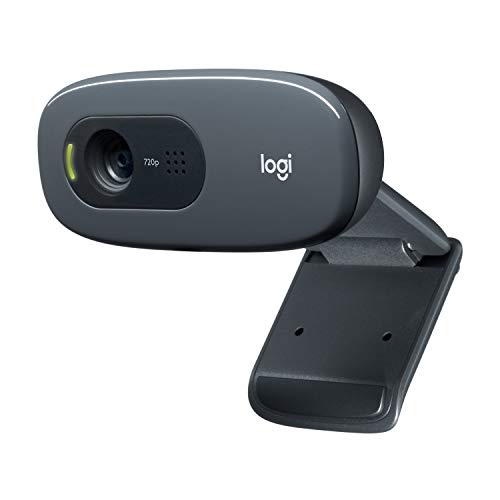
Logitech C270 — The true 720p pick
The C270 is a survivor from another era of computing, and holding it explains both its limits and its charm. It is small, light and unpretentious, with a clip that grips a laptop lid or a monitor bezel and a cable that ends in the USB-A plug its generation grew up with. Plug it into almost any computer made in the last fifteen years and it simply appears as a camera — no software, no account, no firmware ritual. Its picture is honest 720p: a face at desk distance is clear, expressions read easily, and the automatic light correction does a respectable job of rescuing rooms that are merely dim rather than dark. The microphone, a single noise-reducing unit, carries a voice across a desk without fuss, which for school calls and family chats is precisely the job description.
Judged as a main camera for a professional in this decade, the C270 would fail, and this guide will not pretend otherwise — the step-up picks exist because of that verdict. Judged as what it is, it succeeds completely. It asks almost nothing of the computer, almost nothing of the network, and almost nothing of the owner’s attention. It has introduced more children to video calls with grandparents than any camera in this guide’s other five slots combined, and it tolerates being unplugged, drawer-stored and rediscovered in a way delicate flagships do not invite. Logitech’s listing even notes compatibility stretching to the Nintendo Switch 2’s chat mode, a reminder that simple UVC cameras keep finding new hosts. If your need is genuinely 720p-shaped — spare machine, weak link, young caller, old laptop — this is the camera that fills it without apology.
- Resolution: native 720p, exactly as the class promises
- Connection: USB-A, class-compliant plug-and-play
- Microphone: single noise-reducing mic for desk-distance speech
- Light handling: automatic correction for ordinary indoor rooms
- Mounting: universal clip for lids and monitors
Strengths
- Works with elderly computers and thin connections that defeat bigger cameras.
- Zero-maintenance ownership: nothing to configure, update or learn.
- Tough, light and drawer-friendly as a household spare.
Trade-offs
- It is 720p in an age of large monitors — on a big screen, the softness shows.
- Fixed focus and a narrow feature set: what you see on day one is the whole repertoire.
- USB-A plug may need an adapter on the newest laptops.
Best for: spare machines, weak connections, children’s school laptops and anyone whose camera need is occasional and simple. Not suited for: a professional’s daily face-to-the-world camera — read the step-ups below.
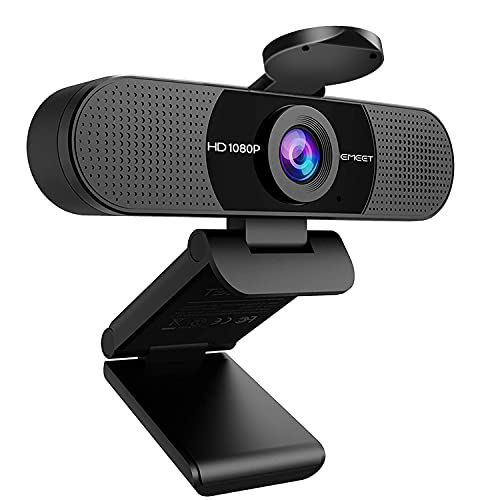
EMEET C960 (1080p version) — Step-up: the gentlest jump
Step-up pick: native 1080p in this listing — an upgrade path, not a 720p model wearing a 720p guide badge. The first rung above the C270 belongs to EMEET’s C960 in its Full HD form, a camera built for buyers who counted the cost of 720p, decided they could stretch a little, and want that stretch to buy visible clarity rather than features they will never open. The jump in resolution is real in the situations where resolution shows: one-to-one calls on a proper monitor, a face filling more of the frame, text on a whiteboard behind you staying closer to legible. Its wide field of view suits the small rooms and close desks where budget cameras usually live, fitting a speaker and a bit of their world into frame without pushing the chair back.
Two microphones rather than one give its audio a steadier quality than the C270 manages, and the plug-and-play manners are preserved — this remains a camera you connect and forget. EMEET’s budget line asks for realistic expectations in return: the image processing is enthusiastic rather than refined, colours can run vivid, and in poor light it will choose brightness over detail. For its intended owner — the home worker upgrading a spare-room setup, the student whose seminars moved online — those are acceptable trades, openly stated. It is the smallest sensible answer to the question every 720p shopper should ask: what does a little more actually get me? In this case: a noticeably clearer face, a wider room, and a camera that will not feel antique the first time it meets a big monitor.
- Resolution: 1080p Full HD — a step-up from the 720p class
- Field of view: wide angle suited to close desks and small rooms
- Microphones: dual array for steadier speech pickup
- Connection: USB plug-and-play, no software obligations
- Character: budget processing — vivid colour, brightness-first in dim light
Strengths
- The smallest stretch beyond 720p money that buys a visible difference.
- Wide view forgives tight desks where other cameras crop too close.
- Dual microphones lift call audio above single-mic rivals.
Trade-offs
- Colour and exposure processing are eager rather than accurate.
- Low-light detail gives way sooner than on the Logitech step-ups.
- Build feels budget in the hand, though it works without complaint.
Best for: buyers stretching just past 720p for a main home camera on a tight budget. Not suited for: anyone recording content they intend to publish.

Logitech Brio 101 — Step-up: the simplest modern Logitech
Step-up pick: a Full HD 1080p camera, included as the modern default rung above the 720p baseline. If the C270 has a spiritual grandchild in Logitech’s current line, it is the Brio 101: the same philosophy — connect it, forget it — rebuilt around a Full HD sensor and the expectations of this decade. Its automatic light balance handles the mixed lighting of real homes with a steadiness the older camera cannot match, so a face lit by a window on one side and a lamp on the other stays plausible instead of splitting into two exposures. A built-in privacy shutter answers the concern that barely existed when the C270 was designed and now tops many buyers’ lists: slide it, and the lens is covered by plastic, not by a promise.
The Brio 101 is deliberately unambitious beyond that brief, and the restraint is its appeal. There is no software suite demanding residence in your menu bar, no ring light gimmick, no app-exclusive mode that a future update can take away. It is the camera for the buyer who read the honest 720p case, concluded their connection and computer can carry more, and wants the extra clarity without inheriting a hobby. Relatives who call the family tech person for help will need less of it with this camera than with anything else on the page. In a guide that began by defending simplicity, the Brio 101 is simplicity with the resolution updated — which, for a great many desks, is the correct final answer.
- Resolution: 1080p Full HD — a step-up from the 720p class
- Light handling: automatic balance for mixed home lighting
- Privacy: integrated sliding shutter
- Connection: USB plug-and-play simplicity
- Microphone: built-in, tuned for ordinary meeting speech
Strengths
- Modern resolution with the C270’s zero-fuss ownership experience.
- Privacy shutter built in rather than sold as an accessory.
- Light balance that flatters real rooms without manual help.
Trade-offs
- No advanced controls for tinkerers who enjoy tuning an image.
- Thirty frames per second only — motion fans should read the StreamCam’s entry.
- Its plainness is the point, which speed-readers may mistake for a lack of features.
Best for: home workers who want modern clarity with antique simplicity. Not suited for: streamers or anyone needing high frame rates.

Logitech C920S HD Pro — Step-up: the classic, with a shutter
Step-up pick: 1080p with a privacy shutter, one class above the 720p cameras this guide is anchored on. The C920 line defined the serious webcam for a generation of remote workers, streamers and tutors, and the C920S is its most considerate edition: the same Full HD image and stereo microphones that made the family famous, plus the privacy shutter the original always lacked. Its autofocus was the benchmark others chased, its light correction rescued a thousand badly lit home offices, and its glass produced a picture with a calm, detailed quality that cheaper cameras still imitate. Choosing it today is choosing maturity — a design whose behaviour is known in every meeting platform, every recording app and every operating system you might plausibly use.
That maturity cuts both ways, and honesty requires the other edge: the design’s roots are old, the connection is USB-A, and its frame rate is thirty, full stop. None of that matters in a meeting. All of it matters if your ambitions include smooth motion or a one-cable USB-C desk. Positioned in this guide, the C920S is the step-up for the buyer who values proven behaviour over novelty — the person whose current 720p camera is dying and who wants its replacement to be the safest pair of hands in the business. There are flashier cameras in this list’s final slot. There is none with a longer record of simply working, in more rooms, for more people, than this one.
- Resolution: 1080p at 30 frames per second — a step-up from the 720p class
- Autofocus: the line’s long-standing benchmark behaviour
- Microphones: stereo pair for more natural voice presence
- Privacy: attachable shutter included with this edition
- Connection: USB-A plug-and-play
Strengths
- A decade of proven behaviour across every platform that matters.
- Stereo audio that sounds less like a phone call than rivals manage.
- The privacy shutter completes the classic design’s one omission.
Trade-offs
- An ageing platform: USB-A and thirty frames are yesterday’s specifications.
- Its price sometimes drifts close to newer designs with more to offer.
- Fixed, businesslike image character — no creative controls to grow into.
Best for: professionals replacing a dying camera with the safest known quantity. Not suited for: motion-heavy recording or minimalist USB-C-only setups without an adapter.

Logitech C920e — Step-up: certified for work platforms
Step-up pick: certified 1080p for work platforms — business trim, resolution a class above 720p. The C920e takes the same proven Full HD foundation and aims it squarely at the managed workplace. Its distinguishing asset is certification: it is certified for Zoom and compatible with Microsoft Teams in the formal, tested sense that IT departments care about, and it carries the compliance markings that let it onto procurement lists the consumer models never see. For the individual buyer, the practical translation is boring in the best way — this camera is the one least likely to surprise an employer’s standard software stack, and the one a company is most likely to hand you if you ask nicely instead of buying your own.
Against its C920S sibling, the trade is character for credentials. The E model’s microphone is enabled and adequate for meetings, its image is the family’s familiar 1080p, and the whole package is tuned for the huddle room and the hot desk as much as the home office. If you work for yourself, the S model’s stereo sound and included shutter may serve you better. If your working life runs through platforms your employer chose, with an IT policy your purchases must survive, the C920e is the step-up that speaks procurement fluently. In a guide about matching cameras to realities, that is a reality plenty of readers live inside.
- Resolution: 1080p Full HD — a step-up from the 720p class
- Certification: Zoom certified, Teams compatible, business compliance markings
- Microphone: enabled, meeting-grade
- Intended habitat: managed workplaces and standardised fleets
- Connection: USB plug-and-play
Strengths
- Certifications that satisfy employers and IT departments.
- The proven C920-family image in a fleet-friendly package.
- Unlikely to clash with any mainstream meeting platform.
Trade-offs
- Less charm for creators: the tuning is corporate, not cinematic.
- Stereo audio gives way to a more utilitarian microphone setup.
- Individual buyers may find the sibling S model the warmer choice.
Best for: employees buying inside an employer’s ecosystem and standards. Not suited for: independent creators choosing a camera purely for image character.

Logitech StreamCam — Step-up: smooth 1080p60
Step-up pick: 1080p at 60 frames per second, two steps above the 720p baseline in resolution and motion alike. The final rung abandons the meeting-first mindset. The StreamCam captures Full HD at sixty frames per second, and that doubling of motion information transforms anything that moves on camera — hands demonstrating a technique, a musician’s fingers, a seller turning a product, a teacher at a whiteboard. It connects over USB-C, rotates for vertical video in its mount, and was designed from the first sketch for people who appear on camera as a creative act rather than an administrative one. Its autofocus and exposure behaviour are tuned for a subject who shifts, leans and gestures, because its designers knew its owner would.
Why does a 720p guide end here? Because the honest journey of many readers starts at “something cheap for calls” and ends, one honest question later, at “actually, I also want to record my lessons” or “my channel needs a camera”. The StreamCam is where that journey should land if it lands anywhere in this pool: not the most resolution on the page, but the most motion, in the friendliest package, from the maker whose software support streamers rely on. If your camera life is purely meetings, it is more than you need and the Brio 101 will make you happier for less. If your camera life is growing, this is the pick that grows in the same direction.
- Resolution: 1080p at 60 frames per second — the motion ceiling of this guide
- Connection: USB-C, at home on modern laptops
- Mounting: rotates for vertical framing in its stand
- Focus and exposure: tuned for moving, gesturing subjects
- Intended habitat: creators, tutors and demonstrators
Strengths
- Sixty-frame motion that no 30fps camera at any resolution can imitate.
- USB-C connection suits current laptops without adapters.
- Creator-friendly framing options, including vertical video.
Trade-offs
- Pure meeting users pay for motion they will never use.
- Sixty frames ask more of the computer and the connection.
- Its talents peak with decent light, like every high-frame-rate camera.
Best for: callers who also record, teach or stream with movement. Not suited for: static meeting-only use on a weak connection — the C270’s home ground.
What Does the Whole Field Look Like at a Glance?
| Camera | True class | Frame rate | Connection | Honest role |
|---|---|---|---|---|
| Logitech C270 | 720p native | 30 | USB-A | The genuine article: spare and weak-link duty |
| EMEET C960 (1080p) | 1080p step-up | 30 | USB-A | Smallest stretch to modern clarity |
| Logitech Brio 101 | 1080p step-up | 30 | USB | Modern simplicity with a shutter |
| Logitech C920S | 1080p step-up | 30 | USB-A | The proven classic |
| Logitech C920e | 1080p step-up | 30 | USB | The certified work tool |
| Logitech StreamCam | 1080p step-up | 60 | USB-C | The motion and creator ceiling |
The table’s most important column is the second one. One camera here is a 720p camera; five are not, and the guide’s usefulness depends on never blurring that line. Read the roles instead: they describe days and desks, and the right choice is the row whose honest role matches the life the camera will actually live.
How Can You Get the Best From a 720p Camera?
Light is the whole secret, and it is not really a secret. A 720p sensor has fewer pixels to hide behind, so every improvement in illumination shows immediately: sit facing a window rather than beside it, switch on the room light you would normally skip, and if you buy one accessory with a 720p camera, buy a modest lamp for your face rather than any gadget that promises to enhance the picture digitally. Distance is the second lever — at 720p, a face that fills more of the frame reads sharper than the same face small in a wide shot, so move the camera closer on its clip or sit a hand’s width nearer than feels natural. The lens will forgive you; the resolution will thank you.
Third, set expectations inside the apps. Choose the camera explicitly in each program’s settings rather than trusting defaults, and where an app offers a bandwidth or quality preference, the honest choice on a weak connection is the steadier one. Fourth, keep the lens clean — a budget camera’s small glass shows a fingerprint’s haze across the whole image, and a weekly wipe with a soft cloth is maintenance that outperforms any software filter. Finally, frame deliberately: a plain background at this resolution reads as professionalism, because the viewer’s eye has fewer pixels to spend and notices composition more. A tidy shelf and a centred chair will do more for a 720p call than any setting buried in a menu.
What About the Computer and Connection a 720p Camera Deserves?
The kindest thing about this class is how little it demands, but “little” is not “nothing”. Give the camera a direct port rather than a tired hub when you can, especially on older machines whose USB controllers share bandwidth grudgingly. If the picture freezes while audio continues, the connection between camera and computer is rarely the culprit — that pattern usually means the network is saturated, and the fixes live there: move closer to the router, wire the computer to it for important calls, or ask the household’s other streams to pause for the length of a lesson. A 720p camera already asks the network for less than any alternative; meet it halfway and it will repay you with the steadiest picture your connection can produce.
On the computer side, close what you are not using. An old laptop juggling a browser’s dozen tabs, a syncing photo library and a video call will drop frames at any resolution; the same machine with the call given room to breathe handles 720p gracefully for years. This is the deeper truth of the class: it extends the useful life of hardware that still serves its owner in every other way, and there is nothing nostalgic or second-rate about that. Sustainability marketing aside, the greenest and cheapest computer is the one already on the desk — and a camera matched to it is good buying, not settling.
How Did 720p Go From Flagship to Legacy So Quickly?
Understanding the fall helps you buy the class wisely. 720p earned its crown honestly: when broadband was measured in single digits and laptop processors wheezed under video encoding, a 1280 by 720 picture was the sweet spot where a face became genuinely clear without melting the machine beneath it. An entire generation of beloved cameras — the ancestors of the C270 included — built remote work’s first era on it. Three forces then moved the ceiling. Displays grew: when the person watching you sits before a 27-inch monitor, a small soft picture stops looking intimate and starts looking tired. Connections fattened in most cities, removing the bandwidth argument for the majority, though never for everyone. And sensors commoditised — the silicon that once made 1080p a premium feature became cheap enough that camera makers stopped treating 720p as a destination and started treating it as a floor for their very cheapest lines.
The subtle casualty was quality within the class. As 720p became the bottom rung, the engineering attention left: the best 720p cameras ever made are old designs kept in production, like the C270, while most newer 720p models are cost-cut exercises from brands you have never heard of. That is why this guide’s native pick is a veteran rather than a newcomer, and why the unbranded end of the class deserves your suspicion. A legacy standard is not a dishonourable thing — vinyl records and mechanical watches send their regards — but it changes how you shop: you buy the proven survivor, you pay no premium for nostalgia, and you keep one eye on the step-up ladder in case your needs outgrow the standard’s honest limits.
How Do the Big Calling Platforms Treat a 720p Feed?
Each platform negotiates resolution in its own way, and knowing the behaviour of the one you live in prevents both disappointment and overspending. Group meetings on the major services are adaptive by design: the platform watches your connection and the layout on everyone’s screen, then requests a version of your picture sized for the tile you occupy. In a crowded gallery that tile is small enough that a 720p feed and a 1080p feed become near neighbours. One-to-one calls are the opposite — the other person’s face fills a window, the platform asks your camera for everything it has, and the class difference stands in plain sight. Screen sharing changes the politics again: when your shared document is the star, your camera tile shrinks to a postage stamp and even a modest camera looks distinguished.
Recording follows yet another rule set. Cloud recordings inherit whatever the platform chose during the call, which is why a lesson recorded through a meeting service can look softer than the same lesson recorded locally with the camera’s full feed. If you keep recordings — training libraries, tutoring archives, family interviews with grandparents that nobody wants to lose — record locally when the material matters, and let the meeting platform handle only the conversation. None of this is an argument that 720p fails on modern platforms; the services were built during its reign and handle it gracefully. It is an argument for knowing which of your calls actually display more than 720p before paying to feed them more.
Who Buys a 720p Camera on Purpose? Four Portraits
The remote grandparent is the class’s most sympathetic customer. Her computer is not new, her village connection thins in the evening, and her requirement is exact: the grandchildren, moving and audible, without a grandchild-on-support-call having to debug a frozen screen from three hundred miles away. A C270 on that machine, aimed at a chair she already sits in, with the room light on, delivers precisely that — and its lack of settings is a feature, because there is nothing for curious fingers to break between calls. Families setting up such a system should do the kind thing and configure it once, in person, with the camera chosen in the app and a shortcut on the desktop, then leave the humble hardware to its decade of service.
The classroom fleet buyer thinks in dozens. A school equipping document-camera substitutes, language-lab stations or loaner laptops for remote days needs cameras that survive bags, drawers and young hands, and whose loss is an annoyance rather than a budget meeting. Standardising on one simple, replaceable model — the same clip, the same plug, the same behaviour in every room — is worth more than a resolution bump no curriculum uses. The same logic serves charities, libraries and community centres lending machines into homes: the camera is infrastructure, and infrastructure should be boring, uniform and cheap to replace.
The field professional is the third portrait: the surveyor, the site manager, the service engineer calling the office from a cabin, a depot or a farm building where the connection is whatever the landscape provides. Her laptop may be rugged and modern, but the link is not, and a camera that sips bandwidth keeps her face moving while a heavier feed would freeze at the exact moment she holds a component up to the lens. For her, 720p is not legacy at all — it is the correct tool for the terrain, chosen the way she chooses boots.
The fourth portrait is the second-angle hobbyist: the model-maker, miniature painter, electronics tinkerer or music teacher who needs an overhead or side view of hands at work. A flagship camera overhead is wasted money and often physically awkward; a small, light 720p camera on a boom arm, feeding a modest picture-in-picture corner while the main camera carries the face, is the setup countless hobby streams quietly use. Resolution matters least exactly where these cameras sit — a small inset window — and their size and price finally become virtues again. If that is your plan, the C270’s long service record in odd positions and stranger mounts is a recommendation in itself.
There is a fifth portrait, easy to overlook: the traveller’s backup. Professionals whose work depends on appearing clearly — the consultant billing by the video hour, the tutor whose students pay per session — often carry a featherweight spare camera in the laptop bag, because hotel-room discoveries that the main camera has failed are discoveries made too late. A 720p veteran is nearly perfect insurance for that bag: light enough to forget, simple enough to work on any borrowed machine, and good enough that a client meeting survives the substitution without comment. Insurance is never the glamorous purchase. It is, on the one day it matters, the only purchase anyone talks about.
What Should You Know Before Buying Old or Discounted Stock?
Legacy classes attract legacy inventory, and a few minutes of suspicion will protect you. Check that the listing is for the camera itself, sold by a seller who will still exist next month, and be wary of bundles whose headline hides a mount or case as the main item. With long-lived models, packaging and included extras changed across the years, so read what the current listing actually includes rather than what a review from another decade described. Inspect on arrival with the same rigour as any camera: lens clean and unmarked, clip tension firm, cable supple rather than kinked, and a test call recorded locally so you can listen to the microphone without a platform’s processing in the way.
Also understand what support means for a veteran model. The C270’s genius is that it needs almost none — class drivers in the operating system carry it — but that also means nobody will add features to it, ever, and its behaviour on the newest systems is “works as a camera” rather than “integrates beautifully”. Buy it as a finished, frozen tool and you will be content; buy it hoping a software update will modernise it and you have misunderstood the product. The step-up picks, being current lines, live under the opposite expectation, which is one more honest difference between the native pick and the ladder above it.
How Should You Test a 720p Camera on Its First Evening?
Keep the test humble and it will tell you the truth. First, record locally: open your computer’s built-in camera or movie-recording app, select the new camera and its microphone, and capture a minute of yourself reading something aloud at your normal distance, moving your head the way you do when you talk. Play it back on headphones. You are listening and looking for three things — whether your face stays clear through natural movement, whether the exposure recovers gracefully when you lean toward the window and back, and whether your voice sounds like you in a room rather than you in a tunnel. A budget camera that passes those three has passed its real examination; the rest is platform weather.
Second, make the worst call you honestly expect, not the best one. If this camera will serve a thin connection, test it at the household’s busy hour with the usual evening traffic flowing. If it will serve an old laptop, run the test with the machine’s normal clutter open, not after a heroic cleanup the owner will never repeat. If it is destined for a child’s school calls, let the child drive it once while you watch — the handling a camera survives in small hands matters more than another line of specification. Defects discovered in the first evening are a returns-window errand; defects discovered in the first important call are a story told for years.
Third, test the boring edges. Unplug the camera and plug it back in: does every app find it again without ceremony? Close the laptop lid and reopen it. Switch between two calling apps in one sitting. Try the clip on the actual screen it will live on, at the angle the chair dictates, and check nobody’s forehead is cropped by the frame’s edge. Budget cameras earn their keep in these unglamorous transitions, and the veterans in this guide pass them precisely because their designs were finished in an era when such reliability was the entire product. If your new camera clears the evening’s tests, stop testing and start calling — the class rewards use, not optimisation.
Which Mistakes Do Buyers Make in the 720p Class?
The expensive mistake is buying an unbranded camera on a miracle listing. The pool of nameless 720p cameras is where inflated claims breed — resolutions the sensor cannot produce, microphones that exist mainly in the description, drivers that abandon you at the first system update. The C270 costs what it costs partly because a real company stands behind it. A second mistake is the opposite snobbery: assuming 720p cannot possibly be enough and overbuying for a spare machine that hosts four calls a year. A third is judging any camera in a dark room at midnight and returning it for failing a test no camera in this price territory passes; light first, verdict second. Fourth, buyers forget the adapter question until the camera meets a USB-C-only laptop — a small thing, but check your ports before the box arrives. And fifth, people buy a second 720p camera for a growing creative hobby, when the honest purchase was the StreamCam’s motion all along. Match the camera to the actual trajectory of your use, not just its first month.
How Do You Set Up a 720p Camera for Someone Who Is Not You?
Half the cameras in this class will be installed by a person who will not be using them — a daughter configuring her father’s machine, a school technician imaging a classroom set, a partner rescuing the household’s spare laptop. Setup for someone else follows different rules than setup for yourself. Do everything in one visit or one remote session, and leave nothing “to finish later”, because later means a confused call at the worst moment. Clip the camera where it will live permanently; a camera that must be fetched from a drawer will simply not be used, and the built-in-less machine it serves will sit camera-less through the calls that mattered.
Choose the camera inside every calling app the person actually uses, not just the one you tested with, and make one real call to yourself from that chair, at that time of day, with the lighting they will honestly have — then fix the lamp situation while you are still there to fix it. Write the three troubleshooting truths on a card that lives under the keyboard: check the app has the camera selected, check the lens is uncovered and clean, check the room light is on. Those three solve nearly everything a simple camera can suffer. Resist installing extra software “just in case”; on a machine maintained at a distance, every additional program is a future mystery. The beauty of this class, configured kindly, is that the technology disappears — and for the person in the chair, the call was never about a camera at all.
Why Does Simplicity Itself Deserve a Place in the Specification?
Buying guides worship measurable things, but the 720p class survives on an unmeasurable one: the absence of decisions. A camera with no modes cannot be in the wrong mode. A camera with no app cannot demand an update at the threshold of a call. A camera with no account cannot lock its owner out of their own face. For confident users these are trivialities; for the fleets, families and field workers in the portraits above, they are the difference between a tool and a responsibility. It is worth saying plainly in a guide that also sells the ladder upward: every step up this page buys capability with a small tax of complexity, and the right purchase is the one where the tax is worth paying for your life — not the one where the specification is longest.
That philosophy also explains this guide’s structure, and it is worth a sentence of the reader’s trust. We could have filled six slots with six nominally-720p cameras and looked complete. Instead the guide shows its working: one survivor worth your money, five honest ladders, and the reasoning laid bare. If you leave with the C270, you leave with the class’s best. If you leave with a step-up, you leave knowing exactly which limitation you paid to escape. Either way, the purchase was made with open eyes — the only kind a legacy class, or any class, deserves. And open eyes, in the end, are what separate a deliberate budget buy from a disappointing one: the hardware in both boxes may be identical, while the satisfaction never is, because expectations, honestly set, are half of every product ever sold.
Final Recommendation
If your need is truly 720p-shaped — a spare machine, a frail connection, an elderly laptop, a child’s school calls — the Logitech C270 remains the one camera in the class we recommend with a clear conscience, and it will do that job for years without asking anything of you. If reading this guide clarified that your main machine and your main calls deserve more, climb only as far as your purpose requires: the EMEET C960 for the smallest stretch, the Brio 101 for modern simplicity, the C920S or C920e for proven professional behaviour, and the StreamCam when movement enters the picture. The class itself deserves a respectful farewell rather than ridicule — 720p carried the world’s conversations through a remarkable decade — but the kindest thing a guide can do is tell you plainly when a standard has become a starting point instead of a destination.
Frequently Asked Questions
Is 720p enough for Zoom and Teams calls?
For ordinary meetings, yes — especially in multi-person galleries where your tile is small and platforms manage bandwidth dynamically. It becomes limiting in one-to-one calls on large monitors, in recordings you keep, and whenever fine detail such as a whiteboard or a product needs to survive the journey.
Why does this guide include 1080p cameras in a 720p roundup?
Because only one native 720p camera in our verified pool is still worth recommending, and inventing rivals would have been dishonest. The 1080p models are labelled as step-ups everywhere they appear, so you can see exactly what the extra money buys and decide whether your situation justifies it.
Will a 720p camera work better on a slow connection?
Generally yes. A lighter stream is easier for a weak upload link to sustain, so the picture stays smooth instead of freezing and recovering. The camera does not fix a bad connection, but it stops asking that connection for more than it can give.
Can a 720p webcam make an old laptop feel usable again?
It can remove one common reason old laptops struggle in calls: the processing and bandwidth load of a high-resolution camera. Paired with a tidy system — few background apps, a clean lens, decent light — a modest camera lets an ageing machine handle video calls gracefully.
What is the single best upgrade for a 720p picture?
Light in front of your face. A window by day or a simple lamp by night improves a 720p image more than any setting, accessory or software enhancement, because the sensor finally receives enough information to describe you clearly.
Can I use a 720p camera as a second, overhead camera?
Yes, and it is one of the class’s smartest modern uses. In recording software such as OBS, a modest camera pointed down at your hands — assembling, painting, repairing, demonstrating chords — occupies a small corner of the final picture, where its resolution is more than sufficient. Its lightness helps here too: small cameras ride boom arms and improvised mounts that would sag under a flagship. Pair it with your main camera for your face, label the sources clearly in your software, and a two-angle setup appears for the price of a drawer spare.
How long will a camera like the C270 keep working?
There is no expiry date printed on class-compliant hardware. Because the C270 speaks the standard camera language that operating systems build in, it has already outlived several generations of both major desktop systems, and its failure mode in the future is more likely to be a worn cable or a tired clip than a software refusal. Buy it as a tool with a long, quiet life — while remembering that no maker will add new features to it, so the camera you test on the first evening is the camera you will own in year five.
Should I buy a 720p camera for a child or a spare room?
That is the class’s best remaining use case. The C270 is inexpensive to run, undemanding of the computer, simple enough for a young caller, and tough enough for drawer storage between uses — exactly the virtues a household spare should have.
Related Guides
Readers weighing the step up to smoother motion should read Best 1080p 60fps Webcams: Native 1080p60 vs 4K Cameras Stepped Down, and anyone confusing camera categories will benefit from Best 1080 IP Webcams: IP Cameras vs USB Webcams — Two Meanings, Separated. If the calls happen in front of a television-sized screen, Best 1080 Gaming TVs covers the display side of the setup.
Related guides
- Best 4K UHD HDR HDMI Extenders: 4K60, Long-Run and 4K120 Kits Compared
- Best 25–35 Inch Monitors With Lowest Display Lag: An Honest Ranking Without Invented Numbers
- Best Enterprise SATA SSDs: Endurance Classes, Power-Loss Protection and Fleet Sense
- Best Color Product Label Printers: Six Desktop Machines for Short-Run Product Labels


