What's inside
- Where to buy
- Key Takeaways
- Quick Picks
- What Did We Weigh When Ranking Tablets This Small?
- Reading, Watching, Playing: Which Size Serves Which Habit?
- Side-by-Side: The Six at a Glance
- How Do You Move Your Library Onto a New Small Tablet?
- Where Do Buyers of Small Android Tablets Usually Slip Up?
- What Can Split-Screen Honestly Do on Nine Inches or Less?
- Should You Hold Out for a Cellular Model in This Size Band?
- How Do Students Actually Use Tablets in This Size Range?
- What Battery Habits Keep a Small Tablet Young?
- Which Grips, Cases and Stands Suit a One-Handed Tablet?
- What Does ‘Full Android’ Actually Guarantee You?
- Is the Second-Hand Market a Shortcut in This Bracket?
- How Would We Spend a Tight, a Middle and a Generous Budget Here?
- Which Reading Apps Make the Most of a Small Android Screen?
- What Happens When a Small Tablet Becomes the Family’s Shared Screen?
- How Does Android on a Tablet Differ From Android on Your Phone?
- Final Recommendation
- Frequently Asked Questions
- Related Guides
As an Amazon Associate I earn from qualifying purchases. This post may contain affiliate links at no extra cost to you.
gizmoverdict.com is reader-supported. When you buy through links on our site, we may earn an affiliate commission.
Where to buy
The best 7 to 9 inch android tablets occupy the friendliest corner of the whole tablet market: big enough to read a comic page without pinching, small enough to hold in one hand on a crowded bus, and cheap enough that a cracked screen ruins your afternoon rather than your month. This guide gathers six Android machines whose screens genuinely measure between eight and nine inches — there is no true seven-inch Android tablet on sale any more, and the six below start at 8.0 — and sorts them by the three jobs this size class actually performs: reading, video and small-screen gaming.
Notice what the range does to choice. At ten and eleven inches, tablets compete on keyboards, stylus pens and laptop ambitions. Between seven and nine inches, none of that theatre matters. What matters is whether the screen stays kind to your eyes at midnight, whether the battery survives a long-haul flight, whether the speakers make dialogue intelligible without earbuds, and whether the chip keeps your favourite game smooth rather than merely launchable. The six picks divide accordingly. Samsung contributes the Galaxy Tab A9 and the newer Galaxy Tab A11, both at 8.7 inches. Lenovo fields three machines with three distinct tempers: the gentle Tab One for readers, the nine-inch Tab M9 for bargain hunters, and the Legion Tab Gen 3, an 8.8-inch gaming missile. Amazon’s Fire HD 8 from 2020 closes the list with an asterisk the size of its price tag: it runs Fire OS rather than full Android, a distinction its section explains in full.
Every diagonal printed below is the manufacturer’s real number, repeated in headings, spec lists and the comparison table, because this size band suffers more than any other from creative retail filing. An 8.7-inch tablet is a fine thing. It is simply not a seven-inch tablet, and a guide that blurred the two would be selling you a case that does not fit. And if a listing’s title and its specification table ever disagree about the diagonal, believe the specification table — then consider whether a seller who files sizes carelessly deserves your money at all.
Key Takeaways
- Nothing in this guide measures under eight inches, because the seven-inch Android tablet no longer exists as a current product.
- Samsung’s Tab A9 and Tab A11 share the 8.7-inch size; the A11 is the newer generation and the one to favour when prices sit close.
- Lenovo’s Legion Tab Gen 3 turns the small Android class into a gaming machine with a Snapdragon 8 Gen 3 and 12GB of memory.
- The Tab M9 stretches to a full nine inches on an HD panel, trading sharpness for the largest reading page among the budget picks.
- Amazon’s Fire HD 8 (2020) runs Fire OS without the Google Play Store by default, so treat it as an honorary Android with conditions.
- For pure reading, panel comfort and battery life beat processor bragging rights at every price in this bracket.
Quick Picks
| Pick | Badge | Why it earns its place |
|---|---|---|
| Samsung Galaxy Tab A9 8.7 | Balanced everyday Android | Metal-backed, store-complete and calm under daily loads; the reference point the rest of this list is judged against. |
| Samsung Galaxy Tab A11 8.7 | Newer-generation Samsung | The A11 refreshes the 8.7-inch Samsung formula with a newer platform, worth choosing when the gap to the A9 is small. |
| Lenovo Tab One 8.7 | Gentlest on the eyes | An eye-comfort panel, a bundled clear case and multi-day reading stamina make this the bookworm’s budget pick. |
| Lenovo Legion Tab Gen 3 8.8 | Small-screen gaming flagship | Flagship silicon in an 8.8-inch frame; the only pick here that treats demanding games as its home turf. |
| Lenovo Tab M9 9.0 | Largest page, leanest spec | A full nine inches for readers who want maximum page area and accept HD resolution and modest memory in exchange. |
| Amazon Fire HD 8 (2020) | Fire OS honorary member | An eight-inch 2020 streamer at a bargain price, included with its Fire OS conditions spelled out rather than hidden. |
What Did We Weigh When Ranking Tablets This Small?
Reading comfort led the scoring, because this bracket lives or dies on long sessions. We looked for panels that dim gracefully for dark rooms, colour tuning that does not turn paper white into blue ice, and front designs without sharp frame edges digging into palms. Weight distribution mattered as much as headline weight: a slightly heavier tablet balanced evenly tires the hand less than a lighter one that pulls toward a corner. Battery testing in our judgement means a realistic travel day — downloads in the morning, video across a flight, reading before sleep — rather than a laboratory loop of one app.
Performance was scored against the bracket’s honest workload. Browsing, streaming, social apps, casual games and video calls should feel fluid on every pick here, and they do; the separation appears when a demanding 3D game or a heavy split-screen session enters the picture, which is why the Legion Tab exists as its own category. Software completeness formed the third pillar. Full Android with the Play Store is the baseline expectation, and any deviation — most obviously the Fire HD 8’s Fire OS — is treated as a headline feature of that pick’s review, not a footnote. Finally, we considered how each maker treats small tablets over time: update cadence, accessory availability and whether the model line shows signs of a future.
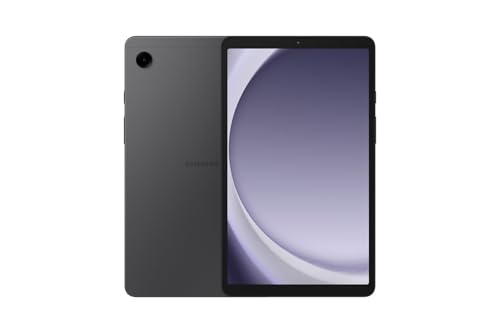
Samsung Galaxy Tab A9 8.7 — Balanced everyday Android
Think of the Tab A9 as the control sample for this entire category. Its 8.7-inch display sits dead centre of the size band, its metal back panel gives it a solidity plastic rivals envy, and its software is the full, unremarkable, exactly-what-you-expect Android with the complete Play Store. Nothing about the A9 strains to impress in a showroom. Everything about it is calibrated for the thousandth ordinary day: the browser opens briskly, streaming apps behave, the speakers carry dialogue across a kitchen, and the battery ends the day with something in reserve.
Video watchers get a quietly capable machine. The panel’s colours flatter animation and documentary footage, the aspect ratio suits films better than the tall screens of phones, and downloads through the major streaming apps land on the microSD card when internal space runs short. Readers fare nearly as well, though the glossy finish reflects lamps more than the Tab One’s gentler tuning. One caution belongs to this specific listing: it is the international Wi-Fi edition with 64GB of storage, so the box will not contain a SIM tray’s worth of connectivity, and regional warranty handling follows the listing’s terms. Within those stated limits, the A9 remains the pick we would hand to a relative who asked for a small Android tablet and no further questions.
There is a durability argument, too. Samsung’s A-series tablets have a long record of surviving family service — passed between children, left in cars, charged with whatever cable is nearest — and the A9’s construction continues that tradition, with a frame that shrugs off the flexing a bag applies. Spare parts and third-party accessories exist in abundance because the model sells in volume worldwide. Long after a spec sheet stops mattering, those ecosystem facts decide whether a tablet is still in service or in a drawer.
- Display: 8.7-inch LCD
- Storage: 64GB, expandable via microSD
- Connectivity: Wi-Fi, international edition
- System: Android, full Google Play Store
- Build: metal back panel, face unlock
Strengths
- The most complete all-round package in the bracket, with no glaring omission.
- Metal construction survives family handling better than plastic rivals.
- Card expansion keeps a large offline video library affordable.
Trade-offs
- Screen reflections annoy readers under bright lamps.
- 64GB is adequate rather than generous for game collectors.
- International listing terms deserve reading before purchase.
Best for: households wanting one small Android tablet that does everything competently.
Not suited for: players of demanding 3D games at high settings.

Samsung Galaxy Tab A11 8.7 — Newer-generation Samsung
The Galaxy Tab A11 answers a question the A9 created: what does Samsung itself think the 8.7-inch formula should become next? The diagonal stays at 8.7 inches — this is a refinement, not a resize — while the platform underneath moves to a newer generation with the small improvements that compound: a fresher processor generation, current software out of the box, and a support runway that starts later and therefore ends later. For a buyer choosing between the two Samsung picks today, that support runway is the argument that matters most, because a tablet bought in 2026 should still be receiving security attention when the decade turns.
In the hand, the A11 feels like a close relative rather than a stranger, which is precisely the point. The size, the balance and the general demeanour carry over, so existing A9 owners considering an upgrade for a second household member will find no learning curve. Video and reading behaviour mirror the family pattern: a bright, colourful panel for streaming, sensible speakers, and battery life measured in days of reading punctuated by evenings of video. This listing is the international SM-X133 Wi-Fi model with 64GB of storage, so apply the same listing-literacy as with its sibling — confirm the variant name in the title, and treat cellular expectations accordingly.
Choosing between the A9 and A11 is ultimately an exercise in price watching. When the A11’s newer platform costs only a little more, take it and enjoy the longer future. When the A9 is discounted heavily — as mature models often are — the older tablet’s identical size and near-identical daily manners make it the value play. Either way you end up with Samsung’s interpretation of the 8.7-inch idea, which remains the bracket’s most conservative and most dependable interpretation.
- Display: 8.7-inch panel
- Storage: 64GB on this Wi-Fi listing
- Model: international SM-X133 variant
- System: Android with Google Play Store
- Positioning: newer generation of the 8.7-inch Samsung line
Strengths
- Newer platform promises the longest support runway of the Samsung pair.
- Ships with current software rather than needing a day-one update chain.
- Familiar size and handling keep it an easy recommendation for families.
Trade-offs
- Improvements over the A9 are generational, not dramatic.
- Same 64GB storage ceiling as its sibling on this listing.
- International variant, so warranty terms follow the listing.
Best for: buyers who keep tablets for years and value the freshest support clock.
Not suited for: bargain hunters when the older A9 is heavily discounted.

Lenovo Tab One 8.7 — Gentlest on the eyes
Some tablets are designed by people imagining spec-sheet comparisons. The Tab One feels designed by people imagining a person in bed at midnight, forty pages from the end of a novel, unwilling to stop. Its 8.7-inch HD panel carries eye-comfort certification, and the tuning behind that badge is perceptible: whites lean warm, brightness descends to genuinely dim levels without flicker drama, and the whole experience encourages duration over dazzle. A clear case rides in the box, so the tablet’s working life can begin immediately rather than after an accessory order arrives.
Video performance follows the reading-first brief. Streams look pleasant, especially animation and drama, though the HD resolution softens fine detail in nature documentaries shot for giant televisions. The 4GB of memory keeps the interface honest as long as you treat the tablet as a single-purpose companion; open a game, a video call and a dozen browser tabs in rotation and the seams show. Battery endurance is the quiet headline — reading-heavy days barely dent it, and a holiday week of evening chapters is a realistic expectation between charges. For its intended reader, that stamina is worth more than any benchmark.
Parents and gift-buyers should note how gracefully the Tab One fits the present-that-needs-no-manual role. Setup is plain Android, the Play Store is complete, the kids space is respectable, and the price rarely provokes the guilt that flagship gifts carry. It is not the tablet for a teenager who games competitively. It is very nearly the perfect tablet for a parent who reads, a commuter who streams, or a student whose course materials live in PDFs and lecture recordings.
- Display: 8.7-inch HD, eye-comfort certified
- Memory and storage: 4GB RAM, 64GB storage
- System: Android with Google Play Store
- Included: clear protective case in the box
- Character: reading and streaming companion
Strengths
- Panel tuning genuinely favours long reading sessions.
- Battery stamina stretches across days of typical use.
- Bundled case and friendly price simplify gift purchases.
Trade-offs
- HD resolution limits fine detail in documents and films.
- Memory headroom is modest for heavy multitaskers.
- Speaker output is clear but not room-filling.
Best for: readers and streamers who value comfort over specifications.
Not suited for: multitaskers juggling calls, games and browser forests.

Lenovo Legion Tab Gen 3 8.8 — Small-screen gaming flagship
Every category has one product that makes the others look like they are not trying, and in small Android tablets that product is the Legion Tab Gen 3. The screen measures 8.8 inches, near the top of this guide’s band, and it refreshes fast enough to keep racing games and shooters fluid. Behind it, a Snapdragon 8 Gen 3 — silicon from the flagship phone tier — works with 12GB of memory, a pairing that would have been absurd in a compact tablet three years ago. The Legion does not merely run demanding games; it runs them at the settings their developers show in trailers.
Lenovo built the surrounding machine for sessions, not demos. The cooling arrangement sustains performance through long matches where lesser tablets throttle into stutter, the frame stays comfortable in landscape grip, and the software includes the performance modes and controller conveniences that serious mobile players actually use. Pair a Bluetooth controller and the Legion becomes a portable console with an 8.8-inch screen no handheld matches for size. Even its non-gaming life benefits: this is the only pick in the guide where split-screen work, large photo libraries and heavy web apps all feel unconditionally fast.
The honest costs are money and specialisation. The Legion Tab asks flagship money for a compact slate, its talents concentrate on performance rather than handwriting or bundled extras, and players who live at maximum settings will watch the battery percentage fall with corresponding speed. Buyers whose gaming stops at puzzles and card games are paying for a racetrack to drive to the shops. But for the player who wants console-class sessions from a device that fits a jacket-adjacent bag, there is exactly one answer in this size band, and this is it.
- Display: 8.8-inch high-refresh panel
- Chip: Snapdragon 8 Gen 3
- Memory: 12GB RAM
- System: Android with Google Play Store
- Design focus: sustained gaming, controller pairing
Strengths
- Performance in another league from every other pick here.
- High-refresh display flatters fast games and scrolling alike.
- Cooling keeps frame rates stable through long sessions.
Trade-offs
- Flagship pricing in a bracket known for bargains.
- Maximum-settings gaming drains the battery briskly.
- No stylus story for note-takers or artists.
Best for: mobile gamers wanting flagship power in a portable frame.
Not suited for: casual players whose library is puzzles and solitaire.

Lenovo Tab M9 9.0 — Largest page, leanest spec
The Tab M9 makes a trade and states it on the label: the full nine inches at the top of this guide’s range, paid for with an HD panel and a lean 3GB of memory with 32GB of storage. Whether that trade delights or disappoints you depends entirely on what your tablet displays all day. For prose — novels, news, articles, messages — pixels per inch matters far less than page size, and the M9’s nine-inch page shows more words per screen than any other budget pick here. Reading on it feels expansive in a way the spec sheet cannot capture.
Video tells a more divided story. Streams are perfectly watchable, and the larger canvas flatters sitcoms and sports, but the HD ceiling softens the fine detail that nature footage and film grain rely on, and keen eyes will notice. The modest memory enforces a one-app-at-a-time rhythm; the M9 is happiest as a dedicated reading and streaming screen, not a multitasking hub. Battery life benefits from the undemanding hardware, stretching comfortably through long reading days. Build quality is plain but honest, with a metal-accented body that does not feel disposable.
Consider the M9 the specialist of the budget trio. Shoppers who read constantly and spend cautiously get the biggest page in the class for the least money. Shoppers who split attention between apps, keep dozens of tabs, or care about crisp video should walk one pick up the list to the Tab One or the Samsung pair. There is no shame in the M9’s compromises; they are simply priced into the product, and this guide’s job is to make sure you meet them before the box arrives rather than after.
- Display: 9.0-inch HD panel, largest in this guide
- Memory and storage: 3GB RAM, 32GB storage
- System: Android with Google Play Store
- Character: dedicated reading and streaming screen
- Build: slim metal-accented body
Strengths
- Biggest reading page among the affordable picks.
- Undemanding hardware sips battery across long days.
- Simple, honest build that shrugs off daily handling.
Trade-offs
- 3GB of memory enforces a patient, single-task rhythm.
- HD resolution softens detailed video and small print.
- 32GB of storage fills quickly with downloaded series.
Best for: devoted readers who want maximum page for minimum spend.
Not suited for: anyone who multitasks or hoards offline video.
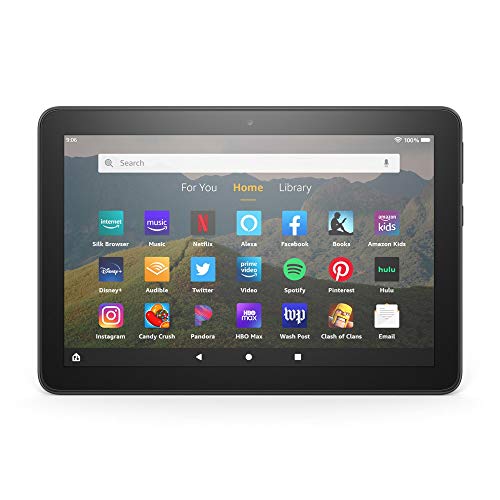
Amazon Fire HD 8 (2020) — Fire OS honorary member
Transparency first: the Fire HD 8 is not a full Android tablet, and this is the 2020 generation. Fire OS is Amazon’s Android-derived system with Google’s services removed, so there is no Play Store by default and your apps come from Amazon’s Appstore. That store covers the entertainment essentials — the big streamers, Kindle, Audible, social staples — and then thins rapidly. Work apps, alternative reading platforms, many banks and most Google services are absent or awkward. Anyone whose digital life is Google-shaped should stop reading this section and choose a Samsung or Lenovo above.
Within Amazon’s world, though, the little 2020 machine still performs its duties with charm. Its eight-inch screen sits at the bottom of this guide’s band, exactly where a bedside or kitchen tablet wants to be. It doubles as an Alexa smart display on a stand, runs household cameras and shopping lists, and offers the most mature children’s profiles in the business. The hardware is dated — app launches pause, cameras are perfunctory, 32GB of storage needs microSD help — yet the price reflects every one of those facts. As a cheap, knowingly limited Amazon appliance, it remains defensible. As an accidental purchase by someone expecting full Android, it is the bracket’s most common disappointment.
Longevity deserves one more honest sentence. A 2020 model sits late in its support window, so buy it for what it does today rather than what updates might bring tomorrow. Households often retire these tablets into single jobs — a recipe screen, a doorbell viewer, a child’s supervised streamer — and in those roles the Fire HD 8 can serve for years after its general-purpose life ends. Just walk in with your eyes open and the label read.
- Display: 8.0-inch HD screen
- Generation: 2020 model, labelled throughout
- Storage: 32GB plus microSD expansion
- System: Fire OS, Amazon Appstore, no Play Store by default
- Extras: Alexa hands-free, Show Mode, child profiles
Strengths
- Deepest integration with Kindle, Audible and Prime Video.
- Excellent supervised profiles for children.
- Bargain pricing for a competent streaming screen.
Trade-offs
- No Google Play Store; app catalogue has real gaps.
- 2020 processor and cameras show their age daily.
- Support window for this generation is nearly spent.
Best for: Households centred on Amazon buying a dedicated streaming appliance.
Not suited for: shoppers who need Google apps or Play Store purchases.
Reading, Watching, Playing: Which Size Serves Which Habit?
Reading rewards page area and panel kindness above all. On that measure the nine-inch M9 shows the most text per screen among the budget picks, while the Tab One’s gentler tuning wins long evening sessions, and the Samsung pair split the difference with sharper, brighter panels that suit mixed reading under lamps. Comics readers should weight resolution more heavily: fixed-layout pages expose an HD panel’s softness, which pushes the A9 and A11 ahead of the Lenovo budget pair for graphic novels and magazines.
Video splits the field differently. Screen size matters less at arm’s length than contrast, speakers and download behaviour. The Samsung tablets offer the most polished streaming package, the Legion’s high-refresh panel is wasted on films but glorious on everything interactive, and the Fire HD 8 streams Amazon’s catalogue happily while locking you out of some rival apps’ full features. Gaming needs no subtlety at all: the Legion Tab Gen 3 is the only pick built for demanding titles, the Samsung pair handle the casual-to-midrange middle, and the M9 and Fire HD 8 should be bought for other virtues entirely.
Side-by-Side: The Six at a Glance
| Pick | Screen | System | Memory/storage | Defining trait |
|---|---|---|---|---|
| Samsung Galaxy Tab A9 | 8.7 inch | Android | 64GB + microSD | All-round balance |
| Samsung Galaxy Tab A11 | 8.7 inch | Android | 64GB | Newer generation |
| Lenovo Tab One | 8.7 inch | Android | 4GB / 64GB | Reading comfort |
| Lenovo Legion Tab Gen 3 | 8.8 inch | Android | 12GB RAM | Gaming flagship |
| Lenovo Tab M9 | 9.0 inch | Android | 3GB / 32GB | Biggest budget page |
| Amazon Fire HD 8 (2020) | 8.0 inch | Fire OS | 32GB + microSD | Amazon appliance |
How Do You Move Your Library Onto a New Small Tablet?
Migration day goes smoothly when you sequence it. Start by signing into your Google account on the new tablet and letting the Play Store restore your app list automatically; resist installing everything at once, because a fresh device is the one chance to leave behind the apps you never opened. Books follow their own services — Kindle, Kobo, Libby and Google Play Books each re-download your library once you sign in — so your shelves rebuild themselves while you make tea. Streaming apps need fresh downloads of any offline films, since licences do not transfer between devices; queue the travel essentials first and let the rest wait for a idle evening.
Photos and files deserve a deliberate pass. Cloud libraries will sync thumbnails quickly and originals on demand, which is fine until a flight forces the issue, so pin the albums you actually show people for offline storage. Move documents through your cloud drive rather than cable archaeology, and check that your password manager and two-factor apps are fully working on the new tablet before wiping or handing down the old one — the classic self-inflicted lockout happens precisely at this step. Finally, spend five minutes arranging the home screen around your real habits: reading apps front and centre, everything else in the drawer. A small tablet arranged honestly gets used daily; one arranged aspirationally gathers dust beautifully, usually beside the charger it was never plugged into.
Where Do Buyers of Small Android Tablets Usually Slip Up?
Storage is the first trap. Thirty-two gigabytes sounds abstract until two streaming apps, a messaging app’s photo cache and a system update have eaten most of it, which is why the M9 and Fire HD 8 demand either discipline or a memory card from day one. The second trap is assuming every Android-shaped tablet runs Google’s Android. The Fire’s missing Play Store has generated more returns than any hardware flaw in this bracket, and it is entirely avoidable by reading the system line before the price line. Third, shoppers overbuy processor and underbuy panel: at this size, the screen is the product, and a gentler, brighter display improves every hour of ownership while a faster chip improves only some minutes.
Fourth, beware listings that merge generations. The A9 and A11, and the various Fire HD 8 model years, share names across hardware revisions, so the title’s year and model code are part of the product you are buying. Fifth, remember that cellular small tablets are rare in this bracket; most picks here are Wi-Fi only, tethering to a phone for data on the move. If your use case is a van or a site cabin beyond Wi-Fi’s reach, confirm the exact variant’s connectivity in the listing rather than discovering its absence at the destination.
What Can Split-Screen Honestly Do on Nine Inches or Less?
Marketing photographs show small tablets running two apps side by side like tiny command centres, and the reality deserves a cooler description. On an 8.7-inch screen, split-screen works beautifully for asymmetric pairs: a video playing in a narrow strip while you browse, a messaging thread beside a document you are quoting, a recipe beside the shopping list it generates. Rotate to genuinely equal halves and each app inherits a phone-sized window, which suits reading and reference but cramps typing, spreadsheets and anything involving a toolbar. The Legion Tab’s memory and the Samsung pair’s software polish make the juggling smoother, yet no processor enlarges glass.
Students discover the productive pattern quickly. Lecture slides on the larger half, notes on the smaller, with the stylus-free reality that typing happens on an external keyboard or not at all during class. Writers drafting against research material find the same rhythm. Where small tablets quietly beat their larger siblings is the pop-over window: a calculator, a translation, a quick reply floating above a full-screen book or film, dismissed with a flick. Judge this size class by those overlay moments rather than by desktop fantasies, and every pick here performs its role with more grace than the brochures promise in the wrong direction.
Should You Hold Out for a Cellular Model in This Size Band?
Connectivity is the specification shoppers most often assume and least often verify in this bracket. The Samsung listings in this guide are Wi-Fi models — one is explicitly the international Wi-Fi edition — and the Lenovo and Fire picks likewise live on wireless networks. A cellular variant exists in some markets for the A9 line, but it is a different listing with a different model code, and ordering the Wi-Fi version while imagining a SIM slot is a well-documented heartbreak in review sections everywhere. Read the connectivity line of the exact listing as carefully as the screen size.
For most owners, Wi-Fi plus a phone hotspot covers real life. Trains, cafés, hotels, campuses and homes supply networks, and the gaps between them are usually filled by downloaded media rather than live data. The exceptions are genuine: delivery and field workers whose routes leave coverage maps behind, van travellers who treat the tablet as the household’s main screen, and anyone whose phone plan punishes tethering. Those buyers should shop the cellular variants deliberately, confirm band support for their carrier in the listing details, and budget for a data plan as part of the purchase — or step up to the rugged cellular models covered elsewhere in our tablet coverage.
How Do Students Actually Use Tablets in This Size Range?
Ask students why they chose a small tablet and the answer is rarely about lectures. It is about the in-between moments: revising on the bus with the device in one hand, reading set texts in bed without a laptop’s glow and weight, annotating PDFs in a café where a large tablet would crowd the table and invite attention. Portability converts dead minutes into study, and the 8.7-inch machines hit the sweet spot where the screen still shows a textbook page respectably while the whole kit — tablet, slim case, charger — weighs less than the printed textbook it replaced.
Practical student advice follows from that pattern. Choose storage for your course’s PDF habit, not for games you might play; a semester of scanned chapters grows faster than anyone predicts, which favours the card-slot Samsung models. Keep the tablet’s job description narrow — reading, notes, reference, calls — and it will feel fast for years, because modest processors only feel modest under multitasking sprawl. Protect the purchase with the unglamorous essentials: a case that survives a backpack’s daily compression, a cloud backup of notes that runs automatically, and a charger that lives in the bag rather than migrating to a bedside table. The Tab One and Tab A9 both serve this life well at prices a student budget can defend.
What Battery Habits Keep a Small Tablet Young?
Battery longevity in this class is a story of chemistry and routine rather than specification. The cells inside these tablets age fastest under three conditions: being kept at full charge in hot places, being drained to empty regularly, and being fast-charged daily when a slower overnight charge would do. None of the picks here demands pampering, but owners who keep charge roughly between a fifth and four-fifths, store the tablet out of sun-baked cars, and let it sip from a modest charger overnight will notice their battery holding up in year three while identical models fade.
Usage patterns matter as much as charging ones. Downloaded video sips power compared with streaming over weak Wi-Fi, which forces the radio to shout; aircraft and rural travel reward the download habit with hours of extra life. Screen brightness is the other great lever — the panel is the hungriest component in any tablet, and reading at a sensible level in a dim room can nearly double a session’s length. The budget picks with undemanding hardware, the M9 and the Fire HD 8, stretch furthest per charge precisely because they ask so little of their batteries. Treat endurance as a behaviour you practise, not a number you bought, and even the oldest pick in this guide will surprise you.
Which Grips, Cases and Stands Suit a One-Handed Tablet?
Ergonomics decides whether a small tablet gets used daily or abandoned for the phone, and the aftermarket knows it. The single most transformative accessory at this size is a case with a rotating hand strap or a pop-out grip: it converts the 8.7-inch machines into secure one-handed readers on trains and in queues, and it rescues the nine-inch M9 from the two-handed caution its larger glass invites. Folio cases with sleep-wake magnets suit bag carry and double as stands, though their tri-fold stands wobble on soft surfaces like duvets, where a small rigid kickstand or a cushion-style tablet pillow performs better.
Kitchen and desk duty reward a different purchase. A weighted countertop stand with an adjustable angle turns any pick here into a recipe follower, a video-call station or a photo frame, and it costs less than the ingredients of one ruined dinner. Buyers of the Fire HD 8 should check stand compatibility with its Show Mode ambitions, since the whole point is a screen that faces the room. Whatever you choose, buy the case after confirming your exact model’s dimensions — the A9 and A11 share a size but not always button and port cut-outs, and the M9’s nine inches exile it from cases cut for the 8.7-inch crowd. Measure twice, order once is dull advice that saves a fortnight of returns.
What Does ‘Full Android’ Actually Guarantee You?
The phrase gets used loosely, so pin it down. A full Android tablet in this guide means three things: the Google Play Store is present and certified, Google’s core apps and services work as their developers intend, and third-party apps install without workarounds. The Samsung and Lenovo picks meet that definition. The Fire HD 8 does not, and the difference shows up in specific, predictable places — a banking app that exists only on Play, a reading service whose Fire version lags generations behind, a school or employer app that refuses uncertified devices entirely.
Certification also shapes the background life of the device. Play-certified tablets receive Google’s security machinery and app scanning as a matter of course, and their owners can hand them to family members with a clear conscience. None of this makes Fire OS a scam; Amazon is transparent that its tablets are portals to Amazon’s services, priced accordingly, and millions of owners never miss what was never promised. The failure mode is only ever a mismatch of expectations, which is why this guide raises the distinction in the introduction, inside the Fire’s own section, and again here. Meet the condition knowingly and the Fire is a bargain. Meet it accidentally and it is a return label.
Is the Second-Hand Market a Shortcut in This Bracket?
Used small tablets tempt because new prices are already low, which should tell you something about how little value the used ones retain. A second-hand budget Android slate typically arrives with a battery worn by years of full charges, a screen that has lived without a protector, and a software version stranded wherever its previous owner’s updates stopped. None of that makes every used purchase foolish — a nearly-new return of a current A9 or A11, bought from a seller with a real returns policy, can be a genuine saving. The foolish version is paying near-new money for a three-generation-old model because its listing photograph looks clean.
If you shop used anyway, interrogate three things. Battery behaviour first: ask for a screenshot of battery health where the system offers one, and treat evasiveness as an answer. Software second: confirm the Android version and the date of its last security update, because an abandoned tablet on home Wi-Fi is a small but real liability. Accessories third: a missing charger and case quietly erase the saving. Compare the total against the new price of the Tab One, which functions as this bracket’s value anchor. When the used total approaches the anchor, buy new, take the warranty, and spend the difference on the case instead.
How Would We Spend a Tight, a Middle and a Generous Budget Here?
On the tightest budget, the contest is between the Tab M9’s page size and the Fire HD 8’s ecosystem, and the deciding question is where your books and programmes live. Library readers and web readers should take the M9 and its full Play Store, because a restricted app catalogue will annoy them weekly. Households already paying for Amazon’s services can take the Fire and spend the change on a case and a memory card. The middle budget is Samsung territory: the A9 when discounted, the A11 when not, with the Tab One slipping in for readers who value its gentler panel and bundled case over Samsung’s sharper screen and stronger speakers.
The generous budget buys the Legion Tab, and it buys it for one reason — performance that will still feel fast when the budget picks are begging for mercy. There is a secondary generous option worth naming: buying two modest tablets instead of one premium machine. Families discover that a Tab One for a child and a Tab A9 for a parent ends more arguments than a single flagship passed around, and the total can undercut the Legion. Budgeting in this bracket is therefore less about finding the best tablet than about deciding how many hands and habits the money must serve. Answer that honestly and the right pick usually selects itself from the six above.
Which Reading Apps Make the Most of a Small Android Screen?
The hardware is only half the reading experience; the app renders the page. Kindle remains the default for Amazon-bought libraries and handles the 8.7-inch screens beautifully, with adjustable margins that matter more at this size than any display specification. Libby, the library-lending app, deserves installation on day one — a library card turns any of these tablets into a free bookshop, and its page tuning is excellent on the Tab One and M9 alike. Kobo’s app serves readers who buy from Rakuten’s store or sideload EPUB files, a format Kindle’s app still treats as a second-class citizen.
For articles and saved web reading, an offline reader that strips pages to clean text transforms the small screen from adequate to ideal, especially on the HD panels where busy web layouts shrink type. PDF readers split by ambition: a simple viewer suffices for menus and manuals, while students annotating course packs should choose one with proper pen-free markup tools and cloud sync, then test it on the largest file they own before the semester starts. Comics deserve their own app with guided panel-by-panel reading, which rescues smaller screens from constant zooming. Spend an evening matching apps to your actual library before spending money on a bigger screen to solve what was always a software problem.
What Happens When a Small Tablet Becomes the Family’s Shared Screen?
Shared duty changes what ‘best’ means. A tablet passed between a parent, a teenager and a grandparent needs multiple user profiles that actually separate libraries and messages, a lock screen that respects everyone’s privacy, and a case that assumes the device will be dropped by the smallest hands in the house. Android’s multi-user support on the Samsung and Lenovo picks handles the profiles; the Fire’s household profiles handle the family angle inside Amazon’s world, with the strongest child controls of the group. Set up each person’s space on day one, because retrofitting profiles onto a tablet already full of one person’s accounts is a rainy-afternoon project nobody enjoys.
Shared screens also argue for boring virtues: the biggest battery you can afford in the bracket, storage that swallows several people’s downloads, and a charger stationed where the tablet lives rather than travelling with one owner. The Tab A9 and A11 absorb this role most gracefully thanks to their balance of storage expansion and performance, while the M9’s 32GB becomes the family’s first argument. Agree the house rules early — whose downloads get deleted when space runs out, whether the tablet travels or stays — and the smallest screen in the house can serve everyone without becoming a source of domestic diplomacy.
How Does Android on a Tablet Differ From Android on Your Phone?
New tablet owners sometimes expect a giant phone and feel briefly cheated. Android on these slates is the same system wearing a larger layout: apps that bother to adapt — mail, browsers, reading and note apps — spread into two panes and sidebars, while lazy apps simply stretch their phone interface across the glass, functional but plain. None of the picks here makes calls over a mobile network, and most lack the NFC and flagship cameras phones take for granted. What you gain is a calmer device: no carrier bloat on the Wi-Fi models, no contract, and a screen whose entire purpose is content rather than communication.
The practical adjustment takes a weekend. Arrange widgets for glances — calendar, weather, the book you are reading — rather than replicating your phone’s icon grid. Let the tablet hold the long-session apps and strip it of the twitchy ones, so picking it up feels like opening a book rather than answering a summons. Owners who make that separation rarely go back, and it explains why this modest size class keeps selling to people whose phones are objectively more powerful: the tablet is not a worse phone, it is a quieter room.
One last practical note before the verdicts: buy the memory card at the same time as any card-slot pick in this guide. Storage anxiety arrives faster than expected — usually during the first holiday download spree — and a card bought later often turns out to be a slow counterfeit from a marketplace listing. A reputable card, fitted on day one and formatted inside the tablet, quietly removes the single most common complaint owners of small Android tablets ever file.
Final Recommendation
Choose by habit and this bracket stops being confusing. Readers should take the Tab One for comfort or the Tab M9 for page size on a budget. Households wanting one dependable small Android for everything should take a Samsung — the A11 for its longer future, the A9 whenever its price undercuts meaningfully. Gamers have a single door to walk through, labelled Legion. And the Fire HD 8 belongs in Amazon households that understand Fire OS and want a cheap, cheerful streamer. The seven-inch Android tablet may be history, but the eight-to-nine-inch generation that replaced it is broader, cheaper and better matched to real habits than the old class ever managed — pick the one shaped like your evenings, and it will earn its place in the bag, on the nightstand, and in the small daily rituals that phones keep interrupting.
Frequently Asked Questions
Is there really no 7-inch Android tablet on sale?
Not from any major brand as a current, supported product. The class ended as phones grew and panel production consolidated around larger sizes. The smallest genuine Android slates now start at eight inches, with the 8.7-inch models forming the practical centre of the small-tablet market.
Tab A9 or Tab A11 — which Samsung should I buy?
Buy the A11 when prices are close, because its newer platform carries a longer support runway. Buy the A9 when it is discounted substantially, since its size, screen and daily behaviour are close enough that the saving outweighs the generational gap for most households.
Can the Fire HD 8 run Google Play apps?
Not by default. Fire OS uses Amazon’s Appstore, which covers major streaming and reading services but omits many Google and work apps. Sideloading workarounds exist online but are unsupported and fragile; if Play Store access matters, choose any other pick in this guide.
Which of these is best for a child’s first tablet?
The Tab One offers the friendliest mix of price, durability, bundled case and parental controls, with the Fire HD 8 as the alternative for households already inside Amazon’s Kids ecosystem. Whichever you choose, set up the child profile before the first hand-over.
Do small Android tablets handle video calls well?
Yes, within limits. Front cameras across this bracket are modest but adequate for family calls in decent light, and the Samsung and Lenovo picks all run the major calling apps from the Play Store. The Fire HD 8 is restricted to the calling services Amazon supports, which is another Fire OS condition to weigh.
How long will these tablets keep receiving updates?
Expect the newest Samsung to fare best, Lenovo’s consumer models to sit in the middle, and the 2020 Fire HD 8 to be near the end of its support story. If you keep devices for many years, weight that ranking heavily; if you replace on a shorter cycle, price matters more.
Can these tablets replace an e-reader for holidays?
For a single trip, yes — download your books, enable the warmest display mode and enjoy. Across a whole reading life, a dedicated e-ink reader still wins on battery and sunlight. Many owners in this bracket eventually run both: the tablet for everything connected, the e-reader for the beach and the bedside.
Are software updates really that important on a cheap tablet?
They matter in proportion to what the tablet touches. A slate that only streams video and reads library books can live safely on an older system for a long while. The moment banking, work accounts or a child’s data enter the picture, current security patches stop being a luxury — which is why the newer A11 earns its premium for many households.
Related Guides
If your shortlist grows beyond this bracket, our survey of eleven-inch Android tablets for family use applies the same scrutiny one size up, the deep dive into handheld gaming tablets and portable consoles follows the Legion’s category into dedicated hardware, and our notes on setting up a child’s first tablet safely walk through profiles and controls step by step.
Related guides
- Best Basic Phones Camera Buyers Can Trust: Flip Phones and Simple Handsets That Still Take a Photograph
- Best Graphic Tablets for Kids: Computer-Connected Drawing Pads, Honestly Explained
- Best 400 FPS High Speed Cameras: The Honest Truth About Burst Slow Motion
- Best Kids Smartwatches for Texting and Calling: Six Watch-Phones Under Parent Control



[…] one corner of a much bigger tablet landscape. If your shortlist is drifting larger, our roundup of compact Android tablets for travel follows the same honest-sizing rules up the size range, while the guide to tablets built for long […]