What's inside
- Key Takeaways
- Quick Picks
- How Did We Choose These 17 Laptop Desks?
- Which Lap Desk Style Suits the Way You Actually Sit?
- How Do the Six Picks Compare Side by Side?
- What Mistakes Do Buyers of Large Lap Desks Keep Making?
- How Should You Set Up a Lap Desk for a Long Session?
- How Do You Measure Your Laptop and Room Before Ordering?
- What Actually Differs Between Cushion Fillings and Surface Materials?
- Can a Lap Desk Travel Beyond the House?
- How Does a Lap Desk Change Life in a Small Flat or Shared House?
- Which Accessories Pair Sensibly With a Lap Desk?
- When Should a Lap Desk Be Replaced Rather Than Repaired?
- Final Recommendation
- Frequently Asked Questions
- Related Guides
As an Amazon Associate I earn from qualifying purchases. This post may contain affiliate links at no extra cost to you.
gizmoverdict.com is reader-supported. When you buy through links on our site, we may earn an affiliate commission.
Where to buy: each of the six products below links to its Amazon listing, where you can check the current colour options, surface dimensions and delivery details before ordering. Nothing in this roundup is covered without a link, because every model here was verified against a live listing while the guide was being assembled.
A 17-inch laptop changes the furniture maths in ways a smaller machine never forces on you. The chassis is wider, the screen sits higher when the lid opens, and the whole machine carries enough weight that a flimsy tray starts to feel like a balancing act within minutes. Shoppers hunting for the best 17 laptop desks quickly discover that the category hides two completely different products behind one name. The first is a cushioned lap desk: a flat work surface bonded to a pillow that rests directly on your legs. The second is a small bed table with folding legs that stands on the mattress or floor and never touches your body at all. Both appear in this guide, and each pick is labelled clearly, because choosing the wrong family is the single most common reason these purchases end up returned or abandoned in a cupboard.
Why does the distinction matter so much? A cushioned model moves with you. It suits the sofa, an armchair, a passenger seat on a long drive, and the corner of a bed where you sit up against the headboard. Heat from the laptop’s underside, though, travels through a thin surface into the cushion and then into your legs, and the working height is fixed by your own lap. A legged bed table lifts the machine off your body entirely, lets air circulate underneath, and often adds tilt and height settings, but it demands a reasonably flat stretch of mattress and it stores like a small piece of furniture rather than a pillow. Neither family is better in the abstract. The honest question is where your laptop actually spends its evenings.
Size honesty matters here too. A desk advertised as fitting a 17-inch laptop should give that machine room to sit flat with the device ledge engaged and a little surface left over, not force the chassis to overhang both edges. Several picks below are generous slabs that swallow a big gaming or workstation laptop whole. One is deliberately compact, with a 20.5 by 11.8 inch top that suits a smaller notebook or a tablet far better than a true 17-inch machine, and we say so plainly in its review rather than pretending the headline number stretches further than it does.
Key Takeaways
- Cushioned lap desks and folding bed tables solve different problems, so decide which family fits your evenings before comparing models inside either group.
- A genuine 17-inch fit means the chassis sits fully on the surface with the retaining ledge still usable, not balanced across two overhanging edges.
- Padding shape decides comfort over an hour: a single soft pillow, a firm foam block and wraparound armrests each load your legs and wrists differently.
- Tilt helps a bed table far more than a lap desk, because a tilted surface on your legs simply slides the machine toward your stomach.
- Carry handles and light weight sound trivial until the desk starts travelling between rooms daily, at which point they decide whether it gets used at all.
Quick Picks
| Pick | Badge | Why it earns its place |
|---|---|---|
| LAPGEAR The Original Lap Desk | Best all-round cushion desk | The microbead base moulds to uneven laps and the built-in pencil tray keeps small kit from vanishing into sofa cushions. |
| HUANUO Laptop Lap Desk with Cushion | Best for grip and storage | An anti-slip strip fights the slow forward creep that plagues glossy surfaces, and the storage pocket swallows a phone and charger. |
| HUANUO Lap Desk with Mouse Pad and Wrist Pad | Best for mouse users | A dedicated mouse zone and a padded wrist rest turn a big laptop into something closer to a proper workstation on your legs. |
| OPTIXCELL Lap Desk with Arm Rest | Best for long sessions | Memory foam armrests carry your forearms instead of leaving them hovering, and the maker rates the surface for loads up to 44 pounds. |
| SONGMICS Laptop Bed Desk | Best folding bed table | Six height settings and a stepless tilt up to 120 degrees make this the adjustable outlier for people who work sitting up in bed. |
| Potuopy Portable Laptop Lap Desk | Best lightweight traveller | A featherweight build, a real carry handle and mouse pads on both sides suit students moving between rooms and libraries. |
How Did We Choose These 17 Laptop Desks?
We started from the screen size and worked outward. Any candidate had to present a surface that a 17-inch class laptop could plausibly occupy, or else be included deliberately as a smaller alternative with that limitation stated in the open. Models that only made sense for tablets and phones were dropped, however handsome their photos looked. We then split the survivors into the two families described above and judged each model against its own kind, because rating a bed table down for lacking a cushion, or a cushion desk down for lacking legs, would tell you nothing useful.
Within the cushioned group we paid closest attention to what touches your body. Bead-filled bases adapt to shape but can feel lumpy and shift under load; moulded foam stays put but fixes one working angle; armrest designs try to move support from your lap to your forearms. In the legged group the questions change: how many height stops are there, does the tilt mechanism hold under a heavy machine, and do the legs fold flat enough for the desk to slide under a bed? Finally we weighed the small practicalities that listings bury in bullet points — ledges that stop a laptop sliding, trays and pockets for pens and phones, handles that make a wide slab carryable in one hand.
One rule governed every inclusion: the dimensions and features quoted in this guide come from the product listings themselves. Where a listing gives a figure, such as the OPTIXCELL desk’s stated 44-pound capacity or the SONGMICS top’s 20.5 by 11.8 inch footprint, we report it as the maker’s figure. Where a listing stays silent, we describe behaviour qualitatively instead of inventing numbers, and we would rather leave a gap than fill one with a guess dressed up as a specification.
Which Lap Desk Style Suits the Way You Actually Sit?
Think about your last three laptop sessions away from a desk. If they happened on a sofa with your feet up, a cushioned lap desk is your natural format: it bridges your legs, rises and settles as you shift, and asks nothing of the furniture around you. If they happened in bed, propped against pillows with the machine growing warm against the duvet, a legged table earns serious consideration, because it restores the airflow a duvet blocks and lifts the screen closer to eye level. People who split their time — sofa on weekdays, bed on Sunday mornings — usually end up happiest with a generously sized cushion desk, since it can sit on a mattress passably well, while a legged table on a sofa is an awkward guest that digs its feet into the seat cushions.
Posture deserves a sentence of its own. Every lap-based setup puts the screen lower than a desk-and-chair arrangement, so your neck flexes more; that is the price of comfort, and no cushion geometry abolishes it. What good designs do is reduce the secondary strains: wrist pads that stop your hands bending sharply over a surface edge, ledges that let you angle the machine slightly without it migrating, and surfaces wide enough that your elbows are not pinched against your ribs while typing. Judge the picks below against those small mercies rather than against promises of ergonomic miracles.

LAPGEAR The Original Lap Desk — Best all-round cushion desk
LAPGEAR has sold versions of this design for years, and its appeal is the absence of gimmicks. You get a broad, flat work surface sized for machines up to 17 inches, a device ledge along the front edge that catches the laptop’s base when the surface tilts with your legs, and underneath, a cushion filled with microbeads. Beads behave almost like a liquid for the first few seconds: they flow into the gaps between your thighs, settle around the shape of your lap, and then hold that shape with a soft, even pressure. On a sofa, where your legs rarely sit at identical heights, that adaptability is worth more than any rigid contour, because a rigid base rocks on the higher leg while the bead base simply conforms.
The details around the edges show a maker who has watched people use the product. A built-in pencil tray gives pens, a stylus and earbuds a home that is not the crease of the sofa. A carry handle cut into the design means the desk travels from living room to bedroom in one hand while the other carries a mug. The surface itself is plain and wipeable, which sounds dull until a coffee ring or a toddler’s crayon enters the story. There is no mouse pad and no wrist rest, and that restraint is deliberate: this is the desk for trackpad users who want the laptop, a notebook and a pen, and nothing else competing for the slab.
Heat is the honest trade-off of the whole cushion family, and this model is no exception. The surface insulates the laptop from your legs reasonably well during browsing and writing, but a gaming session that pushes the machine’s fans hard will warm the cushion through over time, and the beads hold that warmth. Take breaks, or choose the legged SONGMICS below if sustained heavy loads on the bed or sofa are your normal pattern rather than an occasional indulgence.
- Surface family: flat cushioned lap desk for laptops up to 17 inches
- Base: microbead-filled cushion that moulds to the sitter’s legs
- Front edge: raised device ledge to stop the laptop creeping forward
- Extras: integrated pencil tray and a carry handle for one-handed moves
Strengths
- The bead base stays comfortable on uneven laps where foam blocks rock and dig in.
- A ledge, tray and handle cover the three small annoyances of sofa computing in one design.
- The plain surface wipes clean and shrugs off the spills of family-room life.
Trade-offs
- No mouse area at all, so pointer work means the trackpad or a separate pad.
- Warmth builds through the cushion during long, demanding gaming sessions.
- Bead filling can gradually redistribute, needing a shake to restore its shape.
Best for: trackpad-first users who compute mainly on the sofa and want one dependable slab. Not suited for: dedicated mouse users or anyone running hot gaming loads for hours on their lap.

HUANUO Laptop Lap Desk with Cushion — Best for grip and storage
The frustration this HUANUO model attacks is creep. A large laptop on a smooth lap desk does not usually slide dramatically; it migrates, a few millimetres at a time, until the front edge of the machine hangs over the ledge and your wrists are working at a strange angle to compensate. HUANUO’s answer is an anti-slip strip across the surface that grips the laptop’s rubber feet and holds the machine where you put it. It is a modest feature on paper and a genuine quality-of-life improvement across a two-hour film-editing session or a long document, because you stop making the tiny subconscious readjustments that quietly tire your shoulders.
Underneath sits a pillow cushion rather than beads, giving a softer, more uniform feel against your legs, and the package adds a storage function that the LAPGEAR lacks: space to tuck away the small cargo of portable computing. A phone, a charging cable, a pair of earbuds — the things that otherwise migrate to the floor or the far side of the sofa live with the desk instead. For students in shared houses and anyone whose sofa is also their office, that tidiness is not a luxury; it is the difference between a setup that takes ten seconds and one that takes ten minutes of hunting.
Compared with its woodgrain sibling reviewed next, this version keeps the surface clean and general-purpose. There is no fixed mouse pad eating into the right-hand side and no wrist pad dictating where your hands rest, so left-handed users and people who centre a big machine and work from the trackpad get the full width. The compromise is that mouse users must add their own pad, and the soft pillow, while kind to legs, allows a fraction more flex under a heavy 17-inch workstation than the firmer designs in this roundup.
- Format: cushioned lap desk sized for laptops up to 17 inches
- Surface feature: anti-slip strip intended to stop gradual laptop creep
- Base: pillow-style cushion for an even, soft contact with the legs
- Carrying life: storage space for phone, cable and small accessories
Strengths
- The grip strip genuinely reduces the slow slide that spoils long sessions.
- Built-in storage keeps the charger and phone travelling with the desk.
- An uncluttered surface suits left-handed users and centred trackpad work equally.
Trade-offs
- Mouse users need to supply their own pad and give up some surface to it.
- The soft pillow flexes slightly more under the heaviest workstation laptops.
- No wrist support, so marathon typing sessions rest entirely on your own posture.
Best for: sofa workers who hate mid-session readjustments and carry small accessories everywhere. Not suited for: mouse devotees who want a pad and wrist rest built in from the start.

HUANUO Lap Desk with Mouse Pad and Wrist Pad — Best for mouse users
Plenty of people never bonded with the trackpad, and for them a lap desk without a mouse surface is a desk half finished. This woodgrain HUANUO builds the pointer into the layout: a mouse pad zone sits on the surface alongside the laptop, backed by a wrist pad that runs where your hands naturally land. The effect, when it works, is closer to a real workstation than anything else on your legs can manage. Your mouse hand stops hovering over the arm of the sofa, your wrist rests instead of floating, and a 17-inch laptop flanked by a working mouse area feels like a command centre rather than a compromise.
The surface also makes room for the supporting cast. Slots and spaces for a tablet, a phone and a pen acknowledge how modern work actually looks: the laptop runs the document, the tablet shows the reference material, the phone buzzes with the call you are half expecting. A woodgrain finish gives the whole arrangement a calmer, more furniture-like presence in a living room than black plastic, which matters more than specifications admit when the desk lives permanently beside the sofa rather than in a cupboard.
Two cautions belong in this review. First, the layout is handed: the mouse zone assumes a right-handed user, and left-handers should look at the plainer HUANUO above instead. Second, dedicating surface to the mouse means the laptop’s own footprint is effectively tighter than on the unadorned models, so measure a truly enormous gaming chassis carefully. For the mainstream 17-inch machine, though, the trade is well judged — a little width surrendered for a mouse that finally works properly away from a desk.
- Layout: laptop area plus a built-in mouse pad and a padded wrist rest
- Finish: woodgrain surface that blends with living-room furniture
- Organisation: spaces intended for a tablet, a phone and a pen alongside the laptop
- Fit note: sized for laptops up to 17 inches, with the mouse zone sharing the slab
Strengths
- Proper mouse control on the sofa, with wrist support under both hands.
- Tablet and phone have defined homes instead of sliding around the surface.
- The wood finish looks at ease left out in a shared living space.
Trade-offs
- The fixed mouse zone favours right-handed users and cannot be moved.
- Very wide gaming chassis leave less breathing room beside the pad.
- The wrist pad fixes one hand position, which some typists find constraining.
Best for: right-handed mouse loyalists who work long stretches from the sofa. Not suited for: left-handed users or owners of the widest gaming laptops who need every inch of slab.

OPTIXCELL Lap Desk with Arm Rest — Best for long sessions
Most lap desks support the laptop and abandon your arms to improvise. The OPTIXCELL takes the opposite brief: wraparound armrests formed from EPP memory foam give your forearms a continuous place to land, so the weight of a long session spreads across the rests instead of concentrating in your wrists and shoulders. Anyone who has finished an evening of sofa work with aching forearms — the kind of ache you only notice when you finally stand up — will recognise the problem this design is solving. The foam is firmer than a sofa cushion, deliberately, because a rest that collapses under your arm supports nothing.
The listing rates the surface for loads up to 44 pounds, a figure worth reading correctly. No laptop weighs anything near that; the number signals a top that will not bow or creak under a big workstation machine plus a hardback book, a controller and a mug’s worth of incidental cargo. OPTIXCELL also describes the platform as wobble-free, and the broad footprint backs the claim up in spirit: wide bases on laps are inherently steadier than narrow ones, because the contact patch with your legs resists the rocking that typing on one side of the keyboard can start.
Where does it sit in the family argument? Firmly in the cushion camp — it rests on you, travels easily and asks nothing of the room — but it is the member of that camp aimed at duration rather than portability. It is a bigger, more deliberate object than the featherweight Potuopy at the end of this list. Buy it because your sessions run long and your arms complain, not because you need something to throw in a backpack.
- Support concept: memory foam armrests that carry the forearms during use
- Foam type: EPP memory foam, firmer than ordinary sofa cushioning
- Stated capacity: maker rates the platform for loads up to 44 pounds
- Intended setting: bed and couch work with a 17-inch class laptop
Strengths
- Forearm support removes a real and under-discussed source of sofa-work fatigue.
- A stiff, broad platform feels planted under heavy workstation laptops.
- The design suits bed and sofa equally, no legs or assembly involved.
Trade-offs
- Bulkier than minimalist lap desks, so storage needs a proper spot.
- The firm foam feel divides opinion among people who prefer plushness.
- Armrest geometry suits seated-upright postures better than full reclining.
Best for: long-session workers whose arms and shoulders complain before their legs do. Not suited for: minimalists wanting the thinnest, lightest slab that can disappear into a drawer.

SONGMICS Laptop Bed Desk — Best folding bed table
Here the guide crosses into the other family. The SONGMICS has legs. It stands on the bed, the floor or a deep sofa seat, holds the laptop on a tilting platform, and never rests on your body at all. Six height settings let you match the platform to your position — sitting up against the headboard, cross-legged on the floor with a cushion, or perched on the edge of the mattress — and the top tilts steplessly through a range the listing gives as up to 120 degrees, so reading, typing and sketching angles are all reachable without swapping accessories. For anyone recovering from an injury, working through a long convalescence, or simply devoted to the bed-as-office lifestyle, that adjustability is the entire point.
Now the honesty this pick demands. The top measures 20.5 by 11.8 inches. That is a compact platform: comfortable for a tablet, a book, a notebook or a smaller laptop, and genuinely tight for a full 17-inch machine, whose base will claim nearly the whole surface and leave nothing for a mouse. We include it because bed tables in this size are what many shoppers picturing a “laptop desk for bed” actually want, and because its height and tilt hardware is the most capable in this roundup — but if your machine is a true 17-inch model, treat this as a reading and tablet stand with laptop capability for smaller notebooks, and choose one of the wide cushion desks above for the big machine itself.
Used within those limits, the design is liberating. Air flows under the laptop instead of into a duvet. Your legs are free to stretch, cross or tuck a hot-water bottle against. The legs fold for storage, so the table slides under the bed or behind a door when guests arrive. It is a small piece of furniture with a furniture owner’s responsibilities: give it a flat patch of mattress, keep drinks on the nightstand rather than the tilting top, and it will serve for years.
- Family: folding-leg bed table, nothing rests on the sitter’s body
- Top size: 20.5 by 11.8 inches — compact, best for smaller devices
- Adjustment: six height settings with stepless tilt to 120 degrees
- Storage: legs fold so the table can slide away flat
Strengths
- Height and tilt range no cushion desk in this guide can approach.
- The laptop breathes freely, a real advantage during video calls and rendering.
- Folds flat enough to live under a bed between uses.
Trade-offs
- The compact top is honestly too small for most 17-inch laptops.
- Needs a firm, flat stretch of bed; soft mattresses let the legs settle unevenly.
- Drinks and tilting surfaces are enemies — keep cups on the nightstand.
Best for: bed-based readers, tablet users and smaller-laptop owners who value tilt and airflow. Not suited for: anyone expecting a full 17-inch workstation plus mouse room on one platform.
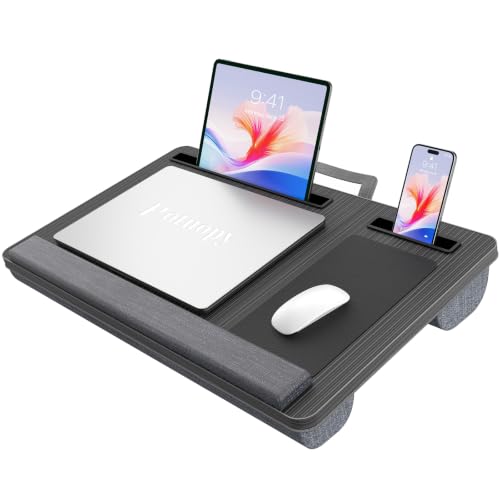
Potuopy Portable Laptop Lap Desk — Best lightweight traveller
The Potuopy design starts from a different question: what if the desk’s main job is to move? It is built light, it carries by a proper handle, and it treats the daily migration between bedroom, sofa, kitchen table and library as the normal case rather than an edge case. Students are the obvious audience. A 17-inch capable surface that can be grabbed in one hand, carried down a corridor and set up on a bed in a shared room solves the student problem precisely, because student computing happens wherever a socket and a horizontal surface coincide.
One thoughtful touch deserves attention: mouse pads on both sides. Nearly every lap desk with a pad hard-codes a right-handed world; this one lets a left-handed user work properly, lets a right-hander swap sides when an arm tires, and lets two people share the desk across a day without either working against the layout. Combined with the ledge that keeps the machine in place, the surface feels considered rather than merely large.
Lightness is a bargain with physics, and the bill arrives as solidity. A featherweight desk will never feel as planted as the OPTIXCELL’s broad foam platform, and on a restless lap it can shift where a heavier design would hold still. The cushion is correspondingly modest. For short and medium sessions in changing places, that trade is exactly right. For a four-hour writing marathon in one armchair, choose one of the heavier, more supportive models above and let this one do what it was born to do: travel.
- Design priority: low weight with a carry handle for room-to-room moves
- Surface: mouse pads on both sides, unusually friendly to left-handed users
- Fit: sized for laptops up to 17 inches per the listing
- Character: light bed-and-lap tray rather than a fixed workstation
Strengths
- Genuinely easy to carry one-handed between rooms, floors and buildings.
- Ambidextrous mouse pads are rare at any size and welcome here.
- Sets up anywhere in seconds, with no legs to unfold or settings to dial.
Trade-offs
- The light build feels less planted under vigorous typing.
- Cushioning is thinner than the comfort-focused models in this guide.
- Fewer organisational extras than the storage-minded HUANUO designs.
Best for: students and movers whose laptop works in a different room every day. Not suited for: settled users wanting maximum cushioning and a rock-steady platform.
How Do the Six Picks Compare Side by Side?
| Model | Family | Defining feature | Watch out for |
|---|---|---|---|
| LAPGEAR The Original | Cushion | Microbead base with pencil tray | No mouse provision at all |
| HUANUO with Cushion | Cushion | Anti-slip strip plus accessory storage | Softer pillow flexes under heavy machines |
| HUANUO Mouse Pad model | Cushion | Built-in mouse pad and wrist rest | Layout assumes a right-handed user |
| OPTIXCELL Arm Rest | Cushion | Memory foam armrests, 44 lb stated capacity | The bulkiest option to store |
| SONGMICS Bed Desk | Folding legs | Six heights, tilt to 120 degrees | 20.5 x 11.8 inch top suits smaller devices |
| Potuopy Portable | Cushion | Lightweight, handle, pads both sides | Least planted feel of the six |
Read the table by family first and features second. If your evenings are sofa-based, your shortlist is the four cushion models, and the choice among them turns on mouse habits and session length. If your evenings are bed-based and your device is a tablet or smaller laptop, the SONGMICS stands alone here and its tilt mechanism becomes the deciding feature. Cross-family comparisons — cushion softness versus leg height — sound thorough but answer a question nobody actually has, because the room and the posture choose the family before you ever open a listing.
What Mistakes Do Buyers of Large Lap Desks Keep Making?
The classic error is measuring the laptop’s screen and forgetting its body. A 17-inch class machine has a footprint notably larger than the diagonal suggests once bezels, hinges and cooling vents are counted, and a desk that matches the screen figure exactly leaves the chassis overhanging. Measure the base of your actual laptop, length and depth, and compare those numbers with the surface before ordering. The second error is ignoring the underside. Gaming and workstation laptops vent heat downward and sideways; park one on a soft cushion for a long session and you have built it a warm nest. Short sessions forgive this. Long ones argue for a legged table, a cooling pad, or at least a hard surface between machine and cushion.
Third, buyers overvalue novelty features and undervalue the ledge. A laptop that slides is a laptop you catch, repeatedly, with your wrists, and the small raised lip that prevents it is worth more than any cup holder. Fourth, people buy for the posture they wish they had. If you actually work reclined with your legs stretched out, a desk designed for upright sitting will fight you nightly. Shop for the slouch you truly live in; your body will not reform itself around a purchase.
How Should You Set Up a Lap Desk for a Long Session?
Start with the surface beneath you. A firm sofa cushion or a bed made with the duvet folded back gives any of these desks a steadier foundation than a soft, sloping pile of blankets. Sit with your back supported and your feet somewhere intentional — flat on the floor or resting on a footstool — because dangling legs pull your pelvis into a slump that no desk can correct. Place the laptop so the top of the screen sits a little below eye level and an arm’s length away; on a lap that usually means the desk pulled closer than feels natural at first, with your elbows bent at roughly a right angle.
Lighting deserves a thought as well, because lap-based work often happens in rooms lit for relaxing rather than reading. A screen that is far brighter than its surroundings tires eyes quickly, while a dim screen in a bright room invites the hunched lean that wrecks the posture you just arranged. A small lamp behind or beside your seat, aimed at the wall or ceiling rather than at the screen, evens the room out cheaply. If you regularly read paper notes alongside the laptop, that same lamp should throw a pool of light onto the desk surface itself, and the wider models in this guide give you a corner where paper can sit inside that pool without sliding under the machine.
Then manage heat and time. Keep the laptop’s rear vents clear of the ledge and cushion edges, and if the machine’s fans run hard for more than a few minutes, that is information: lift the rear of the machine slightly on a slim book to open an air gap, or move the session to a table. Set a timer for a break every forty minutes or so, stand up, roll your shoulders and look at something far away. Lap desks make computing comfortable enough to forget your body entirely, which is precisely why a deliberate rhythm of breaks belongs in the setup rather than in your good intentions.
How Do You Measure Your Laptop and Room Before Ordering?
Begin with the machine itself, closed and sitting on a table. Measure the width across the front edge, then the depth from hinge to front lip, and write both numbers down rather than trusting the screen diagonal printed on the box. Manufacturers quote the panel size, not the furniture size, and two laptops that both claim 17 inches can differ by more than an inch in footprint because one carries slim bezels and the other carries a gaming chassis with rear cooling fins. Your desk surface should exceed the footprint in both directions: a small margin in width lets the device ledge do its job, and a margin in depth keeps the hinge and its exhaust vents on the slab rather than hanging over the back edge above your knees.
Then measure the seat, because a lap desk lives or dies by the gap between your legs and the furniture around them. On a sofa, sit where you normally sit and note the comfortable width between the armrests or cushions; a wide desk that wedges against the arms will tilt every time you shift. In bed, the relevant measurement is the flat territory between your legs when they rest naturally apart — narrower than you would guess, which is why bed tables with legs often outperform wide cushion desks there: the legs straddle you, and the top can be broader than your lap because your lap is not carrying it. Armchairs with high, close arms are the strictest test of all, and a desk that passes the sofa test can still fail the armchair test by an inch on each side.
Finally, rehearse the storage. Where will this object live at midnight? A cushion desk can lean behind the sofa or slide beneath it if the gap allows; a folding bed table needs a slot under the bed frame or behind a wardrobe door. Walk the route from seat to storage spot with a tape measure if you must. Purchases that fail at this stage do not get returned so much as resented, parked in a hallway, tripped over, and quietly blamed for a clutter problem they were bought to solve. Two minutes of measuring protects you from months of that low-grade friction.
What Actually Differs Between Cushion Fillings and Surface Materials?
Microbeads, the filling inside the LAPGEAR, behave like a slow liquid. They offer the best conformity to irregular laps and the worst long-term shape retention, because thousands of tiny spheres migrate gradually toward wherever pressure is lowest. Expect to knead the cushion back into shape every few weeks, a ten-second ritual that restores the original profile. Bead cushions also transmit a faint rustling as you move, inaudible during a film and occasionally noticeable in a silent room at midnight. Neither trait is a defect; both are simply the character of the material, and knowing them in advance is the difference between satisfaction and surprise.
Cut foam and pillow fillings sit at the other pole. A moulded foam base, or the firmer EPP foam in the OPTIXCELL’s armrests, holds one engineered shape indefinitely and gives a predictable working angle every session. The cost of that predictability is fit: the shape was designed for an average lap, and if your legs are much longer, shorter or more restless than average, the foam cannot adapt the way beads do. Soft pillow fillings, like the base under the anti-slip HUANUO, split the difference — gentle conformity, modest support, and a surface that forgives being sat on accidentally by a visiting relative.
Surface materials deserve the same clear-eyed treatment. Smooth laminate and plain plastic tops wipe clean, resist coffee rings and let a laptop’s rubber feet grip or slide depending on texture — which is why anti-slip strips and ledges exist. Fabric-wrapped and padded surfaces feel warmer and quieter, keep a mouse pad from wandering, and show wear sooner under the daily scrape of a laptop base being set down and lifted. Wood-effect finishes, as on the mouse-pad HUANUO, are mostly a peace treaty with your living room: the desk can stay visible without announcing itself as office equipment. Choose the surface for the room it will live in and the drinks that will inevitably visit it, not for the photograph in the listing.
Can a Lap Desk Travel Beyond the House?
More often than buyers expect. The lightweight Potuopy exists precisely because laptops now work in library corners, hospital waiting rooms, trains with wide seats and the passenger side of parked cars, and a handled slab turns each of those into a tolerable workstation. On a train, a lap desk bridges the gap left by a missing or filthy tray table and gives your wrists a level field; in a car, it levels a sloping seat. The discipline is to keep the kit minimal — desk, laptop, one cable — because a lap desk loaded like a picnic tray stops being portable in any useful sense.
For air travel, honesty is required: a full-size 17-inch lap desk is a carry-on item competing with your bag, and most travellers are better served by the laptop alone on the tray table. Where these desks shine is the journey at either end — the holiday cottage with no table, the relative’s spare room, the serviced apartment whose only furniture is a bed and a sofa. If your work follows you to places like that, portability stops being a bullet point and becomes the product, and the lightest model in this guide earns its place in the boot of the car permanently.
How Does a Lap Desk Change Life in a Small Flat or Shared House?
In a small flat, the lap desk is not an accessory; it is a room. The tenant who works from a studio with one chair and a bed discovers quickly that the sofa must serve as office, cinema and dining room in rotation, and a good lap desk is what lets the office portion happen without colonising the kitchen table permanently. This changes the buying priorities. Storage footprint matters as much as working area, because the desk will be put away and taken out twice a day. Surfaces that double gracefully — a lap desk that can also carry a book, a sketchpad or a board game — earn their keep in a way that single-purpose designs cannot.
Shared houses add diplomacy to the specification. A desk that lives on your bed stays out of the communal argument entirely. A desk that lives beside the shared sofa should look like furniture rather than equipment, should move in one hand when a housemate claims the seat, and should not shed beads, crumbs or cables across common ground. The storage-minded HUANUO models understand this social contract instinctively: everything tucks into the desk, the desk tucks beside the sofa, and nobody’s evening is rearranged. If three people share one living room, the best lap desk is frequently the one nobody else ever has to think about.
There is also a quieter benefit worth naming for anyone working from home in tight quarters: ritual. Taking the desk from its spot, settling into the same chair and opening the laptop on the same surface draws a line between working hours and the rest of the day that a small flat otherwise refuses to provide. Putting the desk away at six o’clock is a commute in miniature. Several readers will find that this boundary, not the cushion or the ledge, is what they actually bought — and it is a perfectly good reason to choose a model you enjoy handling daily over one that is marginally larger but charmless.
Which Accessories Pair Sensibly With a Lap Desk?
Resist the urge to build a cockpit. The accessories that genuinely improve lap-based computing are few and small. A slim book or purpose-made riser under the laptop’s rear edge opens an air gap on hot days and costs almost nothing. A compact wireless mouse transforms the pad-equipped models and remains usable on a plain surface with a thin pad. A short charging cable, kept with the desk rather than the laptop bag, removes the nightly hunt for power. And a microfibre cloth in the pencil tray keeps screens and surfaces respectable with ten seconds of effort a week.
What not to add: cup holders clamped to the edge, which raise a full mug to exactly the height from which it can baptise your keyboard; monitor arms and other desk furniture that assume a fixed installation; and heavy hardback books as permanent ballast, which turn a portable object into furniture and defeat the format. The lap desk’s whole virtue is that it assembles in seconds and vanishes just as fast. Every accessory should be interrogated against that virtue, and most candidates fail the interrogation, which is fine — the six designs in this guide were each specced by their makers to work essentially alone, and the happiest owners tend to keep them that way.
When Should a Lap Desk Be Replaced Rather Than Repaired?
Lap desks rarely die dramatically; they fade. A bead cushion that has gone flat in the middle leaves the surface tilting toward you, and while a vigorous kneading restores it for a while, a cushion that needs reshaping every single evening is telling you its filling has broken down or escaped through a seam you have not found yet. Foam bases announce their age differently, through a permanent hollow where your legs rest and a surface that no longer sits level on a table. Either symptom matters beyond comfort: a tilted, sagging platform holds the laptop at an angle its hinges and cooling were not designed for, and your wrists pay the difference nightly.
Surfaces have their own expiry signals. A laminate top that has warped — test it with a straight edge or a marble — will rock a laptop forever, and no cushion adjustment underneath can compensate. Ledges crack at their corners after years of catching sliding machines; a ledge that flexes when you press it will eventually fail during the one slide that matters. Hinges and tilt mechanisms on legged tables loosen gradually, then suddenly, and a platform that drops a notch under load has crossed from charming to hazardous. None of these products is expensive enough to justify heroic repairs, and the honest economics favour replacement once the structure, rather than the cosmetics, is what has worn out. Keep the old one for the car or the guest room, where its remaining life is a bonus rather than a compromise you sit with every day.
Final Recommendation
For most people with a 17-inch laptop and a sofa habit, the LAPGEAR Original is the calm, correct default: adaptable cushion, sensible ledge, a tray for the small things, and nothing you have to learn. Mouse users should step sideways to the woodgrain HUANUO with its pad and wrist rest, while anyone whose arms tire during long sessions will feel the OPTIXCELL’s armrests earning their keep within the first evening. The anti-slip HUANUO suits tidy-minded trackpad users, the Potuopy serves anyone whose desk must travel, and the SONGMICS — honestly sized for smaller devices — is the tilt-and-height champion for bed-based reading and tablet work. Choose by room and posture, and a 17-inch machine stops being the laptop that only works at a desk, becoming instead the one that follows you to the comfortable chair — which is where, on the evidence of every evening, you were going to use it anyway.
Frequently Asked Questions
Will a 17-inch gaming laptop overheat on a cushioned lap desk?
During browsing, writing and video, the surface insulates you from warmth without endangering the machine. During sustained gaming, heat builds through any cushion; keep sessions shorter, raise the laptop’s rear slightly for airflow, or switch to the legged bed table design where air circulates freely underneath.
Can I use a separate mouse with a lap desk that has no pad?
Yes, with compromises. A small pad placed beside the laptop works on the wider plain models, though it eats surface the chassis may need. If mouse work is central to your day, the HUANUO model with a built-in pad and wrist rest is the more honest solution.
How do I clean a microbead or foam cushion base?
Shake bead cushions outdoors to redistribute the filling and spot-clean the fabric with a damp cloth. Foam bases should not be soaked; wipe the cover, let it dry fully before use, and keep both types away from radiators while drying so the filling and foam are not damaged by direct heat.
Is a bed table with legs safe to use on a soft mattress?
It works best on a firm surface. On a soft mattress the legs can settle at slightly different depths and the platform tilts; a large book or a thin board under the legs spreads the load and steadies things considerably.
Do lap desks work for writing by hand as well as typing?
Mostly yes, and for some people that becomes the surprise main use. A flat, firm surface at lap height suits a notebook or sketchbook well, provided the cushion underneath is stable enough not to dip under the pressure of a pen; foam and bead bases both manage ordinary handwriting, while the softest pillow bases can feel spongy under a hard-pressed pencil. The legged SONGMICS, with its tilt, is arguably the best handwriting platform here, since a slight angle is how drafting tables have supported pens for centuries.
What surface width do I actually need for a 17-inch laptop and a mouse?
Measure your laptop’s base, then add roughly the width of a mouse’s working area beside it. If the total exceeds the desk’s surface, the mouse will live on the sofa arm or your thigh — workable for a film, miserable for a spreadsheet.
Related Guides
Keep exploring setups for portable workspaces: best laptop stands for desk use, best cooling pads for large laptops and best bed trays for breakfast and reading.
Related guides
- Best 1440p 165Hz Monitors: One Native 165Hz Pick, Three 180Hz Upgrades, an Overclock Headline and a 160Hz Ultrawide
- Best 13×19 Professional Printers
- Best 3rd Party MacBook Chargers: 96W-Class Alternatives, the 100W Cable Rule, and the Apple Benchmark
- Best Built PC: Six Prebuilt Gaming PCs Judged on Parts, Power and Upgrades


