What's inside
- Where to buy
- Key Takeaways
- Quick Picks: Best Acer Laptops
- How did we decide which Acer machines represent the brand?
- Where does Acer sit among the big laptop brands?
- Comparison Table
- How do you choose between Windows and ChromeOS inside Acer’s range?
- Which Acer specifications deserve your money first?
- How should a family share one Acer across several people?
- What do buyers most often get wrong when choosing an Acer?
- What else is worth knowing before an Acer joins the household?
- Final Recommendation
- Frequently Asked Questions
- Related Guides
As an Amazon Associate I earn from qualifying purchases. This post may contain affiliate links at no extra cost to you.
gizmoverdict.com is reader-supported. When you buy through links on our site, we may earn an affiliate commission.
Where to buy
Acer builds laptops the way a good supermarket stocks shelves: something sensible at every level, rarely the most glamorous object in the aisle, frequently the one that makes the till receipt easiest to defend. This guide to the best acer laptops gathers the four machines from the range that we could verify through our pool, then adds two prose-only mentions for the gaming and creator shelves where Acer’s catalogue is strong but no verified listing sat in front of us.
The brand’s centre of gravity is value engineering — putting the budget into the processor, the screen and the memory rather than into machined metal theatre. Read the picks below with that lens and the line-up makes sense: a roomy mainstream machine, a genuinely light travel laptop, and two Chromebooks that show how far Google’s platform has travelled from its classroom origins.
- Acer Aspire 5 — linked listing — the mainstream anchor
- Acer Swift Go 14 — linked listing — the travel machine
- Acer Chromebook Plus 515 — linked listing — big-screen ChromeOS
- Acer Chromebook Plus Spin 714 — linked listing — convertible ChromeOS
- Acer Nitro 5 — prose-only mention — gaming line, no link
- Acer Swift X 14 — prose-only mention — creator line, no link
Choosing inside one brand is a different exercise from choosing across the whole market. The question stops being whose logo wins and becomes which of Acer’s internal families matches the life the laptop must lead. The Aspire line answers for the household all-rounder, the Swift line for the person whose office changes daily, the Nitro line for the player, the Swift X for the maker of videos and photographs, and the Chromebook Plus machines for anyone whose work already lives entirely inside a browser.
Acer’s other quiet virtue is distribution. These are among the easiest laptops in the world to actually buy, service and find accessories for, because the company sells in volume across nearly every market. Chargers, cases and replacement parts circulate widely, and local repair shops tend to know the chassis. That ordinariness is a feature: a laptop is a tool you depend on during deadline week, not a sculpture.
What Acer does not do is chase the ultra-premium tier where rivals polish logos and charge accordingly. Readers wanting the last word in luxury materials should look elsewhere with our blessing. Readers wanting the most computing per unit of currency, in a machine a local technician can open, are standing in exactly the right department — and the six picks below divide that department by job rather than by price ladder.
Key Takeaways
- Aspire 5 is the household default: a 15.6-inch screen, a proper keyboard with room to breathe and specifications that shrug at family multitasking.
- Swift Go 14 is the commuter’s Acer, pairing a sharp touch display with a modern Core Ultra processor in a bag-friendly frame.
- Chromebook Plus 515 suits browser-native households wanting a large screen without Windows maintenance overhead.
- Chromebook Plus Spin 714 folds into a tablet for readers who annotate, sketch and present from the same device.
- Nitro 5 and Swift X appear prose-only: Acer’s gaming and creator lines deserve mention, honestly labelled, without verified listings here.
- Across the range, value is the thesis — specifications first, ornament second, serviceability always in the background.
Quick Picks: Best Acer Laptops
| Pick | Badge | Why it earns its place |
|---|---|---|
| Acer Aspire 5 (i7-1165G7) | Best Mainstream Acer | The configuration most households actually need, in the chassis Acer sells by the container-load. |
| Acer Swift Go 14 | Best Acer for Travel | A modern Core Ultra chip and a taller touch screen inside a genuinely portable Acer. |
| Acer Chromebook Plus 515 | Best Big-Screen Chromebook | ChromeOS simplicity stretched across a 15.6-inch canvas, with a proper webcam for call-heavy days. |
| Acer Chromebook Plus Spin 714 | Best Convertible Chromebook | A 360-degree hinge, a stronger processor and premium Chromebook manners in a 14-inch frame. |
| Acer Nitro 5 | Prose-Only Gaming Line | Acer’s long-running gaming family, discussed qualitatively because no verified listing sat in our pool. |
| Acer Swift X 14 | Prose-Only Creator Line | The creator-focused Swift variant, mentioned for completeness without a verified listing. |
How did we decide which Acer machines represent the brand?
We started from the jobs Acer’s own range is organised around, because a brand guide that ignores the manufacturer’s internal logic ends up comparing machines that were never rivals. Each pick below leads a distinct family or serves a distinct working pattern, and together they cover the realistic reasons a reader types this brand’s name into a search box rather than a competitor’s.
Verification discipline stayed identical to every other guide on this site. Only listings confirmed through our pool carry purchase links, with their exact titles recorded in the sources file, and models we could not verify appear as prose-only discussion with no link and no invented specification sheet. Where a model’s details are described, they stay at the level of widely documented characteristics rather than invented precision.
We also weighted the unglamorous ownership layer: keyboard feel during long documents, fan behaviour in quiet rooms, the availability of a second storage or memory path where the design allows it, and the likelihood that a local shop can source a charger on a rainy Tuesday. Acer machines generally score well on that layer, and the ordering below reflects it.
Chromebooks earned two of the six places deliberately. Acer is one of the defining Chromebook manufacturers, the Plus programme has lifted the platform’s hardware standards considerably, and a brand guide that pretended ChromeOS did not exist would misrepresent what buying an Acer means in this decade.
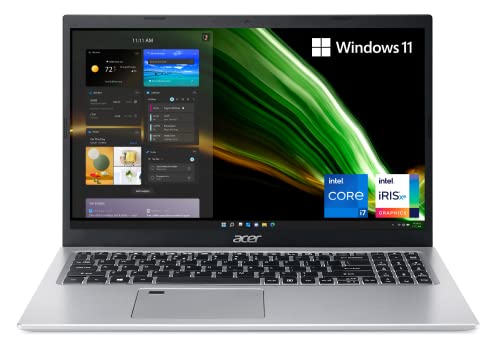
Acer Aspire 5 (i7-1165G7) — Best Mainstream Acer
The Aspire 5 is the laptop equivalent of a reliable family estate car, and the verified configuration shows why the formula endures. A Core i7-1165G7 with sixteen gigabytes of memory and a half-terabyte drive is, frankly, more specification than most households will stress in a week of homework, accounts, photo sorting and streaming, and that headroom is precisely the point: a machine bought with surplus capacity ages in slow motion, staying pleasant long after a minimally specified rival begins to feel its compromises.
Life with the Aspire is dominated by its 15.6-inch screen and the full-size keyboard beneath it, complete with a numeric pad that spreadsheet households and bookkeepers quietly adore. The IPS panel keeps colours honest from off-centre sofa angles, the backlit keys forgive evening work, and the fingerprint reader removes the small daily friction of passwords. It is not a light machine and makes no pretence of being one; it is a desk-and-sofa computer that occasionally travels, and judged on those terms it is the most defensible Acer most readers can buy.
- Display: 15.6-inch Full HD IPS panel
- Processor: Intel Core i7-1165G7
- Memory and storage: 16GB DDR4, 512GB SSD
- Graphics: Intel Iris Xe integrated
- Extras: backlit keyboard, fingerprint reader, Wi-Fi 6
- Operating system: Windows 11
Strengths
- Specification headroom keeps it pleasant for years
- Numeric pad serves accounts and data entry
- Large screen suits split-window household admin
Trade-offs
- Size and weight argue against daily commuting
- Integrated graphics cap gaming ambitions
- Plastic construction feels functional, not luxurious
Best for: households wanting one capable Windows laptop for shared family duties.
Not suited for: daily train commuters or players expecting dedicated graphics performance.

Acer Swift Go 14 — Best Acer for Travel
If the Aspire is Acer’s estate car, the Swift Go 14 is its well-cut city hatchback. The specification reads like a checklist of current expectations: a Core Ultra 7 processor with modern integrated graphics, sixteen gigabytes of fast memory, a half-terabyte drive and Intel Evo certification promising responsive wakes and sensible battery manners. None of that would matter if the machine were a burden, but the Swift line exists to be carried, and this one disappears into a day bag the way the Aspire never attempts to.
The display is the detail owners mention most. Its 1920 by 1200 resolution stretches the screen slightly taller than old Full HD panels, which sounds trivial until you spend a day in documents and feel the extra lines of text on every page, and the touch layer earns its keep during presentations, form-filling and sofa browsing. Add a webcam specified for the video-call era rather than as an afterthought, and the Swift Go becomes the Acer we would hand to a consultant, a postgraduate or anyone whose desk is wherever the day puts them.
- Display: 14-inch 1920 x 1200 touch panel
- Processor: Intel Core Ultra 7 155H
- Memory and storage: 16GB LPDDR5X, 512GB SSD
- Graphics: Intel Arc integrated
- Platform: Intel Evo certified design
- Operating system: Windows 11
Strengths
- Current-generation processor with strong integrated graphics
- Taller screen shows more of every document
- Portability suits genuinely mobile working patterns
Trade-offs
- Memory is soldered, so the fitted amount is final
- Smaller screen than the Aspire for split-window work
- Touch layer adds reflections in bright rooms
Best for: mobile professionals, postgraduates and hybrid workers living out of a bag.
Not suited for: desk-bound readers who would rather have screen size than portability.

Acer Chromebook Plus 515 — Best Big-Screen Chromebook
The Chromebook Plus programme exists because Google recognised that ChromeOS had outgrown bargain hardware, and Acer’s 515 is the large-screen proof. A 15.6-inch Full HD touchscreen, a desktop-class Core i3, eight gigabytes of memory and a 256-gigabyte drive place it far above the wheezing classroom stereotype, while the 1080p webcam acknowledges that its owner attends meetings rather than merely browsing between them. For a household whose computing already lives in Google Docs, Gmail and browser tabs, this machine removes an entire category of maintenance from life.
What you give up is equally clear and should be chosen knowingly. Windows applications do not run here, specialist desktop software belongs elsewhere, and heavy offline workflows fight the platform’s cloud-first grain. What you gain is a computer that updates itself quietly, shrugs off most malware by design, wakes instantly and asks almost nothing of its owner beyond a Google account. For students, home administrators and the family tech-support volunteer tired of patching relatives’ machines, that trade is not a compromise at all.
- Display: 15.6-inch Full HD IPS touchscreen
- Processor: Intel Core i3-1305U
- Memory and storage: 8GB RAM, 256GB SSD
- Webcam: 1080p unit for meetings
- Ports: HDMI and USB-C among the selection
- Operating system: ChromeOS, Plus specification
Strengths
- Large screen with minimal operating-system upkeep
- Webcam quality respects call-heavy schedules
- Fast, quiet and resistant to software clutter
Trade-offs
- No path to Windows desktop applications
- Cloud-first storage model suits connected homes best
- Eight gigabytes of memory is adequate, not generous
Best for: browser-native households, students and anyone escaping Windows maintenance.
Not suited for: users of specialist desktop software or heavy offline media workflows.

Acer Chromebook Plus Spin 714 — Best Convertible Chromebook
The Spin 714 is what happens when a Chromebook grows up and starts attending conferences. Its 360-degree hinge folds the 14-inch touchscreen through laptop, tent and tablet postures, the Core i5 inside is a genuinely brisk processor rather than a platform minimum, and the whole machine carries the fit and finish of a business convertible. Teachers presenting from the front of a room, students annotating readings, and consultants marking up documents in airport seats all exploit exactly this combination of posture and pace.
Storage is the honest caveat: the verified configuration’s 128 gigabytes assumes a cloud-centred life, which the platform encourages and most owners genuinely live. Readers whose work involves large local files should think before falling for the hinge. Everyone else gets a backlit keyboard, modern wireless and a machine that behaves like a tablet when the keyboard is in the way and like a proper laptop when sentences need writing — a duality Windows convertibles promise often and ChromeOS delivers with unusual lightness here.
- Display: 14-inch FHD+ touchscreen, 360-degree hinge
- Processor: Intel Core i5-1335U
- Memory and storage: 8GB LPDDR4X, 128GB SSD
- Keyboard: backlit, convertible layout
- Wireless: Wi-Fi 6 and Bluetooth 5.2
- Operating system: ChromeOS, Plus class hardware
Strengths
- Hinge adapts to presenting, annotating and reading
- Processor is strong for the Chromebook category
- Business-grade feel exceeds platform stereotypes
Trade-offs
- Local storage assumes a cloud-centred workflow
- Tablet mode is heavier than a dedicated tablet
- Premium positioning within the Chromebook shelf
Best for: teachers, students and presenters who annotate as much as they type.
Not suited for: owners of large local media libraries or Windows-only software.
Acer Nitro 5 — Prose-Only Gaming Line
The Nitro 5 line has spent years as the answer to a specific prayer: a gaming laptop whose price does not require a family meeting. Acer builds the range around dedicated graphics, assertive cooling and screens with the higher refresh rates players actually feel, wrapped in plastics chosen for cost rather than catwalk appeal. Because configurations shift constantly and no verified listing sat in our pool, this guide discusses the line’s character rather than a single specification, and links you to none of it — a deliberate honesty gap rather than an oversight.
Readers shopping the Nitro shelf should interrogate three things on any individual listing: the exact graphics chip, because the badge covers a wide performance span; the screen’s refresh rate, which defines the playing experience more than any processor figure; and the cooling behaviour under sustained load, which owners discuss frankly in reviews. Judged as a family, Nitro machines trade elegance for frames per unit of currency with unusual consistency, and for a first gaming laptop that is usually the correct trade.
- Family: Acer’s mainstream gaming laptop line
- Graphics: dedicated GPUs across configurations
- Displays: high-refresh panels on gaming variants
- Cooling: dual-fan designs built for sustained load
- Status: prose-only — configurations vary, verify per listing
- Operating system: Windows across the range
Strengths
- Dedicated graphics unlock real gaming headroom
- Cooling designed for long sessions, not benchmarks
- Range spans several budget levels
Trade-offs
- No verified listing here to anchor a configuration
- Heavier and louder than the Swift machines
- Battery life is a gaming laptop’s usual afterthought
Best for: new players wanting a recognised gaming line at sane money.
Not suited for: commuters, quiet-room workers or buyers needing a verified link from this guide.
Acer Swift X 14 — Prose-Only Creator Line
Acer aims the Swift X line at the reader the Swift Go almost serves: the photographer, video editor or design student who needs dedicated graphics and a colour-respectful screen without surrendering portability to a gaming chassis. In Acer’s internal geography it is the bridge between the travel Swifts and the Nitro shelf, and its existence is exactly why a brand guide should map families rather than merely rank models — many readers searching this brand actually need the bridge, not either bank.
As with the Nitro above, no verified listing for a Swift X sat in our pool, so treat this as orientation rather than recommendation of a specific unit. When examining listings elsewhere, prioritise the display’s colour credentials and the graphics configuration over processor bragging rights, confirm the memory is sufficient for your editing applications at purchase because creator machines are often soldered, and expect pricing above the Go. For video timelines and photo catalogues on the move, the family’s proposition remains one of Acer’s most distinctive.
- Family: creator-focused branch of the Swift line
- Graphics: dedicated GPUs on creator configurations
- Displays: colour-emphasised panels across the line
- Form: slim chassis nearer Swift than Nitro
- Status: prose-only — no verified listing in our pool
- Operating system: Windows across the range
Strengths
- Creator hardware without gaming-laptop bulk
- Screen quality prioritised for visual work
- Portability survives the graphics upgrade
Trade-offs
- No verified listing here, so diligence is yours
- Creator specification commands a premium over Swift Go
- Soldered memory on many configurations
Best for: video editors, photographers and design students who travel.
Not suited for: readers whose work never leaves documents and a browser.
Where does Acer sit among the big laptop brands?
Acer’s historical role is the industry’s pressure valve. Whenever the big names drift toward premium pricing, Acer’s catalogue pulls the market’s centre of gravity back toward specification per currency unit, and reviewers have relied on that gravity for decades. The company rarely wins design awards decided by machined-aluminium fetishists, yet its machines populate an enormous share of the world’s classrooms, small offices and kitchen tables, which is its own kind of verdict.
That volume produces a secondary benefit owners feel years later: ubiquity. A charger for a common Acer can be found in most electronics shops on most continents, a replacement keyboard is a routine order rather than an archaeological expedition, and independent repairers have opened enough Aspire chassis to do it from memory. Buying the popular model from a volume brand is a legitimate strategy for readers who keep machines a long time.
The brand’s spread also means its badge guarantees less than a niche maker’s would. Acer sells everything from featherweight Swifts to hulking gaming rigs, so the family name after the logo — Aspire, Swift, Nitro — carries the real information. This guide’s structure follows that reality deliberately, because an informed Acer buyer shops families first and badges second.
Comparison Table
| Pick | Standout trait | Watch out for | Reader it fits |
|---|---|---|---|
| Acer Aspire 5 | Household specification headroom, numeric pad | Weight argues against commuting | Families and home administrators |
| Acer Swift Go 14 | Modern chip, taller touch screen, portability | Soldered memory, smaller canvas | Hybrid workers and postgraduates |
| Acer Chromebook Plus 515 | Big ChromeOS screen, minimal upkeep | No Windows applications | Browser-native households |
| Acer Chromebook Plus Spin 714 | Convertible hinge, brisk processor | Modest local storage | Teachers and annotating students |
| Acer Nitro 5 | Dedicated graphics for players | No verified listing in this guide | First-time gaming laptop buyers |
| Acer Swift X 14 | Creator graphics in a slim frame | Premium over Swift Go, unverified here | Travelling video and photo editors |
How do you choose between Windows and ChromeOS inside Acer’s range?
List the applications you opened last week, not the ones you imagine opening someday. If every entry runs in a browser tab or has a full web version you already use, ChromeOS will feel like a relief: instant wakes, silent updates and an end to maintenance rituals. The moment one essential application is a Windows desktop programme — a specialist accounts package, an engineering tool, a beloved older game — the decision makes itself in the other direction.
Consider who maintains the machine. Chromebooks suit households where nobody wants the administrator job, because the platform administers itself to a remarkable degree. Windows machines reward a slightly more involved owner with vastly broader software freedom. Acer sells both philosophies under one logo, which is why the brand makes an unusually clean test case for the platform question itself.
Finally, think about peripherals and files. Printers, scanners and external drives generally behave well with modern ChromeOS, yet exotic hardware with Windows-only drivers still exists in offices and studios. A five-minute inventory of the devices your laptop must talk to prevents the one compatibility surprise that can sour an otherwise perfect purchase.
Which Acer specifications deserve your money first?
Memory and storage outrank processor bragging rights for most readers. Sixteen gigabytes of memory keeps a Windows machine graceful under real multitasking, and a half-terabyte drive postpones the storage anxiety that creeps into year three of ownership. Both linked Windows picks in this guide meet that standard, which is no coincidence: it is the configuration plateau where a laptop stops feeling like a compromise.
The screen is the component you will actually look at for thousands of hours, so its quality deserves budget before exotic extras. An IPS panel with honest brightness beats a dim screen attached to a faster chip in every week of real ownership, and the taller 1200-line display on the Swift Go shows how a modest specification difference becomes a daily pleasure in documents.
Processor choice matters most where workloads are sustained: exporting video, compiling code, running many virtual instruments or playing games. For bursty everyday work — documents, calls, browsing — even the Chromebook’s Core i3 feels brisk, because the bottleneck is usually the network or the human. Spend where your own bottleneck lives, not where the marketing points.
How should a family share one Acer across several people?
Set up a separate account for each regular user on day one, whether the machine runs Windows or ChromeOS. Profiles keep school projects out of the household accounts folder, let each person keep their own browser world, and make the eventual handover of the machine to a younger relative a tidy event rather than an excavation. Both platforms handle this gracefully; the only failure mode is never bothering.
Agree on a charging home and a backup habit. A laptop that always returns to the same shelf with its charger does not get lost before deadline mornings, and an automatic cloud backup quietly running for each profile means a hardware accident interrupts homework rather than erasing it. Acer’s mainstream machines are inexpensive enough to replace and important enough to protect; the routine costs nothing but consistency.
What do buyers most often get wrong when choosing an Acer?
The classic error is buying the badge instead of the family. An Acer can be a gaming rig, a travel ultraportable or a Chromebook, and readers who order by logo and price alone occasionally receive a excellent machine for a life they do not lead. The family word — Aspire, Swift, Nitro — is the most important word in the product name, and this guide repeats that point because the mistake is so common and so avoidable.
A second error is under-buying memory on soldered models. Machines like the Swift Go cannot be upgraded later, so the configuration chosen at purchase is the configuration kept for life. Where a listing offers a higher memory tier, readers planning to keep the laptop beyond a couple of years should treat that tier as the real product and the cheaper one as a loan against future frustration.
Finally, Chromebook buyers sometimes skip the software inventory entirely, seduced by simplicity, and discover a single Windows-only obligation afterwards. Five minutes listing your essential applications before purchase — as the guide above describes — prevents the only genuinely painful surprise in this entire catalogue.
What else is worth knowing before an Acer joins the household?
Battery expectations should be set by family rather than by logo. The Swift Go was engineered around a travelling day and behaves accordingly, the Aspire treats the charger as a close companion, and the Chromebooks sip power because their platform asks little of the hardware. None of these is a defect; they are different answers to different briefs, and the reader who matches expectation to family rarely feels disappointed by a number that was never promised.
Acer’s keyboards deserve a sentence of praise they seldom receive in glamour reviews. Across the Aspire and Swift lines the layouts are conventional in the best sense — full-size cursor keys, sensible function rows, no eccentric experiments with the space bar — and conventional layouts are what touch-typists’ muscle memory is built on. Writers migrating from any other mainstream laptop will feel at home within an hour, which cannot be said of every design-forward rival.
Consider the second-monitor question early if the laptop will anchor a desk. All four linked machines here can drive an external display through their modern ports, and pairing a 14-inch travel laptop with a large home monitor produces a two-location working life that many readers find superior to owning one big laptop that does neither job gracefully. The Swift Go in particular was born for that arrangement, waking to a full desk through a single cable.
For gaming-curious readers eyeing the Aspire, honesty helps: integrated graphics run older titles, indie games and cloud streaming services pleasantly, and that covers a surprising share of household play. The moment a reader’s ambitions turn to current releases at high settings, the correct Acer is a Nitro, and no Aspire configuration should be stretched into pretending otherwise. Acer’s own range draws the line cleanly; the buyer’s job is simply to stand on the right side of it.
Students should look hard at the Chromebook Plus machines before assuming Windows is compulsory. Coursework in most humanities, social sciences and business programmes lives in documents, slides, spreadsheets and research databases, all of which ChromeOS handles with less friction and longer battery manners than a Windows machine at similar money. The exceptions — specialist statistics packages, engineering suites, certain exam software — are knowable in advance from a course handbook, and checking takes less time than one lecture.
Acer’s warranty and support experience varies by region more than enthusiasts admit, which makes the local retailer’s role unusually important with this brand. Buying through a seller with a painless returns process is worth a small premium over an anonymous listing with a marginally lower figure, because the first fortnight is when configuration mistakes and rare hardware faults announce themselves, and painless exits are the whole point of that window.
Think about noise in shared spaces. The Aspire’s fans are tuned for a family kitchen and make themselves heard under load without apology, while the Swift line’s cooling manners suit libraries and quiet offices better. Readers who work beside a sleeping baby, a light-sleeping partner or a recording microphone should weight acoustics as a first-class specification, since it is the one characteristic no accessory can fully fix afterwards.
Storage habits decide whether the Spin 714’s modest drive is a footnote or a flaw. A reader whose photographs live in cloud albums, whose documents live in a school or work account and whose music streams will never fill it; a reader who archives video locally will fill it in a season. The machine does not change between those readers — the fit does — which is why this guide keeps returning to inventories of actual behaviour rather than abstract specification worship.
One underappreciated Acer trait is how unremarkable its chargers and docks are, in the complimentary sense. Common connectors, widely stocked replacements and no proprietary oddities mean a forgotten charger on a trip is an errand rather than an emergency. Travellers who have ever paid hotel-desk prices for an exotic adapter will understand why this paragraph exists and why ubiquity is a genuine feature.
Parents buying a first laptop for a teenager might weigh the Chromebook Plus 515 more heavily than its specification suggests. Its large screen suits homework and media equally, the platform resists the accumulated clutter teenagers generate, account controls are straightforward, and the modest commitment lowers the temperature of the inevitable accidents. When the same teenager later needs Windows for a course, the Chromebook retires gracefully into family media duty rather than a drawer.
Readers upgrading from an elderly machine of any brand should prepare for the pleasant shock of modern storage and memory. The jump from a spinning drive and four gigabytes of memory to the configurations in this guide transforms boot times, tab counts and general patience more than any processor headline, and it is the main reason a mid-range Acer can feel like a flagship to someone arriving from a decade-old laptop. Set the old machine aside as a backup rather than erasing it on day one.
Docking and desk setups reward a few minutes of planning with Acer’s mainstream ports. A single powered hub can give an Aspire or Swift a monitor, keyboard, mouse, wired network and charging through one connection, and the machines’ firmware handles the daily plug-and-unplug ritual without drama. Hybrid workers who adopt the habit stop experiencing the laptop as a compromise between locations and start experiencing it as the same desk, folded smaller.
Finally, remember that Acer’s range refreshes frequently and quietly. A model name can persist across processor generations, so the specification of the individual listing — not the badge, not a review of a cousin — is the product being bought. This guide records exact verified titles in its sources for that reason, and readers buying anywhere should hold every seller to the same standard of precision.
Screen brightness is the specification most often misread by first-time buyers comparing Acer listings. Two machines can share a resolution while differing greatly in how their panels handle a bright kitchen or a window seat, and the Swift line’s displays generally serve those environments better than the value panels elsewhere in the range. If your working life happens in sunlit rooms, treat brightness as a headline figure rather than a footnote, and prefer the machine whose screen you will not be shading with your hand.
The numeric keypad on the Aspire deserves a balanced word. Data-entry households, bookkeepers and anyone who types figures into spreadsheets daily will use it constantly and miss it bitterly elsewhere, while writers who centre their hands on a narrower deck sometimes find the offset layout takes a day of adjustment. Neither reaction is wrong; the pad is a genuine fork in the range, and noticing it before purchase is worth more than adapting afterwards.
Acer’s hinge designs across these families favour practicality over theatre, opening smoothly and holding angles without wobble during typing. That sounds like a small thing until a laptop spends years being opened on trains, sofas and lecture desks, where a hinge that stays honest is the difference between a machine that feels tight at year four and one that feels tired. The Spin’s hinge carries the extra duty of convertible postures and is engineered accordingly, with a firmness that reads as quality every time it folds.
Webcam placement and quality quietly sort the range for remote workers. The Chromebook Plus 515’s 1080p camera and the Swift Go’s modern unit respect the reality that faces are now professional equipment, while older or cheaper designs across the industry treated the camera as a checkbox. Readers whose income arrives through video calls should test their chosen machine’s camera in their actual room lighting during the return window, because no specification fully predicts a north-facing window at dusk.
Think about bag dimensions before falling for a screen size. A 15.6-inch Aspire needs a bag that genuinely swallows it plus its charger, and the combined weight announces itself on a long platform walk in a way the product page cannot convey. Readers who already own a beloved 14-inch bag have, in effect, already chosen the Swift or the Spin, and honouring that constraint early saves the peculiar disappointment of a fine laptop that does not fit the life built around it.
For households torn between the two Chromebooks, the deciding question is posture. The 515 sits like a conventional laptop and rewards desk and table work with its larger canvas, while the Spin earns its premium the moment a reader presents standing, annotates a document with the screen folded flat, or reads in an armchair with the keyboard rotated away. Count how often your week involves those postures; the honest total usually picks the winner without further debate.
Acer’s preinstalled software load is lighter than the industry’s worst offenders, yet a calm half-hour of setup still improves any new machine. Removing trial applications you will never open, setting the browser and backup defaults you actually want, and confirming the storage figures match the listing turns an appliance into your computer. That ritual matters doubly on the 128-gigabyte Spin, where every gigabyte was allocated by intention rather than by drift.
Readers who keep laptops for many years should look at the underside before buying, metaphorically and literally. Vents that can be cleaned, panels that open with ordinary screws and batteries that a technician can reach without heroics are the physical form of a long service life, and Acer’s mainstream families remain comparatively friendly in this respect. A machine designed to be opened will be opened, maintained and kept; a sealed one will be replaced at its first tired component.
The secondhand afterlife of a popular Acer is another quiet dividend. Aspires and Swifts sell onward easily because buyers recognise them, parts remain findable, and a documented machine with its charger commands trust. Readers who upgrade every few years effectively rent part of the purchase price back at resale, while readers who keep machines until they expire hand them down inside families with the same ease. Obscure models rarely offer either path so smoothly.
Consider how the laptop will sound in your evening rooms. Streaming a film through the Aspire’s speakers across a kitchen is a different task from the Swift’s near-silent document work in a bedroom, and neither machine was voiced for cinema. A household that watches a great deal on the laptop itself may find a small Bluetooth speaker the highest-value accessory in this entire guide, transforming any of these picks into a respectable evening screen without changing the computer at all.
Security features arrive quietly across this range: fingerprint readers on the Windows machines, verified boot and automatic updates on the Chromebooks, camera privacy considerations designed into modern lids. None of these replaces sensible habits around passwords and backups, but the baseline is reassuring for machines that will hold family photographs, school records and the household accounts. Readers handling client data should still confirm their organisation’s specific requirements before choosing a platform.
A word for readers buying two machines for a household at once: resist matching pairs unless the jobs genuinely match. A common and happy pattern is one Aspire as the home anchor plus one Swift or Chromebook as the traveller, which puts the money where each person’s week actually happens. Identical twins bought for symmetry often leave one user over-served and the other under-served, while a deliberate mixed pair covers more of a family’s real life for similar total outlay.
Finally, let the return window do its quiet work. Live with the machine properly for a week — real documents, real calls, a real commute if it has one — rather than judging it from unboxing impressions. Keyboards reveal themselves on the third long document, screens on the first sunny afternoon and fans on the first warm evening, and all of those verdicts arrive in time to act on them if the purchase ritual is treated as a trial rather than a ceremony.
Travel writers and field researchers often end up as Swift loyalists for reasons beyond weight. A machine that wakes instantly, connects without fuss and survives a day of interviews, photographs and transcription on its battery earns trust in a way specifications cannot simulate, and the Go’s modern wireless and camera suit exactly that itinerant reporting life. Paired with a phone hotspot and a cloud document habit, it becomes a newsroom that fits in a shoulder bag.
The Aspire’s virtues compound in a small-business setting. An office that standardises on one mainstream model gains identical chargers, identical setup steps and staff who can swap machines without relearning anything, and Acer’s pricing makes that standardisation painless to extend as the team grows. The machine’s very ordinariness becomes an operational asset, which is a compliment only people who have managed a mixed fleet of laptops can fully appreciate.
Gamers reading this guide while saving for a Nitro can extract real value from the waiting period. Integrated graphics on the Aspire and Swift run a vast back catalogue of older and independent titles beautifully, and cloud services stream much of the rest, so a household machine bought now does not exclude play — it merely schedules the dedicated hardware for when the budget and the game library justify it. Sequencing purchases this way is how a range with clear families is meant to be used.
Photographers on a budget face a subtler version of the same sequencing. The Aspire’s IPS screen and memory handle catalogue work and everyday editing with composure, and an external monitor added later at the desk upgrades colour confidence more than a laptop swap would. The Swift X remains the Acer answer when editing becomes the job itself, but the mainstream machines carry the hobbyist years gracefully, which for many readers are the years that matter.
Battery care habits extend the life of every machine in this guide more than any accessory. Avoid leaving a laptop baking in a car, let it discharge partially rather than living permanently at full charge where settings allow, and treat the battery’s gradual ageing as maintenance to plan rather than betrayal to resent. Acer’s service network and parts availability make eventual battery replacement a routine errand on the mainstream models, which is precisely the outcome good habits are buying time toward.
Readers choosing between the Swift Go and a rival ultraportable at higher money should ask what the premium actually purchases. Usually it buys materials and brand theatre rather than capability, because the Go’s processor, memory and screen already sit at the level where daily work stops improving. There are legitimate reasons to pay for luxury — pleasure in objects is real — but they should be recognised as luxury purchases, not smuggled into the decision disguised as performance.
The Chromebook Plus badge itself is worth understanding before comparing listings. It denotes a Google-defined floor of processor, memory, storage and camera quality above the old classroom baseline, which is why both Chromebooks in this guide feel like proper computers rather than appliances. When shopping beyond this guide, treat the Plus word as a useful filter and its absence on a very cheap Chromebook as information rather than snobbery.
Home schooling and homework households get particular value from account separation on the Chromebooks. Each child signs into their own profile with their own files and browsing world, the machine stays fast because nothing accumulates cruft, and a parent’s work account remains untouched by a science project’s forty open tabs. The 515’s big screen then doubles as the family media panel in the evening, a second career that justifies its footprint on the kitchen table.
A docking habit transforms the Swift Go’s week most dramatically. At home it wakes a large monitor, a full keyboard and wired networking through one cable; away, it is a light notebook with a taller screen than rivals offer. Readers whose work splits between a home desk and everywhere else should picture that daily transformation when comparing it against larger machines, because the comparison that matters is not laptop against laptop but working life against working life.
Do not underestimate the fan-noise difference between platforms during evening study. The Chromebooks in this guide run cool and near-silent through document work because their hardware is barely taxed, a quality students in shared bedrooms and partners working late both learn to prize. Windows machines doing the same tasks are hardly loud, yet the Chromebook’s silence is of a different order, and for some households it quietly settles the platform debate on its own.
Anyone migrating from a tablet will feel the keyboard difference before anything else. Essays, long emails and structured notes stop being endurance events, trackpads restore precise cursor work that touchscreens approximate, and the laptop’s hinge holds the screen at reading angles a propped tablet never quite manages. Acer’s mainstream keyboards are unglamorous and excellent for exactly this migration, which is why so many tablet households land on an Aspire as their second first computer.
Keep the original charger with the machine and buy spares from reputable sources. Acer’s popularity means the accessory market is flooded with lookalike adapters of uneven quality, and a poor charger is a false economy that can age a battery early or behave unpredictably under load. The genuine article or a certified equivalent costs little against the machine’s lifespan, and labelling the household’s chargers prevents the slow migration of adapters between rooms that ends with the wrong one in the travel bag.
In the end, Acer rewards the reader who shops by life rather than by logo. The families are honest, the specialisms are clear and the value is real, and a buyer who names their week — its rooms, its journeys, its applications — will find that this catalogue contains a machine shaped suspiciously like that week, waiting at a price that leaves room in the budget for the bag, the monitor or the second machine that completes the picture.
Final Recommendation
Start from the job and the Acer range resolves itself. A household needing one Windows machine for everything should take the Aspire 5 and enjoy its headroom; a reader whose office moves should take the Swift Go 14 and its taller, brighter working day; browser-native homes should choose between the Plus 515’s big calm screen and the Spin 714’s folding versatility; players and creators should note the Nitro and Swift X families, verify configurations carefully wherever they buy, and hold this guide’s honesty about links as the standard to demand elsewhere too.
Acer will probably never be the logo that starts conversations at design conferences, and that indifference is precisely its gift to buyers.
The best acer laptops are the ones that spend your money on the parts of a computer you actually touch every day — and then quietly keep working while flashier machines are being repaired.
Frequently Asked Questions
Is Acer a reliable brand for a laptop kept five years?
Acer’s mainstream families are built for volume markets and long service, and their ubiquity makes parts and repairs straightforward years later, which matters more to five-year ownership than any single component. As with any brand, the family matters: a Swift or Aspire treated normally has every prospect of a long life, while any laptop of any badge suffers if it lives on bedding vents and borrowed chargers.
Which Acer is right for a university student?
Match the course, not the campus fashion. Essay-based and browser-based degrees suit the Chromebook Plus machines beautifully, especially the Spin 714 for annotating readings, while engineering, design or software courses that name Windows applications point to the Aspire 5 for value or the Swift Go 14 for carrying across campus all day.
Can the Aspire 5 handle photo editing and light creative work?
Yes, within honest limits. Its processor, memory and IPS screen handle photo catalogues, document design and presentation work comfortably, and the integrated graphics cope with light creative tasks. Sustained video rendering or professional colour grading belongs to dedicated-graphics territory, which inside Acer’s range means the Swift X family discussed above.
Why do two picks here have no purchase link?
Because our verified pool contained no listing for the Nitro 5 or Swift X 14 when this guide was assembled, and this site links only to listings it has actually checked. The families are too important to Acer’s range to omit, so they are discussed as prose-only orientation, clearly labelled, rather than dressed up with an unverified link.
Do Chromebooks work properly without an internet connection?
Modern ChromeOS handles documents, notes, media playback and many Android applications offline, syncing when a connection returns, and for travel days or patchy connections that covers most needs. Workflows built around enormous local files or specialist desktop software remain Windows territory, which is why this guide frames the platform choice as an inventory exercise rather than a fashion statement.
What should I check first when an Acer arrives?
Confirm the specification against the listing — memory, storage and screen — then run the machine through an ordinary working day including a video call, a large download and an hour on battery. Check every port with something real, listen to the fans in a quiet room, and keep the packaging until the return window closes, a routine that protects any laptop purchase regardless of badge.
Related Guides
Buyers comparing across brands and budgets may also want these neighbouring guides on the shelf: best laptops for students and home offices best chromebooks for everyday work best thin and light laptops for travel
Related guides
- Best Acer Chromebook Laptops: 6 Picks for School, Work and Home
- Best 8th Generation Laptops: Renewed Business Machines That Still Earn Their Desk Space
- Best Accessible Laptops: Easy-to-Read Screens, Forgiving Keyboards and Built-In Assistive Tools
- Best Academic Laptops for Researchers, Lecturers and Graduate Students
[…] weighing older hardware against newer shelves may also find these companion guides useful: best business laptops for everyday work best laptops for students on a budget best renewed laptops […]