What's inside
- Where to buy
- Key Takeaways
- Quick Picks: Best 8Th Generation Laptops
- What did a laptop from this era have to prove to be chosen?
- Why does this particular generation keep its following?
- Comparison Table
- How should you inspect a renewed laptop in its first week?
- Which upgrades actually repay their cost on machines of this age?
- What should you realistically expect from Windows support on this generation?
- Which mistakes do buyers of this generation keep repeating?
- What else separates a wise renewed purchase from a lucky one?
- Final Recommendation
- Frequently Asked Questions
- Related Guides
As an Amazon Associate I earn from qualifying purchases. This post may contain affiliate links at no extra cost to you.
gizmoverdict.com is reader-supported. When you buy through links on our site, we may earn an affiliate commission.
Where to buy
Start with a clear head about what this category actually is. Nobody manufactures fresh laptops around Intel’s eighth-generation processors anymore, so every machine gathered here reaches you through the renewed and refurbished channel, where retired corporate fleets get tested, cleaned, reimaged and resold. That is not a compromise to apologise for. It is the entire reason the best 8th generation laptops remain interesting: hardware that once anchored executive travel budgets now changes hands for the sort of money usually reserved for flimsy consumer plastic.
Because condition varies from one seller’s grading bench to the next, read each listing the way you would read a used-car advert. Battery health language, cosmetic grading, warranty length and the return window matter as much as the processor badge, and the sections further down walk through exactly how to inspect a unit during its first evenings at home.
- Lenovo ThinkPad T480 — linked renewed listing — check grading notes first
- Dell Latitude 7490 — linked renewed listing — confirm battery wording
- HP EliteBook 840 G5 — linked renewed listing — review the return window
- Lenovo ThinkPad L480 — linked renewed listing — note the storage size
- Dell Latitude 5490 — prose-only mention — no link attached
- Lenovo ThinkPad X280 — prose-only mention — no link attached
Why would anyone deliberately shop for processors launched when streaming was still overtaking cable television? Because the eighth generation was the moment mainstream business laptops quietly became properly quick. Intel doubled the core count on its U-series chips, so a modest-looking ultraportable from that era carries four cores and eight threads, enough muscle for dense spreadsheets, busy browser sessions, video calls layered over documents, light photo work and the general multitasking weather of a modern working day.
These machines were also built for fleet managers rather than shop-window appeal. That heritage shows up in keyboards designed for eight-hour typing, ports that never went away, chassis panels that open with ordinary screws, and memory and storage that a technician can swap in minutes. Buyers tired of sealed, glued, disposable hardware often find this generation a relief: it is old enough to be affordable, new enough to run current software, and honest enough to repair.
Honesty cuts both ways, so the limits deserve stating early. Support for the newest Windows releases is a grey area on some eighth-generation configurations, battery cells have lived several years of charge cycles before they reach you, and no machine here will trouble a modern gaming laptop in a graphics benchmark. Judge them as durable tools for work, study and home administration, and they make a persuasive case. Judge them as future-proof flagships, and you are shopping in the wrong aisle entirely.
Key Takeaways
- The ThinkPad T480 is the hobbyist favourite: twin battery arrangement, generous ports and a deep pool of spare parts circulating worldwide.
- Latitude 7490 brings the sharpest processor option, with a Core i7 variant for readers whose spreadsheets genuinely sprawl.
- EliteBook 840 G5 dresses the same formula in aluminium, suiting anyone who carries a laptop into rooms where appearance registers.
- ThinkPad L480 trims the asking figure by simplifying a few materials while keeping the keyboard and upgrade paths intact.
- Battery condition is the real lottery across every renewed listing, so warranty terms outweigh tiny specification differences.
- Two prose-only alternatives close the list: a Latitude sibling and a compact ThinkPad for travellers counting grams.
Quick Picks: Best 8Th Generation Laptops
| Pick | Badge | Why it earns its place |
|---|---|---|
| Lenovo ThinkPad T480 (i5-8350U, 16GB/512GB) | Best Overall Renewed Pick | The most complete expression of the era: swappable power, deep ports and parts everywhere. |
| Dell Latitude 7490 (i7-8650U) | Strongest Processor Option | A Core i7 under the hood lifts heavier multitasking while the chassis stays genuinely portable. |
| HP EliteBook 840 G5 (i5-8350U) | Smartest-Looking Boardroom Pick | Aluminium styling and strong conferencing manners carry fleet hardware into client-facing rooms. |
| Lenovo ThinkPad L480 | Leanest Asking Figure | The L-series trims materials, not essentials, keeping the keyboard and upgrade story intact. |
| Dell Latitude 5490 | Prose-Only Fleet Alternative | A close Latitude sibling with the same corporate virtues, described here without a verified link. |
| Lenovo ThinkPad X280 | Prose-Only Compact Traveller | A 12.5-inch ThinkPad for readers whose first specification is the size of their bag. |
What did a laptop from this era have to prove to be chosen?
The first filter was processor reality rather than badge nostalgia. Only quad-core eighth-generation chips made the cut, because the dual-core leftovers from the preceding generation feel their age the moment a video call, a cloud document and a dozen tabs collide. Every linked machine here runs a four-core part, and the two prose-only mentions follow the same rule, so nothing on this page asks you to romanticise genuinely slow hardware.
Serviceability came next. Fleet laptops earn their keep over years because a failed fan, a tired battery or a full drive is a ten-minute repair rather than a replacement decision. We favoured models with accessible memory slots, standard M.2 storage and batteries that can be sourced without drama, and we checked that teardown guidance and spare parts remain easy to find through ordinary channels.
The third filter was the renewed listing itself. A famous model name means little if the individual listing hides behind vague grading, so preference went to listings that state memory, storage and operating system plainly and sit inside programmes with defined return windows. Where a well-known sibling model lacked a verified listing in our pool, it appears as a prose-only pick instead of pretending a link exists.
Finally, we weighted the ownership experience after the courier leaves. Driver support, docking behaviour, keyboard quality and fan manners decide whether a bargain still feels like a bargain in month nine, and those qualities shaped the ordering below more than any single benchmark figure could.
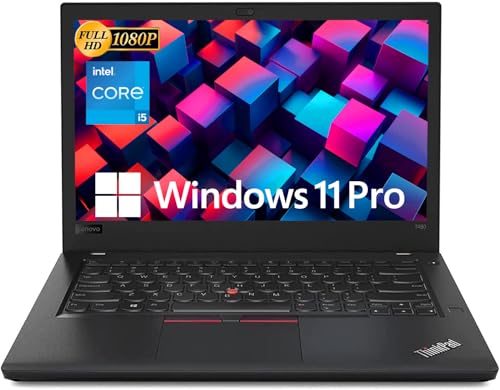
Lenovo ThinkPad T480 (i5-8350U, 16GB/512GB) — Best Overall Renewed Pick
Among machines of this vintage, the T480 has become the one enthusiasts mention first, and the affection is practical rather than sentimental. It was the last of its line to pair an internal battery with a removable external pack, which means a tired cell is a purchase rather than a repair bill, and a spare pack in your bag can stretch a travel day in a way sealed rivals cannot imitate. The chassis feels dense and slightly old-fashioned in the hand, yet every gramme of that density seems to serve stiffness, port selection or cooling headroom.
Daily behaviour is equally reassuring. The keyboard offers the long travel and sculpted caps that made this family famous among writers and administrators, the trackpoint serves readers who never lift their hands from the home row, and the fan keeps its voice down during documents and calls. Sixteen gigabytes of memory and a half-terabyte solid-state drive, as configured in the verified listing, leave the quad-core processor free to do its work without the paging stutters that made older budget machines feel ancient. It will not edit heavy video timelines gracefully, but for office suites, research, coding practice and home bookkeeping it feels composed rather than compromised.
- Display: 14-inch Full HD panel
- Processor: Intel Core i5-8350U, four cores
- Memory and storage: 16GB DDR4, 512GB SSD
- Ports: USB-C, HDMI, Ethernet, card reader
- Operating system: Windows 11 Pro (renewed listing)
- Battery: internal cell plus removable external pack
Strengths
- External battery swaps extend working days without tools
- Memory and drive both remain straightforward upgrades
- Enormous second-hand parts and advice ecosystem
Trade-offs
- Heavier than sealed ultraportables of similar screen size
- Panel brightness suits indoor work better than sunny terraces
- Individual battery wear differs between renewed units
Best for: home-office workers who value repairability and plan to keep a machine for years.
Not suited for: travellers who measure luggage in grams or gamers chasing high frame rates.

Dell Latitude 7490 (i7-8650U) — Strongest Processor Option
Dell’s entry answers the reader who looked at the other machines and asked a fair question: within this generation, what is the quickest sensible option? The Core i7-8650U in this listing raises clock speeds over its i5 siblings, and while nobody should mistake it for a modern performance chip, the difference registers in the unglamorous places where working days are actually lost — recalculating a bloated workbook, exporting a presentation, juggling a screen-share while notes and mail compete for attention.
The surrounding hardware plays a supporting role with unusual competence. The 14-inch chassis is slimmer than the T480 and slips into a bag more gracefully, the keyboard trades a little travel for a crisp, quiet action that office neighbours will appreciate, and the port mix keeps dongles at home for most meeting rooms. As a renewed unit it deserves the usual first-week checks, particularly around battery reporting and fan behaviour under load, but the underlying design was a corporate favourite for good reason: it disappears into a working day instead of auditioning for attention.
- Display: 14-inch business-class panel
- Processor: Intel Core i7-8650U, four cores
- Memory and storage: 16GB RAM, 512GB SSD
- Build: slim aluminium-accented fleet chassis
- Operating system: Windows 11 Pro (renewed listing)
- Connectivity: USB-C with docking support, HDMI
Strengths
- Fastest chip fitted to any pick in this guide
- Slim profile travels better than bulkier fleet rivals
- Quiet keyboard suits shared offices and libraries
Trade-offs
- Battery is internal, so replacement means opening the case
- Fewer legacy ports than the ThinkPad entries
- Renewed cosmetic grades vary noticeably by seller
Best for: analysts and consultants whose documents are heavy and whose bags are light.
Not suited for: owners who want tool-free battery swaps or a built-in card reader.

HP EliteBook 840 G5 (i5-8350U) — Smartest-Looking Boardroom Pick
Some working laptops look like equipment; the EliteBook 840 G5 looks like an accessory, and for client-facing readers that distinction is worth money. Its aluminium shell, narrow bezels for the era and tidy hinge line let it sit on a boardroom table without announcing that it arrived through the refurbished channel. Underneath the polish sits the same sensible formula as its rivals: a quad-core i5, sixteen gigabytes of memory and fast solid-state storage in the verified configuration.
Where this machine quietly distinguishes itself is the meeting layer of modern work. The webcam and microphone arrangement were tuned for conferencing when this model served executives, speakers handle voices clearly at desk distance, and the keyboard backlight and glass-feeling touchpad make hotel-desk evenings less of a chore. The compromises are the familiar ones for slim metal designs — the battery lives inside the case and the chassis shows fingerprints with enthusiasm — but as a renewed purchase it delivers a presentational polish the boxier fleet machines never attempted.
- Display: 14-inch Full HD (1920×1080) panel
- Processor: Intel Core i5-8350U, four cores
- Memory and storage: 16GB DDR4, 512GB SSD
- Ports: USB-C, HDMI, USB-A, Ethernet via design
- Operating system: Windows 11 Pro (renewed listing)
- Extras: backlit keyboard, conferencing-tuned audio
Strengths
- Metal styling holds its own in professional settings
- Pleasant speakers and microphone for daily calls
- Balanced weight for a metal 14-inch machine
Trade-offs
- Internal battery complicates eventual replacement
- Glossy styling collects fingerprints quickly
- Cooling vents dislike soft surfaces like bedding
Best for: freelancers and client-facing professionals who present from their own laptop.
Not suited for: workshop or site use where cosmetics will suffer regardless of care.

Lenovo ThinkPad L480 — Leanest Asking Figure
Every fleet family has a pragmatist, and in this line-up the L480 plays that role with conviction. Lenovo built the L series for organisations buying in volume, which meant shaving cost from shell materials and display options while protecting the things employees actually touch: the keyboard, the ports and the serviceable internals. As a renewed purchase that philosophy works in your favour, because the compromises were cosmetic from the beginning while the working parts stayed honest.
The verified listing pairs its Core i5 with sixteen gigabytes of memory and a 256-gigabyte drive, and that smaller drive is the one figure a buyer should interrogate. Cloud-centric workers and students living in browser documents will never notice; anyone hoarding photo libraries or virtual machines should budget attention, if not money, for the easy drive upgrade the chassis permits. Performance in ordinary duties matches its pricier cousins closely enough that the savings feel shrewd rather than painful, especially for a second household machine or a dedicated writing desk.
- Display: 14-inch panel, fleet specification
- Processor: Intel Core i5, eighth generation
- Memory and storage: 16GB RAM, 256GB SSD
- Operating system: Windows 11 Pro (renewed listing)
- Keyboard: full ThinkPad layout with trackpoint
- Service: memory and storage accessible for upgrades
Strengths
- Lowest commitment route into quad-core fleet hardware
- Keyboard quality survives the cost trimming
- Upgrade paths remain open for drive and memory
Trade-offs
- Smaller fitted drive fills quickly with media libraries
- Shell plastics feel plainer than T-series equivalents
- Screen specification varies across renewed batches
Best for: students, writers and households needing a dependable second computer.
Not suited for: media hoarders who will resent managing a modest internal drive.
Dell Latitude 5490 — Prose-Only Fleet Alternative
The Latitude 5490 appears in this guide without a link because our verified pool did not contain a listing for it, and honesty about that gap matters more than a tidy table. Conceptually it sits beside the 7490 as Dell’s slightly sturdier fleet workhorse of the same generation: similar quad-core processor options, a businesslike 14-inch format, and the kind of port selection that lets a desk worker plug into a monitor, a wired network and a handful of peripherals without negotiating with a hub.
Readers hunting one through general renewed channels should apply the inspection discipline described later in this guide with extra care, because condition language differs between sellers. Check that the configuration genuinely carries a quad-core eighth-generation chip rather than an earlier dual-core leftover wearing a similar name, confirm memory is fitted in two sticks where possible for full bandwidth, and treat battery health reporting as the deciding factor between two otherwise identical offers. Chosen carefully, it delivers the same quiet competence as its linked sibling; chosen carelessly, the badge alone guarantees nothing.
- Format: 14-inch business laptop of the same era
- Processor family: eighth-generation Intel Core options
- Memory: typically configurable, verify per listing
- Storage: solid-state in most fleet configurations
- Ports: USB-C, HDMI, Ethernet on typical units
- Status: prose-only — no verified listing in our pool
Strengths
- Sturdy fleet chassis built for daily transport
- Broad docking and peripheral compatibility
- Plentiful supply across general renewed channels
Trade-offs
- No verified listing here, so seller diligence falls on you
- Specifications drift widely between individual units
- Battery age is entirely unit-dependent
Best for: confident used-hardware shoppers comfortable vetting individual listings.
Not suited for: first-time renewed buyers who prefer a defined programme behind the purchase.
Lenovo ThinkPad X280 — Prose-Only Compact Traveller
Every other machine in this guide treats 14 inches as the natural size of a working laptop, and the X280 exists for the reader who disagrees. Its 12.5-inch footprint slides into small messenger bags, economy tray tables and crowded lecture-hall desks where larger machines feel like furniture, yet it keeps the family keyboard, the trackpoint and a quad-core eighth-generation processor option. For journalists, field researchers and students crossing campus all day, that combination of smallness and seriousness is genuinely rare at renewed prices.
Smallness sends its invoices elsewhere, of course. The display gives you less room for side-by-side documents, the battery is sealed inside the slim case, and memory on many configurations was soldered at the factory, which makes the fitted amount a permanent decision — favour units that left the line with generous memory. Like the Latitude above, it is a prose-only mention because no verified listing sat in our pool, so the same careful vetting applies. Find a well-kept example, though, and you own the most portable honest computer this generation produced.
- Format: 12.5-inch compact business laptop
- Processor family: eighth-generation Intel Core options
- Keyboard: ThinkPad layout with trackpoint
- Memory: often soldered — verify the fitted amount
- Battery: internal cell, condition varies by unit
- Status: prose-only — no verified listing in our pool
Strengths
- Genuinely small footprint for crowded travel days
- Retains the full-size typing feel of larger siblings
- Quad-core options keep performance respectable
Trade-offs
- Compact screen cramps split-window working
- Soldered memory on many units blocks later upgrades
- No verified listing here to anchor the purchase
Best for: mobile writers, students and field workers prioritising footprint above all.
Not suited for: desk-bound readers who live in split-screen spreadsheets all day.
Why does this particular generation keep its following?
Part of the answer is timing. The eighth generation landed just before laptop design pivoted hard toward thinness at any cost, so these machines represent a late flowering of the serviceable business laptop: screws instead of glue, slots instead of solder in most bays, and keyboards with real travel. Owners who keep hardware for a long time recognise that philosophy, and the renewed market lets them buy back into it after the corporate world has moved on.
Another part is the software plateau. Word processing, browsing, mail, bookkeeping, video calls and light creative work have not fundamentally changed their demands in several years, and a quad-core machine with sixteen gigabytes of memory meets those demands without drama. The gap between these laptops and new ones yawns in gaming, heavy video rendering and AI-branded features, yet stays surprisingly narrow in the applications most households open every single day.
There is also an environmental argument that deserves a sentence of its own. Extending the working life of a well-built machine by several years keeps its materials in service and defers the footprint of a replacement, and buying renewed is one of the few sustainability choices that also saves the buyer money instead of charging a premium for virtue.
Comparison Table
| Pick | Standout trait | Watch out for | Reader it fits |
|---|---|---|---|
| Lenovo ThinkPad T480 | Removable battery and deep serviceability | Weight and modest panel brightness | Long-keepers and home-office anchors |
| Dell Latitude 7490 | Core i7 pace in a slim shell | Sealed battery, fewer legacy ports | Heavy multitaskers who travel light |
| HP EliteBook 840 G5 | Aluminium polish, conferencing manners | Fingerprint-prone finish | Client-facing freelancers |
| Lenovo ThinkPad L480 | Lowest ask, honest keyboard | Smaller drive, plainer plastics | Students and second-machine buyers |
| Dell Latitude 5490 | Sturdy all-round fleet design | Listing quality varies, no link here | Confident used-market hunters |
| Lenovo ThinkPad X280 | Smallest footprint in the guide | Tiny screen, soldered memory risk | Travellers counting every centimetre |
How should you inspect a renewed laptop in its first week?
Begin with the battery, because it is the component most likely to disappoint. Charge the machine fully, then work unplugged through an ordinary morning while noting how the reported percentage falls; a healthy unit declines steadily, while a tired one plunges in steps or collapses near the end. Most operating systems can generate a battery health report, and comparing its full-charge capacity against the design figure turns suspicion into a number you can act on inside the return window.
Move next to the screen and hinges. Display a plain white page and a plain black page to expose dead pixels, pressure marks and backlight unevenness, then open and close the lid slowly to feel for hinge looseness or creaks. Fleet machines lived on desks and in docking stations, so cosmetic surprises usually announce themselves here first, and photographing anything you find protects you if grading disputes arise later.
Finish with heat, noise and ports. Run a video call while a large file downloads, listen for fan rattles or coil whine, and plug something into every socket the machine offers, including the card reader and the network port. A renewed laptop that passes this unglamorous hour of testing will very likely serve for years; one that fails has told you so while returning it is still painless.
Which upgrades actually repay their cost on machines of this age?
Memory is the first candidate, although every linked configuration here already carries sixteen gigabytes, which is the comfortable plateau for this class of hardware. Readers who find a cheaper unit fitted with eight should treat the second memory stick as part of the purchase price, because dual-channel memory also lifts integrated graphics performance in a way that is visible in everyday smoothness.
Storage comes second. A modern solid-state drive transforms boot times and application launches even in an older chassis, and moving from a small or elderly drive to a fresh half-terabyte unit is the single most rejuvenating spend available. Keep the removed drive in an inexpensive USB enclosure as a backup device and the upgrade pays for itself twice — once in speed, once in insurance.
The battery is the third candidate, and uniquely for the T480 it is also the easiest, since its external pack swaps without tools. For sealed machines, weigh replacement cost against the hours you genuinely spend away from sockets; a desk-anchored laptop with a mediocre battery is a nuisance, while the same battery in a travelling machine is a defect worth fixing properly.
What should you realistically expect from Windows support on this generation?
This is the question honest guides must not dodge. Eighth-generation Intel processors sit near the boundary of official support for the newest Windows releases, and while the verified listings here ship with Windows 11 Pro installed, long-term update horizons are less certain than on current hardware. For most home and small-office readers the practical horizon still stretches comfortably ahead, but anyone buying for a regulated workplace should confirm their organisation’s policy before committing a fleet of one.
Linux deserves mention as the generation’s insurance policy. These business models are famously well supported by mainstream Linux distributions — drivers for their Wi-Fi, graphics and power management are mature — so a machine that eventually outlives its Windows welcome can begin a second career rather than heading for a drawer. That escape route is part of why this hardware holds its value unusually well on the renewed market.
Which mistakes do buyers of this generation keep repeating?
The commonest error is shopping by badge alone. Two laptops can share a model name while differing in processor generation, memory configuration and screen quality, because fleets were ordered in waves with different options. Read the actual specification of the actual listing in front of you, and treat any vagueness in that specification as information in itself: careful sellers describe machines carefully.
A second error is ignoring the return window until it closes. Renewed hardware rewards prompt inspection and punishes procrastination, because a battery or fan problem discovered in week one is a simple exchange while the same discovery in month three becomes your expense. Put the machine through real work immediately rather than admiring it in its box.
Finally, buyers sometimes demand new-machine behaviour from renewed pricing. Fans will occasionally spin up, batteries will not match factory-fresh endurance figures, and a scuff may hide under a sticker. None of that invalidates the value on offer — it simply prices in. Judge these laptops against what the same money buys new, which is usually a slower processor wrapped in far flimsier plastic, and the comparison settles itself.
What else separates a wise renewed purchase from a lucky one?
Docking deserves a paragraph of its own because it transforms how these machines feel at home. A single USB-C cable into a compatible dock can carry display output, wired networking, peripherals and power, turning a travel laptop into a desk computer the moment you sit down. Fleet machines were designed around exactly this ritual in corporate offices, and their firmware and port layouts show it: connections are reliable, wake-from-sleep behaviour with external screens is mature, and the whole arrangement costs a fraction of what a separate desktop would. For hybrid workers, that docking fluency is arguably worth more than a generation of processor progress.
Keyboard quality is the other quiet dividend. Modern thin laptops have spent years shaving key travel in pursuit of millimetres, while these fleet keyboards were specified by organisations whose staff typed all day and complained loudly when ergonomics slipped. Readers who write for a living — reports, essays, code, correspondence — often find that an evening on a ThinkPad or Latitude keyboard of this era recalibrates what they expect from a laptop at any price, and that recalibration alone justifies the renewed experiment for the writing professions.
Consider also the total cost picture over three years rather than the afternoon of purchase. A renewed fleet machine may ask for a battery or a drive during its service with you, yet those are small, predictable, user-performable expenses on serviceable hardware. A sealed budget machine that suffers the same failures asks for a replacement instead. Readers who keep a simple spreadsheet of ownership costs usually find the fleet route ahead by a widening margin with every year the machine survives.
Security hardware is an underappreciated part of the package. Business laptops of this generation routinely carry fingerprint readers, TPM chips and camera shutters that consumer machines at similar money still treat as luxuries. None of that makes an older machine invulnerable, and sensible software habits matter more than any single feature, but the baseline these models start from is genuinely higher than their price suggests, which matters for readers handling client documents or family finances.
A word about screens, since specifications sheets flatten real differences. Panels in this class were chosen for legibility during long documents rather than cinematic saturation, so colours look honest rather than vivid and text stays crisp at arm’s length. Readers editing photographs seriously should budget for an external monitor at the desk, where any of these machines can drive a far better panel than its own, and treat the built-in display as the capable travelling companion it was designed to be.
Finally, think about who else in a household benefits. A machine bought as your primary computer today can cascade gracefully into other roles later — a homework station, a kitchen reference screen, a dedicated device for a hobby or a small business ledger — because its construction tolerates years of hand-me-down service. Few purchases at this level offer that kind of long, useful afterlife, and it is the deepest reason this generation refuses to leave recommendation lists.
Warranty language deserves slower reading than most buyers give it. A renewed programme’s promise usually covers functional failure rather than cosmetic disappointment, and the distinction decides whether a scuffed lid is your problem or the seller’s. Photograph the machine from every angle on arrival day, keep the delivery packaging until the return window closes, and record the serial number somewhere separate from the laptop itself. These habits cost ten minutes and convert any later dispute from an argument about memory into a comparison of dated photographs.
Chargers are a small detail with an outsized effect on daily contentment. Fleet laptops shipped with adapters matched to their power draw, and a renewed unit occasionally arrives with a lower-wattage substitute that charges slowly or even loses ground during heavy work. Check the adapter’s rating against the figure printed near the machine’s charging port, and raise a mismatch immediately, because a correct charger is part of what you paid for and a weak one masquerades as a battery fault.
Consider the noise a machine makes in a quiet room before dismissing acoustics as a luxury concern. These laptops cool quad-core chips with small fans that spin up under video calls and updates, and bearing wear in a used fan can add a rattle that no specification sheet mentions. An evening of ordinary work in a silent kitchen will tell you more about a particular unit’s fan than any benchmark, and a seller’s return window exists precisely for discoveries of this kind.
Storage speed is the specification that most changes how old hardware feels, more than processor generation in everyday use. A machine that opens documents instantly and resumes from sleep before your hands settle feels modern regardless of its birthday, which is why every configuration in this guide pairs its chip with solid-state storage. If a listing outside this guide tempts you with a spinning hard drive at a tempting figure, mentally add the cost and effort of replacing it before comparing anything else.
Think about the desk the laptop will return to each night. Readers with an external monitor, keyboard and mouse waiting at home will forgive a modest built-in panel and a slightly heavy chassis, because the machine spends its demanding hours plugged into better equipment. Readers who work from the laptop itself in changing locations should weight screen and keyboard far more heavily, since those are the components they will actually experience for thousands of hours.
The resale and hand-me-down market for these models stays liquid for a practical reason: schools, small firms and home users all recognise the badges. A machine you outgrow can usually find a second owner without exotic effort, which softens the true cost of ownership further. Keep the box, the charger and any paperwork from the renewed programme, because a complete, documented unit is simply easier for the next buyer to trust.
Software setup on day one repays a calm hour. Remove trial applications the previous imaging left behind, confirm that the operating system reports the memory and storage the listing promised, and run the manufacturer’s own hardware diagnostics, which fleet brands publish freely for exactly these models. A clean diagnostic pass plus matching specifications is the closest thing renewed buying offers to certainty, and it takes less time than choosing a desktop wallpaper.
Power settings hide a surprising amount of perceived performance. These processors balance speed against heat and battery through power plans that sellers occasionally leave in conservative fleet configurations, making a healthy machine feel sedated. Spend five minutes confirming the plan suits your habits — responsive on mains power, frugal on battery — before concluding that a unit underperforms, because the fix is a settings page rather than a return label.
External storage and backups matter more, not less, on a machine with a past. Whatever you buy, renewed or new, the first week should end with an automatic backup routine running to a drive or a cloud account you control. The habit costs little, protects the work that actually matters, and means a hardware surprise becomes an inconvenience with a restore point instead of a small domestic disaster.
Readers sometimes ask whether these laptops suit programming practice, and the answer is an encouraging yes with one caveat. Editors, terminals, local development servers and coursework-sized projects run comfortably, especially with sixteen gigabytes of memory fitted, while enormous monorepo builds and heavy container fleets will test patience. For learning, freelancing and small-business tooling, the machines in this guide are not a compromise at all; they are simply the sensible price of admission.
Gaming expectations deserve one honest paragraph. Integrated graphics of this era handle older titles, indie games and esports settings at modest resolutions with grace, and cloud streaming services run well wherever the network cooperates. Recent blockbuster releases, however, were built for hardware several generations younger, and no setting menu will fully bridge that gap. Buyers whose evenings centre on new releases should redirect their budget toward a graphics-equipped machine instead.
A final practical note concerns Wi-Fi. Fleet laptops of this period carry wireless cards that handle modern home networks perfectly well, and on many models the card itself sits in a socket that a confident owner can upgrade later. If your home has recently gained a faster router standard, that small future swap is another example of the generation’s serviceable philosophy quietly paying rent long after purchase.
Travel behaviour separates these machines in ways spec sheets flatten. The T480’s removable pack lets a long rail journey end with a fresh battery clicked in rather than a hunt for a seat near a socket, while the slimmer Latitude and EliteBook trade that trick for bags that close more easily and shoulders that complain less by evening. Neither answer is universally right; the honest question is whether your journeys are measured in hours between desks or in days between homecomings, and the picks above divide almost exactly along that line.
Home workers should think about webcam framing and microphone reach earlier than most buyers do. These laptops were designed when video calling was a scheduled event rather than the fabric of the working day, so their cameras are serviceable rather than flattering, and a inexpensive external webcam or a headset transforms call quality more than any setting can. Budget a thought for that accessory layer and a renewed fleet machine presents itself in meetings exactly as professionally as a new one.
There is a particular pleasure in hardware that invites its owner inside. Swapping a drive, reseating a memory stick or cleaning a fan on these chassis teaches a practical literacy that sealed machines actively discourage, and the knowledge compounds: the second repair is faster than the first, and confidence replaces the helplessness of watching a progress bar on a machine you cannot open. For parents buying a first real computer for a teenager, that educational dimension may be worth as much as the savings.
Fleet provenance also means documentation exists in unusual depth. Service manuals written for corporate technicians circulate freely for these models, complete with torque figures, part numbers and disassembly sequences, and owner communities have catalogued nearly every fault and fix across years of threads. When something eventually misbehaves, the probability that a stranger has already solved your exact problem, photographed it and written it up is remarkably high — an ownership asset no marketing department sells.
Think carefully about screen size against the rooms you actually inhabit. Fourteen inches emerged as the fleet standard because it balances document room against train tables and cramped hot-desks, and the two deviations in this guide prove the rule from opposite directions: the X280 sacrifices workspace for genuine portability, while stepping up a size class would have sacrificed the portability that makes a laptop a laptop. Readers upgrading from a tablet often underestimate how much document work improves simply from a proper keyboard and a screen that holds two windows.
Refurbished grading terms are not standardised across the industry, which is why the same word can describe a near-mint machine from one programme and a visibly worn one from another. The defence is boring and effective: favour programmes that define their grades in writing, describe battery expectations numerically where possible, and separate cosmetic grading from functional testing in their listings. Where a listing is vague on all three, the discount is rarely large enough to compensate for the ambiguity.
One more audience finds these machines ideal: writers of every kind. Novelists, students facing dissertation seasons, administrators buried in correspondence and hobbyists keeping journals all share the same true requirements — a superb keyboard, a screen that does not tire eyes, silence during thought and indifference to being opened and closed twenty times a day. On those criteria the fleet machines in this guide outperform most new laptops at their money, because their designers were answering to exactly that constituency.
If two listings compete for your money and differ mainly in fitted storage, choose the larger drive and be done with it. Cloud habits grow, operating systems swell, photo libraries accumulate and offline media for travel adds up, while the price gap between storage tiers on the renewed market is usually the smallest number in the whole transaction. The opposite advice applies to cosmetic grade: paying extra for a prettier lid buys nothing once the machine is open and working, which is where it will spend its life.
Set up user accounts properly on a shared household machine. Separate profiles for each family member keep documents, browser sessions and school projects from tangling, and these business models handle multiple accounts with the same calm they brought to corporate desks. A few minutes of setup at the start prevents the slow chaos of a single shared desktop littered with everyone’s downloads, and it makes the eventual handover to a younger relative almost ceremonial in its simplicity.
Heat management at home is mostly about surfaces and habits. These machines vent through their bases and sides, so a lap desk or a hard table keeps air moving where a duvet defeats it, and an annual blast of compressed air through the vents keeps dust from insulating the cooling fins. None of this is specialised knowledge; it is the ordinary care that fleet technicians performed on schedule, and adopting their rhythm is most of what long ownership requires.
For readers running a small business from a kitchen table, standardisation is a hidden saving. Buying two or three units of the same model across a year means one charger type, one docking answer, one set of spare parts and one mental model when something needs fixing. The models in this guide were built for exactly that fleet logic, and a household or micro-business that adopts it inherits the efficiency that made these machines corporate defaults in the first place.
Do not overlook the humble Ethernet port, which several of these machines retain while newer designs abandoned it. A wired connection still wins for large backups, video calls that cannot afford dropouts and desks that sit far from the router, and having the socket built in removes one more adapter from the drawer of dongles every household accumulates. It is a small emblem of the era’s design brief: assume the user has work to do, and provide the tools without ceremony.
Finally, buy with a named job in mind rather than a vague hope. A laptop purchased to write a thesis, run a shop’s accounts, carry a student through coursework or anchor a home office will be judged by that job’s standards and will very likely pass with room to spare. A laptop purchased to be vaguely future-proof will be judged against every new announcement and found wanting on schedule. The generation’s real gift is focus: honest tools, honestly priced, for work that actually exists.
Spare a thought for the humble carrying case, because how a laptop travels decides how long its hinges and corners survive. A padded sleeve inside an ordinary bag protects a renewed machine as faithfully as it protected the same model in corporate service, and corner dings are the one cosmetic injury that can eventually trouble a screen. Readers inheriting a machine without a sleeve should treat one as part of the purchase rather than an accessory for later, particularly for the metal EliteBook, whose tidy edges show every knock.
Audio on these machines was tuned for voices in meetings rather than for music, and setting expectations accordingly avoids a false disappointment. Speech, podcasts and call audio come through clearly at desk distance, while film scores and bass-heavy playlists sound thin compared with entertainment-focused laptops. A small Bluetooth speaker or decent headphones close that gap completely for evening use, and the laptop’s own speakers return to what they were always meant to be: reliable tools for the spoken word.
Parents setting up a machine for a child’s first school years will find the fleet formula forgiving. The keyboards survive enthusiastic typing, the chassis tolerate backpacks, replacement parts exist if an accident happens, and parental controls in the operating system work exactly as they do on any modern computer. Perhaps most valuably, the modest cost lowers the emotional stakes of the inevitable first drop, turning a potential household crisis into a repair story with a beginning, a middle and an inexpensive end.
The last consideration is timing within the renewed market itself. Supply of a given fleet model arrives in waves as large organisations retire batches, so a model that seems scarce this month may be plentiful the next, and prices drift accordingly. Readers with a functioning current machine can afford to watch listings for a few weeks and buy when a well-specified unit appears, while readers replacing a dead laptop today should simply choose the best-verified configuration available and start the inspection clock without second-guessing.
One habit separates satisfied renewed buyers from disappointed ones more reliably than any specification: they decide in advance what would make them return the machine. A written personal checklist — battery report above a threshold they choose, every port alive, no dead pixels in the central screen area, fans free of rattle — converts vague unease into a calm yes or no inside the window. Without that list, small flaws blur into general doubt; with it, the purchase becomes a procedure, and procedures are what fleet hardware understands best.
Final Recommendation
Choosing inside this guide comes down to the shape of your working life. The T480 is the machine we would hand to a reader who gave us no further information, because its battery flexibility, serviceability and parts ecosystem forgive the widest range of futures. The Latitude 7490 earns its place when processing headroom matters, the EliteBook when the room matters, and the L480 when the budget matters most, while the two prose-only mentions reward travellers and confident used-market hunters respectively.
Whichever direction you lean, buy the listing rather than the legend: verify the specification, test the battery in the first week, and let the return window be your safety net rather than your regret.
A decade from now these machines will be curiosities, but today, matched carefully to ordinary work, an eighth-generation fleet laptop remains the rare purchase that is simultaneously the frugal choice and the satisfying one.
Frequently Asked Questions
Are eighth-generation laptops still fast enough for office work in daily practice?
For documents, spreadsheets, browsing, mail, video calls and light photo organisation, yes — the quad-core chips in this guide handle those duties without drama, especially paired with sixteen gigabytes of memory and solid-state storage. The ceiling appears with heavy video editing, modern games and large software builds, where newer hardware pulls decisively ahead.
How long will a renewed battery realistically last between charges?
It depends entirely on the individual unit’s history, which is why this guide treats battery testing as a first-week ritual. Expect a few hours of ordinary work from a healthy example rather than the endurance of a factory-fresh ultraportable, and remember that the T480’s swappable external pack offers an escape hatch its sealed rivals lack.
Is buying renewed risky compared with buying a cheap new laptop?
The risks differ rather than simply growing. A renewed fleet machine brings condition uncertainty but offers stronger construction, better keyboards and upgrade paths, while a cheap new machine brings a warranty but often a slower processor and soldered components. A defined return window and prompt inspection tilt the balance firmly toward the renewed route for most readers.
Can these laptops run two external monitors at a desk?
Most models here can drive a practical desk setup through their USB-C docking support combined with HDMI, which covers the classic two-screen office arrangement. Exact limits vary by model and dock, so readers planning elaborate multi-display arrays should confirm the specific machine’s display outputs before buying.
What is the first thing to upgrade if the machine feels slow?
Confirm memory and storage before blaming the processor. A unit running eight gigabytes of memory or an elderly, nearly full drive will feel sluggish regardless of its chip, and both are inexpensive, well-documented upgrades on these serviceable chassis. Only after those are healthy does processor age become the honest explanation.
Should students consider one of these instead of a Chromebook?
Students whose courses live entirely in a browser can be well served by either route, but a fleet laptop like the L480 adds full desktop applications, offline resilience and a keyboard built for essay season. The trade is weight and battery freshness, which matters if the machine crosses campus six times a day.
Related Guides
Readers weighing older hardware against newer shelves may also find these companion guides useful: best business laptops for everyday work best laptops for students on a budget best renewed laptops explained
Related guides
- Best Acer Chromebook Laptops: 6 Picks for School, Work and Home
- Best Acer Laptops: Aspire, Swift and Chromebook Picks for Work, Study and Travel
- Best Accessible Laptops: Easy-to-Read Screens, Forgiving Keyboards and Built-In Assistive Tools
- Best Academic Laptops for Researchers, Lecturers and Graduate Students
[…] out your setup with our neighbouring guides: best academic laptops if the machine itself is due for replacement, best 1080p monitors for the external screen a good […]