What's inside
- Where to buy
- Key Takeaways
- Quick Picks
- How did we choose these picks?
- What does 10W wireless charging actually deliver to your phone?
- Why does the wall adapter matter as much as the pad?
- How do the six picks compare side by side?
- Which rooms and routines suit pads, and which suit stands?
- How should you set up a 10W pad for reliable nightly charging?
- What mistakes do buyers keep making with this class of charger?
- How does heat shape the way these chargers behave?
- What else can sit on these pads besides a phone?
- How long will a 10W charger stay relevant?
- What should you check on the morning after your first charge?
- Final Recommendation
- Frequently Asked Questions
- Related Guides
As an Amazon Associate I earn from qualifying purchases. This post may contain affiliate links at no extra cost to you.
gizmoverdict.com is reader-supported. When you buy through links on our site, we may earn an affiliate commission.
Where to buy
Readers comparing the best 10w wireless chargers will find the four linked pads and stands in this guide at Amazon’s US store, and the purchase detail that matters most is printed right inside two of the listings themselves: several of these chargers ship without a wall adapter, so the box on your doorstep may hold a pad, a short cable, and nothing that plugs into the wall. The two remaining picks are covered in prose only — one sits above this guide’s wattage class on purpose, and one is a long-running retail staple we could not verify through our usual channel this round.
People shop for the best 10w wireless chargers expecting a simple promise: drop the phone, walk away, come back to a full battery. The honest version of that promise needs one correction before any product names appear. Ten watts is the ceiling of the pad, not a guarantee delivered to every handset. An Android phone built for standard Qi extended power can genuinely draw close to that figure, while an iPhone resting on the same ordinary Qi pad settles at seven and a half watts, because Apple caps conventional Qi charging there and reserves its faster magnetic speeds for MagSafe and Qi2 hardware, which sit outside the scope of this guide entirely. None of that makes a 10W pad a poor purchase. It makes it a purchase to understand: you are buying overnight convenience, desk tidiness, and a charging habit with zero port wear, and the speed on offer is entirely respectable for those jobs.
That framing shapes every verdict below. A bedside charger is judged on whether it stays quiet, dim, and forgiving about placement at two in the morning. A desk stand is judged on whether the phone remains usable for video calls while it drinks. A two-pack is judged on whether covering two rooms beats one premium pad in one room. Read the picks through the room they will live in, and the right answer usually announces itself before the comparison table does.
Key Takeaways
- An iPhone on any standard Qi pad in this roundup charges at 7.5W, whatever the box prints, so Apple owners should buy on placement forgiveness and build rather than headline wattage.
- Two of the linked Anker and Yootech pads arrive with no wall adapter in the box, which means a spare Quick Charge capable brick at home is part of the real purchase.
- The Anker 313 stand earns its keep at a desk because the raised, angled face keeps notifications and video calls in view while the battery climbs.
- Yootech’s two-pack of stands is the household play: two rooms covered for family phones that never need to share a single charging spot again.
- Samsung’s 15W pad appears in prose as the deliberate step up for Galaxy owners whose handsets can actually use wattage beyond this guide’s class.
- Case thickness decides more real-world charging success than brand does; anything beyond roughly five millimetres of material invites slowdowns and failed starts.
Quick Picks
| Pick | Badge | Why it is here |
|---|---|---|
| Anker 313 Wireless Charger Pad | Best flat pad overall | A slim Qi-certified disc with a wide, forgiving coil area that suits a nightstand where the phone lands half-asleep and off-centre. |
| Anker 313 Wireless Charger Stand | Best desk stand | The upright cradle holds the phone at a reading angle for calls and glanceable clocks, and its two-coil layout tolerates portrait or landscape placement. |
| Yootech Wireless Charging Pad | Best simple spare | A plain, low-profile pad with a subtle indicator ring, suited to a guest room or a second spot where nobody needs stand functionality. |
| Yootech Wireless Charger Stand 2-Pack | Best for two rooms | Two matching stands in one box end the nightly negotiation over whose phone gets the household’s single good charging location. |
| Samsung 15W Wireless Charger Pad | Prose-only step-up | Covered without a link as the honest upgrade path for Galaxy owners, since its extra wattage exceeds the class this guide is built around. |
| Belkin BoostCharge 10W Pad | Prose-only retail staple | Discussed in prose as the long-sold big-brand alternative many shoppers meet first in physical stores, with the same 7.5W iPhone reality applying. |
How did we choose these picks?
We started from the constraint in the keyword itself: ten watts, standard Qi, no magnetic snap systems, no proprietary turbo modes that only one phone family can unlock. Anything whose headline speed depended on MagSafe alignment or a vendor’s private protocol was pushed out of the linked list, because a buyer searching this term deserves hardware whose rated behaviour is achievable on the open standard. What remained was a short, honest field dominated by two names, Anker and Yootech, which between them have sold flat pads and stands in this class for years, plus two prose-only reference points that help a reader understand what sits just outside the class boundary.
Certification carried real weight in the selection. Qi certification means the pad has been tested for interoperability and for the foreign-object behaviour that stops charging when keys or coins wander between phone and coil. Every linked pick here is Qi-certified, and that was a deliberate filter rather than a coincidence: the uncertified end of this market is where mystery heat and three a.m. charging failures breed. We also weighted the unglamorous details that listings bury — whether an adapter is included, what cable the pad itself uses, how bright its indicator burns in a dark bedroom — because those details, not the wattage figure, are what owners praise or curse six months later.
Finally, we deliberately mixed formats instead of crowning six near-identical discs. Two flat pads, two stands counting the twin pack, and two prose benchmarks give a reader the actual decision tree this category presents: pad or stand, one room or two, stay at ten watts or step beyond them. A guide that lists six clones and calls the ranking rigorous would be easier to write and useless to read.
What does 10W wireless charging actually deliver to your phone?
Wireless charging moves energy across a small air gap by induction: a coil in the pad generates a magnetic field, a coil in the phone converts it back into current, and the two devices negotiate a power level through the Qi protocol before anything flows. Each conversion step wastes some energy as heat, which is why a wired connection at the same nominal wattage finishes sooner — the wall-to-battery path through a cable simply has fewer translations. Ten watts at the pad might mean eight or so reaching the battery on a good day, and the phone’s own thermal management can trim that further whenever the handset feels warm.
The negotiation is where the iPhone figure comes from. Standard Qi has a baseline mode around five watts and an extended profile that climbs higher for receivers that request it. Samsung’s Galaxy line and various other Android handsets request up to ten watts from a pad like these, and they get it. Apple’s iPhones, on plain Qi without magnets, request a maximum of seven and a half. That is an Apple policy decision baked into the phones, not a defect in any pad, and it holds whether the pad costs little or plenty. An iPhone owner comparing a 10W pad against a 15W magnetic puck is comparing two different systems, and this guide stays firmly on the Qi side of that fence.
Practically, expect an overnight charge to be the natural habitat of this class. A large phone placed at ten percent in the evening will be full long before morning on either the 10W Android path or the 7.5W iPhone path. A thirty-minute top-up between errands is where the modesty shows: you might add a fifth to a quarter of the battery, enough for the evening, not enough to feel rescued. Buyers who regularly arrive home empty and leave again within the hour should be shopping wired, and no pad below will pretend otherwise.
Why does the wall adapter matter as much as the pad?
Here is the trap that generates a disproportionate share of angry reviews in this category: a 10W pad fed by a weak wall adapter cannot reach ten watts. The pad is a middleman. It can only pass along what the adapter supplies, minus its own losses, so a pad plugged into an elderly five-watt phone brick becomes a five-watt pad wearing a ten-watt label. To feed these chargers properly you need an adapter that supports Quick Charge 2.0 or 3.0, or a USB-C PD adapter of at least eighteen watts, depending on the model’s input design — and the listings for the Anker 313 pad and the Yootech pad both state plainly that no adapter is included.
Treat that omission as a budgeting item rather than a scandal. Most households already own a suitable adapter from a recent phone purchase, since flagship handsets spent years shipping with capable bricks before manufacturers began emptying the boxes. Dig through the drawer, check the fine print on the adapter’s output line, and confirm it lists a nine-volt output before assuming the pad is faulty. If the drawer holds nothing suitable, the honest total cost of the pad-plus-adapter combination still undercuts most magnetic alternatives, but it deserves to be counted before checkout rather than discovered after.
The Anker stand adds a wrinkle of its own: it feeds through a Micro-USB cable, a connector the rest of your kit has probably abandoned. That cable lives permanently behind the desk for most owners, so the legacy connector costs little in practice, yet it is worth knowing before you plan to borrow the stand’s cable for anything else. The Yootech stands and pads use their own included leads as well; in every case the cable in the box is the cable the product was tested with, and substituting a bargain-bin lead is a classic way to manufacture charging problems that get blamed on the pad.
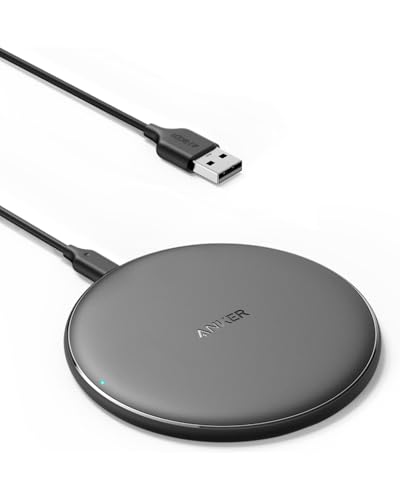
Anker 313 Wireless Charger Pad — Best flat pad overall
The flat Anker 313 is the charger this category looks like in most people’s imagination: a thin, matte disc that disappears under the phone and asks for nothing. Its coil area is generous by the standards of budget pads, which translates into the single most valuable trait a bedside charger can have — tolerance. You can set the phone down rotated a few degrees, nudged a centimetre off centre, or placed by a hand that is already ninety percent asleep, and charging begins anyway. Pads with tight sweet spots train their owners to perform a little alignment ritual every night; this one mostly forgives and gets on with it.
Anker rates it for ten watts to compatible Android handsets, seven and a half to iPhones, and five as the universal fallback, and the case guidance is the standard honest line: it works through ordinary protective cases up to about five millimetres, provided there is no metal plate, magnetic mount disc, or card wallet standing between the coils. The listing is explicit that the wall adapter is not included and that a Quick Charge 2.0 or 3.0 adapter is the intended partner, which we count as straightforward dealing — the requirement is declared before purchase, not discovered in a troubleshooting forum. AirPods and other Qi earbuds charge happily on it too, which quietly makes it the household’s second earbud charger.
- Format: flat Qi-certified charging pad, phone lies horizontal
- Output: up to 10W for compatible Android phones; 7.5W for iPhones; 5W baseline
- In the box: pad and cable; wall adapter deliberately not included
- Case tolerance: works through typical cases up to roughly 5 mm, no metal in the path
- Input partner wanted: Quick Charge 2.0/3.0 or equivalent adapter
Strengths
- The wide coil area forgives sloppy nighttime placement better than most discs in its class.
- A genuinely slim, grippy profile that stays put on a nightstand instead of skating around.
- Qi certification plus Anker’s long track record in exactly this product category.
Trade-offs
- You must supply your own adequately rated wall adapter before it can hit its numbers.
- A flat pad gives you no viewing angle, so alarms and clocks require picking the phone up.
- Metal-backed cases, ring grips, and wallet folds will block it just as they block every rival.
Best for: nightstand duty and anyone who values a charger that simply works every single night without ceremony. Not suited for: desk workers who want the screen visible while charging, or buyers expecting magnetic snap alignment.

Anker 313 Wireless Charger Stand — Best desk stand
A stand changes the relationship between phone and charger. Instead of a handset lying face-up like a sleeping pet, it sits propped at a working angle, and that single geometric change turns charging time into usable time: the clock app becomes a desk clock, a video call can run while the battery recovers, and a recipe can stay readable in the kitchen with the phone safely off the counter’s wet zone. The Anker 313 stand builds that idea on a two-coil layout, so the phone charges in portrait for calls and in landscape for video, without the dead orientation that single-coil stands impose.
Its power story matches the pad’s — up to ten watts for phones that ask for it, seven and a half for iPhones — delivered through a Micro-USB input that betrays the design’s vintage. We would rather it were USB-C, and in a buying guide written for the future that would be a heavier mark against it. In the present tense, the cable stays plugged in behind furniture and the connector standard at the hidden end matters little. What matters more is the stand’s stability: the base is weighted and shaped so that tapping the screen does not rock the phone off its coils, a failure mode that plagues flimsier upright chargers and announces itself as a mysteriously uncharged phone at lunchtime.
- Format: upright stand, charges in portrait and landscape thanks to dual coils
- Output: up to 10W Android; 7.5W iPhone; 5W fallback for other Qi devices
- Input: Micro-USB cable included; wall adapter requirements mirror the pad’s
- Viewing angle: fixed incline suited to desks, counters, and bedside tables
- Extras: works as an always-visible clock and notification surface while charging
Strengths
- Dual coils mean both orientations charge, which video watchers will use daily.
- The propped screen converts charging hours into genuinely usable hours at a desk.
- Stable footing keeps the phone seated through taps, swipes, and table bumps.
Trade-offs
- Micro-USB input feels dated and makes the included cable a single point of failure.
- The fixed angle cannot flatten for travel, so it is furniture rather than luggage.
- Very thick rugged cases can push the phone’s coil too far from the stand’s coils.
Best for: home-office desks, kitchen counters, and anyone who takes calls or watches video while topping up. Not suited for: frequent travellers wanting one charger that packs flat, or owners of the bulkiest protective cases.
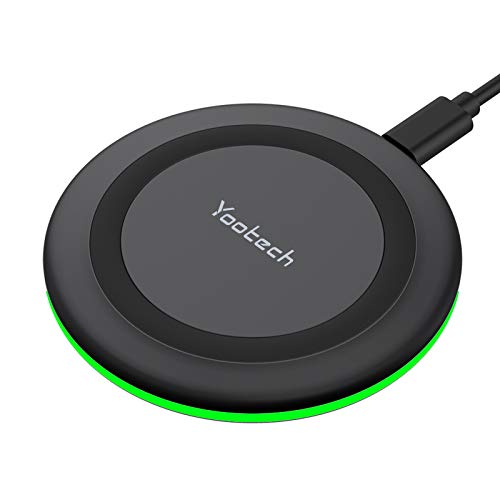
Yootech Wireless Charging Pad — Best simple spare
Yootech built its name in this category by selling the unadorned version of the product: a pad, a cable, a faint indicator, and a price of admission low enough that buying a second one for another room needs no deliberation. This pad follows that formula faithfully. It offers the same three-tier output story — ten watts for handsets that request it, seven and a half for iPhones, five as the baseline — and it adds one thoughtful touch for bedrooms: its indicator behaviour is designed to be tolerable in the dark, glowing to confirm placement and then settling down rather than burning a green beacon into the corner of your vision all night.
The listing states clearly that no AC adapter is included, and Yootech’s own guidance points buyers toward a Quick Charge adapter to unlock the faster modes. Consider that the real specification of this product: it is a coil and a circuit board priced as an accessory to an adapter you probably own. Judged that way it is excellent value; judged as a complete kit it is incomplete, and the distinction explains most of the divided opinion around it. The pad also handles the small-device end of Qi gracefully, so the earbuds case that refuses to align on fussier pads usually finds its charge here without a search party.
- Format: low-profile flat pad with a subdued status indicator
- Output: 10W maximum for compatible Android; 7.5W for iPhones; 5W standard mode
- In the box: pad and cable only — no AC adapter, by the listing’s own statement
- Bedroom manners: indicator designed not to glare through the night
- Small devices: earbuds cases and other low-draw Qi gadgets charge reliably
Strengths
- The most painless way to add a second or third charging spot to a home.
- Night-friendly indicator behaviour that respects a dark bedroom.
- Forgiving with small, low-power devices whose coils are harder to align.
Trade-offs
- Adapter sold separately, so the drawer audit described earlier is mandatory.
- No stand geometry, no viewing angle, no desk productivity angle at all.
- The plain shell scuffs and shows dust more readily than textured rivals.
Best for: guest rooms, hall tables, and households adding charging spots one room at a time. Not suited for: anyone buying their very first charger who owns no suitable wall adapter at all.
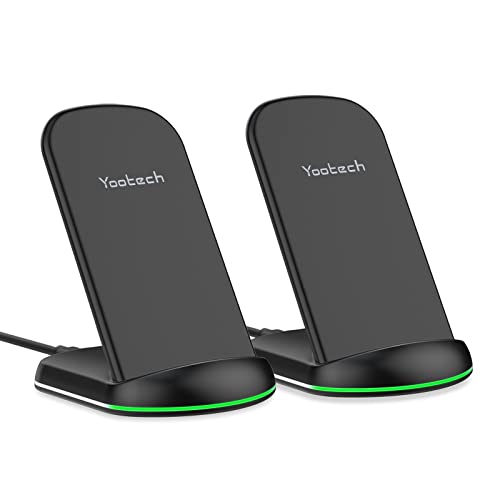
Yootech Wireless Charger Stand 2-Pack — Best for two rooms
The two-pack is a quietly radical idea in a category that sells one charger at a time: it assumes the household, not the individual, is the customer. Two identical stands mean the bedroom and the living room stop competing, partners stop unplugging each other’s setups, and a teenager’s phone can live on the kitchen stand without migrating the nightstand hardware. Because both units are the same model, everything learned about one — the placement feel, the case limits, the indicator — transfers to the other, and a household standardises the way offices standardise on one laptop dock.
Each stand delivers the familiar tiered output, ten watts at the top for phones that take it and seven and a half for iPhones, with the upright dual-orientation convenience that makes stands the better desk and counter format. Buying two at once also changes the failure mathematics: if one stand eventually dies, the household still has a working unit and a known-good replacement model to reorder. The honest caveat is that a twin pack doubles down on one design’s quirks — the fixed angle and the adapter requirements apply twice — so it rewards buyers who have already decided the stand format suits their rooms.
- Format: two identical upright charging stands in a single box
- Output per stand: 10W maximum Android; 7.5W iPhone; 5W baseline Qi
- Orientations: portrait and landscape charging on each unit
- Household logic: standardise two rooms on one model and one set of habits
- Adapters: check the listing’s inclusions and your spare adapter count before ordering
Strengths
- Ends the nightly contest for the household’s single good charging spot.
- Identical twins mean one learning curve and interchangeable placement habits.
- Per-unit cost undercuts buying two separate stands at different times.
Trade-offs
- Commits you to one fixed-angle design in two rooms at once.
- Two stands need two adequately rated adapters to perform at their best.
- Couples or families with mixed needs may prefer one pad and one stand instead.
Best for: couples, families, and two-room households tired of charger migration. Not suited for: single-room dwellers, who would be paying for a second stand that becomes drawer clutter.
Samsung 15W Wireless Charger Pad — Prose-only step-up
We include Samsung’s 15W pad without a link, deliberately, because it answers a question this guide’s title raises: if ten watts is good, is fifteen better? For Galaxy owners, it genuinely can be. Samsung’s recent flagships accept up to fifteen watts over Qi from pads that speak the right dialect, and Samsung’s own pad is the surest dialect speaker, with a built-in fan in the design language of the line to keep temperatures civilised during the faster sessions. For an iPhone owner, by contrast, the same pad offers precisely nothing extra — the phone will still cap itself at seven and a half watts on standard Qi — which is why this product is a benchmark in our guide rather than a pick.
Treat it as the boundary marker of the category. If you own a compatible Galaxy handset, charge mostly during the day in short bursts, and feel the difference between a twenty-minute top-up here and there, stepping up is rational and this is the direction to step. If you own anything else, or charge overnight, the boundary marker tells you the opposite: the cheaper 10W class already delivers everything your routine can absorb, and the money saved is better spent on the adapter audit or a second charging spot.
- Format: flat pad from Samsung’s own accessory line, discussed here without a link
- Output: up to 15W for compatible Galaxy handsets; iPhones remain at 7.5W on Qi
- Cooling: fan-assisted design language typical of Samsung’s faster pads
- Position in guide: prose-only benchmark above this guide’s wattage class
- Who benefits: Galaxy owners doing daytime top-ups rather than overnight charges
Strengths
- The surest route to a Galaxy handset’s full standard-Qi wireless speed.
- Active cooling suits repeated daytime top-up sessions.
- First-party accessory support and firmware manners.
Trade-offs
- Offers iPhone owners nothing beyond what the 10W picks already give.
- Sits above this guide’s class in both wattage and typical street price.
- A fan, however quiet, is a moving part a basic pad simply does not have.
Best for: Galaxy owners who charge in daytime bursts and want their phone’s full Qi speed. Not suited for: iPhone owners, for whom it performs identically to the cheaper pads above.
Belkin BoostCharge 10W Pad — Prose-only retail staple
Belkin’s BoostCharge pad is the charger many people meet before they ever read a guide like this one: it sits in phone shops and airport electronics stores, wears a familiar accessories brand, and promises ten-watt Qi charging with the quiet confidence of a company that has made Apple-adjacent accessories for decades. We discuss it in prose because we could not verify a listing through our channel this round, not because the product is obscure. Its behaviour mirrors the class: ten watts for Android handsets that request it, seven and a half for iPhones, case tolerance in the usual few millimetres, and an adapter story that varies by region and bundle, which is exactly why a buyer should read the specific box rather than assume.
Its real function in this roundup is calibration. When a shopper asks whether the linked Anker and Yootech pads are suspiciously inexpensive, the Belkin is the reference point that answers: the underlying Qi technology is mature, the coils and control chips are commodities, and the premium for a legacy retail brand buys distribution and shelf presence more than it buys electrons. Some buyers value that presence and the easy returns of a physical store, which is a legitimate preference. Nobody should pay it believing the iPhone on top will charge one watt faster.
- Format: flat pad sold widely through physical retail, covered here in prose only
- Output: 10W class behaviour — Android up to 10W, iPhones at 7.5W
- Availability: phone shops and travel retail as much as online listings
- Adapter inclusion: varies by bundle and region; read the actual box
- Role in guide: price-and-brand calibration point for the linked picks
Strengths
- Easy to find, inspect, and return through ordinary physical stores.
- A long accessory pedigree that cautious buyers find reassuring.
- Class-standard performance with no proprietary surprises.
Trade-offs
- Typically costs more than the linked pads for the same delivered watts.
- Bundle contents vary, so the adapter question needs checking per box.
- No stand variant in this specific pick for desk viewing angles.
Best for: shoppers who prefer buying accessories in person with painless returns. Not suited for: value-focused buyers, who get identical charging from the linked pads for less.
How do the six picks compare side by side?
| Pick | Format | Top Qi output | iPhone rate | Adapter note |
|---|---|---|---|---|
| Anker 313 Pad | Flat pad | 10W | 7.5W | Not included; needs a Quick Charge class brick |
| Anker 313 Stand | Upright stand | 10W | 7.5W | Micro-USB cable in box; adapter per listing |
| Yootech Pad | Flat pad | 10W | 7.5W | No AC adapter included, stated in listing |
| Yootech Stand 2-Pack | Two stands | 10W each | 7.5W each | Plan on suitable adapters for both units |
| Samsung 15W Pad | Flat pad, prose-only | 15W for Galaxy | 7.5W | Above this guide’s class; first-party bundle varies |
| Belkin BoostCharge 10W | Flat pad, prose-only | 10W | 7.5W | Bundle-dependent; check the specific box |
Read the iPhone column first if you own one: it is a column of identical numbers, and that sameness is the most useful fact in the table. It tells you the decision among these six is about furniture, rooms, and habits — never about speed. Android owners get a real distinction only at the Samsung row, and only with a compatible Galaxy handset. Everyone else is choosing a shape and a placement personality, so choose the one whose daily friction is lowest in the room where it will live.
Which rooms and routines suit pads, and which suit stands?
The bedroom belongs to flat pads. A pad asks nothing of a tired person, produces no glowing screen angled at the pillow, and lets the phone lie dark and silent while alarms wait for morning. Stands in bedrooms tend to turn the handset into a small television of notifications, and their indicators and propped screens bother light sleepers. The exception is the deliberate alarm-clock user, who wants the time visible at a glance and has already made peace with the glow — for that person a stand by the bed is a feature, not a compromise.
The desk and the kitchen counter belong to stands. Work charges happen in fragments between meetings, and a propped phone keeps glanceable information — timers, calls, messages, a video playing while hands stay busy — available without breaking the charge. Kitchens add a safety argument: a stand lifts the phone’s back off a damp counter and keeps it out of the splash zone near the sink. Living rooms split the difference; a pad on a side table suits the drop-and-socialise pattern, while a stand near the sofa arm suits the person who scrolls through every ad break. Garages, workshops, and hallways, finally, are pad country again — cheap, flat, and unbothered by dust in a way a stand’s cradle never quite is.
How should you set up a 10W pad for reliable nightly charging?
Begin with the adapter, because everything downstream depends on it. Choose a Quick Charge 2.0 or 3.0 adapter, or a USB-C PD adapter of eighteen watts or more, and pair it with the cable that arrived in the pad’s box. Plug the combination into a wall socket rather than a tired power strip shared with a space heater, then place the pad where the phone naturally lands at night — not where you wish it landed. A week of watching your own habit will tell you the truth: if the phone sleeps on the left corner of the nightstand, the pad belongs under that corner.
Next, audit the phone’s clothing. Remove metal plates, magnetic car-mount discs, and grip rings, or move them where they cannot sit between the coils. Test your everyday case by placing the phone and confirming the charging indicator appears within a couple of seconds; then repeat the test at a few angles, because a case that works dead-centre but fails at ten degrees will eventually fail you at three in the morning. If your case carries cards, accept the nightly ritual of removing it, since card wallets and wireless charging are fundamentally incompatible roommates.
Finally, give the setup a honest first week. Check the battery level each morning and note any night the phone woke undercharged. Nearly every failure traces to one of three causes: an underpowered adapter quietly limiting the pad, a case edge lifting the phone a millimetre too far, or the phone being placed by a sleepier hand than the pad’s sweet spot tolerates. Fix the specific cause rather than replacing the pad, because the replacement will inherit the same adapter, the same case, and the same hand.
What mistakes do buyers keep making with this class of charger?
The founding mistake is expecting wired speed from a wireless convenience product, then writing the category off when a twenty-minute session adds a modest slice of battery. Ten-watt Qi was never designed to rescue a dead phone before a night out; it was designed to make the hours a phone spends sitting still do quiet double duty. Judge it on mornings, not on emergencies. The second mistake is feeding a capable pad with a feeble adapter and blaming the pad, a confusion so common that it deserves its own paragraph in every guide in this category, including this one.
Third comes the case surprise: buyers upgrade to a chunky protective case or a wallet folio, discover charging has become intermittent, and conclude the pad died. The pad is innocent; the distance and the metal are guilty. Fourth is the magnetic assumption — shoppers see a round pad, imagine it snaps to the phone like the magnetic systems in advertisements, and feel cheated when the handset slides off a tilted surface. Standard Qi has no magnets. Fifth, and most quietly damaging, is cooking the battery with kindness: leaving a phone on a pad in a hot car or a sunny window charges it slowly while baking it thoroughly, and heat, repeated daily, is the enemy every battery chemist agrees on.
How does heat shape the way these chargers behave?
Every wireless charger is also, unavoidably, a small heater. The energy that fails to make the jump between coils has to go somewhere, and it goes into warmth — in the pad, in the phone’s back panel, and in the battery that sits just behind it. This is why a phone charging wirelessly on a warm afternoon feels noticeably hotter than the same phone on a cable, and why charging speeds sag on summer days: the phone’s thermal management sees the temperature climb and politely asks the pad for less power. Nothing is broken when this happens. The system is protecting the component in your phone that ages fastest, its battery, from the one insult batteries tolerate worst.
Placement is the owner’s main lever over heat. A pad on a hard, bare nightstand in a normally heated room sheds warmth easily and will deliver its rated behaviour through the night. The same pad buried under a duvet corner, stacked on top of a games console, or parked in a stripe of afternoon sun will spend the session throttling. Soft furnishings are the repeat offender: phones left charging on sofas and beds combine blocked airflow with a coil alignment that shifts every time the cushion settles, producing the classic complaint of a phone that charged slowly and woke up warm. Give the pad a hard, shaded, ventilated home and most heat stories in this category simply never happen.
There is also a slower, quieter heat question that thoughtful buyers raise: does nightly wireless charging wear a battery out faster than nightly cable charging? The mechanism for extra wear exists — more warmth, more hours near a full charge — but its size in ordinary use is modest next to the dominant factors, which are total charge cycles, deep discharges, and genuine heat abuse like hot cars. A buyer who keeps a phone for two or three years and charges on a ventilated nightstand will not meaningfully shorten the battery’s useful life by choosing any pad in this guide. A buyer who keeps phones for five years and is meticulous by temperament can split the difference: wireless on weeknights for convenience, a cable on weekends, and the battery kept out of extremes either way.
What else can sit on these pads besides a phone?
The Qi standard was never only about handsets, and the second life of a pad like these is as the household’s small-device dock. Wireless earbuds are the obvious tenants: nearly every major earbud case with wireless charging speaks Qi, draws a gentle couple of watts, and cares far less about wattage than about coil position, since a small case has a small coil that must find the pad’s field. The forgiving pads in this roundup — the Anker 313 pad especially — handle earbuds gracefully, while very small cases on very large pads occasionally need a nudge to find the sweet spot. A useful household pattern emerges in many homes: phones graduate to stands at desks, and the flat pad they replaced becomes the permanent earbud station by the door.
Beyond earbuds, the Qi ecosystem includes a scattering of mice, remote controls, toothbrushes in some markets, and portable batteries that can themselves charge wirelessly. Compatibility is a per-device question, answered by the device’s own specification rather than by the pad, and the safe assumption is that if a gadget advertises Qi charging, any certified pad here will feed it at the baseline rate it requests. One prominent category does not belong on these pads at all: smartwatches. Apple Watch uses its own magnetic inductive system and will not charge from a Qi pad, and most Wear OS watches are similarly committed to proprietary pucks. Shoppers hoping one pad will serve phone and watch alike need a purpose-built multi-device station, which is a different guide and a different budget.
This secondary usefulness matters to the buying decision more than it first appears. A pad bought purely for a phone competes against the phone’s own cable, which is free and faster. A pad that also corrals earbuds, a partner’s handset, and the occasional guest phone becomes a piece of household infrastructure, and infrastructure justifies itself differently — by the clutter it removes and the small frictions it abolishes daily. When you picture where a pad will live, picture everything that will ever sit on it, not only the handset you own today.
How long will a 10W charger stay relevant?
Longer than most tech purchases, because the standard underneath it moves slowly and the phones keep honouring it. Qi has been the common wireless language for well over a decade, every flagship line still speaks it, and the newer magnetic generation was designed as an extension of Qi rather than a replacement — phones with magnetic charging still accept a plain Qi pad, simply at the capped rate discussed throughout this guide. A pad bought today will charge the phone you buy in three years. It may not charge it at that phone’s fastest wireless speed, but overnight, fastest was never the metric that mattered.
The more realistic expiry date is physical, not technological. Cables fray at the pad’s input, feet lose their grip, and a stand’s hinge or cradle eventually loosens. This is one quiet argument for the simpler flat pads: with no moving parts and no angle to sag, a disc like the Anker or Yootech pad can plausibly outlive several phones. It is also an argument for buying from brands with a continued presence in the category, since a warranty claim in year two is only useful against a company still answering its messages. On both counts the linked picks were chosen with boring durability in mind.
So the relevance answer reframes the purchase: you are not buying this year’s speed, you are buying a decade’s worth of unremarkable, dependable overnight charging for whatever Qi-speaking devices pass through the house. Judged on that horizon, the differences that matter are the ones this guide kept returning to — placement forgiveness, adapter honesty, bedroom manners — and the wattage figure on the box is the least interesting number in the whole decision.
What should you check on the morning after your first charge?
The first morning tells you almost everything about whether a wireless setup suits your life, so read it like a diagnostic rather than a verdict. Start with the obvious number: the battery percentage. A phone placed at a typical evening level should be at one hundred, and anything dramatically short of that means the charge was interrupted — the phone slid, the case lifted it, or a pet conducted its own investigation. Next, touch the back of the handset. Pleasantly neutral is normal; distinctly warm suggests the pad spent the night fighting poor alignment or a hot room, and the fix is repositioning rather than replacement.
Then notice the small behavioural things, because they predict whether the habit will stick. Did you reach for the phone in the night and return it without thinking, and did charging resume on its own? Did the indicator wake you, or did it behave with the discretion the bedroom picks in this guide were chosen for? Did the pad stay where you put it, or did the cable drag it half off the nightstand by morning? Each of these is a property of the specific room-and-product pairing, and each is adjustable in the first week: a longer cable, a pad nudged two inches left, a case swapped for a slimmer one at night.
If the first morning is flawless, the remaining test is simply repetition. Wireless charging earns its place by disappearing — by becoming the thing you stop thinking about entirely, like a light switch. Buyers who find themselves still fussing with alignment on the tenth night have usually bought a pad whose sweet spot is too small for their case or their habits, and that is precisely the scenario the forgiving picks at the top of this guide were selected to prevent. Judge generously on night one, judge honestly on night ten, and let that second judgement decide whether the pad stays or goes back.
Final Recommendation
For most people reading this guide, the Anker 313 pad is the purchase: certified, forgiving about placement, honest about its missing adapter, and shaped for the overnight job this class does best. Add the Anker stand if your working day is a string of video calls, or the Yootech twin pack if the charger wars at home have a second front. Galaxy owners with daytime charging habits are the one group with a genuine reason to look above the class at Samsung’s faster pad. Buy the shape that fits your room, feed it a proper adapter, and let the phone fill itself while you sleep — that quiet routine, repeated nightly, is the whole point of a charger like this.
Frequently Asked Questions
Will a 10W wireless charger fast-charge my iPhone?
Not in the magnetic sense. On standard Qi, iPhones accept up to seven and a half watts, so a 10W pad delivers that rate and no more. It is still meaningfully quicker than the old five-watt baseline and entirely sufficient overnight. Faster iPhone wireless speeds require MagSafe or Qi2 magnetic hardware, which is a different product category from everything reviewed here.
Why does my new pad charge more slowly than the box suggests?
The likeliest culprit is the wall adapter feeding it. A pad can only forward the power it receives, so an old five-watt adapter turns a ten-watt pad into a five-watt experience. Fit a Quick Charge class adapter or an eighteen-watt-or-better USB-C PD adapter, use the cable supplied with the pad, and the rated behaviour usually appears immediately.
Can I leave my phone on the pad all night, every night?
Yes, with ordinary prudence. Qi chargers and phones negotiate and taper as the battery fills, and modern handsets manage their own charge ceilings. The greater long-term factor is heat, so keep the pad out of bedding, direct sun, and hot rooms. A phone that wakes merely full, rather than warm, is a phone being treated well.
Do wireless chargers work through phone cases?
Through most ordinary cases, yes, up to roughly five millimetres of thickness. The exceptions are metal plates, magnetic mounting discs, ring grips positioned over the coil, and wallet cases holding cards. If charging becomes intermittent after a case change, the case — not the pad — is the first suspect to test by charging bare for one night.
Is a stand or a pad better for watching video while charging?
A stand, decisively. Dual-coil stands like the Anker and Yootech models charge in landscape orientation, holding the screen at a viewing angle with no hands involved. A flat pad leaves the phone lying like a coaster, fine for audio and podcasts but hopeless for anything you actually want to watch.
Should Galaxy owners pay more for the 15W Samsung pad?
Only if your routine rewards it. Compatible Galaxy handsets draw up to fifteen watts from that pad, which visibly shortens daytime top-ups. If you charge overnight, the extra speed evaporates into hours you were asleep anyway, and the 10W picks in this guide deliver the same full battery by morning for less money.
Does wireless charging work when the phone is switched off or in a thick wallet case?
A phone that is powered down will still charge on a Qi pad, because the receiving circuitry negotiates with the pad independently of the operating system; you simply lose the on-screen confirmation, so placement has to be judged by the pad’s indicator instead. The wallet case question has a firmer answer. Cards with magnetic stripes and chips should never sit in the induction field at all, both because the wallet’s bulk pushes the phone’s coil beyond reliable range and because payment cards deserve better treatment than being warmed nightly by a charging field. If your daily carry is a folio wallet, the workable routine is to pop the phone out at night or choose a wallet case with a detachable inner shell, and to treat any pad that claims to charge happily through a loaded wallet with the suspicion that claim deserves.
Can one pad serve two people taking turns through the evening?
It can, and in kitchens and living rooms it often does, provided expectations are set by the arithmetic of this class. An evening of shared access is a sequence of partial charges rather than two full ones: one phone takes the pad during dinner preparation, the other during the clearing up, and both end the night with enough to reach their own overnight arrangements or to finish filling on the same pad in rotation. Households that try to run two nearly empty phones to full through one pad in a single evening will feel the ten-watt ceiling keenly. The arrangement works when the pad is a top-up station, not when it is asked to be the family’s only well.
Related Guides
Charging decisions rarely stop at one pad, so round out the picture with our companion coverage: the best 18w car chargers for the commute, the best 3rd party iphone chargers for cables and bricks that respect Apple’s rules, and the best affordable phone portable chargers for the days when no wall is nearby at all.



[…] bricks find their way home. For the other consoles and handhelds on the shelf, our guide to the best 100W USB-C chargers for laptops and handhelds covers the bigger bricks. Battery care for the loose cells in your other gear lives in the 18650 […]