What's inside
- Key Takeaways
- Quick Picks
- How Were These Picks Assembled?
- USB, Analog or Bluetooth — Which Connection Does Your Desk Want?
- What Are Studio Monitors Doing in a Best 2.0 Computer Speakers Guide?
- How Should Desk Speakers Be Placed to Sound Their Best?
- How Do You Set Up a Desk Pair, Step by Step?
- Does Desk Size Change Which Pick Is Right?
- Should You Add a DAC Between the Computer and the Speakers?
- How Do the Six Desk Picks Compare?
- What About Gaming and Streaming — Do the Same Picks Apply?
- Why Do Voices Matter More Than Bass at a Desk?
- How Loud Do Desk Speakers Actually Need to Be?
- What Mistakes Do Desk-Speaker Buyers Keep Making?
- Final Recommendation
- Frequently Asked Questions
- Related Guides
As an Amazon Associate I earn from qualifying purchases. This post may contain affiliate links at no extra cost to you.
gizmoverdict.com is reader-supported. When you buy through links on our site, we may earn an affiliate commission.
Where to buy: All of the picks below link to listings verified in this site’s product pool. Two of the six are studio monitors pressed into desk service, and they are labelled as such wherever they appear — a monitor at a desk is a legitimate choice, but it should be a knowing one.
The best 2.0 computer speakers answer a deceptively simple brief: two boxes, no subwoofer, sitting on a desk, making everything a computer does — calls, games, films, music, the notification ping you hear four hundred times a day — sound like it was meant to be heard. The 2.0 format is a discipline. Without a subwoofer to hide behind, the two speakers must cover the whole audible story themselves, at arm’s length, in the near field, where every flaw in voicing is close enough to touch. That intimacy is why the category rewards good design so visibly and punishes lazy design so quickly: a laptop’s built-in speakers are the baseline everyone is fleeing, and the distance between that baseline and a good desk pair is the largest single upgrade most computer users ever make.
The six picks below span the format’s whole personality range. At one end sits a pair of pebble-shaped USB speakers that cost less than a team lunch and run off a single cable. At the other end sit two genuine studio monitors — the PreSonus Eris 3.5 and the Edifier MR4 — designed for people who make audio rather than merely consume it, and included here because an increasing share of desks belong to exactly those people: streamers, podcasters, video editors, bedroom producers. Between them stand the category’s mainstream: a Bluetooth-equipped Logitech pair for the tidy wireless desk, and two Edifier bookshelf models that have quietly become the default recommendation for listeners who want their desk to sound like a small hi-fi.
Three connection philosophies run through the six, and choosing among them matters as much as choosing among the speakers. USB designs take digital audio straight from the computer and convert it themselves, sidestepping a noisy headphone jack. Analog designs trust the computer’s output or, better, an external DAC. Bluetooth designs cut the wire entirely and accept the compromises of wireless in exchange for a desk that also serves a phone. The guide treats each philosophy honestly, because the right speaker on the wrong connection is a familiar and avoidable disappointment.
Key Takeaways
- All six picks are true 2.0 systems — two speakers, no subwoofer — designed to cover the full range at desk distance unaided, every single day.
- Connection is a first-order decision: USB, analog and Bluetooth each suit different desks, and the picks divide among all three.
- Two picks are studio monitors by design and are labelled that way; they flatter nothing and suit creators best.
- The Creative Pebble runs entirely from a USB connection — one cable carries both power and audio.
- Edifier’s R1280T and R1700BT are the hi-fi heart of the category, with the BT model adding wireless to the same formula.
- Near-field listening is unforgiving: placement at ear height, angled toward the listener, matters more at a desk than any specification.
- Voices carry the working day — calls, podcasts and dialogue all live in the midrange, so clarity there outranks bass theatrics at a desk.
Quick Picks
| Pick | Badge | Why it earns its place |
|---|---|---|
| Creative Pebble | One-cable USB minimalism | Spherical 2.0 desktop speakers powered and fed by a single USB connection — the smallest possible upgrade from laptop sound. |
| Logitech Z207 | Bluetooth desk all-rounder | Logitech’s compact stereo pair with Bluetooth alongside wired input, for desks that serve a computer and a phone in turn. |
| Edifier R1280T | The classic desk hi-fi | Powered bookshelf speakers with 42 watts RMS and a remote — the long-standing default for music-first desks. |
| PreSonus Eris 3.5 | Studio monitor — labelled | A true active near-field monitor pair, 50 watts, for creators who edit audio and video at the desk. |
| Edifier R1700BT | Hi-fi plus Bluetooth | The R1280 formula grown up: 66 watts RMS and Bluetooth, for desks that listen as much as they work. |
| Edifier MR4 | Studio monitor — labelled | Edifier’s 4-inch powered studio monitor, voiced flat for production work that happens to live on a desk. |
How Were These Picks Assembled?
The list was built to mirror how desks actually differ. The minimal desk — a laptop, a small surface, a user who wants sound without a project — needed a representative, and the USB-powered Pebble is the purest expression of that desk in the category. The flexible desk, shared between a work computer and a phone, needed Bluetooth without surrendering wired duty, which is the Z207’s entire design brief. The listening desk, where music is a primary use rather than a background, needed genuine powered bookshelf speakers, and Edifier’s two models divide that desk by whether wireless matters. The creating desk needed monitors, labelled honestly, because recommending a monitor as a casual speaker — or a casual speaker as a monitor — serves neither buyer.
Every pick is a verified listing, a true stereo pair and a self-powered design: 2.0 computer speakers plug into the wall or the computer, not into a separate amplifier, and any product requiring one belongs to a different guide. Excluded were 2.1 systems wearing 2.0 language, soundbars (a neighbouring category with its own guides on this site), and single-box Bluetooth speakers, which are mono or pseudo-stereo devices solving a different problem.
The two monitors carry a labelling promise: wherever the Eris 3.5 or the MR4 is named in this guide, its studio-monitor identity travels with it. That is not a warning label — monitors make superb desk speakers for the right listener — but a truthful one, because their flat voicing delights creators and can puzzle listeners who expected their music pre-flattered.
USB, Analog or Bluetooth — Which Connection Does Your Desk Want?
USB is the tidy absolutist. A USB speaker like the Creative Pebble takes the digital signal from the computer and performs the conversion to analog inside the speaker, which removes the computer’s headphone jack — historically a noisy, interference-prone output — from the chain entirely. On the Pebble the same cable also carries power, so the entire installation is one lead from laptop to sound. The constraints are reach and appetite: USB power is modest, which suits small drivers at desk distance perfectly and larger ambitions not at all, and a USB speaker serves the computer it is plugged into, not the phone in your pocket.
Analog is the traditionalist, and its quality is a chain with two links. A 3.5mm or RCA connection sounds as good as the output feeding it: from a decent modern computer that can be perfectly respectable, from a gaming PC with a well-implemented output or an external DAC it can be excellent. Analog’s virtues are universality and zero latency — every device ever made with a headphone socket can drive an analog speaker, which is why the Edifier bookshelf picks and the monitors keep faith with it. Its vice is that it faithfully reproduces whatever hum, hiss and interference the source provides.
Bluetooth is the diplomat, serving two masters. A Bluetooth desk speaker pairs with the computer for work and the phone for everything else, and the Z207 and R1700BT build their cases on that flexibility. The honest costs are latency — irrelevant for music, noticeable in fast games and video if the implementation is careless — and a compression step between your library and your ears that critical listeners can hear on good speakers. The mature position, which most desks eventually reach, is hybrid: wired for the computer’s serious work, Bluetooth for the phone’s casual traffic. Four of the six picks support some version of that treaty, and the guide notes which connection each pick leads with.
One connection question outlives the purchase: what happens when the computer changes? USB and analog speakers are gloriously indifferent to operating systems and model years — a virtue the Pebble and the R1280T share across a decade of machines. Bluetooth speakers occasionally re-litigate pairing with new hardware, and app-dependent features anywhere in audio carry a small dependency on the maker’s continued interest. None of this should veto a connected pick, but the buyer who keeps speakers for ten years — a common and honourable habit in this category — is entitled to count permanence among the specifications.
What Are Studio Monitors Doing in a Best 2.0 Computer Speakers Guide?
Because the desk changed. A generation ago the computer desk was an office annex; today it is where podcasts are edited, streams are produced, videos are cut and songs are mixed. The people doing that work need speakers that tell the truth — a flat, unflattered response that reveals what is actually in the recording — and the products built for them are studio monitors. The PreSonus Eris 3.5 and the Edifier MR4 appear in this guide under their true names and true descriptions because a growing share of “computer speaker” shoppers are, on inspection, monitor shoppers who have not yet been told the category exists.
The distinction a buyer must grasp is intent. A hi-fi desk speaker like the R1700BT is voiced to make finished music enjoyable; a monitor like the MR4 is voiced to make unfinished audio diagnosable. Play a great recording on both and both satisfy. Play a flawed mix on both and the hi-fi forgives while the monitor itemises. For pure consumption, forgiveness is a feature; for creation, it is a bug. Gamers and film watchers sit with the consumers; streamers who monitor their own voice, editors who balance dialogue, and producers at any level sit with the creators. Neither pick is a trap for the other audience — the Eris 3.5 is a perfectly pleasant casual listen — but the labelling exists so the choice is made with open eyes.
One more monitor trait travels to the desk with them: connection culture. Monitors expect balanced or line-level wired inputs, volume managed as part of a chain, and no remote control nestling beside the keyboard. Creators find this normal because it is their world’s grammar; casual buyers sometimes read it as austerity. It is neither — it is a tool assuming a workflow — but the buyer who wants to slump in the chair and conduct the volume from a remote should choose the Edifier hi-fi picks and leave the monitors to the desks that lean forward.
How Should Desk Speakers Be Placed to Sound Their Best?
Near-field placement is the cheapest performance upgrade in this entire category, and it costs nothing but attention. The geometry that matters: the two speakers and your head should form a rough triangle, with the speakers angled inward so their axes cross near your ears rather than firing straight ahead past them. Height matters as much as angle — the tweeters belong at ear level, which on a desk usually means small stands, angled pads or a stack of something unglamorous beneath each cabinet, because a speaker firing at your sternum is a speaker half-heard.
Distance from the wall is the second variable. Bookshelf speakers placed hard against a wall gain bass from the boundary whether they want it or not; a hand’s breadth of clearance usually restores balance, and the monitors in this guide, designed for honest low end, appreciate the room most. Third comes symmetry: a desk against a side wall, with one speaker near the corner and one in open space, will image unevenly no matter the budget, and shifting the whole desk a small distance can outperform an upgrade. Finally, isolation — pads or stands that decouple the cabinet from the desk surface — keeps the desk itself from joining the performance as an uninvited resonating panel. None of this requires measurement equipment; it requires ten minutes and a favourite song.
A particular desk hazard deserves its own warning: the monitor screen itself. Large displays tempt owners to tuck speakers behind them or hard against their edges, where the screen becomes a reflective wall inches from the drivers. Keep the speakers in front of the screen’s plane or clear of its sides, even if the arrangement looks less tidy in a photograph. Desk setups are judged by ears in this guide, not by cameras, and the photograph that wins the internet is often the setup that sounds worst in the chair.
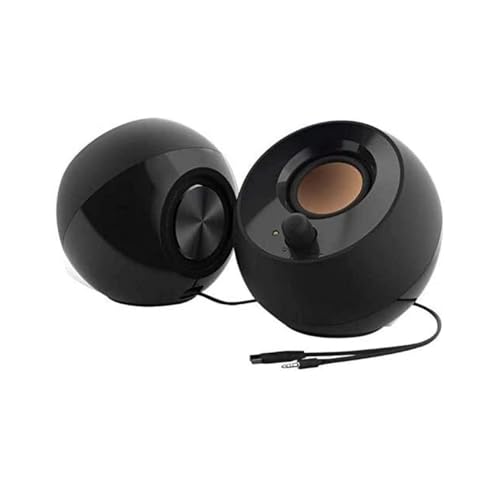
Creative Pebble — One-cable USB minimalism
The Creative Pebble is the smallest complete thought in this guide: two spherical speakers, angled upward toward the listener by their very shape, drawing both power and audio from a single USB connection. Creative designed the Pebble for the desk that has no room — physically or philosophically — for a speaker project: a laptop on a small surface, a user whose entire requirement is “better than the laptop, by tonight, without a power brick.” The spheres deliver exactly that, and their angled drivers show a designer who understood near-field geometry: instead of firing at the desk or the user’s chest, the sound is tilted up toward the ears where it belongs.
Expectations should be set by physics and then pleasantly met. Small drivers in small enclosures, fed by USB power, will not produce deep bass or fill a living room, and the Pebble does not pretend otherwise. What it produces is clarity — voices in calls and videos step forward out of the laptop-speaker murk, music gains stereo shape and presence, and the whole soundscape of the computer becomes legible. For the enormous population of users whose listening happens entirely at a desk, at moderate volume, within arm’s reach, that clarity is not a compromise version of the real thing. It is the real thing, correctly sized.
There is a second, quieter audience for the Pebble worth naming: the second desk. The spare-room workstation, the kitchen-counter laptop, the machine in the workshop — places where sound matters but a speaker budget competes with everything else in the building. The Pebble’s one-cable installation makes it the pair that actually gets installed in those places rather than merely intended, and a modest speaker in use outranks a fine speaker in a wishlist permanently.
- Connection: USB — carries both audio and power in one cable
- Format: 2.0 stereo pair, spherical enclosures angled toward the listener
- Amplification: built in, USB-powered
- Position: the minimal-footprint entry to the category
Strengths
- One cable total — no power brick, no analog lead, no setup decisions at all.
- The angled spherical design aims sound at the listener’s ears by shape rather than by accessories.
- Takes up less desk than the laptop’s own charger while transforming its sound.
Trade-offs
- Bass depth and maximum volume are bounded by small drivers and USB power.
- It serves the computer it is plugged into; phones and other sources need not apply.
- Listeners who play music loudly or game immersively will outgrow it toward the Edifiers.
Best for: laptop users, small desks and anyone whose brief is “better sound tonight, zero fuss.”
Not suited for: music-first listening, gaming immersion, or multi-source desks.

Logitech Z207 — The Bluetooth desk all-rounder
The Z207 is Logitech’s answer to the desk with two citizens: the computer that works there and the phone that lives there. It is a compact 2.0 stereo pair with Bluetooth alongside wired connection — Logitech quotes 10 watts peak for the system — so the same speakers handle the morning’s video calls from the laptop and the evening’s playlist from the phone without a cable being moved. Logitech’s long experience in exactly this product class shows in the priorities: pairing is painless, the footprint is modest, and the sound is tuned for the voices-and-everything diet of a working desk.
Judged against the Edifiers below, the Z207 is the convenience candidate rather than the hi-fi candidate: its drivers and enclosures are smaller, its ceiling lower, its ambitions calibrated to clarity at desk volume rather than to music reproduction as an end in itself. Judged against the Pebble, it is the flexible upgrade — Bluetooth freedom and a wired option, from the brand whose peripherals already populate most desks. The buyer it serves best is the one whose desk is a communications hub first and a listening post second, and who values the speaker disappearing into the workflow over the speaker becoming the workflow’s reward.
The Z207 also earns a mention for shared and family desks, where its easy switching between sources prevents the daily negotiation that wired-only speakers impose. A household machine that serves a parent’s calls at noon and a teenager’s homework playlist at four is a real and common desk, and it is precisely the desk Logitech designed this pair for — the specification sheet reads like a diary of that machine’s day.
- Connection: Bluetooth plus wired input
- Maker’s power figure: 10W peak for the system
- Format: 2.0 stereo pair, compact desktop enclosures
- Position: the flexible all-rounder for mixed computer-and-phone desks
Strengths
- Bluetooth and wired inputs let one pair serve the computer and the phone in turn.
- Logitech’s pairing and controls are as close to invisible as the category gets.
- Compact cabinets suit desks where the Edifiers’ bookshelf size would crowd.
Trade-offs
- Music reproduction sits a class below the Edifier bookshelf picks in depth and scale.
- Bluetooth latency asks gamers and video editors to use the wired connection for critical work.
- Its quoted figure is a peak number; treat the speaker as a clarity device, not a power device.
Best for: home-office desks that split duty between computer calls and phone media.
Not suited for: listeners building a music-first desk, or anyone needing room-filling volume.
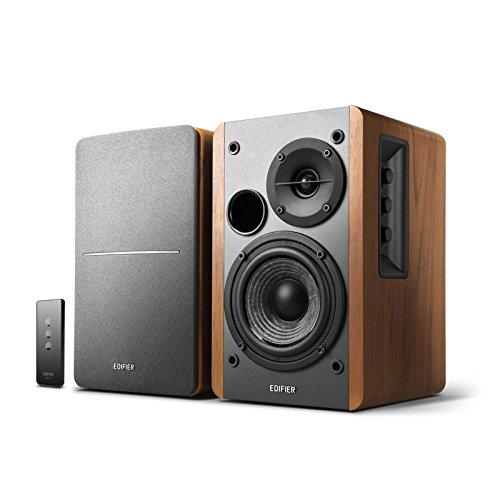
Edifier R1280T — The classic desk hi-fi
If the 2.0 computer speaker category has a default answer, the R1280T is it. Edifier’s powered bookshelf pair — 42 watts RMS, per the listing, with a remote control and tone adjustments on the cabinet — has spent years as the recommendation handed to anyone upgrading from plastic computer speakers to something with genuine hi-fi intent. The formula is conservative in the best way: real wooden-look enclosures of meaningful size, a proper woofer and tweeter per side, amplification with enough substance to fill a room at need, and inputs that assume the speaker will serve a computer today and perhaps a turntable or television tomorrow.
At the desk, the R1280T’s virtue is scale. Music stops sounding like a representation and starts sounding like an event in the room; games gain the low-mid weight that small speakers gesture at; films become watchable without headphones. The trade is footprint — these are bookshelf speakers, and they claim bookshelf space on or beside the desk, which the Pebble and Z207 buyers may not have to give. The remote, a small luxury, matters more at a desk than expected, because the alternative is reaching behind a cabinet for the volume knob several times a day. For the listener whose desk doubles as their main music system, this is where the guide’s centre of gravity sits.
A word about longevity, because the R1280T’s design has a hidden dividend: nothing in it depends on an app, a firmware programme or a wireless standard’s fashion cycle. An analog powered speaker bought today will connect to the computers of a decade from now with the same cable, which cannot be said of every connected product in this guide. Buyers who keep equipment for a long time — and desk speakers are among the most-kept of all electronics — should weigh that permanence as a feature, because it is one.
- Maker’s power figure: 42 watts RMS
- Connection: analog inputs (dual RCA), wired
- Extras: remote control, on-cabinet tone controls
- Format: powered bookshelf pair — allow real desk or shelf space
Strengths
- Genuine hi-fi scale and weight that the compact picks cannot approach.
- Dual analog inputs and a remote make it a small system hub, not just a speaker.
- A long-proven design with the category’s deepest base of satisfied desk installations.
Trade-offs
- No Bluetooth — the phone joins by cable or not at all.
- The bookshelf footprint demands desk or shelf space the minimal picks do not.
- Analog-only connection means sound quality partly inherits the source’s output quality.
Best for: music-first desks and listeners upgrading to their first real speakers.
Not suited for: tiny desks, or buyers who need wireless connection to a phone.

PreSonus Eris 3.5 — Studio monitor, labelled as one
The label comes first because it is the review: the Eris 3.5 is a powered studio monitor — a pair of active near-field monitors with 3.5-inch drivers and 50 watts of amplification, per PreSonus’s listing — that happens to fit a desk beautifully. PreSonus builds for recording musicians, and the Eris line is its entry into their rooms: speakers designed so that what you hear is what your mix actually contains, with tuning controls on the back to adjust the pair to the room and the wall distance behind them. Streamers who need to hear their own voice as the audience will, podcasters editing breaths and sibilance, video editors balancing dialogue against music — this is their pick, and it is not a close call.
As a casual listening speaker the Eris 3.5 remains genuinely enjoyable, with a clarity in the midrange — the region of voices, dialogue and most instruments — that hi-fi speakers at the desk often blur in favour of sparkle and warmth. The honesty cuts the other way on poor recordings and compressed streams, which are presented as they are. Its 3.5-inch drivers set a physical limit on bass depth that no tuning can repeal, so creators working on bass-heavy material should treat the Eris as the truthful near-field it is, and check low end on headphones as professionals do. Within its brief — truth at arm’s length — it is the most purposeful speaker in this guide.
Podcasters should note one specific Eris virtue: it is sold and voiced as a matched working pair for spoken-word editing, the task where midrange honesty is not an audiophile luxury but the difference between an edit that translates to earbuds and one that does not. Most podcast listening happens on earbuds and phone speakers; a monitor that keeps the editor honest about sibilance and room echo protects the episode on every one of those downstream devices.
- Identity: powered STUDIO MONITOR pair — active near-field design
- Maker’s power figure: 50W; driver size 3.5 inch
- Tuning: rear acoustic controls for room placement
- Position: the creator’s desk pick — editing, streaming, production
Strengths
- Monitor honesty: mixes, edits and voice work translate to other systems reliably.
- Midrange clarity serves dialogue, calls and streaming voice monitoring superbly.
- Placement tuning controls acknowledge real desks and real walls — rare at this level.
Trade-offs
- It is a studio monitor: flat voicing flatters nothing, including your favourite flawed recordings.
- The 3.5-inch drivers set a firm floor under bass depth.
- Connection is wired and production-oriented; casual Bluetooth convenience is not the brief.
Best for: streamers, podcasters, video editors and producers who work with sound at the desk.
Not suited for: listeners wanting warm, forgiving hi-fi voicing or deep bass from the desk pair alone.
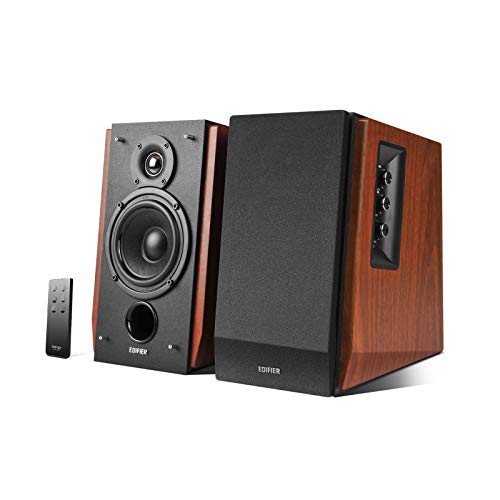
Edifier R1700BT — Hi-fi plus Bluetooth
The R1700BT takes the R1280T’s formula and answers its two most common objections: it grows the amplification to 66 watts RMS and it adds Bluetooth, so the phone joins the desk without a cable and the whole system plays with more authority. The cabinets angle their front baffles slightly upward — a small, intelligent concession to desk geometry, tilting the sound toward a seated listener’s ears — and the package includes a remote, because a speaker this capable tends to serve the room and not only the chair in front of it. This is the pick for the desk that is also the home’s main listening post.
Against its sibling, the choice is genuinely about wireless and headroom rather than quality tier: both are honest powered bookshelf designs, and a wired-only listener loses little by saving with the R1280T. Against the monitors, the R1700BT is the pleasure candidate — voiced to make finished recordings sound their best, forgiving of mediocre sources, generous at the low end within its size. Its footprint matches the R1280T’s, so the desk-space conversation is identical, and its Bluetooth implementation serves music and video happily while competitive gamers will still prefer a wire. For the majority of music-loving desk owners, this is the guide’s summit: the point where computer speakers stop being a peripheral and become the hi-fi.
One practical R1700BT scenario deserves spelling out, because it converts more buyers than any specification: the workday that ends in listening. The same pair that carried the afternoon’s calls and focus playlists takes the evening’s album without a cable moved or a device re-paired — the phone connects, the chair turns slightly, the room’s purpose changes. Speakers that serve both halves of that day get used for both, and a speaker used daily for years is the cheapest kind there is, whatever its ticket said.
- Maker’s power figure: 66 watts RMS
- Connection: Bluetooth plus analog inputs
- Design: angled front baffles aimed at the seated listener; remote included
- Format: powered bookshelf pair — the range’s flagship desk form
Strengths
- The most complete desk package here: power, wireless, remote and hi-fi voicing together.
- Bluetooth frees the phone while analog keeps the computer honest and latency-free.
- Angled baffles show real near-field thinking rather than styling.
Trade-offs
- Bookshelf size claims real estate that compact-desk users may not have.
- It is a hi-fi voicing, not a monitor: creators needing diagnostic truth should choose the Eris or MR4.
- Bluetooth convenience still carries wireless latency for fast gaming — wire it for play.
Best for: listeners whose desk is their main music system and who want wireless without surrendering hi-fi.
Not suited for: production work needing monitor flatness, or the smallest desks.
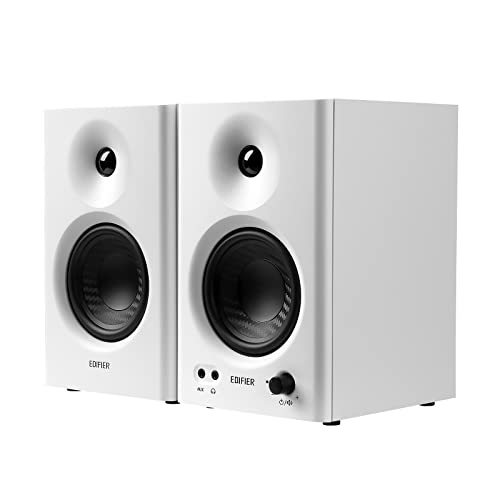
Edifier MR4 — Studio monitor, labelled as one
The second labelled monitor in this guide comes from an unexpected badge: the MR4 is Edifier’s powered studio monitor, a 4-inch active near-field design from a company better known to desk buyers for the hi-fi picks above. The MR4 exists because Edifier watched its speakers colonise creators’ desks and built the honest tool for that job: a monitor-mode voicing for flat, diagnostic listening, in a cabinet sized for the near field, with the connection set a small studio expects. Where the R1700BT asks “how good can this song sound?”, the MR4 asks “what is actually in this recording?” — and the two questions define the fork in this entire category.
Between the two monitors, the MR4’s 4-inch drivers give it a small but real advantage in low-end reach over the 3.5-inch Eris, while the Eris counters with its maker’s deeper roots in recording culture and its placement tuning. Both tell the truth; they tell it with slightly different accents, and a creator choosing between them should weigh driver size against ecosystem familiarity. As a pure listening speaker the MR4 suits the listener who has discovered they prefer accuracy to warmth — there are more of them than the hi-fi market assumes, and they tend to be loyal once converted. What the MR4 will not do is forgive a bad mix or sweeten a flat recording, because forgiveness is precisely the service it was built not to provide.
Creators early in their journey sometimes ask whether a monitor this size can be their only reference, and the honest answer shapes a sane workflow: yes for balance, tone and editing decisions; with a headphone cross-check for the lowest frequencies the 4-inch drivers cannot fully reproduce. That two-device discipline is not a compromise invented for this price point — it is how professional rooms with far larger monitors also work, scaled down to a desk.
- Identity: powered STUDIO MONITOR — active near-field design
- Driver size: 4 inch, per the listing
- Voicing: monitor-flat, intended for production and critical listening
- Position: Edifier’s creator tool, sibling and opposite of the R1700BT
Strengths
- True monitor voicing from a maker whose desk ergonomics are proven by its hi-fi line.
- The 4-inch drivers reach slightly deeper than the 3.5-inch monitor alternative.
- Suits creators who also listen critically — one pair honestly serving both shifts.
Trade-offs
- It is a studio monitor: casual listeners may find the honesty less immediately charming than hi-fi warmth.
- Bass depth remains monitor-modest; bass-critical production still needs headphone checks.
- Wired, work-first connection set — no Bluetooth party tricks.
Best for: producers, editors and accuracy-preferring listeners who want one truthful pair on the desk.
Not suited for: listeners who want their speakers to sweeten recordings, or wireless convenience.
How Do You Set Up a Desk Pair, Step by Step?
The ritual takes ten minutes and repays it daily. Step one: clear the geometry first — decide where you sit, then place the speakers so the triangle can exist, before connecting anything. Step two: raise the tweeters toward ear level with stands, pads or angled placement, and toe the cabinets inward until a centred voice in a recording sits precisely between them rather than smearing toward the nearer speaker. Step three: connect by the pick’s lead route — USB speakers to the computer directly rather than through an unpowered hub, analog pairs to the best output available, Bluetooth pairs paired after the wired route works, so any fault has an obvious address. Step four: set the computer’s output level high and clean, and control listening volume at the speaker where the design allows, which keeps the signal healthy through the chain. Step five: play a familiar voice recording — spoken word reveals placement errors faster than music — and adjust toe-in and height in small moves until the voice locks into the centre and stays there when you shift in your chair.
Two finishing habits separate a setup from a system. The first is cable mercy: route the inter-speaker cable and power leads so the desk’s drawers, monitor arm and your own feet never meet them under tension, because desk speakers live in a kinetic environment. The second is a reference playlist — three tracks and one podcast you know intimately — kept for every future change. Desks evolve: a new monitor shifts a speaker, a plant arrives, a laptop replaces a desktop. The reference playlist turns each evolution into a two-minute re-tune instead of a slow drift into sound you quietly dislike.
Does Desk Size Change Which Pick Is Right?
More than any specification does. The small desk — under a metre of width, shared with a laptop and a notebook — physically excludes the bookshelf picks: there is no honest placement for an R1700BT pair on a surface that cannot form the triangle, and a great speaker badly placed loses to a modest speaker well placed every day of the week. That desk belongs to the Pebble, or to the Z207 if Bluetooth matters, and its owner should spend the savings without guilt. The standard desk admits the bookshelf pairs with stands or pads and rewards them fully; this is the desk the guide’s centre of gravity assumes. The studio desk — wide, deep, often with monitor arms and acoustic self-awareness — is the monitors’ native country, where their wired connections and placement controls stop being specifications and start being the workflow.
Room size draws the second boundary. Desk speakers are near-field devices, but several picks here — the Edifiers especially — double as small-room speakers when the chair is abandoned and the sofa takes over. In a bedroom or small study that double duty is a genuine economy: one pair, two postures. In a large open-plan space, none of the six pretends to be a room system, and the honest upgrade path leaves the desk category entirely rather than asking a desk pair to shout.
Should You Add a DAC Between the Computer and the Speakers?
Only when the evidence asks for one. The symptoms that justify a DAC are specific: audible hiss or hum through analog speakers that follows the computer’s activity, interference that rises when the machine works hard, or an output so weak the speakers must live at maximum. A listener with none of those symptoms owns a chain that is already working, and a DAC would be a purchase in search of a problem. USB speakers like the Pebble bypass the question by design; Bluetooth picks bypass it wirelessly; the analog Edifiers and the monitors are where the question legitimately lives, and even there the first experiment is free — try the computer’s rear output rather than a front-panel jack, and try a different cable — before any money moves. The desk-audio hobby loves a gadget; the disciplined version of it buys the gadget when a named fault demands it.
How Do the Six Desk Picks Compare?
| Pick | Type | Lead connection | Maker’s power figure | Natural desk |
|---|---|---|---|---|
| Creative Pebble | Desktop 2.0 | USB (power + audio) | USB-powered | The minimal laptop desk |
| Logitech Z207 | Desktop 2.0 | Bluetooth + wired | 10W peak | The shared home-office desk |
| Edifier R1280T | Powered bookshelf | Analog (dual RCA) | 42W RMS | The music-first desk |
| PreSonus Eris 3.5 | STUDIO MONITOR | Wired, production inputs | 50W | The creator’s desk |
| Edifier R1700BT | Powered bookshelf | Bluetooth + analog | 66W RMS | The listening desk |
| Edifier MR4 | STUDIO MONITOR | Wired, production inputs | Not headlined in the listing | The production desk |
The type column is the one to read first: it separates the two monitors from the four hi-fi and desktop designs, and that separation — truth-telling versus pleasure-giving — predicts your satisfaction better than any figure in the power column.
What About Gaming and Streaming — Do the Same Picks Apply?
Gaming rearranges the priorities without overturning the list. Latency becomes a specification: wired connections — USB, analog — deliver sound in step with the image, while Bluetooth can trail behind it by enough to notice in fast play, which is why every Bluetooth pick here also offers a wire and why competitive players should use it. Stereo imaging matters more than bass depth for positional play, and the near-field triangle described earlier is, not coincidentally, exactly the geometry gaming rewards. The Edifier bookshelf picks serve immersive single-player gaming best; the monitors serve the streamer who must hear the game and their own voice with equal honesty; the Pebble serves the laptop gamer whose alternative was the laptop itself.
Streaming adds the creator’s twist: the speaker is both output and quality-control instrument. A streamer monitoring through hi-fi speakers hears a flattered version of the broadcast; the audience hears the unflattered file. That asymmetry is the practical argument for the Eris 3.5 and MR4 at streaming desks, and it is why this guide insists on labelling them — the label is the difference between a tool chosen and a tool stumbled into.
Headphones complicate the picture in a healthy way. Most serious desk users own both, and the healthiest workflow treats speakers as the default and headphones as the microscope — for late hours, for detail checks, for the bass verification the monitors’ small drivers defer. A desk pair chosen well does not compete with the headphones in the drawer; it relieves them, and ears that alternate between the two fatigue more slowly across a long editing or gaming day.
Why Do Voices Matter More Than Bass at a Desk?
Count the hours honestly and the desk speaker’s real job description emerges: most of what it reproduces is the human voice. Calls, meetings, podcasts, streams, video essays, game dialogue, the presenter’s narration in every tutorial — the midrange carries the working day, and a speaker that renders voices clearly, without chestiness or sibilant edge, is doing the majority of its job well even before music enters the argument. This is why the small picks survive in this guide beside the large ones: the Pebble and the Z207 are voice instruments first, and within arm’s reach a clear voice at modest volume beats a powerful one rendered thickly.
It is also why the monitors punch so far above their driver size in this category. Monitor design lavishes its budget on exactly the frequencies where voices live, because dialogue editing is unforgiving there. A listener whose desk day is eighty percent speech — the remote worker, the student, the podcast devotee — should weight midrange clarity above every other virtue in this guide, and will find that weighting quietly rearranges the ranking: the compact picks rise, the monitors shine, and the hi-fi pair’s advantages concentrate in the remaining twenty percent of the day. Know your percentages before you shop; the desk keeps a diary even if you don’t.
How Loud Do Desk Speakers Actually Need to Be?
Less than the marketing implies, and the geometry explains why. Sound falls with distance, and the desk listener sits roughly a metre from the speakers — a quarter or less of the distance a living-room listener keeps. A pair that would seem modest across a room is generous across a desk, which is why USB power suffices for the Pebble and why the bookshelf picks’ tens of watts translate into genuine authority at the chair. The buyers who truly need volume at a desk are those using the speakers as a small-room system from across the space — a legitimate second job, and the one that justifies stepping from the compact picks to the Edifiers.
The corollary protects your hearing and your neighbours: a desk pair run at comfortable near-field levels all day is a sustainable habit, while the same pair pushed to fill a flat is a dispute with the building. Buy for the chair first. If the room-filling ambition is real, acknowledge it in the purchase — the R1700BT’s headroom exists for exactly that confession — rather than discovering it through a small speaker’s distortion.
What Mistakes Do Desk-Speaker Buyers Keep Making?
First, buying by driver count of a different kind: choosing a 2.1 system for a 2.0 brief, then discovering the subwoofer has nowhere to live and the desk cable situation has doubled. The 2.0 discipline exists because desks are finite. Second, placing bookshelf speakers flat on the desk firing at the user’s chest, then blaming the speakers for a muffled midrange that geometry caused. Third, feeding analog speakers from the noisiest available output and concluding the speakers hiss — the hiss was in the chain before the speakers joined it, and a USB or DAC-fed route would have acquitted them.
Fourth, expecting Bluetooth to be the gaming connection because it is the convenient one. Fifth, buying a monitor for casual listening because the word “studio” sounded like a quality grade rather than a job description — the MR4 and Eris are superb at their job and merely good at the other one. Sixth, ignoring the return journey: desk speakers are auditioned by the room they will live in, so buy from channels with sane returns and test with your own material, at your own desk, inside the window. Seventh, and most quietly damaging: leaving the computer’s own sound settings in a degraded state — a mono toggle inherited from an old headset, an enhancement suite mangling the stereo image — and auditioning new speakers through the damage. Before judging any pair in this guide, confirm the source is sending an honest stereo signal, because more than one fine speaker has been returned for a checkbox’s crime.
Final Recommendation
Decide what your desk is for, and the pick follows. If it is a laptop’s perch and nothing more, the Creative Pebble’s one cable is the whole argument. If it is a communications hub shared with a phone, the Logitech Z207 keeps both citizens happy. If it is a listening post, the Edifier R1280T is the classic wired answer and the R1700BT the same answer with Bluetooth and more authority — the guide’s overall recommendation for most readers. And if the desk makes audio rather than merely playing it, choose between the two labelled monitors without pretending they are anything else: the PreSonus Eris 3.5 for its recording pedigree and tuning controls, the Edifier MR4 for its extra driver size and desk-native design. Whichever pair you bring home, spend the first ten minutes on placement rather than playlists — because at a desk, the best 2.0 computer speakers are the ones aimed at your ears, and the triangle you make with them is the cheapest hi-fi you will ever own.
Frequently Asked Questions
Are 2.0 speakers enough without a subwoofer?
At desk distance, for most listeners, yes — genuinely. Near-field listening needs far less low-end energy than room listening, and the bookshelf picks here produce satisfying bass at arm’s length. Listeners who game immersively or watch films at the desk may later add a subwoofer to systems that allow it — but buy the 2.0 pair first and let your own ears file the request.
What is the difference between computer speakers and studio monitors?
Intent. Computer and hi-fi desk speakers are voiced for enjoyable listening; studio monitors — the Eris 3.5 and MR4 in this guide — are voiced flat for production work, revealing flaws in recordings rather than forgiving them. Both are legitimate desk choices for different desks, which is why the monitors here are labelled rather than disguised.
Is USB or analog better for sound quality?
USB sidesteps the computer’s analog output entirely, converting the signal inside the speaker — a clean solution, and the only connection the Pebble needs. Analog quality depends on the source feeding it: a good output or an external DAC makes analog excellent and universal. Neither is automatically superior; they fail differently, and the guide’s picks divide accordingly.
Can I use these speakers with a phone or tablet?
The Bluetooth picks — the Z207 and the R1700BT — pair with phones directly. The wired picks can serve a phone through its headphone output or a USB-C adapter where available. The Pebble is computer-only by design, which is part of its minimalism.
How far apart should desk speakers be?
Aim for the triangle: speakers and listener roughly equidistant, speakers angled toward the ears, tweeters near ear height. On most desks that means the pair spread toward the desk’s edges, raised or tilted as needed. Exact distances matter less than symmetry and aim. If one side of the desk is walled and the other open, favour symmetry over spread — a slightly narrower triangle that matches on both sides images better than a wide one the room keeps arguing with.
Do I need an amplifier for any of these?
No. Every pick in this guide is self-powered — amplification is built into the cabinets or, in the Pebble’s case, drawn from USB. Speakers that need a separate amplifier are passive designs, covered in this site’s separate guide to 2.0 passive speakers.
Can desk speakers replace a soundbar for watching films at the computer?
For one viewer at the desk, comfortably — the near-field triangle that serves music serves film dialogue even better, and the bookshelf picks add the scale that laptop speakers and small soundbars lack. For a sofa across the room, the geometry changes sides: a soundbar or room system is built for that distance, and the desk pair should be allowed to stay champions of the chair.
Related Guides
Building the rest of the desk? Continue with our guides to the best 2.0 passive speakers and the amplifiers to drive them, the best 2.1 computer speakers with a subwoofer and the best studio monitors for home recording.


