Our Top Picks
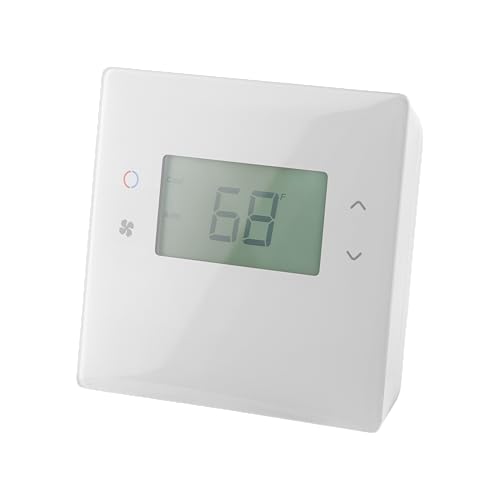
 2GIG Smart Z-Wave Plus Model 2GIG-STZ-1 Programmable Thermostat4.5 x 1 x 5.75 inches1 poundsCheck on Amazon
 ADC-T40K-HD-W Smart Thermostat HD with Color Touchscreen Display1.1 x 4.2 x 4.3 inchesCheck on Amazon



What's inside
- What Z-Wave is, and why it lives below one gigahertz
- No hub, no thermostat: the controller requirement
- Z-Wave Plus and the 700-series generation
- Z-Wave, Zigbee and Wi-Fi thermostats in daily use
- The common wire, power stealing and battery models
- Matching the thermostat to the heating system
- Schedules, scenes and intelligence that live in the hub
- The thermostat as a mesh repeater, and where it sits
- Pairing in practice: inclusion, exclusion and ghost nodes
- Remote sensors, humidity and the fan nobody thinks about
- When the hub changes: migration, backups and longevity
- Installation sequence, with safety in the right order
- Troubleshooting the faults that actually occur
- Setpoints, differentials and the comfort settings in the installer menu
- Zoning, second thermostats and larger homes
- Seasonal changeover and a light maintenance rhythm
- The wall unit itself: display, buttons and life without the hub
- Check prices on Amazon
- Verifying a listing before buying a 2020-generation unit
As an Amazon Associate I earn from qualifying purchases. This post may contain affiliate links at no extra cost to you.
As an Amazon Associate we earn from qualifying purchases. The recommendations and cautions in this guide rest on published protocol specifications from the Z-Wave Alliance, thermostat manufacturers’ installation manuals and hub vendors’ compatibility documentation, not on personal use, so a reader can trace every statement about wiring, staging or radio behaviour back to a document that governs the equipment in question. That documentary grounding matters more for a thermostat than for most smart-home purchases, because the device sits wired into a heating and cooling system worth far more than itself, and a wrong assumption about a control board or a wire can leave a house unheated in January. Read the sections in order the first time through: the radio and hub questions decide which models belong on a shortlist, while the wiring and staging questions decide which of those can safely go on a particular wall.
What Z-Wave is, and why it lives below one gigahertz
Z-Wave is a wireless mesh protocol designed specifically for home control, standardised internationally as ITU-T G.9959 and administered by the Z-Wave Alliance, which certifies devices for interoperability. In North America it operates around 908.4 MHz, inside the sub-gigahertz industrial, scientific and medical band. That neighbourhood of the spectrum behaves very differently from the crowded 2.4 GHz band where Wi-Fi, Bluetooth and microwave ovens jostle for airtime. Longer wavelengths pass through walls and floors with less attenuation, so a signal from a thermostat in a hallway reaches a hub in a utility closet without the repeated dropouts that plague higher frequencies in masonry houses.
Mesh operation defines the experience. Mains-powered Z-Wave nodes do not merely talk to the controller; they also relay traffic for their neighbours, forwarding commands along the most reliable route the network can find. A command to lower the temperature may travel from the hub to a powered light switch, onward to a smart plug, and only then to the thermostat, each hop extending the network’s practical reach well beyond a single radio’s range. The network supports up to four hops, and the controller maintains routing tables that adapt when furniture moves or a node is unplugged.
Because the band is quiet and the messages are tiny, a thermostat exchange consumes negligible airtime. Z-Wave data rates, historically 9.6, 40 and 100 kilobits per second depending on generation, sound trivial beside Wi-Fi figures, yet a setpoint change or a temperature report needs only a few dozen bytes. What matters is reliability of delivery and the acknowledgement that follows each command, which is why the protocol builds in retries and route exploration rather than raw speed. A buyer comparing headline numbers across protocols should remember that a thermostat is a control device, not a streaming device, and its radio should be judged accordingly.
Range figures in marketing copy describe open-air line-of-sight conditions that no house provides. Indoors, each wall, appliance and metal duct extracts a toll, and the older Z-Wave generations were rated for roughly thirty metres indoors under favourable conditions. Real installations succeed because the mesh fills gaps: every hardwired switch, plug or thermostat added to a home quietly becomes infrastructure for everything else. That property, more than any single specification, explains why the protocol retained a loyal following among installers through the 2020 generation of products.
No hub, no thermostat: the controller requirement
A Z-Wave thermostat on its own is an attractive wall unit with a radio it cannot use. Unlike a Wi-Fi model that connects directly to a cloud service, a Z-Wave device must be included into a network run by a controller, and every command, schedule and automation flows through that controller. Suitable hosts include dedicated smart-home hubs such as SmartThings, Hubitat Elevation and Home Assistant running a Z-Wave adapter, as well as alarm panels from companies like Ring Alarm, Abode and various professional security brands whose panels double as Z-Wave controllers.
This architecture reverses the usual buying order. The first decision is not which thermostat looks best but which controller already runs, or will run, the household’s automation, because the thermostat must appear on that controller’s compatibility list and behave well within its software. A model that pairs flawlessly with one hub may expose only basic setpoint control on another, hiding humidity readings, fan modes or equipment status behind a generic driver. Checking the hub maker’s published list, and the community knowledge around it, is therefore a purchasing step, not an afterthought.
The hub model also changes the cost calculation honestly. A Z-Wave thermostat can cost less than a flagship Wi-Fi unit, but a household starting from zero must add a controller to the basket, plus possibly a few mains-powered nodes to build a dependable mesh in a large home. For a household that already owns a compatible panel or hub, the arithmetic flips: the thermostat becomes one of the cheapest ways to bring heating and cooling into existing scenes and security routines. Neither answer is universal, which is exactly why the hub question must be settled before model comparisons begin.
Local processing separates hub platforms sharply. Some controllers execute automations in the cloud, so an internet outage freezes routines even though the radio network is intact. Others, notably Hubitat and a properly configured Home Assistant installation, run rules on the premises, keeping schedules and occupancy responses alive when the broadband line fails. The thermostat itself will hold its last instruction and its local schedule behaviour varies by model, but the intelligence a buyer is paying for lives in the controller, and its outage behaviour deserves direct questioning before purchase.
Homeowners building out a wider system around the same controller often pair climate control with cameras on the same dashboard, and the survey of best 4k smart home security cameras is a practical next read for anyone weighing which devices deserve the powered, always-on positions in a mesh-friendly layout.
Z-Wave Plus and the 700-series generation
By 2020 the market sat in the middle of a generational handover. The earlier Z-Wave Plus standard, built on the 500-series chipset, had already improved on classic Z-Wave with better range, over-the-air firmware updates and extended battery life for sleeping nodes. The 700-series platform, often marketed as Z-Wave Plus version 2, pushed each of those further: manufacturers cited substantially longer range in open conditions, markedly lower power consumption in listening and transmission, and a faster, more capable processor that made security exchanges and inclusion noticeably snappier.
Security is where the 700 generation changed the conversation. The S2 framework, mandatory for certification of newer devices, authenticates nodes during inclusion using an elliptic-curve key exchange, with the owner confirming a device-specific key printed on the product. That design closed the interception weaknesses associated with the older S0 scheme, which also imposed heavy radio overhead, in some cases consuming the majority of a message’s capacity in security wrapping. S2’s lighter framing means a secured thermostat conversation leaves the network’s airtime largely free, a benefit that compounds in a house with dozens of secured nodes.
SmartStart, the other headline feature of the newer specification, lets a controller provision devices before they are even powered, by scanning the QR code printed on the device or its packaging, which encodes its enrolment credentials. A SmartStart node then joins automatically when it first powers up within range of the network. For a single thermostat the convenience is modest; for an installer fitting out a whole property it transforms commissioning. Buyers should still confirm that their specific hub supports SmartStart, because a feature printed on the thermostat’s box only functions when both ends implement it.
None of this makes 500-series thermostats obsolete overnight. Z-Wave maintains backward compatibility across generations, so an older Plus thermostat can join a 700-series controller and work, simply without the newer security and efficiency refinements. The sensible buying posture in 2020 was to prefer 700-series hardware for a purchase expected to serve a decade, especially in the controller itself, while accepting a 500-series thermostat without anxiety when its HVAC compatibility and price were the stronger arguments. Thermostats change slowly; the wall unit bought for a furnace today may still be governing its replacement in ten years.
Z-Wave, Zigbee and Wi-Fi thermostats in daily use
The three radio families produce three distinct ownership experiences. A Wi-Fi thermostat is a self-contained internet appliance: it joins the home router, talks to its maker’s cloud, receives features through phone applications, and stops being smart, beyond its local schedule, when the internet connection or the vendor’s servers fail. It also joins the most congested band in the house and draws enough power that a common wire is effectively mandatory. Its strength is independence; no hub purchase or protocol knowledge is required.
Zigbee occupies the middle ground. It is also a mesh standard, widely used by bulbs, sensors and some thermostats, but it shares the 2.4 GHz band with Wi-Fi and therefore needs channel planning in dense environments. Zigbee thermostat selection in North America has historically leaned toward utility programmes and specific ecosystems, and support inside general-purpose hubs varies more than the Z-Wave equivalent. Where a household’s hub and other devices already centre on Zigbee, a matching thermostat can be perfectly sensible; where the house is a blank slate, Z-Wave’s dedicated sub-gigahertz band and strict certification regime usually give climate control a quieter, more predictable home.
Z-Wave’s daily-use signature is local control and indifference to internet weather. A command issued from a hub on the same network executes across the mesh in well under a second under healthy routing, and a heating routine triggered by a door sensor fires whether or not the broadband line is up, provided the hub itself processes rules locally. Ecosystem lock-in takes a particular form here: the thermostat is not tied to one vendor’s cloud, which protects it from a manufacturer shutting down servers, but it is tied to the controller ecosystem the household has built, its automations, dashboards and voice-assistant bridges included. Moving house or changing hubs means excluding and re-including nodes, a chore measured in an afternoon rather than a subscription cancellation.
Voice assistants enter this picture through the hub, not the thermostat. Alexa and Google Assistant integrations are properties of SmartThings, Hubitat, Ring and their peers, so the quality of voice control, which modes can be requested and whether humidity or fan status can be queried, depends on that layer. A buyer for whom voice adjustment is central should verify the exact phrases and features their chosen hub exposes for thermostat devices, rather than assuming that a Z-Wave logo on the box implies any particular assistant behaviour.
The common wire, power stealing and battery models
Low-voltage HVAC controls run on 24 volts alternating current delivered by a transformer in the furnace or air handler. The R wire brings that power to the thermostat, and the C wire, the common, completes the circuit so the thermostat can draw a steady supply for its screen, sensors and radio. Older installations frequently lack a C wire at the wall because a mechanical thermostat or a battery-powered digital unit never needed one. Every smart thermostat purchase therefore begins with a wire census, and the census, not the feature list, eliminates the first candidates.
Power-stealing designs try to sidestep a missing common by sipping current through the heating or cooling circuit itself, in amounts small enough, in theory, not to trigger the equipment. Practice is messier. Certain furnace control boards interpret that trickle as a call for heat or leak enough voltage to chatter relays, producing symptoms such as a blower that pulses, a system that short-cycles, or a thermostat that reboots when a call begins. Manufacturers of power-stealing models publish compatibility caveats for a reason. Where odd behaviour appears, the honest remedies are to run a new C wire, fit an approved add-a-wire adapter that repurposes the fan wire, or use a plug-in 24 VAC transformer where local codes and aesthetics permit.
Battery-powered Z-Wave thermostats take the third road. Models in the mould of the Honeywell T6 Pro Z-Wave or the Radio Thermostat CT101 lineage can run on AA cells, waking their radios at intervals rather than listening continuously. The compromise is structural: a battery node cannot act as a mesh repeater, responds with some latency because it sleeps, and may restrict how often it reports temperature. In exchange it installs on two-wire and millivolt-adjacent systems where no common exists and no new cable can be fished through finished walls. For a small flat with the hub nearby, that trade can be entirely rational.
Deciding between these paths deserves a look inside the furnace cabinet as well as behind the thermostat. A control board with a clearly labelled C terminal invites a proper common-wire solution, even if it means paying an HVAC technician for an hour to pull new cable. A board without one, or a system whose wiring is undocumented, argues for professional involvement regardless of thermostat choice. The price of that visit is small insurance beside a control board damaged by improvisation, and technicians see these conversions weekly during heating season.
Matching the thermostat to the heating system
Conventional forced-air systems divide into single-stage and multi-stage designs. A single-stage furnace or air conditioner is either on at full output or off, needing one W wire for heat and one Y for cooling. Multi-stage equipment adds W2 and Y2 terminals, running a gentler first stage for mild weather and reserving full output for extremes, which improves comfort and efficiency when the thermostat stages intelligently. A thermostat that supports only one stage will still run a two-stage system through its first stage alone on many boards, quietly surrendering the benefit the equipment was bought for. Count stages from the furnace documentation, not from the number of wires alone.
Heat pumps complicate the picture with a reversing valve that lets one machine heat and cool, controlled through an O or B terminal whose energised state varies by manufacturer, Rheem and Ruud famously energising in heating where most brands energise in cooling. Heat pump systems also carry auxiliary electric strip heat or a backup furnace, governed by an AUX or W2 connection, and many add an E terminal for emergency heat that the homeowner selects manually when the pump fails. A thermostat intended for heat pump duty must state that support explicitly, expose the O/B setting during configuration, and offer controls over auxiliary heat behaviour, because aux strips consume electricity at a punishing rate when invoked carelessly.
Dual-fuel installations, pairing a heat pump with a gas furnace that must never run simultaneously with the compressor in heating, need a thermostat or control board logic that enforces the changeover by outdoor temperature or by a fossil-fuel kit. This is not a corner to cut with a generic model. The thermostat’s equipment menu should name dual-fuel or hybrid heat directly, and the balance point, the temperature below which the furnace takes over, should be set with the installer rather than guessed.
Some systems sit outside this entire category and must be recognised before an order is placed. Millivolt systems, common on gas fireplaces and older floor furnaces, generate their own tiny voltage and need thermostats designed for them. Line-voltage systems, driving electric baseboards at 120 or 240 volts, require thermostats built and rated for that duty, an entirely different product class with its own Z-Wave and Zigbee entrants. High-voltage wiring in a low-voltage thermostat’s box is a fire risk, not an incompatibility to be managed. Identifying baseboard heaters, thick wires and wire nuts rather than slender thermostat cable at the existing unit settles the question immediately.
Radiant floors, boilers and mini-split systems each add their own footnotes. Hydronic zoning may need a thermostat per zone valve, mini-splits often speak proprietary infrared or bus protocols that a wall thermostat cannot replace, and radiant slabs respond so slowly that aggressive setback schedules waste their advantage. The general rule holds across all of them: the thermostat is the servant of the equipment, and the equipment manual outranks any marketplace compatibility claim.
Because network quality decides whether hub commands arrive promptly on a cold night, readers planning the wider installation may want the router guidance in best mesh routers wifi 6 alongside this section, particularly where the hub will sit far from the broadband entry point.
Schedules, scenes and intelligence that live in the hub
Newcomers often ask which Z-Wave thermostat has the smartest scheduling, and the honest answer is that the question belongs to the controller. The wall unit reports temperature, accepts setpoints and calls for equipment; the hub decides when the setpoint changes, in response to what. A weekday programme, a weekend programme and a vacation hold are assembled from the hub’s scenes and routines, drawing on data the thermostat alone never sees, such as the household’s phones arriving home, a door sensor closing at night, or a security system arming.
Geofencing illustrates the division of labour. The hub’s phone application notices the household crossing a boundary around the property and instructs the thermostat to begin recovery early enough that the house is comfortable on arrival. Occupancy routines refine that logic indoors: a motion sensor in a hallway can hold a setback when unexpected activity suggests someone is home sick, while a quiet house at midday lets the temperature drift and saves a heating cycle. Vacation holds can be paired with water-leak sensors and lighting scenes so the property behaves as one system rather than a shelf of gadgets.
Learning features, famous from cloud thermostats that build a schedule by watching manual adjustments, are largely absent from the Z-Wave category, and many owners regard that as a virtue. A rule written deliberately in a hub behaves the same way in year three as in week one, can be inspected, copied and backed up, and does not drift because a guest kept overriding the temperature during one unusual week. Households that want adaptation can still build it explicitly, for example by nudging setpoints according to outdoor temperature feeds the hub retrieves, with every step visible in the automation list.
Energy reporting follows the same pattern. Some thermostats log equipment runtime, and hubs can chart that runtime against outdoor conditions to reveal a furnace that suddenly runs longer for the same weather, an early warning of a clogged filter or a failing component. Utility demand-response programmes occasionally integrate through hub platforms rather than the thermostat maker. In each case the value emerges from the controller’s memory and connections, reinforcing why the hub decision precedes the wall-unit decision in any sound purchase.
The thermostat as a mesh repeater, and where it sits
Any Z-Wave node powered continuously from the mains or from a 24 VAC supply can repeat traffic for the network, and a hardwired thermostat qualifies. Its wall position is often surprisingly good for the job: central in the home, at chest height, away from the metal clutter of a utility shelf. A thermostat mid-house can bridge the gap between a hub at one end and bedrooms at the other, carrying commands for locks and sensors that would otherwise struggle at the edge of range.
Battery-powered models, as noted in the power discussion, do not repeat, because a sleeping radio cannot relay other devices’ traffic. That single fact can change a purchasing decision in a sparse network. If the thermostat is expected to be the only always-powered node on an upper floor, a C-wire model earns its installation effort by strengthening every battery sensor above it. Conversely, in a house dense with smart switches and plugs, repeating capacity is abundant and the battery model’s convenience costs the network nothing.
Placement relative to the hub follows ordinary radio logic sharpened by building materials. Metal ductwork directly behind a thermostat, a mirror with metallic backing, or a run of foil-faced insulation can shadow a node that looks close on a floor plan. When a newly included thermostat reports an unreliable route, the remedies are to add a repeating node in between, relocate the hub a few metres, or run the hub’s network repair so routes rebuild around the obstruction. Distance on paper is a weak predictor; the network’s own neighbour tables, visible in most serious hub interfaces, tell the truth.
Network density also governs how gracefully the system ages. A mesh with several powered nodes per floor reroutes around a failed device automatically, while a starved network loses whole rooms when one repeater dies. Planning a thermostat purchase alongside even one or two smart plugs in strategic hallways is therefore legitimate systems thinking rather than upselling, and those plugs can serve lamps or holiday lights while their radios quietly hold the house together.
Owners extending coverage to outbuildings or far bedrooms sometimes look at the Wi-Fi side of the house too, and the comparison material in best 2 4 ghz 5ghz wifi extenders helps separate problems a Z-Wave repeater can solve from problems that belong to the broadband network entirely.
Pairing in practice: inclusion, exclusion and ghost nodes
Inclusion is the Z-Wave term for adding a device to a controller’s network. The controller enters inclusion mode, the thermostat is put into its pairing state from its installer or radio menu, and the two exchange network keys, under S2 with the owner confirming part of the device’s unique key. The thermostat receives a node ID, appears in the hub’s device list, and should be renamed and assigned to a room immediately, while its physical identity is still obvious. Inclusion works best with the device already installed in its final position for mains-powered nodes, so that neighbour discovery maps the real environment rather than a workbench.
Exclusion is inclusion’s underappreciated twin. Any Z-Wave controller can exclude any Z-Wave device, even one it never included, resetting the device’s network membership. This is the universal remedy for a thermostat that refuses to pair because it believes it still belongs to a previous network, a common state for returned, resold or factory-tested units. When a new thermostat will not join, the correct sequence is to run exclusion first, watch for the controller’s confirmation that an unknown device was removed, and only then attempt inclusion again. Skipping straight to factory resets and repeated pairing attempts wastes an evening that one exclusion would have saved.
Ghost nodes are the residue of devices that left the network without being excluded, through failure, disposal or a botched reset. The controller keeps trying to route through or poll an address that no longer answers, which can slow the whole mesh and drain the routing tables with dead ends. Hub platforms provide varying tools for identifying and removing these entries, sometimes automatically after repeated failed communications, sometimes through a manual node-removal process. A periodic review of the device list against the hardware actually in the house keeps the network honest, especially after any equipment failure.
Network rediscovery, called repair or heal depending on the platform, asks every mains-powered node to report its neighbours so the controller can rebuild optimal routes. Run it after moving furniture significantly, relocating the hub, adding several nodes, or replacing the thermostat itself, and then leave the network alone while it works; large networks can take hours to settle, with battery devices updating only when they wake. Judging a repair’s success the morning after, by checking that previously flaky nodes respond consistently, is more reliable than watching the process live.
Remote sensors, humidity and the fan nobody thinks about
A thermostat measures temperature where it hangs, which is rarely where the household actually lives. Hallways run cooler than sunlit bedrooms, and a single sensing point forces a compromise that shows up as one room perpetually overshooting while another lags. Some Z-Wave installations solve this by letting the hub average readings from separate Z-Wave temperature sensors placed in the rooms that matter, then nudging the setpoint to serve the occupied space rather than the corridor. Not every hub driver exposes that trick for every thermostat model, so sensor averaging belongs on the pre-purchase verification list for any house with known hot and cold rooms.
Humidity control divides models more sharply than temperature features do. A thermostat that merely reports relative humidity is common; one that can call a whole-house humidifier in winter or run the air conditioner slightly longer for dehumidification in summer is rarer, and it needs the wiring and equipment to match, typically an HUM terminal and a system that supports the strategy. In humid climates, overcooling for moisture control trades a little energy for a large comfort gain and protects furnishings, while in dry winter climates a humidifier call keeps wood floors and throats from suffering. Confirm which of those behaviours the specific model and hub combination actually implement, because the word humidity in a listing may mean nothing more than a number on a screen.
The blower fan offers a third quiet lever. Beyond the usual auto and on settings, many systems support a circulate mode that runs the fan intermittently, perhaps twenty minutes an hour, evening out temperatures between floors and filtering air without a heating or cooling call. Through a hub, circulation can be scheduled for occupied hours only, or triggered when a remote sensor reports a widening gap between rooms. That kind of rule, trivial to write in a controller and impossible for a standalone thermostat to invent, is a fair example of why the Z-Wave architecture rewards households willing to think in systems.
When the hub changes: migration, backups and longevity
Controllers are computers, and computers are replaced. A household that outgrows a security panel’s automation limits, or migrates from a cloud hub to a local one, faces moving every node, and thermostats are among the least painful devices to transfer because their configuration lives in installer settings that can be photographed before exclusion. The disciplined sequence is to back up the old controller where the platform allows it, record each device’s settings and automations on paper or in a document, exclude devices floor by floor, and rebuild scenes on the new hub before declaring the migration finished. Z-Wave networks historically could not be cloned between controllers the way a file is copied, although newer backup and restore tooling around 700-series controllers has softened that chore for some platforms.
Firmware stewardship belongs in the same longevity conversation. Z-Wave Plus made over-the-air updates part of the standard, but a thermostat only receives an update when the hub supports delivering it and the manufacturer publishes one. Checking, once or twice a year, whether the thermostat and hub firmware are current keeps security fixes and command-class corrections flowing, and release notes sometimes resolve exactly the staging or reporting quirk an owner has been tolerating. Record firmware versions alongside the wiring photograph from installation day, so a future support conversation starts from facts rather than recollection.
Longevity also argues for keeping the physical installation reversible. Save the old thermostat until the new one has survived a full heating and cooling changeover, keep the labelled wire photograph with the house documents that transfer to a future owner, and leave a note inside the furnace cabinet identifying the thermostat model and hub platform. Heating controls outlast phones and fashions; the next person to service the system, professional or homeowner, will be grateful for a paper trail that explains what is on the wall and why.
Installation sequence, with safety in the right order
Installation begins away from the wall. Switch off power to the heating and cooling equipment at the breaker, then verify the old thermostat is dead by attempting to change a setting and confirming nothing responds; some systems have separate breakers for furnace and air handler, so both may need attention. Remove the old unit’s cover and photograph the wiring before touching a terminal, capturing each wire’s colour and the letter of the terminal it occupies. Because wire colours are conventions rather than guarantees, the letters in that photograph are the record that matters.
Label every conductor with the tags supplied in the new thermostat’s box as it is disconnected, one wire at a time. The standard vocabulary covers R for power, sometimes split into Rc and Rh for separate cooling and heating transformers, C for common, W for heat, W2 for a second heating stage or auxiliary heat, Y for cooling, Y2 for a second cooling stage, G for the blower fan, and O/B for a heat pump reversing valve. A jumper between Rc and Rh on the old plate signals a single transformer; modern thermostats often handle that link internally or with a small switch, and the manual’s treatment of it should be followed literally rather than improvised.
Mount the new backplate with the cable passed cleanly through its centre opening, seal the hole behind it with a little removable filler so air inside the wall cavity cannot drift across the temperature sensor and bias readings, and level the plate before tightening, since a visibly crooked thermostat will irritate its owner daily for a decade. Connect each labelled wire to its matching terminal, tug each gently to confirm the clamp has bitten, and check that no bare copper protrudes where it could touch a neighbour.
Configuration comes before the first call for heating or cooling, and rushing past it is how compressors get short-cycled by a thermostat that thinks it is driving a furnace. In the installer menu, declare the equipment type, conventional or heat pump, the number of stages, the reversing valve’s energised direction for heat pumps, and the fuel type that governs fan control. Restore power at the breaker, let the thermostat boot and join the hub, then test in a deliberate order: fan only, cooling with the setpoint lowered a few degrees, heating with the setpoint raised, and auxiliary heat where fitted. Listen for normal equipment sounds, confirm air temperature at a register matches the mode, and allow each stage its full cycle before moving on.
Anyone uncomfortable at any point in that sequence, faced with unlabelled wires, a system that behaves unexpectedly, or a control board that must be opened to add a common wire, should stop and book an HVAC technician. Thermostat replacement is routine professional work, charged accordingly, and a house call costs a fraction of a compressor or control board. There is no economy in converting a Saturday project into an emergency repair.
Troubleshooting the faults that actually occur
Short-cycling, where the system starts and stops in rapid succession, has several distinct roots. A thermostat configured for the wrong equipment type may apply furnace timing to a heat pump; a location above a supply register or in a sunbeam can convince the sensor the room has reached temperature prematurely; and many thermostats expose cycle-rate or temperature-swing settings that, set too tight, chase the setpoint restlessly. Work through configuration, placement and settings in that order before suspecting the equipment itself, and check the air filter, because a clogged filter trips limit switches and mimics a control fault convincingly.
Auxiliary heat running too often is the heat pump owner’s expensive complaint. Causes range from an outdoor temperature lockout set too high in the thermostat, which hands heating to the strips while the pump could still cope, through aggressive recovery routines that invoke aux to reach a morning setpoint quickly, to a refrigerant or airflow problem that genuinely leaves the pump unable to keep up. The hub’s runtime logs help separate configuration from decline: if aux hours jumped after a settings change, the change is the suspect; if they crept up across a season, the equipment deserves inspection.
Dropped nodes and unresponsive thermostats usually trace back to the mesh rather than the device. A repeater unplugged during decorating, a hub relocated behind a television, or a ghost node corrupting routes can each isolate a thermostat that tests perfectly at the wall. Confirm the thermostat controls the equipment locally first, since local control surviving while remote control fails points squarely at the network. Then run exclusion and inclusion only after checking routes and running a network repair, because re-pairing a node into a broken route structure recreates the same fault with a new node ID.
Firmware differences between hubs explain a subtler class of disappointment, where a thermostat exposes humidity control or a circulate fan mode on one platform and only temperature on another. Device handlers and drivers interpret the thermostat’s command classes, and their completeness varies by hub and by how recently anyone maintained them. Before purchase, search the hub maker’s documentation and user community for the exact model, and note which features are confirmed working rather than merely promised by the thermostat’s own feature list. A model with modest features fully supported beats a richer model half-recognised by the controller that must run it.
Houses that add battery sensors and cameras around the same hub often discover that placement lessons repeat across categories, which is why the placement discussion in best affordable wifi security cameras pairs usefully with the mesh guidance above when a system is planned room by room.
Setpoints, differentials and the comfort settings in the installer menu
Beyond the headline features, a row of quieter settings governs how a house actually feels, and the 2020-generation models differ considerably in which of them they expose. The temperature differential, sometimes called swing or hysteresis, sets how far the room may drift from the setpoint before equipment starts. A narrow differential holds temperature tightly at the cost of frequent, short equipment runs; a wider one lets the house coast, lengthening cycles and usually suiting heat pumps and high-mass radiant systems better. Manufacturer defaults assume a conventional furnace in an average house, and a household that never opens the installer menu inherits those assumptions whether they fit or not.
Minimum run time and minimum off time protect equipment from the opposite failure. Compressors in particular suffer when restarted immediately after stopping, because refrigerant pressures have not equalised, so thermostats enforce a compressor protection delay, commonly around five minutes, during which a new cooling call is held. That pause occasionally convinces an owner the thermostat has frozen in midsummer; in fact it is doing the least visible and most valuable job in the whole control system. Settings that shorten or defeat that protection to make a thermostat feel responsive should be left exactly as the equipment maker directs.
Adaptive recovery, where offered, changes how a scheduled temperature change is reached. Instead of starting equipment at the programmed hour, the thermostat studies how quickly the house warms or cools and begins recovery early enough to arrive at the setpoint on time. On a heat pump system that logic must be configured carefully, because an over-eager recovery can summon auxiliary heat to hit an ambitious morning target, quietly multiplying the heating bill. Many installers disable adaptive recovery, or pair it with an aux lockout, on heat pump installations for precisely that reason, and hub-based scheduling can reproduce the benefit more transparently by simply programming the setpoint change earlier.
Temperature limits and lockouts form the household-policy layer. Maximum and minimum setpoint limits keep a rental property or a teenager’s enthusiasm inside sensible bounds, a partial lock can allow temporary changes while protecting the programme, and a full keypad lock suits commercial or multi-family hallways. Through a hub, those local rules combine with remote alerts: a notification when indoor temperature falls below a freeze-risk threshold is one of the most genuinely useful automations in the entire category, because it converts a burst pipe discovered on return into a warning received in time to act.
Zoning, second thermostats and larger homes
Many larger houses divide heating and cooling into zones, each with its own thermostat talking to a zone panel that opens dampers and coordinates a single air handler. A Z-Wave thermostat can usually serve as a zone’s wall control provided the zone panel presents it with ordinary thermostat wiring, but the panel, not the thermostat, owns the logic about which zones may call together and how the equipment stages when several call at once. Replacing one zone’s thermostat without identifying the panel model is a common oversight; the panel manual states which thermostat types it accepts and whether it supplies a common wire to each zone.
Houses with entirely separate systems, a furnace downstairs and a heat pump serving an addition, simply need one thermostat per system, and the hub becomes the layer that keeps them coherent. Scenes can then coordinate both systems during a vacation hold, stagger their recovery so electrical demand does not peak simultaneously, and present a single dashboard instead of two unrelated wall units. Naming discipline matters here: label each thermostat in the hub by the system it governs rather than by its room alone, because a command sent to the wrong unit in a two-system house produces a very confusing evening.
Mesh planning changes with scale as well. Two hardwired thermostats on different floors are valuable repeaters, but a sprawling single-storey house may still strand a distant wing if the hub sits at one extreme. In that layout the thermostat purchase should be sequenced after the mesh has been strengthened with powered nodes along the spine of the house, and inclusion should be performed from the final installed positions so the routing reflects the real geography. A network repair run overnight after the second thermostat joins will usually settle routes that look erratic during the first hour.
Seasonal changeover and a light maintenance rhythm
A Z-Wave thermostat rewards a twice-yearly review timed to the changeover between heating and cooling seasons. In spring, confirm the cooling configuration survived the winter untouched, replace or clean the system filter, and check that the hub’s schedules reflect longer days rather than January habits. In autumn, review auxiliary heat lockouts before the first cold snap discovers them, verify the freeze alert threshold, and confirm that any humidifier call is enabled only when the equipment serving it has been prepared for the season.
Battery models add their own calendar entry: replace cells before the heating season rather than waiting for a low-battery report in the coldest week, and keep the removed set as emergency spares only if they still hold a reasonable charge. Hardwired models need no such attention, which is one more quiet argument in their favour for a house that prefers its infrastructure invisible. For both types, a glance at the hub’s runtime history at each changeover catches the slow anomalies, a blower running longer each month, aux heat creeping upward, that announce a developing equipment problem while it is still cheap to address.
Documentation closes the rhythm. Update the house file with any setting changed, any firmware version applied and any wire moved, in the same folder as the installation photographs. Five minutes of record-keeping in October is what allows a fault the following February to be diagnosed from evidence instead of folklore, and it is the habit that most reliably separates a smart heating system from a merely connected one. The same folder should hold the hub’s backup file, exported while everything works rather than improvised during a failure, plus a note of which circuit breaker feeds the air handler and which isolation switch serves the outdoor unit, details that are obvious in daylight and strangely elusive during a midnight outage.
The wall unit itself: display, buttons and life without the hub
For all the emphasis on controllers, the thermostat remains a physical object that household members touch daily, including guests, grandparents and anyone whose phone is dead. A legible display matters more than a fashionable one: large temperature digits readable from across a hallway, a backlight that does not glare at night, and an unambiguous indication of whether the system is heating, cooling or holding off. Models that bury the current mode behind menu layers generate the classic complaint that the house feels wrong while the screen insists everything is normal.
Local control is also the fallback when the hub is down for maintenance or replacement. Every model considered here should allow setpoint changes, mode selection and fan control from the wall without any network present, and that behaviour deserves a deliberate check during installation week: power down the hub, adjust the temperature at the wall, and confirm the equipment responds. A thermostat that becomes a frozen ornament without its controller has failed a basic test of domestic engineering, whatever its radio credentials.
Button feel and menu depth shape long-term satisfaction in smaller ways. Raised physical keys can be operated without looking, touchscreens offer richer installer menus but demand clean fingers and patience, and a simple dial suits households that value immediacy over programmability at the wall. None of these choices is objectively superior; the right one is the interface the least technical person in the house can operate confidently at midnight in February, because that moment, not the showroom comparison, is what the purchase is really for.
Check prices on Amazon
Live listings for the shortlist in this guide are pulled from Amazon below, so prices and availability are always current at the moment you look.


Verifying a listing before buying a 2020-generation unit
Start with the protocol generation printed in the manufacturer’s own specification, not in a reseller’s bullet points. Z-Wave Plus certification, and for newer units the 700-series platform with S2 security and SmartStart, should be verifiable in the Z-Wave Alliance’s certified product database, which lists every certified device with its exact command classes and regional frequency. A listing that cannot be matched to a database entry, or that matches a different model suffix, is a listing to leave alone.
Frequency region is the trap specific to buying a mature product category in a global marketplace. Z-Wave frequencies differ by country to comply with local radio law: North America uses 908.4 MHz, Europe uses 868.4 MHz, and other regions have their own assignments. Devices from different regions cannot communicate, full stop, and a European thermostat offered at an attractive price to a North American buyer is an ornament. Confirm the listing states the US frequency or carries FCC identification, and be wary of marketplace sellers shipping internationally without naming the variant.
Hub compatibility deserves the same documentary rigour. Find the thermostat on the chosen controller’s official compatibility list, then corroborate with the hub’s community for the specific behaviours that matter: auxiliary heat control, humidity reporting, fan circulation, remote sensor support where offered. Note whether support is native or depends on a community driver, and whether that driver is still maintained. None of this research is glamorous, but a thermostat is infrastructure, bought rarely and lived with daily, and an hour of verification is proportionate to a decade of service.
Close the purchase checks with the HVAC side of the ledger. Restate, from the equipment documentation gathered earlier, the system type, stage count, heat pump configuration and wire inventory at the wall, and match each against the thermostat’s stated compatibility line by line. Confirm whether a C wire is present, planned or unnecessary for the chosen model, and whether the box includes the trim plate that covers the footprint of a larger old thermostat, a small accessory whose absence leaves an ugly outline on painted walls. When every one of those checks closes cleanly, the buyer has done something better than finding a bargain: they have made the installation boring, which is the highest compliment a heating control can earn, and the house will simply hold its temperature through every season that follows without ever asking to be thought about again.