What's inside
- Key Takeaways
- Quick Picks
- How Did We Choose These Six Transcription Products?
- How Does the Foot Pedal Actually Run a Transcriptionist’s Day?
- What Should You Listen For in a Transcription Headset Itself?
- How Do the Six Products Compare Side by Side?
- How Should You Set Up a Transcription Station for a Full Working Day?
- Which Mistakes Do Buyers Make When Equipping a Transcription Desk?
- How Long Do the Parts of a Station Last, and What Should You Expect to Replace?
- How Should a New Transcriptionist Build Speed Without Breaking Accuracy?
- What Changes When the Transcription Desk Is at Home?
- How Do You Judge Dictation Audio Quality, and What Can Equipment Not Fix?
- Who Should Own the Station: Employer Provision or the Typist’s Own Kit?
- Final Recommendation
- Frequently Asked Questions
- Related Guides
As an Amazon Associate I earn from qualifying purchases. This post may contain affiliate links at no extra cost to you.
gizmoverdict.com is reader-supported. When you buy through links on our site, we may earn an affiliate commission.
Where to buy: The six products below split into complete transcription kits and headset-led bundles, all sold through verified listings in this site’s pool — and the difference between those two kinds is the first thing this guide will teach you to see.
The best medical transcription headsets belong to a profession, not a pastime, and the profession shapes the equipment in ways a casual buyer would never guess. A transcriptionist — the person who turns dictated clinical and legal recordings into accurate written documents — works a three-part station: a headset for the ears, a foot pedal for playback control, and software that binds the two together. The pedal is the signature tool. It lets the typist start, stop and rewind audio with a foot, so the hands never leave the keyboard and the words never stop flowing; a transcriptionist without a pedal is like a pianist reaching for the stops by hand. This is a guide about equipment for an occupation, and it makes no claims about health or treatment — the “medical” in the keyword describes where the dictation comes from, not anything these products do for a body.
That three-part station explains the pool’s most important distinction, which this guide will repeat until it is second nature: some picks are complete kits and some are headsets with extras. The Olympus AS-9000 and the OM SYSTEM AS-2700 present themselves as transcription kits — the AS-2700’s title spells out its contents: a USB foot pedal, a typist stereo headphone and ODMS R8 transcription software for Windows PC. The ECS WordMaster and the VEC bundle pair a headset with the famous Infinity foot pedal. The Express Scribe Pro kit combines software, pedal and a Spectra headset in one box. And the Spectra SP-USB is the honest outlier: a USB transcription headset with volume control, sold on its own, for the typist who already owns the pedal and the software and simply needs ears. Buying the wrong kind is the category’s classic error — a beautiful headset arriving at a desk with no way to control playback — so each review below states its kind in its first lines.
Read the six with your current desk in mind. Starting from nothing? The kits are your shortlist, and the question becomes which software world you want to live in. Already equipped with a pedal you love? The headset-led picks protect that investment. The guide sections explain how the pedal technique actually works, what the software layer decides, and how to set up a station — levels, pedal mapping, file handling — that will still feel right at hour six of a dictation queue.
Key Takeaways
- A transcription station has three parts — headset, foot pedal, software — and picks differ in how many of them the box contains.
- Kits (Olympus AS-9000, OM SYSTEM AS-2700, Express Scribe Pro) suit a desk starting from nothing.
- The Spectra SP-USB is a headset only, with volume control — the right buy when pedal and software already exist.
- The Infinity pedal appears in three picks under different names; it is the category’s standard control surface.
- Software ecosystems are the long-term decision: ODMS R8 on the OM SYSTEM kit, Express Scribe Pro in two others.
- This guide covers equipment for a profession; it makes no medical claims, and none of these products treats anything.
- Test any headset on your worst regular dictator, not on a clean sample file — the bad file is the real specification.
Quick Picks
| Pick | Badge | Why it earns its place |
|---|---|---|
| Olympus AS-9000 Transcription Kit | Best established pro kit | The professional transcription kit from the name that built the category — a complete station in one purchase. |
| OM SYSTEM AS-2700 Transcription Kit | Best fully-specified kit | Its title lists everything: USB foot pedal, typist stereo headphone and ODMS R8 software for Windows PC. |
| Spectra SP-USB Headset | Best headset-only replacement | A USB transcription headset with volume control, for the equipped desk that needs new ears and nothing else. |
| ECS WordMaster Headset + Foot Pedal | Best headset-and-pedal pair | A USB headset with a 7-foot cord bundled with the Infinity-3 USB foot pedal — station minus software. |
| Express Scribe Pro Transcription Kit | Best software-led kit | Professional software, a heavy-duty Infinity IN-USB-3 pedal and a Spectra FLX-10 headset in one box. |
| VEC Infinity 3 Pedal + Spectra Bundle | Best bundle for Express Scribe users | The Infinity 3 pedal, a Spectra USB headset and an Express Scribe Pro license, bundled by the pedal’s own maker. |
How Did We Choose These Six Transcription Products?
The first gate was professional reality: a pick had to belong to the actual transcription trade — made by the companies that supply it, built around the foot-pedal workflow — rather than being a general headset with the keyword pasted on. That gate admits the two kit makers with dictation in their DNA, Olympus and its successor brand OM SYSTEM, the pedal specialists VEC and ECS, the software-led Express Scribe kit, and Spectra, whose headsets appear in this pool three times under three configurations because the trade keeps specifying them. A gaming or music headset, however comfortable, was not eligible: transcription listening is a distinct discipline, tuned for the human voice at dictation quality, hour after hour.
The second gate was honesty about contents, enforced through the titles themselves. Where a title enumerates the box — the AS-2700 naming its pedal, headphone and software; the Express Scribe kit naming its software, pedal and headset — we report the enumeration. Where a title is terse, as the Olympus AS-9000’s is, we say the kit is a professional transcription kit and mark its unstated contents as exactly that, rather than reciting a parts list from the product line’s reputation. A buyer comparing kits should feel the difference between a listing that shows its hand and one that asks for trust, because that difference is data.
Third, we covered the station’s three configurations deliberately: complete kits for new desks, headset-plus-pedal pairs for desks whose software is settled, and a headset alone for desks needing only ears. A guide that listed six identical kits would fail the experienced transcriptionist; a guide of six bare headsets would fail the newcomer. The order leads with the kits, because most readers of a “best” guide are building or rebuilding a station, and closes with the bundles that serve established workflows. Throughout, the discipline of this batch applies: no prices, no invented specifications, and no suggestion that any of this equipment does anything medical — it serves the people who type the records, and that is a skilled enough job to need no embellishment.
How Does the Foot Pedal Actually Run a Transcriptionist’s Day?
Newcomers consistently underestimate the pedal, imagining it as a convenience. It is closer to a third hand. The standard layout — embodied here by the Infinity pedals in three picks — puts playback under the foot as a set of pedals worked without looking: press to play, release or shift to pause, a separate motion to rewind a few seconds. The typist’s eyes stay on the text, the hands stay on the home keys, and the audio is scrubbed back over an unclear phrase with a toe movement that becomes as unconscious as a gear change. The productivity difference against mouse-controlled playback is not marginal; it is the difference between a workflow and an interruption repeated four hundred times a day.
The pedal also shapes accuracy, which is the profession’s real currency. Dictation arrives imperfect — mumbled drug names, numbers half-swallowed, accents meeting unfamiliar ears — and the transcriptionist’s craft is the instant, surgical rewind: back three seconds, listen again, back again, at the speed of thought. A pedal with a positive, heavy-duty action, as the Express Scribe kit’s title describes its Infinity, supports that rhythm for years of daily presses; a vague pedal taxes it. When you read the picks, weigh the pedal as a primary instrument rather than an accessory, because across a career it will be pressed more times than any key on the keyboard.
Setup binds the station together. The software — ODMS R8 on the OM SYSTEM kit, Express Scribe Pro in the Depot kit and the VEC bundle — is where pedal behaviour is mapped and tuned: how far a rewind jumps, whether play latches or must be held, how speed control behaves for fast dictators. Two typists with identical hardware and different mappings own different stations. The how-to section below walks through a sensible starting configuration, and the deeper lesson is that the software choice, made when you choose a kit, follows you for years — which is why this guide treats ecosystems as first-class buying criteria rather than footnotes.
There is a social dimension to the pedal that manuals never mention: it is the visible badge of the trade. A desk with a pedal under it announces a professional station to an employer, a client or an inspector in a way no specification sheet can, and transcriptionists moving from general typing into dedicated work often describe the pedal’s arrival as the moment the job became real. That symbolism rests on substance — the workflow genuinely changes — but it is worth naming, because it explains the fierceness with which experienced typists defend their pedal preferences. You are not arguing about a switch; you are arguing about the instrument your working day is played on.
What Should You Listen For in a Transcription Headset Itself?
A transcription headset is not a music headset, and its virtues are almost opposites. Music rewards bass weight and soundstage; transcription rewards the midrange, where the human voice lives, rendered with absolute clarity at modest volume for very long stretches. The dictation being transcribed is rarely studio-grade — it is a clinician dictating between patients, recorded on whatever was at hand — so the headset’s job is forensic: to make consonants distinguishable, numbers unambiguous and quiet passages legible without turning the volume up to punishing levels. The Spectra headsets that recur through this pool are built to exactly that brief, which is why the trade keeps bundling them.
Fit is the second virtue, and it is audited in hours. A transcriptionist wears the headset for most of a working day, often with one ear periodically freed to hear the room, the phone or a colleague. Light weight, gentle clamp and a cord that reaches without tugging — the ECS WordMaster’s title states a 7-foot cord, a small specification that anyone who has been tethered short will recognise as mercy — decide whether the headset disappears or dominates. Volume control on the headset itself, the Spectra SP-USB’s stated feature, matters for the same reason: dictation volume varies wildly between files and dictators, and adjusting at the ear, without breaking typing rhythm to find a software slider, is a small mercy repeated all day.
The third virtue is durability of the unglamorous kind: cables that survive chair wheels and desk edges, connectors that tolerate daily plugging, ear cushions treated as replaceable consumables. A transcription headset is a tool of trade, bought to be used up over years rather than admired, and the picks in this guide come from the makers who sell into that expectation. Judge them as you would judge any professional tool — by whether the work flows better with them at hour six hundred, not by whether they impress at unboxing.
One more listening consideration separates the trade’s headsets from everything else on a desk: they are often worn asymmetrically. Transcriptionists free one ear to take a call, hear a colleague or simply rest a side, sometimes for whole files at a time, so a headset that sounds balanced and stays put worn half-on is worth more than its specification suggests. When you trial a headset in the first week, spend one file wearing it the way you actually will at hour five — one ear in, one ear out, glasses on, posture slumped to its honest working shape. Equipment that survives that audition will survive the career.

Olympus AS-9000 Transcription Kit — Best established pro kit
The AS-9000’s listing title is the tersest in this guide — Olympus AS-9000 Professional Transcription Kit, nothing more — and the pick’s case rests on what that terseness represents: the flagship kit of the company whose name defined professional dictation and transcription for a generation of typists. A kit, in this category’s usage, means the station: headset, pedal and software conceived together, and the AS-9000 is sold as exactly that complete professional proposition. For a practice, a bureau or an individual setting up a serious desk, buying the integrated kit from the category’s founding name is the lowest-risk route into the workflow — the components were designed for each other and for the software world they serve.
The honest caveat is the one this guide applies everywhere: because the title does not enumerate contents, the spec box declines to recite them, and a buyer should confirm the box’s exact contents and the software version on the listing or in Olympus’s documentation before purchase. That homework is a small price, but it is real, and it contrasts with the AS-2700 below, whose title does the enumerating for you. What can be said without invention is the positioning: this is the professional kit tier, from the dictation trade’s most established name, and for buyers whose work will live inside that ecosystem for years, the establishment is itself the feature — support, familiarity across employers, and a workflow generations of transcriptionists already know in their feet.
- Product kind: Complete transcription kit, per the listing title
- Maker: Olympus, per the listing title
- Box contents: Not enumerated in the listing title — verify on the listing or in the maker’s documentation
- Software: Not named in the listing title — check the maker’s documentation before buying
- Pedal model: Not stated in the listing title
- Platform: Not stated in the listing title — verify before buying
Strengths
- The category’s founding name, selling its flagship professional kit with confidence.
- An integrated station whose parts are conceived from the start to work together.
- Ecosystem familiarity that follows a transcriptionist between employers and years.
Trade-offs
- The title enumerates nothing, so pre-purchase verification is unavoidable.
- Buyers outside the Olympus software world should weigh the ecosystem commitment.
- Experienced typists with a pedal and software they already love may be buying parts they own, and should price the kit against the value of standardisation before committing.
Best for: a new professional desk, a practice or a bureau standardising on the established ecosystem. Not suited for: a typist who only needs a headset, where the Spectra SP-USB answers the actual need without a kit’s worth of extras.
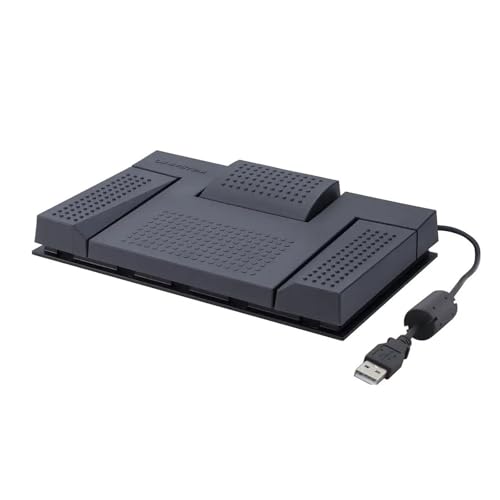
OM SYSTEM AS-2700 Transcription Kit — Best fully-specified kit
If the AS-9000 asks for trust, the AS-2700 shows its work. Its title is a complete inventory: an audio transcription kit containing a USB foot pedal, a typist stereo headphone and ODMS R8 transcription software for Windows PC. OM SYSTEM is the successor brand to Olympus’s imaging and audio business, so this kit is the same lineage wearing its current name — and for a buyer, the enumeration is the luxury: you know the station’s three parts, the pedal’s connection and the software’s identity and platform before any money moves. As a purchasing experience, it is the model the rest of the category should copy.
The contents themselves describe a coherent modern station. A USB pedal means no legacy ports or adapters between the pedal and the software. A typist stereo headphone — note the trade’s own word, typist — signals a headset voiced for dictation rather than adapted from music. ODMS R8 is the dictation-management software of this ecosystem, the layer that receives files, binds the pedal and organises the queue, and its Windows PC framing is stated plainly for the Mac user to notice before rather than after purchase. For a newcomer building a desk from zero, this is the guide’s most self-explanatory purchase: one box, three named parts, no archaeology required.
- Product kind: Complete transcription kit, contents enumerated in the listing title
- Pedal: USB foot pedal, per the listing title
- Headphone: Typist stereo headphone, per the listing title
- Software: ODMS R8 Transcription Software, per the listing title
- Platform: Windows PC, per the listing title
- Cord length: Not stated in the listing title — verify with the maker’s documentation
Strengths
- A fully enumerated box — the most transparent listing anywhere in this guide.
- Current-generation ecosystem carrying the OM SYSTEM name forward.
- USB pedal and named software remove the compatibility guessing entirely.
Trade-offs
- Windows PC framing excludes a Mac-based desk as titled.
- A typist settled in Express Scribe faces a software migration to use it fully.
- Kit pricing buys parts an equipped desk may already own and happily use.
Best for: a newcomer or a Windows-based practice building a complete station in one transaction. Not suited for: a Mac-based transcriptionist, for whom the title’s own platform statement is the stop sign.

Spectra SP-USB Headset — Best headset-only replacement
The SP-USB is the pick for the desk that already works. Its title is a model of economy: a USB transcription headset with volume control. No pedal, no software, no kit — because its buyer owns those already, in the form of a pedal worn smooth by ten thousand presses and a software setup tuned over years, and needs only to replace the part that touches the ears. Headsets are the consumable end of the station: cushions flatten, cables tire, and a working transcriptionist replaces ears the way a cyclist replaces tyres, without rebuilding the bicycle. The SP-USB exists for that moment, from Spectra, the headset maker whose products recur throughout this pool precisely because the trade treats them as its standard replaceable ears.
The volume control is the detail to dwell on, because it reveals the design’s understanding of the work. Dictation files vary enormously in level — one clinician dictates at a murmur into a distant recorder, the next booms — and a transcriptionist rides that variation all day. Control at the headset means the adjustment happens without the hands leaving the keyboard or the eyes leaving the text, which is the whole ergonomic religion of this profession in one small dial. USB connection keeps it native to the modern desk. Buyers starting from nothing should heed the kind label, though: this pick, alone, is not a station, and the kits above exist for them.
- Product kind: Headset only — no pedal or software in this listing
- Connection: USB, per the listing title
- Control: Volume control on the headset, per the listing title
- Cord length: Not stated in the listing title — verify with the maker’s documentation
- Fit details: The listing title does not specify them — check Spectra’s documentation
- Software compatibility: Works as a USB audio device; pedal and software are the buyer’s existing kit
Strengths
- The trade’s standard replacement ears, from the maker the kits themselves bundle and trust.
- On-headset volume control respects the hands-on-keyboard discipline completely.
- USB simplicity itself: plug into the existing station and work.
Trade-offs
- It is only a headset — newcomers must not mistake it for a station.
- The title is terse, so fit and cord details need a documentation check.
- No pedal means no workflow upgrade for a mouse-controlled typist.
Best for: an established transcriptionist replacing worn ears on a working station. Not suited for: a beginner building a first desk, who needs the pedal and software the kits provide.

ECS WordMaster Headset + Foot Pedal — Best headset-and-pedal pair
The WordMaster bundle occupies the thoughtful middle: a USB transcription headset paired with the Infinity-3 USB foot pedal, for the desk whose software is settled but whose hardware needs renewing in one purchase. Its title is generous with the physical details transcriptionists actually ask about — a 7-foot cord, an over-head, around-ear wearing style, and a claim of superb audio clarity that, in this category, translates to dictation rendered legibly. The 7-foot cord deserves its emphasis: stations are arranged around desks, towers and monitor arms, and a cord that reaches with slack to spare is the difference between a headset you forget and one that tugs at every lean.
The Infinity-3 pedal is the bundle’s anchor. The Infinity design is the transcription trade’s standard control surface — the pedal shape generations of feet know — and pairing it with the headset in one box means the two wear items of a station refresh together, matched and warranted as a purchase. ECS, the bundling maker, sells into the dictation trade specifically, and the WordMaster’s positioning reflects that: no software is included or claimed, because its buyer has a program and a preference already. If your Express Scribe or other software setup is exactly as you like it and the hardware is what has aged, this is the most surgical renewal in the guide.
- Product kind: Headset plus foot pedal bundle — no software in this listing
- Headset: USB, 7-foot cord, over-head around-ear, per the listing title
- Pedal: Infinity-3 USB foot pedal, per the listing title
- Audio claim: Superb audio clarity, per the listing title
- Volume control: Not stated in the listing title — verify with the maker’s documentation
- Software: Not included, per the listing’s framing — the buyer’s existing program applies
Strengths
- Both wear items of a station refreshed together in one matched purchase.
- The Infinity-3 pedal is the trade-standard control surface itself.
- A 7-foot cord that genuinely respects real desk geometry.
Trade-offs
- No software, so a from-zero desk still has a decision to make.
- Around-ear fit is a preference; on-ear loyalists should check the style suits.
- Volume control is not stated in the title.
Best for: an equipped transcriptionist whose software is settled and whose headset and pedal have aged together. Not suited for: a first-desk buyer, who should take a kit with software included and start the whole station at once.

Express Scribe Pro Transcription Kit — Best software-led kit
This kit, assembled by Dictation Depot, leads with its software: Express Scribe Pro, the transcription program with the widest grassroots adoption in the trade, paired with a heavy-duty Infinity IN-USB-3 foot pedal and a Spectra FLX-10 headset, over a USB interface. The “16GB Memory” in the title is part of the listing’s own description of the package. As a purchasing proposition it inverts the Olympus logic: instead of an ecosystem defined by a hardware maker, the station is defined by the program the typist will live in, with hardware chosen to serve it. For the many transcriptionists who learned the trade on Express Scribe — and whose employers’ files and habits assume it — that inversion is exactly right.
The component choices support the software-led brief. The heavy-duty pedal wording matters: the IN-USB-3 is the Infinity design in its hard-wearing form, built for the press counts of a professional queue. The Spectra FLX-10 puts the trade’s standard ears in the box. And because the kit is a bundle assembled by a dictation specialist retailer rather than a single manufacturer, its buyer should do the bundle buyer’s one piece of homework: confirm the license terms of the software component and the exact contents against the listing, since bundles evolve. Do that, and this is the most direct route in the guide to the Express Scribe station that much of the profession already runs.
- Product kind: Complete kit — software, pedal and headset, per the listing title
- Software: Express Scribe Pro (Professional Software), per the listing title
- Pedal: Heavy Duty Infinity IN-USB-3 foot pedal, per the listing title
- Headset: Spectra FLX-10, per the listing title
- Interface: USB, per the listing title
- License terms: Not detailed in the listing title — verify on the listing before buying
Strengths
- The profession’s most widely adopted software, as the station’s foundation.
- Heavy-duty Infinity pedal and Spectra headset — the standard parts, both present and accounted for.
- One box to the complete and proven Express Scribe workflow.
Trade-offs
- A retailer-assembled bundle, so contents and license deserve a listing check.
- Typists in the Olympus/OM SYSTEM software world face a migration to adopt it.
- The title’s “16GB Memory” phrasing should be confirmed against the listing’s details.
Best for: a transcriptionist building or rebuilding around Express Scribe Pro. Not suited for: an ODMS-committed practice, where the AS-2700 keeps the software world consistent.

VEC Infinity 3 Pedal + Spectra Bundle — Best bundle for Express Scribe users
VEC makes the Infinity pedal, and this bundle is the maker’s own pairing: the Infinity 3 USB foot pedal, a Spectra USB headset and an Express Scribe Pro license in one package. Where the Dictation Depot kit assembles the same ecosystem from outside, the VEC bundle assembles it from the pedal outward — a meaningful distinction for the buyer who regards the pedal as the station’s heart, because here the heart’s own maker has chosen the company it keeps. The Spectra headset is the same standard-ears choice the rest of the trade makes, and the software license completes a working station without dictating any hardware beyond the two wear items.
Read against the WordMaster bundle, the difference is the license: ECS sells you headset and pedal and trusts your software; VEC sells you headset, pedal and the program, making this the more complete purchase for a desk that needs all three but prefers the pedal-maker’s bundle to a manufacturer’s kit. Read against the Depot kit, the difference is emphasis and assembly. All three are legitimate shapes of the same station, which is why this guide separates them by what they contain rather than pretending one is simply better. The license’s exact terms, as with any bundle, should be confirmed on the listing — the title states the license’s presence, not its conditions.
- Product kind: Bundle — pedal, headset and software license, per the listing title
- Pedal: VEC Infinity 3 USB foot pedal, per the listing title
- Headset: Spectra USB headset, per the listing title
- Software: Express Scribe Pro license, per the listing title
- License terms: Not stated in the listing title — verify on the listing
- Cord length: The listing title does not give one — check the maker’s documentation
Strengths
- The pedal maker’s own bundle — the station built from its heart outward, by the people who know that heart best.
- All three station parts present, including the all-important software license.
- Spectra ears, exactly as the rest of the trade specifies.
Trade-offs
- License conditions require a listing check before purchase.
- Overlaps the Depot kit closely; buyers should compare contents directly.
- An ODMS-world typist gains nothing from the Express Scribe license and should not pay for a second software world they will never open.
Best for: a transcriptionist who wants the complete Express Scribe station from the pedal maker’s own hand. Not suited for: a desk replacing a single part — pedal alone or headset alone — each of which the trade sells separately for less than a bundle.
How Do the Six Products Compare Side by Side?
| Product | Kind | Pedal | Software |
|---|---|---|---|
| Olympus AS-9000 | Kit | In kit; model not stated in title | In kit; not named in title |
| OM SYSTEM AS-2700 | Kit | USB foot pedal | ODMS R8 (Windows PC) |
| Spectra SP-USB | Headset only | None — buyer’s existing | None — buyer’s existing |
| ECS WordMaster + Pedal | Headset + pedal | Infinity-3 USB | None included |
| Express Scribe Pro Kit | Kit | Infinity IN-USB-3, heavy duty | Express Scribe Pro |
| VEC Infinity 3 Bundle | Bundle | Infinity 3 USB | Express Scribe Pro license |
The kind column is the whole guide in one glance. Two manufacturer kits anchor the ecosystems, two Express Scribe bundles serve the software’s nation of users, one pair refreshes hardware alone, and one headset replaces ears alone. If you know which of those six situations is yours, you already know your pick; the detailed reviews exist to confirm the fit and to surface the one caveat — a platform line, a license check, a missing part — that could still trip the purchase. Read the table before the reviews if you are in a hurry, and read it again after them if you are not, because the second reading is where most buyers catch the mismatch they were about to order.
How Should You Set Up a Transcription Station for a Full Working Day?
Begin with the software’s audio path. Install the program first, connect the pedal and headset, and confirm in the software’s settings that both are recognised as the devices you intend — operating systems accumulate audio devices, and a station that silently routes dictation to a monitor’s speakers while the pedal controls nothing is the classic first-day farce. Set the default playback device to the transcription headset explicitly. Then map the pedal: choose a rewind interval short enough for phrase-level surgery — a few seconds — and decide whether play should latch or require a held press, a preference that divides the profession and should be decided by your own foot in the first week, not by a default.
Next, levels. Dictation sources vary wildly, so set the headset volume against your quietest typical file, not your loudest, and use the headset’s own volume control — where fitted, as on the SP-USB — for the file-to-file riding that follows. If your software offers automatic gain or normalisation, test it on a genuinely bad file before trusting it with a queue. Then arrange the physical station: pedal centred where your foot rests naturally, neither stretched nor crowded; cord routed so it cannot meet the chair’s wheels; the headset’s cord given slack at the desk edge. Transcriptionists sit in this geometry for thousands of hours, and centimetres of carelessness compound into posture that no equipment can fix.
Finally, build the file discipline. Agree where dictation lands, how finished work is named and returned, and how the queue’s priorities are marked — the software supports more of this than most users ever configure, and twenty minutes of setup saves the daily friction of hunting files. Keep a backup of your pedal mapping and settings once they feel right; a new computer should inherit your station’s personality in minutes. The through-line of all of it: a transcription station is a tuned instrument, and the tuning is yours.
Which Mistakes Do Buyers Make When Equipping a Transcription Desk?
The founding mistake is kind confusion: buying a headset alone and discovering at the desk that playback still lives under a mouse. It is why every review in this guide names its kind early. The second mistake is software blindness — choosing a kit for its hardware while ignoring that its program becomes your daily environment and your employers’ compatibility question. Ask which software your work sources expect before the box is opened, not after. The third is treating the pedal as an accessory and buying the lightest, vaguest action available; across a career the pedal is pressed more than any other control you own, and its feel is a productivity specification.
Fourth, volume heroics: compensating for poor dictation by listening louder all day, every day. The sustainable answers are a headset voiced for speech clarity, sensible level-setting against the quiet files, and the rewind — the profession’s real tool — used without hesitation. Fifth, neglecting the consumables: cushions and cables wear, and a station whose ears are flattened and fraying delivers worse clarity than its specification promises, so budget the replacements as part of the purchase rather than as a surprise. Sixth, for employers: issuing a kit without the hour of setup and mapping that makes it personal. A transcriptionist’s station is fitted equipment, and the fitting is part of the provision.
How Long Do the Parts of a Station Last, and What Should You Expect to Replace?
A transcription station ages at three speeds, and planning for them turns surprises into maintenance. The headset ages fastest: cushions compress and split, cables fatigue at their flex points, and the clarity that is the product quietly dulls — expect ears to be a periodic replacement across a career, which is precisely why a headset-only pick like the SP-USB exists as a category. The pedal ages slowest of the wear items when it is a heavy-duty design: the Infinity pedals in this pool are built for press counts that dwarf a keyboard’s, and a quality pedal commonly outlives several headsets, migrating from station to station as the rest is renewed. The WordMaster and VEC bundles, which pair a fresh pedal with fresh ears, suit the rarer moment when both ends of the station have aged together.
Software ages by ecosystem rather than by wear: versions advance, operating systems move, and a kit’s program may ask for an upgrade path years before its hardware asks for anything. This is the quiet argument for buying into the ecosystem you intend to stay in — the migration cost is paid in relearning, not in money. Keep the practical habits: spare cushions in the drawer, a note of your pedal mapping, license details filed where a new computer can find them. A transcriptionist’s station, maintained this way, is never really bought once; it is kept, the way a musician keeps an instrument, and the picks in this guide are the ones built to be kept.
How Should a New Transcriptionist Build Speed Without Breaking Accuracy?
The beginner’s instinct is to chase typing speed, and the profession’s elders will tell you it is the wrong chase. Transcription speed is mostly listening speed: the ability to hold a dictated phrase whole, type it while the next phrase arrives, and rewind surgically when a word dissolves. That ability is built by volume of practice with the pedal behaving consistently — which is why your mapping should be settled early and then left alone, so the foot’s grammar becomes permanent. Change the rewind interval weekly and you rebuild the skill weekly; set it once, sensibly, and ten thousand presses will engrave it.
Accuracy habits compound the same way. Learn your software’s text expansion and autocorrect tools and feed them your dictators’ recurring phrases, drug names and formats, because the queue rewards the typist whose station remembers the routine ninety percent, leaving full attention for the treacherous ten. Build a personal reference habit — the spellings, dosages formats and section headings your sources use — in whatever notes system you will actually maintain. And protect the ears that do the work: volume discipline is a career skill, since the instrument you are training sits inside a body that has to last the whole career. The equipment in this guide supports all of this quietly; the craft itself is built at the desk, file by file, and the pedal’s steady rhythm is its metronome.
What Changes When the Transcription Desk Is at Home?
The home transcriptionist’s station is the same three parts, but the room around it stops being an office and starts being a negotiation. Dictation is confidential material in many workflows, and the headset itself becomes part of the privacy arrangement: playback through ears rather than speakers is not just concentration, it is discretion, in a house where other people live. That alone justifies the headset’s quality at home — a leaking speaker betrays content; a well-fitted headset does not. The closed door and the agreed hours, familiar from every home-working trade, matter here in their strongest form, because the work’s raw material is other people’s words.
Practically, home desks reward the same setup discipline with two additions. First, the backup habit: a spare headset — even the retired one, kept in a drawer — because a home worker whose ears fail on a deadline day has no IT cupboard to raid, and the SP-USB’s whole existence as an affordable standard replacement argues for owning the spare before the emergency. Second, the file-security habit: know where dictation files live on your machine, how they are transferred and when they are deleted, per your employer’s or client’s requirements, because the home station is inside your personal computing environment in a way an office terminal never is. None of this changes which pick suits you — kind, ecosystem and pedal still decide — but it changes the margin of preparation around the pick, and preparation is the home worker’s substitute for an institution.
How Do You Judge Dictation Audio Quality, and What Can Equipment Not Fix?
Every transcriptionist develops the same taxonomy of incoming audio. There is the clean file, dictated close and steady, that flows at typing speed. There is the workable file — corridor dictation, a recorder in a pocket, a voice that turns away — where the pedal earns its keep in constant small rewinds. And there is the file where the words were never captured at all: a name spoken into a mask, a number lost under a door slam, a sentence abandoned mid-thought by its own author. Equipment governs the first two categories completely and the third not at all, and a mature transcriptionist’s skill includes knowing which category a struggle belongs to, because the professional responses differ — rewind and resolve, or flag and query, according to the employer’s conventions.
Within the governable categories, the headset’s contribution is resolution at low volume: the ability to separate a consonant from the room tone around it without turning the file up until it hurts. That is why this guide keeps returning to speech clarity over musical virtues, and why a transcriptionist auditioning a headset should test it on their worst regular dictator rather than on a clean sample — the bad file is the specification. The pedal’s contribution is iteration speed: the bad passage may need six passes, and the difference between a two-second rewind ritual and a half-second one, multiplied by a day of bad passages, is the difference between a queue cleared and a queue carried home in your head. Judge the station on the worst file of your week and it will never disappoint you on the best.
Who Should Own the Station: Employer Provision or the Typist’s Own Kit?
The trade has never settled this question, and the honest answer is that both models work when their logic is followed through. Employer provision buys consistency: one kit, one software world, one support conversation, and a new starter who can be productive the day the box is opened — the argument that makes bureaus standardise on a kit like the AS-2700 or the AS-9000. Its weakness is fit and feel: a headset is worn against the body all day, and a pedal’s action is a personal grammar, so a single issued model will be wrong for some minority of every team. The grown-up version of provision therefore standardises the ecosystem and the pedal, and allows latitude at the ears, where bodies differ.
The own-kit model inverts the strengths. Contract and home-based transcriptionists — a large share of the profession — commonly own their stations, choose their ecosystem across employers, and carry their pedal grammar with them from contract to contract like a musician’s instrument. For them, the bundles in this guide are the natural purchases, and the buying questions are business questions: which software do my clients’ files assume, how quickly can I replace a failed part, and does my drawer hold the spare that keeps a deadline safe. Whichever model your work follows, the principle that survives both is the one this guide opened with: the station is three parts in balance, and a decision about any one of them is secretly a decision about all three.
Final Recommendation
Decide your kind first and the choice nearly makes itself. A desk starting from nothing, inside the dictation establishment, should take a kit: the OM SYSTEM AS-2700 for its fully enumerated box and current software, or the Olympus AS-9000 for the founding name’s flagship. A desk that belongs to Express Scribe’s wide world should take one of its two bundles — the Dictation Depot kit for the software-led assembly, the VEC bundle for the pedal maker’s own pairing. A working station renewing its hardware takes the WordMaster and its Infinity-3; a working station renewing only its ears takes the Spectra SP-USB and is back at work by lunch. Equip the station as the profession actually uses it — ears, foot and program in balance, each chosen for the desk it will actually serve — and the dictation queue becomes the only thing left to think about.
Frequently Asked Questions
Do I really need a foot pedal, or can I transcribe with a mouse?
You can, the way you can stir a pot with a fork — the profession uses pedals because hands-free playback control is the difference between a flowing workflow and hundreds of daily interruptions. Every kit and bundle in this guide except the headset-only SP-USB includes or assumes the pedal, and any transcriptionist planning to earn with the skill should treat it as essential equipment.
What is the difference between the Olympus AS-9000 and the OM SYSTEM AS-2700?
Lineage and listing style. OM SYSTEM is the successor brand to Olympus’s audio business, so the two kits are relations; the AS-2700’s title enumerates its contents — USB pedal, typist headphone, ODMS R8 software for Windows — while the AS-9000’s title states only that it is a professional transcription kit, leaving contents to be verified on the listing. Buyers who value a fully specified box will feel the difference immediately.
Is the Spectra SP-USB enough to start transcribing?
No — it is a headset only, with USB connection and volume control, and it assumes you already own a foot pedal and transcription software. It is the right purchase for replacing the ears on a working station. A first desk needs a kit or bundle that includes the pedal and the program.
Which software should I choose, ODMS or Express Scribe?
Choose the one your work expects. ODMS R8, in the OM SYSTEM kit, belongs to the Olympus-lineage ecosystem many practices and bureaus standardise on. Express Scribe Pro, in the Depot kit and the VEC bundle, has the widest independent adoption. If an employer or client specifies one, that settles it; if not, prefer the ecosystem you can get help with locally, because you will live in it daily.
Does this equipment do anything medical?
No. These are workplace tools for the profession of transcription — headsets, pedals and software used by the typists who convert dictated recordings, including clinical dictation, into documents. Nothing in this guide is a medical device, and nothing here makes or implies any health claim; the products serve the person at the keyboard, not any patient.
Can I use a transcription headset for calls and meetings too?
As a USB audio device, a headset like the SP-USB will generally serve wherever the computer routes sound, but its design brief is dictation clarity over long listening hours, not call-centre microphone work — these headsets are listening instruments for playback. If your day mixes transcription with heavy call time, the call-center guide on this site covers the microphone-led tools built for that half of the job.
What should I check in the first week with a new station?
Confirm the software recognises the pedal and headset as the intended devices, set your rewind interval and play behaviour to your foot’s preference, level the volume against your quietest file, and transcribe one genuinely difficult dictation end to end. If the station disappears under the work by the end of that file, it is fitted; if you are still fighting it, adjust the mapping before the habits set.
How do I know whether I need a kit or just parts?
Inventory your desk honestly. Working pedal and software you are happy with, worn headset: buy ears, the SP-USB. Settled software, tired hardware at both ends: buy the pair, the WordMaster bundle. Software unsettled as well: buy a station, choosing between the manufacturer kits and the Express Scribe bundles by the ecosystem your work expects. The commonest waste in this category is replacing the parts that were not worn; the second commonest is replacing one part three times while the real gap — a missing pedal, the wrong software — goes unfilled.
Related Guides
Transcription is one of the professions that live in headsets. The call-center VoIP headsets guide covers the talk-heavy counterpart trade, the film production intercom systems look at headsets as crew coordination tools, and the PS4 headsets that cut background noise apply the same listening discipline to play.


