What's inside
- Key Takeaways
- Quick Picks
- How Did We Choose These Picks?
- What Does “3D Sound” Actually Mean on a PC?
- Should Positional Play Use Headphones or Speakers?
- What Actually Feeds a 3D Sound Card?
- How Much Do Drivers and Software Decide?
- Comparison Table
- How Do You Set Up Virtual Surround Without Ruining It?
- What Mistakes Do Buyers Make With 3D Sound Cards?
- How Should the Budget Be Split Across the Chain?
- Final Recommendation
- Frequently Asked Questions
- Related Guides
As an Amazon Associate I earn from qualifying purchases. This post may contain affiliate links at no extra cost to you.
gizmoverdict.com is reader-supported. When you buy through links on our site, we may earn an affiliate commission.
Where to buy: All six cards below link to listings confirmed in this site’s verified product pool, and each pick names exactly what kind of surround it produces — genuine multichannel output, a virtualised headphone effect, or both — because with best 3d sound cards the word “3D” hides at least three different technologies that do not sound alike and do not suit the same player.
Start with the uncomfortable definition. “3D sound” on a sound card box can mean a head-related transfer function applied to a stereo headphone feed, so footsteps seem to arrive from behind your left shoulder. It can mean an object-based renderer folding a game’s audio down into two channels with positional cues baked in. Or it can mean plain multichannel output to real speakers arranged around a chair, where the position is physical rather than simulated. All three are legitimate. Only the third one is literally sound coming from a direction, and confusing the three is how buyers end up with an excellent headphone card feeding a speaker set it was never voiced for.
The honest question is therefore not which card is “most 3D” but which illusion, or which reality, matches your room. Headphone players in shared houses get the most from virtualisation, because a good binaural mix at midnight beats speakers you are not allowed to turn up. Players with a desk wide enough for satellites get more convincing envelopment from discrete channels, at the cost of cables and calibration. This guide separates the two paths pick by pick, flags where the processing happens in software on your CPU versus in dedicated hardware on the card, and refuses to treat a marketing badge as a measurement.
Price tiers in this category map loosely onto three things: converter quality, amplifier strength, and the sophistication of the processing suite. They do not map onto the word count of the surround claims, which is identical at every tier. A buyer who understands that mapping can shop the range intelligently — the entry card buys quiet, competent conversion; the midrange buys real multichannel outputs and encoding licences; the flagships buy amplifier headroom and refinement you hear most clearly in quiet scenes and demanding headphones. Every pick below is labelled with what its tier actually purchases, so the money follows the mechanism rather than the adjectives.
One more caution before the picks: a sound card cannot invent positional information the game never sent. If a title outputs flat stereo with no surround mix and no spatial API, the card can widen, echo and guess, but it cannot know where the sniper stood. The cards below earn their places by handling real surround feeds well and by being honest, in their own documentation, about when they are synthesising an effect rather than reproducing one.
Key Takeaways
- Most “3D” from a sound card is virtual surround over headphones — a processed stereo signal, not extra physical channels.
- Discrete speaker surround and headphone virtualisation are different purchases; decide which room you actually play in first.
- Software processing on the CPU can sound excellent but adds load and latency variables that hardware DSP avoids.
- A card can only place sounds the game actually outputs; flat stereo sources stay fundamentally flat.
- Headphone amplifier quality decides whether virtual surround sounds spacious or merely smeared.
- The Sound BlasterX AE-5 Plus is the strongest all-round positional card here; the Audigy FX V2 is the honest budget entry.
Quick Picks
| Pick | Badge | Why it is here |
|---|---|---|
| Creative Sound BlasterX AE-5 Plus | Best Overall | A high-resolution DAC, a discrete headphone amplifier and mature surround processing in one card that serves headphones and speakers equally well. |
| Creative Sound Blaster Z SE | Best for Speaker Owners | Its listing states discrete 5.1 output alongside virtual 7.1, so it covers a real satellite set today and headphones tonight. |
| Creative Sound Blaster AE-7 | Best Control | The desktop control module puts volume and switching within reach without opening software mid-match. |
| ASUS Xonar SE | Best Value Multichannel | A 5.1-channel PCIe card with a strong published signal-to-noise figure at a gentler tier than the Creative flagships. |
| Creative Sound Blaster Audigy FX V2 | Best Budget Step Up | The current generation of a long-running entry line, for buyers leaving onboard audio without funding a flagship. |
| Creative Sound BlasterX AE-5 Plus Pure Edition | Best for RGB Builds | The AE-5 Plus platform with bundled RGB strips, for a windowed case where the card is part of the display. |
How Did We Choose These Picks?
We began by throwing out any card whose surround claim could not be traced to a stated output configuration. A listing that says “3D” and nothing else tells you nothing; a listing that distinguishes discrete speaker channels from a virtual headphone mode tells you what will actually come out of the jacks. Every card here survived that filter, which is why the pool leans Creative-heavy: that catalogue states its configurations plainly enough to argue with.
Next we weighed the headphone path, because that is where most positional gaming now happens. A virtual surround mix is only as clean as the DAC and amplifier delivering it, so published resolution, signal-to-noise figures where the listing states them, and the presence of a dedicated headphone amplifier stage all counted. Cards that ask a weak shared output to carry both speakers and demanding headphones were marked down.
Software mattered as much as silicon. Positional processing lives or dies on profile quality: a generic virtualisation that fits nobody’s ears produces the familiar in-your-head blob with vague direction. We favoured ecosystems with per-user tuning, game profiles and scout-style modes that emphasise directional cues, while noting where the processing runs on the host CPU and what that means for older machines.
Finally we checked the boring virtues: PCIe fit in a modern case already crowded by a graphics card, driver support that is still maintained, and an upgrade path that does not strand the buyer. A card bought for positional audio will likely serve two graphics cards and three games libraries; it should not become e-waste at the first platform change.
We also listened for the failure mode nobody advertises: interference. A card lives inside a case full of switching power supplies and a graphics card that changes its electrical noise with every frame. Shielding, layout and output design decide whether that noise reaches your headphones as a faint whine under quiet scenes. Published signal-to-noise figures are measured on a bench, not inside your build, so we treated them as a ceiling and favoured designs with a track record of staying quiet in real machines.
What Does “3D Sound” Actually Mean on a PC?
Picture a grenade landing behind you in a game. Your brain locates real sounds using timing and level differences between your ears, plus the filtering your outer ear applies to sounds from above, below and behind. A binaural renderer imitates those cues mathematically, which is why virtual surround can work at all: two drivers, correctly fed, can suggest a full sphere. The catch is that the mathematical ear used by the renderer is an average ear, and yours is not average, so the effect ranges from startlingly precise to vaguely wide depending on the match.
Physical surround sidesteps the ear-matching problem by putting sound where the sound is. A centre channel anchors dialogue, satellites wrap the sides, and movement pans through real air. The trade is everything physical: speaker placement, cable runs, a desk or room that tolerates the geometry, and neighbours who tolerate the volume. Neither approach is the “real” one in all contexts; each is the real one in its context.
Where the processing happens changes the feel. Hardware DSP on the card applies the effect with fixed, tiny latency and leaves the CPU to the game. Software suites on the host can be more elaborate and more frequently updated, but they share resources with everything else and can behave differently across Windows updates. Several picks below blend both, and the detailed sections say which part of the chain each card actually owns.
There is also the question of the source feed. A game mixing in Dolby Atmos for Headphones, Windows Sonic or its own binaural engine has already done the positional work before the card sees the signal; adding a second virtualisation layer on top usually muddies it. The cleanest setups pick one renderer — the game’s, the operating system’s, or the card’s — and let the card do what it is genuinely best at: clean conversion and amplification.
History explains why the terminology is such a thicket. Positional audio on PC has cycled through hardware-accelerated eras, a long software-only winter when onboard codecs absorbed the market, and a recent revival driven by object-based game mixes and players rediscovering dedicated hardware. Each era left its vocabulary behind, so a modern listing may invoke three generations of jargon at once. Reading past the archaeology to the actual outputs — which jacks carry which channels, which mode is virtual, which encoder is licensed — remains the buyer’s one reliable skill, and it is the skill this guide has applied to every pick.
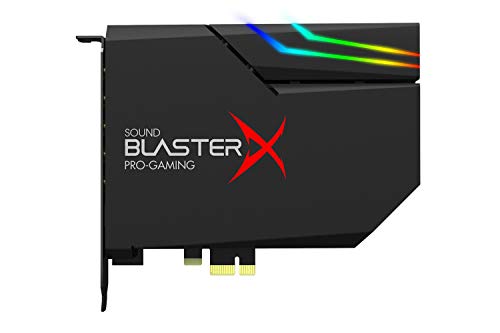
Creative Sound BlasterX AE-5 Plus — Best Overall
The AE-5 Plus earns the top slot because it treats positional audio as a chain rather than a feature. The listing describes a SABRE32-class DAC running hi-res 32-bit/384kHz playback with a 122dB signal-to-noise ratio, a discrete Xamp headphone amplifier that drives each channel with its own stage, and encoding support for Dolby Digital and DTS for feeding external receivers. Numbers alone do not place a footstep, but a quiet, high-resolution chain is what lets subtle directional cues survive to your ears instead of drowning in hiss and crosstalk.
In practice the card’s surround processing gives gaming headsets and proper headphones a wide, legible stage where left-right pans and front-back hints stay separable during busy scenes. Explosions do not collapse the image the way they do on anaemic onboard outputs, largely because the amplifier is not gasping. Switch to speakers and the same card behaves like a respectable hi-fi source, which matters for players whose desk does double duty for music between matches. The RGB lighting is present and configurable; treat it as decoration, not a reason.
Consider how the card behaves across a whole evening rather than a single firefight. In a story game, positional audio is atmosphere: rain that genuinely seems to fall around a shelter, a companion’s voice arriving from the doorway she is standing in. The AE-5 Plus renders those quiet scenes with a stable image that does not wander when the mix gets sparse, which is a subtler achievement than surviving an explosion. Sparse mixes expose noise and channel imbalance, and this card’s low background lets a two-sound scene — footsteps on gravel, wind in a stairwell — keep its geography intact.
Fatigue deserves a mention of its own. Aggressive virtualisation presets that impress in a thirty-second demo can grate across a three-hour session, because exaggerated rear cues force your brain to keep correcting them. The sensible way to live with this card is to dial its surround intensity to the point where direction feels obvious but unremarkable, then leave it alone for a week. Owners who chase the widest possible stage daily tend to abandon the feature entirely; owners who set it moderately tend to forget it exists, which is precisely what successful positional audio feels like — you simply know where things are.
- Form factor: Internal PCIe sound card and DAC
- Playback class: Hi-res 32-bit/384kHz, SABRE32-class DAC (per listing)
- Signal-to-noise: 122dB (per listing)
- Headphone stage: Xamp discrete dual-amplifier design
- Encoding: Dolby Digital and DTS support (per listing)
Strengths
- Exceptionally clean output keeps quiet positional cues audible under loud effects.
- The discrete headphone amplifier drives demanding headphones without strain.
- Equally convincing with speakers, so one card covers desk and lounge duties.
Trade-offs
- Sits in a premium tier that casual players may not hear the benefit of.
- The lighting and software suite add setup time before the first game.
- Its talents are wasted on a low-quality headset downstream.
Best for: Competitive and immersive players who want one card that handles positional headphones and a good speaker set with equal authority. Not suited for: Anyone whose headset is the bottleneck, or who plays on a laptop and needs an external solution instead.

Creative Sound Blaster Z SE — Best for Speaker Owners
The Z SE is the pick that respects both rooms a PC gamer lives in. Its listing is unusually explicit: discrete 5.1 surround for speakers and virtual 7.1 for headphones, with 24-bit/192kHz playback, a 116dB signal-to-noise ratio, and Dolby Digital Live plus DTS encoding for sending multichannel audio down an optical cable to a receiver or soundbar. That single sentence of specification does more honest work than a page of “immersive 3D” adjectives, because it tells you exactly which illusion lives where.
The discrete path is the headline. Five real channels plus a subwoofer feed means a grenade behind your chair is a sound from a speaker behind your chair, no ear-matching algorithm required. When the house goes quiet and headphones come out, the virtual mode takes over with a processed two-channel image that is convincing for games even if purists will always prefer the physical array. The Z SE has been in Creative’s catalogue long enough that its drivers and profiles are a known quantity, which counts for a component you intend to forget about.
The speaker path deserves a closer look, because wiring it correctly is where most of the benefit hides. Discrete 5.1 means five separate analogue feeds leaving the card, so each satellite does one job and the subwoofer handles only what small drivers cannot. Run the room or software calibration your speaker set provides, set distances honestly rather than hopefully, and resist boosting the rears because you paid for them — rears mixed too hot pull the whole image backwards and make frontal dialogue feel detached from the screen. Balanced, a 5.1 array fed by this card produces the most convincing positional audio in this entire roundup, full stop.
The optical encoding deserves equal respect from a different crowd. A player whose PC shares a television with a receiver or an older soundbar can send Dolby Digital Live or DTS down a single optical cable and let the living-room system decode it. That turns the PC into a polite citizen of a home-theatre rack instead of a tangle of analogue leads, and it is a capability the headphone-focused flagship cards treat as secondary. If your gaming seat is a sofa rather than a desk chair, this pick quietly becomes the most relevant card on the page.
- Form factor: Internal PCI-e sound card and DAC
- Speaker output: Discrete 5.1 surround (per listing)
- Headphone mode: Virtual 7.1 surround (per listing)
- Playback: 24-bit/192kHz, 116dB SNR (per listing)
- Encoding: Dolby Digital Live and DTS (per listing)
Strengths
- Genuine discrete 5.1 for desks that can host a satellite set.
- Optical encoding sends multichannel audio to receivers and soundbars.
- A mature, well-documented platform with settled drivers.
Trade-offs
- The virtual headphone mode, while good, sits below the AE-series in refinement.
- Exploiting the discrete output means buying and placing five speakers.
- The design is older than the AE line and shows it in the software polish.
Best for: Players who already own, or plan to buy, a 5.1 speaker set and still want a credible headphone mode after dark. Not suited for: Headphone-only players, who pay for speaker outputs they will never wire up.
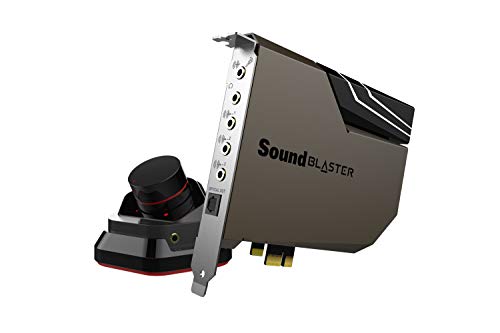
Creative Sound Blaster AE-7 — Best Control
The AE-7’s distinguishing hardware sits on your desk rather than in your case. The listing describes a hi-res PCIe gaming sound card paired with an ACM — an Audio Control Module — and a Xamp headphone amplifier. That module is a physical knob and hub for volume and connections, and for positional gaming its value is mundane but real: adjusting volume without alt-tabbing, and switching outputs without spelunking through a control panel while a match loads.
Underneath the convenience, the AE-7 belongs to the same high-resolution family as the AE-5 Plus, with the clean conversion and headroom that make virtual surround cues readable. Its presentation leans a touch more analytical, which competitive players often prefer: footsteps and reloads sit forward, and the stage feels organised rather than theatrical. Streamers and call-heavy players also gain from having microphone and headphone connections at the desk instead of behind the tower, where cables go to be forgotten.
Think about who benefits most from that module during an actual week. A player who raids on voice chat every night rides volume constantly — game down when the call leader speaks, back up for the quiet exploration stretch — and a physical knob turns that into a reflex instead of a chore. The module also disciplines cable routing: headset leads stop dangling across the keyboard to reach a tower under the desk, which reduces the small daily friction that makes people revert to worse audio out of sheer laziness. Ergonomics is not glamorous, but ergonomics is what determines which equipment is still in use after six months.
Sonically, the AE-7 makes an interesting partner for analytical headphones — the planar and studio-leaning models that present detail without warmth. Its organised stage and clean amplification let those headphones do their forensic work on footsteps and distant reloads, while players who prefer a lush, cinematic presentation may find the pairing a little clinical and should audition the AE-5 Plus’s voicing instead. Neither is objectively superior; they are two temperaments built on similar hardware, and the control module is the practical tiebreaker for most desks.
- Form factor: Internal PCIe sound card with external Audio Control Module
- Headphone stage: Xamp amplifier (per listing)
- Control: Desktop module for volume and connections
- Playback class: Hi-res gaming DAC (per listing)
- Orientation: Gaming and communication-focused desktop setups
Strengths
- Desk-level control ends mid-game dives into software panels.
- Clean, organised soundstage suits cue-driven competitive play.
- Front-access connections help streamers and voice-chat regulars.
Trade-offs
- The module claims desk space and adds a cable run from the card.
- Players who never touch volume mid-session pay for a knob they ignore.
- Premium tier pricing, close to its AE-5 Plus sibling.
Best for: Desk-bound players, streamers and voice-chat regulars who adjust audio constantly and want hardware control. Not suited for: Minimalist desks, or buyers who would rather put the same budget purely into conversion quality.
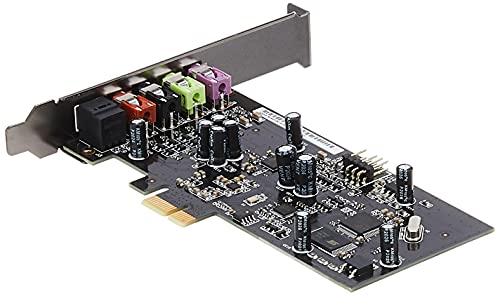
ASUS Xonar SE — Best Value Multichannel
ASUS describes the Xonar SE in its listing as a 5.1-channel PCIe gaming sound card with 192kHz/24-bit hi-res audio and a 116dB signal-to-noise ratio. Those are respectable figures at its tier, and the 5.1 part is physical: this is a card for buyers who want real channels to real speakers without entering the price territory where the Creative AE cards live. In a roundup obsessed with virtual effects, a straightforward multichannel card at a gentler price is a useful anchor.
Fed into a modest satellite set, the Xonar SE gives games the enveloping quality that only separated speakers produce, with dialogue locked to the screen by the centre channel and effects travelling the room. Its headphone output is competent rather than luxurious, and its positional processing for headphones is less elaborate than Creative’s gaming suites — the honest summary is that this card’s surround is the kind you can point at. For a spare-room gaming PC or a first discrete-speaker build, that trade is entirely sensible.
There is a budgeting argument here that deserves to be made plainly. Positional audio improves roughly in proportion to the whole chain, and a mid-priced card plus a decent 5.1 speaker set will surround a player more convincingly than a flagship card plus whatever speakers were bundled free with a monitor. The Xonar SE is the pick that leaves money in the budget for the satellites, the stands and the cable to place them properly — the unglamorous purchases that decide whether physical surround ever reaches its potential. Spending the whole purse on electronics and then stacking the speakers in a row is the classic way this hobby disappoints people.
It also suits the hand-me-down ecosystem of real households. A Xonar SE in a teenager’s first build, a retired gaming PC turned into a bedroom media machine, a spare rig for guests — these are homes where a card must install, work and be forgotten, and where an elaborate software suite is a liability rather than a lure. The card’s straightforwardness is a feature in that context. Buy the elaborate cards for the main battlestation where you will actually explore their settings; buy this one for everywhere else.
- Form factor: Internal PCIe sound card
- Channels: 5.1 (per listing)
- Playback: 192kHz/24-bit hi-res (per listing)
- Signal-to-noise: 116dB (per listing)
- Orientation: Multichannel speaker gaming on a budget
Strengths
- Real 5.1 speaker output at a notably friendlier tier than the flagships.
- Published specifications match pricier cards on paper.
- A simple, focused card without lighting or desk accessories to manage.
Trade-offs
- Headphone virtualisation is less sophisticated than Creative’s gaming software.
- The amplifier stage is modest with high-impedance headphones.
- ASUS’s gaming software ecosystem is thinner than Sound Blaster Command.
Best for: A first discrete 5.1 speaker build, or a second gaming PC that needs real channels without flagship money. Not suited for: Headphone-first players chasing the most refined virtual surround.

Creative Sound Blaster Audigy FX V2 — Best Budget Step Up
The Audigy name has served as Creative’s entry rung for two decades, and the FX V2 is its current generation — the listing presents it plainly as the Sound Blaster Audigy FX V2 sound card, successor to a line whose job was never to dazzle but to beat the audio already on your motherboard. That remains the honest pitch. Modern onboard audio is far better than it was, yet it still shares a board with noisy power delivery and still tends to hiss quietly under sensitive headphones; a dedicated card moves conversion away from that environment.
What the FX V2 buys a positional gamer is a cleaner foundation and access to Creative’s processing ecosystem at the lowest rung. The virtual surround will not match the AE cards’ spaciousness, and the amplifier will not bully demanding headphones into line, but for the headsets most people actually own, the improvement in clarity and cue separation over a tired onboard codec is the difference between guessing a direction and hearing one. It is also the lowest-risk way to discover whether you care about sound cards at all before funding the top of this list.
Judge this card against the right opponent. Its rival is not the AE-7; it is the audio codec soldered to a five-year-old motherboard, with its faint whine that follows mouse movement and its headphone output that gives up on bass when the action gets loud. Against that opponent the FX V2 wins on silence alone — the absence of interference is the first thing owners notice, before any discussion of surround modes. A quieter background makes every positional cue easier to read, because direction lives in small differences and small differences drown in noise.
It is also a forgiving card for shared and older machines. A family PC, a hand-me-down build, a work computer that games in the evening — none of these justify flagship audio, but all of them sound better for a modest dedicated card, and the Audigy line’s long history means troubleshooting advice for almost any configuration is a search away. The sensible expectation is a clear step up in cleanliness and a serviceable introduction to processed surround, not a transformation. Buyers who set that expectation will be pleased; buyers expecting flagship spaciousness at this tier have misread the ladder, and the ladder’s next rungs are reviewed directly above.
- Form factor: Internal sound card, low-profile friendly class
- Line: Current generation of the Audigy Fx family (per listing)
- Role: Entry step up from motherboard audio
- Processing: Creative software ecosystem support
- Orientation: Budget gaming and general media
Strengths
- The cheapest credible exit from noisy onboard audio in this roundup.
- Creative’s software gives a taste of the ecosystem before a bigger spend.
- Undemanding to install and easy to carry to a future build.
Trade-offs
- Virtual surround refinement trails the AE-series noticeably.
- Headphone drive is adequate for mainstream headsets, not hungry planars.
- Buyers who catch the audio bug will outgrow it within a year.
Best for: First-time card buyers and older PCs whose onboard audio hisses, hums or simply sounds flat. Not suited for: Anyone already running a good external DAC, who would be buying sideways.

Creative Sound BlasterX AE-5 Plus Pure Edition — Best for RGB Builds
The Pure Edition is the AE-5 Plus re-dressed for a glass-sided case. The listing describes a SABRE32 Ultra-Class 32-bit/384kHz PCI-e card with the Xamp headphone amplifier, a 122dB signal-to-noise ratio, and bundled RGB LED strips. Everything said about the standard AE-5 Plus’s positional performance applies here unchanged, because the audio platform is the same; what changes is that the card arrives ready to join a lighting scheme rather than sitting in the dark beneath a graphics card.
It is easy to sneer at that, and wrong to. A showpiece build is a legitimate goal, and in such a build an unlit card looks like a missing tooth. The strips extend the card’s lighting into the case, the white-leaning presentation of the Pure Edition suits pale builds that the standard card’s darker finish fights, and none of the theatre costs anything sonically. Choose between the two AE-5 Plus variants with your eyes, in other words — your ears will receive identical work from either.
Because the audio platform matches the standard AE-5 Plus, everything about living with that card applies here too: the same spacious positional processing, the same authority with demanding headphones, the same encouragement to set surround intensity moderately and stop fiddling. The Pure Edition discussion is therefore really about build planning. Lighting strips need somewhere sensible to run, a case with a window positioned where people actually sit, and a motherboard header or controller arrangement thought through before the box is sealed. Buyers who plan the build as a composition will find this card the finishing piece; buyers who add it to a finished black box will wonder why they paid extra.
One honest caveat belongs to themed builds generally. A lighting scheme is a snapshot of taste, and the card will outlive the colour palette of the moment by years. The reassuring news is that the lights can simply be turned off when the rainbow era ends, leaving a flagship-grade sound card that owes nothing to its decorations. Few components offer that exit: the performance remains when the fashion moves on, which is more than can be said for a purely cosmetic purchase.
- Form factor: Internal PCI-e sound card
- Playback class: SABRE32 Ultra-Class 32-bit/384kHz (per listing)
- Signal-to-noise: 122dB (per listing)
- Headphone stage: Xamp discrete amplifier
- Extras: RGB LED strips included (per listing)
Strengths
- Full AE-5 Plus positional performance with build-ready lighting.
- Bundled strips save a separate accessory purchase for themed cases.
- Light finish complements white and pastel builds.
Trade-offs
- You pay a premium for appearance over the standard AE-5 Plus.
- In a closed case the entire point evaporates.
- Lighting control adds one more software ecosystem to a themed build.
Best for: Windowed, themed builds where the sound card is part of the visual composition. Not suited for: Closed cases, small-form-factor builds without a view inside, or anyone indifferent to lighting.
Should Positional Play Use Headphones or Speakers?
The genre you play most should arbitrate this. Competitive shooters reward headphones disproportionately: cues are small, directional precision is scored in milliseconds, and voice chat already lives in the headset, so the virtual path on a strong card is the pragmatic professional choice. The amplifier matters here more than the surround brand, because a cue you cannot hear cleanly cannot be located at all, and several cards in this guide earn their price precisely on that unglamorous strength.
Immersive single-player games argue the other way when the room allows it. A horror title through a calibrated 5.1 array produces dread that headphones approximate but rarely equal, because sound occupies the room with you and the subwoofer communicates through furniture. Racing and flight simulation sit between the camps: engines and weather envelop beautifully on speakers, yet a headset keeps a household asleep during a midnight endurance stint. Many settled players keep both paths wired — discrete speakers for the evening, virtualised headphones for the night — which is exactly the dual competence that makes the Z SE and the AE-5 Plus so easy to recommend.
Roommates, thin walls and open-plan offices all vote for headphones regardless of genre. So does a microphone: speaker playback bleeds into voice chat unless echo cancellation is doing heavy, audible work. Treat the choice as a property of your living situation first and your taste second, and the card shortlist usually narrows itself.
Budget interacts with the choice in one more way worth stating. Headphone positional audio concentrates spending into two components you can upgrade independently, while speaker surround spreads it across six boxes whose placement you cannot upgrade at all — only arrange. Renters who move often consistently report the headphone path travelling better; a card and a headset fit in a backpack, while a satellite array fits in a van. Permanence favours speakers, impermanence favours the virtual path, and most players’ lives contain more impermanence than their purchasing plans assume.
What Actually Feeds a 3D Sound Card?
Understanding sources prevents most disappointment in this category. A modern game engine typically mixes dozens of sound objects — each with a position in the world — down to whatever output the player selected. Choose a surround output and the engine renders channels; choose a headphone mode and either the engine, the operating system or the card performs the binaural fold-down. The quality of the original mix sets the ceiling for everything downstream, which is why a lavishly mixed game sounds positional even on modest hardware while a cheaply mixed one sounds flat through a flagship card.
Streaming video sits a step below games in interactivity but often carries excellent multichannel mixes, and the same virtualisation that folds a game’s channels will fold a film’s. Music remains the outlier: recordings are mixed for two speakers in a room, and processing them into pseudo-surround rearranges an artistic decision. Every card here can do it; few listeners keep it enabled for long. The mature setup is per-source discipline — surround processing for games and films, untouched stereo for music — and the better software suites automate exactly that switching by application profile.
Voice is the third source nobody budgets for. A card that handles your microphone input cleanly, with sensible gain and noise control, improves every call you join, and positional players are usually also talking players. When a pick here includes desk-level microphone access or a control module, that is not garnish; it is the other half of multiplayer audio, heard by everyone you play with.
How Much Do Drivers and Software Decide?
More than the hardware snobs admit. A sound card is a long-lived component, and its second five years depend entirely on whether the manufacturer keeps the control software healthy through Windows feature updates. A stale suite that resets your channel layout after every major update will train you to hate a card whose silicon never failed. When comparing ecosystems, look for recent update history, a single consolidated control application rather than a litter of utilities, and profiles you can export before a reinstall.
Software is also where positional honesty lives. A good suite names its modes plainly — this one virtualises a multichannel feed, that one widens stereo, this third one is a microphone effect — while a poor suite hides everything behind trademarked nouns. The cards gathered here come from catalogues that mostly document what their processing does, and where a mode is synthesis rather than reproduction, the suite says so. That transparency is worth real money to a buyer who wants to understand a setup rather than merely enable it.
Practical diligence takes ten minutes before purchase. Check the card maker’s support page for your exact model and note the date of the newest driver or suite release; a page updated within the current Windows generation signals a living product. Check your case for a free slot that is not smothered by a thick graphics card, because a sound card wedged against a hot GPU shroud inherits its heat and sometimes its electrical noise. And check your power and front-panel cabling intentions — small things, decided early, that separate a ten-minute installation from an afternoon of reseating hardware.
Comparison Table
| Pick | Surround type | Headphone stage | Choose it if… |
|---|---|---|---|
| Sound BlasterX AE-5 Plus | Virtual processing + speaker output, Dolby/DTS encode | Xamp discrete amp | You want the strongest all-round positional chain. |
| Sound Blaster Z SE | Discrete 5.1 speakers / virtual 7.1 headphones | Standard gaming output | You own or plan a real 5.1 speaker set. |
| Sound Blaster AE-7 | Virtual processing | Xamp amp via desk module | You adjust volume and connections mid-session. |
| ASUS Xonar SE | Discrete 5.1 speakers | Modest integrated stage | You want real channels at a gentler price. |
| Audigy FX V2 | Entry-level virtual processing | Basic amplified output | You are leaving onboard audio on a budget. |
| AE-5 Plus Pure Edition | Virtual processing + speaker output | Xamp discrete amp | Your build is meant to be looked at. |
How Do You Set Up Virtual Surround Without Ruining It?
Begin by choosing exactly one positional renderer. If the game offers its own headphone mix or an object-based output, use it and set the card to plain stereo so the card contributes clean conversion and power without reprocessing an already-positioned signal. If the game outputs a 5.1 or 7.1 bed with no headphone rendering, that is the card’s moment: feed it the multichannel signal and let its virtualisation fold the channels into your headphones. Stacking two renderers is the single most common cause of the washy, nowhere-sounding result that makes people conclude virtual surround is a scam.
Next, configure Windows honestly. Set the playback device to the channel layout the card expects when virtualising, disable any operating-system spatial effect you are not using, and turn off unrelated enhancements — loudness equalisation and bass boosts smear the timing cues the renderer worked to create. Then spend ten minutes in a quiet game area rotating your character against a fixed sound source: a waterfall, an idling engine, a radio. You are checking that sounds behind you read as behind, not merely quieter, and most suites let you adjust intensity until the illusion locks for your ears.
Finally, match the amplifier to the headphone. Use the gain setting intended for your headphone’s impedance class where the software offers one; too little gain starves dynamics, too much raises the noise floor and makes volume control twitchy. If your headset has its own USB processing, decide whether the card or the headset owns the signal — running analogue out of the card into a headset that re-digitises it adds a conversion nobody needed.
Give the setup a week before judging it. Positional hearing through a new renderer is a learned skill, and the first evening’s impressions — usually that everything sounds too wide or oddly hollow — soften as your brain recalibrates to the cue set. Players who toggle settings hourly never complete that calibration and conclude, wrongly, that nothing works. Fix a sensible configuration, play the games you know best, and only then adjust one variable at a time, keeping notes if your memory for settings is as fallible as everyone else’s.
What Mistakes Do Buyers Make With 3D Sound Cards?
The first mistake is buying a badge. “3D”, “immersive” and “cinematic” describe intentions, not outputs; the specification lines that matter state channels, modes and where the processing occurs. The second is expecting a card to rescue a stereo-only game or a film with a flat mix — processing can widen a source, but it cannot recover positions that were never recorded. Buyers who understand that distinction enjoy these cards; buyers who do not return them.
A third mistake is pairing tiers carelessly. A flagship card feeding a bargain headset reveals the headset. A budget card feeding excellent headphones reveals the card. The chain should rise together, and the honest upgrade order for most players is headphones first, then the card that can drive and process for them properly. Fourth comes the forgotten room: discrete speaker surround bought for a desk against a wall, with satellites stacked beside the monitor, delivers expensive stereo. Placement is not a detail of physical surround; it is the product.
There is also the sample-rate superstition to retire. A card advertising very high playback rates is describing the ceiling of its converter, not a quality your games will use; game audio is produced at ordinary rates, and clean implementation at those rates is what you hear. Chasing the largest number on the box instead of the quietest output and the strongest amplifier is how budgets leak into specifications with no audible address.
Last, many owners never revisit their settings after a driver or Windows update resets the device layout. A card silently reverted to stereo will still make noise, so the failure hides. After any major update, re-check the channel configuration before concluding the card has lost its magic.
How Should the Budget Be Split Across the Chain?
Positional audio is a chain of four links — the game’s mix, the card’s conversion and processing, the amplifier, and the transducers at your ears or around your chair — and the chain performs at the level of its weakest link. That single fact should govern spending. A player with a bargain headset gains more from upgrading the headset than from any card in this guide, because the card’s cleanest signal still ends in drivers that smear it. A player with fine headphones on a noisy motherboard gains most from the card, because the transducers are already revealing everything the source does wrong.
A workable split for a from-scratch headphone setup puts the largest share into the headphones themselves, the next share into the card, and keeps a reserve for the unglamorous extras — a decent microphone, replacement pads, a headphone stand that keeps the cable from dying at the plug. For a speaker setup the satellites and their placement consume the largest share, with the card chosen for its outputs and encoding rather than its flagship converter. In both cases the card is the middle purchase, sized to the transducers it must serve, and buying it first and largest is the classic inversion this guide has tried to argue against throughout.
Leave room in the plan for the second year, too. Pads wear, tastes sharpen, and the player who begins with virtual surround curiosity often ends with strong opinions about presentation. A card with both speaker outputs and a serious headphone stage — the profile shared by the top picks here — survives those opinion changes without replacement, which is the quiet economic case for buying the flexible card once rather than the narrow card twice.
Final Recommendation
Whichever card you choose, judge it in the games you already know by heart, where your memory of how a space should sound exposes instantly what the new chain gets right. A familiar corridor, a familiar waterfall, a familiar voice from a familiar doorway — those references are worth more than any demo reel, because they turn listening into comparison rather than impression.
For most players the Sound BlasterX AE-5 Plus is the card to buy: its conversion and amplification are strong enough that positional cues survive busy mixes, and it serves speakers honourably when headphones come off. Speaker owners with a real array should look first at the Z SE or the Xonar SE, whose discrete channels do physically what virtualisation only suggests, while the AE-7 suits anyone whose hand reaches for a volume knob mid-match. The Audigy FX V2 remains the sensible first step away from a motherboard, and the Pure Edition is the same flagship wearing its party clothes. Pick the illusion — or the reality — that matches the room you truly play in, because a waterfall behind your character should sound like weather, not like a rumour.
Frequently Asked Questions
Is virtual surround as good as real speakers?
It is different rather than simply worse. A well-matched binaural render can locate sounds convincingly, including behind you, and it works at midnight in a flat. Real speakers locate sounds effortlessly and add physical sensation, but demand space, placement and volume. Most players end up preferring whichever suits their living situation, which is why several picks here offer both paths.
Will a 3D sound card help in every game?
No. Games that output surround or object-based audio give the card material to work with; stereo-only titles can be widened but not truly positioned. Check a game’s audio settings for surround, spatial or headphone modes — the presence of those options usually means the card’s processing will have something genuine to chew on.
Does hardware processing matter versus software?
Hardware DSP applies effects with fixed low latency and no CPU cost, which suits older processors and competitive play. Software suites update more often and can offer richer profiles, at the price of sharing system resources. In blind listening the better-implemented one wins regardless of address; the practical difference is consistency under load.
Should I match the card to a specific headphone?
Yes, in one practical respect: amplifier strength. Efficient portable headphones and gaming headsets run happily from any card here, while high-impedance studio models and low-sensitivity planar designs reward the discrete amplifier stages in the AE-series picks. Check your headphone’s impedance and sensitivity against the card’s intended gain range, and when in doubt choose the card with the stronger, better-documented headphone stage — headroom you never use is silent, while headroom you lack is distortion.
Can these cards improve films and music too?
Films with multichannel mixes benefit from the same virtualisation or speaker outputs as games. Music is stereo by design and usually sounds best with surround processing switched off, letting the DAC and amplifier quality — where these cards genuinely shine — carry the performance unadorned.
Why does virtual surround sound wrong to me?
Usually because the generic ear model in the renderer does not match your ears, or because two processing layers are stacked. Try a single renderer at moderate intensity for several sessions before judging — perception adapts — and test with a rotating fixed source in a quiet game area. If rear cues still collapse into your head, physical speakers or a different processing suite will suit you better, and that is a property of your hearing, not a defect in the card.
Do I need a sound card if my motherboard is new?
Not automatically. Recent boards with well-implemented audio can satisfy casual listening. A card earns its slot when you hear hiss with sensitive headphones, need discrete multichannel outputs or optical encoding, want a stronger headphone amplifier, or want a card’s specific surround processing. Buy against a problem you can name.
Related Guides
Players refining a full audio setup may also want our guide to 5.1 sound cards for PC, our roundup of 7.1 sound cards and what the label really means, and our look at affordable internal sound cards worth buying.



[…] Keep reading with our guide to 3D sound cards and positional audio, our roundup of 5.1 sound cards for PC, and our look at affordable internal sound cards. See also 3d sound cards. […]