Our Top Picks
 ecobee Smart Thermostat Premium2.9 x 4.09 x 4.09 inches1.02 x 4.09 x 4.09 inches1.32 poundsCheck on Amazon


What's inside
- The three models at a glance, and why the differences are structural
- Displays, materials, and the everyday interface
- Occupancy sensing: radar, motion, and why it changes schedules
- SmartSensor: the room sensor that changes what temperature means
- SmartSensor for doors and windows, and the boundary of a thermostat ecosystem
- HVAC compatibility: conventional systems, heat pumps, and auxiliary heat
- The 24-volt common wire, and what happens without one
- The Power Extender Kit: what it does, how it wires, and its limits
- Platforms: HomeKit, Google Assistant, Alexa, and SmartThings
- eco+, Home IQ, and reading energy reports without fooling yourself
- Smart Security: what the subscription adds, stated plainly
- Installation day: a careful sequence from furnace to first schedule
- Living with the system: schedules, holds, and household politics
- Troubleshooting the problems ecobee owners actually meet
- Which model for which home: a decision framework
- Check prices on Amazon
- Ownership costs and longevity beyond the purchase
As an Amazon Associate I earn from qualifying purchases. This post may contain affiliate links at no extra cost to you.
A thermostat looks simple on the wall, yet behind that small glass rectangle sits the control logic for the most energy-hungry system in most homes. The ecobee range matters because its models share a familiar name while differing in ways that only become obvious after installation: one includes a room sensor in the box and another does not, one carries a built-in voice assistant and radar-based occupancy sensing while another relies on simpler motion detection, and one supports accessory control for a humidifier or ventilator while another leaves that wiring unsupported. Choosing well therefore starts not with a headline feature but with your furnace, your rooms, and your wiring.
This guide works through the current ecobee lineup as published by the manufacturer: the Smart Thermostat Premium, the Smart Thermostat Enhanced, and the ecobee3 lite. It explains how their displays, bezels, sensors, and platform support differ, how the SmartSensor and SmartSensor for doors and windows communicate with the thermostat, what heating and cooling configurations the terminals actually support, and when the Power Extender Kit solves a missing common wire and when it does not. It also covers installation checks at the furnace, temperature and humidity calibration, the eco+ software layer, Home IQ energy reporting, and which convenience and security functions sit behind the optional Smart Security subscription, described here without any subscription pricing.
A note on how this guide was assembled, specific to this thermostat comparison: every specification, terminal designation, sensor range, and compatibility statement below is drawn from manufacturer-published product pages, installation guides, and technical documentation released by ecobee, cross-checked against the wiring diagrams the company supplies for its own installers. No claim in this article rests on personal use of any of these thermostats, and no reader should read a comparison here as a report from a lived-in test house. Where retailer links appear on this page, they are commerce links, and this site may earn a commission if a purchase follows one of them; that arrangement does not change the specifications quoted or the wiring cautions given.
That disclosure matters for thermostats more than for many gadgets, because the cost of a wrong choice is rarely the device itself. A mismatched thermostat can short-cycle a heat pump, leave auxiliary heat running far longer than needed, fail to drive a whole-home humidifier in January, or sit dark on the wall because the control board could not supply it with continuous power. Reading the sections below in order, especially the wiring and compatibility material before the platform material, mirrors the order a careful installer would follow: confirm the system, confirm the wires, then enjoy the software.
The three models at a glance, and why the differences are structural
The Smart Thermostat Premium is the flagship of the range. Ecobee gives it a larger, higher-resolution colour display than the other models, a metal-trimmed bezel rather than an all-plastic housing, radar-based occupancy sensing, a built-in voice assistant with a choice of Alexa or Siri when paired through Apple Home, an integrated air-quality sensor that reports volatile organic compounds and estimated carbon dioxide, and a bundled SmartSensor in the box. It is positioned as both thermostat and small home hub, and its terminal set and accessory support are the broadest in the lineup, which is why it is the natural reference point for the comparisons that follow.
The Smart Thermostat Enhanced sits one step below the Premium and keeps much of what households use daily. It retains a colour touchscreen, occupancy sensing through a more conventional sensor arrangement rather than the Premium radar system, compatibility with remote SmartSensors, and support for the major voice and smart-home platforms, but it drops the built-in voice assistant microphone array as a hub feature, omits the air-quality sensing, and uses a plastic bezel and a slightly smaller display. For a home that already has smart speakers in the rooms that matter, the Enhanced often covers the heating and cooling job completely while leaving hub duties to devices already owned.
The ecobee3 lite is the entry model and the oldest design language in the group. Its display is smaller, its bezel is plain black plastic, it has no built-in voice assistant, no radar, no air-quality sensing, and crucially no accessory terminals for controlling a humidifier, dehumidifier, or ventilator from the thermostat. It does still accept remote SmartSensors, still reports through the ecobee app, and still handles a wide range of conventional and heat-pump systems. Its appeal is focus: where a home has a straightforward furnace and air conditioner, no accessory equipment, and no need for a wall-mounted assistant, the lite model performs the core scheduling and remote-sensor work without paying for hub hardware.
These distinctions are structural rather than cosmetic because several of them cannot be added later. A homeowner cannot retrofit accessory control onto the ecobee3 lite, cannot add the Premium air-quality sensor to an Enhanced, and cannot turn the lite display into the larger Premium panel. By contrast, remote room sensors can be added to any of the three at any time, and platform integrations can be enabled or changed in software. A sound buying decision therefore weighs the fixed hardware first, the terminals, sensors, and display, and treats software features as the adjustable layer on top of that foundation.
Displays, materials, and the everyday interface
All three models use capacitive colour touchscreens, but the experience differs in resolution, size, and what the idle screen chooses to show. The Premium presents indoor temperature in large numerals alongside weather, humidity, and air-quality readings when those sensors are active, and its proximity and radar sensing wake the display as someone approaches rather than only on touch. The Enhanced wakes on approach as well, with a clean temperature-forward layout. The ecobee3 lite presents a simpler face, with temperature and mode prominent and fewer secondary tiles. None of this changes heating performance, yet it changes how often household members glance at, and trust, the information on the wall.
Bezel material sounds like a styling footnote until cleaning and durability enter the picture. The Premium metal trim resists the fine scratching that glossy plastic accumulates from years of fingertip contact and dusting, and its glass sits flush in a way that makes a microfibre wipe simple. The Enhanced and lite plastic housings are lighter and perfectly serviceable, but they reward gentler cleaning products. Ecobee advises against spraying cleaner directly onto any of the units; a lightly dampened cloth is the published guidance, and it applies across the range regardless of trim.
Brightness and night behaviour are handled in software on all three. The displays can dim or sleep on a schedule, which matters when a thermostat sits outside a bedroom door and its glow is visible from a pillow. Radar and occupancy logic on the Premium can keep the screen dark in an empty hallway at night while still waking promptly for a person walking through. Households sensitive to light should plan to spend two minutes in the display settings during setup rather than discovering the glow on the first night and hunting through menus half asleep.
Occupancy sensing: radar, motion, and why it changes schedules
Occupancy sensing in an ecobee does two jobs. It informs the Smart Home and Away behaviour that can adjust a schedule when nobody is present, and on sensor-equipped models it contributes to the averaged temperature reading when Follow Me logic is enabled. The Premium uses radar, which detects micro-movement through a wider field and at a greater distance than a passive infrared window, and which continues to register a still occupant reading in a chair more reliably than motion-only sensing. The Enhanced uses occupancy sensing suited to detecting people moving through its space. The ecobee3 lite has more limited built-in occupancy capability and leans more heavily on its remote sensors for presence information.
The practical consequence appears in rooms where people sit still. A home office occupant who barely moves for an hour can vanish from a motion-only sensor, nudging the system toward an away adjustment or dropping that room from a Follow Me average at exactly the moment comfort matters. Radar reduces that failure mode in the room containing the thermostat itself. It does not extend to other rooms; remote SmartSensors use their own occupancy sensing, so a whole-home claim about presence is really a patchwork of individual sensor viewpoints, each with its own field of view and blind spots.
Placement therefore shapes sensing quality as much as sensor technology does. A thermostat mounted facing a busy hallway sees constant passing motion and may judge the home occupied long after the last person has settled in a bedroom the sensor cannot see. A thermostat tucked beside a kitchen doorway sees cooking traffic rather than living patterns. Ecobee installation guidance favours an interior wall, away from direct sunlight, drafts, and heat sources, at a typical mounting height around eye level for the display; those same conditions, no sun patches, no supply vent blowing across the unit, also give the occupancy and temperature sensors their fairest view of the home.
Readers planning a broader sensor and camera layout for awareness at home may also find our coverage of whole-home monitoring useful alongside this thermostat material: best 4k smart home security cameras That topic is separate from heating control, but the placement lessons rhyme, since both cameras and occupancy sensors reward a clear field of view and punish glare, obstruction, and hasty mounting.
SmartSensor: the room sensor that changes what temperature means
The SmartSensor is a small, battery-powered remote unit that reports temperature and occupancy for the room where it sits. The Premium includes one in the box; for the Enhanced and ecobee3 lite it is an additional purchase, and all three thermostats can pair with multiple sensors. Instead of governing the whole home by the hallway temperature alone, the thermostat can average readings across participating sensors, or, with Follow Me enabled, weight the average toward rooms that report occupancy. A nursery that runs cold, a south-facing bedroom that overheats in afternoon sun, and a basement office that lags the rest of the house stop being invisible to the control system once each carries a sensor.
Ecobee specifies the SmartSensor as a wireless device communicating with the thermostat over a proprietary low-power radio link in the sub-gigahertz range the company documents for this accessory family, with a published range that assumes typical residential construction and line-of-sight conditions far more generous than any real house provides. Walls, metal ductwork, and distance all erode that link. In practice, sensors placed within a few rooms of the thermostat, on the same floor or one floor away, maintain their connection reliably in most construction, while a sensor pushed to a far garage conversion or behind a foil-backed insulation layer may drop in and out. The app reports sensor connectivity, so a doubtful placement can be checked over a day before screws go into a wall.
Power comes from a replaceable coin-cell battery, the CR2477 format ecobee specifies for the SmartSensor, with published battery life measured in years rather than months under normal reporting intervals. Long battery life follows from the design: the sensor wakes, samples, transmits briefly, and sleeps. Households should still note the battery type in a home log when a sensor is installed, because the day it fades will arrive during a cold snap rather than at a convenient moment, and the thermostat will quietly revert to governing without that room, which can look like a sudden comfort problem rather than a flat coin cell.
Mounting options include a small stand for a shelf or dresser and a magnetic wall mount. Shelf placement is the pragmatic starting point: set the sensor at roughly seated or sleeping height in the room, away from the direct blast of a supply register, out of direct sun, and not on top of heat-producing electronics such as a game console or a television. A sensor perched above a radiator or in a sun patch will faithfully report a temperature nobody in the room actually feels, and the averaging logic will then drive the furnace or air conditioner to satisfy a fiction.
Balancing rooms with sensor participation and schedules
Sensor participation is configured per comfort setting, the ecobee name for the scheduled periods such as Home, Away, and Sleep. A common pattern includes the nursery and primary bedroom sensors in the Sleep setting, the living room and office sensors in the Home setting, and perhaps only the thermostat itself in the Away setting, where precision matters least. This per-period participation is the feature that turns remote sensors from a novelty into a genuine comfort tool, because a single all-day average cannot serve both a daytime office and a night-time bedroom equally well.
Averaging has limits worth understanding. If one participating room is dramatically colder than the others, say an uninsulated sunroom in January, the average will call for heat long after the main rooms are comfortable, overheating them and lengthening furnace run time. The remedy is usually to remove the extreme room from participation for that season rather than to fight the average. Ecobee systems also apply a form of smoothing so a single brief reading, a door left open for two minutes, does not swing the control decision; even so, households should review the sensor graph in the app after the first week and look for a room whose trace diverges wildly from the rest.
SmartSensor readings also feed the occupancy side of Follow Me, so a sensor in a rarely used guest room will mostly report vacancy and contribute little, which is correct behaviour. Where two sensors disagree about occupancy, the system works from the rooms reporting presence. Families with irregular patterns, shift workers, teenagers on late schedules, benefit most from checking that the Sleep setting does not weight an empty living room over an occupied bedroom simply because the defaults were accepted without a second look during setup.
SmartSensor for doors and windows, and the boundary of a thermostat ecosystem
Alongside the room sensor, ecobee offers the SmartSensor for doors and windows, a two-part contact sensor whose magnet and body report open and closed states for an entry door, a patio slider, or a window. Its relevance to a thermostat guide is twofold. First, within the Smart Security ecosystem it contributes entry awareness. Second, and more directly for heating and cooling, an open-window or open-door event can be used by the system to prompt or, depending on configuration and subscription features, to pause or adjust HVAC operation so the furnace is not fighting an open patio door in July.
The contact sensor shares the family traits of the room sensor: battery power with a multi-year expected life from its coin cell, wireless communication back to a compatible ecobee thermostat acting as hub, and status visible in the app. Compatibility is narrower than the room sensor’s, since the security-oriented functions centre on the Premium as the hub device. Buyers with an Enhanced or ecobee3 lite should confirm, against the current manufacturer compatibility list, exactly which contact-sensor features their model supports before buying a multipack for every door in the house.
Installation is adhesive or screw mounting with careful alignment between the sensor body and its magnet; a gap beyond the published tolerance produces false open reports that erode trust in every alert that follows. Doors that flex in their frames, older wooden doors that swell in humid weather, can drift in and out of alignment seasonally. A sensible rollout fits one sensor to the busiest door first, lives with it through a week of comings and goings, and only then extends the system to windows and secondary doors.
It is equally important to name what these sensors are not. They are not a monitored alarm system by themselves, they do not replace locks, and their notifications depend on home internet and power staying up. Households designing entry awareness should treat the ecobee contact sensors as a convenient layer inside a thermostat-centred home, valuable for HVAC awareness and casual peace of mind, rather than as the foundation of a dedicated security installation.
HVAC compatibility: conventional systems, heat pumps, and auxiliary heat
Ecobee publishes broad compatibility with forced-air, radiant, and heat-pump systems, and the detail lives in the terminals. For conventional systems, the thermostats support multi-stage heating and cooling, commonly described as up to two stages of heat and two stages of cool on the Premium and Enhanced, with the ecobee3 lite covering the single- and two-stage arrangements most homes present. Terminal labels follow industry convention: R for power, split on some systems into Rc and Rh, W and W2 for heating stages, Y and Y2 for cooling stages, G for the fan, and C for the common wire that completes the power circuit.
Heat-pump systems add the reversing valve, controlled through the O/B terminal, and auxiliary or emergency heat, typically wired to W2 or an Aux designation depending on the air handler. Correctly telling the thermostat during setup that W2 is auxiliary heat for a heat pump, rather than a second stage of conventional furnace heat, changes the control logic profoundly: aux heat is expensive resistance or backup heat that should engage in defined conditions, during defrost cycles, below a configured outdoor balance point, or when the heat pump cannot hold the setpoint, not as a casual second stage. Ecobee setup asks the installer to identify the equipment, and guessing at that screen is the single most consequential error available in the whole installation.
Dual-fuel systems, a heat pump paired with a gas or oil furnace, require the thermostat to lock out one heat source while the other runs and to switch between them at a chosen outdoor temperature. The Premium and Enhanced support dual-fuel configurations when wired and configured accordingly, with the furnace taking over below the balance point where the heat pump’s efficiency and capacity fall away. This configuration deserves extra care and, for many households, a professional installer, because simultaneous or mis-sequenced operation of both heat sources can damage a heat-pump coil placed in the furnace airstream.
Boiler and radiant systems appear in ecobee compatibility material with caveats. A thermostat that switches 24-volt control circuits can govern many boiler zone controls, but line-voltage baseboard heating, millivolt systems, and proprietary communicating systems from certain furnace brands sit outside standard ecobee wiring. Communicating systems deserve emphasis: if the outgoing thermostat is a brand-specific communicating unit talking digitally to its furnace over two or three wires, replacing it with a conventional ecobee can sacrifice the furnace’s variable-speed and staging intelligence. Ecobee own compatibility checker, driven by the wire labels found at the existing thermostat, is the authoritative first step, and its verdict overrides any general statement in a guide like this one.
Before compatibility can even be assessed, the household network has to carry the thermostat reliably, since a smart thermostat that keeps dropping offline loses its app control, weather data, and reporting. Homes with sprawling floor plans sometimes solve that problem at the router layer first, a topic explored in our networking coverage here: best 2 band wifi routers A thermostat needs very little bandwidth, but it needs a stable 2.4 gigahertz connection at the wall where it sits, which is a different requirement from fast Wi-Fi at a desk.
Accessory control through ACC+ and ACC-
Whole-home accessories, a bypass or steam humidifier, a dehumidifier, an energy or heat recovery ventilator, or a fresh-air damper, are controlled on the Premium and Enhanced through accessory terminals labelled ACC+ and ACC-. Depending on the accessory and wiring arrangement, the thermostat can drive a one-wire or two-wire accessory connection, energising the accessory in coordination with a call for heat or a fan call, or independently based on indoor humidity readings. The ecobee3 lite lacks these terminals entirely, which is the clearest hardware dividing line in the range and the reason accessory owners should not consider the lite model at all.
Humidity control logic rewards a few minutes of understanding. In heating season, the thermostat can run a humidifier to hold a target relative humidity, and ecobee offers a frost-control approach that lowers that target as outdoor temperature falls, reducing the window condensation that appears when warm moist indoor air meets cold glass. In cooling season, a dehumidifier or the air conditioner itself, run with an overcool allowance, can pull humidity down. These are comfort and building-health features, not luxuries: sustained excess indoor humidity feeds mould and dust mites, while winter air that is too dry cracks woodwork and irritates skin and airways.
Wiring an accessory is also where misidentification is easiest. The wire landing on ACC+ at the thermostat must correspond to the accessory relay or control board input at the air handler, and some accessories expect a dry contact while others expect a powered signal. Ecobee publishes accessory wiring diagrams for the common arrangements, humidifier with its own transformer, humidifier powered from the furnace board, ventilator interlocks, and installers should match their exact arrangement to a published diagram rather than improvising from a forum photograph of a different furnace.
The 24-volt common wire, and what happens without one
Every ecobee needs continuous 24-volt AC power between the R and C terminals. Older thermostats could live on batteries or steal tiny amounts of power through the heating circuit, but a colour touchscreen with Wi-Fi, radar, and a voice assistant cannot. Where a C wire already runs from the air handler to the thermostat location, installation is straightforward. Where it does not, there are three honest options: run a new thermostat cable, repurpose an unused conductor in the existing cable, or install the Power Extender Kit described next. A fourth option sometimes suggested online, jumping terminals or stealing power in ways ecobee does not document, risks furnace control-board damage and should be left alone.
Identifying a spare conductor is a furnace-side job. Thermostat cable often contains five or more conductors even when the old thermostat used four, with the unused wire wrapped around the cable jacket at both ends. If that spare exists, connecting it to the C terminal at the control board and to C at the thermostat is the cleanest solution of all, giving true continuous power with no intermediary electronics. Photographing the control-board terminals before touching anything, with the furnace power switch off, is the step that makes this job safe and reversible.
Voltage itself can be verified with a multimeter for those comfortable using one: roughly 24 volts AC between R and C at the thermostat confirms the supply. Ecobee documentation assumes that nominal 24VAC supply from the HVAC transformer. A reading far from that range, or a transformer already loaded by multiple zone controls and accessories, points to professional help rather than a weekend project, because control transformers have limited capacity and an overloaded one presents as intermittent thermostat reboots that are maddening to diagnose after the fact.
The Power Extender Kit: what it does, how it wires, and its limits
The Power Extender Kit, universally shortened to PEK, is ecobee’s answer to the four-wire house. It is a small module installed at the furnace or air-handler control board that multiplexes signals so the existing four wires can carry both the control signals and the power the thermostat needs, effectively manufacturing a common connection without pulling new cable through finished walls. The Premium and Enhanced include the PEK in the box; ecobee3 lite installations may use a PEK as well, and ecobee sells and documents it as the standard remedy for a missing C wire on supported systems.
Wiring the PEK follows a fixed pattern in the ecobee diagrams. The module intercepts the four thermostat wires, typically the R, W, Y, and G conductors arriving from the thermostat, and connects to five terminals on the control board, adding the C connection at the board that the wall location lacks. At the thermostat end, the wire that served as G is reassigned in the thermostat configuration, and the setup process must be told that a PEK is installed so the thermostat drives its outputs accordingly. Fan control is the subtle casualty to understand: with a PEK, independent fan operation is handled through the module’s logic, and ecobee documentation describes how fan calls are managed in that arrangement.
The limits matter as much as the method. The PEK supports a defined set of system types; it is not a universal adapter for every multi-stage, dual-transformer, or accessory-heavy configuration, and systems with both Rc and Rh from separate transformers, certain zone panels, or more elaborate staging may fall outside its supported envelope. Ecobee publishes the PEK compatibility conditions alongside the kit, and a system that fails those conditions needs a new cable run or a different power solution, not a hopeful experiment. Equally, a PEK installation concentrates all connections at the control board, so tidy labelling there pays for itself at the first furnace service visit.
A practical PEK workflow runs in this order: power off at the furnace switch and breaker, photograph the control board as found, label each thermostat wire with the terminal it leaves, move the wires to the PEK following the diagram for the system type, land the PEK leads on the board including C, close up the air handler, then wire the thermostat end exactly as the ecobee app instructs for a PEK install. Rushing the labelling step is how a white wire that was actually W2 ends up misidentified for the life of the installation, quietly degrading second-stage heat in a way nobody notices until a cold morning exposes it.
Platforms: HomeKit, Google Assistant, Alexa, and SmartThings
Ecobee thermostats integrate with the four platforms most households actually run. Apple HomeKit support allows the thermostat to appear in the Apple Home app, respond to Siri, and join HomeKit scenes and automations, and on the Premium the built-in voice option can be Siri itself when the household is Apple-centred. Alexa support is two-layered: the thermostats work with Alexa as a controlled device from Echo speakers elsewhere in the home, and the Premium additionally contains an Alexa voice service in the thermostat. Google Assistant control covers temperature adjustment, mode changes, and sensor queries by voice. Samsung SmartThings integration brings the thermostat into SmartThings routines alongside locks, lights, and leak sensors.
The honest way to choose among these is by household gravity rather than by feature counting. A home already running HomeKit automations gains the most from the Premium with Siri on the wall and its sensors exposed to HomeKit. A home built around Echo devices may find the Enhanced plus existing speakers entirely sufficient, since the thermostat still answers to Alexa commands issued elsewhere. Platform support in this category is mature across the range, so the platform question rarely decides the model by itself; it decides which conveniences switch on during the first evening of setup.
Local control and cloud dependence deserve a sentence of realism. Scheduling, sensor averaging, and basic control continue at the thermostat itself, but app access, voice control, weather display, energy reports, and firmware updates all ride on the home internet connection and ecobee’s services. A household that values resilience should learn the on-wall controls properly rather than treating the thermostat as an app accessory, because the wall unit remains fully operable by touch during an internet outage even while its smart features pause.
Network upgrades and thermostat projects often land in the same season of home improvement, and readers weighing router replacements for a growing smart home can compare the older wireless generation in this guide as part of that planning: best 11ac long range routers The thermostat itself will not benefit from exotic throughput, but the household’s phones, televisions, and computers sharing the network will, and a stable router reduces the mysterious offline episodes that get blamed on thermostats.
eco+, Home IQ, and reading energy reports without fooling yourself
Eco+ is ecobee’s software layer for squeezing efficiency from a schedule without demanding constant attention. Its published components include adjustments for humidity so the perceived temperature guides control rather than the raw number alone, schedule-aware recovery that begins heating or cooling ahead of a setpoint change so the home arrives at the target on time, time-of-use awareness for households on variable electricity pricing where that programme is enabled, and community energy features in regions where utilities run demand-response events. Each element can be tuned or disabled, and the degree of eco+ influence is presented to the user as a level rather than a hidden nudge.
Smart Home and Away, fed by occupancy sensing, sits alongside eco+ as the other major automatic behaviour. When sensors agree the home is empty outside an Away period, the system can drift the temperature toward an efficient setting and restore the schedule before the usual return time. Households with predictable lives feel this as pure saving. Households with chaotic lives sometimes feel it as the house being cool when someone comes home early, which is why the feature’s sensitivity and the geofencing options in the app deserve configuration rather than default acceptance.
Home IQ is the reporting side of the platform, presenting monthly energy summaries, estimated comparisons against community averages, system run-time breakdowns, and the sensor and temperature history that lets a homeowner see how the house actually behaved. The most valuable chart for most readers is run time by equipment stage: a heat pump household that discovers auxiliary heat consuming a large share of winter run time has found a configuration or balance-point problem worth real money, and that discovery begins in these reports rather than in any single cold day.
Reports require interpretation discipline. A month that used more energy than the same month last year may simply have been colder, and ecobee reporting attempts weather context, but no dashboard can separate a new baby at home, a visiting relative, and a failing duct seal from one another. Use Home IQ to find patterns and questions, a stage running too long, a room diverging, a schedule mismatched to real life, and then verify the cause in the house.
Smart Security: what the subscription adds, stated plainly
Ecobee’s Smart Security is the optional subscription that turns a Premium-centred sensor network toward home awareness and security functions. In the manufacturer’s description, the paid tier is where features such as professional-style alerting workflows, richer notifications around door and window sensor events, occupancy-based alerts when the home is armed, and related app functionality reside. Some awareness features and basic sensor notifications exist without a subscription, while the fuller security behaviour, including certain automations around HVAC response and the handling of alerts, requires the plan. Ecobee changes the exact boundary over time, so the current plan page from the manufacturer is the source to check on the day of purchase.
This guide deliberately states no subscription pricing, because plan structures and regional availability shift and a printed figure would age badly. The decision framework survives without numbers: a household that already pays for a dedicated monitored alarm gains little from layering Smart Security on top, while a household with a Premium, several contact sensors, and no other security system may find the subscription turns hardware it already owns into a coherent, if lighter-weight, awareness system. The value question is about consolidation, not about the thermostat, which performs its heating and cooling duties identically with or without the plan.
Arming behaviour is the detail to configure carefully if the subscription is adopted. Occupancy sensors that normally serve comfort averaging become presence witnesses when the home is armed, and a pet, a house cleaner, or a teenager returning early can each generate events the system must handle gracefully. Ecobee provides entry delays, sensitivity choices, and member-based awareness in the app. Spending twenty minutes aligning those settings with real household life is the difference between a system the family trusts and one they mute within a fortnight.
Installation day: a careful sequence from furnace to first schedule
Installation begins away from the wall, at the furnace or air handler. Switch the HVAC power off at the service switch and confirm it at the old thermostat, which should go dark or unresponsive. Remove the old thermostat from its wall plate and photograph the wiring with terminal labels legible; if wires are unlabelled or colours look non-standard, label them by terminal letter with the tags ecobee supplies before disconnecting anything. Wire colours are conventions, not guarantees, and the terminal a wire leaves matters infinitely more than its insulation colour.
At the control board, repeat the photography before any PEK or C-wire work. This second photograph protects against the most common installation fog: standing in a basement an hour later, unsure whether the blue wire began on C or Y2. With power still off, complete board-side changes, route or identify the common wire, and restore the air-handler panel, since many furnaces will not run with the blower door switch open, a detail that has convinced many installers they broke something when the system simply refuses to start with the panel off.
On the wall, feed the wires through the ecobee wall plate, level it, and land each conductor on its labelled terminal, matching the photographs rather than assumptions. The thermostat body then seats onto the plate. Restore power and let the unit boot; the guided setup walks through equipment configuration, asking what system type, how many stages, whether a heat pump and what reversing-valve orientation, and whether accessories or a PEK are present. Answer from the photographs and the furnace documentation, not from optimism, and write the answers into a home log for the next person who services the system.
After setup, force each function in turn from the thermostat: a call for heat, a call for cooling, a fan-only run, and the accessory if fitted, confirming at the vents and, where safe, at the equipment that the right stage responds. This commissioning pass takes ten minutes and catches reversed O/B settings, misidentified stages, and PEK wiring slips while the tools are still out. Skipping it defers discovery to the first genuinely cold or hot day, which is the worst possible commissioning schedule.
Homes undertaking several connected upgrades at once sometimes stage the network work before the thermostat swap, and our gigabit networking overview can help plan that side of the project: best 1 gb routers The thermostat will happily join a modest network, but placing it on a stable, well-covered home LAN from day one removes a whole category of setup friction that has nothing to do with heating.
Calibrating temperature and humidity after installation
Ecobee allows a temperature correction offset, adjustable in the installer settings, for cases where the thermostat reading diverges from a trusted reference thermometer placed beside it. The correct method is patience: let the system settle for several hours without heating or cooling calls skewing the air near the wall, place the reference at the same height and a short distance away, compare over multiple readings, and only then apply a small offset. Following a single afternoon reading, with sun on the wall and cooking underway, calibrates the thermostat to an anomaly.
Humidity calibration follows the same philosophy with an independent hygrometer as reference. Indoor humidity sensors drift and placement matters, since a thermostat on a wall shared with a bathroom will sample shower steam that the bedrooms never feel. If the offset needed is large, suspect placement or a genuine sensor problem rather than dialling in an extreme correction. Accurate humidity matters beyond comfort where the thermostat drives a humidifier or dehumidifier through its accessory terminals; a sensor reading ten points low will over-humidify a house all winter and paint the windows with condensation.
Threshold settings complete the commissioning picture. Compressor minimum off time, heat differential, and the staging thresholds that decide when a second stage or auxiliary heat joins are installer-level settings ecobee exposes with sensible defaults. Most households should leave them alone initially, live with the system through a weather swing, and adjust one value at a time only against a specific observed behaviour, such as short cycling on mild days. Random adjustment of thresholds is how a well-installed system becomes a strange one.
Living with the system: schedules, holds, and household politics
The best schedule is the one that matches the household’s real week, and ecobee’s comfort settings make building it straightforward: a Home period, an Away period for work and school hours, and a Sleep period with its own sensor participation. Vacation holds, temporary holds, and hold-duration preferences, whether a manual change lasts two hours, until the next scheduled period, or until revoked, should be set deliberately. The until-revoked default has created many mysteriously expensive months in smart-thermostat households generally, because a single manual bump silently cancels the programme until somebody notices the pattern in a report.
Geofencing through the app can trigger Home and Away transitions from phone location for households that prefer it to fixed times. It suits irregular schedules and single-occupant homes particularly well, and suits multi-occupant homes only when every regular occupant participates, otherwise the house sets back while a phoneless teenager is home alone. Ecobee allows combining approaches, and many households land on a fixed schedule as the backbone with occupancy-based Smart Home and Away as the safety net for days the schedule gets wrong.
Sensor strategy evolves with the house. A sensor bought for a cold nursery migrates to a home office when the child grows; a basement that becomes a media room earns its own sensor and a place in the Home comfort setting. Revisiting participation once a season, when the clocks change or the heating season opens, keeps the averaging aligned with how rooms are actually used, and takes less time than resetting a forgotten Wi-Fi password. The app sensor history makes these reviews concrete rather than impressionistic.
Troubleshooting the problems ecobee owners actually meet
A thermostat that reboots, shows a blank screen intermittently, or reports power-related warnings is almost always describing a power problem: a marginal common connection, a PEK wired slightly off, an overloaded control transformer, or a furnace high-limit or condensate switch interrupting R power to protect the equipment. That last cause is the important one. A condensate float switch or a tripped limit can cut thermostat power precisely because something else needs attention, so a dark thermostat after a humid cooling week should prompt a look at the drain pan before a look at replacement thermostats.
Temperature complaints decompose into sensor questions. A room that never reaches setpoint while others overshoot points to averaging participation, duct balance, or a sensor in a misleading spot, in roughly that order of likelihood. A whole house that lags on the coldest mornings points to auxiliary-heat thresholds or heat-pump capacity, visible in Home IQ stage run times. A house that overshoots after long runs may be showing heat-soak from radiators or a differential set too wide. Each symptom maps to a setting or a sensor reviewed earlier in this guide, which is why commissioning notes and photographs remain valuable months later.
Connectivity complaints, the thermostat offline in the app while still controlling fine on the wall, are usually network events: a router change, a new network name, an access point moved, or the thermostat clinging to a distant band. Rejoining the network from the thermostat settings, confirming the 2.4 gigahertz band is available at that wall, and checking that a router feature has not isolated the device resolves most cases. Firmware updates arrive automatically when the connection is healthy, and ecobee release behaviour means features occasionally shift in the app after an update, another reason to glance at settings after any major change.
When troubleshooting exceeds these patterns, ecobee support will ask for the system configuration, the wiring photographs, and the equipment details, exactly the material a careful installation produced. Having it in a home log transforms a support call from archaeology into a short conversation, and it equally serves any heating technician who later meets an unfamiliar smart thermostat wired into their furnace.
Which model for which home: a decision framework
Choose the Smart Thermostat Premium where the home has accessory equipment to control, a household that will use a voice assistant at the thermostat, an interest in air-quality visibility, tricky occupancy patterns in the main living space where radar earns its keep, or an intention to build the door and window sensor layer into Smart Security. It is also the natural choice for heat-pump and dual-fuel homes that benefit from the fullest configuration options, provided the wiring check confirms support. The Premium is the model with no asterisks in this range.
Choose the Smart Thermostat Enhanced for the large middle of homes: a conventional furnace and air conditioner or a straightforward heat pump, perhaps one accessory, remote sensors planned for the bedroom and office, and smart speakers already handling voice duties. It keeps the colour interface, the platform breadth, the PEK route for four-wire houses, and the sensor ecosystem, while omitting hub features the household may genuinely never invoke. For many buyers this is the balanced point of the lineup, and the money difference is better spent on the additional SmartSensors that change daily comfort.
Choose the ecobee3 lite where the system is simple, no accessories need control, the budget is firm, and the household still wants scheduling, app control, and remote-sensor averaging. Rentals, smaller homes, and second properties suit it well. The condition is honesty about the future: a household planning a whole-home humidifier next year, or a ventilator with a renovation, should not buy the one model in the range that cannot control it, because replacing a thermostat early erases the saving entirely.
Whichever model is chosen, the pre-purchase checklist is the same and takes fifteen minutes: photograph the existing wiring, run the manufacturer compatibility checker with those terminal letters, count the wires and decide the C-wire or PEK route, list any accessories and confirm terminals, and decide sensor placement for the rooms that matter. A purchase made after that checklist almost never comes back, and an installation planned around it finishes in one session instead of three.
Check prices on Amazon
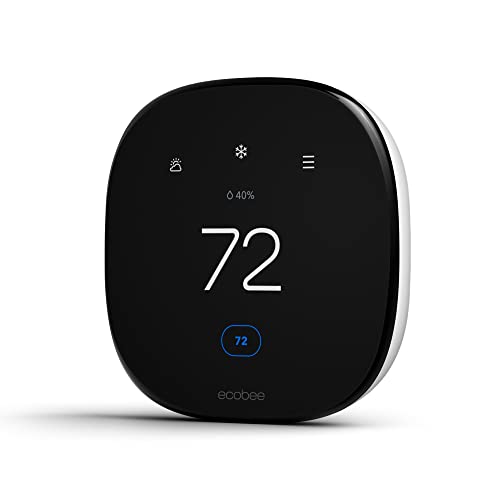
Live listings for the shortlist in this guide are pulled from Amazon below, so prices and availability are always current at the moment you look.


Ownership costs and longevity beyond the purchase
Beyond the device, ownership involves coin cells for sensors every few years, the optional security subscription for those who adopt it, and the household’s own time in seasonal schedule reviews. There is no required subscription for core heating and cooling, remote sensors, eco+, or Home IQ reporting as ecobee currently publishes the range, and that distinction is central to the value case: the thermostat a household buys remains a full thermostat if every optional service is declined. Buyers should confirm that position on the manufacturer’s current pages, since service packaging in this industry does evolve.
End-of-installation, one final habit separates satisfied owners from frustrated ones: resist re-litigating the settings daily. A smart thermostat with remote sensors, occupancy awareness, and recovery logic needs a week of ordinary living to show its patterns, and its reports need a month. Adjust schedules on evidence, one change at a time, and let the system do the quiet arithmetic it was bought for. The households that get the most from an ecobee are, in the end, the ones that set it up carefully and then mostly leave it alone.
For the house that measures its hallway honestly, wires its common line with care, and lets each room speak through its own small sensor, an ecobee stops being a gadget on the wall and becomes the calm, unremarked reason the nursery stays gentle through the coldest night of the year.