What's inside
- Where to buy
- Key Takeaways
- Quick Picks
- How did we judge phones at the very bottom of the memory ladder?
- What does RAM actually do, and why does 3GB struggle now?
- How do the six low-memory picks compare?
- How do you make a low-memory phone feel faster without spending anything?
- Who is a low-memory phone genuinely right for?
- What mistakes do buyers of cheap phones keep making?
- How long can you realistically keep a phone in this class?
- What actually happens inside a low-memory phone on a busy day?
- How would we spend three different budgets in this class?
- How should you set up a low-memory phone for someone else?
- Why did the budget floor move, and will it move again?
- How do these phones handle games, cameras and video calls?
- What will a phone in this class cost to run?
- What should you do when a low-memory phone starts feeling slow?
- How do carriers and prepaid plans change the picture?
- What about durability, repairs and hand-me-downs in this class?
- Final Recommendation
- Frequently Asked Questions
- Related Guides
As an Amazon Associate I earn from qualifying purchases. This post may contain affiliate links at no extra cost to you.
gizmoverdict.com is reader-supported. When you buy through links on our site, we may earn an affiliate commission.
Where to buy
Follow the link on a phone’s name to reach its listing, and read that listing’s memory and storage figures carefully before ordering, because budget phones are sold in several configurations under one name. That caution matters more in this guide than in any other we publish. Shoppers searching for the best 3gb ram android phones deserve a straight answer before anything else: a brand-new phone with exactly 3GB of RAM has become genuinely rare in the US market, and where it survives it is usually an ageing or ultra-basic model. The honest modern equivalent — the lowest-memory phones that are still worth buying new — starts at 4GB, and that is where this ranking concentrates, with one true 3GB veteran included for completeness and discussed without varnish.
Why does this category still exist? Because RAM is the specification that decides whether a cheap phone feels cheap. A phone’s memory holds the apps you are switching between; when it runs out, the phone closes things behind your back, and every return to a message thread or a map becomes a slow reload. Buyers on the tightest budgets, buyers purchasing a first phone for a child, a spare handset for a glovebox, or a simple device for an older relative, all end up asking the same question: how little memory can a phone have and still do its job? This guide answers that question honestly, phone by phone, rather than pretending the answer is more comfortable than it is.
So the ground rules are stated up front. Five of the six picks below carry more than 3GB of RAM, because those are the lowest-memory phones currently sold that we can recommend without crossing our fingers. One pick, discussed in its own section, is a genuine older 3GB-class device that remains available through remaining stock and the renewed market; it is included so readers set on the exact specification can see its real strengths and its real ceiling. Every pick is judged on the same test: calls, messages, messaging apps, maps, light browsing, photos and video calls, the workload these phones are actually bought for.
Key Takeaways
- True 3GB RAM phones have nearly vanished from the new US market; the realistic floor for a phone bought today is 4GB, and the difference in daily smoothness is larger than the single gigabyte suggests.
- The Motorola Moto G 2025 is the benchmark here, the lowest-memory phone in the guide that still feels like a complete, modern handset.
- Samsung’s Galaxy A15 5G and A16 5G bring the longest software support in this class, which matters enormously on phones kept for years.
- On any low-memory phone, storage discipline and app discipline matter as much as the hardware: keep free space, install the lite versions of heavy apps, and restart weekly.
- The one genuine 3GB veteran in this guide suits calls, messages and messaging apps only; buyers expecting maps, multitasking and modern games will outgrow it immediately.
- If your budget can stretch even slightly beyond this class, it should: memory is the one specification you cannot upgrade later.
Quick Picks
| Pick | Badge | Why it earns its place |
|---|---|---|
| Motorola Moto G 2025 | Best Overall | The 4GB floor done properly: clean software, a big bright screen and a battery that outlasts the day. |
| Samsung Galaxy A16 5G | Best for Longevity | Samsung’s long update promise turns a low-memory phone into a safe multi-year companion. |
| Samsung Galaxy A15 5G | Best Screen for the Money | An AMOLED display that looks far above its class, with memory card expansion for tight storage. |
| Samsung Galaxy A25 | Best Step Up | More memory headroom and a smoother screen for buyers who can stretch a little further. |
| TCL 50 XL 5G (T-Mobile) | Best Big-Screen Bargain | A huge, fast display for media and reading, tied to T-Mobile’s network and priced accordingly. |
| Samsung Galaxy A03s | The True 3GB Option | A genuine 3GB veteran for the lightest duties, included honestly with its limits stated plainly. |
How did we judge phones at the very bottom of the memory ladder?
Judging low-memory phones requires a different yardstick than judging flagships, because the question is not how fast a phone is but how gracefully it copes. We weighted four things. First, software weight: a light, near-stock Android build leaves more memory for your apps than a heavy skin does, which is why Motorola’s approach scores so well here. Second, memory management behaviour — how the phone treats background apps, and whether it warns you or simply lets things die. Third, the supporting hardware: a decent processor and enough storage matter because a low-RAM phone that also skimps on those becomes unusable rather than merely modest. Fourth, support life, because a cheap phone kept for four years needs security patches for four years.
We were equally strict about honesty. Any phone that struggled with the basic workload — a video call while a message arrives, a map rerouting while music plays — was either excluded or labelled with its limits in plain language. Readers of this guide are often buying for someone else: a parent, a child, an employee. A recommendation that overpromises creates a support burden for the buyer, so this guide errs on the side of understatement throughout. Where a model’s listed configuration differs from the headline version in memory or storage, we say so, because in this corner of the market the configuration is the product.
What does RAM actually do, and why does 3GB struggle now?
Think of RAM as the phone’s desk and storage as its filing cabinet. Everything you are actively using sits on the desk: the app on screen, the ones you just left, the keyboard, the camera’s processing, the system’s own services. A bigger desk means more work stays open and instantly reachable. A small desk means the phone constantly clears space by closing things, and reopening them takes time and battery. Ten years ago, apps were small and a 3GB desk was roomy. Today’s apps are far heavier — social and messaging apps carry media caches, browsers hold multiple rich pages, and the operating system itself reserves more memory for security and features — so the same 3GB desk is now crowded before you open anything ambitious.
This is why the honest headline of this guide is that 3GB has slipped below the comfortable line for a primary phone in 2025. It remains workable for a narrow, patient workload: calls, texts, one messaging app, occasional photos, a radio or podcast app. It is not workable for the pattern most people actually have, which involves switching among half a dozen services while maps run in the background. The phones ranked below were chosen to mark the real boundary: the 4GB models show what the practical minimum now looks like, and the single true 3GB pick shows exactly what the old minimum can and cannot still do.

Motorola Moto G 2025 — Best Overall
Picture the buyer this whole category is really for: someone replacing a cracked handset on a Friday afternoon, with a hard budget and no patience for a phone that stumbles over its own menus. For that buyer, the least expensive new handset here is also the one that still behaves like a proper smartphone — and it is this Motorola. Its 4GB of RAM is the practical floor, and Motorola’s light software makes the most of every megabyte, because an interface that carries little bloat leaves the memory free for your apps rather than the manufacturer’s. The big display is bright and smooth-scrolling for its class, the 50-megapixel camera handles daylight family photography credibly, and the battery is sized for people who cannot charge during the day.
Living with it requires the modest discipline this whole category demands: keep a few gigabytes of storage free, let the phone restart itself weekly, and prefer the lighter builds of heavy social apps. Do that and the Moto G feels composed rather than constrained — messages, maps, video calls and browsing all run without the constant reloading that defines lesser phones. The listed unit is a renewed example, so its cosmetic condition sits with the seller’s grading, but the hardware proposition is unchanged. As a first phone, a spare phone or a tight-budget primary phone, it is the safest pair of hands in this guide.
- Display: large panel with high refresh for its class
- Memory: 4GB RAM with 128GB storage on the listed unit
- Main camera: 50MP
- Software: near-stock Android, lightly customised
- Battery: sized for full-day use
Strengths
- Clean software squeezes more usable performance from modest memory than rivals manage
- Big, pleasant screen makes reading and video comfortable for older eyes
- Battery endurance that suits workers and travellers away from chargers
Trade-offs
- 4GB still means heavy multitasking will close background apps
- Motorola’s update window is shorter than Samsung’s
- Low-light photography is adequate rather than impressive
Best for: Budget buyers, first-phone shoppers and anyone needing a dependable spare. Not suited for: Gamers or heavy multitaskers who live in split-screen view.

Samsung Galaxy A16 5G — Best for Longevity
The A16’s argument is time. Samsung sells this as an inexpensive phone and then supports it like an expensive one, with years of Android upgrades and security patches promised — an extraordinary commitment at the bottom of the market, and the single best reason to buy it. The hardware around that promise is sensible: a large AMOLED display that flatters everything shown on it, a durable-feeling build, fast charging by class standards, and expandable storage so the phone’s cupboard can grow even though its desk cannot.
Performance is the honest compromise. The A16’s memory and processor combo handles the core workload — calls, messages, social apps, maps, video — with composure, provided you do not ask it to juggle like a flagship. Samsung’s One UI is heavier than Motorola’s software, and you feel that occasionally in a pause before an app opens. What you get in return is the ecosystem and the support: a phone bought for a parent or a young teenager that will still be receiving security patches when they are ready to hand it on. For a keeper phone on a small budget, that trade is the right one.
- Display: large AMOLED
- Memory: low-RAM class with expandable storage via card slot
- Software: Samsung One UI with a long update promise
- Charging: fast wired charging for its class
- Network: 5G, US version
Strengths
- Update longevity no rival in this guide can match
- Expandable storage postpones the full-phone problem for years
- Bright AMOLED screen that makes everything look a class better
Trade-offs
- Heavier software makes it feel less nimble than the Moto G
- App switching under load shows the memory ceiling plainly
- Camera is dependable in daylight, unremarkable at night
Best for: Buyers purchasing for parents, children or themselves with a multi-year horizon. Not suited for: Anyone who wants the snappiest possible feel from cheap hardware.

Samsung Galaxy A15 5G — Best Screen for the Money
The A15 earned its popularity the honest way, by putting a genuinely lovely AMOLED screen on a phone almost anyone could afford, and in the renewed and remaining-stock market it remains a compelling buy. That display, with its deep blacks and strong colours, transforms the cheap-phone experience more than any other single component could: photos look rich, video looks cinematic, and text stays crisp for long reads. Like its A16 sibling it offers expandable storage, and its camera is a pleasant daylight performer.
As the older of the two Samsungs here, the A15 sits one rung down in remaining support, though Samsung’s promise still stretches years ahead. Its memory configuration is in the same low class as the rest of this guide, so the same discipline applies: keep storage breathing room, prune unused apps, and do not expect flagship multitasking. The listed unit is a renewed international version, which means two checks before ordering — confirm your carrier accepts it, and read the seller’s condition grading. Pass those checks and the A15 is the connoisseur’s bargain of this list: the one that looks expensive every time the screen lights up.
- Display: AMOLED with strong contrast and colour
- Memory: low-RAM class with card expansion
- Main camera: 50MP class
- Software: Samsung One UI, long support runway remaining
- Storage: 128GB on the listed configuration
Strengths
- Screen quality that embarrasses phones costing considerably more
- Card slot keeps photo libraries growing without cloud fees
- Samsung support and accessory availability everywhere
Trade-offs
- International renewed listing demands a carrier compatibility check
- One generation older means one year less of updates than the A16
- Performance ceiling shows with several heavy apps open
Best for: Media lovers on a strict budget who read and watch more than they multitask. Not suited for: Buyers unwilling to verify network compatibility before ordering.

Samsung Galaxy A25 — Best Step Up
Every budget guide needs an escape hatch, a pick for the reader who came in hunting the cheapest possible phone and can be persuaded, gently, that a little more buys a lot more calm. In this guide that pick is the Galaxy A25. Its memory headroom is a clear step above the rest of the list, and the difference is not theoretical: apps stay alive longer, switching feels less like restarting, and the phone absorbs a busy day of maps, messages and media without the reload stutter that defines the class below it. The 120Hz AMOLED screen completes the impression of a phone that is not merely coping.
The A25 also carries Samsung’s camera tuning and support commitment, expandable storage, and a design that could pass for a far pricier Galaxy at conversational distance. The listed unit is renewed, which pulls its cost back toward the rest of this guide and makes the step up smaller than it first appears. If the person who will use this phone keeps devices for years, or uses more than a handful of apps daily, the A25 is where we would steer them: it is the cheapest phone here that stops feeling like a compromise within the first week.
- Display: AMOLED, 120Hz
- Memory: a step above the guide’s floor, with card expansion
- Main camera: 50MP with stabilisation
- Software: Samsung One UI with years of support
- Storage: 128GB on the listed configuration
Strengths
- Noticeably calmer multitasking than the lower-memory picks
- Smooth, bright screen lifts the whole experience
- Renewed pricing keeps the upgrade within budget reach
Trade-offs
- Still a budget processor, so demanding games remain off the menu
- Renewed condition varies by seller and grade
- Costs more than the strict floor models it outclasses
Best for: Buyers who can stretch slightly to escape the reload-and-wait routine. Not suited for: The absolute tightest budgets, where every last bit of savings counts.
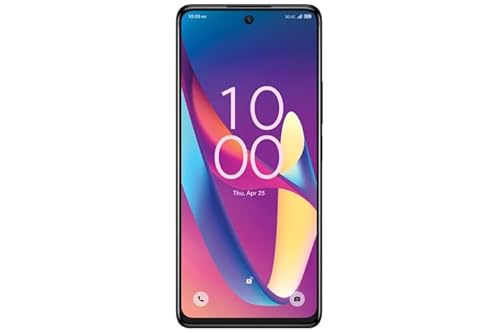
TCL 50 XL 5G (T-Mobile) — Best Big-Screen Bargain
TCL builds screens for a living, and the 50 XL shows it: a very large 6.78-inch display with a 120Hz refresh rate, on a phone priced for the bargain shelf. For the buyer whose phone is mostly a reading and viewing device — news over breakfast, video on the bus, big text for tired eyes — that screen is a persuasive argument all by itself. The 50-megapixel camera is serviceable, the battery is generously sized at just over five thousand milliamp-hours, and the memory sits in the same modest class as most of this guide, coping fine with a media-centred workload.
The defining condition is in the name: this listing is for T-Mobile’s network. That is not a flaw so much as a fence — T-Mobile customers and those on its partner networks get a lot of screen for their money, while everyone else should choose a different pick from this page. TCL’s software support also runs shorter than Samsung’s, so this is a phone to buy for the next couple of years rather than the next half-decade. Within those honest boundaries, it is the easiest recommendation here for anyone whose eyes vote first.
- Display: 6.78-inch, 120Hz
- Main camera: 50MP
- Battery: just over 5,000mAh
- Network: T-Mobile only on this listing
- Memory: modest class, suited to media-centred use
Strengths
- The largest, smoothest screen in this guide
- Big battery matches the big display’s appetite
- Comfortable text size for readers and older users
Trade-offs
- Locked to one network’s ecosystem by this listing
- Shorter software support than the Samsung picks
- Large body is a handful for smaller hands and pockets
Best for: T-Mobile customers who read and watch more than they multitask. Not suited for: Anyone on another carrier, full stop.
Samsung Galaxy A03s — The True 3GB Option
Here, as promised, is the genuine article: a phone from the era when 3GB of RAM was a normal budget specification. The Galaxy A03s was built for the lightest duties and, within them, it remains a likeable device — a large, simple screen, a battery that lasts because the hardware asks so little of it, a fingerprint reader, and Samsung’s straightforward software of the period. As a calls-and-messages phone, a device for a grandparent who wants WhatsApp with the family and nothing more, or a child’s strictly supervised first handset, it can still serve.
But this guide will not dress the A03s up as something it is not. Its memory ceiling is felt constantly in 2025: apps reload, the camera is slow to open, modern games are beyond it, and its software support has effectively run its course, which means it should not hold banking apps or anything sensitive. Remaining stock and renewed units are how it is bought now, and prices should reflect its status as a basic appliance. If your needs truly are calls, texts and one messaging app, it is an honest tool. The moment your needs grow past that list, every other phone in this guide is a better answer, and the kindest advice we can give is to buy the 4GB floor instead.
- Display: large LCD panel
- Memory: 3GB RAM class, with card expansion on most variants
- Battery: large cell, long standby
- Software: older Samsung Android experience
- Availability: remaining stock and renewed units
Strengths
- Genuinely simple, with battery life measured in days for light users
- Familiar Samsung layout for older users moving from an older Galaxy
- Costs very little through remaining and renewed stock
Trade-offs
- 3GB of RAM reloads apps constantly under modern workloads
- Software support has effectively ended, so avoid sensitive accounts on it
- Camera and general speed are firmly from another era
Best for: Calls, texts and a single messaging app for the most patient, lightest users. Not suited for: Banking, multitasking, gaming or anyone buying a primary phone for years ahead.
How do the six low-memory picks compare?
| Phone | Badge | Memory position | Standout quality | Main compromise |
|---|---|---|---|---|
| Motorola Moto G 2025 | Best Overall | 4GB floor | Light software, big battery | Shorter updates than Samsung |
| Samsung Galaxy A16 5G | Best for Longevity | Low-RAM class | Years of Samsung support | Heavier software feel |
| Samsung Galaxy A15 5G | Best Screen for the Money | Low-RAM class | AMOLED display | International listing checks |
| Samsung Galaxy A25 | Best Step Up | Above the floor | Calmer multitasking | Renewed pricing varies |
| TCL 50 XL 5G (T-Mobile) | Best Big-Screen Bargain | Modest class | Huge 120Hz screen | One network only |
| Samsung Galaxy A03s | The True 3GB Option | 3GB | Simplicity and standby | Support ended, apps reload |
The table tells the guide’s whole story in miniature. Memory rises as you move down the first four rows and daily life gets calmer; the TCL trades universality for screen size; and the A03s anchors the bottom as a reminder of what the exact specification in this article’s title now means in practice. Choose by workload, not by nostalgia for a number.
How do you make a low-memory phone feel faster without spending anything?
Start with storage, because a nearly full phone sabotages its own memory management. Keep at least a tenth of the storage empty, move photos to a card or the cloud, and delete the apps you have not opened in a month; on this class of phone, unused apps are not harmless, because many keep background services alive. Next, install the lite editions of the heaviest social and messaging apps where they exist, and use the browser for services you check rarely instead of carrying their full apps. Turn off auto-playing video in social feeds, which quietly consumes both memory and battery.
Then adopt the weekly restart. It sounds like folk wisdom, but on a low-memory phone it genuinely clears accumulated clutter and gives the memory manager a clean desk. Restrict background battery use for apps that misbehave, keep the launcher simple with few widgets, and let system updates install promptly, since manufacturers do tune memory behaviour in updates. Finally, manage expectations inside the apps themselves: close the camera fully before opening maps, avoid running navigation and video recording simultaneously, and download music and maps for offline use so the phone is not streaming and caching at the same time. None of this turns 4GB into 12GB. All of it together is the difference between a phone that copes and a phone that constantly apologises.
Who is a low-memory phone genuinely right for?
More people than the industry admits. The relative who uses a phone as a phone — calls, family messaging, photographs of grandchildren, the weather, the news — will be well served by the Moto G or A16 for years, and will never encounter the ceilings this guide describes. A child receiving a first device benefits from a phone that does the essentials well and games indifferently. Workers whose employers issue handsets for calls, scanning and messaging need durability and battery, not memory. And as a second phone — the one that goes to festivals, building sites and boat decks where a flagship would be a worry — a cheap, capable-enough handset is not a compromise at all but the correct tool.
The buyer these phones are wrong for is equally clear: anyone whose phone is their primary computer. If your day involves constant switching among email, documents, maps, camera and half a dozen services, low memory will tax you dozens of times a day, and the small saving will be repaid in irritation with interest. That buyer should read this guide as a signpost pointing one rung up the ladder, to the A25 at minimum and preferably beyond.
What mistakes do buyers of cheap phones keep making?
The first is buying the specification in the search box rather than the workload in real life — hunting for exactly 3GB because a listing or an old article mentioned it, when the living market has moved to 4GB for good reason. The second is ignoring storage while obsessing over memory; a low-RAM phone with generous or expandable storage ages far better than one that is full by Christmas. The third is skipping the support check: a cheap phone with years of patches ahead, like the A16, is a safer home for a family’s accounts than a marginally faster phone abandoned by its maker.
Fourth, buyers forget the network line on the listing. Two picks in this guide carry conditions — an international variant and a single-network model — and both are excellent value for the right buyer and useless for the wrong one. Fifth, people load a new cheap phone with every app they owned on their old flagship and then blame the hardware. A low-memory phone rewards a deliberate app list. Install what the user genuinely needs, in its lightest available form, and the phone will feel twice as capable as the same device buried under forty inherited apps.
How long can you realistically keep a phone in this class?
Kept within its workload, a phone from the top half of this guide can serve three to four years, with Samsung’s support windows making the longer end of that range safe as well as possible. The battery will soften first, as batteries do, and a light user’s phone may simply be retired when its patches end rather than when its hardware fails. The A03s is the exception in both directions: its hardware could potter on for years as a calls-only device, but its ended support means its responsible working life for anything account-based is already over.
Plan the exit when you buy. A phone purchased for a child can cascade to a grandparent; a worker’s handset can become the household spare. Low-memory phones cascade gracefully because their second jobs — calls, messages, a kitchen radio, a car navigation backup with downloaded maps — are exactly the jobs they were good at all along. Bought with that full life in mind, the modest phones in this guide are not the cheap option. They are the efficient one.
What actually happens inside a low-memory phone on a busy day?
Follow a typical morning on a 4GB phone and the memory story becomes concrete. The alarm app, the messaging service and the system itself wake already resident. You open the news, which loads a browser engine and several pages; the desk is filling. A message arrives and you switch to answer it — the news stays open behind you, for now. Maps joins for the commute, holding a live location and a downloaded route, while a podcast plays through an app that also wants its share. Photograph a timetable at the station and the camera demands a large, immediate workspace, so the phone quietly evicts the news page and perhaps the messaging app’s second thread. When you return to them, they reload. Nothing has gone wrong; this is simply the arithmetic of a small desk, and the art of owning these phones is arranging your habits so the evictions happen to things you were finished with.
On a true 3GB device the same morning involves harder choices. The camera opening may evict the maps app mid-route, which then has to reacquire its position. A video call arriving while a browser is open can stutter as the phone scrambles for room. This is why this guide insists on matching phone to workload rather than declaring phones good or bad in the abstract: the A03s on a quiet desk, handling calls and messages for a patient owner, is a perfectly contented machine, while the same phone in a busy commuter’s hand becomes a source of daily friction. The hardware has not changed. The desk is simply being asked to hold more than it can.
Manufacturers fight this arithmetic with increasingly clever memory management — predicting which apps you will return to, freezing background processes, compressing memory pages. Motorola’s light software benefits doubly here, because there is less manufacturer machinery competing for the desk in the first place. Samsung counters with features and support. Neither can repeal the arithmetic, which is why the step from 3GB to 4GB feels larger than the step from 4GB to 6GB: at the bottom of the ladder, every gigabyte is load-bearing.
How would we spend three different budgets in this class?
Imagine first the smallest possible budget, where the choice is between remaining 3GB stock and nothing. If the phone is for calls, messages and family chat only — genuinely only — a cheap A03s-class device does the job, and the money saved can buy a good case, a spare cable and a year of patience. The discipline is in the word only: the moment the user wants maps on the move, mobile banking or a grandchild’s school app, the calculation collapses and the phone becomes a false economy that will be replaced within the year.
Now imagine the budget stretched to the level of the guide’s floor models, which is where we would push almost every buyer. The Moto G 2025 and Galaxy A16 live here, and the choice between them is philosophical: Motorola’s lightness and battery against Samsung’s support and screen. Either transforms the experience compared with the tier below, because the phone stops being a negotiation. Add a memory card to the Samsung or choose the roomier storage configuration of the Motorola, and you have a device that can serve a light user for years without drama.
Finally, imagine the budget stretched once more, to the A25’s territory. What the extra money buys is not luxury but headroom — apps that stay open, a screen that scrolls at flagship smoothness, a camera that opens when the moment happens rather than after it. For a buyer purchasing their own primary phone, this is usually the wisest money in the entire guide, because the cost is spread across thousands of daily interactions. For a buyer purchasing a spare or a child’s first phone, it is unnecessary. The art of this market is knowing which of those buyers you are.
How should you set up a low-memory phone for someone else?
Many of these phones are bought by one person and used by another, and a thoughtful setup is worth more than a model upgrade. Before handing the phone over, install only the apps the user needs, in their lightest forms, and sign them in yourself. Set the text size and display scaling for the user’s eyes, place the five things they actually use on the home screen, and remove everything else from view. Turn on automatic updates, automatic photo backup and the weekly restart schedule if the phone offers one. Write the unlock code somewhere safe that the user controls, and make sure a trusted family member is set as the account recovery contact.
Then teach the two habits that keep these phones happy. The first is the weekly restart, framed not as maintenance but as the phone’s day off. The second is storage awareness: when the phone warns that space is low, that warning is real and should be answered by deleting videos or moving photos, not dismissed. Finally, agree in advance what the phone is not for. If banking and shopping will live on a different, supported device, say so at setup and remove the temptation. A low-memory phone configured with this much care will out-serve a carelessly configured phone with twice its specification, because most cheap-phone misery is configuration misery wearing a hardware costume.
Why did the budget floor move, and will it move again?
The floor moved because the software world grew. Android itself added security machinery and features; the big apps added media, stories, in-app browsers and AI assistants; cameras began processing multiple frames for every photograph. Each addition was reasonable in isolation and relentless in combination. Memory prices, meanwhile, fell slowly enough that manufacturers held the entry specification steady for years and let the experience absorb the strain, until the strain became the product’s reputation and the floor finally shifted to 4GB.
It will move again. The same forces are still at work, and the AI features now arriving on expensive phones will filter downward as selling points, bringing their memory appetites with them. That is the practical reason this guide favours headroom wherever the budget allows it, and why Samsung’s long support only fulfils its promise when paired with hardware that can run the software being supported. A phone bought at today’s floor should be bought as a three-year device. A phone bought a rung above it has a fair chance of a fourth and fifth year. In a market obsessed with this season’s numbers, that difference in lifespan is the number that matters.
How do these phones handle games, cameras and video calls?
Games draw the sharpest line through this guide. Simple puzzle and card games, the kind that fill waiting rooms, run happily on every pick here including the A03s. The big competitive titles are a different country: they want memory for textures, processing power for frame rates and storage for their enormous installs, and only the A25 among these phones gives them even a modest welcome, at reduced settings. Parents buying for children sometimes see this as a feature rather than a failure. Everyone else should treat gaming ambition as a reason to leave this class entirely.
Cameras divide the list more gently. In daylight, the Moto G, the two A-series Samsungs and the A25 all produce photographs that their owners happily share, because modern computational photography does much of the work and even modest sensors gather enough light at noon. The differences arrive at dusk: the Samsungs’ processing works harder to hold night scenes together, the TCL and Moto G produce softer, noisier results, and the A03s asks for a steady hand and low expectations. For the documentary photography of family life — birthdays indoors being the sternest common test — the A16 and A25 are the picks we would trust, with the A15’s screen making it the most enjoyable to review the results on.
Video calling, the third great test, is where this class quietly shines. Front cameras across the guide are adequate for family calls, the processors handle the common calling apps without strain, and the large screens on the TCL and the Samsungs flatter grandparents on both ends of the conversation. The one discipline required is singularity: a video call plus a heavy game plus navigation will overwhelm the smaller phones, while a video call alone is effortless. Families buying a phone primarily so an older relative can see the grandchildren should choose on screen size, speaker clarity and support length — which is to say, the A16 or the TCL depending on network — and ignore almost everything else in this guide.
What will a phone in this class cost to run?
The purchase is the small part of the story. A memory card for the Samsungs that accept one is a minor, one-off expense that pays for itself by postponing a replacement phone. A case matters more on these phones than on flagships, not because they are fragile but because their owners keep them longer and hand them down. Cloud storage can stay at the free tier if the card-and-backup discipline described earlier is followed. The real running cost to plan for is time: a low-memory phone asks for a few minutes of housekeeping a month, and owners who give it that time are rewarded with years of service, while owners who do not eventually pay in frustration instead. Totalled honestly, the phones in the top half of this guide are among the cheapest computing devices a household can run — provided their workload was chosen as carefully as their price was.
What should you do when a low-memory phone starts feeling slow?
Work the ladder from the bottom rung before blaming the hardware. First, check storage: if free space has fallen into the last few percent, the phone is suffocating, and deleting a handful of videos or moving the photo library will often restore it more completely than any other single act. Second, restart it, properly, and then watch which apps you reopen out of habit; the phone’s slowness is often a portrait of its owner’s app list. Third, hunt the rogue: battery and memory settings will show which app has been consuming resources in the background, and the culprit is frequently a forgotten game or a social app with every notification and auto-play option enabled.
Fourth, update everything — the system, then the apps — because memory management genuinely improves across a phone’s supported life. Fifth, if the phone remains sluggish, back it up completely and perform a factory reset, then reinstall only what you use. A reset low-memory phone, restored with discipline, often feels startlingly close to new, because the clutter it sheds took years to accumulate. Only after that ladder has been climbed should replacement enter the conversation, and when it does, this guide’s lesson applies to the replacement too: buy the memory headroom, not the headline number, and the new phone will climb its own ladder far more slowly.
There is one more honest possibility to name. Sometimes the phone has not slowed at all; the user’s life has sped up. A relative who once only called now video-chats daily, a child who once messaged now edits video, a worker whose employer has added three new apps to the daily round. No housekeeping fixes a workload that has outgrown the desk, and recognising that moment — and upgrading without resentment toward a phone that did its original job faithfully — is part of owning this class well.
How do carriers and prepaid plans change the picture?
Many phones in this class are bought on prepaid and family plans, and the plan can matter as much as the handset. Carrier stores often stock the Moto G and Galaxy A families at aggressive prices when a line is added, which can make a supported, warrantied new unit cheaper than a renewed listing bought outright — worth checking before ordering online, particularly for the Samsungs. The counterweight is choice: carrier shelves rarely include every configuration, and the version on offer may carry less storage than the listing you researched. Ask for the exact memory and storage figures in the shop, because in this class those numbers are the product.
Prepaid buyers should also confirm that the specific phone supports their network’s current bands and any device whitelist the carrier maintains. The two conditional picks in this guide — the international A15 and the T-Mobile TCL — exist precisely because this check matters. A five-minute compatibility confirmation, done before money changes hands, is the cheapest insurance in the entire budget-phone market, and the buyers who skip it fund the returns departments of the industry.
What about durability, repairs and hand-me-downs in this class?
Cheap phones lead hard lives — they are the ones dropped at work sites, soaked at kitchen sinks and inherited by the family’s most careless member — so their practical durability deserves respect in the buying decision. The Samsungs and the Moto G benefit from enormous accessory ecosystems and repair familiarity: any phone shop in any town has seen them, stocks their screens, and can quote a battery replacement from memory. The TCL is nearly as well served. The A03s, being older, is beginning to leave that comfortable zone, one more reason its remaining role is a gentle one. When you buy, fit the case on day one and treat the screen protector as part of the phone’s price; on a device intended to cascade through two or three owners, those small protections are what make the cascade possible.
Final Recommendation
Buy the Motorola Moto G 2025 if you want this class at its best: the lightest software, the calmest daily behaviour and a battery that minds its own business. Buy the Galaxy A16 5G if the phone must stay safe and supported for as many years as possible, and step up to the A25 whenever the budget allows, because its extra memory headroom is the single most felt upgrade in this entire guide.
And if you arrived here determined to buy exactly 3GB of RAM, leave with this thought instead: the number was never the point — the workload was — and the kindest, cheapest phone for a light workload in 2025 simply happens to start at 4GB.
One closing practical note: whichever pick you choose, buy it from a listing that states its memory and storage in the title or the first lines of its specifications, and screenshot those figures at checkout. In a market where one model name can hide three configurations, that ten-second habit is the difference between receiving the phone this guide recommended and receiving its lesser twin.
Frequently Asked Questions
Can a 3GB RAM phone run WhatsApp and other messaging apps?
Yes. Calls, texts and one or two messaging apps are precisely the workload a 3GB phone can still handle, which is why the A03s remains in this guide. The strain appears when several heavy apps must stay open at once, or when maps, camera and messaging combine. Keep the messaging list short, close the camera when you finish with it, and a light user will find the experience perfectly civilised; ask the phone to run a busy modern app rotation and the reloads will begin within the hour.
Why are there so few new 3GB phones on sale?
Because modern Android and modern apps have outgrown the specification. Manufacturers have quietly moved the entry level to 4GB and beyond, since the cost difference is small and the difference in returns, reviews and user satisfaction is large. Remaining 3GB stock is mostly older models selling through. A handful of ultra-basic devices for emerging markets still ship with 3GB or less, but they rarely reach US shelves through reputable channels, and their software support is typically the shortest in the industry.
Does adding a memory card help a low-RAM phone run faster?
Not directly — a card expands storage, not memory. It helps indirectly by keeping the internal storage from filling up, and a phone with breathing room in its storage manages its memory better. Keep photos and media on the card where the phone allows it. Think of it this way: the card cannot make the desk bigger, but it stops the desk being buried under filing that belongs in the cabinet, and on a small-desk phone that tidiness is worth real speed.
What is virtual RAM or memory expansion, and should I use it?
Many phones in this class offer to borrow storage space as extra memory. It can keep a background app alive a little longer, but storage is far slower than real RAM, so treat it as a mild comfort rather than a transformation, and leave it on only if you notice a benefit. Never let a listing’s expanded figure substitute for the real memory number when you compare phones.
Should I buy a 3GB phone for my child?
For a young child’s first device, a 3GB phone can be a reasonable, low-stakes introduction, provided a parent sets it up, limits the app list and understands that support limitations make it unsuitable for anything sensitive. For a teenager whose social life runs through several demanding apps at once, the 4GB floor models in this guide will prevent far more frustration than the small saving is worth.
How can I check how much RAM a phone is using?
Most Android phones hide memory details in the developer options or the device care section of settings, where you can see average memory use and which apps consume the most. You do not need to watch it daily; check it when the phone feels slow, and let the figures tell you which app to restrict, lighten or remove.
Is a low-memory phone safe for banking?
On a supported phone like the A16, A15 or Moto G, yes, provided updates are installed and the phone is kept locked. On a device whose security support has ended, such as the A03s, we would not sign into banking or other sensitive accounts at all.
Related Guides
If this guide has persuaded you to look one rung higher, these companions continue the search: best affordable android phones for the strongest all-round value just above this class, best mid range android phones for a fuller step up in every department, and best 5g android phones for rankings organised around modern network performance.


