What's inside
- Key Takeaways
- Quick Picks
- How Did We Choose These Whole-House Speakers?
- Which Ecosystem Should a Whole House Commit To?
- What Does Living With Grouped Playback Actually Change?
- Which Rooms Deserve a Speaker First, and Which Can Wait?
- The Six Systems, Room by Room
- How Do the Six Systems Compare Side by Side?
- How Should a Whole-House System Be Set Up, Room by Room?
- What Mistakes Ruin Whole-House Speaker Setups?
- How Do Guests, Children and Grandparents Fare With Each System?
- What Happens When the Internet Goes Down or the Platform Changes?
- Can These Speakers Pair Up for Stereo or Help a Television?
- What Should Be Checked Before Ordering a Multi-Room Set?
- How Should a System Be Budgeted Across Rooms?
- Why Do Rooms Drift Out of Sync, and How Is It Fixed?
- Final Recommendation
- Frequently Asked Questions
- Related Guides
As an Amazon Associate I earn from qualifying purchases. This post may contain affiliate links at no extra cost to you.
gizmoverdict.com is reader-supported. When you buy through links on our site, we may earn an affiliate commission.
Where to buy: Each of the six systems below links to its own Amazon listing, where the current bundle configuration and finish options are shown before checkout.
Finding the best bluetooth speakers to set up throughout house-wide listening really means choosing an ecosystem before choosing a speaker. A single portable speaker dragged from room to room solves nothing once two people want different music at the same time, and a drawer full of unrelated Bluetooth models cannot play in sync no matter how good each one sounds alone. Whole-house audio works when every speaker speaks the same grouping language, joins the same home network, and can be handed a stream from one app. The six options in this guide are built for exactly that job: they are mains-powered home speakers and multi-speaker sets designed to live in fixed rooms, join a shared system, and play either together or independently as the evening demands.
One honest clarification belongs at the top. Despite the wording of the search, Bluetooth is rarely the transport that carries music around a finished whole-house system. Bluetooth is how a phone pairs to one speaker at close range; multi-room playback travels over Wi-Fi, because Wi-Fi reaches through walls, holds sync between rooms, and frees the phone to leave the room without taking the music with it. Every pick here is a Wi-Fi home speaker first, with Bluetooth as a handy side door for a guest’s phone or a quick one-room session. Buying with that hierarchy in mind prevents the most common disappointment in this category: a house full of speakers that each play alone beautifully and together not at all.
The line-up spans three ecosystems and one flexible outsider. Sonos contributes three entries at three sizes, Amazon’s Echo Studio anchors the Alexa-centred home, Google’s Nest Audio arrives as a ready-made three-room bundle, and the Dio Node three-pack groups over Apple AirPlay 2. None of these systems mixes with the others for grouped playback, so the real decision is which platform the household already leans toward — voice assistant, phone type, and streaming habits matter more here than any single speaker’s spec sheet.
Key Takeaways
- Whole-house playback runs on Wi-Fi, not Bluetooth; Bluetooth serves one speaker at close range, while grouped, in-sync rooms need every speaker on the same Wi-Fi ecosystem.
- Sonos is the deepest bench in this guide, with the Four Room Set Sonos One SL, Era 100 and Era 300 covering four-room coverage, compact singles and a Dolby Atmos flagship inside one app.
- Bundles change the maths of coverage: the Google Nest Audio three-pack and the Dio Node three-pack put a speaker in three rooms in a single purchase.
- The Echo Studio is the heavyweight single unit here, the one pick that pairs whole-house grouping with a built-in smart home hub role.
- AirPlay 2 is the Dio Node’s grouping language, which suits Apple-centred homes that would rather not adopt another speaker app.
Quick Picks
| Pick | Badge | Why it earns its place |
|---|---|---|
| Four Room Set Sonos One SL | Best instant coverage | Four matched Sonos rooms in one box, the fastest route from silence to a genuinely covered house. |
| Sonos Era 100 | Best compact single | The small Sonos for kitchens, studies and bedrooms, bought one at a time as rooms join the system. |
| Sonos Era 300 | Best sound-first room | A Dolby Atmos flagship that treats the main listening room as a destination rather than background. |
| Amazon Echo Studio | Best Alexa anchor | Immersive Atmos sound plus a built-in smart home hub, for homes already run by voice. |
| Google Nest Audio (3-Pack) | Best value bundle | Three matched rooms in one purchase, the gentle on-ramp to grouped playback in a Google-centred home. |
| Dio Node | Best for AirPlay homes | A three-pack of Wi-Fi speakers that group through Apple AirPlay 2 instead of a proprietary speaker app. |
How Did We Choose These Whole-House Speakers?
Three filters shaped the shortlist. First, grouped playback had to be a designed feature rather than a hope: each pick belongs to a named multi-room ecosystem — Sonos, Amazon’s Echo family, Google’s speaker platform, or AirPlay 2 — so rooms can play the same stream in sync or different streams independently. Second, every pick is a mains-powered home speaker meant to stay put; battery portables earn their keep elsewhere, but a whole-house system should not depend on charge levels. Third, the set had to cover real buying patterns: complete multi-room bundles for a fresh start, singles that extend a system room by room, and one large anchor speaker for the room where listening is the point.
Just as important is what the shortlist refuses to promise. Grouping never crosses ecosystems: a Sonos room and a Nest room cannot join one group, and no app update will change that. Claims in the pick sections below stay tied to what each listing title actually states — a set described as a four-room set is treated as four speakers, a speaker whose title names Dolby Atmos is discussed as an Atmos model, and where a title is silent about a feature, the spec box says so instead of guessing.
Which Ecosystem Should a Whole House Commit To?
The ecosystem question deserves a slow answer, because it outlives every individual speaker. Hardware gets replaced one room at a time over a decade; the platform is the constant. Sonos is the specialist’s answer — an audio company whose entire product line exists to be grouped, with the widest ladder of sizes and a mature app. Amazon and Google treat speakers as one limb of a smart-home body: their speakers group happily, answer questions, run routines and control lights, and they suit homes already invested in Alexa or Google Assistant respectively. AirPlay 2 is the minimalist’s answer, a protocol rather than a product line, letting speakers from different makers group through the Apple devices a household already owns.
Voice control habits usually settle the argument. A home where people already ask Alexa for timers will find an Echo in every room natural and a Sonos in every room oddly mute by comparison, while a home that treats voice assistants with suspicion may prefer the microphone-free discipline of the One SL set or the app-driven Dio Nodes. Streaming service support is the other quiet decider: check that the household’s main service is natively supported by the platform under consideration, because a system that needs a phone-side workaround for its owner’s favourite service will be worked around daily, and resented weekly.
Network quality is the third decider, and the least glamorous. Grouped playback asks the home router to hold several speakers in tight sync while everything else in the house streams, games and video-calls. Crowded 2.4 GHz airspace in a dense apartment block can make any ecosystem stutter; a modern router, speakers placed within honest range of it, and a willingness to put the main speaker on the stronger band solve most sync complaints before they start. No speaker in this guide can outplay a failing network, and several returns in this category trace back to Wi-Fi rather than to the speaker that got blamed.
What Does Living With Grouped Playback Actually Change?
The difference shows up in small behaviours rather than in any single listening session. News follows the cook from kitchen to dining room without a volume negotiation at each doorway. A podcast survives the walk from desk to laundry room, so episodes stop dying at the fifteen-minute mark where the speaker used to fade out. Children get the same audiobook in two bedrooms from one stream, started once, instead of two phones balanced on two pillows. None of these moments needs audiophile equipment; all of them need speakers that share a grouping language, which is why this guide treats ecosystem as the headline specification and cabinet size as the footnote.
Grouped playback also changes how a house handles guests and occasions. A party stops being a single loud room that everyone must stand in, and becomes even sound at conversational level everywhere — the same playlist at the same moment in the kitchen, on the terrace-side room and in the hall, so conversation never competes with one blasting speaker. Announcements and intercom features in the voice-enabled systems add a domestic utility that has nothing to do with music: calling children to dinner through the speakers is a joke the first time and a habit by the third. These are the returns that make owners expand systems room by room, and they explain why the coverage bundles in this guide sell despite each individual speaker being unremarkable on a spec sheet.
There is a discipline cost worth naming. A whole-house system rewards a single streaming account, a tidy app and consistent naming, and it punishes improvisation — the borrowed speaker from another platform, the room renamed on a whim, the group rebuilt every weekend. Households treating the system as infrastructure, setting it up once and leaving it alone, report the highest satisfaction; households tinkering constantly, by contrast, discover every platform’s rough edges. Choose the ecosystem the whole household can live with, including the person least interested in technology, because that person will use it most honestly.
Which Rooms Deserve a Speaker First, and Which Can Wait?
Priority follows time spent awake. The kitchen leads almost every household’s list: it hosts cooking, cleaning, morning news and the informal half of every gathering, and it is a room where hands are usually too wet or too busy for a phone. The main living room comes second, though its speaker should be the best the budget allows, since it doubles as the music room and often supports the television. A home office or study is third in the current era — background music and spoken word at desk level, plus a speakerphone-adjacent presence for the workday. Bedrooms split opinion: some households want the alarm, the evening radio and the sleep sounds in the room where the day ends, while others deliberately keep bedrooms screen-and-speaker-light, which is precisely the temperament the microphone-free One SL set was designed around.
Rooms that can wait include bathrooms, hallways and spare bedrooms. Bathroom listening is delightful but humidity, small volume and short visits make it a luxury tier addition — and any speaker placed there should be chosen with moisture in mind rather than borrowed from the living room for a weekend. Hallways rarely need their own unit because sound spills generously from open doorways; a hallway that still feels dead usually signals that the neighbouring rooms’ speakers are too quiet or too directional, not that a seventh speaker is required. Garages and workshops join the system happily once the core rooms work, and they tolerate older, hand-me-down units well — a natural retirement path for the first speaker a growing system replaces.
Open-plan spaces deserve a special note, because they break the one-room-one-speaker rule. A combined kitchen, dining and living area is acoustically one room wearing three name tags; it wants either one substantial speaker placed centrally — the Era 300 or Echo Studio role — or a stereo pair of compact speakers at the living end with the kitchen riding along at lower volume. Putting three small speakers in one open space and grouping them produces loudness without clarity, since their outputs overlap and smear. Measure the air, not the floor plan’s labels.
The Six Systems, Room by Room
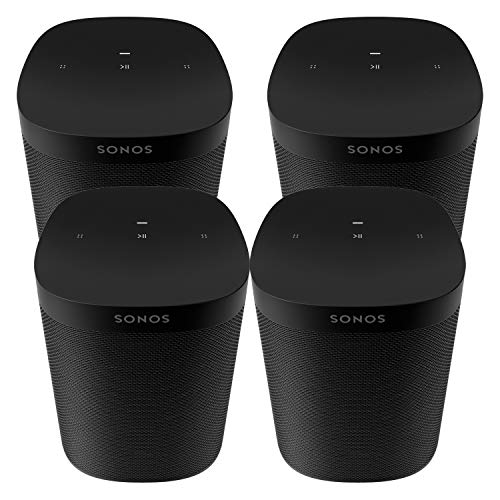
Four Room Set Sonos One SL — Best instant coverage
Most whole-house projects fail at the arithmetic: one speaker gets bought, sounds lovely, and the other three rooms stay silent for two years because each additional purchase needs its own justification. This set deletes that problem at checkout. Four matched Sonos One SL speakers arrive as a four-room set, ready to be unboxed into a kitchen, a bedroom, a study and a living room on the same afternoon, and from that first evening the house behaves like a system rather than a collection. The One SL is the microphone-free member of the Sonos family, which shapes its role: control runs through the Sonos app, a paired phone, or another voice-enabled device elsewhere in the system, and in exchange the speaker suits rooms where a listening microphone is unwelcome — bedrooms being the obvious example.
Sonically the One SL is a compact-room design, voiced for clarity at the moderate volumes background listening actually uses. Four identical speakers also produce the most coherent grouped sound in this guide, because every room shares the same tonal balance; walking from kitchen to hallway to bedroom with a podcast or a playlist running feels continuous rather than like passing between different radios. Expansion stays open-ended — an Era 100 or Era 300 can join the same system later for a room that graduates to serious listening, and the SLs keep their jobs as the coverage layer. For a household starting from zero that already knows it wants Sonos, this is the shortest path to a finished result.
- Configuration: four-speaker set, sold as a four-room bundle
- Ecosystem: Sonos multi-room over Wi-Fi
- Voice microphone: not a voice-assistant speaker; control via the Sonos app
- Grouping: plays in sync with other Sonos speakers, or independently per room
- Bluetooth role: system playback is Wi-Fi based; check the listing for current input details
Strengths
- Four matched rooms covered in a single decision, with identical voicing in every space
- Microphone-free design fits bedrooms and guest rooms where an always-listening device feels intrusive
- Sits inside the Sonos ecosystem, so larger speakers can be added later without replacing anything
Trade-offs
- No built-in voice control on these units themselves; hands-free requests need another device
- Commits the house to Sonos in one purchase — a big first step if the platform is untested
- Compact cabinets mean compact bass; a large open-plan space may still want a bigger anchor speaker
Best for: a fresh whole-house start on the Sonos platform, spread across small and medium rooms. Not suited for: a home that wants voice control from the speaker in every room.

Sonos Era 100 — Best compact single
The Era 100 is the incrementalist’s speaker: one room now, another at the next birthday, a third when the study finally gets finished. As Sonos’s compact single, it carries the platform’s grouping behaviour into spaces where a larger cabinet would crowd the worktop or the bedside table, and it does so without feeling like a compromise unit — stereo playback from a single small enclosure is its party trick, spreading a believable image across a desk or a kitchen counter where a mono speaker sounds pinned to one spot. Voice control is built in, so the Era 100 also serves as the voice endpoint in rooms where the One SL deliberately is not.
In a whole-house plan the Era 100 plays two roles. It is the natural first Sonos for a household testing the platform before committing, small enough that a disappointing experiment is not an expensive one — though the more common story is that the first Era 100 causes the second. And it is the natural gap-filler in an established system, the speaker for the laundry room, the nursery or the home office that never justified a flagship. Bluetooth pairing is present for the quick phone-to-speaker handoff, and line-in flexibility through Sonos’s accessories widens its sources, but its centre of gravity is the same as every pick here: grouped Wi-Fi playback under one app, with each room free to join the group or defect to its own stream.
- Configuration: single compact speaker, bought per room
- Ecosystem: Sonos multi-room over Wi-Fi
- Voice control: built-in microphone for voice-assistant use
- Playback character: stereo sound from a single enclosure
- Expansion: joins existing Sonos systems, including the One SL set above
Strengths
- Small footprint suits counters, shelves and bedside tables that reject bigger cabinets
- Adds voice control to rooms in a Sonos system built from microphone-free speakers
- Lets a system grow one affordable room at a time instead of demanding a bundle
Trade-offs
- Physics still applies: low-end weight is modest next to the Era 300 or Echo Studio
- Buying four singles generally costs more than the four-room set for the same coverage
- Stereo from one box is convincing at desk distance, less so across a big room
Best for: growing a Sonos house gradually, and for small rooms that need a full-featured speaker. Not suited for: filling a large living room as the only speaker in it.

Sonos Era 300 — Best sound-first room
Every whole-house system has one room where the music is not wallpaper — the chair, the records, the evening set aside for listening. The Era 300 is built for that room. Its listing names Dolby Atmos, and the cabinet’s multi-driver architecture exists to deliver spatial audio: height and width cues that let a well-mixed Atmos track place instruments in a volume of air rather than along a line between two boxes. As the flagship single in this guide, it also produces the scale that party duty demands, filling open-plan space at volumes where the compact picks start to sound strained.
None of that flagship character isolates it. The Era 300 is a Sonos speaker, grouped and governed like the others, so the same unit that plays an Atmos mix for one listener on Friday can join the whole-house group for a Sunday clean-up playlist, then split off again. That dual citizenship is the real argument for spending flagship money inside a system rather than on a standalone audiophile toy. Two Era 300s can also be paired for stereo or used as rear channels with a Sonos soundbar, giving the main room a growth path that the coverage speakers lack. Voice control is built in, Bluetooth covers casual pairing, and the size — this is a substantial object — is the main planning constraint: it needs a real shelf or stand, not a windowsill.
- Configuration: single flagship speaker
- Ecosystem: Sonos multi-room over Wi-Fi
- Headline feature from the listing title: Dolby Atmos spatial audio
- Voice control: built-in microphone
- Pairing options: stereo pair or soundbar rear channels within a Sonos system
Strengths
- Genuine spatial-audio presentation gives the main room a reason to exist in the system
- Output and scale suit open-plan spaces that overwhelm compact speakers
- Full Sonos grouping means flagship sound never sits outside the whole-house plan
Trade-offs
- The largest and priciest single here — overkill for a hallway or a small bedroom
- Atmos impact depends on Atmos content; ordinary stereo tracks gain less
- Needs proper placement on a stable surface to do its spatial work
Best for: the main listening room in a Sonos house, and film-adjacent music listening. Not suited for: background-only rooms where its abilities would never be switched on.

Amazon Echo Studio — Best Alexa anchor
The Echo Studio is what happens when a smart speaker stops apologising for its sound. Amazon’s listing leads with immersive Dolby Atmos audio, and the Studio’s large, multi-driver cabinet is the most powerful single unit in this guide — a speaker that can carry a living room on its own and still hold the detail of a quiet acoustic track at the other end of the volume dial. For a whole-house plan built on Alexa, the Studio is the anchor: the room where listening matters most gets the flagship, while smaller Echo devices can populate secondary rooms inside the same Amazon ecosystem and group with it.
Its second job is infrastructure. The listing title names a built-in smart home hub, which makes the Studio a control point for compatible lights, plugs and sensors as well as a speaker — one less box to plug in, and one more reason the unit earns a central position rather than a corner. Voice control is the native interface here, of course: timers, routines, announcements across rooms and hands-free music requests are the daily texture of an Alexa house, and the Studio delivers them with far better sound than the small Echo units people usually shout at. Households outside the Amazon orbit should note the flip side — this speaker’s talents are inseparable from its ecosystem, and it will not group with Sonos or Google speakers across the hall.
- Configuration: single large smart speaker
- Ecosystem: Amazon Echo / Alexa multi-room grouping
- Headline features from the listing title: immersive Dolby Atmos sound; built-in smart home hub
- Voice control: Alexa, built in
- Role in a system: flagship anchor for the main room
Strengths
- The most powerful single-speaker sound in this line-up, with Atmos presentation
- Smart home hub duties built in, reducing the box count in a connected home
- Natural fit for households already running routines and devices through Alexa
Trade-offs
- Groups only within Amazon’s ecosystem; no cross-play with Sonos or Google rooms
- A big cabinet that needs a committed spot, not a perch
- Voice-first design is a poor match for homes that dislike always-listening microphones
Best for: the main room of an Alexa-run home that wants real sound, not just answers. Not suited for: mixing into a house already grouped on Sonos or Google speakers.

Google Nest Audio (3-Pack) — Best value bundle
Google’s entry takes the bundle logic of the Sonos set and applies it at a friendlier scale: three Nest Audio speakers in one purchase, explicitly sold as a multi-room bundle. Nest Audio is Google’s full-size smart speaker — a fabric-wrapped unit voiced for music rather than the mini puck category — and three of them cover the classic triangle of kitchen, living room and main bedroom in a single afternoon of setup. Speaker groups are created in the Google Home app, named, and then treated as destinations: the morning news in the kitchen group, everything everywhere for a party, one bedroom defecting to its own podcast at night.
The Nest Audio’s character is easygoing. Its sound favours voices and midrange clarity, which flatters radio, podcasts and the singer-songwriter end of most libraries, and its Google Assistant endpoint in each room means questions, timers and broadcast messages between rooms are part of the package. As a system it rewards households already living in Google’s world — Android phones, Chromecast habits, Google calendars — where the speakers feel like an extension of existing routines rather than a new platform to learn. Bass weight is the honest limit: three Nest Audios spread through a house give even, pleasant coverage, but a large living room that wants physical low end will eventually ask for a bigger anchor, and Google’s own ecosystem offers fewer flagship music speakers than Sonos does.
- Configuration: three-speaker bundle, sold for multi-room coverage
- Ecosystem: Google Home speaker groups over Wi-Fi
- Voice control: Google Assistant, built into each unit
- Playback character: voice-forward, midrange-clear tuning
- Grouping: named groups in the Google Home app, per the multi-room bundle description in the listing title
Strengths
- Three matched rooms from one box and one setup session
- Assistant in every room supports intercom-style broadcasts and shared timers
- Soft-touch design and modest size disappear into ordinary rooms
Trade-offs
- Low-end weight is limited; big rooms may still want a larger anchor speaker
- Locked to Google’s grouping — no joining Sonos or AirPlay groups
- Music-first households may outgrow the platform’s thinner flagship ladder
Best for: a Google-centred home seeking painless three-room coverage in one purchase. Not suited for: a main listening room that demands flagship scale and bass.

Dio Node — Best for AirPlay homes
The Dio Node three-pack is the quiet radical in this guide. Its listing title describes multiroom Wi-Fi speakers that work with Apple AirPlay 2, and that protocol-first design is the whole point: instead of asking a household to adopt another speaker platform, another account and another app’s idea of a library, the Nodes join the grouping system built into iPhones, iPads and Macs. Open the AirPlay menu, tick the kitchen and the study, and the music follows. For Apple-centred homes, the learning curve is close to zero because the interface is the one already in their pockets.
Each Node is a compact Wi-Fi speaker intended for exactly the rooms bundles always target — counters, shelves, bedside tables — and the three-pack mirrors the coverage logic of the Nest bundle. The trade for that simplicity is that AirPlay grouping lives on the sending device: playback is steered from an Apple device rather than from a platform cloud service, and Android visitors cannot drive the group. There is also no voice assistant living in these speakers, which some households will file under feature and others under relief. Within its lane, though, the Node set solves a real problem elegantly: whole-house audio for the Apple household that has resisted every previous ecosystem pitch.
- Configuration: three-speaker pack
- Ecosystem: Apple AirPlay 2 multiroom, per the listing title
- Voice control: none built in; control runs from Apple devices
- Connection: Wi-Fi speakers, grouped through AirPlay 2
- Setup character: no separate speaker-platform account required for grouping
Strengths
- Grouping happens inside the AirPlay controls Apple owners already know
- Three rooms covered in one purchase, like the other bundles here
- No always-listening assistant in rooms where that is unwelcome
Trade-offs
- AirPlay-centred: Android phones cannot steer the multi-room group
- Playback depends on a sending Apple device rather than speaker-side streaming accounts
- Compact cabinets keep bass modest, as with the other coverage sets
Best for: an Apple household seeking multi-room sound without adopting a new platform. Not suited for: a mixed-device home that needs Android phones to run the system.
How Do the Six Systems Compare Side by Side?
| System | Units in the purchase | Grouping language | Voice built in | Character |
|---|---|---|---|---|
| Four Room Set Sonos One SL | 4 | Sonos over Wi-Fi | No | Matched coverage layer, microphone-free |
| Sonos Era 100 | 1 | Sonos over Wi-Fi | Yes | Compact stereo single, grows room by room |
| Sonos Era 300 | 1 | Sonos over Wi-Fi | Yes | Dolby Atmos flagship for the main room |
| Amazon Echo Studio | 1 | Amazon Echo grouping | Yes (Alexa) | Large Atmos anchor with smart home hub |
| Google Nest Audio (3-Pack) | 3 | Google Home groups | Yes (Google Assistant) | Voice-forward three-room bundle |
| Dio Node (3-Pack) | 3 | Apple AirPlay 2 | No | Protocol-first set for Apple homes |
Read the table as a map of commitments rather than a league table. The two bundles and the Sonos set sell coverage; the three singles sell depth in one room. Mixing the two ideas inside one ecosystem — a bundle for coverage, a flagship for the main room — ends up producing the most satisfying systems of all, while mixing ecosystems instead ends up with two apps and a permanent low-grade argument about which speaker the kitchen belongs to.
How Should a Whole-House System Be Set Up, Room by Room?
Start with the router, not the speakers. Walk the house with a phone and note where the signal fades; speakers placed beyond honest Wi-Fi range will drop from groups no matter their brand. Put the first speaker in the room used most, finish its setup completely, and play it for a day before unboxing the rest — one working room teaches the app’s grouping logic better than four simultaneous setups. Then add rooms outward from the router, testing grouped playback at each step, and name every speaker for its room immediately; a system full of devices named by model number becomes unusable by voice within a week.
Power deserves thirty seconds of planning per room. Every speaker here is mains-powered and stays plugged in permanently, so each needs a socket that is not already hosting the kettle, the charger drawer and a power strip of regrets. Cables should be dressed once, at installation, rather than left to wander: a speaker whose cord crosses a walkway will be unplugged by a vacuum cleaner within the month, and a system that keeps vanishing from the app because its members lose power teaches the household to stop trusting it. Where a target room has no free socket near a sensible shelf, that room’s speaker waits until an electrician or a furniture rearrangement solves it properly.
Placement inside each room follows two rules. Keep speakers off the floor and away from corners unless more bass is genuinely wanted, because boundaries inflate low end unevenly; and keep them at roughly ear height relative to how the room is used — seated height in a study, standing height in a kitchen. Run any available room-tuning feature after furniture is in its final position, not before. Finally, build two or three named groups that match real life — downstairs, bedrooms, everywhere — rather than grouping on the fly each time; daily whole-house audio becomes routine in homes where starting it takes just one tap.
What Mistakes Ruin Whole-House Speaker Setups?
The classic error is buying across ecosystems — a Sonos for the kitchen because it was on sale, an Echo for the bedroom because it was bundled with something — and discovering at the first party that the house cannot play together. The second error is expecting Bluetooth to do Wi-Fi’s job: pairing a phone to whichever speaker is nearest produces one room of music and a phone that must stay in that room. Third is starving the network, hanging six speakers off a wheezing router in a cupboard and blaming the speakers for dropouts. Fourth is skipping the small rooms: coverage that stops at the bathroom and study doors is exactly where grouped audio feels most magical, because those are the rooms music never used to reach. The last mistake is volume thinking — judging a coverage speaker by how loud it plays a demo track instead of how clear a voice sounds at breakfast level, which is the level it will actually live at.
How Do Guests, Children and Grandparents Fare With Each System?
A whole-house system is only finished when the least technical person in the building can start music without a tutorial. Voice-enabled rooms win this test outright: asking the kitchen speaker for the radio is a skill a grandparent masters in one demonstration and a child masters before the demonstration ends. App-driven systems demand a phone, the app, the household account and the confidence to group rooms — a chain that breaks at its weakest link, usually the account password. This is the practical argument for including at least one voice-enabled speaker in systems built mainly from microphone-free units, and for choosing the platform whose assistant the household already talks to.
Guests present the mirror-image problem: their music lives on their phones, outside every household account. Bluetooth pairing is the universal guest door, and it is one reason the wireless wording of this search still matters — a visitor can put a playlist on the nearest speaker in seconds, in one room, without joining the home network or the family streaming plan. AirPlay offers Apple-carrying guests a smoother version of the same courtesy where the network allows it. Hosts who entertain often should test the guest path once themselves, phone in hand, before the evening it is needed; the thirty seconds of pairing friction discovered in advance beats the same friction performed in front of an audience holding drinks.
Children deserve a planning sentence of their own. Voice speakers in children’s rooms bring audiobooks and music under the household’s account controls, with filters and routines set by parents; they also bring a microphone into a child’s room, which some families accept and others refuse on principle. The microphone-free coverage speakers exist in this guide partly for that refusal. Either choice is defensible; the indefensible version is discovering the household’s position after six speakers are already installed.
What Happens When the Internet Goes Down or the Platform Changes?
Whole-house speakers are network citizens, and their behaviour during an outage reveals their design. Grouped streaming depends on the home network and, for most services, on an internet connection reaching the platform; when the connection drops, cloud-streamed music stops with it, on every ecosystem in this guide. Local sources soften the fall — a phone can still Bluetooth a downloaded playlist to one speaker, and line-in sources keep playing in Sonos rooms so equipped — but the honest expectation is that a smart speaker system is diminished offline in a way a shelf of CDs never was. Households for whom that trade is unacceptable should keep one good standalone speaker or a radio in the mix without embarrassment.
Platform change is the slower risk. Speaker ecosystems evolve: apps are redesigned, features migrate, older models eventually stop receiving the newest tricks. The defence is not clairvoyance but proportion — the systems here come from the largest platforms in the category, with the deepest installed bases, which historically correlates with long support tails. Buying coverage gradually, as the Era 100 route allows, also spreads the commitment across years instead of concentrating it in one weekend. And the speakers themselves keep their core skill — playing grouped music over the home network — long after the marketing features rotate.
Can These Speakers Pair Up for Stereo or Help a Television?
Within their own ecosystems, several picks stretch beyond background duty. Two Era 100s or two Era 300s can form a stereo pair, which transforms a desk or a listening chair: instruments separate, voices centre, and the room gains the soundstage that a single box simulates but cannot fully draw. The Era 300 pair can also serve as rear channels behind a Sonos soundbar, pulling the television into the same system that already fills the house with music. The Echo Studio can likewise be paired and can join a home-theatre grouping with compatible Amazon devices, while Nest Audio speakers pair for stereo in a single room inside Google’s app. The Dio Nodes keep a simpler brief — grouped rooms over AirPlay rather than theatre roles.
Two cautions keep these upgrades honest. Stereo pairs must be identical models, so the time to plan a pair is before the first purchase, not after a mismatched second speaker arrives. And television sound through grouped speakers is for the platform’s own theatre features; sending TV audio to a kitchen speaker down the hall introduces delay that no setting fully cures. Music forgives a few milliseconds between rooms because ears forgive it too — lip movement on a screen does not.
What Should Be Checked Before Ordering a Multi-Room Set?
Four checks prevent most returns in this category. Confirm the household’s main streaming service works natively inside the chosen platform, rather than assuming a favourite app will somehow reach the speakers. Confirm the phones in the house match the grouping system — an AirPlay set steered by nobody’s iPhone is a paperweight with a power cord. Confirm Wi-Fi strength in the furthest target room with a phone speed test at the exact shelf position, not at the doorway. And confirm the physical fit: measure the shelf or counter each speaker will occupy, because flagship units like the Era 300 and Echo Studio are furniture-scale objects that surprise people who shopped from thumbnail photographs.
A softer check matters too: sit the household down for the voice question. Voice-enabled speakers in every room are a genuine convenience and a genuine presence, and families divide honestly on them. The line-up here deliberately includes both temperaments — microphone-free coverage from the One SL set and the Dio Nodes, voice everywhere from the Echo, Nest and Era models — so the disagreement can be settled by shopping rather than by unplugging things later.
How Should a System Be Budgeted Across Rooms?
Whole-house money divides into three tiers of spending, and mixing them deliberately beats spreading the same amount evenly. The coverage tier — bundles and compact singles — should be bought for reach and sameness, not for thrills: its job is to make every target room a citizen of the system at breakfast volume. The anchor tier deserves the largest single share, because the main room hosts the deliberate listening and the gatherings, and its speaker will be judged hardest. The patience tier is the money not spent yet: leaving room in the plan for the speaker a household does not know it needs — the study unit, the second half of a stereo pair — prevents the false economy of finishing a system that is one room short of finished.
Sequencing protects the budget as much as selection does. Buying coverage first and the anchor second risks a month of even, underwhelming sound that sours the household on the whole project; buying the anchor first proves the concept at its most impressive and makes the coverage purchase feel like spreading a good thing rather than multiplying a mediocre one. The exception is the household certain of its platform and its floor plan, for whom a four-room or three-room bundle simply is the efficient move. Either way, the discipline that matters is refusing to split the spend across two ecosystems in the name of deals: the money saved on a discounted foreign-ecosystem speaker is spent again, with interest, in duplicated apps, unmatched groups and eventual replacement.
Running costs are mercifully thin. The speakers draw modest standby power, ask for no subscriptions of their own, and consume nothing but the household’s existing streaming accounts. The realistic long-term expense is expansion itself, because working systems invite it — a fact worth treating as a feature of the plan rather than a failure of restraint.
Why Do Rooms Drift Out of Sync, and How Is It Fixed?
Sync complaints follow a pattern so regular that it can be diagnosed from the description alone. Rooms drift or drop when a speaker sits at the edge of Wi-Fi coverage, when the router is asked to hold a group while a game console downloads an update at full tilt, or when one speaker in the group rides a congested band while the others sit comfortably elsewhere. The fixes follow the same order as the causes: move the suffering speaker or the router until both are honestly inside coverage, let the router’s automatic band steering settle the group onto the healthier band, and restart the system in sequence — router first, speakers after — before concluding anything is broken. Grouped audio is a real-time workload; it exposes network weaknesses that web browsing politely hides.
Distance between rooms is not itself a problem, because the speakers do not talk to each other across the house — each talks to the router, and the router conducts. A long thin house with the router at one end is therefore the hardest floor plan in this category, harder than a larger square house with a central router. Mesh Wi-Fi, where present, should be treated as part of the speaker system and placed with the speakers in mind. Owners who solve the network first routinely report that the speakers they nearly returned became flawless; the speaker was the messenger, and the message was about the router all along.
Final Recommendation
Choose the ecosystem first and the hardware second, and this category becomes simple. A household starting from zero on the strongest audio platform should take the Four Room Set Sonos One SL for instant coverage and add an Era 300 when the main room asks for more; a household growing cautiously should start with a single Era 100 and let it multiply. Alexa-run homes should anchor on the Echo Studio and let smaller Echo units fill the gaps, while Google-centred homes get the gentlest on-ramp in the Nest Audio three-pack. Apple households having refused every platform pitch so far should look at the Dio Node set and its AirPlay grouping. Whichever route is chosen, the house that plays together on the first weekend is the one that was planned as a system — because in whole-house audio, the group is the product, and every speaker here is only as good as the rooms it can sing with.
Frequently Asked Questions
Do whole-house speakers actually play over Bluetooth?
Only in a limited sense. Bluetooth pairs one phone with one speaker at short range, which is fine for a guest’s playlist in a single room. Synchronised playback across several rooms travels over Wi-Fi, because Wi-Fi reaches the whole house and keeps rooms in time with each other. Treat Bluetooth as a convenience input and Wi-Fi grouping as the system itself.
Can Sonos, Echo and Nest speakers join one group together?
No. Grouped playback stays inside each platform: Sonos speakers group with Sonos, Echo devices with Echo, Nest speakers with Nest, and AirPlay 2 speakers group through an Apple device. A house can own two ecosystems, but they will always behave as two separate systems with separate apps.
How many speakers does a house actually need?
One per room where music should be present — which is usually fewer than every room. Most households settle on the kitchen, living room, main bedroom and one workspace. Bundles like the four-room Sonos set and the three-packs here exist because that pattern is so consistent.
Will a weak router cause problems?
Yes, and it is the most misdiagnosed problem in this category. Grouped speakers ask the network for steady, simultaneous streams; an old or badly placed router produces dropouts that look like speaker faults. Improve placement and coverage of the Wi-Fi itself before blaming or replacing speakers.
Is a microphone-free speaker a disadvantage?
It depends on the room. The Sonos One SL set skips built-in voice control, which costs hands-free requests at that speaker but suits bedrooms and guest rooms where an always-listening microphone is unwelcome. Control still happens through the app, and voice-enabled speakers elsewhere in the system can take requests.
Should every speaker in the house be the same model?
No, and inside one ecosystem it usually should not be. Matched speakers matter inside a stereo pair and help bundles sound coherent, but a system thrives on hierarchy: strong speakers where listening is deliberate, compact ones where coverage is the job. The platform is the thing that must match; the cabinets are free to specialise.
Can a whole-house system be built gradually?
Yes, and for many households, this is the wisest route. Begin with one speaker from the chosen ecosystem in the most-used room, live with the app and the assistant for a month, and let the verdict of daily life decide the expansion. Singles like the Era 100 exist for exactly this pattern, and bundles remain available later when the commitment is proven.
What is the difference between a stereo pair and a multi-room group?
A group plays the same programme in several rooms, each speaker covering its own space, timed so the music agrees as you walk between them. A stereo pair works inside one room: two matched speakers split the left and right channels between them to build a single, wider image for a listener in one place. The two ideas combine freely — a stereo pair in the living room can itself join the whole-house group.
Do these speakers need a subscription?
The speakers themselves do not charge rent; they play through the streaming services and radio sources the household already uses, free tiers included where the platform supports them. A paid music subscription improves catalogue depth and removes advertising on most services, but no pick in this guide requires one to function as a grouped system.
Related Guides
For the rooms where listening gets serious, see our guide to bookshelf speakers for music, compare the desk end of the spectrum in desktop speakers for a home office, and round out film nights with soundbars for living-room TVs.
Related guides
- Best Affordable Bluetooth Headsets: Earpieces and Light Work Headsets That Earn Their Keep
- Best Replacement Speakers for 2004 Toyota Tundra: Six 6.5-Inch Pairs and the Figures Their Titles Actually Print
- Best 6×8 Speakers
- Best Aviation Headsets With Noise Canceling: ANR Flagships and the Honest Passive Pair