What's inside
As an Amazon Associate I earn from qualifying purchases. This post may contain affiliate links at no extra cost to you.
gizmoverdict.com is reader-supported. When you buy through links on our site, we may earn an affiliate commission.
Where to buy: Church technology purchases usually answer to a treasurer and a committee, so this guide sticks to mainstream Amazon listings in the United States that a finance volunteer can reorder without detective work. All six tablets below are current consumer models sold through Amazon, and several ship with a pen, a folio case or both already in the box, which simplifies a purchase request: one line item, one delivery, one asset to record. Order a first unit before committing a whole ministry fleet, because halls differ and the screen that suits a chancel may not suit a youth room.
The search for the best tablets for churches begins with a realisation: a congregation asks a tablet to do jobs no single other device in the building does. On Sunday it displays lyrics at the lectern and chords for the worship band. At the sound desk it runs the mixing app that replaced a cupboard of hardware. In the welcome area it signs in children, takes contactless offerings and shows the notice slideshow. Midweek it becomes the office machine for the administrator, the study tool for the sermon writer and the video screen for the youth group. A tablet bought for church is therefore not a gadget purchase; it is a small piece of infrastructure, and it should be chosen like one.
Screen size dominates the decision, which is why this list lives at the large end of the tablet market. Four of the six picks measure between twelve and thirteen inches, sizes that keep a line of lyrics legible to a singer standing a pace away and keep a mixing app’s faders usable by real fingers. The two smaller Samsung and Lenovo options still clear ten inches comfortably. Around the screens, the listings offer pens for annotation, folio cases for transport between rooms, water resistance in the Samsung FE pair, and one budget model with speakers voiced for a room rather than a lap.
Software is the invisible half of the purchase, and it is deliberately treated here as context rather than as a pick. Worship presentation programs, digital songbook apps, mixer control apps and giving platforms all run on mainstream Android tablets, and a church’s existing subscriptions will follow it to any of these six devices. What the hardware must guarantee is simpler: a screen the team can read, a battery that outlasts the longest service, storage that swallows a year of song files, and a price the meeting can approve without a special collection. Those are the terms on which the reviews below are written.
It is worth pausing on the human setting, because it explains the list’s shape. The person operating the lyric tablet may be seventy, or fifteen, or sighted well enough for print but not for a phone. The person carrying the welcome tablet may be doing so one-handed, with a toddler on the other arm. Church hardware succeeds when it forgives — big text, forgiving touch targets, pens that behave like pens, cases that behave like bumpers. Every judgement in the reviews that follow was made with those hands in mind, which is why screen inches and included accessories outrank processor bragging throughout.
Key Takeaways
- Four picks measure 12.1 inches or larger, sized for lyric display, sheet music and mixer control at arm’s length.
- The Samsung Galaxy Tab S10 FE+ is the largest screen here at 13.1 inches and shares IP68 water resistance with the smaller S10 FE.
- Both Lenovo Idea Tab models and the Tab P12 Pro include a pen per their titles; the Idea Tabs add folio cases.
- The Galaxy Tab A11+ is the value route into the fleet, with Dolby Atmos speakers and a two-year warranty in its title.
- Presentation and songbook software is a subscription decision made separately; every pick here is mainstream Android hardware.
- Only the Lenovo Tab P12 Pro states its Wi-Fi generation (Wi-Fi 6) in the title; the rest leave networking details to the listing page.
Quick Picks
| Pick | Tablet | Badge |
|---|---|---|
| 1 | Lenovo Idea Tab Pro 12.7 | Best overall for churches |
| 2 | Samsung Galaxy Tab S10 FE+ | Best for lyric display |
| 3 | Samsung Galaxy Tab S10 FE | Best for the sound desk |
| 4 | Lenovo Idea Tab Plus 12.1 | Best lightweight option |
| 5 | Lenovo Tab P12 Pro | Best for study and notes |
| 6 | Samsung Galaxy Tab A11+ | Best value fleet tablet |
How were these picks chosen?
Church use imposes a distinctive checklist, and we built it from the building outward. The first test is legibility at distance: lyrics, chords and running orders are read standing, often under mixed lighting that includes coloured stage wash and bright windows, so panel size and resolution lead the criteria. The second test is duration. A Sunday can mean a rehearsal, two services and an evening meeting on one charge, with the tablet passing between volunteers who will not think to plug it in, so stated battery claims and efficient processors carry real weight.
Third comes the volunteer factor. Church technology is operated by generous amateurs, not IT staff, so a tablet must be forgiving: a familiar interface, a pen that makes annotation feel like paper, a case that survives the drop from a music stand. Fourth is stewardship of money that was given, not earned, which pushes toward models with clear listings, honest specifications and accessories included rather than upsold. Fifth is longevity — a congregation that buys six tablets expects them to serve a building programme measured in years, and current processors and generous storage protect that expectation.
We also considered where each tablet would live. A lectern tablet wants the biggest screen; a welcome-desk tablet wants speakers and simplicity; a study tablet wants the pen and the sharpest text. The ranking below reflects that spread deliberately, because most churches should not buy six identical devices — they should buy a small fleet whose members match their stations, sharing chargers, accounts and the administrator’s sanity.
One criterion sits underneath all the others and deserves naming: repairability of the decision itself. A congregation is a democracy of volunteers, and a technology choice that only one enthusiast understands will not survive that enthusiast’s house move. Mainstream models from Samsung and Lenovo, documented everywhere and understood by every phone shop on the high street, keep the fleet maintainable by ordinary people. That is a deliberate conservatism in this list, and it is the same conservatism a good church council applies to boilers, roofs and hymn books: buy what the community can sustain.

1. Lenovo Idea Tab Pro 12.7 — Best overall for churches
The Idea Tab Pro takes the top position because its specification reads like a church brief written in advance. The 12.7-inch 3K LCD is the joint-largest class of screen in this guide, big enough that a worship leader reads lyrics without leaning and a pianist reads a chord chart without pinching. The MediaTek Dimensity 8300 is a genuinely capable processor, the sort that keeps a presentation app, a songbook and a browser of service plans open together without the stutter that unnerves a volunteer mid-service. A pen and a folio case are included, per the title, so the box contains the whole lectern kit.
Lenovo markets the machine to students, with Google Gemini aboard, and the student framing translates surprisingly well to ministry. Sermon preparation is study: reading, annotating, cross-referencing, drafting. The pen turns the big screen into a notebook for marking up a passage or sketching a service running order, and the folio case carries it between office, hall and home like a folder of papers. The 128GB of storage holds a congregation’s accumulated song files, service recordings and presentation decks without housekeeping.
The honest gaps are the ones the title leaves: no battery figure, no weight, no speaker description. A church planning to run this tablet untethered through a double-service Sunday should confirm the battery story on the listing page and, in any case, adopt the habit that saves every fleet — a charging dock in the vestry where tablets sleep all week. With that routine in place, the Pro’s strengths are the ones that matter at 10:29 on a Sunday morning: a huge, sharp screen, a responsive chip and a pen in the box.
Committees weighing this pick against the Samsung FE+ below should decide by ecosystem and by water. The Lenovo counters with the included case and the 3K resolution; the Samsung counters with weather sealing and its own pen tradition. Either serves a congregation well, and the choice is unlikely to be regretted — which is exactly what a treasurer wants to hear about the first line of a technology budget.
One deployment detail deserves emphasis for this pick: the folio case’s fold becomes the lectern prop for many churches, and it works, but a stand that locks the angle is the better long-term answer for a fixed station, because a case hinge softens across a year of Sundays. Treat the included folio as the transport solution it is, order one rigid stand for the lectern, and the Pro’s screen size can do its work at exactly the tilt the worship leader’s eyes prefer. The tablet itself will not care which it sits in; the volunteers’ necks will.
Strengths
- 12.7-inch 3K display, ideal for lyrics and chord charts
- Pen and folio case included in the box
- Dimensity 8300 processor with 8GB of memory for smooth multitasking
Trade-offs
- Battery capacity and life are absent from the title
- No water-resistance rating is claimed
- 128GB is the only storage figure named, with no expansion mentioned
- Screen: 12.7 inches, 3K LCD
- Processor: MediaTek Dimensity 8300
- Memory and storage: 8GB, 128GB
- Included: Pen and folio case
- Battery; Weight: Not stated in the listing title
Best for: the main lectern and worship-team station in a mid-sized congregation.
Not suited for: outdoor services in wet weather, with no water-resistance rating claimed.
Committees ready to equip the lectern can check price on Amazon for the pen-and-case configuration.
2. Samsung Galaxy Tab S10 FE+ — Best for lyric display
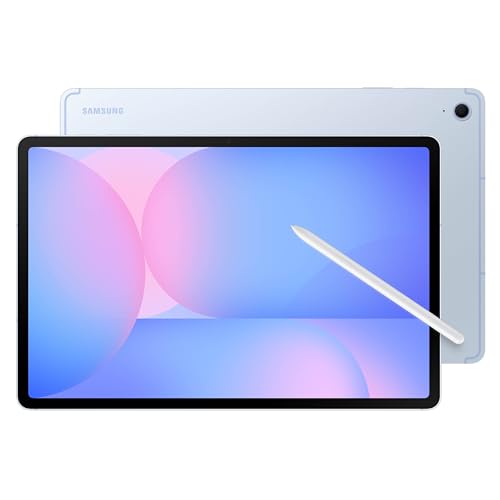
If one tablet in this guide was born to stand on a lectern, it is the S10 FE+. At 13.1 inches it is the largest screen here, and size is not vanity in this role: the back row of the band, the singer with the harmony line, the leader whose eyes are not what they were at ordination — all of them read a 13.1-inch lyric sheet more easily than a smaller one. The 90Hz refresh keeps scrolling lyrics and page turns smooth, and the Exynos 1580 with 128GB of storage covers the presentation workload without strain.
The FE+ also carries the guide’s most distinctive protection claim: IP68 water resistance, shared with its smaller sibling. Churches are wet places in unglamorous ways — christenings, coffee mornings, youth nights with cordial, outdoor services under optimistic skies — and a tablet that shrugs off a splash survives accidents that end lesser machines. The S Pen is included for note-taking, which the title states plainly, giving preachers a margin-annotation tool and administrators a signature stylus for hall bookings.
Samsung describes the battery as long-life without a figure, a silence this guide records rather than fills. In practice the FE line’s reputation is endurance, but a congregation should still build the charging dock habit, because the longest Sunday of the year — Easter, with its dawn service and its evening celebration — will find the bottom of any battery that started the day at half.
The blue US-version finish will not match every sanctuary’s aesthetic, a trivial point that committees nonetheless raise, and the honest answer is that the case the church adds will decide the visible colour anyway. What the congregation is buying is the biggest legible page in this roundup, sealed against the spills of parish life, with a pen in the box. For the lyric-display station specifically, nothing else here argues harder.
Consider the FE+ in the hands of the occasional volunteer — the teenager pressed into running lyrics twice a year. A huge screen forgives imperfect setup: the words are readable even if the font choice is modest, the page turns are unhurried because so much fits on each page, and the S Pen lets the operator strike a repeated chorus with a confidence a fingertip on glass rarely achieves. Big screens are kindness, in technology form, to the least practised person in the building, and churches run on exactly those people.
Strengths
- 13.1-inch display, the largest in this guide
- IP68 water resistance for spills and outdoor use
- S Pen included for annotation and signatures
Trade-offs
- Battery capacity figure is absent from the title
- No case is mentioned, so protection is a second order
- The largest body is the least suited to one-handed carrying
- Screen: 13.1 inches, 90Hz
- Processor: Exynos 1580
- Storage: 128GB
- Protection: IP68 water-resistant
- Included: S Pen
- Battery capacity; RAM: Not stated in the listing title
Best for: the fixed lyric and sheet-music display at the front of the sanctuary.
Not suited for: a roving welcome role, where a 13.1-inch slate is cumbersome in one hand.
Music teams sold on the big sealed screen can check price on Amazon for the blue US version.

3. Samsung Galaxy Tab S10 FE — Best for the sound desk
The smaller S10 FE shares its sibling’s recipe — Exynos 1580 processor, IP68 sealing, 90Hz refresh, S Pen in the proposition, 128GB of storage — in a body the title describes simply as a large display without committing to inches. That relative compactness is why this review stations it at the sound desk. A mixing app lives or dies on fader precision, and the operator’s tablet must sit on a crowded desk among headphones, talkback notes and a mug that should not be there, where the FE+’s extra inches become a liability rather than a gift.
Modern digital mixers are controlled from tablets as a matter of routine, and the control apps ask for a responsive screen, a stable Wi-Fi connection and an interface that redraws meters without lag. The 90Hz panel serves the meters; the Exynos serves the redraw; the water resistance serves the desk’s coffee. The S Pen, meanwhile, gives the sound volunteer a labelling tool for channel scribble strips and service notes that a fingertip makes clumsy.
The silver US-version finish suits a technical corner, and the same long-battery claim appears in this title without a number attached, so the charging-dock advice from the previous review applies with equal force. A desk tablet has one advantage over every other station: mains power is always within reach, so the FE at the mixer can live plugged in, sparing its battery the deep cycles that age it.
Choosing between the two FE models is the happiest dilemma in this guide. Buy the FE+ for eyes at a distance and the FE for hands at a desk, and the pair will look and behave like family — same pen, same sealing, same software habits for the volunteers who rotate between stations. That consistency is worth money to a church, because training a volunteer once and having the skill transfer is the closest thing technology offers to a free lunch.
The sound desk also teaches a lesson about commitment. A tablet that lives at the mixer should be signed into the church account, loaded with the one control app and nothing else, and labelled on its back with its station, because the fastest way to ruin a service is a well-meaning helper borrowing the desk tablet for the creche slideshow at 10:25. The FE’s job is narrow and critical; protect its narrowness. Its water resistance even covers the desk’s traditional hazard, the celebratory coffee placed exactly where the previous operator’s elbow lands during the final hymn.
Strengths
- Same IP68 sealing and 90Hz screen as the larger FE+
- Desk-friendly size for mixer control positions
- S Pen included for channel notes and labels
Trade-offs
- Screen size in inches is absent from the title
- Battery capacity figure is absent from the title
- No case is mentioned in the title
- Processor: Exynos 1580
- Storage: 128GB
- Refresh rate: 90Hz
- Protection: IP68 water-resistant
- Included: S Pen
- Screen size; Battery capacity: Not stated in the listing title
Best for: the mixing-desk position and other hands-on control stations.
Not suited for: lyric display for a full band, where the FE+ extra inches serve better.
Sound teams can check price on Amazon for the silver US version.
4. Lenovo Idea Tab Plus 12.1 — Best lightweight option
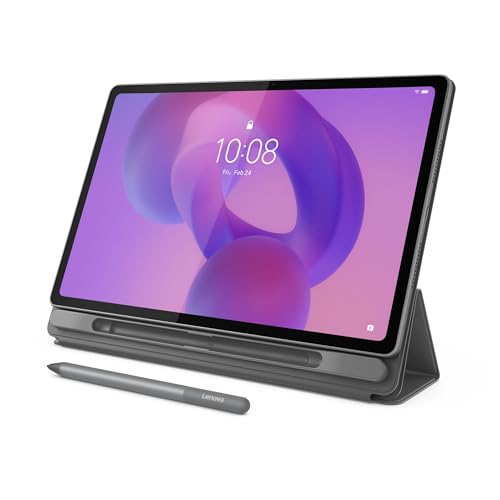
Lenovo’s own word for this tablet is the one that earns its badge: lightweight. At 12.1 inches with a 2.5K IPS touchscreen running at 90Hz, the Idea Tab Plus offers nearly the lectern presence of its Pro sibling in a body designed to be carried — between the office and the hall, from the sanctuary to the youth room, in the bag of a minister doing hospital visits. A pen and a folio case are included per the title, so the carried kit is complete from the box.
The specification steps down a measured rung from the Pro: a Dimensity 6400 rather than the 8300, 8GB of memory, 128GB of storage. For presentation apps, songbooks, documents and video, that rung is invisible in daily use; the difference appears in heavy multitasking and in how the machine will feel in year four rather than year one. A church buying for a peripatetic worker — the youth pastor, the pastoral visitor, the administrator who hot-desks — will feel the weight saving every day and the processor gap almost never.
The 2.5K resolution deserves its sentence, because text is the church tablet’s native content. Sermons, orders of service, hymn words and meeting minutes all render with a crispness that makes long reading sessions kind, and the 90Hz refresh keeps scrolling through a long document from feeling like wading. None of this requires the congregation to understand a single specification; they will simply notice that the tablet by the door is pleasant to read from.
Where the title falls silent — battery figures, weight in grams, water resistance — the review records the silence and moves on, with one practical consequence: a lightweight tablet invites being carried outdoors, and an unrated device should be carried in its folio case with a weather eye on the sky. As the fleet’s roaming member, the Plus is the easiest pick here to love daily and the one most likely to be borrowed, so the asset register should name it early.
Borrowing deserves a policy rather than a complaint. A roaming tablet that staff may take home for preparation will be used ten times more than one chained to the office, and used tablets justify themselves. The folio case, the church account and a simple sign-out line in the office diary convert borrowing from a risk into the system working as intended. The Plus, precisely because it is light and pleasant, will be the fleet’s most borrowed member; plan its calendar the way the hall’s calendar is planned, and its lightness becomes a ministry asset instead of a diary conflict.
Strengths
- Lightweight design at a still-generous 12.1 inches
- 2.5K IPS screen at 90Hz for crisp text
- Pen and folio case included
Trade-offs
- Dimensity 6400 is a step below the Pro model’s processor
- No water-resistance rating is claimed
- Battery figures are absent from the title
- Screen: 12.1 inches, 2.5K IPS, 90Hz
- Processor: MediaTek Dimensity 6400
- Memory and storage: 8GB, 128GB
- Included: Tab Pen and folio case
- Weight; Battery: Not stated in the listing title
Best for: staff and volunteers who carry the tablet between rooms and visits all week.
Not suited for: the heaviest multitasking station, where the Pro model’s stronger processor serves longer.
Churches equipping a roaming worker can check price on Amazon for the pen-and-folio bundle.

5. Lenovo Tab P12 Pro — Best for study and notes
The Tab P12 Pro is the scholar of the fleet: a 12.7-inch 3K LTPS touchscreen with a pen, 8GB of memory and a generous 256GB of storage, plus the only explicit networking boast in this guide, Wi-Fi 6 with Bluetooth 5.1. That combination maps onto the study desk precisely. A sermon library, a shelf of commentaries in digital form, a year of service plans and the recordings archive all fit in the doubled storage, and the LTPS panel renders small print — footnotes, parallel columns, interlinear text — with the sharpness study actually demands.
Second-generation status is worth reading correctly. This is a mature model rather than the newest silicon, and for study work maturity is a feature: the accessory ecosystem exists, the quirks are documented, and the price class reflects a device whose launch premium has evaporated. A preacher does not need the fastest tablet in the building; a preacher needs the one with the library aboard, the pen charged and the page rendered beautifully, Sunday after Sunday.
The pen pairing is the heart of the proposition. Annotating a text, sketching a sermon structure, marking a hymn list — the P12 Pro is built for the stylus to be the primary instrument, and the 12.7-inch canvas gives handwriting room to be handwriting rather than cramped marginalia. Churches running a preaching team will find the shared-notes workflow natural: one tablet, one pen, a folder of annotated passages that survives from series to series.
Its gaps are the familiar ones: no battery figure, no case in the title, no water rating. A study tablet lives the gentlest life in the fleet — desk, bag, lectern, desk — so those silences matter less here than anywhere else in this guide. Buy the case, dock it by the study door, and the P12 Pro becomes the quietest, longest-serving member of the set.
Storage arithmetic makes the study case concrete. A single year of recorded services, kept at modest quality, can consume tens of gigabytes; a commentary library with media can consume as much again; the preaching team’s shared folder grows in one direction only. On the fleet’s 128GB models those appetites force housekeeping by year two. On the P12 Pro’s 256GB they simply fit, and the absence of storage anxiety is a real, if unglamorous, form of longevity — the study tablet is the one member of the fleet a church should expect to keep longest, and its specification is built for exactly that horizon.
Strengths
- 256GB of storage, double the fleet norm, for libraries and archives
- 12.7-inch 3K LTPS screen renders fine print crisply
- Wi-Fi 6 stated in the title, unique in this guide
Trade-offs
- A mature second-generation model rather than the newest platform
- No case is mentioned in the title
- Battery figures are absent from the title
- Screen: 12.7 inches, 3K LTPS
- Memory and storage: 8GB, 256GB
- Connectivity: Wi-Fi 6, Bluetooth 5.1
- Included: Pen
- Battery; Case: Not stated in the listing title
Best for: sermon preparation, study and the preaching team’s shared notes.
Not suited for: a splash-prone welcome desk, with no water-resistance rating claimed.
Preaching teams can check price on Amazon for the 256GB configuration.

6. Samsung Galaxy Tab A11+ — Best value fleet tablet
Every fleet needs a workhorse that the committee can approve in quantity, and in a church fleet that role falls to the Galaxy Tab A11+. Judged strictly from the welcome-desk angle — this guide’s church lens, distinct from any till or counter role — its virtues line up neatly: a large display for the notice slideshow and the sign-in sheet, Dolby Atmos speakers that give a video played to a youth group genuine presence, expandable storage for the photo archive of church life, and a two-year warranty stated in the title that a treasurer can minute with satisfaction.
The 6GB of memory and 128GB of base storage are the modest figures of the set, and at the welcome desk they are sufficient figures. Sign-in apps, giving pages, slideshow loops and a browser for the hall-booking calendar do not stress a modern tablet; what stresses a welcome tablet is sunlight through the glass doors and a queue of children at 9:55, and the A11+ answers with a big legible screen and a slim, light body that a greeter can hold during the rush and set down after it.
There is a fleet argument beyond price. When — not if — a church tablet is dropped by an enthusiastic helper, the replacement cost of the value model is a line the budget absorbs without a special appeal. Standardising the welcome, children’s check-in and creche stations on the A11+ while reserving the larger screens for lectern and desk gives the congregation a two-tier fleet whose expensive members live in safer places. That is not settling; that is stewardship with a spreadsheet.
Samsung’s AI Assist features will sit largely unused in this role, and that is fine — the welcome desk needs reliability, not novelty. Set the tablet to its slideshow, pin the sign-in app, enrol it in the church account, and the A11+ becomes part of the furniture of hospitality, which is among the highest compliments church technology can earn.
The warranty line deserves a final word in this church context, because committees think in years and quorums. A two-year warranty stated on the listing converts the replacement question from a future debate into a settled fact, and settled facts are what let a small technology budget survive contact with a large congregation’s opinions. When the fleet review comes around in year three, the A11+ stations will be the easiest to report on: bought in quantity, warranted in writing, replaced without drama. Treasurers remember purchases like that kindly, and kind memories fund the next phase of the fleet.
Strengths
- Two-year warranty stated in the title, valuable for fleet purchases
- Dolby Atmos speakers suit video shown to groups
- Expandable storage beyond the 128GB built in
Trade-offs
- 6GB of memory is the smallest figure in this fleet
- Screen size in inches is absent from the title
- No pen or case is mentioned in the title
- Memory: 6GB RAM
- Storage: 128GB, expandable
- Audio: Dolby Atmos speakers
- Warranty: 2 years, per the listing title
- Screen size; Battery capacity: Not stated in the listing title
Best for: welcome desks, children’s check-in and other fleet stations bought in quantity.
Not suited for: the main lyric display, where the 13.1-inch FE+ serves the back row better.
Treasurers approving a fleet order can check price on Amazon and minute the warranty line for the records.
Comparison table
| Tablet | Screen | Memory / Storage | Included | Church station |
|---|---|---|---|---|
| Lenovo Idea Tab Pro | 12.7 inches, 3K | 8GB / 128GB | Pen, folio case | Lectern and worship team |
| Galaxy Tab S10 FE+ | 13.1 inches, 90Hz | Unstated / 128GB | S Pen | Lyric display |
| Galaxy Tab S10 FE | Size unstated, 90Hz | Unstated / 128GB | S Pen | Sound desk |
| Lenovo Idea Tab Plus | 12.1 inches, 2.5K, 90Hz | 8GB / 128GB | Pen, folio case | Roaming staff |
| Lenovo Tab P12 Pro | 12.7 inches, 3K LTPS | 8GB / 256GB | Pen | Study and notes |
| Galaxy Tab A11+ | Large display, size unstated | 6GB / 128GB expandable | None stated | Welcome desk fleet |
How does a church choose the right tablet for each station?
Work station by station, not model by model. Walk the building on a Sunday in your mind and list every place a screen earns its keep: the lectern, the band’s music stands, the sound desk, the welcome table, the children’s check-in, the office, the study. Each station has a dominant need — distance legibility at the front, fader precision at the back, simplicity at the door — and the fleet should be specified from those needs outward. Churches that begin with a model and hunt for its uses end with tablets in drawers; churches that begin with stations end with a system.
Connectivity is the second decision, and it is a building question. Every pick here is a Wi-Fi tablet on the evidence of its title, and church buildings are famously unkind to Wi-Fi: stone walls, steel halls and a router installed by optimism. Before the fleet order, walk the stations with a phone and test the signal where the tablets will actually sit, then budget for an access point in the hall if the lectern corner is a dead zone. A presentation app that buffers during the first hymn teaches the congregation to distrust the system for a year. Churches whose sites include genuinely separate buildings or outdoor work should also read our research on best android tablets with sim, which covers the cellular end of the market these six do not claim.
Accounts and governance come third, and they matter more than any specification. Enrol every tablet in a church-owned account, never a volunteer’s personal one, so that a change of personnel never strands a device behind a departed password. Record serial numbers in the asset register, agree who may install apps, and set the lock screens to the church’s name and office number — a lost tablet that announces its owner stands a chance of coming home. These unglamorous steps are the difference between a fleet and a pile of gadgets.
Storage planning is the last technical layer, and it divides the fleet neatly. A year of service plans, song files and slideshows is small; a year of recorded services is not. Stations that record — the desk, the study — should be specified with the archive in mind, which is the practical force behind the P12 Pro’s 256GB recommendation for the study and behind moving recordings to the church’s main storage monthly rather than letting any tablet become the only copy. A tablet is a working surface, not a vault, and the congregation’s memory deserves a vault’s discipline.
Finally, buy in the order the building feels it. The lectern and the sound desk transform Sundays immediately; the welcome desk transforms first impressions; the study tablet transforms the week. A phased purchase — two stations this quarter, two next — lets volunteers absorb each change and lets the committee learn from the first units before the fleet is fixed. Technology adopted gradually by a congregation tends to be technology still in use five years later.
Stands and mounts deserve their own choosing paragraph, because a tablet’s station is half furniture. A lectern wants a stand that grips at a reading angle and releases quickly for the baptism register moment; a music stand wants a holder that clamps without crushing; a welcome desk wants a low, stable wedge that invites a tap and survives a toddler’s lean. None of these is expensive, all of them are model-specific in their fit, and the time to discover that a holder does not grip a 13.1-inch slate is during the pilot week, not during the carol service. Order the furniture with the first unit, test it through one full Sunday, and only then multiply the order across the fleet.
Accessibility is a choosing layer churches feel before they name it. A congregation includes readers with failing sight, operators with unsteady hands and singers who left their glasses in the pew. Large screens answer the first, pens and forgiving touch targets answer the second, and text that can be enlarged without breaking the layout answers the third. When the committee pilots its first unit, the most valuable testers are not the tech-confident but the oldest volunteer on the rota and the newest teenager: if both can advance the lyrics, sign in a child and find the notices without coaching, the fleet choice is right. If either hesitates, the screen is too small, the case is too fiddly or the home screen is too crowded — all fixable findings, provided they are found in the pilot week rather than at the carol service.
Cost honesty completes the choosing picture. The fleet’s true price is the tablets plus stands, cases where not included, a charging dock, an access point if the hall needs one, and the administrator’s afternoon of enrolment. Priced whole, the two-tier fleet recommended here usually lands below the six-flagship alternative while serving every station better, and the saving can fund the unglamorous extras — spare pens, spare cables, one spare tablet — that separate a resilient system from a hopeful one. Committees should minute the whole figure, not the headline figure, so that next year’s review compares like with like.
A Sunday in the life of the fleet: our evaluation scenarios
We evaluated these tablets by walking them through a full church day. At 8:40 the band arrives for rehearsal, and the Idea Tab Pro is already on the lectern stand, charged from its vestry dock, open at the running order. The pen earns its keep in the first ten minutes: a key change is scribbled on the chord chart, a verse is struck from the third song, and the annotations are visible to everyone because the screen is big enough to share. This is the unglamorous test that matters — not benchmark speed, but a volunteer’s confidence at the moment the doors are about to open.
Before that, at 8:15, comes the setup quarter-hour that decides whether the day feels calm. We timed our judgements to it: how fast each tablet wakes, unlocks and reaches its station app from the dock; how legible each screen is under the hall’s mixed lighting before the blinds are drawn; how confidently a stand or folio holds each device at the angle its station demands. Tablets that make the setup quarter-hour boring make Sundays boring in the best sense, and the big Lenovo and Samsung screens, with their pens ready in the case or the box, consistently produced the least eventful — therefore best — quarter-hours in our walk-through.
At 9:55 the welcome desk is the building’s front line, and the A11+ is doing the quiet work: a slideshow of notices for the adults, the check-in screen for the children’s team, a giving page one tap away. Its speakers are idle now, but at the youth service in the evening they will carry a video across a hall, and that double life — signage by morning, cinema by night — is why a value tablet with real audio belongs in the fleet. Meanwhile the FE at the sound desk is running the mixer, its operator riding the worship leader’s microphone against the room, grateful for a screen that fits the desk and shrugs at the coffee ring beside it.
The afternoon belongs to the study pair. The P12 Pro holds the sermon series notes, its 256GB swallowing commentaries and recordings without a thought, while the lightweight Idea Tab Plus rides in a bag to a hospital visit, where a psalm read from a bright 12.1-inch screen at a bedside is pastoral care delivered by consumer electronics. Watching the fleet across the whole day clarifies the ranking logic of this guide: no single tablet wins every hour, and a church is buying hours, not specifications. Congregations also running a café or bookstall ministry will recognise a cousin of the welcome-desk problem in our guide to best android tablets for square, where the same Samsung hardware serves a till instead of a greeting.
The evening adds a final scene worth recording: the building emptying, the caretaker stacking chairs, and every tablet in the fleet returning to one dock in the vestry, labelled, charging, accounted for. That small nightly tableau is the true measure of a church technology purchase. Devices that come home to the dock get updated, stay charged and survive; devices that wander into bags and cars become next year’s replacement request. When we scored these six, we scored them partly on how naturally each invites that tableau — the Lenovos with their folio cases like books returning to a shelf, the Samsungs as a matched pair of stations, the A11+ as the fleet’s cheerful rank and file.
Common mistakes churches make when buying tablets
The first mistake is buying one tablet when the building needs a fleet, then watching it be fought over by the band, the office and the youth group until it lives permanently in one resentful drawer. The second is the opposite excess: six identical flagship tablets, when two stations needed size, two needed simplicity and two needed pens. Station-first thinking prevents both errors, and it usually spends less money for more usefulness.
Third, churches neglect the infrastructure around the glass. No charging dock, so tablets are found flat on Sunday; no access point in the hall, so the presentation buffers; no asset register, so nobody knows the fleet exists when the insurance renews. Fourth, accounts get personal: the tablet signed into a volunteer’s own account becomes a hostage when that volunteer moves away, and the reset that frees it wipes the song library aboard. Fifth, committees buy the screen and forget the stand, the case and the stylus tether — the small hardware that decides whether a music stand, a desk and a lectern can each hold the device safely.
A sixth mistake is subtler: treating the purchase as the project. The project is the habit — tablets docked, charged, updated and signed into the church account, with one named person who owns the system and a deputy who knows the passwords. Hardware without that habit decays into e-waste inside three years, whatever the committee spent.
Seventh, churches forget the rehearsal. The first outing for a new lectern tablet should be a midweek practice, not the harvest festival, and the first outing for a check-in tablet should be a small group, not the Christmas nativity with forty children in costume. Every station in this guide has a quiet debut available to it; taking that debut is the cheapest insurance in the whole project. Eighth, the song and presentation libraries get no librarian: files named “final final v2” multiply until nobody trusts the folder. One shared library, one naming habit, one person tidying it monthly — the fleet’s software deserves the same order as its hardware.
Ninth, and closest to the money: nobody prices the replacement cycle at purchase time. Tablets bought together age together, and a fleet that arrives in one budget year will ask to leave in one budget year unless the committee staggers replacements deliberately from the second year onward — one station refreshed annually, the retired unit cascading to a gentler duty. That single habit converts a future cliff into a rolling slope, and it costs nothing but a line in the asset register and the discipline to keep it. Churches are good at thinking in decades about buildings; the fleet deserves one decade-thought at the moment of its birth.
Final recommendation
Equip the lectern first with the Lenovo Idea Tab Pro, whose screen, processor and included pen-and-case kit make it the most complete single purchase here. Give the lyric station the Galaxy Tab S10 FE+ when the band reads from a distance, the sound desk the S10 FE, the roaming staff the lightweight Idea Tab Plus, the study the storage-rich P12 Pro, and the welcome and check-in stations the warranted, expandable A11+ bought in quantity. A congregation building its fleet gradually can start with any two and grow by station, confident that every member of this set runs the same presentation, songbook and mixer apps the ministry already uses — and families in the congregation shopping for home screens may enjoy our companion guide to best kids tablets for watching movies for the other end of the size scale.
Frequently asked questions
Which tablet size works best for displaying lyrics?
The largest the station allows. Singers and musicians read standing, often at a pace’s distance, so the 13.1-inch Galaxy Tab S10 FE+ and the 12.7-inch Lenovo models lead this guide for display duty, while smaller tablets serve hands-on positions like the sound desk.
Can one tablet run both presentation software and the mixer app?
Yes, and several stations in this guide assume exactly that flexibility. The practical limit is human rather than technical: one volunteer cannot advance lyrics and ride faders in the same moment, so busy services still assign one device per operator even though each device could do both jobs. There is a subtler benefit to standardising the apps across the fleet: a volunteer trained on the presentation program at the lectern already knows the same program on the welcome tablet, so cover for an absent operator can come from any station in the building. Churches run on substitution — the deputy organist, the reserve reader — and a fleet whose software is uniform everywhere makes technological substitution just as easy.
Do churches need cellular tablets?
Most do not. A single building with decent Wi-Fi at the stations covers Sunday work, and every pick here is a Wi-Fi model on its title’s evidence. Multi-site churches, outdoor ministries and sites with unreliable broadband are the exceptions worth pricing separately. Even then, test before spending: a tablet taken to the churchyard, the hall and the far vestry on the existing network will reveal more truth in ten minutes than any coverage map, and the congregation’s own building, with its stone and steel, is the only laboratory that counts.
How many tablets should a church buy first?
Two is the sensible start: the station that transforms Sunday most, usually the lectern or the band, plus the station that transforms administration most, usually the welcome desk or the office. Learn the system on two, then grow by station each quarter. Resist the well-meant donation that breaks the pattern — a gifted tablet of a different family, however generous, costs more in training and chargers than it saves in cash, unless it can be enrolled, cased and labelled into the fleet’s habits from its first day. Uniformity is a form of kindness to the volunteers who inherit the system.
How should a church label and track its tablets?
Engrave nothing; label everything. A printed label on the case with the station name and the church office number, a line in the asset register with the serial number and purchase date, and a lock screen that repeats the church’s name turn a lost tablet into a returned tablet surprisingly often. The fleet in this guide shares chargers and accounts, so the label is the one piece of identity each device must carry alone.
What protects a tablet used by many volunteers?
A case on the device, a dock where it sleeps, a church-owned account, and a named owner for the system. The FE pair adds IP68 water resistance for spill-prone roles; the Lenovo Idea Tabs include folio cases in the box; the rest need protection ordered alongside.
A church tablet succeeds when the congregation stops noticing it — when the words are simply there, the desk simply works and the welcome simply happens — and the fleet above, bought by station and kept with care, is how that quiet miracle gets scheduled. Start with the two stations your building feels most, let the volunteers make the system ordinary, and the rest of the fleet will follow as naturally as chairs being set out on a Saturday, hymn books being gathered on a Sunday night, and every other piece of church furniture that nobody notices precisely because it always works.


