What's inside
- Key Takeaways
- Quick Picks
- How Did We Choose These Picks?
- What Changes When a Television Becomes a Computer Display?
- How Much Refresh Does a Desktop Actually Use?
- What Should the Setup Evening Look Like at 85 Inches?
- The Six Big Computer TVs, Pick by Pick
- How Do the Six Compare Side by Side?
- What Mistakes Do Big-Screen Computer Buyers Keep Making?
- Final Recommendation
- Frequently Asked Questions
- Related Guides
As an Amazon Associate I earn from qualifying purchases. This post may contain affiliate links at no extra cost to you.
gizmoverdict.com is reader-supported. When you buy through links on our site, we may earn an affiliate commission.
Where to buy: the six televisions below are all sold on Amazon, and their names throughout this guide link to the listings, where the full title wording, dimension figures and port photographs can be studied before a panel the size of a door is committed to a wall. Returns at this size are a logistics project, so the listing and the maker’s documentation deserve more of the buyer’s time than the checkout does.
The best big TVs for computers are not simply the largest televisions that accept an HDMI cable. At 85 inches, a television stops being a screen the desk sits in front of and becomes the wall the whole room works against — spreadsheets read across the room, code reviewed by two people standing, a trading wall, a design review, a flight simulator’s horizon. That change of job changes the judging. This guide ranks six 85-inch sets on monitor duty: what their titles state about refresh, panel technology and computer-relevant behaviour, and — because most television titles are written for film buyers, not computer users — how much homework each one leaves behind.
Honesty about the category comes first. Television titles almost never discuss the traits computer users ask about first: chroma behaviour for text, input counts, wake-from-sleep manners. None of the six titles below settles those questions, so this guide does not pretend otherwise. What the titles do settle — native refresh on three sets, Mini-LED backlights on three, brightness and dimming claims on the flagship — turns out to matter enormously at this size, because an 85-inch panel magnifies every weakness a 43-inch panel forgives. Judged as monitors, these are six different answers to the same enormous question.
The spread of intent is wide. Two Hisense models and the TCL arrive with gaming-grade refresh headlines that double as desktop smoothness; the Samsung brings Mini LED processing and an AI companion layer; the Toshiba and Insignia bring the simplest propositions — a QLED or LED panel, Fire TV, a voice remote — at the size where simplicity itself is a feature for shared and public-facing screens. Read the guide with two measurements in hand: the distance from the wall to the furthest regular viewer, and the width of the wall itself.
Why 85 inches, specifically, has become the working wall’s size is worth a paragraph. Below it, at 75 inches, a panel still reads as a large television; at 85, the geometry changes — four people can stand and read, a spreadsheet’s full width survives at readable size, a design’s details hold across a meeting table. The category has quietly standardised here for boardrooms, studios and serious home workspaces, and the six titles below are the current Amazon shelf at exactly that diagonal. The guide’s job is to sort them by the work they will actually do.
Key Takeaways
- At 85 inches, viewing distance is the first specification: text that is crisp at three metres dissolves at one, so these sets suit wall-and-room computing rather than arm’s-length desks or single-user cubicles.
- Three titles state native refresh rates — Hisense U6 Pro and TCL F8D at 144Hz, Hisense U8 at 165Hz — and those figures double as desktop cursor smoothness, not merely gaming credentials or marketing garnish.
- No title here discusses chroma subsampling or text rendering, so the documentation check for PC use is mandatory on every single pick, not optional on some.
- Mini-LED backlights on the Samsung M70H and both Hisense models promise the contrast that makes white text on dark code themes readable across a room.
- The Hisense U8’s title is in a class of its own: 5000 nits, up to LD5600 dimming zones and a 4.1.2-channel audio system are figures no other listing here attempts.
- Fire TV appears on four of the six sets, Google TV on one and Samsung’s own platform on one — the smart layer matters less for monitor duty, but it decides the screen’s idle life and its meeting-start speed.
Quick Picks
| Pick | Badge | Why it made the list |
|---|---|---|
| TOSHIBA 85″ M450 QLED Fire TV | Straightforward QLED wall | An 85-inch QLED panel with Fire TV and cable-free live TV streaming, the uncomplicated shared-screen proposition. |
| INSIGNIA 85″ F50 Fire TV | House-brand big screen | The simplest 85-inch LED proposition here: 4K UHD, Fire TV and an Alexa remote, nothing in the title a computer user must decode. |
| Samsung 85″ M70H Mini LED | Mini LED processing at scale | Samsung’s Mini LED line stretched to 85 inches, with its AI companion and motion processing for mixed work and viewing. |
| Hisense 85″ U6 Pro Mini-LED | Glare-free 144Hz wall | Native 144Hz, a glare-free claim and Dolby Vision IQ on a Mini-LED panel — the office-window room’s candidate. |
| Hisense 85″ U8 ULED (165Hz) | Flagship numbers, stated outright | Native 165Hz, VRR 288, up to LD5600 and 5000 nits in one headline, the most monitor-ambitious title of the six. |
| TCL 85″ F8D QLED (144Hz) | Gaming hardware, office size | Native 144Hz with Game Accelerator 288 and VRR, a refresh story that serves fast desktops as well as fast games. |
How Did We Choose These Picks?
Size was the entry ticket and the easiest filter: every set here is an 85-inch class television, the size at which a wall becomes a workspace. Within that size, the first ranking question was refresh evidence, because a computer desktop is a motion test no film ever sets — windows dragged across four metres of glass, cursors crossing spreadsheets, timelines scrubbed. A title stating a native rate, as three of these do, earned its set a presumption of desktop smoothness; a title silent on refresh pushed its set into the shared-screen and signage end of the ranking, where motion matters less.
The second question was backlight ambition. Text is a contrast exercise — bright glyphs on dark grounds or the reverse, held static for hours — and Mini-LED dimming is the backlight technology these titles use to promise control over it. The third question was the room: glare behaviour, brightness headroom and the smart platform that governs the screen when no computer is attached. An 85-inch panel is never only a monitor; it is the room’s television at night and its noticeboard by day, and a pick that served only the computer hours would be half a recommendation.
Exclusions shaped the list from the other side. Smaller televisions with genuine monitor credentials were removed, however good, because this guide’s question begins at 85 inches; readers whose desks argue for a smaller panel will find that question answered directly in best small 4k tvs for pc monitors. Projectors were removed as a different category with different light maths. What remains is six televisions that share a diagonal and almost nothing else.
One methodological note deserves emphasis, because it explains the shape of every spec box below. Television listings are marketing documents, and their silences are not evidence of absence — a set may handle PC input beautifully while its title says nothing about the subject. The guide’s rule is narrower and stricter: only stated facts are ranked, and unstated ones are routed to the documentation. That rule occasionally makes a good television look under-evidenced, and the per-pick prose says so when it happens. Being under-evidenced is a listing’s flaw, not necessarily a panel’s, and the buyer’s manual-reading is what separates the two.
What Changes When a Television Becomes a Computer Display?
Text is the first change, and it is unforgiving. A film hides its pixels in motion; a spreadsheet holds them still for inspection. At 85 inches and 4K, each pixel is physically large, so the sharpness of text depends on viewing distance more than on any panel statistic: the same panel that renders code beautifully at three metres looks coarse at one. This is why the guide keeps returning to distance. An 85-inch computer display is a wall instrument for a room — a pairing desk, a studio, a control wall — and households imagining one at arm’s length are shopping for a different product, however the listings are labelled.
Static content is the second change. A desktop holds a taskbar, a menu bar, a dock of icons in the same pixels for eight hours a day, a pattern no broadcast ever produces. Panel technologies differ in how gracefully they host static imagery over years, and titles are uniformly silent on the subject — one more reason the maker’s documentation, including any guidance about static content and screen maintenance features, belongs in the purchase process. Varying content, using the set’s built-in screen care routines and avoiding maximum brightness for office work are the practical habits that protect a television pressed into monitor service.
The third change is the handshake. Computers sleep, wake, change resolution and renegotiate with their displays constantly, and a television’s manners through those transitions — how fast it wakes, whether it remembers the input, whether the desktop returns at the resolution it left — decide daily satisfaction more than any specification. No title can state those manners, which is why the per-pick sections below distinguish carefully between what each headline proves and what only ownership reveals. The honest summary: buy the panel on title evidence, and budget one evening of setup patience for the handshake.
Sound changes jobs too. A television’s speakers are voiced for dialogue across a sofa’s distance; a computer wall asks them to carry video calls, review audio and presentation soundtracks to a room of listeners. Two titles here make explicit audio promises — the U8’s 4.1.2-channel system, Dolby Atmos wording on the Hisense models and the TCL — and those promises matter more in a meeting room than in a cinema, because call clarity is a daily tax or a daily relief. Rooms that live on calls should still plan a dedicated audio path, but the stated systems decide how gracefully the wall copes until that path exists.
How Much Refresh Does a Desktop Actually Use?
More than office folklore suggests. A 60Hz desktop redraws the pointer trail and the dragged window sixty times a second, and the human eye, given a four-metre canvas to notice it on, sees the steps. The three sets here stating native rates of 144Hz or 165Hz are offering a desktop that moves like a good monitor’s — scrolling that stays legible, window drags without judder, timelines that scrub smoothly. For video editors, animators, traders watching fast charts and any professional whose work is motion on a screen, the refresh headline is a work specification wearing gaming clothes.
The vocabulary needs the same care here as in any gaming guide. A native figure describes the panel; a motion-rate figure describes processing layered above it, and processing is exactly what a computer user switches off, because interpolation adds delay between the mouse and the glass. The Hisense U6 Pro’s title conveniently prints both — Native 144Hz and Motion Rate 480 — letting the reader take the first as the desktop promise and the second as a film-night feature. The Samsung’s Motion Xcelerator plus DLG 120Hz wording, by contrast, never separates a native figure, which is why its spec box records the gap.
VRR, stated by the Hisense U8 and the TCL F8D, has a desktop meaning too. A computer whose graphics output fluctuates — a 3D viewport, a game engine editor, a visualisation — tears or stutters against a fixed-refresh panel, and variable refresh smooths precisely that seam. It is the feature that turns a television from a display a computer tolerates into one it cooperates with, and its presence in two of these six titles marks where the category is heading.
A caution about chasing the largest number belongs here. Refresh benefits obey the chain rule: the computer’s output, the cable and the input must all carry the rate before the panel can show it, and the weakest link sets the desktop’s actual speed. A workstation with an older graphics output will run a 165Hz panel at the rate its port allows, which is no failure of the panel — but it does mean buyers should inventory their sources before paying for headline hertz. The U8’s 165Hz is a promise to a computer that can keep it; to a computer that cannot, the U6 Pro’s 144Hz and even the Samsung’s processing story may deliver the identical desk.
What Should the Setup Evening Look Like at 85 Inches?
Begin with the mount, because at this size the mount is a structural decision rather than an accessory. An 85-inch panel is a two-person lift and a wall’s worth of leverage; the documentation’s weight and VESA figures decide the bracket, and the bracket decides whether the screen can sit at the height text work demands — centre of panel near seated eye level for desk-facing walls, higher for standing and presentation rooms. Decide the height from the chairs, not from the wall’s available space, because a wall display mounted for a photograph will punish every working day that follows.
Cabling comes second, while the screen is still reachable. Run the longest cable the layout might ever require, rated for the highest mode in use, and add a spare pull line or conduit if the wall allows it; the computer that drives the wall today will not be the computer that drives it in three years, and the second installation should not require reopening the first. Test the complete chain — computer, cable, input, resolution, refresh — before the panel is finally seated, and read the computer’s own display settings as the witness: they report what the chain actually negotiated, which is the only version of the truth that matters.
Settings come last and deserve an hour. Set the computer’s input to its PC or graphics mode if the documentation offers one, since that mode is where text behaviour usually lives. Bring brightness down to the room’s working level rather than the showroom’s. Walk the room’s seats and read real text from each — a paragraph of body copy, a column of figures — because uniformity problems announce themselves at angles, not from the centre chair. Save the film settings to a different input or profile so the evening’s viewing never has to undo the morning’s calibration.
Finally, solve the control problem before it solves itself badly. A wall display accumulates remotes, keyboards and presenters’ clickers, and the room’s regulars will improvise a system if none is provided: one labelled keyboard and mouse that live with the screen, the television remote in a fixed home, and a one-page card near the door describing how to wake the wall and choose the computer input. That card, unglamorous as it is, will be read more often than this guide, and it converts the installation from one person’s project into the room’s shared instrument.
The Six Big Computer TVs, Pick by Pick
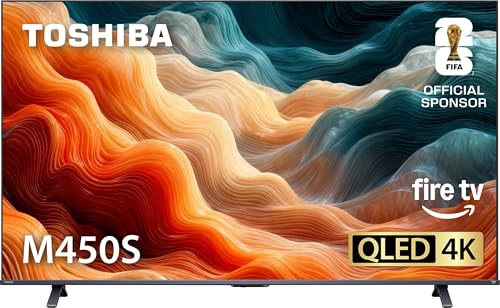
TOSHIBA 85″ M450 QLED Fire TV — Straightforward QLED wall
The M450’s title is a model of economy: an 85-inch class QLED 4K UHD smart Fire TV, a voice remote with Alexa, and the ability to stream live TV without cable. Translated into monitor language, the proposition is a very large quantum-dot panel whose smart layer can run a room’s ambient content — news, a dashboard stream, a welcome loop — without any computer attached at all, and which accepts the computer as one input among several when work begins.
That profile suits shared spaces better than private desks. A studio wall that shows clients the work by day and streams the studio’s reel between meetings, a classroom or training room, a family space where the computer is a sometime guest — in these rooms the M450’s simplicity is the feature. QLED colour holds up in lit rooms, Fire TV is an interface guests already understand, and the Alexa remote settles the what-do-we-watch question without a keyboard.
The computer-specific homework is correspondingly larger. No refresh figure is stated, no dimming technology is named, and nothing in the title speaks to text rendering or input behaviour, so a buyer planning all-day desktop work from this panel is planning on faith. The documentation check — native rate, PC-mode behaviour, port specification — is not a formality for this pick; it is the entire technical evaluation, with the title having supplied only the size, the colour technology and the platform.
There is also a dignity argument for this pick in professional settings. Clients and students read a room before they read a screen, and an 85-inch QLED wall presenting work at scale communicates a seriousness that a laptop passed around a table cannot. The M450 does not pretend to be the sharpest instrument in this guide; it claims the room, and for practices whose work is persuasion as much as production, claiming the room is the job.
- Panel as titled: 85-inch class QLED, 4K UHD
- Smart platform as titled: Fire TV, Voice Remote with Alexa
- Streaming as titled: live TV without cable
- Refresh rate: Not stated in the listing title — verify with the maker’s documentation
- PC / chroma behaviour: Not stated in the listing title — verify with the maker’s documentation
Strengths
- QLED colour at wall size suits lit, shared rooms where the screen serves many masters.
- Fire TV plus cable-free live streaming gives the screen a full life with no computer attached.
- The title’s simplicity means the purchase decision can be made quickly and honestly.
Trade-offs
- No refresh or dimming claim appears, so desktop smoothness is unproven from the listing.
- Nothing addresses text rendering, the central question of monitor duty.
- Shared-screen virtues are wasted on a single-user desk setup.
Best for: studios, training rooms and family walls where the computer is one input among several and the screen must entertain without it. Check price on Amazon after the documentation supplies the refresh and PC-mode facts the title leaves open.
Not suited for: all-day text work planned from the listing alone — the headline offers size, colour technology and platform, and no evidence about the desktop behaviour the purchase would depend on.

INSIGNIA 85″ F50 Fire TV — House-brand big screen
The F50’s title could hardly say less: an 85-inch class LED 4K UHD smart Fire TV with an Alexa voice remote, model NS-85F501NA26. No QLED branding, no refresh figure, no dimming claim, no HDR format. What the headline does communicate is the proposition itself — the largest screen in this guide’s size class from a house brand, running Amazon’s platform, at the end of the shelf where the pitch is the diagonal and the simplicity rather than any technology layered on top.
For computer duty, that pitch has a genuine use case, and it is the ambient one. Digital signage, a lobby display, a workshop wall cycling through schedules and instructions, a gym or café screen — these are computer-driven displays where the content is large-type, slow-moving and forgiving, and where an 85-inch LED panel’s job is presence rather than precision. The F50’s title, read fairly, is aimed exactly there, and the Alexa remote even suits the setting: staff can change what the wall shows by voice.
The discipline is in not asking it for more. A buyer imagining eight hours of spreadsheet work owes themselves the documentation investigation this title makes necessary — refresh, PC behaviour, text handling — with the expectation that the answers may redirect them to the Hisense or TCL picks below. House-brand support through the retailer is the counterweight: at 85 inches, a clear returns and service path is worth real money, and Insignia’s retail backing supplies it.
Scale reframes the F50’s modesty in one more way: content built for signage is cheap to make well. A menu, a schedule, a safety notice, a welcome screen — these are large-type artefacts that a 4K LED panel renders with total authority at ten metres, and the computer driving them can be the humblest machine in the building. Pairing the least demanding content with the largest affordable canvas is not a compromise; it is correct engineering, and the F50 is this guide’s instrument for it.
- Panel as titled: 85-inch class LED, 4K UHD
- Smart platform as titled: Fire TV, Alexa Voice Remote included
- Colour technology: Not stated in the listing title — verify with the maker’s documentation
- Refresh rate: Not stated in the listing title — verify with the maker’s documentation
- PC / chroma behaviour: Not stated in the listing title — verify with the maker’s documentation
Strengths
- The largest canvas in the guide paired with the simplest possible pitch.
- Fire TV gives the screen an independent streaming life between computer sessions.
- House-brand retail backing simplifies service at a size where service is logistics.
Trade-offs
- The title states no colour, refresh or HDR technology at all.
- Text-focused desktop work is entirely unevidenced by the listing.
- LED without a stated dimming scheme leaves contrast behaviour to the documentation.
Best for: signage-style computer duty — lobbies, workshops, schedules and big-type content — where presence matters more than pixel behaviour. Check price on Amazon once the maker’s documentation has answered the basic panel questions.
Not suited for: fine-text desktop work as the primary job — nothing in this headline speaks to the behaviour that job is judged on.

Samsung 85″ M70H Mini LED — Mini LED processing at scale
Samsung’s 85-inch M70H carries the same headline architecture as its 55-inch sibling: Mini LED, 4K, 2026 model, with the Samsung Vision AI Companion, a Mini LED Processor 4K, Pure Spectrum Color, endless free content and a Motion Xcelerator plus DLG 120Hz motion line. At 85 inches the Mini LED claim grows in importance, because backlight control is what keeps a wall of white spreadsheet from glowing unevenly and a dark code theme from washing grey at the edges.
The processing pitch has a computer reading. A named picture processor is the component that handles scaling — and a computer wall spends its life scaling: a laptop’s output to the full panel, a video call window beside a document, a 1080p source in a 4K field. Samsung’s claim, in its own vocabulary, is that this work is the set’s home ground. The Vision AI Companion, meanwhile, is the idle-life layer: the assistant that fields questions and surfaces content when the screen is a television again.
What the title never does is speak computer. No native refresh figure is separated from the DLG motion wording, no PC feature is named, and the free-content emphasis addresses the viewer, not the worker. A Samsung-ecosystem household or studio gets continuity of interface and account; a buyer choosing purely as a monitor gets a strong backlight claim wrapped in a television’s vocabulary, and must extract the desktop facts from the documentation before the wall is drilled.
Consider the hybrid worker’s week on this wall. Weekday documents and calls benefit from the backlight’s evenness; the evening’s film benefits from the same hardware wearing different settings; the weekend’s match benefits from the motion processing the title advertises. The M70H’s pitch is that one wall can hold all three lives without any of them feeling like the compromise, and its headline — backlight, processor, colour system, assistant — is arranged to make exactly that argument. Whether the argument survives contact with a particular room is the documentation’s remaining question.
- Panel as titled: 85-inch class Mini LED, 4K
- Motion as titled: Motion Xcelerator + DLG 120Hz
- Processing as titled: Mini LED Processor 4K, Samsung Vision AI Companion
- Colour as titled: Pure Spectrum Color
- Native refresh rate: Not stated in the listing title — verify with the maker’s documentation
- PC / chroma behaviour: Not stated in the listing title — verify with the maker’s documentation
Strengths
- Mini LED backlighting is the contrast technology a wall of mixed content most benefits from.
- A named picture processor speaks directly to the scaling work a computer wall does all day.
- Samsung’s platform continuity suits households and studios already inside that ecosystem.
Trade-offs
- The refresh story arrives as motion-processing wording, not a stated native rate.
- No computer-facing feature of any kind is named in the title.
- The headline’s AI and content emphasis serves viewing hours more than working ones.
Best for: mixed rooms where a Mini LED wall splits its life between computer sessions and flagship television duty. Check price on Amazon after the documentation separates the native refresh figure from the motion wording.
Not suited for: a monitor-first purchase decided on desktop specifications — the title’s evidence is a backlight and a processor, with the desktop facts left to the manual.

Hisense 85″ U6 Pro Mini-LED — Glare-free 144Hz wall
The U6 Pro’s title reads like it was written by someone who has worked in a bright room. It is an 85-inch Mini-LED ULED 4K UHD HDR gaming AI smart Fire TV — and then the phrases that matter for this guide: Hi-QLED, Native 144Hz, Motion Rate 480, Dolby Vision IQ and Atmos, HDR10+, Glare-Free, Alexa+. The glare-free claim, in particular, is a workplace claim wearing a television’s clothes: office windows and overhead lighting are the natural enemies of a wall display, and a title that names the problem is a title that expects the set to work for a living.
Native 144Hz is the desktop gift. As the refresh section above argues, a stated native rate at this level turns window drags, scrolling documents and scrubbed timelines into monitor-grade motion, and the U6 Pro prints it beside its processing figure rather than instead of it. Dolby Vision IQ adds a subtler workplace virtue: it adapts the picture to ambient light, so the panel that is correct under morning sun stays correct under evening lamps without a settings pilgrimage twice a day.
Fire TV is the platform, which at this size mostly governs the screen’s evenings. The computer-facing silences remain — chroma behaviour and PC-mode specifics are documentation territory, as they are for every pick here — but the U6 Pro’s title answers more of the monitor questions than most: refresh outright, glare outright, backlight technology outright. Among the six, it is the pick whose headline most nearly describes a working wall.
The U6 Pro also illustrates how the gaming and office briefs have merged at this size. Its title leads with the word “Gaming” and then spends its evidence on workplace virtues — native rate, glare behaviour, adaptive HDR — because the modern wall display refuses to keep two diaries. A studio buying this set for standups and reviews will find the console features waiting in the evening; a gaming household buying it for the den will find the workday virtues waiting in the morning. The title’s honesty about both lives is the pick’s deepest strength.
- Panel as titled: 85-inch Mini-LED ULED, Hi-QLED, 4K UHD
- Native refresh as titled: 144Hz (Motion Rate 480 also stated)
- Room behaviour as titled: Glare-Free
- HDR/audio as titled: Dolby Vision IQ, Dolby Atmos, HDR10+
- Smart platform as titled: Fire TV, Alexa+
- PC / chroma behaviour: Not stated in the listing title — verify with the maker’s documentation
Strengths
- Native 144Hz is stated plainly, the desktop-smoothness promise in its most honest form.
- The glare-free claim addresses the bright-room reality most wall displays live in.
- Dolby Vision IQ adapts the picture to changing room light without manual recalibration.
Trade-offs
- Text-rendering specifics remain a documentation question, as with every pick here.
- Fire TV may not match a Google-centred workplace’s casting habits.
- The gaming-and-AI headline density means some purchased features serve evenings, not work.
Best for: bright workrooms and studios where the wall must stay readable under windows and overhead light while moving like a monitor. Check price on Amazon with the documentation’s PC-mode page open alongside.
Not suited for: a light-controlled desk cave where the glare-free and brightness virtues go unused — the premium here is aimed at rooms with windows.

Hisense 85″ U8 ULED (165Hz) — Flagship numbers, stated outright
The U8’s title is the most ambitious headline in this guide, and it is not close. An 85-inch ULED Mini-LED 4K UHD smart Google TV with QLED colour, Native 165Hz, VRR 288, up to LD5600, 5000 nits, HDR10+, Dolby Vision IQ and Atmos, IMAX Enhanced and 4.1.2-channel audio. Nearly every figure a specification hunter chases is printed, at flagship scale: the highest native refresh here, the only VRR figure, a dimming-zone count with four digits in it, and a brightness number that reads like a misprint until the Mini-LED context explains it.
For computer duty, translate the superlatives. Native 165Hz with VRR 288 is a desktop that can follow a workstation’s fluctuating output — a 3D viewport, a simulation, an engine editor — without tearing, at a size where a design review becomes a walk-in experience. Up to LD5600 zones is contrast granularity: small bright elements — a cursor, a highlighted cell, a waveform peak — held against genuinely dark surroundings. And 5000 nits is headroom for the sunlit studio, the showroom, the room where the wall must win against the windows at noon.
Google TV is the platform, the only one among the six, which matters for workplaces built on Google accounts and casting. The cautions are the usual ones, sharpened by scale: the title still says nothing about chroma behaviour for text, and a flagship’s figures describe its peaks — the documentation and the first week’s real work decide how it behaves at the modest brightness office text actually uses. This is the pick for the buyer whose wall is a professional instrument and whose budget conversations happen elsewhere; readers weighing it against pure gaming panels will find the overlap explored in best 55 inch tvs for gaming.
Restraint is the U8’s final exam, and it is set by the buyer rather than the panel. Figures like 5000 nits describe what the backlight can do at its peak for HDR highlights; a workstation run at showroom brightness would exhaust its viewers by lunch. The professional setup for this set involves deliberately turning its headline down — calibrating for the room’s working light, saving the peaks for the content that earns them — and buyers that enjoy that discipline will extract more from this panel than from any other in the guide. Buyers that leave every setting at its maximum will blame the wrong party.
- Panel as titled: 85-inch ULED Mini-LED, QLED, 4K UHD
- Native refresh as titled: 165Hz, VRR 288
- Dimming/brightness as titled: up to LD5600, 5000 nits
- HDR/audio as titled: Dolby Vision IQ, Dolby Atmos, HDR10+, IMAX Enhanced, 4.1.2 Ch audio
- Smart platform as titled: Google TV
- PC / chroma behaviour: Not stated in the listing title — verify with the maker’s documentation
Strengths
- Native 165Hz plus a stated VRR range is the strongest motion evidence in this guide.
- The dimming-zone and brightness figures promise contrast and glare headroom at flagship scale.
- Google TV suits workplaces standardised on Google accounts and casting.
Trade-offs
- Peak figures describe peaks; sustained office behaviour still needs the documentation.
- Text-rendering specifics are unstated, a notable gap at this ambition level.
- The audio system and IMAX features serve viewing hours a pure workstation never uses.
Best for: professional walls — design reviews, visualisation, simulation, showroom work — where the display is an instrument, not furniture. Check price on Amazon after confirming the PC-mode details in the maker’s documentation.
Not suited for: ordinary office text duty on a ordinary budget of attention — the flagship’s figures solve problems of brightness, motion and contrast that a spreadsheet wall never poses.

TCL 85″ F8D QLED (144Hz) — Gaming hardware, office size
The F8D’s title is a gaming headline that wandered into a computer guide and stayed because it earned its place: an 85-inch 144Hz 4K UHD QLED smart Fire TV with Dolby Vision HDR and Atmos, HDR10+, Game Accelerator 288 and VRR, Alexa+, and — the phrase this guide trusts most — “Native 144Hz Refresh Rate” printed as its own clarification. TCL separates the panel’s real speed from its accelerator figure in the title itself, a candour the desktop buyer benefits from exactly as the console buyer does.
As a computer display, the F8D’s story is motion and colour. Native 144Hz with VRR is the workstation handshake described in the U8’s section, delivered here on a QLED panel rather than a Mini-LED one: the colour volume serves bright rooms and saturated content — dashboards, presentations, product imagery — while the refresh serves the cursor and the timeline. What the title does not claim is a dimming architecture, so dark-theme text contrast rests on the panel’s native behaviour and the documentation’s account of it.
Fire TV again governs the idle hours, and the Alexa+ wording signals the current generation of that platform. The F8D and the Hisense U6 Pro are this guide’s natural final pair for most buyers — both state native 144Hz, both run Fire TV — and the choice between them is a backlight philosophy: the Hisense’s Mini-LED dimming and glare-free claim against the TCL’s QLED colour and accelerator headroom. Rooms with windows argue one way; rooms with dark themes argue the other.
There is a budgeting clarity to the F8D’s proposition as well. A buyer choosing between a large gaming monitor array and one 85-inch wall is choosing between private precision and shared presence, and the F8D argues that at native 144Hz the shared presence no longer concedes the motion argument. Multi-monitor desks still win for the solo worker surrounded by windows; the wall wins the moment a second person must see the work. The F8D’s title, uniquely among the QLED picks here, supplies the refresh evidence to have that argument honestly.
- Panel as titled: 85-inch QLED, 4K UHD
- Native refresh as titled: 144Hz, with Game Accelerator 288 and VRR
- HDR/audio as titled: Dolby Vision, Dolby Atmos, HDR10+
- Smart platform as titled: Fire TV, Alexa+
- Dimming architecture: Not stated in the listing title — verify with the maker’s documentation
- PC / chroma behaviour: Not stated in the listing title — verify with the maker’s documentation
Strengths
- The native 144Hz rate is stated separately from the accelerator figure, no decoding required.
- VRR is named, the cooperative-display feature a fluctuating workstation output benefits from.
- QLED colour volume suits bright rooms and saturated work content.
Trade-offs
- No dimming architecture is claimed, leaving dark-theme contrast to the documentation.
- The gaming vocabulary dominates a title a work buyer must translate for themselves.
- Fire TV is the only platform offered; Google-centred rooms face a casting adjustment.
Best for: motion-heavy work — editing, animation, fast dashboards — on a wall that also hosts serious gaming after hours. Check price on Amazon once the documentation has filled in the dimming and PC-mode picture.
Not suited for: dark-room text work judged on dimming evidence — this title spends its claims on refresh and colour, and the contrast story must come from the manual.
How Do the Six Compare Side by Side?
| Pick | Panel | Refresh evidence in title | Computer-relevant claims | Platform |
|---|---|---|---|---|
| TOSHIBA 85″ M450 | QLED | None stated | Live TV without cable | Fire TV |
| INSIGNIA 85″ F50 | LED | None stated | None stated | Fire TV |
| Samsung 85″ M70H | Mini LED | DLG 120Hz motion wording | Named picture processor | Samsung smart platform |
| Hisense 85″ U6 Pro | Mini-LED ULED | Native 144Hz stated | Glare-Free claim | Fire TV |
| Hisense 85″ U8 | ULED Mini-LED | Native 165Hz, VRR 288 stated | LD5600, 5000 nits stated | Google TV |
| TCL 85″ F8D | QLED | Native 144Hz stated | VRR named | Fire TV |
The table sorts the six into three temperaments. The Toshiba and Insignia are presence screens — size and platform, with the computer as a guest. The Samsung is a processing screen, its claims about the picture brain rather than the panel’s speed. The two Hisense models and the TCL are motion screens, their native-rate headlines doubling as desktop specifications. None of the temperaments is wrong; each maps to a room. The wider category, including the sizes below this one, is mapped in best 4 k tvs to use as computer monitor and best 4k tvs that double as a monitor for readers whose rooms argue for a different diagonal.
Read the platform column with a workplace eye. Fire TV’s four appearances here reflect Amazon’s grip on this size class, and for rooms whose casting and accounts already live in Google’s world, the U8’s Google TV may outweigh small specification differences elsewhere. Platform is the one attribute that touches the screen’s idle hours, its meeting-start minutes and its evening life simultaneously, and it is the attribute buyers most often choose by accident — by never choosing it at all. Choose it on purpose.
What Mistakes Do Big-Screen Computer Buyers Keep Making?
The first mistake is measuring the wall and forgetting the room. An 85-inch panel fits a wall long before it fits a viewing distance, and text work punishes the error daily: the buyer who measured only the wall discovers the desk must move, the chairs must move, or the font sizes must grow until the 4K resolution is doing 1080p work. The second mistake is assuming television inputs behave like monitor inputs. Wake behaviour, per-input memory and PC modes vary, titles never describe them, and the discovery is always made after the mount is drilled — read the documentation’s PC sections before the purchase, not after the installation.
The third mistake is brightness bravado: running a wall-sized panel at maximum brightness for office work because the figure impressed in the title. Peaks exist for HDR highlights and sunlit rooms; sustained text at peak brightness is fatiguing and shortens the panel’s comfortable life. The fourth mistake is neglecting the cable run. At this size the computer is rarely beside the screen, and long HDMI runs have capability limits that titles cannot warn about — plan the run, buy the cable by its rating for the modes in use, and test the full chain before the wall is closed. The fifth mistake is forgetting the screen’s second life: an 85-inch television will be watched, so platform and HDR evidence deserve their share of the decision even in a work-first purchase.
A sixth mistake is organisational rather than technical: buying the wall for one person’s workflow in a room used by twenty. Shared screens fail socially before they fail electronically — an interface nobody else can drive, a remote that lives in one desk, settings that only one employee understands. The picks with the simplest platforms and the clearest titles, unfashionable as they look in a specification comparison, often outserve the flagships in shared rooms for exactly this reason. Match the screen’s complexity to the room’s least technical regular user.
Final Recommendation
For the working wall in a bright room, the Hisense U6 Pro is this guide’s default: native 144Hz stated, a glare-free claim aimed at real offices, Mini-LED contrast and Dolby Vision IQ adapting the picture as the day changes. For the professional instrument — the review wall, the visualisation screen, the showroom — the Hisense U8’s stated figures stand alone, provided the documentation confirms the PC behaviour its headline omits. The TCL F8D is the motion-and-colour alternative, strongest where the wall works by day and games by night.
The Samsung M70H serves the ecosystem household and the mixed studio, its Mini LED backlight and processing carrying a purchase its refresh wording leaves partly unproven. The Toshiba M450 and Insignia F50 are the presence screens: shared walls, signage and streaming-first rooms where the computer visits rather than resides. Decide by the room’s worst hour — the sunlit standup, the dark review, the lobby at noon — because an 85-inch panel is bought for its worst hour or regretted at it, and the wall remembers the choice for years.
One last discipline applies whichever name wins: keep the documentation’s PC pages, the mount receipt and the cable rating together in a single folder, physical or digital. Wall displays outlive the computers, the staff and sometimes the companies that installed them, and the next person to reconfigure the room will bless the folder or curse its absence. The purchase is the panel; the legacy is the paperwork. Photograph the installed wall and the cable labels too, because the second installer’s hardest question is always what the first installer actually did.
Frequently Asked Questions
Can an 85-inch TV really replace a monitor?
It replaces a kind of monitor: the shared wall display. For a room where work is reviewed together, presented, monitored or performed at distance, an 85-inch 4K panel does what no desktop monitor can. For one person at arm’s length doing fine text work, it does not — the pixels are too large at that distance, and a smaller panel serves better. The honest question is not television versus monitor but room versus desk. Many workplaces end up owning both: the wall for the room’s shared hours, the desk monitor for the individual’s focused ones, and the laptop moving between them.
Why does no spec box here state a chroma figure?
Because no listing title states one, and this guide reports titles rather than borrowing figures from reviews or sibling models. Chroma behaviour decides how coloured text renders — the difference between crisp code syntax highlighting and fringed characters — so it matters enormously for this category. The maker’s documentation, which typically publishes the PC-mode specification, is where the figure can be confirmed before purchase.
How far away should the furthest viewer sit?
For text-bearing work, plan the room so regular viewers sit roughly between two and a half and five metres from an 85-inch panel, with the nearer end for detailed content and the farther end for dashboards and presentations. Inside two metres, individual pixels assert themselves during static work; beyond five, small text surrenders regardless of resolution. Films forgive both errors; spreadsheets forgive neither. If the room’s fixed seating falls outside that band, the correct response is usually a different diagonal rather than a different brand — the size classes above and below this one exist because rooms, not panels, set the geometry.
Does a high refresh rate matter for office work?
For motion on screen, yes: scrolling, window movement, cursor travel and timeline scrubbing all read as smoothness, and the difference between a fixed 60Hz-class desktop and a stated native 144Hz panel is visible within a minute at this size. For static reading it matters hardly at all. Buyers with motion-heavy work — editing, animation, live data — should weight the native figures in this guide heavily; buyers with static work should weight contrast and glare instead. There is a middle case worth naming: video calls with shared screens, where a colleague’s scrolled document is the content — the wall’s refresh decides whether that shared motion arrives as a readable flow or a slideshow.
What should be checked in the documentation before buying?
Four things, in this order: the PC-mode specification including chroma behaviour; the native refresh rate and which inputs carry it; the wake and input-memory behaviour for a sleeping computer; and any maker guidance about static content, since desktops hold imagery still for hours. Every spec box in this guide marks which of these the title left open, and the finalist’s manual should close all four before money moves. Add a fifth check at this size that smaller screens forgive: the stand’s leg span or the mount’s rating against the panel’s documented weight, confirmed before delivery day rather than during it.
Related Guides
Two companion guides complete the television-as-monitor shelf: best 4 k tvs to use as computer monitor surveys the category across sizes, and best 1080p tvs as pc monitor covers the older value route for rooms where resolution matters less than presence.


