What's inside
- Where to buy
- Key Takeaways
- Quick Picks
- How did we choose these cube cases?
- Which of the best atx cube cases pc builders love fits your build?
- Why did true ATX cubes become so hard to find?
- How do you build in a cube without wasting its advantages?
- What should you measure before ordering any cube?
- How do cubes cope with today’s enormous graphics cards?
- What is it like to live with a cube day to day?
- How do you cool the second chamber properly?
- Horizontal tray or dual chamber — which cube layout suits you?
- What should you know about buying a long-running cube model?
- Can a cube work as a living-room gaming and media PC?
- How future-proof is a cube purchase?
- How should you choose fans and airflow direction in a cube?
- Comparison table
- What mistakes do cube-case buyers keep making?
- Final Recommendation
- Frequently Asked Questions
- Related Guides
As an Amazon Associate I earn from qualifying purchases. This post may contain affiliate links at no extra cost to you.
gizmoverdict.com is reader-supported. When you buy through links on our site, we may earn an affiliate commission.
Where to buy
One honest note before the shopping advice: true cube cases have become a niche within a niche, and several of the models below are sold through marketplace sellers, specialist PC retailers or remaining retail stock rather than a single tidy Amazon listing we can verify for you today. Five of our six picks are therefore covered in prose only, with no purchase link — we would rather send you searching by exact model name than attach a link we cannot stand behind. The sixth pick is a linked, current-production case, included openly as the practical alternative for readers who decide the cube shape is not worth the hunt.
Why do people still hunt for the best atx cube cases pc builders can actually buy? Because the cube solves a real layout problem. A conventional tower is a tall, narrow corridor: the motherboard stands vertically, the power supply hides at one end, drives squeeze into whatever corners remain, and every cable run is a negotiation with gravity. A cube turns the motherboard tray horizontal or splits the interior into two chambers side by side, which puts the hot, pretty hardware in one room and the power supply, drives and cable mess in another. The result is a case that is wider and shorter than a tower, easier to build in, kinder to heavy graphics cards that no longer hang off a slot, and — in a living room or on a wide desk — often easier to place than a tall tower that dominates everything near it.
Key Takeaways
- A true ATX cube is now rare in current production; most of the best examples are established models sold through specialists or remaining stock, which is why five picks here are prose-only and worth searching by exact name.
- The cube’s real advantage is layout, not novelty: a horizontal motherboard or a dual-chamber split removes GPU sag, shortens cable runs and separates heat sources.
- Check your desk before your heart: cubes trade height for width and depth, and a case that fits beautifully on a media unit may swallow a small desk whole.
- Micro-ATX cubes such as the Core V21 and Node 804 are easier to find than full ATX cubes; if your board is smaller, the class suddenly has far more choice.
- If you need a case you can order today with full warranty support, the linked Lian Li LANCOOL 217 is our sanctioned detour — a conventional tower that keeps the easy-building spirit without the cube silhouette.
Quick Picks
| Pick | Badge | Why it is here |
|---|---|---|
| Cooler Master HAF XB EVO | True ATX cube, builder’s favourite | A horizontal-motherboard cube with handles, hot-swap bays and the easiest top-down building experience in the class. |
| Thermaltake Level 20 XT | Largest cube here | A vast E-ATX cube built for custom water cooling and showcase hardware, with glass on three sides. |
| Corsair Crystal Series 280X | Dual-chamber showpiece | A micro-ATX dual-chamber cube that puts the build behind glass and the cables in a separate room. |
| Thermaltake Core V21 | Modular micro cube | Stackable, rearrangeable panels and a horizontal tray in a compact micro-ATX cube that invites tinkering. |
| Fractal Design Node 804 | Quiet home-server cube | A sober micro-ATX cube with room for many drives, made for NAS and media duties as much as gaming. |
| Lian Li LANCOOL 217 | Linked practical alternative | Not a cube — a current ATX tower with five PWM fans and a walnut-accented front, for buyers who value easy ordering over shape. |
How did we choose these cube cases?
We began by defining the term strictly, because “cube” gets abused in listings. A pick had to be genuinely cube-proportioned — width and depth in the same neighbourhood as its height — or built around the cube’s defining layout ideas: a horizontal motherboard tray or a dual-chamber interior that separates components into two side-by-side volumes. Tall towers with a marketing cube in the name were excluded, as were open test benches, which share the horizontal tray but none of the enclosure.
Availability shaped the list more than any other factor, and we will not pretend otherwise. Full-ATX cubes were a healthy category a decade ago; today the volume of the market sits in mid towers and small-form-factor boxes, and cube production has thinned to a handful of long-lived designs. Rather than fill the guide with whatever cube-shaped listings could be found this week regardless of quality, we chose the models with a genuine track record among builders — cases that owners keep, recommend and rebuild in — and marked them prose-only where a verified current listing is not something we can offer.
Within that honest constraint, we weighed the things cube buyers actually care about: how the layout treats a heavy graphics card, how much radiator and drive room the second chamber really provides, whether panels and windows survive repeated removal, and whether the case’s footprint suits the desks and media units cubes usually end up on. The LANCOOL 217’s presence needs its own justification, and here it is: some readers arrive wanting a cube and leave realising they wanted easy building and tidy cabling more than the silhouette. For them, one clearly labelled modern tower beats a sixth hard-to-source cube.
Which of the best atx cube cases pc builders love fits your build?
Cooler Master HAF XB EVO — True ATX cube, builder’s favourite
If a single case defines the ATX cube for most builders, it is this one. The HAF XB EVO lays the motherboard flat, like a test bench that grew walls, and that one decision cascades into advantages no tower can copy. The graphics card sits on the tray instead of hanging from it, so sag simply stops being a topic. The CPU cooler’s weight presses down through the socket rather than levering against it. And building becomes a top-down job with both hands and full visibility, instead of the usual tower ritual of working through a side opening while a cable escapes for the third time.
Cooler Master built the XB as part of its HAF line, so airflow is direct and unembarrassed: big front intakes, room for serious fans, and two hot-swap drive bays at the front that home-server tinkerers and benchmarkers have loved for years. Two carrying handles on top sound like a gimmick until the first time you move a full build to another room or a friend’s house, at which point they become the feature you describe to other people. The trade-offs are equally characteristic. The cube is wide — genuinely, measure-your-desk wide — its styling is industrial rather than domestic, and as a long-running model it is most often found through marketplace sellers and remaining stock, so check the seller and the condition with the care this guide’s introduction describes. For a builder who swaps hardware often, no tower at any price is as pleasant to work in.
- Format: ATX cube, horizontal motherboard tray
- Layout: two-storey interior, PSU and drives below the tray
- Drive features: front hot-swap bays
- Mobility: twin top carrying handles
- Cooling style: direct high-airflow design
Strengths
- Horizontal tray ends GPU sag and makes building genuinely enjoyable
- Hot-swap bays suit tinkerers, testers and home-server use
- Handles make a heavy build honestly portable between rooms
Trade-offs
- Very wide footprint that overwhelms small desks
- Industrial styling will not blend into a living room
- Usually sold via marketplace or remaining stock — verify the seller
Best for: frequent builders, bench-testers and anyone whose GPU is heavy enough to worry a tower. Not suited for: narrow desks or buyers who need a factory-fresh listing with easy returns.
Thermaltake Level 20 XT — Largest cube here
The Level 20 XT is the cube as architecture. It accepts E-ATX motherboards, wraps the hardware in tempered glass on three sides, and provides the sort of internal volume that custom water-cooling builders usually have to buy a full tower to obtain — except here the volume is arranged as a cube, with the motherboard chamber displayed like an aquarium and the plumbing given room to be beautiful rather than merely possible. Multiple large radiators, reservoirs and pump mounts all fit the way the designers intended, which is to say without the dremel work older cubes sometimes demanded.
Owning one is a commitment, and the guide would be dishonest not to say so plainly. The XT is enormous by cube standards, heavy before a single component goes in, and priced and sized for a builder who knows exactly why they want it. Its glass-heavy construction also means its cooling depends on the builder’s planning: fill it with radiators and considered fan placement and it performs superbly; treat it as a sealed display box with a token fan and it will disappoint in the way all glass showcases do. Thermaltake’s distribution for the model has varied by region and season, so treat it as a search-by-name purchase through specialist retailers. For the custom-loop builder who wants the cube form at full scale, there is effectively no substitute on this page — the XT is the class’s flagship and behaves like one.
- Format: E-ATX cube
- Panels: tempered glass on three sides
- Cooling: extensive radiator and reservoir support
- Layout: chambered interior for display builds
- Audience: custom water-cooling enthusiasts
Strengths
- Huge, cube-arranged volume for elaborate custom loops
- Glass presentation that turns hardware into the room’s feature
- E-ATX support, rare among cube designs
Trade-offs
- Very large and heavy even by cube standards
- Cooling results depend heavily on the builder’s planning
- Availability varies — expect a specialist-retailer search
Best for: custom-loop builders who want a showcase cube with real radiator room. Not suited for: air-cooled mainstream builds or any desk you would describe as cosy.
Corsair Crystal Series 280X — Dual-chamber showpiece
The Crystal 280X is where the cube idea met the mainstream and got dressed for it. It is a micro-ATX case — that board-size limit is the first thing to check — arranged as two chambers: a glass-fronted main room where the motherboard and graphics card live on display, and a second room behind it swallowing the power supply, drives and every cable you would rather not see. Dual-chamber design is the cube family’s most successful export, and the 280X shows why: the visible build looks impossibly tidy because the mess has somewhere legal to live.
That tidiness is the pick’s whole argument, and it is a strong one for a PC that sits on a desk in a room where people look at it. Cooling is the counterweight. Glass at the front means intake air arrives through side channels rather than a free mesh, so the 280X rewards moderate hardware and sensible fan placement and gently punishes a flagship GPU run at full power for hours. Corsair sold the case in RGB and plainer trims, and it remains findable through the usual specialist channels, though like most picks in this guide it is not a model we can attach a verified current listing to. Buy it for a beautiful mid-range build and it will please you for years; buy it as a thermal solution for hot hardware and you have misread its character entirely.
- Format: micro-ATX dual-chamber cube
- Panels: tempered glass front and side
- Layout: separate chamber for PSU, drives and cables
- Trims: RGB and non-RGB versions were sold
- Cooling style: style-first, moderate airflow paths
Strengths
- Dual-chamber layout produces exceptionally tidy visible builds
- Compact cube proportions suit desks and media units
- Glass presentation at a friendlier scale than the Level 20 XT
Trade-offs
- Micro-ATX boards only — full ATX does not fit
- Glass front limits intake for very hot graphics cards
- Second chamber is cosy once cables and drives multiply
Best for: a tidy, visible micro-ATX build for a desk or living room. Not suited for: full-ATX owners or maximum-power gaming hardware.
Thermaltake Core V21 — Modular micro cube
The Core V21 treats a case less like a fixed box and more like a set of decisions you can revisit. Its panels are interchangeable — window, mesh and solid panels can swap between the top and sides — the motherboard tray sits horizontal, and the whole cube is designed to be reconfigured as the build inside it changes jobs. Thermaltake even designed the V21 to stack, so a builder who outgrows one cube can, in principle, put a second storey on it. In a market of sealed, take-it-or-leave-it enclosures, that modularity feels almost radical, and it is why the V21 retains a following among tinkerers long after flashier cases have cycled through.
As with the 280X, the board limit comes first: this is a micro-ATX and mini-ITX cube, not a home for a full ATX board, and we include it because a large share of cube shoppers discover their board is smaller than the “ATX cube” phrase they searched with. Within its class it offers generous radiator and fan options for its size, a chambered lower level for the power supply and drives, and the same horizontal-tray building pleasure as the HAF XB in miniature. Its plastic-and-steel construction is honest rather than luxurious, and panel fit is a step behind the Fractal below. Availability follows the pattern of this guide — search by exact name through PC specialists. For a first cube, or a small build you expect to rearrange as often as you upgrade, it remains the most playful option here.
- Format: micro-ATX / mini-ITX cube
- Panels: interchangeable window, mesh and solid panels
- Layout: horizontal tray, chambered lower level
- Special feature: stackable design
- Cooling: flexible fan and radiator mounting for its size
Strengths
- Panels reconfigure as the build’s priorities change
- Horizontal tray makes small builds easy to assemble and service
- Stacking option gives the design an upgrade path of its own
Trade-offs
- No full-ATX support despite the cube search that led you here
- Panel fit and materials are functional rather than premium
- Compact interior still demands cable discipline
Best for: tinkerers with a micro-ATX board who like rearranging their case. Not suited for: full-ATX builds or anyone wanting a sealed, finished feel.
Fractal Design Node 804 — Quiet home-server cube
The Node 804 is the cube for people whose PC works for a living. Fractal aimed it at home servers, NAS builds and media machines as much as at gamers, and the interior tells the story: two chambers again, but here the split is between the motherboard side and a drive side that can hold a genuinely large stack of hard drives on removable, vibration-damped holders. A cube full of spinning disks is a specific and honourable machine — the household’s photo archive, media library and backup target — and the 804 is one of the few compact cases that treats that machine as a first-class citizen rather than an afterthought with two cages.
Its manners match the job. The styling is a plain black monolith with a brushed front, there is a fan controller for the fitted fans, and the whole design leans toward low speeds and long, unattended running rather than benchmark glory. It is a micro-ATX case, which suits server boards and most home builds, and its age means — following the pattern of this entire guide — finding one is a matter of searching specialists and remaining stock rather than clicking a verified listing here. If your cube is destined to sit in a corner quietly holding your family’s data for a decade, this is the pick that was designed for exactly that corner, and the gaming cubes above will look frivolous by comparison.
- Format: micro-ATX cube
- Layout: dual chamber, drive-focused second chamber
- Storage: extensive 3.5-inch drive support on damped holders
- Control: integrated fan controller
- Role: home server, NAS and media duties
Strengths
- Drive capacity that embarrasses most full towers
- Restrained design and fan control suit always-on running
- Chamber split keeps drive heat away from the motherboard side
Trade-offs
- Micro-ATX only, and windowless — nothing here is on display
- Drive-heavy layouts make cable routing a planned exercise
- Long-running model; expect a search rather than a listing
Best for: home-server and NAS builders who want cube proportions and serious storage. Not suited for: showcase gaming builds or full-ATX boards.
Lian Li LANCOOL 217 — Linked practical alternative
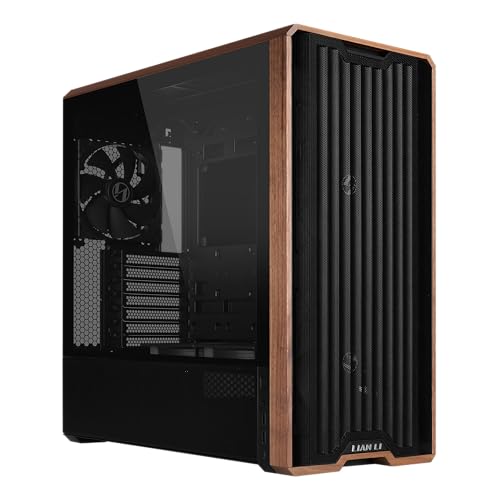
Let us be completely plain about what this pick is: the LANCOOL 217 is not a cube. It is a current-production ATX mid tower, and it is in this guide because it is the case we can actually link, verify and recommend without reservation to a reader who needs to order a case this week. Its listing specifies five PWM fans fitted and a walnut-wood-accented front, which gives it a warmer, more domestic face than most towers, and Lian Li’s recent LANCOOL designs have earned their reputation the honest way — sensible interiors, generous airflow and cable management that does not require an engineering degree or a third hand.
Why might it satisfy a cube shopper? Because much of the cube’s appeal is practical rather than geometric: room to work, cables that disappear, components that sit where you put them. The 217 delivers the modern tower version of those virtues, with airflow a glass cube cannot match and a warranty-and-returns experience that remaining-stock marketplace purchases cannot. What it cannot deliver is the silhouette, the horizontal tray or the two-room interior; if those are the point — and for many readers they genuinely are — then the prose picks above are your list and this paragraph is a footnote. We would rather mark that boundary clearly than blur it, because a guide that quietly substitutes a tower for the cube you asked about has failed you in a way a labelled alternative does not.
- Format: ATX mid tower (not a cube — see the notes above)
- Fans fitted: 5 PWM fans per the listing
- Front: walnut wood accent design
- Availability: current production, linked listing
- Role: the easy-order fallback for cube-curious builders
Strengths
- Orderable today with normal warranty and returns
- Five fitted PWM fans and strong airflow out of the box
- Wood-accented front softens the tower look for living spaces
Trade-offs
- It is a tower: no horizontal tray, no dual-chamber cube layout
- Tall silhouette, the very thing some cube shoppers are avoiding
- Less distinctive in a room than a true cube
Best for: buyers who need a dependable case now and care more about building ease than shape. Not suited for: anyone whose brief actually is the cube itself — read the five picks above again.
Why did true ATX cubes become so hard to find?
The short answer is that the market moved and the cube did not move with it. Tower cases standardised around tempered glass, vertical GPUs and radiator support, and case makers followed the volume. Small-form-factor design simultaneously ate the cube’s other flank: mini-ITX boards grew powerful enough that builders who once needed a cube for a compact, flexible machine now buy a 10-litre ITX box instead. Between the tower above and the ITX box below, the full-ATX cube was left serving a loyal but small audience of horizontal-tray fans, home-server builders and custom-loop show builders — which is exactly the audience the picks in this guide serve.
There is a manufacturing logic too. A cube’s wide panels and chambered interior use more material and more tooling than a tower of similar volume, and its shipping box is bulkier, which matters when cases are freighted across oceans by the container. None of that makes the surviving cubes bad purchases — several models above have outlived multiple generations of fashionable towers precisely because their owners refuse to replace them — but it does mean the class now rewards patience. Search by exact model name, buy from a seller whose condition grading you trust, and consider that a well-kept used cube from a long production run is often a safer purchase than an obscure new cube-shaped listing with no community behind it.
How do you build in a cube without wasting its advantages?
Plan the build around the tray. In a horizontal-tray cube, install the CPU, cooler and memory on the motherboard before the board goes in, because you have the rare luxury of working from above with gravity helping instead of fighting. Route the power supply’s cables through the chamber division before seating the board, since the second chamber’s whole purpose is to receive them, and a cube rewards the builder who treats cable routing as a first step rather than a final tidy. Fit drives into their chamber or bays next, connect their cables while both hands still fit, and leave the graphics card — the component the horizontal layout flatters most — for last.
Airflow in a cube follows the same physics as a tower but with shorter distances, which tempts builders to under-fan the build. Resist that. A dual-chamber cube still needs a deliberate path: intake where the components are, exhaust that does not fight it, and attention to the second chamber, where a power supply and a stack of drives generate their own quiet heat that has nowhere to go if you forget it. In the Node 804 especially, the drive chamber’s airflow is a design feature to use, not a detail to block with a bundle of spare cables. Finish with the panel check every cube owner learns: chambers and wide panels mean more seams, and a seam with a cable trapped in it is a rattle waiting for a quiet evening to announce itself.
What should you measure before ordering any cube?
Measure width first, because width is where cubes surprise. A tower’s footprint is roughly a shoebox stood on end; a cube’s is closer to a microwave’s, and desks, media units and under-desk spaces that swallow towers without comment can reject a cube by centimetres. Measure depth second, including the space behind for cables and exhaust — cubes often sit on media furniture that backs onto a wall, and a case exhausting into five centimetres of trapped air will run its fans harder and louder than its specification suggests. Measure the route into the room as well if the case is a big one: the Level 20 XT’s box and the case itself both need doors and corners negotiated, and more than one owner has assembled a cube in the only room it could reach and then been unable to move it.
Then measure your components against the case’s real limits rather than its class name. “ATX cube” spans everything from the full-ATX HAF XB to micro-ATX designs that share the silhouette; the board in your current PC decides which half of this guide is even available to you. Check graphics-card length against the chamber, CPU cooler height against the tray-to-panel distance (horizontal trays change which dimension matters), and radiator plans against the specific model’s mounts rather than the general reputation of cubes as water-friendly. Ten minutes with a tape measure and a spec sheet is the cheapest insurance in PC building, and cube buyers — shopping a class where returns are slower and stock is thinner — benefit from it more than most.
How do cubes cope with today’s enormous graphics cards?
Modern flagship graphics cards stress cases in three ways — length, thickness and heat — and cubes answer each differently from towers. Length is the simplest: a cube’s motherboard chamber is usually shorter front-to-back than a tower’s, so the longest cards need their clearance checked against the specific model rather than assumed, and a front radiator can quietly steal the centimetres a card needed. Thickness, paradoxically, is where the horizontal tray shines: a three-slot card lying flat does not droop, does not block the slots beneath it in the same way, and its fans face open chamber air rather than a nearby panel or a neighbouring card. Several owners of horizontal cubes report their card running its fans a notch lazier than it did in a tower, simply because the intake side of the cooler is no longer breathing against a wall of cables or a drive cage.
Heat is the honest challenge. A powerful card turns its chamber into a small oven, and a cube gives that heat a shorter trip to an exhaust but also less vertical room to stratify away from other components. The designs that cope best are the ones with a direct exhaust path beside or above the card — the HAF XB’s unpretentious airflow philosophy again — while the glass-fronted 280X asks its owner to keep power targets sensible. None of this is a reason to avoid cubes for gaming; it is a reason to spec the whole machine as a system. A cube around a mid-range card is a delight. A cube around a flagship card is a project, and projects deserve the XT’s volume or the XB’s honesty rather than a pretty box chosen from a photograph.
What is it like to live with a cube day to day?
The daily texture of cube ownership is mostly pleasant surprises. The machine sits lower, so it fits under shelves and on media units where a tower would poke into the room’s sightlines. Ports and power buttons land at a height that suits a case on furniture rather than on the floor. Opening it feels like opening a piece of equipment rather than undressing a tower — panels come away to reveal a tray you can actually reach, and a five-minute job like reseating a card or adding a drive stays a five-minute job in year three, which is more than most tower owners can claim.
Dust is the recurring chore, and cubes have their own pattern for it. Horizontal top panels collect settling dust that a tower’s vertical sides shrug off, and a cube placed on the floor — which its shape discourages but some rooms demand — ingests carpet-level air through its lower intakes. The mitigations are mundane: filtered intakes where the model provides them, a stand or shelf rather than the floor, and a seasonal pass with a blower that the cube’s open layout makes genuinely quick. Owners who keep servers in Node 804s add one more habit — checking drive temperatures after any cable work in the drive chamber, because a rearranged bundle can quietly block the path the chamber’s air was using.
There is also a social dimension worth naming. A cube reads as furniture or equipment; a tall RGB tower reads as a gaming PC, whatever is inside it. In shared homes that distinction decides where the machine is allowed to live, and a machine allowed into the living room on a media unit gets used, maintained and enjoyed differently from one exiled to a spare room. More than one cube in this guide has been bought, if owners are honest, as a peace treaty — and peace treaties, unlike benchmark charts, appreciate with age.
How do you cool the second chamber properly?
The second chamber is the cube feature most often wasted. Builders treat it as a cupboard — the place cables, the power supply and the drives go to be forgotten — and then meet its heat as a surprise. Treat it instead as a small room with its own climate. The power supply should draw its intake from outside the case where the design allows, exhausting its own heat without borrowing the chamber’s air. Drives should be spaced across their holders rather than stacked in a solid block, because a stack of drives with air gaps runs meaningfully cooler than the same drives touching. And spare cables belong in a tied bundle along a wall of the chamber, never wadded into the middle where the air path runs.
Fan provision for the chamber varies by model, and the difference matters for server-style builds. A gaming cube with two drives barely notices chamber heat; a Node 804 filled toward its drive capacity is a small furnace with a filing system, and its owner’s fan plan should include the drive side explicitly. This is unglamorous advice, but cubes reward it disproportionately, because the whole point of the two-room layout is that each room’s problems stay its own. A tower mixes everything into one thermal soup and calls it simplicity; a cube asks a little more thought and returns a machine whose parts age at their own rates rather than cooking each other.
Horizontal tray or dual chamber — which cube layout suits you?
The two layouts look similar in a catalogue and feel different on the desk. A horizontal-tray cube — the HAF XB, the Core V21 — is a builder’s layout. Everything you service often sits on one open tray, the power supply and drives live in the storey beneath, and the case’s personality is access: panels off, hands in, job done. Choose it if your PC is a hobby as much as an appliance, if you swap drives or cards with any regularity, or if a heavy graphics card’s sag has been quietly bothering you for years. Its weakness is presentation; a tray of components under a window looks purposeful rather than polished, and cable artistry matters less because the layout forgives so much.
A dual-chamber cube — the 280X, the Node 804 — is a curator’s layout. The visible room is kept immaculate by exiling everything untidy or hot to the service room, and the case’s personality is separation. Choose it if the PC is on display, or if its second job involves a stack of drives whose heat and cables you want nowhere near the motherboard. Its weakness is access: the service chamber is a smaller, tighter place to work than a tray, and a build that changes weekly will start to resent the panels and partitions between its owner and its parts. Neither layout is the advanced version of the other; they are answers to different questions, and the most satisfied cube owners are the ones who knew which question they were asking.
There is a hybrid reality worth acknowledging: many owners use a chambered cube like a tray build, leaving the service side sealed for years while the component side gets all the attention, and that is fine. The layouts differ in where they put friction, not in whether friction exists. A tray puts none between you and the parts but offers nowhere to hide anything; a chamber hides everything at the price of a panel and a partition each time you visit the hidden half. Knowing which side of that trade your habits sit on is the whole decision, and it is a decision about you rather than about the cases.
A practical tiebreaker: count how many times you opened your current case in the last year, and why. Mostly to add or change hardware? Tray. Mostly to clean it, or never at all because it just sits and works? Chamber. The answer takes ten seconds and predicts your next five years with the case better than any feature list in this guide.
What should you know about buying a long-running cube model?
Because most picks here are established designs rather than this season’s launches, the buying skills differ from tower shopping. Buy the seller as much as the case: prefer listings that show the actual unit or state the condition precisely, confirm that accessories — drive trays, panel variants, fan controllers, thumbscrews — are included, because a missing proprietary drive tray for a discontinued cube can be harder to replace than the case was to buy. Ask about the panels specifically. Glass and acrylic that has survived years of other people’s builds may carry scratches that photographs flatter, and on a showcase cube the panel is half the product.
Check the small consumables too. Fans in a long-running model may be original and tired; budget mentally for replacing them and the purchase often improves, since modern fans will make the old cube quieter than it ever was new. Filters, if the design uses them, should be present and intact. None of this is a warning against the class — it is the normal diligence of buying any well-made durable good second-hand or from remaining stock, and the cubes above were chosen partly because their build quality survives this scrutiny. A flimsy fashionable tower bought new can be a worse five-year proposition than a solid cube bought carefully, and the owners’ communities around these models exist precisely because the hardware earned them.
Can a cube work as a living-room gaming and media PC?
It is arguably the cube’s best modern job. A living-room PC must satisfy constraints no tower enjoys: it sits near a television, inside furniture designed for consoles and amplifiers, in a room where noise carries and appearances are negotiated. The cube’s proportions match AV furniture because they evolved from the same logic — wide, low, deep rather than tall. A Node 804 under a television holding the household’s media library, or a 280X on a sideboard running couch games, looks like it belongs in a way a tower beside the sofa never quite manages.
The practical checks are heat and noise, in that order. AV furniture encloses; before committing a cube to a cabinet shelf, confirm the shelf’s rear is open or can be opened, because a cube exhausting into a closed wooden box will thermal-throttle its way through a film’s loudest scenes and then cool down audibly in the quiet ones — the worst possible acoustic pattern for a cinema room. On an open shelf or media unit, by contrast, a sensibly specced cube is calm, and its fans at film-watching loads are effectively inaudible at sofa distance. Controller and wireless peripherals complete the setup; the case choice that remains is mostly about which of this guide’s personalities — the server’s storage, the showcase’s glass, the tinker’s tray — matches the room’s other furniture and the household’s tolerance for visible technology.
One caution belongs here because living rooms expose it: standby behaviour. A media PC wakes and sleeps constantly, and a cube full of drives or fans that spin up audibly on every wake will announce itself in a quiet room. Set fan curves and drive sleep policies with the room in mind, and the cube disappears into the furniture it resembles — which, for this use, is the highest compliment a case can earn.
How future-proof is a cube purchase?
More than the fashion cycle suggests. Motherboard form factors change slowly, and an ATX or micro-ATX cube bought today will accept boards for many years; the horizontal tray cares nothing for GPU fashion except length, and the chambered designs predate and will outlast the current tempered-glass era because their advantage is geometry, not styling. The genuine risks are at the margins: graphics cards continue to grow, so a cube bought for a flagship card should be chosen with clearance headroom rather than a perfect fit; front-panel connectivity ages, though a cube with a replaceable or generous front panel suffers less; and proprietary small parts — drive trays, panel clips — become scarcer as a model ages, which argues for buying any spares you foresee while the model is still findable.
Set against that, the cube’s durability story is strong. The models in this guide have already survived a decade of fashion by being useful, and usefulness is the only future-proofing that has ever worked in PC hardware. A builder who chooses a cube for its layout — because they rebuild often, store much, or display proudly — will still be served by that layout when today’s tower trends are trivia questions. Buy the geometry that fits your habits and the case will not need replacing when the market’s attention wanders, as it reliably does, to something else.
How should you choose fans and airflow direction in a cube?
Cube airflow confuses tower veterans because “front to back, bottom to top” stops being a complete description when the motherboard lies flat or the case has two rooms. Start from the components instead of the compass. The graphics card and CPU cooler are the heat sources that matter; give each a supply of fresh air that has not already passed over another hot part, and give the combined heat a short, unobstructed exit. In a horizontal-tray cube that usually means intake low and at the front of the tray level, exhaust high and at the rear, letting natural convection assist rather than oppose the fans. In a dual-chamber cube, plan the component chamber that way and then repeat the exercise, smaller, for the service chamber.
Fan count matters less than fan placement, and cubes punish the scattergun approach of filling every mount. Each additional fan is another noise source and another turbulence maker; a cube with three well-placed fans routinely behaves better than the same cube with seven fans arguing about direction. Pressure balance deserves a sentence too: a slight positive pressure — a little more filtered intake than exhaust — keeps dust entering through the filters rather than through every seam, which matters doubly in a cube whose wide panels present more seams than a tower’s. Set curves per chamber if your controller allows, because the service room’s ideal curve follows drive activity while the main room’s follows gaming load, and a single shared curve serves both masters badly.
Comparison table
| Case | Board size | Layout | Availability | Choose it when |
|---|---|---|---|---|
| Cooler Master HAF XB EVO | ATX | Horizontal tray, two storeys | Prose-only — search by name | You rebuild often and hate GPU sag |
| Thermaltake Level 20 XT | E-ATX | Chambered glass cube | Prose-only — specialist search | A custom loop needs a showcase with volume |
| Corsair Crystal 280X | Micro-ATX | Dual chamber, glass front | Prose-only — search by name | A tidy visible build matters most |
| Thermaltake Core V21 | Micro-ATX / ITX | Horizontal tray, modular panels | Prose-only — search by name | You reconfigure your case as often as your PC |
| Fractal Node 804 | Micro-ATX | Dual chamber, drive-focused | Prose-only — search by name | The cube is a home server or NAS |
| Lian Li LANCOOL 217 | ATX | Conventional tower | Linked, current production | You need to order today with full support |
What mistakes do cube-case buyers keep making?
The first is assuming the word “cube” in a search result guarantees the layout they want. Shoppers picture a horizontal tray or two chambers and receive a tall tower with a cube in its marketing name, or a micro-ATX case for their full-ATX board. Read the form factor line, look at an interior photograph, and confirm which layout the specific model actually implements — the picks above spell theirs out precisely because this mistake is so common.
The second is forgetting the footprint until delivery day, covered in the measuring section but worth repeating as a mistake because it ends more cube purchases than any defect does. The third is starving the second chamber: builders lavish fans on the motherboard side and leave the power supply and drives stewing in a sealed room, then wonder why drive temperatures climb. The fourth is buying a glass showcase cube for a hot build — the Level 20 XT rewards planned water cooling and the 280X rewards moderation, and neither forgives being treated as an airflow case. Match the cube to the machine, as with every case, and the shape will repay you.
Final Recommendation
If you want the cube in its purest surviving form, hunt down the HAF XB EVO and enjoy building the way tower owners never get to. If your ambitions run to water and glass, the Level 20 XT is the class’s flagship and priced like one. Micro-ATX owners have the happiest choice: the 280X for display, the Core V21 for play, the Node 804 for serious storage. And if the search itself exhausts you, the LANCOOL 217 stands ready as the honest, orderable tower that borrows the cube’s manners without borrowing its shape. The cube endures because a horizontal motherboard and a separate room for the mess are genuinely good ideas — ideas worth a little extra searching, in a market that has mostly forgotten how good they are.
Frequently Asked Questions
Is a cube case better than a tower for cooling?
Not automatically. A cube’s shorter air paths and chamber separation can help, and a horizontal tray removes the hot-air-rising-past-the-GPU quirk of towers, but a modern mesh tower with large fans will out-cool a glass cube every time. Judge the specific model’s intake and fan plan, not its geometry.
Will my ATX motherboard fit every case in this guide?
No, and this is the most important check in the article. The HAF XB EVO takes full ATX and the Level 20 XT takes E-ATX, but the Corsair 280X, Core V21 and Node 804 are micro-ATX designs. Measure your board before falling for any cube’s photograph.
Why are most of these picks not linked?
Because the models are long-running designs most often sold through marketplace sellers, specialists or remaining stock, and we only attach purchase links we have verified through our pool. Searching the exact model name at a retailer you trust will find them; a tidy link we cannot stand behind would be worse than none.
Are cube cases good for home servers?
The right cube is excellent for it — the Node 804 was designed for exactly that work, with a chamber that holds many drives away from the motherboard’s heat. Cubes also sit more stably and discreetly on shelves and in cupboards than tall towers, provided ventilation is respected.
Do horizontal motherboards really prevent GPU sag?
Yes, mechanically and completely: a card resting on a horizontal tray has no lever arm pulling it down, so the slow bending and slot stress that tower owners brace against simply do not occur. It is the cube layout’s most concrete, least arguable advantage. It also removes the market for support brackets and stands that tower ownership has created — accessories that exist only to compensate for a card hanging sideways off a vertical board, and which a cube owner can simply never think about again.
What is a dual-chamber case, and is it the same as a cube?
A dual-chamber case splits its interior into a component room and a service room for the PSU, drives and cables. Many dual-chamber designs are cube-proportioned, which is why the terms travel together, but some tall towers now borrow the split too. The 280X and Node 804 above are cubes and dual-chamber; the LANCOOL 217 is neither, and says so.
Are cube cases a good choice for a first PC build?
For the building itself, yes — a horizontal tray is the most forgiving classroom a first-timer can ask for, with every socket visible and nothing fighting gravity. The cautions are about shopping rather than assembly: confirm the board size, measure the desk, and buy from a seller you trust, since the class’s best models are established designs rather than this season’s stock.
Can I put a cube case on carpet?
You can, but you should not. Cubes often draw air from low intakes, and carpet both starves those intakes and feeds them dust and fibre. A simple board or low stand under the case restores the airflow the design expects and keeps filters on a seasonal schedule instead of a monthly one. The same advice applies to towers, but cubes sit lower and wider, so the penalty for skipping the stand is larger and arrives sooner.
Related Guides
Round out the build with our guides to the quietest PC cases for shared rooms, small-form-factor cases for compact builds and how to stop graphics card sag in any case.