What's inside
- Where to buy
- Key Takeaways
- Quick Picks
- How did we choose the quietest cases worth your money?
- Which of the best and quietest pc cases belongs on your desk?
- What actually makes a PC case quiet?
- How do you set up a quiet case so it stays quiet?
- How do these quiet cases behave across a real week?
- What else belongs in a quiet build?
- How do you choose between damping and airflow for your room?
- Can water cooling make a quiet case quieter still?
- How can you judge a case’s noise before your return window closes?
- Which upgrades help an older quiet build most?
- What do noise measurements actually tell you — and what do they hide?
- How does your room size change which case you should buy?
- Comparison table
- What mistakes do quiet-case buyers keep making?
- What should you check on delivery day?
- Final Recommendation
- Frequently Asked Questions
- Related Guides
As an Amazon Associate I earn from qualifying purchases. This post may contain affiliate links at no extra cost to you.
gizmoverdict.com is reader-supported. When you buy through links on our site, we may earn an affiliate commission.
Where to buy
Every case in this guide is sold through Amazon’s US store, and the six picks below carry links to their listings so you can check the current configuration, panel options and stock before committing. Quiet cases are unusually sensitive to which variant you order — the same model name can hide a mesh front or a sealed front, a glass side or a steel side — so read the listing title carefully rather than assuming the quietest version is the one in the cart.
People searching for the best and quietest pc cases usually fall into two camps that rarely admit they want different things. One camp works or games in a shared room and needs a machine that disappears under speech, a television or a sleeping partner. The other camp records audio, streams with an open microphone, or simply finds fan whine more tiring than heat. Both camps are really shopping for the same physics: a case earns its silence by moving enough air at low fan speed that nothing inside ever has to spin up, and by giving the noise that remains a muffled, indirect path out of the box. This guide ranks six cases on exactly that logic — how they behave at idle and under a long gaming or rendering load in a normal room, not how impressive their airflow charts look in a wind tunnel.
Key Takeaways
- The be quiet! Silent Base 802 is the only case here designed from the first sketch around sound control, and its swappable front and top panels let you choose between a sealed, damped configuration and a mesh one without buying a second case.
- Silence at idle is mostly a fan-curve problem, but silence under load is a case problem: restricted fronts force fans to work harder, which is why the airflow-led Lian Li LANCOOL 216 can end up calmer than a cheap sealed box once a graphics card starts pulling real power.
- The Fractal Design North pair prove that a quiet case does not have to look like a black refrigerator — walnut slats and a mesh or glass side change the character completely while the noise behaviour stays civilised.
- Budget silence is real but narrower: the Pure Base 501 and Pure Base 600 ask you to accept fewer fans and simpler interiors in exchange for damped panels at a friendlier tier.
- Whatever you buy, plan the build around large, slow fans and a power supply with a semi-passive mode; the case can only muffle noise the components actually make.
Quick Picks
| Pick | Badge | Why it is here |
|---|---|---|
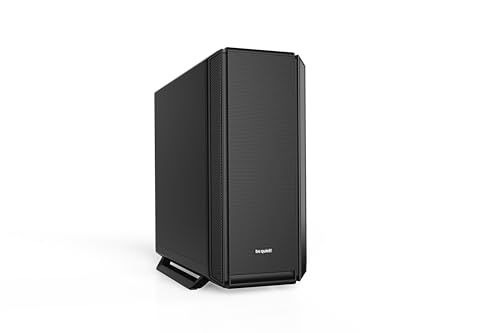
| be quiet! Silent Base 802 Black | Quietest overall | Purpose-built damping, three fans fitted, and panels you can swap between sealed and mesh as your hardware changes. |
| be quiet! Pure Base 600 Black | Measured value | The older, calmer Pure Base formula: sound-insulated panels and a fan controller, in a plainer box that costs less to own. |
| be quiet! Pure Base 501 Black | Compact quiet | A smaller midi tower with two 140mm PWM fans that suits a tidy single-GPU build under a desk. |
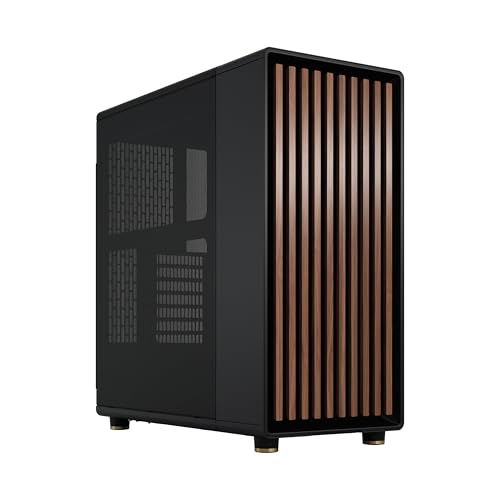
| Fractal Design North Charcoal, Tempered Glass Dark | Quiet with a window | Walnut-front furniture styling with a dark glass side, for a living-room PC that still keeps its manners. |
| Fractal Design North, Mesh Side | Quietest looks-first pick | The mesh side panel breathes easier than glass, which lets its fans loaf along at lower speed under load. |
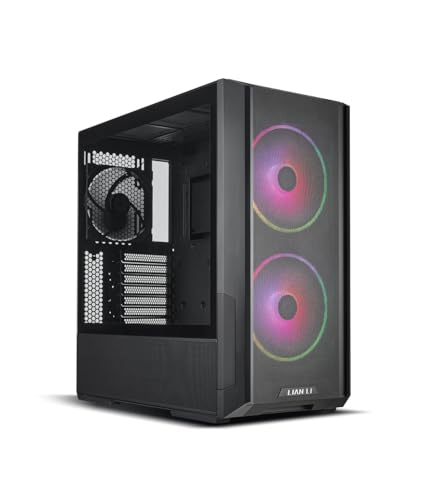
| Lian Li LANCOOL 216 RGB Black | Quiet through airflow | Two huge 160mm front fans move serious air at lazy speeds, so a hot gaming rig can stay composed without a sealed box. |
How did we choose the quietest cases worth your money?
We started from a simple observation gathered from years of reader complaints: nobody returns a case because it was three degrees warmer than a rival, but people absolutely return cases that drone. So the first filter was intent. A case had to be designed, marketed or widely used with low noise as a primary goal — through damping material, through fan selection, or through an airflow path generous enough that slow fans suffice. Generic gaming towers with a glass front and a prayer were left out.
The second filter was fan strategy. Large fans move a given volume of air at lower rotational speed than small ones, and lower speed is where noise falls away fastest, so cases built around 140mm or larger spinners scored ahead of designs relying on banks of fast 120mm units. We also looked at what control the builder gets: a case that hands you PWM headers and room to set a gentle curve beats one that locks you into a fixed-speed hub.
Third came the escape routes for sound. Noise leaves a case through every opening, so we weighed how direct those paths are. A solid, lined front forces sound to bounce and lose energy; an open mesh front lets fan noise walk straight out but compensates by letting fans run slower. Neither approach is automatically better — the ranking below separates them by use case rather than pretending one philosophy wins everywhere.
Finally, we checked the unglamorous details that decide whether a quiet build stays quiet: whether the panels sit flush so they cannot buzz, whether hard-drive cages are isolated or at least removable, whether there is room for a thick radiator if you later move to water, and whether the power-supply shroud gives the PSU fan its own intake so it is not recycling hot air and spinning up in protest.
Which of the best and quietest pc cases belongs on your desk?

be quiet! Silent Base 802 Black — Quietest overall
The Silent Base 802 is what happens when a company that sells quiet fans decides the case itself should finish the job. Its panels are lined with thick insulating material, the front is a closed face with side intakes rather than an open grille, and it arrives with three fans already fitted so the out-of-box behaviour is calm rather than something you must fix with a shopping list. In a bedroom or a small flat, this is the case that most reliably turns a gaming PC into background furniture: at idle it is effectively absent, and under load the sound that escapes is a low, even wash rather than a whine with a pitch you can follow.
What lifts it above older silent cases is the pair of interchangeable panel sets. Run the sealed front and top when the machine is a workstation or a media PC, then swap to the mesh panels in minutes if you later install a hotter graphics card and would rather trade a whisper of extra audibility for lower temperatures. That flexibility matters because a case is a five-to-ten-year purchase while GPUs change every two or three; the 802 is the rare quiet case that does not punish you for upgrading. Inside, there is generous room for large air coolers, long cards and radiators, and the interior layout is modular enough that a second build in the same shell still feels fresh.
- Format: ATX midi tower, supports E-ATX boards
- Fans fitted: 3 fans included per the listing
- Front/top: interchangeable sealed and mesh panel sets
- Panels: sound-insulated steel construction
- Cooling room: space for large radiators and tall air coolers
Strengths
- Genuinely damped panels rather than a quiet badge on an ordinary box
- Swappable panels let one case serve both a silent workstation and a hotter gaming build
- Calm, low-pitched noise character that microphones and nearby listeners tolerate well
Trade-offs
- Sealed configuration runs warmer, so very hot hardware needs the mesh panels fitted
- It is a large, heavy case that dominates a small desk setup
- Sits in a higher price tier than the Pure Base models below
Best for: builders who want one case to stay quiet through several hardware generations. Not suited for: anyone chasing the lowest possible GPU temperatures in a small room that already runs hot.

be quiet! Pure Base 600 Black — Measured value
The Pure Base 600 has been the sensible person’s quiet case for years, and its formula explains why. It takes the same basic ingredients as its bigger sibling — insulated panels, a restrained closed front, fans chosen for manners — and serves them in a plainer, slightly smaller box without the modular party tricks. Two fans are fitted, and a manual fan controller lets you set a baseline speed from the case itself, which suits builders who would rather turn a knob once than live inside BIOS fan curves.
Its age shows in small ways rather than fatal ones. The interior layout is a generation older, cable routing is less pampered than in the newest designs, and you should not expect the panel-swapping versatility of the 802. But for a single-GPU gaming PC or an office machine with a mid-range card, none of that changes the acoustic result: the 600 muffles coil whine and fan hum into something you stop noticing within a day. It is also a forgiving case for a first quiet build, because the damping does the work even if your cable management is untidy and your fan curve is the motherboard’s default with the volume mentally turned down.
- Format: ATX midi tower
- Fans fitted: 2 fans included per the listing
- Control: built-in manual fan speed controller
- Panels: sound-insulated front, top and sides
- Drive support: traditional cages suited to mixed SSD/HDD builds
Strengths
- Proven damped design at a friendlier tier than the flagship
- Manual fan controller gives quick, software-free speed control
- Plain exterior that disappears in offices and shared rooms
Trade-offs
- Older interior with less refined cable management
- No swappable mesh panels, so hot builds run warmer
- Fewer fitted fans means adding one for demanding graphics cards
Best for: a calm, good-value build for work and evening gaming in a shared space. Not suited for: high-power GPUs run for hours in a warm room, where the sealed front becomes the limit.

be quiet! Pure Base 501 Black — Compact quiet
The Pure Base 501 trims the quiet formula down to the size most people actually need. It is a midi tower that assumes one graphics card, a sensible CPU cooler and no ambitions toward a drive farm, and in return it takes up less floor and desk space while keeping the family’s insulated panels and restrained styling. The listing specifies two 140mm PWM fans, and that detail matters more than it looks: 140mm spinners under PWM control can idle almost inaudibly and still have the headroom to clear gaming heat without a sudden, noticeable ramp.
Think of the 501 as the case for the PC that lives under a desk in a flat where the desk is also the dining table. It does not try to swallow radiators in every wall or host a storage array; it tries to make a mainstream build quiet and tidy, and it succeeds. Builders stepping down from a full tower will notice the tighter working room behind the motherboard tray, and anyone planning a second GPU or a custom loop should look at the 802 instead. For everyone else, the smaller footprint is not a compromise so much as an admission of how most PCs are really configured.
- Format: ATX midi tower, compact footprint
- Fans fitted: 2 x 140mm PWM fans per the listing
- Panels: insulated, closed-front design
- Layout: single-GPU focused interior
- Control: PWM fans for motherboard fan-curve tuning
Strengths
- Large PWM fans give a wide, gentle operating range
- Smaller size suits flats, dorms and under-desk placement
- Keeps the damped-panel character of the larger Pure Base models
Trade-offs
- Tight interior for very long cards or elaborate water cooling
- Only two fans fitted, so hot builds may want a third
- Less expansion room than the 600 or 802 for future drives
Best for: a mainstream gaming or work PC in a small room where space and silence both count. Not suited for: custom-loop builders or anyone hoarding hard drives.

Fractal Design North Charcoal, Tempered Glass Dark — Quiet with a window
Most quiet cases ask you to hide the PC; the North asks you to furnish with it. The front is a row of real walnut slats over a ventilated frame, the chassis is finished like a piece of Scandinavian furniture, and this Charcoal variant pairs that front with a dark tempered-glass side so the build remains visible without turning into a light show. The surprise, for anyone who assumes pretty means loud, is how composed it stays: the slatted front feeds air along indirect paths, and Fractal’s fan selection keeps the stock behaviour relaxed rather than eager.
Under a desk in a living room, the North solves a social problem as much as an acoustic one. A sealed black tower can be silent and still be the ugliest object in the room; the North earns its place visually, which matters when the PC shares space with people who did not choose it. Acoustically, the glass side is the honest compromise here — glass reflects internal sound back into the case rather than absorbing it, so a North build rewards quiet components: a graphics card with a good zero-fan idle mode, a power supply that stays passive at desktop loads, and storage on SSDs rather than spinning disks. Choose those parts well and the glass costs you almost nothing; choose them badly and no case on this page would fully save you anyway.
- Format: ATX mid tower
- Front: natural walnut slats over ventilated frame
- Side: dark tempered glass panel
- Finish: Charcoal colourway
- Role: living-room and design-led desk setups
Strengths
- Furniture-grade looks that justify a visible placement
- Slatted front breathes better than a flat sealed face
- Dark glass shows the build without glare or tint tricks
Trade-offs
- Glass side offers no damping, so component choice matters
- Wood front needs gentler handling than plain steel
- Interior is mid-tower sized, not a big-radiator playground
Best for: a living-room or studio PC that must look intentional and stay polite. Not suited for: builders who want the case alone to silence loud, cheap components.

Fractal Design North, Mesh Side — Quietest looks-first pick
This is the same walnut-fronted North with one change that quietly alters its personality: a mesh side panel instead of glass. Mesh cannot show off a build, but it can breathe, and a side that breathes lets the whole system exhale without asking the front fans to push harder. In practice that means the mesh North holds lower fan speeds during long sessions than its glass sibling with identical hardware, and lower fan speed is the currency this entire guide trades in.
The mesh variant is the one we would hand to a gamer who loves the North’s looks but plays demanding titles for hours. The fine mesh also softens the sound that does escape, breaking up the direct path between a GPU’s fans and your ears in a way a solid glass pane cannot. You give up the display-window effect and any internal lighting theatrics, which for many adults is less a sacrifice than a relief. If the PC lives in a bedroom where its owner sleeps a metre from the desk, this is the North to buy, and the difference between the two variants is a useful reminder that in quiet computing, panels are not decoration — they are part of the cooling system.
- Format: ATX mid tower
- Front: natural walnut slats over ventilated frame
- Side: full mesh panel for side ventilation
- Finish: standard North colourway per the listing
- Role: long gaming sessions in quiet rooms
Strengths
- Mesh side lowers the fan speeds needed under sustained load
- Keeps the walnut-front design that makes the North distinctive
- Mesh diffuses escaping sound better than a glass pane
Trade-offs
- No view of the build, so lighting and tidy cabling go unseen
- Mesh admits more dust than a sealed side over time
- Still a mid tower, with the usual limits on radiator size
Best for: gamers who want the North’s design with the calmest possible load behaviour. Not suited for: showcase builders whose build is meant to be looked at.

Lian Li LANCOOL 216 RGB Black — Quiet through airflow
The LANCOOL 216 argues the opposite case from the be quiet! boxes — literally. Instead of sealing sound in, it fits two enormous 160mm ARGB front fans behind a fine mesh front and lets them turn so slowly that there is barely any sound to seal. Big fans at low speed are the oldest trick in quiet computing, and Lian Li executes it well: the 216 feeds a hungry graphics card with a river of slow air, so neither the case fans nor the card’s own coolers need to ramp during ordinary gaming.
Honesty requires a boundary here. The 216 is an airflow case, and in a silent room at idle, with everything else switched off, a damped be quiet! build will measure and feel calmer. The 216 earns its place for the opposite scenario: a powerful GPU under load in a normal room, where a sealed case’s fans and the card inside it are working hard enough to be heard through the damping. There, the mesh design’s laziness wins. The RGB in the name is real but optional in spirit — turn the lighting off and the case is a sober black mesh tower that happens to breathe exceptionally well. Motherboard compatibility and cable management are modern and painless, which makes it an easy case to recommend to a first-time builder who fears noise but fears overheating more.
- Format: ATX mid tower
- Fans fitted: 2 x 160mm ARGB front fans per the listing
- Front: full mesh for unrestricted intake
- Lighting: addressable RGB, can be switched off
- Role: high-power gaming builds that must stay composed
Strengths
- Oversized front fans move large air volumes at low speed
- Hot hardware stays cooler, so component fans ramp less
- Straightforward, modern interior for first-time builders
Trade-offs
- No damping material, so idle silence trails the be quiet! cases
- Mesh front passes some component noise straight through
- ARGB styling will not suit every room, even switched off
Best for: powerful gaming PCs where load noise, not idle noise, is the complaint. Not suited for: recording setups chasing the lowest possible idle floor.
What actually makes a PC case quiet?
Strip away the marketing and a quiet case does three jobs. It reduces noise at the source by letting fans turn slowly, which is a question of fan size and how freely air can enter. It blocks or absorbs the noise that remains, which is where dense panels and insulating foam earn their keep. And it avoids creating new noise of its own — no rattling side panels, no vibrating drive cages, no thin steel that hums in sympathy with a pump. A case that does only one of the three will disappoint you in a specific, predictable way: the sealed box that cooks its GPU until the card’s fans scream, the mesh box that is cool and clearly audible at idle, the damped box with a loose panel that buzzes at exactly the frequency your desk amplifies.
There is also a frequency dimension that spec sheets ignore. Human ears forgive low, steady sound and resent high, varying sound. A case can measure respectably and still annoy if it lets a thin whine escape, while another can measure slightly higher and feel calmer because what escapes is a featureless hush. This is why damped cases punch above their measurements in bedrooms and why fan quality matters as much as fan quantity: a bearing that ticks at low speed will be heard through any panel.
Finally, remember that the case is the last link in the chain, not the first. The loudest component sets the floor. A quiet case around a blower-style graphics card, a stock CPU cooler and a bargain power supply is money spent muffling problems that better components would never have made. Buy the case for the build you have, but if you are choosing parts at the same time, spend on quiet components first and let the case finish the job.
How do you set up a quiet case so it stays quiet?
Start with the fan curve, because it is free and it is where most of the win lives. In your motherboard’s BIOS or its control software, set case fans to a flat, low speed across the temperature range your PC sees at idle and during light work, then let them rise gently only when the graphics card is genuinely hot. Tie the curve to GPU temperature if your board allows it, or to a motherboard sensor near the card; a curve tied to CPU temperature will ignore the component that actually makes gaming noise. Give the curve a slow response time too, so a brief temperature spike during a loading screen does not produce an audible surge and fade.
Placement is the second free win. A case on a hard floor under a wooden desk sits inside a resonating box; raising it on a stand, moving it off a shared wall, or simply giving its intakes ten centimetres of clearance changes what you hear. Keep the rear exhaust away from the wall behind it — hot air bouncing straight back raises internal temperatures and fan speeds together. If the machine must live on the desk, a damped case earns its money twice over, because at ear distance every small noise is larger.
Third, hunt vibration before it hunts you. Fit hard drives on any isolation mounts the case provides, or retire spinning disks to an external enclosure if the build allows. Check that side panels are fully seated after every hardware change; a panel resting on a cable is a panel that will buzz at 2 a.m. during a download. And once a season, clear the intake filters — a clogged filter is a silent tax on fan speed that accumulates so gradually you blame the case for noise your dust created.
How do these quiet cases behave across a real week?
Monday’s video calls are an idle test: every case here passes, with the be quiet! trio passing most completely because their panels hide the small sounds — a pump’s tick, a drive’s seek — that mesh and glass let through. Wednesday’s long gaming session reverses the ranking. The LANCOOL 216 and the mesh North keep their composure as GPU temperatures climb, while the sealed Pure Base 600 asks its fans for more and gives back a little more sound in exchange. The Silent Base 802 splits the difference depending on which panels you fitted, which is precisely its design argument.
The weekend render or the overnight download is the third test, and it is about character rather than volume. A low, steady sound fades from attention within minutes; a sound that rises and falls with scene changes keeps pulling you back. This is where fan-curve patience matters more than case choice, and where the 802’s damping and the 216’s slow giants both succeed for opposite reasons. None of these cases will make a PC silent in the absolute sense — physics does not sell that — but each of them can make a PC stop being a topic of conversation in the room it occupies.
What else belongs in a quiet build?
Treat the case as one line item in a system. A CPU cooler with a 140mm fan and a reputation for smooth bearings will do more for your evenings than any panel. A power supply with a semi-passive mode removes one fan from the idle equation entirely, and its fan, when it does start, should be exhausting through its own intake rather than breathing the case’s hot air. Storage is easy: SSDs are silent by nature, and the only reason to keep a spinning drive inside a quiet case is capacity economics — if you must, choose a slower-spinning archive drive and mount it softly.
Cable discipline matters acoustically too, though nobody puts it on the box. A cable resting against a fan hub, a loose connector vibrating on a panel, a side panel closed over a bulging harness — these are the noises owners describe as “the case rattling” in reviews, and they are all assembly faults rather than design faults. Spend the extra twenty minutes during the build. A quiet PC is assembled, not purchased, and the cases above simply give careful assembly something worth working with.
How do you choose between damping and airflow for your room?
Let the room decide. A bedroom or a studio flat where the PC shares air with a bed argues for damping, because the sounds that matter there happen at idle and during films, calls and light work — exactly the regime where insulated panels win. A dedicated gaming room or a desk in a busy family kitchen argues the other way: nobody hears a mesh case over a kettle, and when the room empties and the gaming starts, what matters is that a hot GPU never forces its fans into their frantic upper range. The honest question is not which approach is quieter in a reviewer’s test chamber; it is which approach is quieter at the moments you personally will be listening.
Also consider who else listens. A partner reading in the same room experiences your PC differently from you: they sit further from it, they did not choose it, and they are not distracted by the game that is distracting you from its noise. Households regularly discover that the “quiet enough” verdict of the owner and the verdict of everyone else in the room differ by an entire product category. If the PC lives in shared space, weight the damped picks more heavily than your own tolerance suggests, and treat the LANCOOL 216’s load composure as a benefit you will appreciate on the nights you play after others have gone to bed — with headphones on, when the room’s silence makes any fan sound larger.
Climate plays a quiet role too. In a home that runs warm through the summer, a sealed case’s temperature penalty grows exactly when you are least willing to add a room fan’s noise to the evening, and the airflow designs pull ahead. In a cool northern flat, the damped cases lose almost nothing. None of this appears on a spec sheet, which is why two owners can buy the same case, report opposite experiences, and both be telling the truth.
Can water cooling make a quiet case quieter still?
It can, with conditions. A large radiator gives heat a big, slow-fanned surface to leave through, and a 280mm or 360mm liquid cooler running its fans gently will usually beat a mid-range air cooler for load noise. But liquid introduces a pump, and a pump is a small, constant, high-pitched sound source that damping handles well and mesh handles badly — one more reason the sealed be quiet! cases pair naturally with liquid cooling while the LANCOOL 216 is happiest with a big, lazy air cooler or a carefully chosen AIO. If you go liquid in a damped case, mount the pump’s speed conservatively; pump curves that chase CPU temperature produce a wandering whine far more annoying than the fan noise you removed.
Custom loops are beyond what most quiet seekers need, but the principle scales down usefully: every decision that spreads heat over more area, or moves it with slower air, buys calm. That is the same reason the mesh North beats the glass North under load and the same reason a modest undervolt on a graphics card — often costing almost no performance — can transform a build’s evenings. The case is where these decisions become audible or inaudible; choose the case that flatters the cooling you actually plan to run, not the cooling in a forum signature.
How can you judge a case’s noise before your return window closes?
Test in the room and at the hours that made you shop for a quiet case in the first place. Run the machine at your desk at night, with the rest of the home silent, and do the three things your week actually contains: sit idle on a call, play your most demanding game for half an hour, and leave a long download or render running while you read in the same room. A case that passes all three in your space, on an ordinary weeknight, has passed the only review that matters. Testing at midday with traffic outside and a television on will flatter any case ever made, including the loud one you are replacing.
During those tests, listen for character as much as volume. Put your ear at the front, the side and the rear in turn. Noise at the rear exhaust is normal and the easiest to live with, because it points away from you. Noise leaking from a side panel suggests a panel seating problem or a component mounted against it. A ticking or chirping that repeats at a steady interval usually traces to a fan bearing or a pump, and it will not burn in or improve; identify it during the return window, not after. And check the case at the fan speeds your curve actually uses at idle — some fans that are smooth at full speed develop a resonance at low speed, which is precisely where a quiet build lives.
Temperature checks belong in the same session, because the trade is always two-sided. Note GPU and CPU temperatures in your longest session, then ask whether the quiet you are enjoying was bought with heat you are comfortable keeping for five years. If the sealed case runs the card warmer than you like, the fix order matters: first raise the fan curve’s middle rather than its idle floor, then consider the mesh panels or an added exhaust fan, and only then conclude the case was wrong. Most “loud case” and “hot case” stories are really “default settings” stories, and the return window is best spent learning what your case does when it is set up the way this guide describes.
Which upgrades help an older quiet build most?
If you already own a damped case and it has grown louder over the years, the cause is rarely the case. Fans age: bearings dry, blades accumulate a film that no cloth fully removes, and a fan that was smooth in year one can develop a wobble by year four. Replacing the case fans with modern 140mm units from a quiet-focused brand is the single most effective refresh, and it is cheaper than a new case by a wide margin. While the panels are off, replace any hardened drive mounts, reseat every panel screw, and clear the filters — the machine you reassemble will often match its first-year behaviour closely enough to cancel the upgrade itch entirely.
The second refresh is the power supply, for the reason given earlier: its fan is the one fan you cannot curve, replace or silence from the BIOS. A modern semi-passive unit removes it from idle duty altogether. The third is storage. If a spinning hard drive still lives in the case for media or backups, moving it to a small network enclosure in another room removes both its seek noise and its idle hum from your space, and for many owners that single change is the difference between a PC they tolerate and a PC they forget. Do these three things before concluding that a good quiet case has stopped being one.
What do noise measurements actually tell you — and what do they hide?
Shoppers love a single number, and case marketing is happy to supply one, but a decibel figure without its conditions is closer to a mood than a measurement. Distance changes everything: a reading taken at one metre and one taken at thirty centimetres describe different machines. So does the test hardware, the fan profile, the room’s own background level and whether the meter sat in front of the intake or behind the exhaust. Two reputable reviews of the same case can legitimately differ by a margin larger than the gap between rival cases, which is why this guide ranks by design logic and behaviour patterns rather than pretending to a precision the physics of home listening does not support.
What the numbers are good for is spotting categories. A case whose reviewers consistently describe it in the language of libraries belongs to a different class from one described in the language of hairdryers, whatever the exact figures. Within a class, trust the descriptions of sound character — words like hum, wash, whine and tick tell you what your evenings will actually contain — and trust your own return-window test over any table, including ours. The quietest case is the one whose remaining sound your particular room, hardware and ears agree to ignore, and no laboratory can audition that combination for you.
One more caution: idle figures flatter everyone. Modern components idle coolly, fans idle slowly, and almost any case in this guide is effectively silent on a desktop with nothing running. The differences that decide ownership appear twenty minutes into a game or an export, which is why load behaviour carries so much weight in the picks above and why a case bought on idle impressions alone is the most common quiet-PC disappointment we hear about.
How does your room size change which case you should buy?
Small rooms forgive nothing. Sound has nowhere to dissipate, hard walls sit close on every side, and the distance between the PC and the bed or sofa may be under two metres — at that range, panel damping earns its money every single night, and the be quiet! trio are the natural shortlist. Small rooms also heat up faster, though, and a sealed case in a warm box room during summer can push its fans into audibility by the simple route of having no cool air left to breathe. If your small room runs hot, the Silent Base 802’s mesh panels stop being an accessory and become the reason to buy it over the Pure Base models.
Open-plan homes invert several assumptions. The PC competes with a kitchen, a television and conversation, so its idle behaviour barely matters; what matters is that it never produces a sound distinctive enough to cut through — a whine carries across an open space in a way a low hum does not. Here the LANCOOL 216 and the mesh North come into their own, because their load sound is a featureless wash at low pitch, and their owners report the odd experience of a technically measurable PC that nobody in the flat ever mentions. Placement helps disproportionately in open plans: exhaust pointed into a soft-furnished area rather than down a hard hallway can be worth more than a product tier.
Home offices sit between the two. Your own working hours are an idle-and-calls test you will pass with any pick here; the deciding scenario is the call that matters — the client presentation, the recorded interview — happening while a compile or an export runs in the background. Damping wins that scenario, because it is the sudden, load-linked sounds that microphones betray you with. If your office doubles as your recording space, buy the 802, set a conservative fan curve, and let the mesh North and the 216 tempt someone whose deadlines are less audible.
Comparison table
| Case | Approach | Fans fitted | Side panel | Choose it when |
|---|---|---|---|---|
| be quiet! Silent Base 802 | Damping plus swappable panels | 3 | Insulated steel | You want one case for quiet work and hotter gaming |
| be quiet! Pure Base 600 | Damping, manual control | 2 | Insulated steel | You want proven silence at a calmer price tier |
| be quiet! Pure Base 501 | Damping, compact body | 2 x 140mm PWM | Insulated steel | Space is tight and the build is mainstream |
| Fractal North Charcoal TG | Design-led, slatted front | See listing | Dark tempered glass | The PC is furniture in a shared living space |
| Fractal North Mesh | Design-led, breathing side | See listing | Mesh | You game for hours and sleep near the desk |
| Lian Li LANCOOL 216 | Airflow, oversized fans | 2 x 160mm ARGB | See listing variant | Load noise from a powerful GPU is the problem |
What mistakes do quiet-case buyers keep making?
The classic error is buying a sealed, damped case for a graphics card that was never going to be quiet, then blaming the case when the card’s fans become the loudest thing in the room. Damping muffles mid and high frequencies best; a card at full tilt produces more sound than panels can civilise, and the sealed front simultaneously starves it of air. Match the philosophy to the hardware: hot card, airflow case; modest card, damped case; uncertain future, the 802’s swappable panels.
The second error is ignoring the power supply. Owners audition cases for weeks and then reuse a ten-year-old PSU whose fan runs constantly and whose bearings are audible through any panel. The third is setting fans to a performance profile “temporarily” during installation and never revisiting it — most quiet builds are one BIOS visit away from the behaviour their owner paid for. The fourth is placing the finished, silent PC on a hollow desk or inside a closed cabinet, handing its small remaining noise a megaphone and its exhaust nowhere to go.
Finally, do not chase silence into thermal trouble. Fans exist to move air, and a curve flattened in the name of quiet until components throttle has not made a better PC, just a slower one that happens to be calm. The goal is a machine that is quiet at the performance you bought, and every case in this guide can deliver that balance when it is set up with a little patience.
What should you check on delivery day?
Unbox the case before you dismantle the old PC, and inspect the things returns departments understand: panels that sit flush on every corner, a front door or slatted front that opens and closes without scraping, filters present where the listing promises them, and the correct panel variant in the box — glass orders and mesh orders are confused in warehouses often enough that checking takes less time than the alternative. Photograph any transit damage before you remove protective film. Then build slowly, because the quiet you bought is assembled at this stage: route cables clear of fan blades, seat every panel fully, and only then judge the result. A surprising share of cases returned as faulty or loud are neither — they are well-made boxes that were closed over a stray cable on a tired evening.
Final Recommendation
For most people, the Silent Base 802 is the answer that survives contact with the future: quiet today with its sealed panels, adaptable tomorrow with its mesh ones, and built by a company whose entire reputation rests on not being heard. If the budget is tighter, the Pure Base 600 delivers the same damped character with fewer refinements, and the Pure Base 501 shrinks it for smaller rooms. Choose the mesh North if the PC must look like furniture and work like a gaming rig, the glass North if the build itself is part of the décor, and the LANCOOL 216 if your graphics card is powerful enough that airflow, not insulation, is the honest route to a calm room. A quiet PC is not the one you cannot hear in a shop — it is the one you forget is running during the last hour of a long evening, and that forgetfulness, once you have lived with it, is very hard to give up.
Frequently Asked Questions
Is a mesh case or a sealed case quieter in practice?
It depends on the hardware inside. A sealed, damped case is quieter at idle and with modest components, because it blocks the small sounds that are all a light load produces. A mesh case with large fans can be quieter under heavy gaming load, because its fans and the GPU’s fans never need to spin hard. Match the case to where your PC spends its noisy hours.
Do sound-insulated panels make a PC overheat?
They raise temperatures somewhat compared with an open mesh design, because insulation restricts the easy paths for air as well as sound. With sensible components and fan curves the increase is manageable, but a very high-power build in a sealed case should either use the mesh panel option where offered, like the Silent Base 802 provides, or choose an airflow case from the start.
How much difference do 140mm fans make over 120mm fans?
A 140mm fan moves roughly the same air as a 120mm fan at a noticeably lower speed, and noise falls quickly as speed drops, so larger fans are one of the simplest routes to a calmer PC. The effect is real but not magic — fan quality, the curve you set and what the air must pass through all matter alongside diameter.
Can a quiet case fix a loud graphics card?
Only partly. Damping softens the card’s sound and an airflow case reduces how hard the card’s fans must work, but a card designed without regard for noise will remain audible in any enclosure. If the card is the problem, undervolting it slightly and setting a gentler fan curve usually achieves more than any case swap.
Where should a quiet PC sit in the room?
On a stable surface with clear space around its intakes and exhaust, away from walls that reflect sound back at you and away from hollow furniture that can resonate. Under a desk is fine if air can move; inside a closed cabinet is not, however tidy it looks. If the only available spot is a carpeted floor, put the case on a board or stand so its bottom intake can breathe and its filters are not vacuuming the carpet pile directly.
Are these cases suitable for a recording or streaming setup?
The damped be quiet! models are the strongest choices here, because microphones are unforgiving of exactly the mid-range fan sound that insulation absorbs best. Keep the PC as far from the microphone as the cables allow, prefer a cardioid mic close to your mouth, and even an airflow case becomes workable — but start with damping if recording is the priority.
Does removing a side panel ever help a loud PC?
As a diagnostic, yes; as a lifestyle, no. If the PC becomes dramatically calmer with a panel off, the problem is airflow starvation or a panel resonance, and the fix is fan setup or panel seating rather than a new case. Running open permanently invites dust, exposes the components, and usually raises the direct sound reaching you even as temperatures fall.
How long should a good quiet case last?
A well-built steel case should comfortably serve through two or three full system rebuilds, which is why the flexibility questions in this guide — swappable panels, radiator room, modern front connectivity — matter as much as the first month’s noise. Fans are consumables and may need replacing within that span; panels, frames and damping material are not, and on the cases above they are built to outlast the hardware inside them.
Related Guides
Keep reading with our guides to the best airflow PC cases for hot graphics cards, quiet CPU coolers that finish a silent build and semi-passive power supplies for near-silent PCs.