What's inside
- Key Takeaways
- Quick Picks: The Best CPU Coolers for Quiet Cool Gaming at a Glance
- How Did We Choose These Picks?
- Why Does a Bigger Heatsink Usually Mean a Quieter Gaming PC?
- What Should You Check Before Buying a Large Quiet Tower?
- Which Quiet Towers Deserve a Closer Look?
- How Do the Six Compare Side by Side?
- How Should You Set Up a Quiet Cooler Once It Is Installed?
- What Mistakes Make a Quiet Build Loud?
- Final Recommendation
- How Do Fan Speed, Case Airflow and Cooler Size Interact?
- Which of These Coolers Fits Your Kind of Gaming Build?
- What Do Decibel Figures Actually Tell You — and What Do They Hide?
- How Should You Maintain a Large Air Cooler Over Years of Service?
- When Is the Cooler You Already Own Quiet Enough?
- Frequently Asked Questions
- Related Guides
As an Amazon Associate I earn from qualifying purchases. This post may contain affiliate links at no extra cost to you.
gizmoverdict.com is reader-supported. When you buy through links on our site, we may earn an affiliate commission.
Where to buy: All six coolers below were checked against this site’s verified product pool, and each one carries a purchase link to its checked listing. Every pick here is an air cooler, so there is no pump, no tubing and no radiator to fit — the buying decision is about tower size, fan behaviour and whether your case and memory leave room for the heatsink you actually want.
A gaming PC makes a particular kind of noise complaint. It is rarely the loudest machine in the house, yet it sits a metre from your ears for hours at a time, and the sound it makes changes with the game: quiet in a menu, busy in a loading screen, then suddenly working hard in a firefight. Shoppers looking for the best cpu coolers for quiet cool gaming are really asking for two things that pull against each other. The processor has to stay cool enough that it never throttles mid-session, and the fans have to do that work at a speed your ears can ignore while a headset is off and the room is still.
Air cooling answers that brief better than it used to. The six towers in this guide span the serious end of the air market: two generations of one famous dual-tower design, two coolers from a brand that built its name on silence, a six-heat-pipe value favourite, and a single-fan tower from a maker known for clever fan frames. None of them needs software to behave. All of them move the noise question away from “how loud is it at full speed” and towards “how rarely does it ever need full speed”, which is the question that actually decides whether a gaming room feels calm at midnight.
One warning before the picks. A quiet cooler cannot rescue a loud system. If your graphics card fans are the dominant sound and your case fans run at a fixed high speed, a premium tower will lower processor temperatures without making the room feel much quieter. Read this guide as a way to remove the CPU cooler from the list of noise sources, then be honest about what remains.
Key Takeaways
- Cooling headroom is the real silence feature: a tower that holds your processor at moderate fan speeds during a long session stays quiet precisely because it is never desperate.
- Dual-tower designs spread heat across two fin stacks and two slower fans, which is why the largest coolers here are also among the calmest under gaming loads.
- Fan count is not the whole story — one well-tuned 120mm fan on a dense heatsink can sound smoother than two mediocre fans fighting each other.
- Check memory and side-panel clearance before falling for the biggest tower; the quietest cooler is useless if the case will not close.
- Every pick below is an air cooler, so long-term quiet also means no pump hum and nothing to refill, ever.
Quick Picks: The Best CPU Coolers for Quiet Cool Gaming at a Glance
| Pick | Badge | Why it earns its place |
|---|---|---|
| be Quiet! Dark Rock Pro 5 | Quiet flagship | A silence-first dual tower whose fans are tuned to stay composed long after lesser coolers start to buzz. |
| be quiet! Dark Rock 5 | Compatibility pick | The calmer single tower in this list, shaped to clear tall memory and busy motherboard heatsinks. |
| Noctua NH-D15 chromax.Black | Proven dual tower | The long-running benchmark for quiet high-performance air cooling, finished in black for windowed builds. |
| Noctua NH-D15 G2 chromax.Black | Newest generation | The G2 revision of the dual-tower formula, for builders who want the current flagship rather than the classic. |
| Thermalright Peerless Assassin 120 SE | Value standout | Six heat pipes and dual 120mm fans delivering dual-tower cooling without dual-tower pricing habits. |
| Scythe Mugen 6 | Single-fan calm | A single-fan tower with broad Intel and AMD socket support that suits smaller, quieter gaming cases. |
How Did We Choose These Picks?
We started from the gaming workload rather than from benchmark charts. A game loads a processor unevenly: a few cores work very hard, others idle, and the load spikes when a new area streams in. A cooler that looks strong in a synthetic all-core test can still hunt up and down in fan speed during play, and that hunting — the constant small rises and falls in pitch — is what most people actually find annoying. So the first filter was thermal mass and fin area. Big fin stacks absorb the spikes, which lets the fan curve stay lazy.
The second filter was fan behaviour at low and middling speeds, because that is where a gaming PC lives for most of a session. Coolers designed around silence tend to use fans with smooth bearings, shaped blades and motors that do not tick or whine when a motherboard’s PWM signal tells them to crawl. We favoured designs with a reputation for exactly that behaviour, and we treated the word “Quiet” in a product name as a claim to be reasoned about, not a fact to be repeated.
Third came fit. A quiet-cool build is usually a closed, tidy case, often with tall memory and a large graphics card. We kept a mix: maximum-capacity dual towers for spacious cases, one compatibility-shaped single tower, and one slimmer single-fan option for builds where the big blocks simply crowd everything else out.
Finally, every pick had to be verifiable. Each cooler below matched a checked listing in this site’s product pool at the time of writing, and the specifications quoted in the spec boxes come from those listing titles — nothing more exotic than heat-pipe counts, fan sizes and socket lists that the listings themselves state.
Why Does a Bigger Heatsink Usually Mean a Quieter Gaming PC?
Heat leaves a processor through surface area and airflow, and the two trade against each other. A small heatsink needs fast air to shed the same heat, and fast air is loud air. A large heatsink presents so much fin surface to the case’s general airflow that the fans can turn slowly and still move the heat away. This is the entire logic of the dual-tower design: two fin stacks, a fan in front and a fan in the middle, each fan doing half the work at a fraction of the speed a single fan would need.
There is a second, quieter benefit. Thermal mass smooths transients. When a game suddenly loads a new zone and the processor surges for twenty seconds, a heavy heatsink warms slowly, so the fan controller — which reacts to temperature — barely responds. On a small cooler the same surge sends the fan sprinting, then easing, then sprinting again. Gamers describe that as the PC “breathing”, and it is far more noticeable than a steady low hum at the same average volume.
Heat pipes are the plumbing that makes the mass useful. Each sealed pipe carries heat from the cold plate above the processor out along the fin stack, so the far fins do real work instead of decorating the case. Six pipes, as on the Peerless Assassin in this list, is a generous count for the class; what matters practically is that the whole stack warms evenly, because a stack with cold corners is a stack you paid for and are not using.
None of this requires exotic materials or liquid. It requires volume, and volume is why the first buying question in this category is always about your case, not your processor.
What Should You Check Before Buying a Large Quiet Tower?
Measure three clearances. First, cooler height against your case’s stated CPU cooler limit — the big dual towers are tall, and a millimetre of optimism ends with a side panel that will not sit flush. Second, memory clearance: a front fan mounted over the memory slots can collide with tall heatspreaders, although several designs here let the front fan slide up its rails to buy room, at the cost of a little extra total height. Third, the space above the top PCIe slot, because a wide heatsink can crowd a graphics card’s backplate or its power cables.
Then think about who installs it. Large towers mount with real pressure over the socket and need a long screwdriver reaching down between the fin stacks on many designs. It is a twenty-minute job done carefully, and a frustrating one done in a hurry inside a fully built system. If you are swapping a cooler into an existing build, consider whether the motherboard has to come out for backplate access; on most modern cases a rear cutout makes it unnecessary, but check before you start, not after.
Last, set expectations about the rest of the system. Put the money you save by not buying the absolute flagship towards one good case fan if your chassis is starved of intake air. A quiet tower fed with warm recycled air will run its fans harder than the same tower fed with fresh air, and the difference is audible. Judge the cooler, the case and the room as one purchase, because your ears will experience them as one machine.
Which Quiet Towers Deserve a Closer Look?

be Quiet! Dark Rock Pro 5 — Quiet flagship
The Dark Rock Pro 5 comes from the one brand in this list that treats silence as the product rather than a side effect. The listing calls it a “Quiet Cooling CPU Cooler”, and the design logic matches the claim: a dual-tower heatsink with a fan at the front and a second fan buried between the stacks, both chosen for smooth low-speed behaviour rather than headline airflow numbers. In a gaming build that means the cooler spends most of its life turning slowly, with the deep fin area doing the heavy lifting while a match runs.
What suits it to gaming specifically is how it handles the rhythm of a session. Menus and lobbies ask almost nothing of it. A demanding open-world title asks a lot, but steadily, and steady load is where a big dual tower is happiest: temperatures settle, fan speed settles with them, and the sound character of the PC stops changing. Players who game in a shared room, or who record voice chat without wanting the PC audible behind them, feel that steadiness more than any single temperature figure.
There are honest costs. This is a large, heavy block of metal that dominates a mid-tower and makes memory swaps and top cable runs fiddly. It also asks you to trust a fan curve: leave the motherboard’s default aggressive curve in place and even this cooler will sprint more than it needs to. Set a gentle curve in the BIOS, cap the top speed where temperatures are still comfortable, and the Pro 5 becomes the sort of component you forget exists — which, for a quiet build, is the entire point.
- Format: dual-tower air cooler
- Design focus, per the listing title: quiet cooling
- Brand line: be Quiet! Dark Rock Pro series, fifth generation
Strengths
- Dual-tower mass absorbs gaming load spikes without fan-speed drama.
- Fans selected for smooth low-speed manners suit late-night, headset-off play.
- Finished look is tidy enough for windowed cases, with no garish accents.
Trade-offs
- Its size crowds memory slots and makes in-case work slower.
- You pay a flagship price for what is, deliberately, an unflashy object.
- Needs a sensible BIOS fan curve to show its best behaviour.
Best for: a spacious gaming tower where the CPU cooler is meant to disappear acoustically for years. Not suited for: compact cases whose stated cooler-height limit leaves no margin above a full-size dual tower.

be quiet! Dark Rock 5 — Compatibility pick
The Dark Rock 5 is the single-tower sibling, and its listing headline is not silence but fit: “High RAM and VRM Cooler Compatibility”. That is a meaningful promise in modern builds, where memory modules wear tall decorative heatspreaders and motherboards surround the socket with chunky voltage-regulator heatsinks. An offset, compatibility-shaped single tower leaves the first memory slot breathing and avoids the wrestling match that a symmetrical dual tower can cause over a crowded socket area.
For quiet gaming, the question is whether one tower gives up too much. On mainstream gaming processors — the six and eight-core chips most people actually buy — a well-made single tower with a quality fan holds temperatures comfortably and stays quiet doing it, because gaming rarely loads every core at full tilt for hours. The Dark Rock 5 trades the Pro’s ultimate headroom for an easier install and a calmer relationship with the rest of your components, and for a great many builds that is the smarter trade.
Where it earns its keep over seasons rather than days is consistency. A single fan is a single point of acoustic character: no pair to fall out of sync, no subtle beating between two motors. Owners who are sensitive to tonal noise, the faint hum-and- throb some dual-fan setups produce, often prefer exactly this simplicity. Pair it with a case that has decent intake and it will hold a gaming processor in the quiet zone without ever sounding strained.
- Format: single-tower air cooler
- Listing highlight: high RAM and VRM cooler compatibility
- Brand line: be quiet! Dark Rock series
Strengths
- Shape respects tall memory and large motherboard VRM heatsinks.
- One fan means one smooth, predictable sound signature.
- Simpler mounting and better access to surrounding slots than a dual tower.
Trade-offs
- Less thermal headroom than the Pro 5 for heavily overclocked processors.
- Still a premium-priced single tower in a class full of cheaper rivals.
- Blacked-out styling hides it in a case — a drawback if you wanted a showpiece.
Best for: gaming builds with tall RGB memory that still want a genuinely quiet cooler. Not suited for: extreme overclocking projects that need the largest fin volume the case can physically accept.
Noctua NH-D15 chromax.Black — Proven dual tower
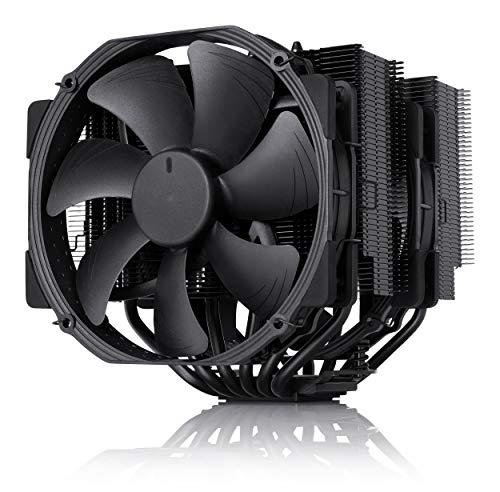
The NH-D15 is the cooler other coolers get compared to, and the chromax.Black edition wraps that long-proven dual-tower design in an all-black finish for builders who found the original’s beige-and-brown fans hard to love. The listing describes it plainly as a “Quiet High-Performance Dual Tower CPU Cooler”, and unusually for marketing language, both adjectives have been earned over years of independent testing and an enormous installed base. If you want the known quantity in this category, this is it.
Its gaming manners come from the same physics as the Dark Rock Pro: two fin stacks, two large fans turning slowly, and enough metal that short load spikes barely register. Where the D15 built its legend is the quality of everything around the heatsink — the mounting system that makes even pressure easy to achieve, the fans’ reputation for lasting years without developing bearing noises, and the manufacturer’s habit of supporting new sockets with mounting kits long after purchase. A quiet cooler that develops a rattle in year three is not a quiet cooler; longevity is an acoustic feature.
The caveats are physical. It is wide as well as tall, and in its standard fan layout the front fan sits over the memory, so tall modules push that fan upwards and add height. Plan the build around it: choose memory with clearance in mind, confirm the case limit, and the D15 rewards you by simply never being a problem again. For a gaming PC expected to survive several graphics card upgrades, that set-and-forget character is worth more than a degree or two either way.
- Format: dual-tower air cooler
- Listing description: quiet, high-performance
- Finish: chromax.Black all-black edition
Strengths
- The reference dual-tower for quiet cooling, with a huge track record.
- Mounting hardware and fan quality support a fit-it-and-forget-it build.
- Black finish suits windowed gaming cases far better than the classic colours.
Trade-offs
- Width and height demand careful case and memory planning.
- Front fan placement can force compromises with very tall memory kits.
- Design is a generation old, even if its performance barely shows it.
Best for: a long-service gaming build where proven behaviour matters more than novelty. Not suited for: narrow cases or builds committed to the tallest decorative memory heatspreaders.

Noctua NH-D15 G2 chromax.Black — Newest generation
The G2 is Noctua’s generational rework of the D15 idea, and this chromax.Black version brings the updated design into the all-black finish. The listing keeps the family description — “Quiet High-Performance CPU Cooler” — and the interest here is in refinement rather than reinvention: a revised fin and heat-pipe arrangement, updated fans, and a cold plate shaped with modern processor heat spreaders in mind. Buyers cross-shopping the two Noctuas in this guide are really choosing between the classic at its settled price and the current flagship with its newer engineering.
In gaming terms the G2’s refinements show up at the margins that matter for noise. Modern gaming processors concentrate heat in a small, offset area of the chip, and a cooler whose base and pipe layout account for that can hold a given temperature at slightly lower fan speed. Lower fan speed, sustained across a three-hour session, is the whole game in this category. The G2 also inherits the family’s serious mounting system and long socket-support tradition, which matters if the cooler is expected to outlive the motherboard it first lands on.
Be clear-eyed about the premium. The G2 sits at the top of the air-cooling price ladder, and the practical difference over its own predecessor in a typical gaming build is measured in small degrees and small decibels, not in a transformed experience. It makes sense for a flagship build where every component is the current best of its kind, or for a noise-sensitive owner who will genuinely hear those small differences in a quiet room. It makes less sense as a place to spend money a mid-range build needs for storage or a better graphics card.
- Format: dual-tower air cooler, G2 generation
- Listing description: quiet, high-performance
- Finish: chromax.Black all-black edition
Strengths
- Current-generation cold plate and fan design tuned for modern processors.
- Same dual-tower calm as the classic, with engineering refinements throughout.
- Strong prospect of future socket support from a maker known for it.
Trade-offs
- The most expensive route to quiet air cooling in this guide.
- Still a very large cooler with the same case-planning demands.
- Gains over the original D15 are real but modest in everyday gaming.
Best for: a no-compromise gaming build that will keep the same cooler across several upgrades. Not suited for: budget-conscious builds where the price gap would be felt more keenly in the graphics card tier.

Thermalright Peerless Assassin 120 SE — Value standout
The Peerless Assassin 120 SE is the cooler that embarrassed the premium end of this market. Its listing states the recipe openly: “6 Heat Pipes AGHP Technology, Dual 120mm” fans. Six heat pipes feeding two fin stacks, spun by a pair of 120mm fans, is precisely the dual-tower formula the flagships use — delivered by Thermalright at a price that routinely undercuts them by a wide margin. For quiet gaming, that matters because the physics does not care what you paid: the fin volume is there, so the fans can turn slowly.
AGHP, the maker’s anti-gravity heat-pipe technology, addresses a subtle real-world point: heat pipes behave slightly differently depending on orientation, and a tower cooler in a vertical case asks its pipes to work against gravity on one side. More consistent pipe performance means the far stack earns its keep in a real installation, not just on a test bench. In practice the Assassin’s reputation among builders is of a cooler that performs within touching distance of the famous names while costing far less, and that reputation is why it anchors the value end of this guide.
The compromises live in the details rather than the temperatures. The fans are good rather than exceptional, and at the very lowest speeds they lack the silky character of the premium brands’ best. The finish is more utilitarian, the mounting experience a touch less polished. None of that is audible from a metre away in a gaming room with a case panel on, which is the honest standard to judge it by. If your priority is the quietest possible processor for the money, this is where the guide points first.
- Format: dual-tower air cooler
- Heat pipes: 6, with AGHP technology, per the listing title
- Fans: dual 120mm, per the listing title
Strengths
- Dual-tower cooling capacity at a distinctly non-flagship price.
- Six heat pipes spread heat across both stacks effectively.
- Lets a build spend its savings on quieter case fans or a better GPU.
Trade-offs
- Fan refinement at crawl speeds trails the premium brands.
- Fit and finish are workmanlike rather than luxurious.
- As with all dual towers, memory and case clearance need checking.
Best for: value-led gaming builds that refuse to accept loud cooling as the price of saving money. Not suited for: silent-PC purists who can hear and dislike any tonal character at very low fan speeds.

Scythe Mugen 6 — Single-fan calm
The Mugen 6 takes the opposite route to quiet from the dual towers: one tower, one 120mm fan, and a design refined over several generations of Mugen coolers. Its listing spells out the broad socket support — “Intel LGA1700, LGA1151, AMD AM5, AM4 Support” — which makes it a comfortable recommendation for the mixed reality of gaming PCs, where a cooler often migrates between an Intel build and an AMD rebuild over its life. Scythe’s fan frames are designed to keep the fin stack sealed so air goes through the fins rather than escaping around them, a small detail that helps a single fan do honest work.
A single fan changes the acoustic picture in a way some gamers prefer. There is one motor, one pitch, and at gaming loads on mainstream processors it turns at a modest, steady speed. The Mugen’s fin stack is deep rather than wide, which leaves the first memory slot more accessible than the dual towers allow and keeps the cooler from looming over the top graphics card slot. In a compact mid-tower built for calm rather than spectacle, that tidier footprint is a genuine virtue.
Know its ceiling. A single 120mm fan on one stack cannot match the dual towers when a high-end processor is pushed hard for hours, and in a hot room with a power-hungry chip the Mugen will be working audibly harder than a Dark Rock Pro would. For the broad middle of gaming — the processors most people own, in cases with reasonable airflow — it delivers quiet, cool running with the least fuss of any pick here. Judge it by that brief and it does not disappoint.
- Format: single-tower air cooler, single 120mm fan per the listing title
- Socket support in the listing title: Intel LGA1700 and LGA1151; AMD AM5 and AM4
- Brand line: Scythe Mugen series, sixth generation
Strengths
- One fan, one smooth sound — no paired-fan interactions.
- Deep, narrower stack is kinder to memory access than dual towers.
- Broad Intel and AMD socket list suits a cooler that migrates between builds.
Trade-offs
- Less headroom than the dual towers for the hottest processors.
- Single fan means no redundancy if it ever fails.
- Styling is understated to the point of invisibility in a showcase case.
Best for: mainstream gaming processors in tidy mid-towers where calm matters more than records. Not suited for: flagship processors run at sustained maximum load in warm rooms.
How Do the Six Compare Side by Side?
| Cooler | Layout | Stated highlights | Quiet-gaming character |
|---|---|---|---|
| be Quiet! Dark Rock Pro 5 | Dual tower | Quiet cooling focus | Maximum calm at high loads |
| be quiet! Dark Rock 5 | Single tower | High RAM and VRM compatibility | Smooth single-fan behaviour, easier fit |
| Noctua NH-D15 chromax.Black | Dual tower | Quiet, high-performance | The proven long-service benchmark |
| Noctua NH-D15 G2 chromax.Black | Dual tower | Quiet, high-performance, G2 generation | Flagship refinement of the formula |
| Thermalright Peerless Assassin 120 SE | Dual tower | 6 heat pipes, AGHP, dual 120mm fans | Flagship physics at a value price |
| Scythe Mugen 6 | Single tower | 120mm single fan; LGA1700, LGA1151, AM5, AM4 | Tidy footprint, simple sound signature |
How Should You Set Up a Quiet Cooler Once It Is Installed?
The cooler is only half of quiet; the fan curve is the other half, and it lives in your motherboard’s BIOS or fan-control software. Start by finding the temperature your processor actually reaches in your longest gaming session, then set the curve so the fans reach only the speed that temperature genuinely requires. Most default curves are written for small stock coolers and command far more speed than a large tower needs. A curve that idles the fans low, rises gently through the gaming range and reserves full speed for temperatures you never see in play will transform how the machine sounds.
Add a delay if your fan software offers one. A response delay of a few seconds stops the fans chasing every brief temperature spike when a game loads a new area — the heatsink’s mass absorbs those spikes, and the delay lets it. This single setting removes most of the “breathing” behaviour that makes a PC feel restless.
Then check the unglamorous things. Confirm the fans spin the right way and the front fan is not mounted higher than the case allows with the panel on. Confirm the cooler survived transport: a tower this heavy should be supported if the PC is moved, and many builders remove large coolers before shipping a system. Finally, dust is a noise issue in slow motion — a fin stack clogged with dust needs faster air to do the same work, so a gentle clean every few months keeps a quiet build quiet.
What Mistakes Make a Quiet Build Loud?
The classic mistake is buying the big cooler and leaving the stock fan curve in charge. The motherboard does not know a dual tower is fitted; it commands fan speeds as if cooling were scarce, and the result is a premium cooler behaving like a cheap one. Ten minutes in the BIOS is the difference.
Second is ignoring the case. A sealed glass box with one weak intake fan starves any cooler, and starved coolers spin faster. Third is chasing silence in the wrong component: if the graphics card is the loudest part under load, money spent upgrading an already-decent CPU cooler buys temperature, not quiet. Fourth is forgetting memory clearance until the front fan is resting on a heatspreader — measure first. And fifth is mounting with too little confidence: uneven mounting pressure leaves one corner of the processor running hot, and the fan curve responds to the hottest sensor it can see.
Final Recommendation
For most gaming builds, start with the Thermalright Peerless Assassin 120 SE: it delivers the dual-tower physics that make quiet cooling possible, at a price that leaves budget for the rest of the system. If the build is a flagship and the cooler is a long-term keeper, the Noctua NH-D15 G2 chromax.Black is the current peak of the form, with the original NH-D15 chromax.Black the proven alternative a step below it. Builders who prize fit and a single smooth fan voice should look at the be quiet! Dark Rock 5 or the Scythe Mugen 6, while the Dark Rock Pro 5 remains the choice when silence at high load outranks everything else. Choose by your case, your processor and your ears — in that order — and any of the six will keep a gaming PC cool without making its presence heard, leaving the loudest thing in the room to be the game itself.
How Do Fan Speed, Case Airflow and Cooler Size Interact?
It helps to think of the cooler, the case fans and the room as one system with three resistances in series. The processor’s heat must cross into the heatsink, out of the fins into the case air, and out of the case into the room. If any one of those steps is bottlenecked, the fans at that step work harder and the whole machine gets louder, no matter how good the other steps are. This is why two PCs with the identical cooler can sound completely different: one sits in a mesh-front case on a desk in a cool room, the other in a sealed glass box under a desk in August.
Case airflow deserves the same care as the cooler itself. A large tower cooler exhausts its warmed air towards the rear of the case, and a rear exhaust fan positioned to receive that air completes the path. When the rear fan is absent or feeble, warmed air pools around the socket, the cooler re-breathes it, and its fans climb to compensate. One decent exhaust fan, running at a modest fixed speed, often does more for a quiet build than a cooler upgrade a class above. Intake matters too, particularly with a large graphics card dumping heat into the same airspace: fresh air delivered low and at the front gives the CPU tower something cool to work with even while the GPU is at full load.
There is also a subtlety about where the temperature sensor sits. Motherboards can key the CPU fan curve to the processor’s own temperature or, on some boards, to a motherboard sensor. The processor sensor reacts instantly to load spikes, which is honest but jumpy; pairing it with a response delay, as described earlier, gives the heatsink’s mass time to absorb the spike before the fans are told anything about it. Builders chasing silence spend surprising amounts of time in this one settings page, and rightly so — it is the cheapest performance in the whole build.
Finally, remember that fan noise is not one thing. There is the broadband whoosh of moving air, which most people tolerate easily and which scales with speed. There is motor and bearing noise, a tonal layer that quality fans minimise and cheap ones do not. And there is resonance, where a fan’s vibration excites a case panel into humming along. The coolers in this guide attack the first by needing less speed, and the second by using better fans. The third is yours to solve with firm mounting and, if needed, a case whose panels do not behave like drum skins.
Which of These Coolers Fits Your Kind of Gaming Build?
Start with the processor you own, not the one in the advertisement. Mainstream gaming chips — the six-core and eight-core parts that power most Steam libraries — are genuinely easy to cool quietly, and every pick in this guide handles them with room to spare. For those builds the decision is about fit and budget: the Mugen 6 or Dark Rock 5 for tidier cases and simpler installs, the Peerless Assassin when value leads, the dual towers when you simply want the question closed.
Step up to the high-end gaming processors, the ones with aggressive boost behaviour and power limits that climb when a motherboard’s limits are unlocked, and the dual towers earn their size. Sustained boost is a marathon, and fin volume is stamina. The Dark Rock Pro 5 and the two Noctua D15 variants are the picks that keep those chips boosting through a long session without the fans announcing it. If you stream while you play, encoding on the processor while the game runs, you are in this tier whether your chip’s box says so or not — combined loads are exactly what big fin stacks are for.
Consider, too, how long the build must stay quiet. Fans age. A cooler bought from a maker with a long support record and replaceable fans can be refreshed years later for the price of one fan, while a cooler with a proprietary, discontinued fan becomes a whole new purchase when it starts to chatter. This is an unglamorous argument for the established names in this list, and it is one of the reasons they hold their prices. A gaming PC is usually upgraded piecemeal for half a decade; the cooler is one of the few parts that can plausibly survive the whole journey, crossing from one socket generation to the next with a mounting kit, still doing the same quiet job.
And if your build lives in the living room, connected to a television, the calculus shifts again: the PC is further from your ears but the room is quieter and the sound carries during dialogue-heavy games. There, the steadiest cooler at low load matters more than peak capacity, and the single-fan picks with their simple, constant voice often please more than a dual tower idling its two fans at slightly different speeds.
What Do Decibel Figures Actually Tell You — and What Do They Hide?
Every cooler box carries a noise figure, and almost none of them are comparable. A decibel rating depends on the distance of the microphone, the room it was measured in, whether the fan was mounted on the heatsink or spinning freely, and whether the figure describes the fan alone or the finished cooler inside a case. Two coolers both claiming the low twenties in decibels can sound plainly different on your desk. Treat published figures as a rough ordering within one maker’s range, not as a league table across brands.
Distance is the variable you control. Sound falls off quickly as you move away from the source, so a PC on the desk beside the monitor is a very different proposition from the same PC on the floor. Builders with a desk-mounted PC should weight low-speed fan quality heavily, because at half a metre even a good fan’s air noise is present. Builders whose tower lives under the desk, behind a modesty panel, have more forgiveness to spend and can prioritise cooling capacity instead.
Character matters as much as level. A steady broadband hush disappears from conscious attention within minutes; a faint whine, a ticking bearing or a fan that surges twice a minute will still be annoying in hour three. This is why this guide talks about sound character — steadiness, smoothness, the absence of tonal surprises — rather than quoting numbers nobody measured the same way. When you read owner reports, look for descriptions of behaviour over time: does it stay composed in long sessions, does anything rattle, does the pitch wander. Those are the reports that predict your own experience.
One practical test costs nothing. Before buying, play a demanding game on your current setup with the case fans temporarily slowed in software and listen to what remains. If what remains is mostly graphics card, a new CPU cooler will not transform your room. If the processor’s fan is clearly the restless element — rising and falling with every scene change — then a large tower from this list will make a difference you hear in the first evening.
How Should You Maintain a Large Air Cooler Over Years of Service?
Air coolers ask for very little, which is part of their appeal against liquid systems, but “very little” is not “nothing”. Dust is the main enemy. A fin stack is a filter whether it wants to be or not, and a visible grey felt building up on the leading edges of the fins insulates exactly the surfaces that need exposure to air. Every few months, with the PC off, a soft brush and a can of compressed air used in short bursts will clear it. Hold the fan blades still while you blow through them; a fan spun fast by air can generate voltage and, at the least, it is hard on the bearing.
Listen once in a while, deliberately. A fan that is beginning to fail usually announces itself politely at first — a faint new tick at certain speeds, a hum that was not there in spring. Caught early, it is a cheap fan swap. Ignored, it becomes a rattle that makes the whole build feel old before its time. Because the picks in this guide use standard fan sizes and widely available mounting hardware, replacements are straightforward; keep the spare clips and brackets from the box in a labelled bag and future-you will be grateful.
Check the mounting if the PC travels. These are heavy objects hanging off a motherboard, and a house move or a trip to a LAN event can shift a tower on its mount or stress the bracket. After any move, glance at temperatures in your first session; a sudden step up at the same fan speeds suggests the cooler moved or the paste seal broke, and a remount with fresh paste restores it. Builders who move their PCs often sometimes choose the lighter single towers in this list for exactly this reason.
That is the whole maintenance schedule: dust occasionally, listen occasionally, remount if it travels. No coolant levels, no pump warranties ticking down, no tubing ageing in the dark. For a component whose job is to be forgotten, that short list is the strongest argument air cooling makes.
When Is the Cooler You Already Own Quiet Enough?
Honesty requires a section this guide could have skipped. If your processor is a modest gaming chip, your case has decent airflow, and your current cooler holds temperatures comfortably without its fan becoming the loudest thing you can hear, then the six towers here are a refinement, not a rescue. Plenty of builds are one fan-curve adjustment away from contentment. Slow the existing fan until temperatures in your longest session sit at a level you are comfortable with, and listen for a week before spending anything.
The upgrade becomes clearly worthwhile in three situations. The first is throttling or near-throttling: if the processor cannot hold its boost in long sessions, you are losing performance you paid for, and fin volume is the direct cure. The second is a noise character you cannot tune away — bearing tick, whine, a fan that hunts no matter how the curve is drawn. Curve settings can ration speed; they cannot change a fan’s voice. The third is a planned processor upgrade, where it is simply efficient to fit the cooler once, sized for the chip you are moving to, rather than twice.
There is also a middle path worth naming: keep a good existing tower and spend the smaller sum on case airflow. A starved premium cooler and a fed mid-range cooler are closer in behaviour than their prices suggest. But when the decision is made and a new tower is going in, buy for the build’s whole life — the socket support, the fan quality, the mounting hardware — because the true cost of a cooler is not its price, it is the afternoon you spend fitting it, and nobody wants to spend that afternoon twice.
Frequently Asked Questions
Is air cooling really quieter than a liquid AIO for gaming?
It can be, because an air cooler has no pump. A pump adds a constant hum that never fully disappears, while a large air tower’s fans can slow to near-inaudibility at light loads. A good AIO competes well under sustained load, but for the mixed, spiky load of gaming, a big air cooler is very hard to beat for overall calm.
How much cooler height does a dual tower need?
More than most stock coolers by a wide margin, and the exact figure belongs to your case’s specification sheet, not to guesswork. Check the case maker’s stated CPU cooler clearance, compare it with the cooler’s stated height, and remember that sliding a front fan up to clear tall memory adds height too.
Will a quiet cooler lower my frame rates?
No — the opposite risk is the real one. A cooler that lets the processor hold its boost clocks without thermal throttling protects frame rates in long sessions. All six picks here have the capacity to keep mainstream and high-end gaming processors out of throttling territory in a sensibly ventilated case.
Does the number of heat pipes decide which cooler is quietest?
Not on its own. Pipe count helps spread heat across the fin stack, but fin volume, fan quality and the fan curve matter just as much. Treat pipe count as one clue among several, which is why this guide mixes six-pipe designs with others whose overall execution is strong.
Can I move one of these coolers to a new motherboard later?
Usually, yes, provided the new socket is supported. The Scythe Mugen 6’s listing, for example, names Intel LGA1700 and LGA1151 plus AMD AM5 and AM4. Keep the mounting hardware from the box, and check the maker’s site for a kit if a future socket needs one.
Why does my quiet cooler still get loud in summer?
Because it breathes room air. A room that is several degrees warmer hands the cooler warmer intake air, and the fans compensate with speed. It is normal, temporary, and a good reminder that case intake and room conditions are part of the cooling system. If summer is when you do your longest gaming sessions, it is worth setting your fan curve in summer rather than winter, so the profile you live with most is tuned for the conditions that actually trouble you.
Should I replace the fans on a cheaper cooler with premium fans instead?
Sometimes that works out, but price it honestly first. A value dual tower plus two premium fans can cost as much as a mid-priced cooler that already includes good fans, a better mounting system and a longer warranty. The Peerless Assassin in this guide is the exception that proves the rule: its stock fans are good enough that most owners never feel the urge.
How often does thermal paste need replacing under a big tower?
Rarely. A properly mounted cooler with quality paste can run for many years without attention. If temperatures creep up noticeably at the same fan speeds, or the cooler has been removed and refitted, fresh paste is worth the small effort — but treat it as troubleshooting, not scheduled maintenance.
Do I need to remove the motherboard to fit a dual tower?
Usually not. Most modern cases have a cutout behind the socket that lets you reach the backplate with the board installed, and the mounting systems on the coolers in this guide are designed to be worked from above once the bracket is in place. The job is easier on a bench before the board goes into the case, so if you are building from scratch, fit the cooler early — but a swap into a finished build is a normal afternoon task, not a rebuild.
Related Guides
Cooling is one part of a calm, capable gaming PC. For the cases these towers have to fit into, see our guide to quiet gaming PC cases with real cooler clearance, and for the processors they serve, our roundup of the best gaming CPUs to pair with a large air cooler is the natural next read. If your build is smaller, our low-profile cooler guide for compact systems covers the other end of the size scale.


