What's inside
- Key Takeaways
- Quick Picks
- How Did We Choose These Picks?
- What Actually Makes a Gaming Case Worth Its Money?
- How Do the Six Cases Compare Side by Side?
- Which Clearances Should You Verify Before Ordering?
- How Should You Set Fan Curves in a Value Case?
- What Mistakes Do Budget Case Buyers Keep Making?
- How Does Dust Behave in a Mesh Gaming Case, and How Do You Stay Ahead of It?
- What Is the Real Cost of a Case Over Five Years?
- How Should a First-Time Builder Approach Build Day in One of These Cases?
- Where Should an Affordable Build Compromise, and Where Must It Refuse?
- How Do Room, Desk, and Climate Change the Right Answer?
- What Upgrades Should a Value Case Receive First?
- How Can You Tell a Good Affordable Case From a Photogenic Trap in a Listing?
- What Does the Second Year of Ownership Reveal?
- How Should You Handle Cable Management Without Losing Your Mind?
- What Should You Do in the First Week After the Build?
- Final Recommendation
- Frequently Asked Questions
- Related Guides
As an Amazon Associate I earn from qualifying purchases. This post may contain affiliate links at no extra cost to you.
gizmoverdict.com is reader-supported. When you buy through links on our site, we may earn an affiliate commission.
Where to buy: Linked picks below go to Amazon listings from our verified pool. Case pricing drifts with promotions and color variants, so judge each model by the value pattern described here rather than any single day’s tag.
Finding the best affordable gaming PC cases is an exercise in refusing to pay for the wrong things. A case contributes nothing to frame rates directly, yet it decides how cool the expensive parts run, how much noise reaches your ears, and how miserable the build afternoon feels. Spend too little and you inherit rattling panels, starving graphics cards, and cable management that resembles a junk drawer. Spend carelessly and the budget bleeds into lighting controllers and glass you never look at, while the power supply and storage, parts that actually change the machine, get whatever money remains.
The value sweet spot has moved upward in quality over the last few years, which is the good news running through this guide. Mesh front panels, once a premium confession that airflow mattered, now appear at friendly prices. Generous stock fan bundles are common. Even the cable-routing details, grommets, tie points, channels with actual depth, have trickled down from flagship enclosures. A careful buyer today assembles a quiet, cool, tidy gaming system in a case that costs a fraction of the graphics card inside it.
Our six picks divide into four verified listings and two prose-only mentions of models our pool does not currently carry. The linked four span the realistic value landscape: an airflow champion with oversized fans, a modular newcomer, a silence-leaning all-rounder, and a premium-flavored stretch pick for readers whose definition of affordable has some give. The prose pair covers the ultra-budget territory where value is measured in tolerated compromises.
Key Takeaways
- Airflow is the first value metric: a mesh front and competent stock fans beat decorative glass every time.
- Included fans are real money; a case bundling three or more good fans can undercut a cheaper case plus separate fan purchases.
- Graphics card length and radiator clearance, checked before purchase, prevent the classic affordable-case heartbreak.
- Silence and cooling are both achievable at this tier when fan curves are tuned instead of left at factory defaults.
- The smartest savings come from skipping lighting ecosystems and proprietary controllers, not from thinner steel.
Quick Picks
| Pick | Badge | Why it earns a place |
|---|---|---|
| Lian Li LANCOOL 216 RGB Black | Airflow Value Leader | Twin oversized front fans move serious air without needing an immediate fan upgrade. |
| Corsair 4000D RS Frame Modular | Most Flexible Builder | Modular frame thinking and three included fans make future changes unusually painless. |
| be quiet! Pure Base 501 Black | Quiet Value Pick | Two large PWM fans and a noise-conscious layout for gaming in shared spaces. |
| Lian Li LANCOOL 217 | Stretch Pick | Five PWM fans and a walnut accent for buyers stretching toward premium territory. |
| Montech X3 Mesh | Ultra-Budget Prose Pick | A fan-heavy bargain whose fixed lighting and basic finish demand honest expectations. |
| Phanteks XT Pro Ultra | Prose Alternative | A roomy airflow design frequently discounted into this guide’s territory. |
How Did We Choose These Picks?
Value was judged as delivered capability per unit of money, with no prices printed because promotions shuffle the ranking weekly. Capability, for a gaming case, decomposes into cooling headroom, acoustic behavior, build experience, and compatibility with the long graphics cards and tall air coolers that define current hardware. A case had to clear a minimum bar in all four before its price could make it interesting; a bargain that cooks a graphics card is not a bargain, it is a delayed second purchase.
Stock fan bundles received heavy weighting because they are where spec sheets hide real money. A case shipping with two large, well-chosen fans may need nothing added for a midrange build, while a cheaper shell with one token exhaust fan quietly demands a fan purchase that erases its advantage. We also credited front-panel connectivity that reflects actual desks, USB-C included, and penalized proprietary lighting hubs that lock owners into one maker’s ecosystem for no cooling benefit.
Finally, we favored designs with a track record or a clear engineering lineage. Affordable cases live hard lives, moved between rooms, opened for upgrades, leaned on by headsets and cats. Panel fit, hinge quality where present, and filter access all predict whether a case feels like a deal in year three or a regret with a power button.
What Actually Makes a Gaming Case Worth Its Money?
Begin with the physics every gaming load obeys. A modern graphics card and processor together convert several hundred watts of electricity into heat inside a metal box, and the case’s job is to exchange that hot interior air for room air steadily and quietly. Mesh intake area, fan diameter, and unobstructed exhaust paths decide how hard the fans must work, and fan effort is noise. This is why the oversized front fans on the LANCOOL picks matter beyond their looks: large fans move generous air at lazy rotational speeds, and lazy fans are quiet fans.
The second job is structural honesty. Steel thickness, panel rigidity, and the fit of the side panels determine whether a case buzzes sympathetically with fan vibration or sits in dignified silence. You cannot read rigidity in a listing, but you can infer it from weight, from the maker’s history, and from owner reports mentioning rattles. Every linked pick here comes from a maker whose affordable lines have earned a reputation for not cutting that particular corner.
The third job is hospitality toward the builder. Tool-less panel removal, a motherboard tray with sensible cutouts, Velcro straps instead of a prayer, and a power supply shroud that hides the cable thicket all convert build day from an endurance event into a pleasant hour. Affordable no longer means hostile, and any case still demanding blood sacrifices to sharp edges in this decade has failed its assignment.

Lian Li LANCOOL 216 RGB Black — Airflow Value Leader
The LANCOOL 216 built its reputation on a simple, devastating idea: put two very large fans behind a mesh front and let physics do the marketing. Those 160mm intake fans sweep air across the motherboard and graphics card with an authority smaller fans imitate only by spinning fast and loud. For a gaming build centered on a hot graphics card, this case delivers cooling headroom that rivals enclosures wearing much prouder price positioning, and it does so out of the box, with no fan shopping list appended.
Lian Li’s detailing lifts it above the bargain bin in ways owners notice weekly. The motherboard tray accommodates back-connector layouts, cable channels are genuinely usable, and the airflow-focused design still leaves room for a front radiator if a future upgrade wanders toward liquid cooling. The RGB in the name refers to the fans’ lighting, which can be run subtly or switched off entirely for readers who prefer their machines unlit.
- Format: ATX mid-tower
- Stock fans: two 160mm ARGB front fans per the listing
- Front panel: full mesh for unrestricted intake
- Layout: supports back-connector motherboard designs
- Cooling options: air tower or front radiator configurations
Strengths
- Out-of-box airflow that embarrasses pricier enclosures
- Large fans deliver that air at civilized noise levels
- Thoughtful tray and routing design speeds up build day
Trade-offs
- Mesh front prioritizes airflow over hushed operation
- Lighting controls add a small learning curve for newcomers
- Popular color variants drift in and out of stock
Best for: gamers whose graphics card runs hot and whose budget refuses flagship cases. Not suited for: near-silent studio builds in treated rooms.

Corsair 4000D RS Frame Modular High Airflow — Most Flexible Builder
Corsair’s 4000D line became the default recommendation of its generation by being good at everything and annoying about nothing, and this RS Frame Modular edition reworks the idea around changeability. The frame concept treats panels and mounts as pieces that can be rearranged or replaced as a build evolves, which suits the affordable segment perfectly: a first build today, a radiator next year, a different aesthetic whim the year after, all without replacing the enclosure itself.
Three RS fans arrive installed, and the high-airflow front keeps them fed. Corsair’s accessory ecosystem is the quiet superpower here, since replacement panels, filters, and fittings remain orderable long after purchase, turning accidents and upgrades into errands instead of obituaries. For a builder who expects to keep a case through two or three platform generations, that parts availability is a form of value no launch review ever measures.
- Format: mid-tower, modular frame design
- Stock fans: three RS fans included per the listing
- Front panel: high-airflow configuration
- Ecosystem: broad replacement-part and accessory availability
- Layout: radiator support for future liquid cooling
Strengths
- Modularity stretches one purchase across several builds
- Three included fans cover most gaming systems immediately
- Replacement parts remain easy to source years later
Trade-offs
- Modular hardware invites optional spending on accessories
- Airflow front trades some silence for its cooling
- Design language is restrained beside flashier rivals
Best for: builders who upgrade in stages and keep cases for years. Not suited for: one-and-done builds chasing the absolute lowest entry cost.

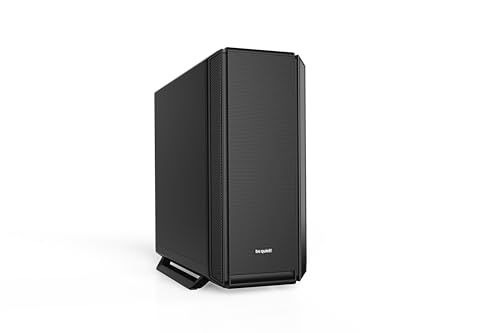
be quiet! Pure Base 501 Black — Quiet Value Pick
Not every gaming room is a dedicated cave. For the machine that shares a living room, a bedroom, or a thin-walled apartment, the Pure Base 501 argues that affordable and considerate can coexist. Two 140mm PWM fans move air with the large-fan advantage, while the case’s layout and panel design lean toward containing the sound of the machine working. be quiet! built its entire brand on this negotiation between cooling and calm, and the 501 is where that expertise meets a value brief.
Ownership manners are excellent. The fans’ PWM control lets the motherboard orchestrate speed against temperature, so the system idles nearly inaudibly and only speaks up during genuine gaming loads. Panel fit and finish feel a class above the price neighborhood, and the understated black exterior offends no room it enters. Buyers who stream or record voice will appreciate a case that does not audition for the microphone.
- Format: ATX mid-tower
- Stock fans: two 140mm PWM fans per the listing
- Control: PWM fan behavior for temperature-linked quiet
- Design: understated black finish for shared spaces
- Focus: balanced airflow with noise discipline
Strengths
- Quiet manners suit bedrooms and living rooms
- Large PWM fans balance cooling against acoustics
- Panel quality feels above its value positioning
Trade-offs
- Two fans may want a third in very hot builds
- Conservative styling will not thrill showcase builders
- Less raw airflow than the mesh leaders here
Best for: gamers in shared spaces who value calm. Not suited for: maximum-overclock systems chasing every last degree.
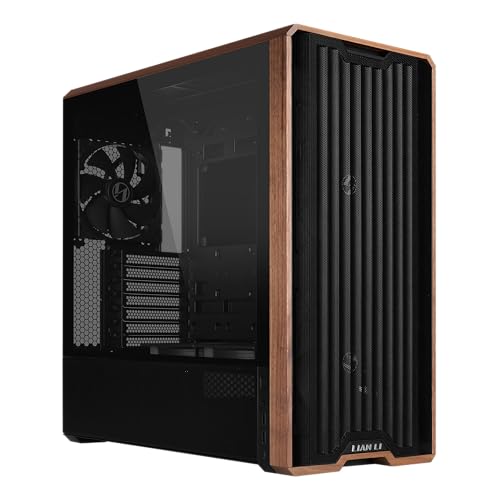
Lian Li LANCOOL 217 — Stretch Pick
The 217 is where this guide deliberately leans toward the premium fence to show readers what the extra money buys, and whether it buys anything they need. Five PWM fans arrive installed, a bundle that would cost a meaningful sum on its own, and the walnut wood accent across the front gives the machine a furniture-adjacent warmth that gaming hardware rarely attempts. Cooling capacity is abundant, fan control is granular, and the whole enclosure feels composed rather than assembled from compromises.
Whether it belongs in an affordable guide depends on a household definition. Against the cost of outfitting a cheaper case with equivalent fans, the 217’s arithmetic narrows considerably, and for a build expected to serve through several upgrades, its headroom and finish may be the frugal choice in disguise. For a first build on a hard budget, it is a want rather than a need, and this guide labels it a stretch pick precisely so that distinction stays honest.
- Format: ATX mid-tower
- Stock fans: five PWM fans per the listing
- Accent: walnut wood front detailing
- Cooling: abundant headroom for high-end hardware
- Positioning: premium edge of the value conversation
Strengths
- Five-fan bundle erases the usual first upgrade
- Wood accent suits adult rooms and desks
- Cooling headroom covers flagship-class components
Trade-offs
- Stretches the definition of affordable for many budgets
- Capability exceeds what midrange builds can use
- Wood finish narrows the rooms it visually fits
Best for: buyers who keep cases a decade and value finish. Not suited for: strict-budget first builds counting every component.
Montech X3 Mesh — Ultra-Budget Prose Pick
Our pool carries no verified listing for the X3 Mesh, so it appears without a link, but an affordable-case guide that skipped it would feel incomplete to anyone who has browsed this segment. The formula is aggressive generosity: a mesh front, a crowd of included fans with fixed lighting effects, and a glass side panel, all at the bottom of the price ladder. For a build assembled around a modest graphics card, the result can be startlingly cheerful for the money.
The compromises are equally characteristic. Fixed-speed, fixed-color fans cannot be tuned into silence, cable space is tight, and materials remind you of the price whenever a panel comes off. None of that makes it a bad case; it makes it a case for a specific buyer, someone outfitting a secondary machine, a young relative’s first build, or a budget that must protect the graphics card line above all else. Judged by that mission, it succeeds loudly, in every sense.
- Format: mid-tower, mesh front
- Stock fans: numerous, fixed lighting and speed character
- Panel: tempered glass side
- Positioning: bottom of the price ladder
- Watch-out: limited fan control and tight cable room
Strengths
- Fan count at this tier is genuinely generous
- Mesh front keeps modest builds properly cooled
- Lets the budget concentrate on performance parts
Trade-offs
- No verified listing in our pool, so no purchase link
- Fixed fans cannot be quieted through curves
- Fit and finish trail the linked picks visibly
Best for: secondary machines and ruthlessly tight budgets. Not suited for: noise-sensitive rooms or showcase builds.
Phanteks XT Pro Ultra — Prose Alternative
The XT Pro Ultra earns its prose mention as the roomy pragmatist of the segment: a spacious interior, strong stock fan provision in its Ultra configuration, and a layout that welcomes long graphics cards and tall coolers without negotiation. It frequently drifts into this guide’s price territory during promotions, which is exactly when it becomes interesting, because at full positioning it competes with the linked picks above rather than beneath them.
Builders praise the working room most. Cable channels accommodate real bundles rather than theoretical ones, and the interior accepts the oversized components that define current gaming hardware without the knuckle-scraping choreography cheaper cases impose. If you find it discounted while you shop, treat it as a fifth linked pick in spirit; if it sits at full price, the LANCOOL 216 remains the cleaner value answer.
- Format: mid-tower with spacious interior
- Stock fans: generous in Ultra configuration
- Clearance: friendly to long cards and tall coolers
- Positioning: value when promoted, premium when not
- Watch-out: no verified pool listing at time of writing
Strengths
- Interior room simplifies every stage of the build
- Component clearance covers current oversized hardware
- Discounted pricing makes it a genuine bargain
Trade-offs
- Value case depends heavily on promotional pricing
- No purchase link available through our verified pool
- Plainer interior aesthetics than design-led rivals
Best for: patient shoppers who buy on promotion. Not suited for: buyers who need a case delivered this weekend at a set budget.
How Do the Six Cases Compare Side by Side?
| Case | Cooling character | Stock fans | Noise character | Ideal role |
|---|---|---|---|---|
| Lian Li LANCOOL 216 | Mesh, very strong | 2 x 160mm ARGB | Moderate | Hot graphics cards |
| Corsair 4000D RS Frame | High airflow, modular | 3 x RS fans | Moderate | Evolving builds |
| be quiet! Pure Base 501 | Balanced | 2 x 140mm PWM | Low | Shared rooms |
| Lian Li LANCOOL 217 | Abundant | 5 x PWM | Low to moderate | Long-term flagship home |
| Montech X3 Mesh | Mesh, basic control | Many, fixed | Higher | Ultra-budget builds |
| Phanteks XT Pro Ultra | Strong, spacious | Generous bundle | Moderate | Promotion hunting |
Two columns decide most purchases: the noise column, chosen by where the machine lives, and the stock-fan column, which quietly determines the true total price. Match those to your room and your parts, and the rest of the table becomes preference rather than risk.
Which Clearances Should You Verify Before Ordering?
Graphics card length is the headline check because current cards have grown into small furniture. Measure the card you own or intend to buy, including any protruding power connector bend, and compare it against the case maker’s stated clearance with the front fan or radiator configuration you plan to use, since a front radiator consumes length that the headline figure may assume is empty. Cards that fit on paper with a millimeter to spare fit in practice only if cables cooperate, so treat tight arithmetic as a no.
Cooler height runs second. Tall dual-tower air coolers are the value kings of processor cooling, and their height collides with side panels in narrower cases. Radiator thickness and fan combinations create a third dimension of interference at the top of the case, where a thick radiator can crowd the motherboard’s upper edge and its power cables. Every maker publishes these figures; the five minutes spent reading them is the cheapest insurance in the entire build.
Power supply length and cable exit space close the checklist, particularly in compact shrouds where a long modular supply plus its connector depth can exceed the bay. None of the linked picks is unusually restrictive, but affordable builds often pair a case with a hand-me-down supply of unknown dimensions, and that is precisely when verification matters most.
How Should You Set Fan Curves in a Value Case?
Factory fan settings are written for worst-case hardware in worst-case rooms, which is why so many new builds sound like appliances. Spend ten minutes in the BIOS and the same machine becomes civilized. Set the case fans to follow a blend of processor and graphics temperatures if the board allows, or processor temperature alone if it does not, and shape the curve so fans idle at a genuinely low speed until the system crosses into gaming temperatures.
The shape matters more than the numbers. A gentle ramp avoids the oscillating surge-and-fade that listeners find more annoying than steady noise, and a small delay, available on many boards, stops fans from reacting to momentary temperature spikes during loading screens. Reserve the top of the curve for temperatures your system should rarely see, so full speed remains an emergency voice rather than a conversational one.
Positive pressure, slightly more intake than exhaust, deserves deliberate setup in mesh cases because it decides where dust enters. Air pushed in through filtered intakes stays manageable; air sucked through unfiltered seams coats components. Balance the fan counts and speeds to achieve that gentle surplus, then confirm with a tissue at a side seam if you enjoy small experiments: it should press outward, not flutter inward.
What Mistakes Do Budget Case Buyers Keep Making?
The classic error here is buying the photograph instead of the airflow path: a sealed glass front with decorative side vents photographs beautifully and cools terribly. The second error is forgetting the fan budget, comparing a bare case against a fully fanned rival as if the missing fans were free. Third comes clearance optimism, the belief that a long card and a front radiator will negotiate their own peace. They will not; geometry is undefeated.
A subtler mistake is spending the case budget on a lighting ecosystem while the machine’s actual pain point, a starving stock cooler or a cramped desk, goes unfunded. Lighting is delightful and entirely optional; cooling and fit are neither. Finally, many buyers overlook the front panel’s everyday ergonomics: a power button you can find by touch, ports at a reachable angle, and a headphone jack that exists at all. The case is the part of the computer you physically touch daily, and its small kindnesses compound.
How Does Dust Behave in a Mesh Gaming Case, and How Do You Stay Ahead of It?
Mesh fronts invite a fair question: does all that open intake turn the case into a vacuum cleaner bag? The answer depends on pressure and filtration, and it is more reassuring than the question implies. A mesh case running gentle positive pressure, with filtered intakes doing the breathing, accumulates dust slowly and predictably on those filters, where a monthly wipe removes it. The same case running negative pressure, exhaust fans outmuscling intakes, inhales through every unfiltered seam and coats the motherboard instead. The mesh is not the variable; the pressure is.
Establish a rhythm proportional to your environment. A home with pets or carpets may warrant a filter check every few weeks, while a hard-floored room with no animals can stretch to a season. The ritual takes five minutes: panels off where tool-less design allows, filters rinsed or brushed outdoors, a soft brush across the graphics card’s fins, and a visual inspection of fan blades for the felt-like buildup that unbalances them over time. Cases in this guide were chosen partly because none of them makes that ritual a screwdriver ceremony.
Placement is the cheapest dust control ever sold. A case on the floor beneath a desk ingests the room’s entire sediment layer; the same case on the desk or a low stand breathes markedly cleaner air. If floor placement is unavoidable, a simple stand that lifts the case even a few inches changes its diet noticeably. Smokers’ rooms and workshops sit at the extreme end of the scale, and owners there should treat filter maintenance as a calendar item rather than an inspiration.
One warning belongs in every dust discussion: never vacuum a running system, and be cautious with compressed air around fans, which can spin a fan fast enough to generate voltage or damage bearings. Hold blades still while cleaning them. The goal is a boring, repeatable routine that keeps temperatures where they were on build day, because creeping temperatures are how dust eventually taxes performance, silently raising fan speeds and noise for months before anyone investigates.
What Is the Real Cost of a Case Over Five Years?
Sticker arithmetic misleads in this category because a case is the longest-lived component most people buy. Amortize honestly and the picture inverts: the enclosure that feels like a stretch in the shopping cart often becomes the cheapest part of the system per year of service, while the rock-bottom case that gets replaced at the next build, because a panel cracked, a port died, or a new card would not fit, quietly costs more across the same period. Durability is a discount that arrives slowly.
Fan replacements belong in the ledger too. A case whose included fans are quality PWM units, as in the be quiet! and LANCOOL 217 picks, may never ask for replacements. A case built around fixed, sleeve-bearing fans at the bottom of the market may ask twice in five years, each time converting its headline savings into an errand. Electricity, by contrast, is a rounding error: case fans sip power, and even lighting left on nightly amounts to very little over a year.
Resale and hand-me-down value complete the accounting. A respected case in clean condition sells or gifts easily, carrying its reputation with it, while an unknown bargain enclosure is effectively worth its weight in scrap. Households that pass machines down to younger members feel this concretely: the good case simply becomes the next build’s foundation, and the five-year cost of the original purchase falls toward zero.
None of this argues for extravagance. It argues for buying at the tier where steel, fans, and fittings stop being consumables, which is exactly the tier this guide patrols, and for treating the stretch pick’s premium as a legitimate calculation rather than an indulgence. Value is a five-year word, not a checkout word.
How Should a First-Time Builder Approach Build Day in One of These Cases?
Preparation converts anxiety into sequence. Lay out the case’s accessory box and identify every screw type before the first component appears, because cases ship with several similar-looking threads that are not interchangeable, and forcing the wrong one is the classic beginner’s wound. Read the case manual’s diagram page, the one showing where the motherboard standoffs belong for your board’s size, and set the standoffs before anything else. Photograph the front-panel connector block on the motherboard if your eyes dislike small print; you will consult that photo twice.
Install in the order that preserves access. Power supply first in most layouts, with its cables loosely routed toward their destinations, then the motherboard wearing its processor, cooler, and memory, fitted outside the case where the work is easy. Storage and graphics card follow, and cable management happens progressively rather than in a final wrestling match. The routing channels and straps in these picks reward that patience visibly: a build tidied as it grows stays tidy.
Expect the first power-on to be a diagnostic moment, not a verdict. A fan that does not spin is usually a header choice, a light that stays dark is usually a front-panel connector one row off, and both are five-minute corrections documented in every forum on earth. The cases here were selected partly because their manuals and connector labeling assume a first-timer’s perspective rather than punishing it.
Finish with the unglamorous ceremony: update the BIOS if appropriate, set the fan curves described earlier, install the chipset and graphics drivers from current sources, and run a game for half an hour while watching temperatures. A machine that survives its first honest workload with temperatures behaving has introduced itself properly. Save the accessory box, the spare screws, and the manuals in one labeled place, and future upgrades will feel like reunions instead of archaeology.
Where Should an Affordable Build Compromise, and Where Must It Refuse?
Every value build is a negotiated settlement, and the skill lies in knowing which clauses are cheap to concede. Aesthetics concede beautifully: a plainer exterior, fewer lighting zones, and a steel side panel instead of glass cost the machine nothing it can feel. Size concedes well too, within fit limits, since a slightly larger case is merely furniture while a slightly smaller one can be a genuine constraint. Even stock fan count concedes gracefully when the included fans are good, because a well-placed pair outperforms a noisy quartet.
Airflow refuses negotiation. A graphics card throttling in a sealed box loses performance the owner paid full price for, and no other component can refund it. Structural rigidity refuses as well, because a case that buzzes teaches its owner to resent the machine daily, a tax no benchmark records. Front-panel essentials, a working USB-C port for modern peripherals and a headphone path that does not hiss, sit on the refusal list for anyone whose desk life runs through them.
The middle territory is where judgment earns its keep. Radiator support matters only if liquid cooling is a real plan rather than a screensaver fantasy. Vertical graphics mounting is decoration wearing engineering clothes. Hot-swap drive bays serve a shrinking priesthood. Affordable shopping is mostly the discipline of pricing your own actual habits instead of a brochure’s imagination of them, and the six picks here were arranged to make that discipline easy: each concedes a different clause, so the reader can choose which concession fits a life rather than accepting one at random.
Revisit the settlement annually. A machine’s role drifts, a bedroom system becomes a living-room system, a solo gamer becomes a streamer, and the case that fit the old life may chafe in the new one. Because these enclosures hold their value and their parts remain available, adjusting the settlement, a panel here, a fan there, usually beats replacing it, which is the final form value takes.
How Do Room, Desk, and Climate Change the Right Answer?
A case does not live in a laboratory; it lives in your room, and the room votes. A small, warm bedroom in a summer climate argues for maximum airflow headroom, because the case’s exhaust becomes the room’s problem and the room’s heat becomes the case’s intake temperature. In that setting the LANCOOL 216’s appetite for air is not excess but adaptation, and under-desk placement against a wall, trapping its own exhaust, should be avoided even if the furniture prefers it.
A shared living room argues the opposite direction, toward the Pure Base 501’s manners and an exterior that reads as furniture rather than arcade. Open-plan homes transmit sound efficiently, and a case that whirs through a film’s quiet scenes will be negotiated about, count on it. Dusty climates and pet households elevate filtration and maintenance access in the ranking, while a clean, hard-floored study can safely deprioritize both.
Desk geometry casts its own vote. A case displayed on the desk rewards glass and lighting; the same budget under the desk rewards silence and a front panel whose ports face upward toward the seated user. Measure the alcove, the shelf, the gap beside the monitor, with the same respect given to graphics card clearance, because a case that technically fits but cannot breathe or be reached is a compromise wearing a disguise.
Climate-controlled rooms forgive almost anything, which is why advice written in them travels badly. Read every case recommendation, including this one, through the filter of your own four walls, and let the room’s reality break ties between otherwise equal picks.
What Upgrades Should a Value Case Receive First?
When a little money returns to a finished build, spend it where the machine’s daily experience is thinnest. For most owners that is one additional quality fan, placed to feed the graphics card directly or to relieve a warm top corner, because a single well-aimed fan changes temperatures more than a matched set installed at random. Fan placement is a small science: intake low and front, exhaust high and rear, following heat’s own preference for rising.
Second in line is storage convenience, a front-panel expansion or a simple internal bracket, whatever removes the friction your usage actually generates. Third comes the quality-of-life tier: a headset hook that keeps the desk clear, a set of quality cables that end the adapter tangle, lighting only after the machine is cool, quiet, and convenient. The order matters because decoration purchased before comfort tends to be enjoyed for a week and resented for years.
Resist the upgrade that exists mainly to be photographed. A value build’s dignity lies in how it behaves at midnight during a long session, temperatures steady, fans unhurried, cables forgotten. Every purchase should be interrogated against that scene, and the ones that improve it rarely need a camera to justify themselves.
How Can You Tell a Good Affordable Case From a Photogenic Trap in a Listing?
Listings are arguments, and learning to cross-examine them is a durable skill. Start with the photographs that show the interior rather than the beauty shot: look for rolled or finished edges, a motherboard tray with cutouts where cables actually travel, and a power supply shroud that does not end abruptly mid-case. Then find the photograph of the rear, which reveals fan mounting honesty, expansion slot construction, and whether the maker spent money where cameras rarely linger.
Read the specifications for the numbers that cannot be faked in a render: weight, which betrays steel thickness more honestly than any adjective; maximum graphics length stated with and without a front radiator; and the stock fan list with sizes and connector types. A listing that hides its fan specifications behind the phrase “fans included” is telling you the fans are not a selling point, and you should price the case as if it ships with none worth keeping.
Owner reviews reward a particular reading technique. Ignore the star-shaped summary and mine the text for recurring nouns: rattle, clearance, screws, filter, cable. A complaint repeated by strangers across months is data; a single furious paragraph is weather. Pay special attention to reviews from owners six months in, because build-day delight is cheap and month-six contentment is the product you are actually buying.
Finally, check the maker’s own site for the manual and a parts page. A downloadable manual with real diagrams signals a company that expects to support the product, and a parts page signals that a broken clip in year two is a small order rather than a slow tragedy. In the affordable tier, that institutional seriousness is the rarest feature of all, and it is the one this guide weighted most heavily after airflow itself.
What Does the Second Year of Ownership Reveal?
Build day grades a case on promise; the second year grades it on evidence. By then the filters have been cleaned a dozen times or neglected entirely, the side panel has been off for a memory upgrade and a storage addition, and the fans have accumulated thousands of hours. Cases that were designed with maintenance in mind pass this period invisibly. Cases that were designed for a product photograph begin to testify: a filter frame that cracked at its third removal, a glass panel whose mounting threads have loosened, a front connector that crackles when the cable shifts.
The linked picks share a trait that predicts second-year contentment, which is that their makers sell enclosures across many price tiers and reuse proven mechanisms downward. The tool-less panel system in a value Lian Li or Corsair is a descendant of flagship engineering, debugged by far more expensive products. That inheritance is invisible in a specification table and decisive in a life.
Owners can tilt the odds further with two habits. Keep every screw and bracket in the case’s own accessory box rather than a household junk drawer, because the bracket needed in year two is always the one that migrated. And clean on the gentle schedule described earlier, since the second year’s most common failure, rising temperatures from neglected filtration, is entirely a habit problem wearing a hardware costume.
Choose with the second year in mind and the affordable case stops being a compromise category altogether. It becomes what it should have been all along: the sensible default, against which expensive enclosures must justify themselves.
How Should You Handle Cable Management Without Losing Your Mind?
Cable management intimidates beginners because showcase photographs set an inhuman standard, cables vanishing as if the machine were wireless. Lower the bar to its functional definition and the task becomes pleasant: cables should stay out of fan blades and airflow paths, avoid pressing against the side panel, and remain traceable when something needs changing. A build meeting those three tests is well managed, regardless of whether its rear side would win a beauty contest nobody attends.
Work in layers. The thickest cables, the motherboard’s main power lead and the graphics card’s feeds, route first because they claim the most channel depth and dictate where everything else can lie. Medium cables, storage data and front-panel leads, settle into the remaining channels. The thin front-panel wires go last, bundled loosely along the tray’s edge. Velcro straps, included with most picks here, beat zip ties for this work because the build will be reopened someday, and the person reopening it deserves mercy.
Leave service loops, small deliberate slack near each connector, rather than pulling every cable drum-tight. A connector under constant tension works against its own socket for years, and a cable with no slack turns a simple drive swap into a partial rebuild. The channel depth in these cases accommodates sane slack; use it without guilt.
Photograph the finished rear before the panel goes on. That image is a map for every future intervention, showing which strap hides which cable, and it takes ten seconds. Builders who adopt the habit stop dreading the rear panel entirely, which is the true graduation from cable anxiety.
One last encouragement: the side panel bulge test is real and forgiving. If the panel closes with light pressure and stays closed, the job is done. Perfection behind a closed steel panel is a hobby, and hobbies are optional; airflow and sanity are not.
What Should You Do in the First Week After the Build?
Treat the first week as a shakedown cruise with a checklist. Run the games and applications the machine was built for, at the settings you actually use, and glance at temperatures and fan behavior each evening. New builds reveal their small faults early: a fan curve that hunts, a cable that settled against a blade, a front connector seated imperfectly. Every one of them is a five-minute correction in week one and a mysterious intermittent fault by month three, which is why the shakedown matters.
Register the warranty while the receipt is findable, photograph the serial labels, and store the digital copies with the build’s other records. Then back up the system once it is configured and calm, because the best time to create a restore point is when nothing is wrong. Households that adopt these small ceremonies rarely appear in support forums at midnight, and the correlation is not a coincidence.
Finally, resist the immediate second upgrade. Live with the machine for a month and let its real annoyances identify themselves, because they are frequently not the ones predicted during shopping. The money saved by that patience, across a hobby measured in decades, buys a great many graphics cards.
During that month, note the sounds the machine makes in each activity the way you would learn a new house: which fan speaks first under load, what the drives whisper, how the room’s quiet hours reveal the idle character. That familiarity becomes diagnostic capital. When something changes months later, you will hear it before any monitoring software flags it, and you will know which panel to open first.
Share the build with someone, too, even if only in a photograph and a paragraph about what you would do differently. The value-case community runs on exactly that currency, hard-won small knowledge passed between strangers, and every pick in this guide arrived at its reputation through thousands of such reports. Adding yours completes a circle that the next budget builder will benefit from, probably while comparing the same handful of honest enclosures.
Keep a small reserve in the parts budget for the discovery every builder makes exactly once: the cable that is two inches too short, the adapter the monitor requires, the fan splitter the layout demands. Planning for that discovery in advance converts it from a schedule-breaking errand into a rounding error, and it is the last piece of value discipline this guide can offer. The builders who enjoy this hobby for decades are not the ones who never meet surprises; they are the ones whose budgets and tempers both contain a margin for them.
One scenario deserves a direct word before we close the guidance sections: the gift build, assembled for a child, a partner, or a friend entering the hobby. Choose the case for their room and their patience, not for your own taste, and favor the picks whose panels open without tools and whose manuals forgive beginners. Include your shakedown notes and a standing offer to help with the first upgrade, because the real gift is not the hardware but the confidence that maintaining it is normal, learnable work. A value case chosen with that generosity in mind will be remembered long after its specifications are forgotten, which is the highest return any component in this guide can pay.
The same generosity applies when the machine is your own and the budget is genuinely tight: a build assembled patiently in an honest case, with temperatures watched and cables tamed, will outperform a careless build in a costly enclosure every day of its life. Craft is a component too, and it is the only one that is free.
Bring that craft to the unboxing as well. Inspect the case on arrival for shipping damage while the return window is wide open, check that both panels release smoothly, and confirm the accessory box is complete against the manual’s inventory page. Five calm minutes at the start are worth an hour of frustration at the end, and they ensure that when build day comes, the only surprises are the pleasant kind.
Then put the empty box somewhere it survives the month. Cases travel badly without their original packaging, and a retained box quietly protects every future move, sale, or warranty errand the enclosure will ever make.
Small disciplines, repeated across a build, are what separate the machines people love from the machines people tolerate; the case simply makes those disciplines visible first.
Trust the process, measure twice, and let the machine’s first quiet evening under load deliver the verdict that no specification sheet can.
That verdict, earned in your own room with your own games, is the only review that will still matter in five years.
Choose accordingly, and build slowly enough to enjoy it.
The tools are ordinary; the attention is the upgrade.
Start there, and the rest follows naturally.
Final Recommendation
For most gaming builds, the LANCOOL 216 is the value answer to beat: its oversized fans deliver flagship-grade cooling behavior at a fraction of flagship money, and the rest of the design respects the builder. Choose the Corsair 4000D RS Frame if your system evolves constantly, the Pure Base 501 if the machine shares a quiet room, and the LANCOOL 217 only when a decade-long keeper justifies the stretch. The prose picks wait patiently for the tightest budgets and the best promotions.
A gaming case earns its keep every single day in temperatures, in decibels, and in the small pleasure of a machine that feels considered; buy the airflow and the fit first, and let the decoration be whatever is left over.
Frequently Asked Questions
Does a more expensive case improve gaming performance?
Indirectly, yes, when better cooling lets the graphics card sustain its boost clocks, and when quieter operation makes longer sessions pleasant. The case adds no performance of its own; it protects the performance you already bought.
How many case fans does a gaming build actually need?
Two intakes and one exhaust handle most midrange systems well. Hotter builds benefit from a third intake or a top exhaust, but fan quality and placement outweigh raw count quickly.
Is a mesh front always better than a solid front?
For cooling, almost always. Solid fronts serve silence-focused designs with side intakes, like some be quiet! models, but a sealed decorative front with token vents is the worst of both worlds.
Can I reuse an affordable case for my next build?
Absolutely, and the linked picks are chosen partly for that durability. Keep the accessory box, filters, and screws, and a good case can host three generations of hardware.
Should I choose the case or the graphics card first?
Choose the card first for performance, then verify the case fits it with room for its power cables. Reversing the order invites the clearance heartbreak described above.
Do I need a separate fan controller for these cases?
Rarely. Modern motherboards offer enough fan headers and software control for the bundles these cases include, and a controller earns its place only in builds with more fans than headers.
Is tempered glass a problem for cooling?
A glass side panel is thermally neutral in a well-ventilated case, since air travels front to back rather than through the side. Glass fronts are the restrictive ones; glass sides are mostly an aesthetic choice.
Related Guides
Continue the value hunt with our guide to sizing a power supply without overspending, the walkthrough for quiet fan curves on any motherboard, and our roundup of air coolers that punch above their price.