What's inside
- Where to buy
- Key Takeaways
- Quick Picks
- How did we choose these wired gaming headsets?
- Why does wired still win arguments in the wireless era?
- What does virtual 7.1 actually do, and when should you turn it off?
- How do the six wired gaming headsets compare side by side?
- How should you set up a wired gaming headset for your platform?
- How should you position and manage the microphone for team play?
- Which headset traits matter for shooters, story games, racing and flight?
- What about glasses, big heads and four-hour comfort?
- How do you keep a cable alive for the headset’s whole life?
- How do you choose inside each pair: Cloud, G and Razer?
- What mistakes do buyers make with wired gaming headsets?
- What should your first week with a new wired headset include?
- Do you need an amplifier, a DAC or a sound card with these headsets?
- Final Recommendation
- Frequently Asked Questions
- Related Guides
As an Amazon Associate I earn from qualifying purchases. This post may contain affiliate links at no extra cost to you.
gizmoverdict.com is reader-supported. When you buy through links on our site, we may earn an affiliate commission.
Where to buy
All six headsets below are sold through Amazon’s US store, and that is where our links point. Wired gaming headsets accumulate near-identical names across generations — a Cloud is not a Cloud is not a Cloud — so confirm the exact model and generation on the listing before ordering, because the differences between them are the subject of half this guide.
The best gaming wired headsets with microphone make an argument that sounds unfashionable until you examine it: the cable is the feature. A wired connection carries audio with effectively zero latency — no codec delay between the on-screen event and the sound in your ears — and it never, ever runs out of battery in the final round of anything. There is no pairing to fail, no dongle protocol to argue with a new console, no charge anxiety folded into a tournament weekend. In exchange you accept a tether to the desk or controller, and this guide accepts that trade openly rather than apologising for it, because the players who choose wired in the current era choose it for exactly those two guarantees, and they are right.
One piece of vocabulary needs disarming before the picks, because it decorates half the boxes in this category. “7.1 surround” on a gaming headset does not mean seven drivers. Every headset here has two drivers, one per ear, like every stereo headphone ever made. The 7.1 is virtual: software processing — usually living in a USB dongle or a companion app — that reshapes the stereo signal with positional cues to suggest direction. Done well, it is genuinely useful in shooters. It is also optional, defeatable, and entirely absent when the same headset is plugged in by its 3.5mm jack. The six picks below were chosen for their drivers, microphones, comfort and build — the physical things — with their virtual-surround implementations treated as the software garnish they are.
Key Takeaways
- Wired means two guarantees no wireless headset can sign: effectively zero audio latency, and no battery that can die mid-session.
- Every “7.1” claim in this guide is software processing over two drivers, delivered through a USB path — plug in by 3.5mm and you are in stereo, which many players prefer anyway.
- Microphone quality divides the field more than drivers do: the Logitech G Pro X’s Blue VO!CE processing and the Razer BlackShark’s HyperClear capsule lead very different price classes with the same priority.
- The two HyperX Clouds are generations, not twins — the Cloud III is the modernised design, the Cloud II the veteran with the famous dongle — and the same generational logic separates the two Razer and two Logitech picks.
- Connection flexibility is a wired virtue: headsets offering USB-C, USB-A and 3.5mm between them cover PC, both console families and handhelds without adapters.
- Comfort decides ranked nights: memory foam, clamp force and weight distribution matter more across a four-hour session than any single specification.
Quick Picks
| Pick | Badge | Why it earns its place |
|---|---|---|
| HyperX Cloud III | Best all-round wired headset | The Cloud formula modernised: memory foam comfort, a detachable noise-cancelling mic, and USB-C, USB-A and 3.5mm in one box. |
| Logitech G Pro X | Best microphone | Blue VO!CE broadcast-style voice processing on a detachable boom, with pro-series build and DTS spatial audio over USB. |
| Razer BlackShark V2 X | Best value esports pick | TriForce Titanium 50mm drivers and a HyperClear cardioid mic in a featherweight frame, at the friendliest price here. |
| HyperX Cloud II | Best veteran with surround dongle | The aluminium-framed classic whose USB sound card delivers its famous virtual 7.1, with memory foam endurance for long sessions. |
| Razer Kraken V4 X | Best modern USB-C all-rounder | USB-C and USB-A wired connection, a retractable-style cardioid mic arrangement, memory foam and Chroma RGB for the desk that wants it. |
| Logitech G432 | Best flip-to-mute simplicity | 50mm drivers, DTS Headphone:X 2.0 over USB, and a boom that mutes when flipped up — the honest mid-price workhorse. |
How did we choose these wired gaming headsets?
Every pick had to be genuinely wired-first — not a wireless headset with an emergency cable, but a design whose primary connection is the wire — and had to carry a real boom microphone, because the category keyword promises one and because in-ear or inline microphones lose the voice-clarity contest before it starts. Beyond that threshold, we weighted the four things competitive and long-session players actually feel: driver tuning for positional audio, microphone clarity for team communication, comfort across hours, and build that survives being dropped off a desk weekly.
Connection audits mattered more than usual. A wired headset’s versatility is its port list, so we favoured models that arrive with the adapters their platforms need — USB-C and USB-A for the PC and modern console world, 3.5mm for controllers and handhelds — and we note in each section exactly which path delivers which features, because the industry habit of reserving surround processing and microphone processing for the USB path is legitimate engineering that becomes a nasty surprise only when nobody states it. This guide states it, per pick.
Finally, generational honesty. This roundup contains three pairs from three brands, and in each pair the two models are different products aimed at different buyers, not a new one and its obsolete shadow. The Cloud II still earns its place beside the Cloud III; the G432’s simplicity still argues against the G Pro X’s processing suite; the BlackShark V2 X’s value still embarrasses the Kraken V4 X’s newer conveniences in one direction while losing in another. Each pair’s sections cross-reference the sibling explicitly, so a buyer torn between them gets a decision, not a shrug.
Why does wired still win arguments in the wireless era?
Latency first, because it is measurable. A wired signal travels at the speed of the electronics, arriving effectively instantly; a wireless signal is encoded, transmitted, decoded, and buffered against interference, arriving measurably later. Modern wireless has shrunk that gap impressively, and most players in most genres will never feel it — but “most” and “never” are doing heavy lifting in that sentence, and the players in rhythm games, fighting games and high-refresh competitive shooters, on monitors fast enough to show the difference, are precisely the players who shop this category. For them the cable is not nostalgia. It is the elimination of a variable.
The battery argument is simpler and, over years, larger. A wired headset at year five performs exactly as it did at year one. A wireless headset at year five carries a battery that has lived five years of charge cycles, and its session length has quietly become a negotiation. Add the failure modes that never happen to wire — the forgotten charge before the tournament, the dongle left in the other laptop, the interference argument with a neighbour’s network — and the wired proposition resolves into a single word: certainty. The tether is the price, paid in desk geography and the occasional cable tug, and this guide’s position is that players who pay it knowingly are making a rational trade, not a dated one.
There is a third, quieter argument: repairability and universality. A 3.5mm-equipped wired headset works with hardware not yet designed, through a connector older than most of its players. Its cable may be its weak point — the sections below flag which models let you replace it — but its protocol will never be deprecated, its app never discontinued, its pairing never broken by an operating-system update. In a hobby that replaces peripherals on a hype cycle, the wired headset is the one built to be boring for a decade.
What does virtual 7.1 actually do, and when should you turn it off?
The processing behind the badge — DTS Headphone:X on the Logitechs, the surround delivered by HyperX’s USB sound card on the Cloud II, Razer’s software equivalents — works by altering the timing, level and tonal balance of sounds between your two ears, imitating the cues your brain uses to locate a sound in space. Fed a multi-channel game mix, it can place a footstep behind-left with conviction that plain stereo approximates less well. That is the honest case for it, and in competitive shooters many players swear by their chosen implementation with the fervour of people who have tested both — because they have, and because positional information in those games is ammunition.
The honest case against leaving it on permanently is equally concrete. Virtual surround reshapes everything, including music, film and the games whose own audio designers already built a superb headphone mix — a growing number of titles ship with their own spatial audio, and stacking two spatial processors produces the acoustic equivalent of seasoning a seasoned dish. Voice chat can also smear under aggressive processing. The working rule adopted by most experienced players: enable the headset’s virtual surround for the competitive titles that reward it, disable it for music, film and story games with authored headphone mixes, and never run two spatial systems — headset and game, or headset and operating system — at once. The picks below note which path carries each model’s processing, because the toggle only exists where the USB connection does.

HyperX Cloud III — Best all-round wired headset
The Cloud III is HyperX taking its own most successful formula apart and rebuilding it with a decade of complaints addressed. The comfort that made the line famous — memory foam ear cushions and headband, a clamp tuned for hours — remains the headline, now on a modernised frame, and the connection story is the most complete in this guide: USB-C, USB-A via adapter, and 3.5mm, so one headset covers a gaming PC, both console families through their controllers or ports, and a handheld, without a single third-party adapter. The microphone detaches — a small thing that transforms the headset’s life, because a Cloud III with its mic removed is a respectable pair of headphones for a train, and a headset that travels gets used twice as much.
Against its own sibling, the Cloud II below, the III’s argument is modernisation rather than revolution: cleaner design language, the detachable noise-cancelling microphone, broader native connectivity, and drivers retuned for the current generation of games. What it does not carry is the II’s famous USB surround dongle with its big hardware button — the III’s spatial story runs through software — and veteran Cloud II owners should read both sections before assuming the newer number is their upgrade. For a buyer entering the line today, though, the III is the default this guide recommends: the all-rounder whose worst sin is being beaten in single categories by specialists it out-balances overall.
- Connection: USB-C lead, USB-A adapter, 3.5mm jack
- Microphone: detachable, noise-cancelling boom
- Comfort: memory foam cushions and headband
- Platforms: PC, PlayStation, Xbox, handhelds
- Design: modernised Cloud frame
Strengths
- The most complete connection kit here — one headset, every machine in the house.
- Cloud-line comfort, refined: the four-hour session is its home territory.
- The detachable microphone gives it a second life as travel headphones.
Trade-offs
- No hardware surround dongle of the Cloud II kind; spatial audio is a software affair.
- Its balanced tuning excites nobody — specialists beat it category by category.
- Premium pricing beside the BlackShark’s value argument.
Best for: multi-platform players who want one wired headset for everything. Not suited for: Cloud II devotees attached to the hardware dongle experience.
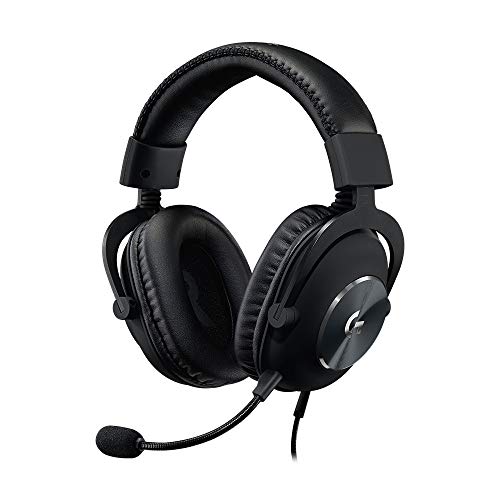
Logitech G Pro X — Best microphone
The G Pro X was designed with professional players, and its microphone shows what that consultation buys. The detachable boom carries Blue VO!CE processing — technology from the Blue microphone company — which applies broadcast-style filtering, compression and noise management to your voice when the headset runs over USB through Logitech’s software. Teammates hear the difference in the first lobby: a voice that sounds produced rather than captured, with keyboard clatter and room noise pushed down in the mix. For players who stream, captain teams, or simply refuse to be the muffled voice in their squad’s recordings, this is the microphone pick of the guide, full stop.
The rest of the headset honours the pro brief: 50mm drivers with DTS spatial processing over USB, a steel-and-aluminium build that feels like equipment, and a box that historically includes both leatherette and cloth cushions plus a carrying case — the travel-to-LAN details pros actually use. Its conditions deserve the usual clarity: Blue VO!CE lives on the USB path through the software, so a 3.5mm connection to a controller gives you the hardware microphone without its processing suite, and the headset’s price puts it at the top of this guide alongside the experience it sells. Buy it for the voice. The voice is worth it.
- Connection: USB (with processing) and 3.5mm
- Microphone: detachable boom with Blue VO!CE processing over USB
- Drivers: 50mm, DTS spatial audio over USB
- Build: steel and aluminium pro-series construction
- Audience: competitive players, captains, streamers
Strengths
- The best voice in the guide — broadcast processing your teammates will notice immediately.
- Pro-grade build and travel kit suit players who carry their headset to events.
- Driver tuning and spatial processing serve competitive play properly.
Trade-offs
- Blue VO!CE requires the USB path and software; controller play gets the plain microphone.
- Top-tier pricing in this roundup.
- The firmer pro fit can clamp harder than the Clouds on larger heads.
Best for: players whose voice carries responsibility — captains, streamers, shot-callers. Not suited for: casual players who rarely speak in game.

Razer BlackShark V2 X — Best value esports pick
The BlackShark V2 X is the headset that embarrasses this guide’s price ladder. Razer’s esports line gives it TriForce Titanium 50mm drivers — a three-part driver design coated in titanium, tuned so bass, mids and highs can be voiced separately — and a HyperClear cardioid microphone that rejects sound from the sides to keep the focus on your voice, all in a frame light enough to forget across a long session. In a voice channel, the BlackShark’s owner does not sound like the budget pick; in a firefight, its positional clarity does not feel like one either. Its savings were taken in materials and features, not in the two things that decide matches.
Those savings are visible and should be bought knowingly. The frame is plastic where the G Pro X is metal, the microphone is fixed rather than detachable, the connection is a single 3.5mm path — universal, console-friendly, and without the USB processing suites the Logitechs reserve for their dongles — and the aviation-inspired design language divides opinion in the way of all strong styling. None of it touches the core transaction: the most competitive audio-and-voice package per unit of money in this guide. For a first serious headset, a second headset for a second machine, or a whole team’s worth of identical kits, the BlackShark V2 X is the arithmetic champion, and arithmetic is a perfectly honourable way to win a roundup category.
- Connection: 3.5mm wired
- Drivers: TriForce Titanium 50mm
- Microphone: HyperClear cardioid boom
- Weight class: featherweight esports frame
- Audience: competitive players on a budget
Strengths
- Driver and microphone quality that shames headsets costing far more.
- The light frame disappears across tournament-length sessions.
- One universal 3.5mm connection for every platform with a jack.
Trade-offs
- No USB path means no surround or voice processing suite to grow into.
- Fixed microphone — no travel-headphone second life.
- Plastic build asks for kinder treatment than the metal-framed picks.
Best for: competitive players who want performance per penny above all. Not suited for: buyers wanting processing features or a detachable mic.

HyperX Cloud II — Best veteran with surround dongle
Some products in this guide are current; the Cloud II is canonical. Its aluminium frame, memory foam and velour-inclusive comfort made it the default recommendation of an entire era, and its signature remains in the box: a USB sound-card dongle with a big, satisfying surround button that switches its virtual 7.1 processing in and out at a touch. That hardware toggle is a genuinely lovely piece of design — no software spelunking mid-session, just a button where your hand rests — and it is the feature its successor most conspicuously declined to keep, which is why the II continues to sell and to anchor this guide’s veteran slot on merit rather than nostalgia.
Buying it today means choosing its era’s trade-offs with eyes open. The microphone detaches, the frame will outlast most of its rivals, and the comfort remains a benchmark — but the design is a decade’s styling old, the connection story is the dongle and a 3.5mm plug rather than the III’s modern trio, and its drivers voice an older generation’s idea of excitement. None of that prevents it from being the right purchase for the player who wants the hardware surround switch, the proven frame, and a price that years of production have made friendly. Classics are not apologies. The Cloud II is in this guide because it still wins its specific argument.
- Connection: USB dongle and 3.5mm
- Surround: virtual 7.1 via USB sound card, hardware toggle
- Microphone: detachable boom
- Frame: aluminium, memory foam comfort
- Audience: veterans and dongle loyalists
Strengths
- The hardware surround button remains the best interface for the feature anywhere.
- A decade of production proves the frame, the comfort and the support ecosystem.
- Value pricing for a metal-framed, detachable-mic headset.
Trade-offs
- Styling and connectivity belong to its launch era.
- The Cloud III modernises fit, mic and ports for buyers who prefer new.
- Virtual surround exists only on the USB dongle path, as always.
Best for: players who want the classic Cloud with its hardware surround toggle. Not suited for: buyers who prioritise the newest design and port selection.

Razer Kraken V4 X — Best modern USB-C all-rounder
The Kraken line is Razer’s mainstream banner — the headset with the ears, the colours and the presence — and the V4 X wires it for the current port landscape: USB-C and USB-A connection for PC and modern platforms, a cardioid microphone in a retractable-style arrangement that tucks away when the session is social rather than competitive, memory foam cushions, and Chroma RGB lighting for the desk that treats a headset as part of the room’s lighting design. It is the most contemporary-feeling object in this guide, and its design brief — one wired headset that looks and connects like a current product — is executed completely.
Against its own sibling, the BlackShark V2 X, the Kraken trades the esports line’s featherweight minimalism for features and presence: heavier, plusher, lit, and connected by USB paths that unlock Razer’s software world where the BlackShark’s lone 3.5mm plug cannot go. Competitive purists will keep the BlackShark’s arithmetic; players whose headset lives a broader life — games, calls, media, a desk that glows — will find the Kraken the more complete daily object. Its cardioid microphone is clear and team-worthy, a step behind the G Pro X’s processed broadcast voice and comfortably ahead of the category’s forgettable booms. Choose it as the modern all-rounder it intends to be, and it will not argue.
- Connection: USB-C and USB-A wired
- Microphone: cardioid, retractable-style housing
- Comfort: memory foam cushions
- Extras: Chroma RGB lighting
- Audience: mainstream players wanting a current-design headset
Strengths
- Modern USB-C connectivity with Razer’s software ecosystem behind it.
- The tuck-away microphone suits headsets that live on desks between sessions.
- Plush comfort and lighting make it the best desk presence here.
Trade-offs
- Heavier and warmer than the BlackShark across long competitive sessions.
- RGB is a battery-free joy on wired, but a taste not every desk shares.
- Its all-round balance loses the value crown to its own sibling.
Best for: mainstream players wanting a modern, fully featured wired headset. Not suited for: minimalists and weight-sensitive competitive players.

Logitech G432 — Best flip-to-mute simplicity
The G432 is the honest workhorse of Logitech’s wired line, and its signature is a gesture: flip the boom up and you are muted. No software, no button hunt, no wondering — a physical fact your teammates and your household can both rely on, which streamers and parents of sleeping children value in exactly the same way. Around that gesture sits a complete mid-price instrument: 50mm drivers, DTS Headphone:X 2.0 spatial processing when connected over its USB adapter, a 3.5mm path for controllers, and Logitech’s sober, glasses-friendly fit in leatherette.
Its place in the guide is the simplicity argument against its own sibling. The G Pro X above it offers processing, materials and travel kit for considerably more money; the G432 offers the same brand’s driver competence and the category’s best mute, for the player whose needs end at hearing clearly, speaking clearly and muting instantly. Its build is lighter and more plastic than the Pro’s, its microphone lacks the Blue VO!CE suite, and its styling will start no conversations. It is, in the best sense, the headset you buy when the headset is not the hobby — when the game is. Squads equipping several seats at once have made it a quiet institution, and institutions of that kind are earned the slow way.
- Connection: USB adapter and 3.5mm
- Drivers: 50mm, DTS Headphone:X 2.0 over USB
- Microphone: boom with flip-to-mute
- Fit: leatherette cushions, sober design
- Audience: value-minded teams and households
Strengths
- Flip-to-mute is the fastest, surest mute in the guide — a physical certainty.
- Full-size drivers and DTS processing at a mid price.
- Both USB and 3.5mm paths cover PC and console without drama.
Trade-offs
- No voice processing suite; your microphone sounds like your room more than the Pro X’s does.
- Plastic-forward build beside the metal picks.
- Leatherette cushions warm up across long summer sessions.
Best for: players and households who value simple, certain controls. Not suited for: voice-quality maximalists and streamers.
How do the six wired gaming headsets compare side by side?
| Headset | Connections | Microphone | Spatial audio | Defining trait |
|---|---|---|---|---|
| HyperX Cloud III | USB-C / USB-A / 3.5mm trio | Detachable, noise-cancelling | Software-based | Best connection kit and comfort balance |
| Logitech G Pro X | USB, 3.5mm | Detachable, Blue VO!CE over USB | DTS over USB | Broadcast-grade voice |
| Razer BlackShark V2 X | 3.5mm | Fixed HyperClear cardioid | None — stereo by design | Performance per penny |
| HyperX Cloud II | USB dongle, 3.5mm | Detachable | Virtual 7.1 via dongle button | The veteran classic |
| Razer Kraken V4 X | USB-C, USB-A | Cardioid, tuck-away | Software-based | Modern design and RGB |
| Logitech G432 | USB, 3.5mm | Flip-to-mute boom | DTS Headphone:X 2.0 over USB | Simplicity and the mute gesture |
The spatial-audio column quietly teaches the guide’s founding lesson: every entry in it is processing, delivered over a digital path, over the same two ears. Note how the 3.5mm column changes a headset’s identity — the G Pro X without USB is a fine headset with an ordinary microphone, and the Cloud II without its dongle is a stereo classic — because on analogue paths, every pick in this table is a pair of drivers and a capsule, which is all a wired headset fundamentally is. Buy the fundamentals; treat the processing as the bonus it honestly is.
How should you set up a wired gaming headset for your platform?
On PC, choose your path deliberately rather than accepting the first hole the cable finds. The USB connection unlocks each model’s processing — spatial audio, voice suites, firmware and software control — and should be the default for desk play; the 3.5mm connection is the fallback for audio interfaces and troubleshooting. Set the headset as both the default output and the default communication device, then set your game’s audio mode to headphones if it offers one, so the game’s own mix and the headset’s processing are not fighting over the same signal. Run the microphone test in your voice app of choice and set the boom a couple of centimetres from the corner of your mouth — close enough for clarity, off-axis enough to keep breath and plosives out of your teammates’ ears.
On console, the controller’s 3.5mm jack is the wired path for most headsets here, with the modern USB-C models also serving newer systems directly where supported. Accept the platform’s own spatial offerings — both console ecosystems provide their own headphone audio processing — rather than expecting the headset’s PC software suite to cross over, and use the console’s microphone monitoring to set your level, because hearing your own voice slightly in the mix is what stops the whole street from hearing your callouts. Handhelds take the 3.5mm picks natively. In every case, route the cable once, kindly: down, clipped or channelled away from chair wheels and desk edges, because the leading cause of wired-headset death is not electronics but a wheel, a tug and a yanked connector repeating their small violence for a year.
How should you position and manage the microphone for team play?
The boom’s correct home is a couple of centimetres from the corner of your mouth, angled so you speak across the capsule rather than directly into it. That geometry captures the voice’s clarity while letting breath pass beneath the microphone instead of detonating into it, and it keeps plosive consonants — the p and b sounds that punctuate callouts — from arriving as thumps. Most new owners park the boom too far away, out of a politeness the microphone does not need, and then compensate with gain, which invites the keyboard, the fan and the household into the channel at equal volume. Close placement plus modest gain is the entire secret of sounding like the G Pro X owner in the next lobby, whatever headset you own.
Gain discipline continues in software. Set the input level so your loudest genuine callout — not your conversational voice, your actual excited peak — sits below distortion with a little room to spare, because a clipped callout in a clutch round communicates nothing but volume. Use push-to-talk or a disciplined mute where your platform allows it; the flip of the G432’s boom and the detachable mics elsewhere exist partly as social technology, marking the boundary between the team’s channel and your room’s life. And learn your squad’s honest feedback loop: ask once, early, how you sound, and adjust once, properly, rather than spending a season as the lobby’s underwater voice out of unexamined habit.
Streamers add one layer: your audience hears the produced version of everything, so the processing suites — Blue VO!CE above all — earn their keep as broadcast equipment, while the raw 3.5mm path belongs to console nights when nobody is recording. Treat microphone setup as a pre-session ritual of thirty seconds — boom placed, level glanced at, mute tested — and voice problems mostly vanish from your gaming life, which is more than any purchase alone can promise.
Which headset traits matter for shooters, story games, racing and flight?
Competitive shooters buy information: positional clarity, a restrained low end that does not bury footsteps under explosions, and a microphone the squad trusts. That profile favours the BlackShark’s esports tuning, the G Pro X’s voice, and whichever spatial processing your ears have voted for after honest testing in your actual title — because implementations differ, games differ, and the only tribunal that matters is your own replays. Players who chase a single universal setting across every shooter are chasing a rumour; test per game, save per game, and let the stereo-versus-surround question be answered by evidence rather than by the box.
Story and adventure games buy the opposite: immersion, warmth, the orchestra and the weather. Here the fuller tunings please, virtual surround usually steps aside for the game’s own authored headphone mix, and comfort outranks everything because the sessions are cinema-length. Racing and flight simulation buy endurance and a particular microphone virtue — clarity over a constant engine bed of noise, in communities where a muddy transmission is a safety issue inside the fiction — plus compatibility with the sim rig’s own audio routing, where the honest 3.5mm path often wins over any USB suite. The six picks divide across these genres without a single overall winner, which is why their sections argue from use rather than from a league table: the guide’s recurring advice, that you buy the headset your actual evenings describe, applies to genres exactly as it applied to platforms.
What about glasses, big heads and four-hour comfort?
Comfort in this category is an engineering outcome with four ingredients: clamp force, cushion material, weight, and where the headband parks its share of that weight. Glasses wearers feel the clamp first — temple arms pressed by cushions ache on a schedule and leak sound where the seal breaks — and they should favour the softer clamps and plush memory foam of the Cloud line, testing with their actual frames during the return window rather than trusting a showroom minute. Larger heads should note maximum band extension and cup size as real specifications; a headset at the end of its adjustment is a headset pressing at its limits, and no driver quality compensates by hour three.
Cushion material is a climate decision disguised as a luxury one. Leatherette seals best and warms fastest; cloth and velour breathe and leak a little; memory foam underneath either distributes pressure the way a good mattress does, in points spread rather than concentrated. The Cloud II’s inclusion of alternative cushions in its era’s box, and the G Pro X’s dual cushion sets, acknowledge what players learn empirically: the same head prefers different cushions in January and July. Budget for a replacement set in year two or three regardless — foam tires, hygiene argues, and a fresh set restores both the seal and the sensation of a new headset for the price of a pizza.
How do you keep a cable alive for the headset’s whole life?
The cable dies by inches: a kink repeated at the same point, a chair wheel’s weekly crossing, a connector used as a handle for yanking the plug from across the desk. Counter each with its small discipline. Route the cable with slack in a fixed path — down the desk’s back, across to the machine — so daily movement never becomes tension. Coil for storage in loose loops at the cable’s natural diameter, never wound tight around the headset, which twists conductors inside their insulation while the outside looks innocent. Disconnect by the plug body, every time, and teach the household the same, because connectors fail at the strain relief where impatience applies its force.
Where a model offers a detachable cable or microphone — the Clouds and the G Pro X lead here — treat those joints as the service points they are: a worn cable becomes a small purchase instead of a funeral, and a detached microphone converts the headset for travel. Fixed-cable designs like the BlackShark ask for the gentler handling their price implies. None of this is precious; it is the same respect you would give a good tool, and it is why a wired headset bought this year can plausibly be the headset a younger sibling inherits, still sounding exactly like itself, when the wireless contemporaries have long since become e-waste with fond memories.
How do you choose inside each pair: Cloud, G and Razer?
Cloud III versus Cloud II is modernisation against character. Take the III for its ports, its detachable noise-cancelling microphone and its refined frame; take the II for the hardware surround button, the aluminium classicism and the friendlier price — and do not let the numerals bully you, because HyperX kept the II in production for the same reason this guide kept it in the roundup. G Pro X versus G432 is production against sufficiency: the Pro X if your voice is broadcast, captained or recorded; the G432 if your voice is a squad channel and your budget has other plans, with the flip-mute as its own small genius either way. BlackShark V2 X versus Kraken V4 X is the esports ledger against the modern desk: the BlackShark wins performance per penny and loses every feature contest the Kraken enters, and both outcomes are the brands segmenting honestly rather than one pick failing.
Notice what none of these tiebreaks uses: age. A headset’s launch year predicts its ports and its styling, not its worth at your desk, and in a category whose founding virtue is decade-long certainty, buying the older design that matches your evenings is not settling. It is the category working as intended.
What mistakes do buyers make with wired gaming headsets?
The vocabulary mistake leads: paying a premium for “7.1” as if it were hardware, then feeling deceived on learning it is a software mode on two drivers. It can still be worth having — but buy it as software. The path mistake follows: plugging a processing-rich headset into a controller by 3.5mm and judging its microphone or surround as broken, when the features live, by design, on the USB path nobody used. The sibling mistake is buying by number alone — assuming III beats II, or the newer Kraken beats the BlackShark — when each pair in this guide splits its audience deliberately.
The comfort mistake is buying by specification for a four-hour use case: clamp force, cushion material and weight distribution decide whether a headset is worn for the whole session or hung around the neck by the second hour, and none of those appear in a driver-size table. And the cable mistake is treating the tether as immortal — coiling it tight, rolling over it, yanking it from across the room — then blaming the category when the connector tires. Wired headsets reward a small amount of care with a decade of certainty; the care is part of the product, and this guide counts it as such.
What should your first week with a new wired headset include?
Day one is setup, done slowly: choose the USB path on PC, set defaults, position the boom, record a voice test and play it back before judging anything, because your own recorded voice through a new microphone always sounds strange for reasons that are physiology, not product. Then play one familiar game — familiar matters, because a known soundscape exposes what the new headset does differently — in stereo first, spatial processing off, and only then toggle the processing and compare on evidence. Most players form their permanent setting in that single honest A/B, and it beats a month of forum opinions because the ears and the game are both yours.
Across the week, wear it for one genuinely long session before the return window closes, with your real glasses, your real chair and your real posture, because comfort verdicts delivered at minute twenty are fiction. Test the console path even if PC is home, test the microphone with the actual squad, and route the cable into its permanent path while the setup is still new enough to bother. A headset that survives its first week configured, compared and worn-in is a headset that will still be on your desk when its wireless contemporaries are on their second battery — which was, from the first paragraph of this guide, the entire point of the wire.
Do you need an amplifier, a DAC or a sound card with these headsets?
Almost certainly not, and the wired category’s honesty includes saying so. These headsets are designed to be driven by the devices they plug into — a controller, a motherboard, a laptop — and their USB models carry their own conversion in the dongle or the cup, which is the DAC question answered inside the product. External amplification enters the conversation for high-impedance audiophile headphones, a different category with different physics, and bolting that hobby’s hardware onto a gaming headset buys volume you already have and problems you did not. Where an external device does earn its desk space is at the margins: a streamer’s interface, which gathers microphone, game and voice into one mixer for broadcast, serves the broadcast rather than the headset.
The money rule follows. Spend on the headset, then on its consumables — cushions, a spare cable where detachable — and stop. A wired gaming headset is a closed system that arrives complete, and the upgrade itch it cannot scratch is better spent on the games themselves. Players who keep that discipline own the same headset happily for years, which is, for the last time in this guide, precisely what the wire promised on day one.
Final Recommendation
Choose by the job your voice and your platforms describe. Multi-platform players should take the HyperX Cloud III and its complete connection kit; shot-callers and streamers should take the Logitech G Pro X and never apologise for their microphone again; value-driven competitors should take the Razer BlackShark V2 X and spend the savings on the games. The HyperX Cloud II remains the connoisseur’s veteran, dongle button and all; the Kraken V4 X is the modern desk’s all-rounder; the G432 is the household workhorse with the perfect mute. Then plug in, set the boom once, route the cable kindly — and enjoy the two promises no wireless headset in the world can sign: the sound arrives when the event happens, and the battery, there being none, will never once let you down. Run the first week the way this guide prescribes — stereo before surround, recordings before judgements, one long honest session before the return window closes — and the headset you keep will not be the one a chart crowned. It will be the one your ears, your squad and your platforms each voted for in their own way, which is the only election in this category whose result still matters at hour four of a ranked night in year three.
Frequently Asked Questions
Is wired really lower latency than wireless?
Yes — a wired connection adds effectively no delay, while wireless audio is encoded, transmitted and decoded, which always costs some milliseconds. Modern gaming wireless has made the gap small enough that many players never notice it, but the gap is real, permanent and free to eliminate with a cable, which is this category’s founding argument. Players on high-refresh monitors in timing-critical genres are the ones most likely to feel the difference, because their whole setup is built to shave delays of exactly this size wherever they hide.
Does a 7.1 gaming headset have seven speakers?
No. Every headset in this guide has two drivers, one per ear. The 7.1 is virtual surround: software processing, usually on the USB path, that reshapes the stereo signal with positional cues drawn from a multi-channel mix. It can be genuinely effective in competitive games, it costs nothing in weight or battery because it is mathematics rather than hardware, and it vanishes — by design — when you connect by 3.5mm, leaving honest stereo that many players, on many games, end up preferring for everything except ranked shooters.
Which connection should I use on PC: USB or 3.5mm?
USB, in almost every case. The USB path carries each model’s processing — spatial audio, the G Pro X’s Blue VO!CE microphone suite, software control and firmware updates — while 3.5mm gives you the raw headset with none of its production team. Keep the analogue path for dedicated audio interfaces, consoles and troubleshooting, and notice the difference once, deliberately, in your first week: the same headset, two personalities, and a permanent understanding of what your money bought beyond drivers and foam.
Can one wired headset serve my PC, PlayStation, Xbox and Switch?
The Cloud III comes closest to a yes out of the box, with USB-C, USB-A and 3.5mm covering the landscape. Any 3.5mm pick here serves controllers and handhelds directly. Check each model’s stated platform support for the specifics of your exact consoles, because controller and port behaviour varies by generation — and because a headset bought for four machines should be tested on all four during its first week, while the return window can still arbitrate any surprise.
Why does my microphone sound worse on console than on PC?
Because the processing lives on the PC’s USB path. Suites like Blue VO!CE run in software on the computer; a controller’s 3.5mm jack receives the raw capsule. The microphone hardware is identical — what changed is the production team behind it. Set levels with the console’s mic monitoring to get the best from the raw signal, keep the boom at its practised distance rather than compensating by shouting, and remember that your squad on console is hearing everyone else’s raw capsules too, so the playing field is more level than the comparison with your produced PC voice suggests.
My squad says I sound quiet even with the boom close. What else can it be?
Work the chain in order. Confirm the headset — not a webcam or laptop array — is the selected input device, because operating systems choose creatively after updates. Raise the input level in the voice app rather than the game, then the game’s own level if it has one, testing with a recording at each step. Check that any processing suite’s noise suppression is not set so aggressively that it eats your voice’s beginnings, a common over-correction. Finish by checking the physical layer — a connector half-seated in a controller or a splitter sharing the jack with another device — because analogue paths fail mechanically more often than electronically. One of those checks is the culprit in nearly every case; the capsule itself almost never is.
Are wired headsets good for work calls as well as games?
Emphatically — a gaming boom is, by the standards of office audio, a serious microphone, and the detachable-mic models here double as respectable headphones for the desk. The G Pro X’s processed voice is practically a cheat code for call presence. Just mind the aesthetics of RGB and aviation styling on camera, and remember the mute gesture your model uses before the meeting, not during it. Many hybrid workers keep one of these as the desk’s single headset for exactly this reason: the workday’s calls and the evening’s ranked queue make the same demands — a clear voice, a certain mute, and comfort that survives being worn by both shifts. One headset earning its keep across sixteen hours of a day is also the strongest value argument in this entire guide, stronger even than the BlackShark’s price, because cost per hour of genuine use is the arithmetic that outlives every launch sale.
How long should a wired gaming headset last?
Years longer than its wireless contemporaries, because there is no battery ageing inside it. Its mortal parts are the cable and connectors, the cushions, and the microphone’s boom joint — which is why detachable cables and mics, replaceable cushions and kind cable routing are worth real money in this category. A realistic expectation for a cared-for pick in this guide is that it outlives the console generation it was bought for and greets the next one through the same 3.5mm jack, which no wireless protocol in this guide’s other chapters would dare to promise.
Related Guides
Complete the headset shelf with the best headsets microphone dictation for boom discipline in the office, where the same microphone geometry decides whether software hears you and the same USB path keeps a trained profile honest; the best motorcycle headsets for intercoms at speed, where the cable’s absence is the entire design problem and mesh networks replace the wire with their own kind of certainty; and the best headsets for sleeping for the hours when the ranked queue finally closes and the only positional audio that matters is a story arriving softly from inside a pillow’s neighbourhood. Six categories, one head, every hour of the day accounted for — which is a fair summary of what a good headset cluster is for, and a reasonable place to stop reading and start playing.


