What's inside
- Key Takeaways
- Quick Picks
- How Did We Choose These Xbox One Headsets?
- Why Does the Xbox Wireless Protocol Matter So Much?
- Which Connection Style Fits the Way You Play?
- Our Six Xbox One Headsets, Reviewed One by One
- How Do the Six Compare Side by Side?
- What Mistakes Do Xbox One Headset Buyers Keep Making?
- How Should You Set Up a New Headset on Xbox One?
- Does Spatial Audio Actually Change How Games Feel on Xbox One?
- What About Glasses, Big Heads and Long Sessions?
- How Do You Keep a Gaming Headset Alive for Years?
- A Short Buying Checklist Before You Order
- Why Party Chat Culture Shapes the Right Choice
- Is an Xbox One Still Worth a Good Headset in 2026?
- Headset or Television Speakers: What Actually Changes?
- What Should You Do in the First Week With a New Headset?
- How Should Two Players Share One Console and Two Headsets?
- Final Recommendation
- Frequently Asked Questions
- Related Guides
As an Amazon Associate I earn from qualifying purchases. This post may contain affiliate links at no extra cost to you.
gizmoverdict.com is reader-supported. When you buy through links on our site, we may earn an affiliate commission.
Where to buy: Each headset below links to its Amazon listing, where you can confirm the exact Xbox variant before ordering, because several of these families also ship in PlayStation-only and PC-only versions that look nearly identical in photos.
Finding the best xbox one game headsets in 2026 starts with a compatibility trap that catches more buyers than any sound-quality question ever will. The Xbox One does not accept ordinary Bluetooth audio. Microsoft built its consoles around a proprietary wireless protocol, so a headset that pairs happily with your phone, your laptop and your tablet may still refuse to connect to the console sitting under your television. That single fact explains most of the one-star frustration in this category, and it shapes every recommendation in this guide. The six picks here divide cleanly into two camps. The wireless models are Xbox-licensed designs that speak the console’s own protocol and connect directly, with no dongle dangling from a USB port. The wired models take the simpler road: a 3.5mm plug into the jack on the bottom of your controller, which works with every Xbox One controller that has that port and never needs charging.
Sound matters, of course, and so do microphones, battery endurance and whether a headset stays comfortable through a three-hour session. But none of those qualities rescue a headset that cannot talk to your console in the first place. So this guide teaches the protocol lesson first, then judges each pick on the things you will actually notice night after night: how clearly teammates hear you, how footsteps and reload sounds sit in the mix, how the earcups feel against glasses, and how much fiddling each model demands before a match starts. Whether you play competitive shooters where positional cues decide rounds, story games where dialogue carries the plot, or a mix of both with friends in a party chat, one of these six will fit the way you play.
Key Takeaways
- Xbox wireless is a licensed protocol, not standard Bluetooth, so only headsets built and labelled for Xbox connect directly to an Xbox One console.
- A 3.5mm cable into the controller remains the universal fallback: it works across generations, costs less, and never runs out of charge mid-match.
- Two wireless picks here stretch to very long rated battery runs, which changes how often you think about a charging cable at all.
- Flip-to-mute and detachable microphones are not gimmicks; in a shared living room they decide how fast you can answer a knock at the door.
- Check the variant name on the listing twice, because an X in the model name often marks the Xbox edition while a near-twin serves PlayStation.
Quick Picks
| Pick | Badge | Why it earns its place |
|---|---|---|
| Xbox Wireless Headset | First-party pick | Microsoft’s own headset pairs with the console exactly like a controller and adds spatial audio support with Dolby Atmos. |
| Turtle Beach Stealth 600 | Longest battery | An 80-hour rated battery, 50mm drivers and a flip-to-mute microphone make it the set-and-forget wireless choice. |
| SteelSeries Arctis Nova 5X | Multi-system traveller | Switches between 2.4GHz wireless and Bluetooth across Xbox, PC, PlayStation, Switch and mobile from one headset. |
| HyperX CloudX Stinger Core Wireless | Featherweight wireless | Memory foam cushions in a light frame with a noise-cancelling microphone aimed at long, relaxed sessions. |
| Razer BlackShark V2 X Xbox | Wired clarity | A cardioid microphone that rejects room noise plus 50mm drivers, with no battery to manage at all. |
| Turtle Beach Recon 50 | Spare-room staple | A simple, light wired headset with a removable microphone that suits a second controller or a younger player. |
How Did We Choose These Xbox One Headsets?
We started from the connection and worked outward. Any headset that could not demonstrate a genuine Xbox path, either the licensed wireless protocol or the controller’s 3.5mm jack, was cut before sound quality entered the discussion. That filter alone removes a large share of the headsets marketed with gaming language, because many of them quietly assume a PC or a PlayStation on the other end of the cable. From the survivors, we weighed driver size only as a rough guide, since a 50mm driver in a poorly sealed cup can sound thinner than a well-tuned 40mm design, and we gave more weight to microphone behaviour, because party chat is where Xbox One players spend most of their headset hours.
Comfort criteria were practical rather than luxurious: clamping force that does not punish glasses wearers, cushions that survive warm rooms, and controls you can find by touch without leaving a match. Battery figures are quoted exactly as the listings state them and treated as best-case claims, since volume, microphone use and wireless distance all shorten real runs. Finally, we favoured headsets that keep working beyond the Xbox One itself. Every pick here also serves newer Xbox consoles or other platforms in some form, so a headset bought for an ageing console does not become e-waste the day you upgrade.
Why Does the Xbox Wireless Protocol Matter So Much?
Hold two headsets side by side and they may look interchangeable, yet one carries the radio and licence for Microsoft’s Xbox Wireless protocol while the other carries only Bluetooth. The console will welcome the first and ignore the second. This is not a quality judgement; it is an ecosystem rule, closer to how a controller pairs than to how a phone pairs. When you press the pairing button on an Xbox-licensed headset, the console finds it through the same routine you use for a new gamepad, and after that the headset wakes and reconnects on its own. Bluetooth enters the picture only as a second channel on some models, useful for answering a phone call or listening to a podcast from your pocket while the game stays connected through the Xbox link.
The practical consequence is a shopping rule worth memorising: the word wireless on a box means nothing for Xbox until the listing names Xbox compatibility outright. Our wireless picks state it in their titles. The Stealth 600 names Xbox Series X|S and Xbox One alongside other platforms. The Arctis Nova 5X lists Xbox among its systems and carries the X suffix that marks SteelSeries’ Xbox edition. The first-party Xbox Wireless Headset removes all doubt by coming from Microsoft itself. If a headset you are considering elsewhere cannot point to that kind of explicit statement, assume it will need the controller cable, no matter how modern its Bluetooth version sounds.
Which Connection Style Fits the Way You Play?
Couch distance decides more than audiophile arguments do. If your console sits across a room and you play from a sofa, a wireless headset frees you from a cable that tugs every time you shift position, and it lets you keep listening while you fetch a drink between matches. If you play at a desk with the controller close, the wired route loses its main drawback, and you gain a headset that is ready the instant you plug it in, with no pairing state to check and no battery gauge to glance at before a long session. Households with several players often end up with one of each: a personal wireless headset for the main player and an inexpensive wired set for the second controller, which is exactly the role the Recon 50 fills in this line-up.
Latency worries mostly belong to a different era. The licensed Xbox wireless link is built for game audio and handles lip-sync and positional cues without the lag people associate with old Bluetooth connections to a television. Wired audio through the controller is equally direct. Where delay can creep in is a chain you build yourself, such as routing console audio through a television’s Bluetooth output, which is a workaround rather than a connection any of these headsets is designed around. Keep the path short, console to headset or controller to headset, and timing simply stops being a topic.
Our Six Xbox One Headsets, Reviewed One by One

Xbox Wireless Headset — First-party pick
Microsoft’s own headset removes the compatibility question entirely, and that peace of mind is its headline feature. It pairs with an Xbox One through the same Xbox Wireless protocol as your controller, so setup feels familiar from the first minute: hold the pairing control, watch the console find it, and play. The listing also promises play across consoles, PCs and televisions, which reflects how the headset combines the Xbox link with Bluetooth for other devices. For a player who owns one console and wants the audio accessory that was designed alongside it, this is the shortest path from box to game.
The sound story centres on spatial audio with Dolby Atmos named in the listing. In practice, spatial processing matters most in games that mix height and distance cues, where a rotor overhead or a voice behind a wall should feel placed rather than merely loud. The rotating earcup dials are the detail owners praise in daily use: one side handles overall volume and the other balances game audio against chat, so when a party gets loud during a quiet stealth section you can tip the mix toward the game with a fingertip instead of opening a menu. That small hardware decision suits the Xbox dashboard’s party culture particularly well.
Comfort lands in the middle of this group. The over-ear cushions seal well enough to keep a room’s television speakers from competing, and the frame carries its weight without hot spots for most head sizes. Players with very large heads should read the big-heads guide linked below before assuming any first-party frame will stretch far enough. Battery life is the honest compromise here: it is a rechargeable headset built for evening sessions rather than the multi-week endurance of the Stealth 600, so a charging habit, ideally plugging in where the controller charges, becomes part of the routine.
- Connection: Xbox Wireless direct to console, plus Bluetooth for phones and PCs
- Audio highlight from the listing: spatial audio with Dolby Atmos
- Controls: rotating earcup dials for volume and game-to-chat balance
- Form: over-ear, Carbon Black finish
Strengths
- Pairs with the console exactly the way a controller does, with no dongle to lose.
- Game-to-chat balance on a physical dial is faster than any dashboard menu.
- Spatial audio support suits shooters and cinematic games alike.
Trade-offs
- Battery endurance trails the longest-running rivals in this guide.
- The snug frame will not be every large-headed player’s friend.
- Its feature set shines brightest inside the Xbox ecosystem rather than across many platforms.
Best for: Xbox One owners who want the official accessory and value painless pairing over marathon battery figures. Not suited for: players who routinely game for days between charges and would rather trade first-party polish for endurance.
Turtle Beach Stealth 600 — Longest battery
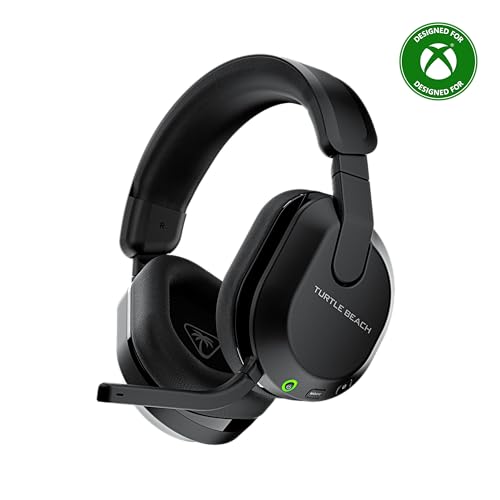
An 80-hour battery rating changes your relationship with a wireless headset. Instead of a nightly charging ritual, the Stealth 600 becomes something you charge occasionally, the way you might charge a controller dock on a Sunday and forget about it. Turtle Beach lists this generation for Xbox, PlayStation, PC and mobile, with Bluetooth alongside the console connection, and the 50mm drivers give game audio a full low end that suits explosions and engines without drowning footsteps when the mix is set sensibly. For an Xbox One player who also keeps a PC nearby, the multiplatform reach means one headset covers both chairs.
The flip-to-mute microphone deserves its own paragraph because it solves a social problem elegantly. Need to speak to someone in the room, cough, or answer the door? Swing the boom up and you are muted, with a physical gesture nobody on your team can misread. Swing it down and you are live again. There is no hunting for a tiny switch during a match and no uncertainty about whether the mute took effect. Teammates hear a clear voice when the mic is down, helped by the boom’s close placement, and the headset’s chat controls let you keep party volume where you want it.
Where the Stealth 600 asks for compromise is in its control density and its fit. Turtle Beach packs mode and preset controls onto the earcup, which rewards a week of learning and punishes the first evening with a few accidental presses. The clamp is secure rather than loose, excellent for players who move around, less ideal if you wear thick-framed glasses for long sessions. Neither point dents the central appeal: this is the wireless pick for someone who hates cables and hates charging almost as much.
- Battery claim in the listing: up to 80 hours between charges
- Drivers: 50mm, tuned for game audio across Xbox, PlayStation, PC and mobile
- Microphone: flip-to-mute boom, raised position silences you instantly
- Extra channel: Bluetooth for a phone alongside the console link
Strengths
- The rated battery outlasts everything else in this round-up by a wide margin.
- Flipping the mic up to mute is foolproof even mid-firefight.
- One headset honestly serves console, computer and phone duties.
Trade-offs
- Busy earcup controls take practice before they feel automatic.
- A firm clamp can press on glasses arms during marathon sessions.
- Players who want app-based sound tweaking get more of it from the SteelSeries rival.
Best for: sofa players who want wireless freedom measured in weeks of evenings rather than hours. Not suited for: anyone who prefers the absolute lightest frame and minimal buttons over battery endurance.

SteelSeries Arctis Nova 5X — Multi-system traveller
The Arctis Nova 5X is built for the household where gaming hardware multiplies. Its listing names Xbox, PC, PlayStation, Switch and mobile, and the headset moves between them using 2.4GHz wireless or Bluetooth, with the X edition carrying the Xbox compatibility that this guide insists on. A 60-hour battery rating sits comfortably between the first-party headset and the Turtle Beach marathon runner. What separates the Nova 5X from both is SteelSeries’ software culture: preset sound profiles shaped for individual games, adjustable from a phone app, so a shooter profile with lifted footstep detail is a tap away rather than a settings expedition.
Microphone quality is the second pillar. The ClearCast Gen 2.X microphone is a retractable design that slides into the earcup when you only want to listen, which keeps the headset looking like ordinary headphones on a train or at a desk. In party chat it delivers the crisp, slightly broadcast character SteelSeries built its name on, and the retractable arm removes the dangling-boom problem that makes some gaming headsets awkward for music or calls. For a student whose Xbox One shares a room with study, work and travel, that disappearing act has genuine daily value.
Expect to spend a little time learning the switching behaviour between the 2.4GHz link and Bluetooth, because a headset this promiscuous about platforms occasionally needs telling which source owns your ears. The magnetic-driver sound signature leans clean and detailed rather than bass-heavy, which competitive players tend to love and cinematic bass hunters sometimes find restrained. Neither observation is a flaw so much as a personality: this is the precision instrument of the group, priced and featured accordingly.
- Wireless routes: 2.4GHz link or Bluetooth, chosen per device
- Battery claim in the listing: up to 60 hours
- Microphone: ClearCast Gen 2.X, fully retractable into the earcup
- Platforms named in the listing: Xbox, PC, PlayStation, Switch and mobile
Strengths
- Covers more gaming systems from a single purchase than any rival here.
- Retractable microphone makes it credible as an everyday headset away from the console.
- Game-specific sound presets reward players who switch titles often.
Trade-offs
- Source switching has a learning curve the simpler picks avoid.
- The leaner bass character will not thrill players chasing cinematic rumble.
- It asks the highest commitment in this line-up, in both money and setup time.
Best for: multi-platform players who want one serious headset to follow them from Xbox One to PC to handheld. Not suited for: single-console households that would never use the extra connections they are paying for.

HyperX CloudX Stinger Core Wireless — Featherweight wireless
HyperX built the CloudX line specifically for Xbox, and the Stinger Core Wireless shows that focus in its priorities: memory foam cushions wrapped in leatherette, a frame light enough to forget during a long evening, and a direct wireless connection for Xbox Series X|S and Xbox One as its listing states. Where the Stealth 600 competes on endurance and the Nova 5X on versatility, this HyperX competes on how little it asks of you. Put it on, turn it on, play. The controls are few, the fit is forgiving, and the whole headset feels designed for the player who finds flagship feature lists exhausting.
The microphone carries a noise-cancelling description in the listing, and here that phrase belongs to the microphone rather than to your ears: it works to keep fan hum and room chatter out of your outgoing voice, so teammates hear you instead of your household. That distinction matters across this whole category, and HyperX applies it honestly to a headset whose earcups rely on ordinary passive isolation. In a quiet room the result is perfectly pleasant; in a loud one, you will still hear the house around you, just muffled by the cushions.
Sound tuning follows the comfort brief. The presentation is warm and undemanding, kind to long sessions and to dialogue-heavy games, though competitive players hunting the faintest positional whisper may prefer the SteelSeries’ sharper profile. Battery life sits in the practical middle ground: enough for many evenings, not enough to forget where the charging cable lives. Treat this as the relaxed wireless option, the headset equivalent of a favourite hoodie, and its place in the guide makes complete sense.
- Xbox link: direct wireless for Xbox Series X|S and Xbox One, per the listing
- Cushions: memory foam with a leatherette finish
- Microphone: noise-cancelling boom aimed at cleaner outgoing chat
- Character: lightweight frame built for low-effort, long sessions
Strengths
- Memory foam comfort at a weight that suits younger and older players alike.
- Simple controls mean almost nothing to learn or press by accident.
- The microphone focuses on your voice in a lived-in, noisy home.
Trade-offs
- No Bluetooth second channel for a phone alongside the game.
- Passive isolation only, so busy rooms still leak into your ears.
- Detail retrieval trails the sharper-tuned SteelSeries for competitive play.
Best for: comfort-first players who want Xbox wireless without flagship complexity or flagship weight. Not suited for: listeners who want to mix phone audio and game audio in the same headset at once.

Razer BlackShark V2 X Xbox — Wired clarity
Plug the BlackShark V2 X into your controller and two entire categories of worry vanish: there is no battery to die during a final circle and no pairing state to check when friends are waiting in a lobby. Razer’s listing describes 50mm drivers, a cardioid microphone and lightweight noise-isolating earcups, with compatibility spanning Xbox Series X and S, PlayStation 5, PC and Switch through the universal 3.5mm connection. That breadth makes it a natural shared headset for a household with more than one kind of console, since the cable does not care which logo sits on the machine.
The cardioid microphone is the reason to choose this Razer over cheaper wired rivals. A cardioid pattern listens hardest in front of the capsule, aimed at your mouth, and pays less attention to the television speakers and keyboard behind it. In an open-plan room where the TV is also the game’s speaker for anyone watching, that rejection keeps your callouts clean. Your own listening benefits from the isolating earcups, which hush the room passively; voices nearby become murmur rather than competition for the game’s dialogue.
Razer’s esports heritage shows in the weight, or rather the lack of it. Long sessions stay easy on the neck, and the frame’s simplicity means fewer hinges and sliders to work loose over years of use. The cable is the cable: it will brush your arm, it limits how far you can lean back, and it is the price of never charging anything. Players who sit close to their controller will barely notice it; players who pace during cutscenes should look at the wireless picks above instead.
- Connection: 3.5mm plug into the controller, no charging ever required
- Drivers: 50mm, per the listing
- Microphone: cardioid pattern that favours your voice over room sound
- Earcups: noise-isolating design in a lightweight esports frame
Strengths
- Your voice stays front and centre even with a television playing nearby.
- Works with nearly every gaming device that still offers a headphone jack.
- Featherweight build keeps multi-hour sessions comfortable.
Trade-offs
- The cable tethers you to the controller at all times.
- No wireless freedom for sofa players sitting far from the screen.
- Isolation depends on cushion seal, so glasses can soften the effect.
Best for: desk and monitor players who value microphone discipline and zero battery management. Not suited for: anyone whose seating puts real distance between them and their controller.
Turtle Beach Recon 50 — Spare-room staple
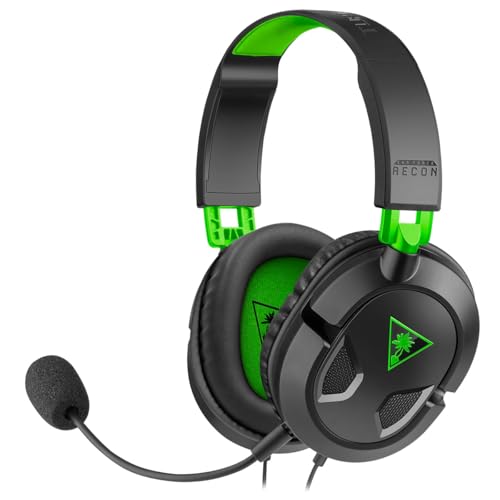
Every gaming household eventually needs a headset that nobody has to be precious about, and the Recon 50 has filled that role for years. It is a wired multiplatform design with 40mm speakers, in-line controls and a removable microphone, listed for Xbox Series X|S, Xbox One, PlayStation, PC and mobile. The removable mic is the thoughtful touch: unplug it and the Recon 50 becomes plain headphones for a bus ride or a homework video, then plug it back in when the party chat starts. For a child’s first headset or a guest controller’s permanent companion, that flexibility beats exotic features.
Sound expectations should be set by its station in life. The 40mm speakers deliver clear dialogue and perfectly serviceable game audio, with enough punch for casual play, but they do not chase the low-end weight of the 50mm models above. In-line controls put volume and mute on the cable where a younger player can find them without memorising earcup buttons. The light frame and soft pads suit shorter sessions best; after several hours, bigger and plusher headsets in this guide justify themselves.
Durability is the quiet argument in its favour. A simple wired headset with a detachable mic has few failure modes, tolerates being tossed into a drawer, and costs little enough that a lost one is an annoyance rather than a disaster. Families buying for an Xbox One that lives in a shared room often discover this is the headset that actually gets used daily, while a premium model stays boxed for special occasions. There is wisdom in owning the tool that fits the routine.
- Speakers: 40mm, voiced for clear everyday game audio
- Microphone: removable boom, so the headset doubles as plain headphones
- Controls: in-line volume and mute on the cable
- Platforms in the listing: Xbox generations, PlayStation, PC and mobile
Strengths
- Detachable microphone makes it genuinely useful beyond gaming.
- Simple, light and tolerant of rough family handling.
- The easiest recommendation here for a second or third controller.
Trade-offs
- Smaller drivers give up bass weight to the 50mm picks.
- Cushions suit moderate sessions better than all-evening marathons.
- No wireless option at all, by design and by price.
Best for: families, younger players and anyone equipping a spare controller without drama. Not suited for: competitive players who need every positional cue a larger driver can offer.
How Do the Six Compare Side by Side?
| Headset | Connection to Xbox One | Headline trait | Microphone style |
|---|---|---|---|
| Xbox Wireless Headset | Xbox Wireless, direct | Spatial audio with Dolby Atmos | Built-in boom, dial-controlled chat mix |
| Turtle Beach Stealth 600 | Xbox wireless plus Bluetooth | 80-hour rated battery | Flip-to-mute boom |
| SteelSeries Arctis Nova 5X | 2.4GHz wireless or Bluetooth | Five-platform versatility | Retractable ClearCast Gen 2.X |
| HyperX CloudX Stinger Core Wireless | Xbox wireless, direct | Memory foam, low weight | Noise-cancelling boom |
| Razer BlackShark V2 X Xbox | 3.5mm via controller | Cardioid voice focus | Fixed cardioid boom |
| Turtle Beach Recon 50 | 3.5mm via controller | Removable mic, family friendly | Detachable boom |
Read the connection column first, because it predicts your daily routine: direct wireless models live near the console’s pairing button, while the two wired models live in a drawer and work instantly anywhere. Battery claims belong only to the wireless rows, and even there they describe the maker’s best case rather than a promise for your volume settings. Microphone style is the sleeper column. A flip-to-mute boom changes how you behave in a shared room, a retractable mic changes where the headset can travel, and a detachable boom changes who else in the house will borrow it.
What Mistakes Do Xbox One Headset Buyers Keep Making?
Assuming Bluetooth is enough sits at the top of the list, and it produces more returned headsets than every sound complaint combined. A headset can be excellent and still be wrong for this console. The second mistake is buying the wrong twin: several brands sell Xbox and PlayStation editions with near-identical shells, and the wrong one may connect by cable only or not at all. Read the variant name in the listing title letter by letter, especially the X suffixes and platform lists, before ordering.
Chasing driver size as a quality score comes third. A 50mm badge does not guarantee clearer footsteps than a tuned 40mm design, and it says nothing about microphone quality, which your teammates will judge long before they admire your bass. Fourth, players forget the controller generation on their own shelf: very early Xbox One controllers lack the 3.5mm jack entirely and need an adapter for wired headsets, so check the bottom edge of your gamepad before choosing a wired pick. Finally, many buyers never touch the console’s audio settings after plugging in, leaving chat mix and monitoring levels at defaults that make a good headset sound ordinary.
How Should You Set Up a New Headset on Xbox One?
For a wireless model, begin with the console fully updated, then put the headset into pairing mode and press the console’s pairing button as you would for a controller; the status lights settle once the link is made. Open the audio settings and set the headset format, then adjust the chat mixer so party voices sit slightly above game effects if you play socially, or below them if you mostly play alone with friends chatting in the background. Microphone monitoring, which feeds a little of your own voice back into your ears, deserves a small amount rather than none: it stops you shouting without realising it.
For a wired model, push the 3.5mm plug firmly into the controller until it seats, because a half-seated plug is the hidden cause of many one-ear and no-microphone complaints. Test in a party with a friend rather than in a menu, speak at your normal volume, and ask directly whether you sound clear or distant. Whichever connection you chose, spend the first session adjusting fit before judging sound: earcups centred over your ears and a headband carrying weight across the crown rather than a single pressure point. Ten patient minutes on day one prevent weeks of vague dissatisfaction.
Does Spatial Audio Actually Change How Games Feel on Xbox One?
Spatial audio earns its keep in specific moments rather than across every minute of play. When a helicopter circles in a war game, when rain moves across a roof in a story scene, or when a teammate calls a direction and the game itself reinforces that direction with sound, processed audio helps your brain build a map without looking at one. The first-party headset names Dolby Atmos in its listing, and the Xbox platform also carries its own spatial formats, so the console does much of the thinking while the headset delivers the result. Players raised on plain stereo sometimes need an evening to adjust, because familiar games sound rearranged at first, with dialogue pushed forward and effects spread wider than memory expects.
Temper the expectation, though. Spatial processing cannot rescue a game mixed in flat stereo, and it will not hand a casual player the awareness of someone with thousands of hours in one title. It shines brightest in headphones-only households, where the television speakers stay silent and every cue arrives through the cups. If you mostly play sports titles or puzzle games, the benefit shrinks to pleasant ambience. If you play shooters, horror or open-world games with dense sound design, it becomes one of the strongest reasons to pick the Microsoft headset or to enable spatial output with whichever model you choose.
What About Glasses, Big Heads and Long Sessions?
Comfort complaints rarely mention the first hour. They arrive in hour three, when a clamp that felt secure starts pressing a glasses arm into the side of the head, or when a headband’s single pressure point announces itself. Among these six, the HyperX CloudX Stinger Core Wireless makes the most explicit comfort pitch with its memory foam, while the Razer BlackShark V2 X counters with sheer lightness, asking very little of your neck. The Stealth 600’s firmer grip rewards players who move and punishes still, glasses-wearing marathoners a little more. None of this is knowable from a photograph, which is why fit deserves a trial session at home with your own glasses, your own chair and your longest typical game.
Heat is the other slow variable. Leatherette-style cushions seal sound in and warmth with it, pleasant in a cold room and stuffy in a summer one. Taking the headset off during loading screens and cutscenes you have seen before sounds trivial, yet it is the habit that separates players who love their headset after a year from those quietly shopping again. If you know your head runs large, measure before ordering and consult the dedicated fit guide linked at the end of this article, because extension range, not cushion softness, is what decides whether a frame can fit you at all.
How Do You Keep a Gaming Headset Alive for Years?
Cushions die first. Skin oils and friction flatten foam and crack coverings long before drivers fail, so wiping cushions with a barely damp cloth after long sessions and storing the headset on a stand rather than around a monitor stretches their life noticeably. Cables die second, usually at the plug, where repeated bending work-hardens the wire; the wired picks here reward owners who unplug by gripping the plug body instead of tugging the cord. Wireless models add a battery to the ageing list, and batteries prefer partial cycles to being drained flat and left empty, so a headset charged little and often will outlast one rescued from zero every week.
Microphone booms have their own etiquette. Flip-to-mute arms are built for that motion thousands of times, but bending a boom sideways to shape it, over and over at the same joint, shortens its life. Position it once, gently, and then use the flip or the slide as designed. Finally, keep the original box or a drawer divider for travel. Most headset damage happens between rooms and between houses, not during play, and a detachable or retractable microphone, like those on the Recon 50 and the Nova 5X, removes the most fragile part from harm’s way entirely.
A Short Buying Checklist Before You Order
First, name your console generation and your controller: confirm the 3.5mm jack exists if you are buying wired, or confirm the listing names Xbox wireless compatibility if you are not. Second, decide where you sit, because sofa distance argues for wireless while a desk makes the cable invisible. Third, count your platforms honestly; a household with only an Xbox One gains nothing from the Nova 5X’s five-system reach, while a mixed household gains everything. Fourth, think about who else will use it, since a headset shared with children should be the Recon 50’s kind of simple rather than anyone’s flagship. Fifth, plan the charging home for a wireless model before it arrives, ideally beside the controller charger, so the habit forms on day one.
Run that checklist and the six picks sort themselves quickly. What remains is taste: the dial-driven calm of the first-party headset, the Stealth 600’s indifference to charging, the SteelSeries’ travelling versatility, the HyperX’s soft landing, the Razer’s disciplined microphone, or the Recon 50’s cheerful simplicity. Those are good choices to be stuck between, and every one of them respects the one rule this console insists on.
Why Party Chat Culture Shapes the Right Choice
On Xbox more than on most platforms, the headset is a social instrument. Parties persist across games, across evenings and sometimes across years, and your microphone is how a dozen friends actually know you. That is why this guide keeps returning to boom placement, mute behaviour and monitoring rather than treating the microphone as a specification footnote. A player whose mic crackles, echoes the television or fades whenever they lean back becomes, politely, the person others mute. Every pick here avoids that fate when set up properly, but they get there differently: Razer through pattern discipline, Turtle Beach through the flip gesture everyone can see in their mind, SteelSeries through a broadcast-leaning capsule, HyperX through noise rejection aimed at busy homes.
Monitoring deserves a fuller explanation than it usually gets. Hearing a trace of your own voice in the cups confirms the microphone is live and, more importantly, calibrates your volume against the room. Without it, players in exciting moments shout without knowing, because the sealed cups make their own voice sound distant. With too much of it, every breath becomes a distraction. The correct setting is personal, found by asking a friend in a party to tell you when you sound natural rather than performed. Spend those two minutes once and every session afterwards improves, whichever of the six headsets you bought.
Chat mix is the companion setting. During a loud firefight you want game audio dominant; during the lobby conversation afterwards you want voices on top. Headsets with a physical balance control, above all the first-party model with its earcup dial, let that shift happen as a reflex. Software-only control works too, but it asks you to pause, and paused players miss moments. When friends are the reason you play, prioritise the headset whose chat controls you will genuinely use mid-game.
Is an Xbox One Still Worth a Good Headset in 2026?
Yes, and the reasoning is practical. The Xbox One library is enormous, its games are inexpensive, and Game Pass keeps feeding it attention. A headset is the single upgrade that improves every one of those games at once, because audio design matured early and even decade-old titles reward good headphones with detail that television speakers smear. Better still, the picks in this guide were deliberately chosen to survive a console upgrade. When an Xbox One household eventually adds a Series X or S, the same headset moves across, which spreads the cost across two console generations instead of one.
There is also a household harmony argument that never appears on packaging. A good headset lets one person play a loud game at midnight while a partner sleeps in the next room, or lets a teenager join a party without the whole kitchen hearing both sides of the conversation. In shared homes that peace dividend can matter more than any driver specification. It is why the spare wired headset, the Recon 50, earns its place beside flagships: it extends that quiet to the second player on the sofa.
Finally, consider the second-hand reality of this console. Many Xbox One units now serve as bedroom or children’s-room machines after a newer console took the living room. A headset bought for that role should be simple, tough and cable-optional rather than precious, which is the exact centre of gravity for the HyperX and the two wired Turtle Beach and Razer designs. Matching the headset to the console’s current job, not its launch-day glory, is the mature way to shop this category.
Headset or Television Speakers: What Actually Changes?
Switching from television speakers to any of these headsets changes three things at once. Detail rises first: footsteps, reload clicks, distant engines and whispered dialogue all sit closer to your ears with no room reflections blurring them. Direction sharpens second, because two drivers fixed beside your ears give the game’s stereo or spatial mix a stable stage that a soundbar across the room cannot match when you shift on the sofa. Privacy arrives third, and for many households it is secretly the main purchase reason, as described above.
What you give up is shared spectacle. A headset is a private cinema; nobody else in the room hears the goal, the explosion or the joke. Families who watch each other play should keep the television speakers in the rotation and treat the headset as the late-night and competitive tool. That is also why several picks keep microphones removable or retractable, so the same hardware can serve a solo film on a tablet when the console is off. Versatility, in a mature console’s ecosystem, is a form of value.
What Should You Do in the First Week With a New Headset?
Treat the first week as calibration, not judgement. On day one, set the fit and the chat mix and then deliberately play three different kinds of game: something competitive where cues matter, something cinematic where voices carry scenes, and something quiet you know by heart. The familiar title is your reference recording; if it sounds wrong there, the settings are wrong, not your memory. Adjust one variable at a time, because changing fit, mix and spatial mode together leaves you unable to say which change helped.
By the middle of the week, test the social side properly. Join a party, ask a friend for an honest microphone report, and try your mute gesture under mild pressure, mid-conversation rather than in a silent menu. Wireless owners should also learn their headset’s low-battery warning sound now, while it is still a curiosity, instead of meeting it for the first time during a final round. Wired owners should route the cable the same way every session, perhaps under a sleeve or along the controller’s natural hang, until the tether becomes invisible through habit.
At the week’s end, decide about the extras. If spatial audio stayed on all week without fatigue, leave it on. If a preset in an app kept being swapped per game, favourite the two you actually used and ignore the rest. And if anything about the fit still nags, act while returns are easy rather than hoping month three will soften a clamp that month one could not. A headset is a long-term companion on this console; the first week is when you teach it your habits and learn its own.
How Should Two Players Share One Console and Two Headsets?
Split-screen and pass-the-controller households ask a question solo players never face: how do two people hear one console? The honest answer is that the Xbox One feeds game audio to one headset path gracefully, and everything beyond that is compromise. In practice, families solve it socially rather than technically. One player wears the headset for chat while the television quietly carries game sound for both, or the pair alternate the good headset by game while the Recon 50 covers the second seat through its own controller. Party chat complicates the picture further, because a single party identity belongs to the signed-in profile, so a guest on the sofa hears the game but speaks through the main player’s microphone or not at all.
That reality argues for owning two different tiers rather than two identical flagships. Put the wireless headset with the player who talks most, since microphone quality and mute speed matter socially, and give the second seat a wired model that tolerates drops, spills and younger hands. When the second player graduates to their own console or PC, the wired headset travels with them and still works everywhere, which is more than can be said for platform-locked wireless designs. Shared-household logic, more than any specification, is why this guide deliberately spans from a first-party flagship down to a humble spare.
Final Recommendation
Most Xbox One players should start with the Turtle Beach Stealth 600 if wireless freedom is the goal, because its battery rating removes charging from weekly life and its flip-to-mute microphone suits real living rooms. Choose the first-party Xbox Wireless Headset instead if you want the console’s own pairing ritual and dial-based chat balance, or the Arctis Nova 5X if your gaming spreads across several systems and one headset must follow you. On a cable, the Razer BlackShark V2 X is the serious player’s pick, the Recon 50 the household’s, and the HyperX CloudX Stinger Core Wireless remains the comfort candidate for anyone who finds the others overbuilt. Whatever you pick, let the connection rule lead: a headset that speaks Xbox fluently will make you happy long after a louder one that cannot connect has gone back in its box.
Frequently Asked Questions
Will my phone’s Bluetooth headset work with an Xbox One?
Almost certainly not directly. The console does not accept standard Bluetooth audio, which is why the wireless picks in this guide use the licensed Xbox protocol instead. Your phone headset can still join the session indirectly through the Xbox mobile app for party chat, but game audio will not travel that route the way it does with a proper Xbox headset.
Do these headsets also work on Xbox Series X and S?
Yes, and the listings say so. The Stealth 600, CloudX Stinger Core, BlackShark V2 X and Recon 50 all name Series X|S alongside Xbox One, and the first-party and SteelSeries models cover current consoles as part of their platform lists. That forward compatibility is deliberate in our selection, so an upgrade does not orphan your headset.
Is wired audio through the controller worse than wireless?
Not in any way you will hear during play. The controller’s 3.5mm output carries clean game audio and chat, and it never suffers battery anxiety. Wireless wins on freedom of movement, wired wins on simplicity and price, and choosing between them is a lifestyle decision rather than a sound-quality verdict.
Why does my party say I sound quiet with a new headset?
Usually the boom is too far from your mouth or the console’s microphone monitoring and volume settings are still at defaults. Bend a flexible boom so its tip sits near the corner of your mouth, raise the headset microphone volume in audio settings, and test again in a live party. If only one ear plays sound, reseat the cable plug fully.
What does an X in a headset’s name usually signal?
On several brands it marks the Xbox edition of a wider family, as with the Arctis Nova 5X and the CloudX line. The near-identical non-X version may be built for PlayStation or PC and lack the Xbox wireless licence. Treat that single letter as load-bearing and confirm the platform list in the listing before buying.
Can I use one of these headsets for films and music too?
Yes, with different expectations per model. The Nova 5X hides its microphone and travels well, the Recon 50 unplugs its boom to become plain headphones, and the wireless models can serve a phone or PC through Bluetooth where the listing provides it. Game-tuned bass will flatter films, though purists may find the tuning warmer than a dedicated music headphone. For casual listening alongside gaming, every pick here is honestly serviceable. If music becomes a daily habit rather than an occasional bonus, favour the models with retractable or removable microphones, because a headset that looks ordinary on a train or in a café gets used far more often than one that announces its gaming pedigree to the whole carriage.
Related Guides
Players building a fuller setup may also enjoy our companion coverage of best headsets for gaming nintendo switch for the handheld side of the house, and best headsets for people with big heads if fit has defeated you before. For desk days that blur into game nights, best work from home headsets with mic rounds out the picture.


