What's inside
- Key Takeaways
- Quick Picks
- How Did We Choose These Converters?
- How Does a Converter Actually Work?
- Which Size Converter Does Your Workstation Need?
- Six Converters, Sized and Shaped for Real Desks
- How Do You Set Up a Converter So Sitting Still Works?
- When Is a Converter the Wrong Answer?
- How Long Does a Converter Experiment Need to Prove Itself?
- What Should Sit Beside the Converter, and What Should Never Board It?
- Converters for Renters, Guests and Other Temporary Lives
- How Do Converters Behave on Different Kinds of Desk?
- What Happens When a Converter Household Gets a Second Worker?
- What Do Converter Owners Know After a Year That They Didn’t at Purchase?
- How Do You Move House With a Converter?
- Comparison Table
- What Mistakes Do Converter Buyers Make?
- Final Recommendation
- Frequently Asked Questions
- Related Guides
As an Amazon Associate I earn from qualifying purchases. This post may contain affiliate links at no extra cost to you.
gizmoverdict.com is reader-supported. When you buy through links on our site, we may earn an affiliate commission.
Where to buy: Nothing in this guide is a desk. Every pick is a converter that sits on a desk you already own, and each links to a listing verified in this site’s product pool.
The best convertible standing desks are not desks at all, and this guide will keep saying so, because the distinction is the entire value of the category. A converter — also sold as a desk riser — is a platform that sits on top of your existing desk and raises your workstation, and only your workstation, between sitting and standing heights. The desk beneath stays exactly where it was, with its drawers, its cable runs, its history and its perfect fit in your room. If the furniture is not the problem, a converter argues, why are you shopping for furniture?
That argument wins in more homes than the desk industry admits. Renters who cannot replace a landlord’s desk, workers with built-in or antique desks, anyone whose desk is a solid slab they love — for all of them the choice was never between two desks, but between a converter and nothing. The six picks below are all converters, sized from 32 to 48 inches, and they divide by the questions that actually govern riser ownership: how wide a workstation you run, whether your monitors sit on the platform or on mounts, and how the lift is powered — hand pressure with gas assistance, in every case here.
Two honest limits frame everything that follows. A converter raises a workstation, not a room’s worth of equipment: the VIVO models in this guide are rated at 33 pounds, which is monitors and a laptop, not a tower PC and a printer. And a converter inherits the character of the desk beneath it, faithfully amplifying a solid desk’s solidity or a wobbly desk’s wobble. Buy with those limits in view and a converter is the smartest money in the standing-desk world; ignore them and it is an expensive tray.
Key Takeaways
- Every pick here is a converter that sits on an existing desk — none includes legs, and none replaces your furniture.
- The VIVO line spans 32, 36, 42 and 48 inches, each rated at 33 pounds with a wide keyboard tray — size is the main decision in this guide.
- 33 pounds means monitors, a laptop and peripherals; a desktop tower belongs on the floor or the desk, never on the riser.
- The HUANUO 36 takes a different shape — a Z-frame with dual gas lift and an especially wide keyboard tray, aimed at dual-monitor setups.
- The Mount-It! converter includes two monitor mounts, so screens ride on arms rather than stands — the pick for small footprint desks.
- A converter adds its platform thickness to your sitting height; measure your seated posture with the riser lowered before committing.
Quick Picks
| Pick | Badge | Why it is here |
|---|---|---|
| VIVO Standing Desk Converter 32 | Best for laptop-plus-one-screen setups | The 32-inch entry point: a 33-pound platform with a wide keyboard tray, for a laptop and one monitor on a desk that stays put. |
| VIVO Standing Desk Converter 36 | Best all-round converter | The mainstream size: 36 inches of platform, 33 pounds of capacity and the wide tray — the riser most workstations were imagining. |
| VIVO Standing Desk Converter 42 | Best for two full-size monitors | Forty-two inches for pairs of full-size monitors on their own stands, with the same 33-pound rating and tray as its siblings. |
| VIVO Standing Desk Converter 48 | Widest converter in the guide | A 48-inch platform for the widest arrays a riser can honestly carry — big screens, a laptop wing and elbow room, still at 33 pounds. |
| HUANUO 36 Z-Shaped Standing Desk Converter | Best straight-lift alternative | A 36-inch riser on a Z-shaped steel frame with dual gas lift and an especially wide keyboard tray, pitched at dual-monitor setups. |
| Mount-It! Standing Desk Converter with Dual Monitor Mounts | Best converter with screens on mounts | A 36-inch riser that arrives with two monitor mounts included, so your screens ride on arms and the platform stays uncluttered. |
How Did We Choose These Converters?
The gate was categorical: converters only. Complete desks, however compact, were excluded, because mixing them in would blur the one decision this guide serves — keep the furniture, raise the workstation. Within the category we prioritised the size ladder, since width is the converter buyer’s first and most consequential choice, and VIVO’s range conveniently supplies four honest steps of it, each with the same 33-pound rating and keyboard-tray layout, which makes the size comparison unusually clean. Around that ladder we placed the two converters that argue a different shape: HUANUO’s Z-frame and Mount-It!’s mount-equipped riser.
Every specification is drawn from the verified listing titles in our pool: the 33-pound ratings across the VIVO line, the HUANUO’s dual gas lift and Z-shaped steel frame, the Mount-It!’s included dual monitor mounts and gas spring lift. Where the titles are silent — exact height ranges, for instance — the reviews speak in terms of behaviour rather than inventing numbers, because a converter’s real specification is how it behaves under your monitors on your desk.
We also weighted install honesty. A converter’s great promise is reversibility: minutes to install, minutes to remove, no trace left. Picks whose listings describe simple placement and tray fitting were favoured over anything requiring the desk beneath to be modified, because a converter you must bolt down has surrendered its birthright.
How Does a Converter Actually Work?
A converter is a small lifting platform with two levels. The upper surface carries your screens — or your laptop — and the lower tray carries keyboard and mouse, so the ergonomic relationship between eyes and hands is preserved at every height. The lift between the levels and your desk is usually a scissor or column mechanism with gas assistance: squeeze the handles, and the stored pressure in the struts does most of the work of raising your equipment; lean on the surface with the handles squeezed, and it settles back down. There is no motor, no cord and nothing to programme, which is precisely the appeal for desks far from sockets or rooms that rearrange often.
The geometry deserves a moment, because it decides which converter shape suits your desk. Scissor-style risers — the VIVO pattern — swing slightly forward as they rise, so the workstation moves a little toward you at standing height; on a deep desk that is harmless, on a shallow one it can push the keyboard tray toward the edge. Straight-lift designs, like the HUANUO’s Z-frame in this guide, travel more vertically and suit shallower desks. Either way, measure your desk’s depth with the riser’s full journey in mind, not just its parked footprint.
Capacity is the other governing number, and it is smaller than desk buyers expect. Thirty-three pounds, the rating across the VIVO line, sounds modest until you weigh a workstation honestly: two ordinary monitors and a laptop come in well under it, while a large all-in-one or a tower crosses it at once. The rating also explains the category’s posture: a converter is a peripheral elevator, and the heavy machinery of your setup — tower, printer, speakers on stands — stays on the desk or the floor, travelling not at all.
Which Size Converter Does Your Workstation Need?
Size a converter by the workstation, not by the desk. A laptop alone, or a laptop with one modest monitor, lives happily on 32 inches with width to spare for a notebook. One full-size monitor plus a laptop, or two smaller monitors on their stands, is 36-inch territory — the size most people mean when they picture a riser, and the size where this guide fields two different shapes. Two full monitors on stands want the 42, and a genuinely wide array — two large screens, or a screen flanked by a laptop and a tablet — is what the 48 exists for.
Oversizing has a cost beyond money. A converter wider than your workstation wastes the desk’s remaining surface on either side, because the riser’s footprint is dead ground for anything that does not travel — papers and printers must live beyond its edges. Undersizing is worse: monitors overhanging a platform look and feel precarious, and a keyboard tray too narrow for your mouse turns every standing hour into a negotiation. The sweet outcome is a riser whose top matches your screens’ combined footprint with an inch or two of grace, and no more.
One more sizing truth: the tray matters as much as the top. Your keyboard and mouse spend the day on it, at both heights, and a tray that fits the keyboard but exiles the mouse to the desk below has broken the converter’s promise — your hands would work at two different heights. Every pick in this guide carries a wide tray by design; check its width against your keyboard-plus-mouse span before you fall for a top size.
Six Converters, Sized and Shaped for Real Desks
Four sizes of the same proven VIVO pattern, one Z-frame alternative and one mount-equipped special case — the reviews name the workstation each one was built for.

VIVO Standing Desk Converter 32 — Best for laptop-plus-one-screen setups
The 32-inch VIVO is the converter in its purest form, sized for the workstation most people actually run at home: a laptop, often joined by one monitor, on a desk that has other jobs to do. Its top holds 33 pounds per the listing — the family rating — and the wide keyboard tray below keeps hands and mouse together at the travelling height. At 32 inches it leaves the most desk surface unclaimed of any pick here, which matters in the rooms converters usually serve: the dining table that is an office by day, the bedroom desk that is also a dressing table, the study corner where the riser is a guest, not a landlord.
Its ceiling is equally clear. Two full-size monitors on their own stands will crowd or overhang a 32-inch top, and no amount of optimism changes the geometry — the 36 and 42 exist for those setups. But judged on its own brief, the small VIVO does the category’s essential trick flawlessly: it arrives, it sits down on your desk, and by the next coffee your workstation stands when you do, with the furniture underneath entirely unbothered. For a first converter, or a small desk, it is the size we reach for first.
There is a social virtue to the smallest riser that the larger ones cannot claim: it is borrowable. A 32-inch converter can be lifted off for the weekend when the dining table must be a dining table, stored against a wall, lent to a partner whose back is complaining, and returned without a van or a plan. Owners of small risers describe exactly this casualness — the converter as a household tool rather than an installation — and for renters whose lives are rearranged twice a year, that portability is not a footnote. It is the reason the category exists in miniature at all.
Small, in this category, is not the apology it is elsewhere — it is the size that leaves a shared table still shared, a bedroom desk still a dressing table, and a renter’s deposit entirely unthreatened by the standing experiment.
- Platform: 32-inch top, black
- Load rating: 33 lbs (per listing title)
- Tray: wide keyboard tray
- Mechanism: manual height adjustment
- Model per listing: DESK-V000K
Strengths
- Smallest footprint — leaves the most desk surface free
- Full 33-pound family rating despite the size
- Ideal weight and width for laptop-plus-monitor work
Trade-offs
- Two large monitors on stands will overhang
- Tray width suits standard keyboards, not oversized gaming boards plus a large pad
- Raises only the workstation — tower and printer stay put
Best for: Laptop users and one-monitor setups on shared or multi-use desks.
Not suited for: Dual-large-monitor workstations, which need the 42 or 48.

VIVO Standing Desk Converter 36 — Best all-round converter
Thirty-six inches is where converter geometry and real workstations meet, and this VIVO is the guide’s all-rounder for that reason. The top takes two modest monitors on their stands or one generous screen with a laptop beside it; the rating is the family’s 33 pounds; the keyboard tray is wide enough for a full keyboard and a mouse travelling together, which is the detail that decides whether standing feels like working or like balancing. If a reader asked for a converter without telling us anything about their setup, this is the box we would hand them while asking follow-up questions.
Its behaviour is the family behaviour, executed at the most forgiving size: squeeze, rise, work; squeeze, lean, sit. On a desk of ordinary depth the scissor’s slight forward travel at height is a non-event, and at sitting height the platform’s thickness is the thing to check against your eye line, as with every riser here. The 36 is also the size where the comparison with its Z-frame rival in this guide — the HUANUO, same width, different skeleton — becomes interesting, and readers torn between them should read both reviews: the choice is about lift geometry and tray shape, not capacity.
Thirty-six inches also turns out to be the size at which a converter stops being visible as an addition. On a desk of ordinary proportions the riser’s footprint matches the workstation’s natural territory so closely that visitors read the whole arrangement as one desk, slightly architectural. That camouflage matters in rooms where the desk is furniture first — the riser earns its place aesthetically as well as ergonomically, and the household stops negotiating about the equipment on the good table. The 36 is the size most likely to be forgiven by a room, which is a real and underrated specification.
A final sizing courtesy for the 36’s shoppers: photograph your current workstation from above before ordering, with a tape measure laid across it. The photograph settles, in one glance, whether your screens’ stands truly fit the platform’s width with grace to spare — and it settles the 32-versus-36-versus-42 argument more honestly than any amount of squinting at dimensions in a listing. Converters are bought by geometry, and geometry prefers evidence.
- Platform: 36-inch top, black
- Load rating: 33 lbs (per listing title)
- Tray: wide keyboard tray
- Mechanism: manual height adjustment
- Model per listing: DESK-V036KB
Strengths
- The size that fits the widest range of real workstations
- 33-pound rating covers dual modest monitors
- Wide tray keeps keyboard and mouse at one height
Trade-offs
- Platform thickness raises your sitting screen height
- Forward travel at full rise wants a desk of decent depth
- No motor or presets — your hands are the mechanism
Best for: The typical two-screen home worker converting a desk they like.
Not suited for: Shallow desks where forward travel pushes the tray to the edge.

VIVO Standing Desk Converter 42 — Best for two full-size monitors
The 42-inch VIVO exists for a specific picture: two full-size monitors, each on its manufacturer’s stand, side by side. On a 36 those stands crowd, tilt inward or overhang; on the 42 they sit flat with daylight between them, and the workstation stops looking like a compromise photographed mid-argument. The rating stays at the family’s 33 pounds, which two ordinary monitors and nothing else respect comfortably — the discipline is to keep the tower, the speakers and the desk’s archive off the platform, where they never belonged.
Width cuts both ways, and the review should say so. A 42-inch riser claims 42 inches of your desk’s surface for itself, permanently, and on a 48-inch desk that leaves almost nothing beside it; this size presumes a desk of 55 inches or more underneath, or a willingness to let the converter be the desk’s whole story. On the right desk, though, it delivers the converter promise at full workstation scale — your screens, your keyboard, your heights, your furniture untouched — and for the dual-monitor renter it is very often the entire solution.
A practical ritual belongs to the 42’s owners: the weekly weight audit. Wide risers accumulate — a speaker migrates up, a console joins the monitors, a stack of drives finds the corner — and the platform’s 33-pound rating is a budget that creep spends silently. Owners who keep the riser honest keep the lift light and the platform stable; the audit is simply glancing at what has boarded since last week and evicting what never needed to travel. Every converter rewards this discipline, but the wide ones, with their tempting spare inches, demand it.
Forty-two inches, honestly used, is where dual-monitor standing work stops feeling like an experiment and starts feeling like Tuesday.
- Platform: 42-inch top, black
- Load rating: 33 lbs (per listing title)
- Tray: wide keyboard tray
- Mechanism: manual height adjustment
- Model per listing: DESK-V042KB
Strengths
- Room for two full-size monitors on their own stands
- Same proven lift and tray as the smaller siblings
- Lets a big workstation convert without new furniture
Trade-offs
- Claims most of a smaller desk’s surface
- 33-pound rating still excludes towers and heavy all-in-ones
- Needs a desk of real width beneath it
Best for: Dual-full-monitor workers on desks 55 inches wide or more.
Not suited for: Small desks, where the 36 leaves room to live.

VIVO Standing Desk Converter 48 — Widest converter in the guide
The 48 is the top of VIVO’s ladder and the widest converter in this guide, built for workstations that sprawl horizontally: two large monitors with space between them, or a central screen flanked by a laptop and a tablet, with the tray below wide enough that the mouse never has to choose between the platform and the desk. Everything else about it is the family recipe — manual lift, wide tray, 33-pound rating — scaled to a width that presumes a substantial desk beneath, ideally 60 inches or more, so the riser reads as the desk’s centrepiece rather than its entire surface.
At this size the converter idea reaches its natural frontier, and honesty requires naming it. A 48-inch riser carrying a wide array is a serious object to raise by hand several times a day, and while the gas assistance does the heavy work, owners of the largest setups should rehearse their expectations: this is a twice-or-thrice-daily mechanism, not an hourly one. Buyers who change posture constantly at this workstation scale are the natural customers of a complete electric desk. Buyers whose pattern is a standing morning and a sitting afternoon, on a desk they refuse to replace, have in the 48 the biggest honest converter money buys here.
The 48 also changes the psychology of the desk beneath it. A riser this wide is effectively a second desktop, and owners find the original surface reorganising into zones — the travelling workstation above, and below it, at the riser’s flanks, the permanent citizens: lamp, speakers, the paper tray. The desk becomes a two-storey arrangement with a clear constitution about what moves and what does not. Buyers who enjoy that kind of order describe the 48 less as a platform than as a reorganisation of their whole desk, purchased in a single box.
Owners of the widest riser also inherit a small social fact: a 48-inch converter on a desk reads, to visitors, as the desk itself — which means the category’s usual explanation (“it is a platform on my desk”) stops being believed at exactly the size where the platform becomes furniture-scale. Accept the compliment, keep the load honest, and let the room think what it likes.
- Platform: 48-inch top, black
- Load rating: 33 lbs (per listing title)
- Tray: wide keyboard tray
- Mechanism: manual height adjustment
- Model per listing: DESK-V048KB
Strengths
- Widest platform — arrays fit without overhang
- Tray width matches the top’s ambition
- Converts a large workstation while keeping a large desk
Trade-offs
- Demands a desk of 60 inches or better beneath it
- Hand lift at this scale suits a few changes a day, not hourly
- Still 33 pounds — width is not capacity
Best for: Wide dual-screen arrays on large desks that must not be replaced.
Not suited for: Hourly posture changers or desks under 55 inches.
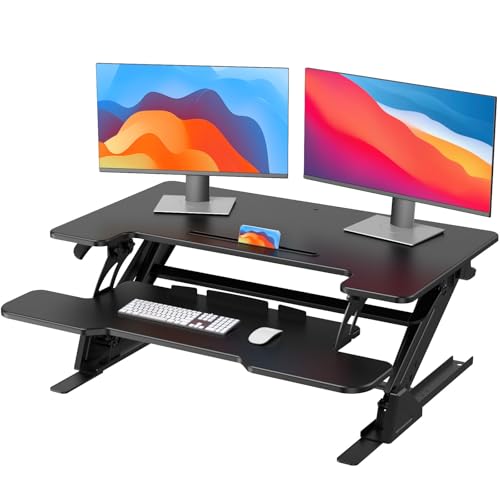
HUANUO 36 Z-Shaped Standing Desk Converter — Best straight-lift alternative
The HUANUO is the guide’s structural dissenter: same 36-inch class as the all-round VIVO, but built on a Z-shaped steel frame with a dual gas lift rather than the VIVO scissor pattern. The practical meaning of that skeleton is travel direction — a Z-frame lifts more nearly straight up, which suits shallower desks where a scissor’s forward swing would push the tray toward the edge. Its listing also leans on the keyboard tray, described as wide and paired with a dual-monitor fit, and the tray earns the emphasis: on this riser the lower level feels like the main event rather than an afterthought shelf.
The listing’s other promise is about the first ten minutes: unpack, fit the tray, use. Converters live on their reversibility and their freedom from assembly theatre, and a riser that goes from box to working in one coffee’s worth of effort understands its category. Against the VIVO 36, the HUANUO trades the scissor’s long track record for the Z-frame’s straighter lift and tray design; neither is objectively superior, and the honest recommendation is geometric — measure your desk’s depth, picture the lift’s path, and let the room referee.
The Z-frame’s straight lift has one more beneficiary worth naming: the desk against a wall with a shelf or window directly behind it. Scissor risers, travelling forward as they rise, pull the workstation away from the wall; the HUANUO’s vertical journey keeps screens at a constant distance from whatever is behind them, which preserves a carefully set eye line and avoids the slow creep of cables being tugged at every rise. In the shallow, shelf-hung desks of real homes, that geometric politeness is a daily virtue disguised as a frame shape.
- Platform: 36-inch top, black
- Frame: Z-shaped steel
- Lift: dual gas lift
- Tray: wide keyboard tray
- Positioning per listing: dual-monitor fit
Strengths
- Straighter lift suits shallower desks
- Dual gas lift keeps the rise light under load
- Tray is a genuine design focus, not an afterthought
Trade-offs
- A newer pattern than the long-running VIVO scissor line
- Same category limits — workstation only, desk inherited
- Assembly is light but the tray fitting is still a step
Best for: Dual-monitor users on shallower desks who want a straight-up lift.
Not suited for: Very deep desks where the VIVO’s pattern is equally happy and more proven.
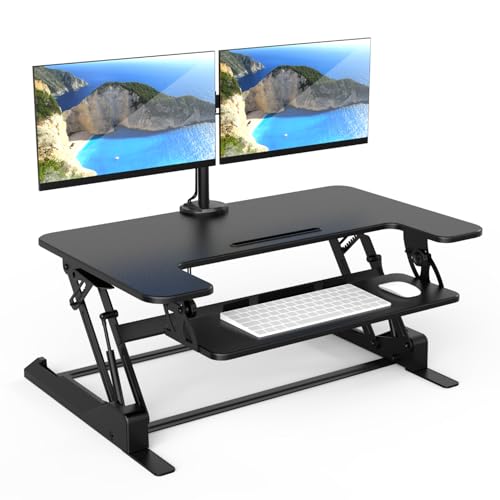
Mount-It! Standing Desk Converter with Dual Monitor Mounts — Best converter with screens on mounts
Mount-It! looked at the converter’s oldest annoyance — monitor stands eating the platform — and simply removed the stands from the equation. This 36-inch riser includes two screen mounts, so your monitors ride on the converter’s own arms: their footprints vanish from the top surface, their heights adjust independently of the platform, and the desk space the stands would have eaten stays yours. For a dual-screen setup on a modest desk, that is a genuinely different proposition from every other pick in this guide, and its gas spring lift keeps the rise manageable with the screens aboard.
Mounts bring their own honest conditions. Your monitors need compatible mounting points — most modern screens have them, some older or design-led ones do not — and the first setup takes longer than placing two stands on a board, because arms must be fitted and tensioned. The reward is a workstation that travels as one engineered unit, with screens floating at exactly your eye line rather than wherever their stands decreed. If your monitors can mount, this is the converter that makes a small desk feel like a cockpit; if they cannot, the VIVO line is waiting with flat tops and no questions asked.
Mount ownership teaches a skill the other picks never ask for: screen choreography. With both monitors on arms, owners find themselves adjusting heights independently for sitting and standing in ways a shared platform cannot — the left screen a touch lower for documents, the right at eye line for calls — and the workstation becomes tuned rather than merely raised. It is more setup, honestly acknowledged in the review above, and for the dual-screen perfectionist it is the only converter in this guide that treats the two screens as individuals.
There is a fitting symmetry in ending the size ladder with a mounted pair of screens: the converter began, a decade ago, as a board on a mechanism, and it arrives here as a small workstation architecture — platform, arms, gas spring — that a buyer can specify almost like a desk. The category grew up without ever surrendering its founding promise, and this pick is the evidence: your furniture stays, your workstation rises, and the two facts no longer argue.
- Platform: 36 inches wide
- Included: 2 monitor mounts
- Lift: manual with gas spring
- Format: converter with integrated screen mounting
- Finish: black
Strengths
- Screens on mounts free the whole platform surface
- Independent screen height adjustment
- Gas spring keeps the loaded rise manageable
Trade-offs
- Monitors must have compatible mounting points
- First setup is a real fitting job, not a placement
- Two screens is the design’s assumption — solo users pay for a spare mount
Best for: Dual-monitor users on modest desks who want screens floating, not standing.
Not suited for: Monitors without mounting points, or single-screen setups.
How Do You Set Up a Converter So Sitting Still Works?
The step most converter buyers skip is the sitting audit, and it decides whether the riser is loved or tolerated. With the converter lowered on your desk, sit in your normal chair and check three things: your screen’s height against your eye line, since the platform’s thickness has raised it; your keyboard’s position on the tray, which now sits above the old desk surface; and your chair’s height, which may need a small rise to restore the old geometry — with your feet still flat, which is where a footrest sometimes enters the story. Ten minutes of adjustment here buys years of unremarkable comfort.
Then rehearse the standing geometry. Raise the riser with your real equipment aboard and confirm the tray arrives where your elbows expect it, that the screens have not drifted too close — risers with forward travel need the desk’s depth to absorb it — and that cables reach at full height without going taut. A cable that was perfect for a fixed desk is often exactly one rise too short, and a single longer lead bought in week one prevents the slow tug that otherwise loosens connectors for months.
Finally, decide what does not ride. The tower, the printer, the speakers and the reference books keep their places on the desk or the floor, and the riser carries only the travelling workstation. That discipline is what the 33-pound ratings in this guide are asking for, and observing it keeps the lift light, the platform stable and the whole arrangement feeling like equipment rather than a wager.
When Is a Converter the Wrong Answer?
A converter is the wrong answer when the desk beneath it is the problem. A wobbly, undersized or failing desk will be faithfully elevated along with your monitors, and the money spent raising it would have been better spent replacing it — this site’s other desk guides exist for exactly that reader. It is also the wrong answer when the workstation is heavy machinery: a tower PC that must travel with the screens, a large all-in-one, or a three-monitor array on arms belongs on a complete electric desk whose rating was written for it.
It is the wrong answer, too, for the hourly posture changer with a wide setup. Hand lifts, even gas-assisted ones, charge a toll of effort and interruption that presets do not, and a 48-inch array raised by hand six times a day becomes a fixed desk with handles by February. And it is the wrong answer when the room’s real deficit is storage or surface — a converter adds neither a drawer nor an inch of desk, and buyers who needed those things will feel their absence daily.
None of this dents the category. A converter is a precise tool for a precise situation — good desk, moderate workstation, a few changes a day — and in that situation nothing else in the standing-desk world delivers so much for so little disruption. The skill is recognising whether the situation is yours.
How Long Does a Converter Experiment Need to Prove Itself?
Give a converter a month, and structure the month. The first week is geometry: chair height corrected for the platform’s thickness, screen distance settled at both heights, cables re-routed for the full journey. Most early complaints live in this week and die in it, because they were never about the riser — they were about a chair two inches out of date. Judge nothing until the geometry is right, or you will return a good converter for a bad setup’s reasons.
The second and third weeks are the habit test. Count your standing sessions honestly, and notice their length: converter owners typically settle into fewer, longer stands than preset-desk owners, because the hand lift is a small toll charged per change. That pattern is not a failure — for many bodies it is the better rhythm — but if your count is collapsing toward zero, the toll is the cause, and an electric desk is the honest next step rather than a month of self-reproach.
The fourth week is the furniture verdict. By now the riser either reads as part of the desk or as an object on it, and that reading predicts the year. Owners whose converters have visually merged with the furniture keep them for years; owners still seeing a platform on a desk are usually one honest conversation away from buying the full desk they wanted all along. The converter’s gift is that it makes this discovery cheaply, reversibly and without a single screw in the furniture.
What Should Sit Beside the Converter, and What Should Never Board It?
A converter divides the desk’s population into travellers and citizens, and the constitution should be written before the first rise. Travellers: the screens, the laptop if it is the machine in use, the keyboard and the mouse — the workstation proper, the things your eyes and hands address. Citizens: everything else. The tower stays on the floor or the desk, where its weight and its cables belong; the printer keeps its parish; speakers on stands flank the riser rather than riding it; the lamp, the books and the archive remain citizens of the surface.
The border cases deserve rulings. A small dock or hub can travel if it is light and its cables are routed for the journey — most are happier as citizens with one cable visiting the laptop. A desk phone or tablet usually travels well and earns its place. Anything heavy, anything with a short cable to a wall, anything you would not want moving several times a day: citizen, without appeal. The 33-pound ratings in this guide are the constitution’s enforcement arm, but the real reason for the border is stability — a riser carrying only what it was designed to carry feels like furniture, and one carrying the whole desk feels like a wager.
Review the border monthly. Objects migrate upward the way clutter migrates everywhere, and a riser’s lift is the first place the migration announces itself, as effort. Five minutes of eviction restores the constitution, and the converter goes back to feeling like the lightest purchase in the office — which, at its best, is exactly what it is.
Converters for Renters, Guests and Other Temporary Lives
The converter is the standing desk of temporary life, and temporary life is more common than the furniture industry admits. The renter on a twelve-month lease, the worker posted to another city for a season, the adult child working from a parents’ spare room, the student in furnished housing — none of them can or should buy furniture-scale solutions, and all of them have backs that would like to stand. A riser fits in a car, installs on whatever desk the situation provides, and leaves no trace when the situation ends. That biography is not a compromise version of standing work; for a large class of lives it is the only version on offer.
Guest duty is the converter’s second career. A household riser that normally serves one worker can host a visiting relative’s laptop week, a teenager’s exam season at the kitchen table, a partner’s deadline fortnight — because it is the only standing solution that can be carried to the person rather than requiring the person to come to it. Owners describe lending theirs the way one lends a good ladder: briefly, locally, and with the confidence it will come back unchanged.
Even permanent households use the reversibility. Renovation, a new desk on order, a room being repainted — the converter bridges every interregnum, standing on a dining table while the office is in boxes. Buyers who purchase one as a trial often discover they have actually purchased the household’s permanent insurance policy against disrupted work, and that discovery reframes the price entirely.
How Do Converters Behave on Different Kinds of Desk?
The desk beneath is half the product, so it deserves a field guide. On a solid wooden desk — the converter’s ancestral home — a riser feels like architecture: the mass below absorbs every tremor, and standing work has the stillness of a lectern. On a modern flat-pack desk with slender legs, the same riser reports the furniture’s flexibility honestly at full height, and the cure is the furniture’s, not the riser’s: wall-bracing the desk or accepting a gentle liveliness in the platform. On a glass desk, use a protective mat under the riser’s base and check the glass desk’s own rating before adding a loaded platform to its burdens.
Dining tables are the converter’s most common temporary host and its most forgiving: heavy, wide, and built for elbows. The riser goes on for the working week and off for the dinner party, and the table’s dignity survives both. Kitchen counters and standing-height surfaces invert the problem — a riser there may only be needed at its lowest settings, effectively becoming an adjustable shelf — and built-in desks in alcoves demand the depth measurement twice, since the alcove’s walls forbid the riser any sideways forgiveness.
The pattern across all hosts is the same: a converter multiplies the desk it stands on. Choose or steady the host first, and every pick in this guide performs as reviewed; neglect the host, and no riser at any width can save the arrangement.
What Happens When a Converter Household Gets a Second Worker?
Success breeds imitation: one partner’s riser becomes the household’s proof that standing works, and within a season a second workstation wants raising. The converter scales to this moment more gracefully than any rival category. A second riser is a modest, same-day purchase; it can match the first for a shared desk’s symmetry or differ in size for a different workstation’s needs; and if the household’s arrangement changes again, both risers store flat against a wall in a way two complete desks never will.
Shared single risers are the harder case, and honesty requires saying the riser serves it less well than a preset desk serves shared heights. A converter’s height is set by hand and feel, so two workers of different statures re-negotiate the platform at every handover — a small toll that some households pay happily for years and others find quietly corrosive. The tell is the sticky note: the day a riser acquires a note with two heights in centimetres, the household has begun shopping for presets without admitting it.
None of this diminishes the category. It locates its sweet spot precisely: one worker, one desk, one workstation — or two workers with two risers. Households inside that spot get the standing life at the lowest total cost in this entire family of guides, and households outside it now know exactly which door to take next.
What Do Converter Owners Know After a Year That They Didn’t at Purchase?
They know their desk’s true measurements, for one thing — not the catalogue’s, but the lived ones: the exact tray height where their shoulders drop, the screen distance their eyes prefer, the number of centimetres the riser’s journey consumes. That knowledge is the converter’s hidden curriculum, and it transfers perfectly if they ever buy a full desk, which is why so many full-desk owners speak of their converter years without embarrassment. The riser was the apprenticeship; the body kept the certificates.
They know, secondly, which of their objects were furniture and which were merely habit. A year of deciding what boards the riser teaches a ruthless clarity about the workstation’s essentials — most owners end with fewer, better-arranged things than they began with, and the desk beneath looks better for the education. Visitors often assume a converter household bought a new desk; in fact it edited the old one.
And they know the value of reversibility in a way spec sheets cannot teach. A year that included a house move, a room swap or a borrowed-desk season proves the category’s founding promise in the only court that matters. Owners who have lifted their whole standing workstation off one desk and set it on another, in minutes, in a new city, do not describe their riser as a compromise. They describe it as the piece of office equipment that understood their life first.
How Do You Move House With a Converter?
Moving day is where the converter’s biography pays out in full, so the scene deserves describing. While the complete desks of this world are being disassembled, wrapped, insured and argued with in doorways, the converter is lifted off its desk by one person, carried to the car like a large tray, and set down in the new home on whatever desk-shaped object the new rooms provide — which is standing-height work, available on the first evening, in a house still made of boxes. Movers charge by the hour and by the stair; the riser declines both tariffs.
The discipline is in the small parts. The tray, any loose fittings and the cable you shortened for the old desk’s geometry travel in one labelled bag, because a converter separated from its tray is a shelf with ambitions. Photograph the old arrangement before dismantling anything — the riser’s cable routing and screen positions represent a year of small optimisations, and the photograph is the only backup that exists.
Households that move often — posted workers, serial renters, the professionally restless — sometimes conclude that the converter is not their trial product but their permanent one, precisely because their lives are a sequence of other people’s desks. This guide has a full-desk chapter for settled lives and makes no apology for it; but it records, with respect, that for the unsettled life the riser is not the rehearsal. It is the performance.
Comparison Table
Width is the first sort, lift geometry the second: the four VIVOs share one pattern across four sizes, while the HUANUO and Mount-It! each change the shape of the answer at 36 inches.
| Pick | Desktop | Mechanism | Defining trait |
|---|---|---|---|
| VIVO Standing Desk Converter 32 | 32 in platform | Manual converter | 33 lbs, wide tray |
| VIVO Standing Desk Converter 36 | 36 in platform | Manual converter | 33 lbs, the mainstream size |
| VIVO Standing Desk Converter 42 | 42 in platform | Manual converter | 33 lbs, dual-monitor width |
| VIVO Standing Desk Converter 48 | 48 in platform | Manual converter | 33 lbs, widest riser here |
| HUANUO 36 Z-Shaped Standing Desk Converter | 36 in platform | Manual, dual gas lift | Z-frame, wide tray |
| Mount-It! Standing Desk Converter with Dual Monitor Mounts | 36 in platform | Manual, gas spring | Dual monitor mounts included |
What Mistakes Do Converter Buyers Make?
The governing mistake is loading the riser like a desk. Thirty-three pounds is a workstation — screens, laptop, keyboard — and buyers who add the tower, the speakers and a stack of drives discover the limit as a lift that strains and a platform that complains. Weigh or estimate your travelling kit before ordering, and exile the heavy machinery to the desk or the floor in your plan, not as an improvisation later.
Second, people size by the desk instead of the workstation, buying a 48 for a laptop because the desk is wide, then wondering why the room feels colonised. The riser should match the screens’ footprint with a little grace and no more. Third, the sitting audit gets skipped: the platform’s thickness changes seated geometry, and buyers who never adjust chair and screen for the lowered riser conclude that converters are uncomfortable, when in fact their chair was simply two inches out of date.
Fourth, shallow desks meet forward-travelling lifts without a rehearsal, and the tray arrives at standing height nearer the edge than anyone planned. Measure the journey, not the parking spot. And fifth, buyers mount a converter on a desk that wobbles, then review the riser for the desk’s sins. The platform is an honest mirror; make sure you like what it will reflect.
Final Recommendation
Start with width: the VIVO 32 for a laptop and one screen, the 36 for the mainstream two-screen setup, the 42 for full-size monitor pairs, the 48 for wide arrays on wide desks. Then consider shape: the HUANUO if your desk is shallow and a straight lift matters, the Mount-It! if your monitors can ride on mounts and you want the platform back. Every one of them leaves your desk exactly as it found it, which remains the category’s quiet miracle.
Other guides on this site will happily sell you a whole new desk, and sometimes that is the right purchase — but if your furniture was never the problem, the converter is the rare upgrade that solves the actual complaint and leaves everything you liked exactly where it was.
Frequently Asked Questions
Is a converter as good as a real standing desk?
It does the same ergonomic job for the workstation — screens and keyboard at standing height — with three honest differences: it carries less weight, it changes height by hand rather than by preset, and it leaves your desk’s surface and storage untouched. For a good desk and a moderate setup, those differences may not matter at all.
How much weight can these converters hold?
The VIVO models in this guide are each rated at 33 pounds in their listings. That covers typical monitor-and-laptop combinations comfortably. Desktop towers, large all-in-ones and printer-class objects exceed the idea of a riser and should stay on the desk or floor.
Will a converter work on a small desk?
Yes, with the smaller sizes — the 32-inch VIVO was made for it — provided the desk is stable and deep enough for the lift’s travel. Check the tray’s journey at standing height on shallow desks, and consider the HUANUO’s straighter Z-frame lift if depth is tight.
Do converters damage the desk underneath?
They sit on the surface by weight, so there is no drilling or clamping of the desk itself in normal use. Felt pads or a mat under the base are a sensible courtesy on delicate finishes, and the whole unit lifts away in minutes leaving the desk as it was.
Can I use a converter with a laptop only?
Certainly — the 32-inch size suits it well. Put the laptop on the top level and a separate keyboard and mouse on the tray, so your screen height and hand height can both be right at once; working from the laptop’s own keyboard on a raised platform defeats the posture the riser exists to create.
What if my monitors do not have stands that fit?
Look at the Mount-It! pick: it includes two monitor mounts, so screens attach to the converter’s arms instead of standing on the platform. Your monitors need compatible mounting points; if they have them, the arrangement also frees the platform surface entirely.
Related Guides
Keep reading with Best Slim Doorbell Cameras: Narrow Bodies for Tight Door Frames Best Backup Portable Hard Drives: Software, Recovery Cover and Routines That Work Best AMD Graphics Cards: RDNA 4 Flagships, the GRE Explained and the 16GB Mainstream Pick.


