What's inside
- Where to buy
- Key Takeaways
- Quick Picks
- How did we define a business ultraportable worth recommending?
- The picks in detail: best 13 inch business laptops for your working week
- Why did the 13-inch business laptop become a 14-inch one?
- How much performance does a business laptop actually need?
- What should you check about screens, keyboards and ports before buying?
- How do you set up a new business laptop for travel in the first hour?
- What does ownership look like in year three?
- How do docks and monitors change the ultraportable equation?
- What about security when the laptop never stays in the office?
- How do the keyboards and trackpads really differ across these six?
- What should a small firm standardise on, and why?
- How does battery life behave in the real travelling week?
- What do frequent flyers pack around a compact business laptop?
- How should you compare warranties across the business lines?
- Which pick suits which kind of working week?
- What does a week of commuting teach you about this class?
- One last check before you order any of these six
- Comparison table
- What mistakes do buyers of compact business laptops keep making?
- Final Recommendation
- Frequently Asked Questions
- Related Guides
As an Amazon Associate I earn from qualifying purchases. This post may contain affiliate links at no extra cost to you.
gizmoverdict.com is reader-supported. When you buy through links on our site, we may earn an affiliate commission.
Where to buy
Amazon carries every machine shortlisted here, mostly through authorised resellers and the manufacturers’ own storefronts, and business models often appear in several memory and storage configurations under near-identical names. Read the configuration line carefully before ordering, because a cheaper listing sometimes hides half the RAM or a dimmer screen rather than a genuine bargain.
Anyone hunting for the best 13 inch business laptops quickly discovers an awkward truth about the category: the true 13-inch corporate laptop has nearly vanished. Panel makers moved the whole industry to 13.3-inch and then 14-inch 16:10 screens, which squeeze a noticeably taller working area into a chassis barely wider than the old 13.3-inch designs. So this guide treats the class honestly, as the 13-to-14-inch ultraportable business tier, and every pick below is a machine a frequent traveller can carry all day without resenting it by Thursday.
That honesty matters because buyers searching this phrase usually want three things at once: a laptop light enough for a shoulder bag, tough enough for years of airport security trays, and manageable enough that an IT department will actually support it. Screen size is really shorthand for that bundle. We weighted weight, battery behaviour, keyboard quality, port selection and warranty support ahead of benchmark bragging rights, since a machine that wins a spreadsheet race but dies before the evening flight home has failed at its actual job.
Key Takeaways
- The modern business ultraportable is a 14-inch 16:10 machine in a 13-inch-era footprint, and pretending otherwise would shrink this list to antiques.
- The ThinkPad X1 Carbon Gen 13 Aura Edition is the lightest serious option here, with an OLED screen that makes long document days easier on the eyes.
- HP’s EliteBook 840 G11 is the fleet manager’s favourite, thanks to deep manageability tools and a webcam package built for hybrid meetings.
- The ASUS ExpertBook B9 OLED undercuts the big three brands while keeping an impressively light magnesium chassis and vPro on this configuration.
- Dell’s Latitude 7450 2-in-1 earns its place for presenters who genuinely flip the screen around in client rooms, not as a novelty.
- Every pick here charges over USB-C, so one compact adapter can serve the laptop, phone and earbuds in a travel kit.
Quick Picks
| Pick | Badge | Why it is here |
|---|---|---|
| Lenovo ThinkPad X1 Carbon Gen 13 Aura Edition | Lightest Flagship Pick | It pairs the featherweight carbon chassis the line is famous for with a 2.8K OLED panel and generous memory, making it the one to beat for executives who live in transit. |
| Lenovo ThinkPad X1 Carbon (Ultra 5) | Best Value X1 Carbon | It keeps the same beloved chassis and keyboard as the flagship while the matte FHD+ screen and Ultra 5 chip trim the price to something a finance department can swallow. |
| ASUS ExpertBook B9 OLED | Featherweight Challenger | ASUS built one of the lightest 14-inch business laptops anywhere, then added an OLED display and vPro management, undercutting the traditional fleet brands. |
| HP EliteBook 840 G11 | Fleet Manager’s Choice | HP’s Wolf security suite, a strong webcam and the deepest enterprise support ecosystem here make it the safest standard-issue laptop on the list. |
| Dell Latitude 7450 2-in-1 | Best Convertible for Presenters | The 360-degree hinge turns it into a shared screen on a client’s table or a note-taking tablet in a site walkthrough, while staying a proper Latitude underneath. |
| Lenovo ThinkPad T14 Gen 6 | Workhorse With Headroom | With 32GB of memory and a terabyte drive in a repairable T-series shell, it is the pick for buyers who keep laptops longest and load them heaviest. |
How did we define a business ultraportable worth recommending?
We started from the machines large companies actually deploy, then filtered for models an individual buyer or small firm can purchase singly without a corporate account. Anything over roughly 1.4 kilograms was cut unless it brought something exceptional, and anything lacking a fingerprint reader or infrared camera for face sign-in was marked down, because password-free login is now basic hygiene for a laptop that leaves the office. Screens had to reach brightness levels that survive a window seat and a sunlit café, and keyboards had to be the kind you can type a proposal on for three hours without your wrists filing a complaint.
Processor choice was judged on sustained behaviour rather than peak numbers. The Intel Core Ultra chips in most of these machines trade a little top-end drama for cooler, quieter running and far better standby behaviour, which is the right bargain for email, documents, browser work and video calls. We also checked what happens after the sale: spare part availability, next-business-day warranty options, and whether the maker publishes service manuals. A business laptop is a five-year relationship, and the honeymoon specifications matter less than year three’s replacement battery being obtainable.
The picks in detail: best 13 inch business laptops for your working week
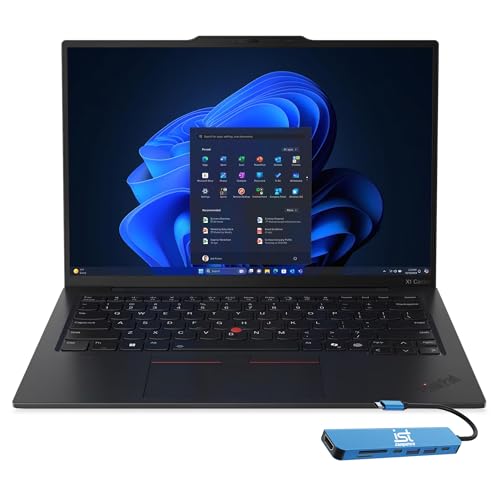
Lenovo ThinkPad X1 Carbon Gen 13 Aura Edition — Lightest Flagship Pick
The X1 Carbon has been the default answer to the travelling executive question for a decade, and the Gen 13 Aura Edition is the most refined version of that answer yet. The chassis hovers around a kilogram, which sounds like a spec-sheet party trick until you have carried it through three terminals in a day and realise your shoulder never once complained. Lenovo’s Aura software layer adds small courtesies, such as attention-aware screen dimming when you look away and quick sharing gestures, that sound like garnish but genuinely smooth a day built from short bursts of work between meetings.
The 2.8K OLED screen is the headline upgrade. Text stays crisp at the scaling most people choose, colours are deep without looking theatrical, and the panel’s fast response makes scrolling long contracts feel oddly luxurious. The Core Ultra 7 258V with 32GB of memory handles the usual executive workload — dozens of browser tabs, a heavy spreadsheet, a call running alongside — without the fan becoming a third participant in the conversation. Battery behaviour is the real prize, though: this generation sips power during standby, so the laptop you closed on Friday evening still has charge on Monday morning, a small miracle anyone who has owned an older ultraportable will appreciate.
- Display: 14-inch 2.8K OLED, 16:10
- Processor: Intel Core Ultra 7 258V
- Memory and storage: 32GB RAM, 1TB SSD
- Weight: around 1 kg, carbon fibre and magnesium build
- Ports: two Thunderbolt 4, USB-A, HDMI, headphone jack
- Security: fingerprint reader, IR camera, Windows 11 Pro
Strengths
- Featherweight chassis that disappears into a carry-on bag
- Gorgeous OLED panel with sharp text rendering
- Superb keyboard with the familiar deep, quiet key travel
Trade-offs
- Memory is soldered, so the configuration you buy is final
- OLED brightness trails the best matte LCD options outdoors
- Premium pricing even by flagship business standards
Best for: senior staff and consultants whose laptop is open in four cities a week and whose bag weight is a genuine quality-of-life issue.
Not suited for: buyers who need to upgrade RAM later, or anyone whose work involves long stretches under direct sunlight.

Lenovo ThinkPad X1 Carbon (Ultra 5) — Best Value X1 Carbon
Not every traveller needs the Aura Edition’s OLED glamour, and this plainer X1 Carbon configuration is arguably the smarter purchase for most working weeks. The anti-glare FHD+ panel gives up some contrast but wins back real-world readability: under the fluorescent glare of a conference room or the mixed light of a train carriage, the matte finish keeps documents legible without the mirror effect glossy screens suffer. For text-heavy work — which is most business work — the lower resolution is barely perceptible at normal viewing distance, while the power savings versus the OLED panel are very real.
The Core Ultra 5 125U is the efficiency-focused chip in Intel’s line-up, and paired with 16GB of memory it covers the standard office stack comfortably. Where this model quietly shines is endurance discipline: Lenovo rates it generously, and the Rapid Charge support means a short layover plugged into an airport socket restores a working day’s worth of runtime. You still get the full ThinkPad keyboard, the TrackPoint for those who swear by it, dual Thunderbolt 4 ports and an infrared webcam. Think of it as the same suit, tailored slightly less extravagantly, at a price that lets a small firm buy three instead of two.
- Display: 14-inch FHD+ anti-glare, 16:10
- Processor: Intel Core Ultra 5 125U
- Memory and storage: 16GB RAM, 512GB SSD
- Charging: Rapid Charge over USB-C
- Ports: two Thunderbolt 4, USB-A, HDMI
- Security: IR webcam, fingerprint reader, Windows 11 Pro
Strengths
- Matte screen stays readable under harsh office lighting
- Same excellent keyboard and build as the flagship model
- Rapid Charge rescues short stops between meetings
Trade-offs
- 16GB of memory will feel tight for heavy multitaskers by year four
- Integrated graphics only, so no serious 3D work
- Speakers are adequate for calls rather than enjoyable for music
Best for: small firms and solo professionals who want the X1 Carbon experience without paying for the OLED flagship tier.
Not suited for: analysts running huge models in memory, or anyone who edits video as a core part of the job.

ASUS ExpertBook B9 OLED — Featherweight Challenger
The ExpertBook B9 is the pick that surprises people who equate business laptops with three familiar logos. Its magnesium-lithium chassis is strikingly light — in hand it feels closer to a thick magazine than a computer — yet ASUS quotes military-grade durability testing, and the lid resists the flexing that makes some ultralights feel fragile. The OLED display is the centrepiece: deep blacks make evening work in a dark hotel room genuinely pleasant, and the tall aspect ratio fits more of a spreadsheet or a contract page before you need to scroll.
This configuration carries Intel vPro Essentials, which puts it on the radar of IT managers who need remote management, and the port selection is unusually generous for something this thin, including full-size HDMI and USB-A alongside Thunderbolt. The number pad is etched into the touchpad and lights up on demand, a party trick that data-entry travellers actually use. ASUS’s business support network is thinner than Lenovo’s or HP’s in some regions, which is the honest caveat, but for an owner-managed business buying a handful of machines, the B9 delivers flagship sensations at a noticeably friendlier price.
- Display: 14-inch OLED, tall aspect ratio
- Processor: Intel Core 7 with vPro Essentials
- Memory and storage: 16GB LPDDR5X, 512GB NVMe SSD
- Build: magnesium-lithium alloy, exceptionally light
- Ports: Thunderbolt, HDMI, USB-A, audio jack
- Extras: illuminated touchpad number pad, Wi-Fi 6E
Strengths
- Among the lightest business laptops ever sold at this size
- OLED screen with a tall, document-friendly shape
- vPro management at a price the big fleets rarely match
Trade-offs
- Service network is patchier than HP or Lenovo in some countries
- 16GB memory is fixed at purchase
- Glossy panel reflects bright windows behind you
Best for: owner-managed firms and solo consultants who buy their own kit and want flagship lightness without the flagship invoice.
Not suited for: large fleets standardised on another maker’s docking and support ecosystem.

HP EliteBook 840 G11 — Fleet Manager’s Choice
The EliteBook 840 G11 is what happens when a laptop is designed by people who think about the five hundredth unit as much as the first. HP’s Wolf Pro security layer works below the operating system, guarding the firmware and isolating risky browser sessions, which is why security-conscious firms keep standardising on this line. This configuration pairs the more powerful Ultra 7 165H processor with 24GB of memory and a terabyte of storage, a combination that shrugs off the modern office reality of a video call, a cloud spreadsheet suite, a CRM and forty tabs all competing at once.
Hybrid workers will notice the meeting hardware first. The 5MP-class camera with auto-framing keeps you centred when you shift in your chair, the microphones do a respectable job of ignoring a barking dog two rooms away, and the touchscreen earns its keep during document reviews where a quick pinch and annotate beats emailing comments. The chassis is aluminium, serviceable, and decorated with the small mercies fleet technicians love: screws that stay put, parts that swap without surgery. It is a little heavier than the X1 Carbon, and that trade buys robustness and easier repairs — a bargain most IT departments accept happily.
- Display: 14-inch FHD+ touchscreen, 16:10
- Processor: Intel Core Ultra 7 165H
- Memory and storage: 24GB RAM, 1TB SSD
- Camera: high-resolution webcam with auto-framing
- Ports: two Thunderbolt 4, USB-A, HDMI, microSD reader
- Security: HP Wolf Pro, fingerprint reader, Windows 11 Pro
Strengths
- Enterprise security and management tools are best in class
- Webcam and microphones tuned for hybrid meeting life
- Serviceable design that technicians can repair quickly
Trade-offs
- Heavier than the carbon and magnesium rivals here
- Touchscreen adds cost some buyers will never use
- Fan can make itself heard under sustained heavy load
Best for: IT departments issuing laptops at scale, and hybrid workers whose day is wall-to-wall video meetings.
Not suited for: ultralight obsessives counting every gram in a personal carry-on.

Dell Latitude 7450 2-in-1 — Best Convertible for Presenters
Most convertibles in business dress are laptops first and tablets as an afterthought, but the Latitude 7450 2-in-1 makes a genuine case for the hinge. Picture a consultant walking a client through a dashboard: the screen folds flat on the table so both sides can read it, or tents on a cramped café table during a video call, or flips fully for annotating a floor plan with a pen while standing in a half-finished office. Those are real working postures, and the stiff, well-damped hinge holds each one without wobbling when you tap the glass.
Underneath the gymnastics sits a conventional, well-mannered Latitude: the efficiency-tuned Ultra 7 165U, fast LPDDR memory, a bright FHD+ touch panel and Dell’s mature BIOS and support tooling. Wi-Fi 7 future-proofs the wireless side, and the 1080p infrared camera handles face login quickly even in a dim room. The compromises are the usual convertible taxes — a bit more weight than the clamshell Latitude, a glossy screen, and a keyboard that feels slightly shallower than a ThinkPad’s — but for people whose job involves showing their screen to other humans several times a day, no other pick here adapts as gracefully.
- Display: 14-inch FHD+ touch, 360-degree hinge
- Processor: Intel Core Ultra 7 165U
- Memory and storage: 16GB RAM, 512GB SSD
- Camera: 1080p IR webcam for face sign-in
- Wireless: Wi-Fi 7 and Bluetooth
- Ports: Thunderbolt, USB-A, HDMI, Windows 11 Pro
Strengths
- Hinge postures genuinely help presenting and annotating
- Dell’s support tooling and warranty options are mature
- Bright touch display works well in tablet mode
Trade-offs
- Glossy screen fights reflections in bright rooms
- Slightly heavier than its clamshell sibling
- Pen is typically an extra purchase, not in the box
Best for: consultants, trainers and sales engineers who present from their own screen in other people’s offices.
Not suited for: pure desk-and-dock workers who would never fold the screen back.

Lenovo ThinkPad T14 Gen 6 — Workhorse With Headroom
The T14 line has always been the ThinkPad for people who value the machine over the silhouette, and the Gen 6 continues that tradition in a slightly thicker, far more accommodating body. This configuration’s 32GB of memory and 1TB drive answer the two most common reasons business laptops get replaced early: running out of RAM as software bloats, and running out of storage as local files accumulate. The chassis gives back in serviceability what it takes in slimness — components are accessible, the keyboard swaps easily, and Lenovo publishes the maintenance documentation that keeps a good technician productive.
Day to day, it behaves like the sensible colleague it is. The Ultra 5 225U keeps fan noise low during ordinary work, the touchscreen FHD+ panel is crisp enough for dense documents, and the port spread — dual Thunderbolt 4, USB-A, HDMI, Ethernet on many configurations of this family — means fewer dongles forgotten in hotel rooms. It will not win a beauty contest against the X1 Carbon across the hall, and it weighs noticeably more in a bag. But judged over a five-year life with one battery swap and zero drama, the T14 Gen 6 might be the most rational purchase on this page.
- Display: 14-inch FHD+ touchscreen, 16:10
- Processor: Intel Core Ultra 5 225U
- Memory and storage: 32GB DDR5, 1TB SSD
- Ports: two Thunderbolt 4, USB-A, HDMI
- Security: fingerprint reader, IR webcam
- Build: serviceable T-series chassis, Windows 11 Pro
Strengths
- Generous memory and storage postpone replacement day
- Repairable design with published service documentation
- Full port selection reduces dongle dependence
Trade-offs
- Heavier and thicker than the ultraportable flagships
- Design is functional rather than elegant
- Battery life trails the efficiency-tuned flagships slightly
Best for: power users in business roles — analysts, operations leads, technical managers — who keep a laptop four or five years.
Not suited for: weekly flyers for whom every extra hundred grams compounds.
Why did the 13-inch business laptop become a 14-inch one?
The shift was driven by bezels, not by marketing whim. A decade ago a 13.3-inch screen sat in a chassis with thick borders all around; as those borders shrank, manufacturers discovered a 14-inch panel fits the same desk footprint and nearly the same bag footprint. At the same moment, panels moved from the wide, short 16:9 shape to taller 16:10 and 3:2 shapes, restoring the vertical room that widescreen displays had stolen from documents. The result is that a current 14-inch business laptop shows roughly a fifth more of a spreadsheet than the 13-inch machines this keyword remembers, while weighing less than they did.
There is a genuine loss buried in the progress, and honesty requires naming it: if you truly need the smallest possible machine — for a tiny tray table in economy, for a handbag rather than a backpack — the modern answer is a 13.3-inch model from a shrinking pool, or accepting a 14-inch machine and a slightly bigger bag. What you should not do is buy an ageing 13-inch design at a clearance price without checking its processor generation, screen brightness and battery health, because the discount often reflects a machine that was mid-tier when new and is now simply old. The six picks here were chosen to deliver the spirit of the 13-inch class — light, tough, all-day — in the sizes the industry actually builds now.
How much performance does a business laptop actually need?
Far less than gaming marketing suggests, and slightly more than the cheapest configurations offer. The modern office workload is bursty: opening a large presentation, joining a call, recalculating a model, searching a mailbox of a hundred thousand messages. Modern Core Ultra processors handle those bursts easily, and their efficiency cores keep the machine cool and quiet between them. Where buyers actually feel a shortage is memory. Sixteen gigabytes remains workable, but browsers and collaboration apps grow greedier every year; if you plan to keep the machine beyond three years, the configurations here with 24GB or 32GB buy real longevity for a modest premium.
Storage follows a similar logic. A 512GB drive suits someone whose files live in cloud storage and whose laptop is essentially a window onto shared drives. Anyone keeping local photo libraries, offline project archives or virtual machines should step to a terabyte, because external drives are exactly the thing travelling workers forget, lose or leave plugged into a hotel television. Graphics, by contrast, can stay integrated for almost every business role; only the workstation crowd in our 17-inch guide genuinely needs a discrete GPU, and paying for one here would cost battery life and add fan noise to solve a problem most owners never have.
What should you check about screens, keyboards and ports before buying?
Screen quality decides daily happiness more than any benchmark. Look for a 16:10 panel at FHD+ resolution or better, brightness that copes with a window seat, and a matte or anti-glare finish if you work under overhead lighting — which is to say, if you work in an office. OLED panels, offered on two picks here, deliver beautiful contrast for evening work and media, but their glossy surfaces reflect bright rooms and they draw more power displaying white documents, which is most of a business day. Neither choice is wrong; matching the panel to your lighting is what matters.
Keyboards separate the business lines from consumer machines more than any other component. Every pick here has a backlit board designed for long documents, but the feel differs: ThinkPads remain the benchmark for key travel and sculpted caps, the EliteBook is close behind, and the convertible’s slightly shallower board is the price of its hinge. Ports deserve a final audit against your actual desk. If your monitors, dock and peripherals are USB-C, any pick works; if your world still runs on USB-A sticks and wired Ethernet in client offices, favour the models keeping those ports onboard rather than building a dongle collection.
How do you set up a new business laptop for travel in the first hour?
Start before the trip, not at the gate. Sign in, let Windows finish its updates on your home connection, and confirm face or fingerprint login works with the lighting you will actually face. Turn on device encryption and check that the recovery key is stored somewhere you can reach from your phone, because an encrypted laptop with a lost key is a paperweight with a nice keyboard. Install your password manager and authenticator next, then your collaboration apps, and only then the long tail of utilities — a machine rebuilt in priority order is usable within the hour if a flight gets moved.
Then rehearse failure. Tether the laptop to your phone once, so the first time is not in a dead conference centre. Download the documents for the trip while you still have fast Wi-Fi, and set your cloud folders to keep those files available offline. Pack the charger in your carry-on, learn whether your machine charges from a seat’s USB-C port slowly or not at all, and photograph the serial number and asset tag into your phone. None of this is glamorous, but the difference between a travelling professional and a travelling victim is almost entirely preparation done calmly at home.
What does ownership look like in year three?
By year three, the spec sheet has stopped mattering and the support ecosystem has taken over. Batteries in every pick here will have lost some capacity; the question is whether a replacement is a five-minute swap, a service visit, or a saga. Business lines from Lenovo, HP and Dell publish part numbers and sell batteries through channels a local technician can use, and that boring fact is worth more than a small benchmark lead. Firmware updates also matter more with age: makers who keep shipping BIOS fixes for security flaws protect a machine long after its launch reviews are forgotten.
Plan for the predictable failures. Keyboards wear shiny, hinges loosen a fraction, and a fan bearing can start to sing. A laptop bought from a line with deep spare-part availability absorbs all of these as maintenance; an exotic import absorbs them as replacement. This is also where buying the higher memory configuration pays its quiet dividend, because software in year three assumes year-three hardware. Judged on that horizon, the premium for a proper business line over a consumer laptop stops looking like a luxury tax and starts looking like insurance you will probably claim on.
How do docks and monitors change the ultraportable equation?
A compact laptop at a desk should stop behaving like a compact laptop, and the modern USB-C dock is what performs that transformation. One cable delivers power, drives two external monitors, and connects the keyboard, mouse, headset and wired network that a travelling machine cannot carry. Every pick in this guide supports that arrangement through its Thunderbolt ports, which means the 14-inch screen that suits an aeroplane tray becomes the second display beside a large monitor at headquarters, and the machine’s smallness costs its owner nothing from nine to five. When you budget for one of these laptops, budget for the dock in the same breath; the pair is the actual product.
Monitor choice deserves a thought of its own. A single large high-resolution display suits document work better than two small ones for most people, because the tall laptop screen beside it becomes a natural home for email and chat while the main panel holds the work itself. Ultrawide monitors tempt spreadsheet users, and they pair well with these machines, but check the dock’s bandwidth claims against the panel you choose rather than assuming any dock drives any screen. The goal is a desk where sitting down and plugging in one cable is the entire morning ritual.
There is a subtler benefit to standardising on docked ultraportables across a small firm: the desk becomes interchangeable. Any employee can sit at any workstation, plug in, and be home. Hot-desking stops being an IT project and becomes a furniture decision. That flexibility, more than any benchmark, is why the 13-to-14-inch class conquered business — it is the only size that is simultaneously a travel machine, a desk machine and a spare machine, and organisations feel that versatility in their logistics long after the purchase invoices are forgotten.
What about security when the laptop never stays in the office?
A business ultraportable lives in the world’s least secure places: café tables, conference rooms belonging to other companies, the seat pocket of a train. Its security therefore has to be physical and automatic rather than procedural. The features to insist on are all present across this guide — encryption enabled by default, face or fingerprint sign-in that works faster than a password can be shoulder-surfed, and a privacy screen or at least a glance-aware display on the machines that offer one. None of these requires the user to remember anything, which is precisely why they work.
The second layer is what happens when the machine does not come home. Remote locate and wipe capabilities, whether through the maker’s tooling or your organisation’s management platform, convert a lost laptop from a data breach into an insurance claim. That capability has to be enrolled before the loss, ideally on the day the machine is unboxed, and the recovery key for its encrypted drive must live somewhere other than the laptop bag. Solo buyers should treat this with the same seriousness as IT departments do, because a one-person firm’s entire client list often sits on a single drive.
Finally, there is the human layer: the privacy of the screen in public. Two picks here offer OLED panels whose wide viewing angles are a delight at a desk and a disclosure risk in a departure lounge, where the contract on your screen is legible two seats away. A clip-on privacy filter is an unglamorous accessory that frequent travellers handling sensitive documents should simply buy with the laptop. Security in this class is a set of small, boring decisions made once — and every pick here supports making all of them.
How do the keyboards and trackpads really differ across these six?
Specifications never capture the component you touch for eight hours a day, so it is worth being specific. Lenovo’s ThinkPad boards — in both X1 Carbon models and the T14 — remain the reference: deep travel, sculpted caps that centre your fingers, and a layout that wastes no space, with the TrackPoint nub for the devoted. The EliteBook’s board is a close second, slightly firmer and quieter, paired with a large, precise glass trackpad that suits gesture-heavy Windows use. The ExpertBook B9 splits the difference and adds its party piece, the illuminated number pad inside the touchpad, which data-entry travellers either love immediately or never touch again.
The Latitude 7450 2-in-1 makes the convertible’s compromise: its keys travel a little less far, a tax levied by the hinge and the thinness it demands, though Dell’s trackpad is excellent and the touchscreen earns its place in its owner’s presenting life. None of these keyboards will disappoint a professional typist, but the differences compound across a working year. If you write for a living — proposals, reports, code, long emails — weight this section heavily, handle a ThinkPad if you possibly can before deciding, and remember that a keyboard you love is a productivity feature no processor can substitute for.
What should a small firm standardise on, and why?
Standardisation is the unglamorous superpower of small-firm IT. When every laptop in a ten-person company is the same model, there is one dock type, one charger type, one spare machine that can substitute for any failure, and one set of quirks the whole team learns together. The picks in this guide divide naturally for that purpose: the EliteBook 840 for firms that want the deepest support ecosystem, the T14 Gen 6 for firms that maintain their own machines and value repairability, and the X1 Carbon Ultra 5 configuration for firms whose people travel constantly and whose standardisation budget stretches to comfort.
The discipline matters more than the specific choice. Buy the standard machine in a generous configuration — memory above all — rather than scattering savings across individual deals, because a mixed fleet of bargains costs more in support time than it ever saved at purchase. Keep one spare, imaged and ready, because the day a laptop dies before a client deadline is the day the spare pays for the entire programme. And revisit the standard every two or three years rather than continuously, so the fleet stays coherent. The 13-to-14-inch class makes all of this easier than any other, because it is the one size nobody in the company will refuse to carry.
How does battery life behave in the real travelling week?
Manufacturers quote battery figures measured in conditions no working week reproduces: dim screens, light workloads, radios behaving. Real travel days are harsher — brightness up against window light, a hotspot running, a video call over café Wi-Fi, forty tabs of research. Under that load, expect the efficient machines in this guide, the Ultra 5 X1 Carbon and the Latitude, to deliver a long working day rather than the headline figure, and the more powerful configurations, the EliteBook with its H-series chip and the OLED Aura Edition, to ask for a top-up during a long afternoon. None of them will strand a prepared traveller; all of them reward one.
Preparation is mostly about charging opportunities rather than charger specs. These machines all sip from USB-C, which means the same compact adapter that charges your phone can keep the laptop alive through a layover, and many aircraft and trains now offer enough socket power to work indefinitely. The habit worth building is opportunistic charging: plug in whenever you sit somewhere for more than twenty minutes, and the battery gauge stops being a source of anxiety altogether. Rapid Charge features, present on the Lenovos, convert even a coffee-length stop into hours of runtime.
Standby behaviour is the week’s other quiet variable. The newest Core Ultra machines sip power while asleep far more gracefully than their ancestors, so a laptop closed on Friday can open on Monday with charge to spare — a small mercy that anyone who has started a week with a dead battery and a missing charger will not underrate. When you compare these six, weigh that consistency alongside the headline hours; the best travel battery is the one you never have to think about.
What do frequent flyers pack around a compact business laptop?
The laptop is the centre of a travel kit whose other members earn their space or stay home. A compact high-wattage USB-C charger replaces the maker’s brick in most bags, because the same adapter serves the phone and the earbuds during a layover. A short, sturdy cable outlasts the elegant thin ones that fray at the connector by spring. A lightweight sleeve protects the machine in a bag that also holds shoes and chargers, and it doubles as the surface the laptop sits on in questionable conference rooms. Everything else — the mouse, the hub, the stand — must argue for its grams against the class’s entire reason for existing.
The kit’s philosophy is that the laptop’s lightness is a budget the accessories spend. Owners of the X1 Carbon models notice this most keenly: a kilogram of laptop wrapped in two kilograms of accessories is a two-kilogram system wearing a costume. Audit the bag once a season and evict anything that has not been used on two consecutive trips. The machines in this guide were chosen to need very little company — a charger, a cable, perhaps a privacy filter — and the traveller who respects that minimalism arrives with the energy the class was designed to protect.
How should you compare warranties across the business lines?
Every maker in this guide sells next-business-day on-site service, but the details differ in ways that matter on the worst day of ownership. Read for the response promise’s geography: on-site in your home city may become depot service two countries away, and international travellers should confirm the service footprint against their actual map. Read also for what the warranty calls accidental — most base warranties exclude the cracked screen and the coffee incident, and the accidental-damage add-on is cheap precisely in the years when travel makes accidents likely. A warranty is a description of a future bad day; buy the version of that day you can live with.
Battery coverage deserves its own line, because batteries are the one component guaranteed to age. Some plans treat a battery that falls below a capacity threshold as a warranty event and others treat it as a consumable you will fund yourself; the difference over a four-year life is real money and real downtime. Finally, note the transferability of the cover if your firm sells or hands down machines, and the ease of raising a case — a support line answered by people who know the model is worth more than a slightly longer term answered by a script. These are boring paragraphs to read at purchase and priceless ones to have read at breakdown.
Which pick suits which kind of working week?
Let the week decide. The week of airports and client sites belongs to the X1 Carbon Gen 13 Aura Edition, whose weight and standby manners are built for motion, with the ExpertBook B9 as its value-minded understudy. The week of the hybrid office — two days at headquarters, three at home, meetings throughout — belongs to the EliteBook 840, whose camera, security and dock manners assume exactly that rhythm. The week of presentations belongs to the Latitude 2-in-1, the only machine here that turns toward an audience.
The week of the desk that occasionally travels belongs to the T14 Gen 6, whose memory, storage and repairability suit a machine that works hard in one place and visits others. And the week of the solo professional who buys their own tools belongs to the X1 Carbon Ultra 5 configuration or the ExpertBook, depending on whether the keyboard or the screen wins the argument in their hands. Six machines, six weeks — the right question was never which laptop is best, but which week is yours.
What does a week of commuting teach you about this class?
A specification sheet is written in a laboratory; a commute is written in weather, crowds and haste, and the two documents disagree about what matters. The commuting week teaches first that weight is not a number but a relationship: a kilogram-class machine like the X1 Carbon or the ExpertBook B9 disappears into the day, while a machine half a kilogram heavier announces itself on every staircase and every crowded platform where the bag swings against strangers. It teaches that a lid which opens one-handed matters at a ticket barrier, that a screen readable in a sunlit carriage matters more than its resolution, and that a battery which survives the delayed train matters more than the one that wins the benchmark.
The week also teaches respect for the unglamorous details. A charger that fits the bag’s smallest pocket, a port that accepts the cable without the laptop being lifted and turned, a fingerprint reader that works with cold fingers at a station entrance — these are the features a commuter would vote for, and they are distributed unevenly across even this excellent shortlist. The ThinkPads and the Latitude read your hand fastest; the EliteBook’s camera signs you in before you have sat down. Judge the six by your own commute’s choreography, because a business laptop is not really bought for the office. It is bought for the journey, twice a day, in all weathers, for years.
One last check before you order any of these six
Before the order is placed, run one final audit against the configuration rather than the model name, because business laptops hide their differences in the small print of a listing. Confirm the memory figure, since it cannot be changed later; confirm the screen option, since the same model may ship with panels of very different brightness; and confirm the warranty’s starting terms and its service geography against the life the machine will actually lead. Then check the return window and keep its dates somewhere you will see them. Five minutes of this unglamorous verification protects a purchase meant to last half a decade, and it is the same discipline — read the configuration, not the headline — that this entire guide has tried to teach. The right laptop, bought carefully, disappears into your working life so completely that you will forget choosing it, which is the surest sign the choice was right.
Comparison table
| Pick | Badge | Standout trait | Main compromise |
|---|---|---|---|
| Lenovo ThinkPad X1 Carbon Gen 13 Aura Edition | Lightest Flagship Pick | Around a kilogram with a 2.8K OLED screen | Soldered memory and a premium price |
| Lenovo ThinkPad X1 Carbon (Ultra 5) | Best Value X1 Carbon | Flagship chassis with a glare-free screen | 16GB ceiling on this configuration |
| ASUS ExpertBook B9 OLED | Featherweight Challenger | Magnesium-lithium chassis with OLED and vPro | Thinner regional service coverage |
| HP EliteBook 840 G11 | Fleet Manager’s Choice | Wolf security plus a meeting-ready camera | Extra weight over the lightest rivals |
| Dell Latitude 7450 2-in-1 | Best Convertible for Presenters | 360-degree hinge in a proper business chassis | Glossy panel and convertible weight |
| Lenovo ThinkPad T14 Gen 6 | Workhorse With Headroom | 32GB and 1TB in a repairable shell | Bulkier than the flagship ultraportables |
What mistakes do buyers of compact business laptops keep making?
The commonest error is shopping by the number in the keyword and rejecting 14-inch machines outright, then ending up with an outdated 13-inch model whose dim screen and elderly processor make it worse at the very job — painless travel work — that motivated the search. Judge the footprint and the weight in your hand, not the diagonal printed in a listing title.
A second mistake is buying the base memory configuration to save money today, then discovering in year three that soldered RAM cannot be upgraded and the whole machine must be replaced early. On ultraportables, memory is a buy-it-once decision; if your workload is growing, the larger configuration is the cheaper one over the machine’s life.
Third, people forget to check the warranty’s geography. A laptop bought for international work needs support that functions where the work happens, and next-business-day on-site service in your home country may become a mail-in depot abroad. Business buyers should read the service terms with the same care as the processor line.
Finally, many buyers skip the dock question until the laptop arrives. Confirm that your existing dock, monitors and charger wattage match the new machine’s USB-C expectations, or budget for the replacement dock in the same purchase, rather than discovering the mismatch on the first morning of a new job.
Final Recommendation
If money is secondary and weight is primary, the X1 Carbon Gen 13 Aura Edition is the machine this category dreams about: a kilogram of carbon, a beautiful OLED screen and standby behaviour that respects your weekends. The ExpertBook B9 OLED is the value disruptor in that same featherweight class, while the EliteBook 840 G11 is the answer when an IT department, rather than an individual, is doing the choosing. The Latitude 7450 2-in-1 serves presenters, and the T14 Gen 6 serves keepers — people who load a laptop heavily and keep it for years.
Whichever direction you lean, buy the memory you will need in year three, not the memory you need this quarter, and treat the screen finish as a lighting decision rather than a beauty contest. A business laptop succeeds invisibly: it opens fast, lasts the day, survives the bag and never becomes the story of your trip — and the right one here is simply the one whose compromises you will never notice.
Frequently Asked Questions
Is a 14-inch laptop too big if I asked for 13 inches?
For most travellers, no. Modern 14-inch business models occupy almost the same footprint as older 13.3-inch designs because their bezels shrank, and they weigh less than those older machines did. The taller 16:10 screen also shows more of a document. If your bag or tray table is genuinely tiny, compare the chassis dimensions in the specifications rather than trusting the screen diagonal alone.
How much RAM should a business laptop have in 2026?
Sixteen gigabytes handles the standard office stack today, but 24GB or 32GB is the wiser buy for a machine you intend to keep four or five years, because collaboration software and browsers steadily consume more. Since ultraportable memory is soldered, this decision cannot be revisited later, which argues for buying headroom now.
Are OLED screens a good idea for office work?
They are lovely for contrast and evening work, and modern panels handle static content better than early OLEDs did. The trade-offs are glossy reflections under bright lights and higher power draw when displaying white documents. If your days are spent in bright offices with documents, a good matte LCD may suit you better; if you work in varied and dimmer spaces, OLED is a pleasure.
Do I need vPro or other enterprise management features?
Only if an IT department manages your laptop. vPro and similar toolkits let administrators provision, patch and recover machines remotely, which matters at fleet scale and adds nothing a solo user will feel. Small firms without dedicated IT can safely choose configurations without it and spend the difference on memory or storage.
Can these laptops replace a desktop entirely?
For document, browser and communication work, yes — a single USB-C dock drives monitors, keyboard and power, and these processors are comfortably fast enough. The exceptions are sustained heavy workloads such as large-scale video rendering or 3D modelling, where a desktop or a mobile workstation with a discrete GPU remains the honest recommendation.
How long should a business laptop last?
Four to five years is a realistic expectation for the lines listed here, helped by replaceable batteries, published service documentation and ongoing firmware updates. Planning one battery replacement around year three, and buying generous memory at the start, are the two cheapest ways to reach the far end of that range.
One pattern unites every owner testimonial in this class: nobody praises the processor by spring. They praise the morning the laptop opened instantly in a strange city, the battery that outlasted the delay, and the keyboard that never made a long report feel longer — the quiet virtues this guide weighted first, and the ones your own shortlist should end with.
Related Guides
Keep researching with our companion guides to larger business machines, mobile workstations and the wider laptop range: best 15 inch business laptops best affordable business laptops best 17 inch windows business laptops You may also want our guide to best Windows 10 business laptops.
Related guides
- Best 5 Windows 10 Business Laptops: Professional Machines From the Windows 10 Era, Judged for Buyers Who Still Run It
- Best Affordable Business Laptops Quadro Buyers Can Still Justify: Mobile Workstations With Professional Graphics on a Sensible Budget
- Best 17 Inch Windows Business Laptops: The Workstation Class That Replaced Them
- Best Affordable Business Laptops: Total Cost, Durability and Business Warranty Without the Premium Price