What's inside
- Where to buy
- Key Takeaways
- Quick Picks
- How did we choose these dictation headsets?
- Why does microphone position matter more than microphone price?
- USB, USB-C, wireless dock or analogue: which connection serves dictation best?
- How do the six dictation headsets compare side by side?
- How should you set up and train your dictation system for accuracy?
- How do clinicians, lawyers, writers and students dictate differently?
- Should you use Dragon, built-in operating-system dictation, or a cloud service?
- What about comfort, glasses and long dictation sessions?
- Which desk accessories complete a dictation setup?
- What accuracy should you honestly expect, and how do you measure yours?
- What mistakes do dictation buyers and users make?
- How long does it take to become fluent at dictating?
- Final Recommendation
- Frequently Asked Questions
- Related Guides
As an Amazon Associate I earn from qualifying purchases. This post may contain affiliate links at no extra cost to you.
gizmoverdict.com is reader-supported. When you buy through links on our site, we may earn an affiliate commission.
Where to buy
The six headsets in this guide are sold through Amazon’s US store, and that is where our links lead. Dictation hardware is a specialist corner of the market, so read listings closely: several of these models are also sold in bundle variants with foot pedals or software, and the headset-only listing is the one this guide is discussing.
Anyone hunting for the best headsets microphone dictation users can rely on should first unlearn the instinct that shopping for headphones teaches. For music, the money goes into the drivers that play sound into your ears. For dictation, the sound in your ears is almost irrelevant — a prompt, a playback, a confirmation beep. The money belongs at the other end of the signal: the microphone capsule, its noise-cancelling pattern, and above all its position, held a consistent short distance from the corner of your mouth by a boom that does not drift. Speech-recognition software, whether Dragon or a built-in operating-system engine, does not hear like a person. It cannot lean in, guess from context the way a secretary does, or forgive a microphone that wandered four centimetres between sentences. It compares your audio against trained patterns, and steady, close, quiet-capsule audio is what lets it be brilliant. Every pick and every section in this guide follows from that single fact.
The six headsets split by working style. The Philips SpeechOne is the professional wireless outlier — a dictation instrument with a docking station, built for clinicians and legal professionals who dictate standing, walking and turning between a patient, a screen and a door. The two ECS headsets are the Dragon-specialist wired picks, different from each other in ear configuration and connection, both engineered around recognition accuracy rather than listening pleasure. The Koss CS100 is the long-running budget speech-recognition headset, the Spectra SP-USB serves the transcription side of the workflow — listening to recorded dictation rather than producing it — and the Voice Recognition USB Headset is a purpose-labelled Dragon boom headset for the home and small-office user. Choose by how you actually produce words, not by which box mentions your software loudest.
Key Takeaways
- Recognition accuracy is bought with microphone position, not headphone quality: a boom holding a cardioid capsule at a fixed distance from your mouth outperforms any expensive driver.
- USB headsets win for dictation because the computer sees one standard audio device, keeping the microphone path identical every session — the consistency recognition software feeds on.
- The Philips SpeechOne is the only wireless pick, and its dock-based workflow suits professionals who dictate away from a fixed desk.
- The two ECS models are not duplicates: the WordCommander is a dual-ear USB headset with its own in-line sound card, while the WordSecure is a USB-C around-the-ear design bundled with a lapel microphone option.
- Transcription and dictation are opposite jobs — the Spectra SP-USB exists for listening back to recorded speech, and transcribers should not buy a boom-first headset by mistake.
- Train your software with the exact headset you will use, in the room you will use it, and never swap microphones mid-profile without re-checking accuracy.
Quick Picks
| Pick | Badge | Why it earns its place |
|---|---|---|
| ECS WordCommander | Best wired pick for Dragon users | A dual-ear USB headset with a noise-cancelling boom and its own in-line sound card, engineered end to end for recognition accuracy. |
| Philips SpeechOne | Best professional wireless | A dedicated wireless dictation headset with docking station and status light, built for clinicians and lawyers who dictate on their feet. |
| ECS WordSecure | Best USB-C and lapel option | Around-the-ear USB-C headset with noise cancelling, paired with a tie-clip condenser lavalier for presenters and hybrid workers. |
| Voice Recognition USB Headset for Dragon | Best straightforward Dragon boom headset | A noise-cancelling boom microphone on a USB path, labelled and tuned for Dragon NaturallySpeaking and Dragon Home workflows. |
| Koss CS100 | Best budget speech headset | The veteran entry point for speech recognition, covering the boom-and-headphone basics for occasional dictators at minimal cost. |
| Spectra SP-USB | Best for transcription listening | A USB transcription headset with in-line volume control, made for hours of accurate listening to recorded dictation. |
How did we choose these dictation headsets?
The first filter was microphone architecture. Every dictation pick here places its capsule on a boom or a lapel clip — a defined position near the mouth — rather than in an earbud stem or a laptop lid, because position consistency is the accuracy variable users actually control. Noise-cancelling capsules with a directional, cardioid-style pickup pattern were favoured, since they hear the mouth in front of them and discount the office behind. Headsets marketed for calls or music, however excellent, were excluded unless their makers aimed them at recognition work specifically; a gaming boom tuned for chat warmth is not the same instrument as a dictation boom tuned for consonant clarity.
The second filter was the audio path. USB and USB-C picks dominate this guide deliberately: a USB headset presents itself to the computer as its own sound device, bypassing whatever noisy analogue jack or mystery codec the machine offers, and it presents identically at every session. That repeatability is why Dragon specialists like ECS build in-line sound cards into the cable itself. The Philips earns its exception honestly — its wireless path runs through a dedicated dock designed for dictation, not through a general-purpose Bluetooth stack, which is a different engineering proposition entirely.
Finally, we sorted by workflow honesty. Dictation splits into people who compose by voice at a desk, people who dictate professionally while moving, and people who transcribe recordings made by others. A guide that mixes those jobs produces wrong purchases, so each pick below is labelled with its workflow and its section argues from inside that workflow — including the Spectra, which produces no dictation at all and is included precisely because transcription buyers land on dictation pages and buy boom headsets they do not need.
Why does microphone position matter more than microphone price?
Speak a sentence with your hand cupped at a fixed distance from your mouth, then speak it again while slowly moving your hand away and back. A human listener barely notices. A recognition engine sees two different acoustic signatures — level changes, room reflections growing as direct sound shrinks, consonants softening — and its confidence falls on every word. Boom headsets exist to delete that variable. A properly adjusted boom parks the capsule roughly a finger’s width or two from the corner of your mouth, slightly below the lip line so your breath passes under rather than into it, and it holds that geometry through head turns, sips of coffee and the lean-back stretch at paragraph nine. That is the whole secret of professional dictation accuracy, and it costs geometry, not money.
The capsule’s pickup pattern is the second half of the story. A cardioid capsule hears what is in front of it and rejects, by design, much of what arrives from the sides and rear — the colleague’s call, the printer, the traffic through the window behind you. Noise-cancelling dictation microphones push this further with processing tuned for speech. The practical consequence for buyers: a modest headset with a well-placed cardioid boom, like the Koss or the Dragon-labelled USB pick, will out-recognise a costly headset whose microphone sits wherever fashion placed it. And the reverse also holds — the finest boom in this guide, carelessly swung up onto a forehead rest between sentences and forgotten there, dictates like a laptop microphone. The sections on technique later in this guide matter as much as the picks.
Room and voice complete the triangle. Recognition engines prefer a consistent acoustic: the same room, the same chair, the door in its usual state. Dictating in a tiled kitchen one day and a carpeted study the next asks the software to re-learn your world nightly. As for the voice itself, engines reward the unglamorous habits of radio announcers — steady pace, finished words, punctuation spoken as commands where the software expects them — over volume or theatrical clarity. Buy the boom for position, set up the room for consistency, speak like you mean every syllable, and accuracy stops being a lottery.
USB, USB-C, wireless dock or analogue: which connection serves dictation best?
The USB wired connection is the dictation default for a reason that has nothing to do with fashion: the computer treats the headset as a complete, self-describing audio device. Levels are set once, the path is identical tomorrow, and the recognition profile you trained on Monday describes the hardware you use on Friday. ECS builds its reputation on this, going so far as to put a premium sound card in the WordCommander’s cable so the conversion from voice to data happens under ECS’s control rather than the laptop’s. For a Dragon user whose accuracy is a professional asset, that determinism is worth more than any single feature elsewhere in this guide.
USB-C, represented by the WordSecure, is the same argument in modern dress, aimed at current laptops that have retired their rectangular ports. Its around-the-ear wearing style and the bundled lapel condenser microphone widen the job: the headset serves desk dictation, while the tie-clip microphone serves the user who presents, teaches or records while standing at a whiteboard — two capture geometries in one purchase. Wireless, represented solely by the SpeechOne, answers a genuinely different need: the professional whose dictation happens between rooms, at a patient’s side, on a warehouse walk, where a cable is not an inconvenience but an impossibility. Its dock keeps the connection dedicated and the headset charged, which is how professional wireless dictation avoids the pairing roulette of consumer Bluetooth.
Analogue 3.5mm connections, the Koss CS100’s home territory, still work — computers recognise them through the machine’s own audio hardware — but they inherit that hardware’s quality and its settings drift, and many current laptops offer only a combo jack or none at all. The CS100’s role in this guide is the honest budget on-ramp: real boom, real recognition service, minimal spend, with the understanding that a user who graduates to daily dictation will likely graduate to a USB path too. None of these connections is wrong. Each is a bet on a workflow, and the picks below state their bets plainly.
ECS WordCommander — Best wired pick for Dragon users
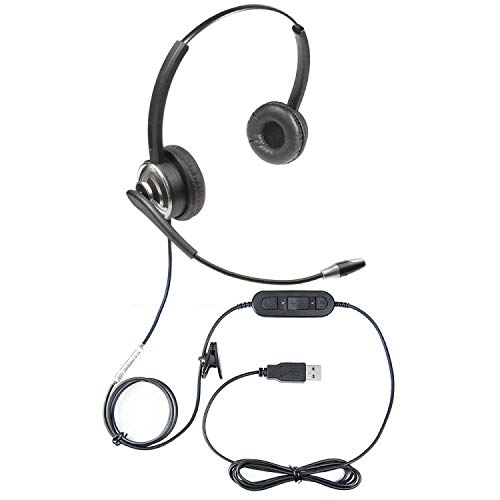
ECS — Executive Communication Systems — is the name Dragon power users pass to each other, and the WordCommander is why. It is a dual-ear USB headset whose specification reads like a checklist written by a recognition engine: a noise-cancelling boom microphone positioned for dictation geometry, and a premium in-line sound card in the cable, so the analogue-to-digital conversion happens in hardware ECS specified rather than in whatever audio chip your laptop happens to contain. Dual-ear wearing matters for dictators more than outsiders expect: with both ears covered, your own voice feedback and the software’s audio prompts stay clear in a working office, and the headset sits stable through long sessions, keeping the boom where you set it at nine in the morning.
The WordCommander’s audience is the professional for whom dictation is production — the attorney turning out correspondence, the physician finishing notes, the writer drafting books by voice. For that user, the headset’s lack of glamour is its virtue: no wireless to pair, no battery to manage, no mode in which it presents itself differently to the computer. It is the same device at every session, and profiles trained on it stay trained. Occasional dictators will find it more money than their use justifies — the Dragon-labelled USB pick and the Koss below exist for them — but anyone measuring accuracy in billable pages will recognise the WordCommander as the guide’s wired reference point, the pick against which the others’ compromises are defined.
- Connection: USB, wired
- Sound path: premium in-line sound card in the cable
- Microphone: noise-cancelling boom, dictation-positioned
- Wearing style: dual-ear headset
- Audience: Dragon and professional recognition workflows
Strengths
- The in-line sound card makes the audio path identical every session, which is the foundation recognition accuracy is built on.
- Dual-ear stability keeps the boom parked in its trained position through long dictation days.
- ECS specialises in speech-recognition hardware, and the tuning priorities show in consonant clarity over musical warmth.
Trade-offs
- Professional pricing for a tool occasional users will not exploit.
- The wired tether ties you to the desk — standing and walking dictation belongs to the Philips.
- Dual-ear coverage isolates you from the room, which some home workers with children or doorbells will not want.
Best for: daily Dragon professionals whose accuracy is worth money. Not suited for: occasional dictators or anyone who composes away from a desk.

Philips SpeechOne — Best professional wireless
The SpeechOne comes from a different world than the other five picks: Philips’ dictation division builds recording instruments for hospitals and law firms, and this is their wireless headset expression of that trade. It pairs to its own docking station rather than to a general Bluetooth stack, and the dock earns its desk space three ways — it charges the headset, anchors the connection with the determinism dictation demands, and carries a status light that tells a room you are recording, a small professional courtesy that matters in clinical and legal settings. The headset itself is built to be worn for a working day and to capture speech while its wearer moves: examining, consulting, walking a site, turning between screen and human.
Judge it as professional equipment and its price stops looking like a headset price and starts looking like an instrument price — which is also how to decide against it. A home user dictating letters at a desk gains little from wireless freedom they will never use and pays for a dock ecosystem aimed at institutional workflows, often alongside Philips’ own speech software. But for the clinician whose notes happen where the patients are, or the lawyer who dictates walking a corridor between meetings, the SpeechOne is not the expensive option in this guide; it is the only option in this guide, and its section should be read that way. Wireless dictation done properly looks like this — dedicated link, docked home, status visible — or it should not be attempted at all.
- Connection: wireless to dedicated docking station
- Dock functions: charging, connection anchor, status light
- Microphone: professional dictation microphone design
- Wearing style: headset designed for all-day professional wear
- Audience: medical, legal and institutional dictation
Strengths
- Frees dictation from the desk entirely, with a dedicated link rather than consumer Bluetooth pairing.
- The status light communicates recording state to a room — a genuine professional feature, not decoration.
- Philips’ dictation heritage means the ergonomics assume hours of daily use, not occasional calls.
Trade-offs
- The highest investment in the guide by a wide margin, aimed at institutional budgets.
- The dock ecosystem is desk furniture; laptop-bag workers carry a system, not a headset.
- Desk-bound dictators pay for mobility they will never use.
Best for: clinicians, lawyers and professionals who dictate while moving through their work. Not suited for: home users dictating at a fixed desk on a personal budget.

ECS WordSecure — Best USB-C and lapel option
The WordSecure is the WordCommander’s modern sibling, and the differences are the point of including both. Where the WordCommander is a USB headset covering both ears, built around its in-line sound card, the WordSecure connects over USB-C, wears around the ear in a lighter single-point style, and arrives with a second capture tool in the box: a tie-clip condenser lavalier microphone. That pairing describes a different worker — the hybrid professional whose week mixes desk dictation with presentations, recorded lessons, site walk-throughs and video segments where a headset cannot appear on camera. The headset handles the desk hours with ECS’s noise-cancelling recognition tuning; the lapel microphone handles everything the boom cannot attend.
For pure desk dictation measured in pages per day, the WordCommander’s dual-ear stability and sound-card path remain the stronger instrument, and this guide says so in both sections. The WordSecure’s case is breadth: one purchase covering the two microphone geometries a modern knowledge worker actually cycles through, on the connector current laptops provide. Its around-the-ear fit also suits users who dislike full headsets — glasses wearers, people who run warm, anyone who wants one ear open to the room. Buy it as a two-microphone system for a varied week and it is the cleverest value here; buy it expecting it to out-dictate its dual-ear sibling at a fixed desk and you have misread both products.
- Connection: USB-C, wired
- Microphone: noise-cancelling headset microphone plus tie-clip condenser lavalier
- Wearing style: around-the-ear, lightweight
- Audience: hybrid dictation, presentation and teaching workflows
- Maker: ECS speech-recognition specialist line
Strengths
- Two capture geometries in one box — boom discipline at the desk, invisible lapel capture on camera or on foot.
- USB-C connects natively to current laptops without adapters joining the failure chain.
- The light around-ear fit suits glasses wearers and long, warm working days.
Trade-offs
- A single-ear design gives the boom a less anchored platform than its dual-ear sibling’s frame.
- Users who never present are paying for a lavalier that will live in a drawer.
- USB-C-only connection needs an adapter for older USB-A machines.
Best for: hybrid professionals who dictate at a desk and also present, teach or record away from it. Not suited for: pure high-volume desk dictators, who should take the WordCommander.
Voice Recognition USB Headset for Dragon — Best straightforward Dragon boom headset
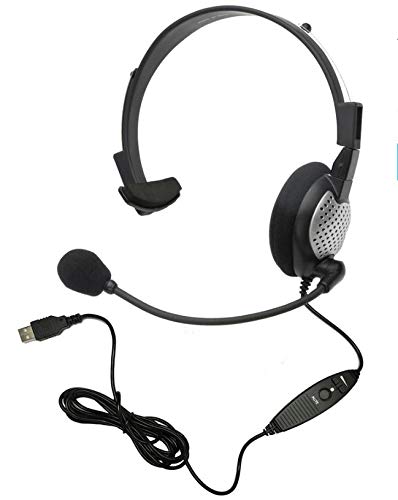
Some products name themselves after their job, and this is one: a USB headset with a noise-cancelling boom microphone, offered explicitly for Dragon NaturallySpeaking and Dragon Home workflows. Its proposition is the shortest path between owning Dragon and dictating into it properly — plug in the USB connection, let the computer meet one standard audio device, position the boom, train the profile, work. The noise-cancelling boom follows the dictation geometry this guide keeps returning to: close to the mouth, fixed by the boom’s arm, directional enough to favour your voice over the room behind it.
Its natural owner is the home and small-office Dragon user — the author dictating a manuscript in a study, the consultant turning out reports, the user whose hands or RSI have made the keyboard a rationed resource and voice the main road into the machine. For that owner, the ECS WordCommander may be engineering beyond the need, and this headset’s simpler proposition is the honest fit. The trade-offs are those of its class: build and materials are workmanlike rather than premium, and it carries no specialist sound-card story, so its accuracy depends on the boom discipline of its user and the consistency of its setup — which, as the technique section argues, is where most accuracy lives anyway. Set it up once, properly, and it will serve a Dragon profile faithfully for years.
- Connection: USB, wired
- Microphone: noise-cancelling boom
- Software fit: positioned for Dragon NaturallySpeaking 15 and Dragon Home workflows
- Wearing style: headset for desk dictation sessions
- Audience: home and small-office recognition users
Strengths
- The most direct route from buying Dragon to dictating into it with a proper boom.
- USB device consistency keeps a trained profile valid session after session.
- Noise-cancelling boom geometry covers the accuracy fundamentals at a modest price.
Trade-offs
- No in-line sound card, so conversion quality rides on the headset’s own simpler electronics.
- Materials and long-session comfort trail the professional ECS and Philips picks.
- Its labelling ties it to Dragon; users of other engines should confirm the standard USB path suits them — it generally does.
Best for: home and small-office Dragon users who want a proper boom without professional pricing. Not suited for: institutional dictation where accuracy is audited and billed.

Koss CS100 — Best budget speech headset
The CS100 has been the budget doorway into speech recognition for so long that its silver-and-black design is practically the category’s folk costume. Koss built it for exactly the keyword in its name — speech recognition — with a boom microphone positioned for the close, consistent pickup recognition needs, on a lightweight headset that costs less than a team lunch. For the user testing whether dictation fits their life — the student with an essay backlog, the journal-keeper, the curious typist with tired wrists — it answers the question honestly at the lowest price in this guide, and many long-term dictators started exactly here before graduating up this page.
Its limitations are the limitations of its era and price, and they should be bought with open eyes. The CS100’s analogue-era connection path relies on your computer’s own audio hardware rather than presenting a self-contained USB device, so results vary with the machine it meets, and jackless modern laptops will need adapters that complicate the bargain. Comfort is adequate for sessions rather than days. None of that diminishes its role: as a first boom, a spare, or a travel headset whose loss would not sting, it remains the rational minimum. Just understand that if dictation becomes your working method, the upgrade path leads to the USB picks above — and the profile you trained on the Koss should be re-checked, not blindly trusted, on any new microphone.
- Connection: analogue headset connection (computer audio jacks)
- Microphone: boom microphone positioned for speech recognition
- Wearing style: lightweight supra-aural headset
- Audience: first-time and occasional dictators
- Maker: Koss, long-running speech-recognition line
Strengths
- The lowest-cost way to learn whether dictation suits your work, with a genuine dictation boom.
- Featherweight build is easy on users who find full headsets oppressive.
- Decades in production mean it is a known quantity to recognition software and support forums alike.
Trade-offs
- The analogue path inherits your computer’s audio quality and settings drift.
- Jackless laptops need adapters, eroding its simplicity advantage.
- Session-length comfort and build refinement are budget class, honestly delivered.
Best for: first-time dictators, students and spare-headset duty. Not suited for: professionals whose daily output depends on recognition accuracy.

Spectra SP-USB — Best for transcription listening
Every workflow in this guide so far produces dictation. The Spectra exists for the people at the other end of it: transcribers, who listen to recorded speech for hours and type what they hear. Its design follows that job — a USB headset with an in-line volume control placed where a transcriber’s hand actually rests, built for listening clarity and long-session wear rather than microphone performance. In transcription, the expensive errors are misheard words, and they come from fatigue and muddy playback; a headset that keeps speech crisp at moderate volume, hour after hour, is a professional tool in the same way a boom is for the dictator.
We include the Spectra deliberately, and label it plainly, because transcription buyers routinely land on dictation pages and leave with boom headsets whose microphones they will never use and whose listening comfort was never the design priority. If your work is typing up interviews, depositions, medical recordings or meeting audio — often alongside a foot pedal and transcription software — this is your pick in the guide, and the boom headsets above are not. Conversely, dictators should not buy it hoping to dictate: it is a listening instrument. Two professions share the word “headset” and almost nothing else, and this guide would rather say so twice than sell either profession the other’s tool.
- Connection: USB, wired
- Controls: in-line volume control
- Role: transcription playback listening
- Wearing style: headset built for long listening sessions
- Audience: transcribers and audio typists
Strengths
- Purpose-built for the listening half of the dictation economy, with clarity as the design goal.
- The in-line volume control sits where a working transcriber’s hand needs it, mid-playback.
- USB connection gives consistent playback levels across machines and sessions.
Trade-offs
- It is not a dictation headset — buyers wanting to speak to their software must choose above.
- No boom-microphone performance to speak of, by design.
- Its comfort tuning favours seated listening marathons, not mobile work.
Best for: transcribers and audio typists working through recorded speech daily. Not suited for: anyone whose job is producing dictation rather than typing it up.
How do the six dictation headsets compare side by side?
| Headset | Connection | Microphone arrangement | Workflow | Defining trait |
|---|---|---|---|---|
| ECS WordCommander | USB wired | Noise-cancelling boom | Desk dictation | In-line sound card, dual-ear stability |
| Philips SpeechOne | Wireless dock | Professional dictation microphone | Mobile professional dictation | Status light and docking workflow |
| ECS WordSecure | USB-C wired | Boom plus lapel condenser | Hybrid dictation and presenting | Two microphones, one purchase |
| Voice Recognition USB Headset | USB wired | Noise-cancelling boom | Home Dragon dictation | Shortest path into Dragon |
| Koss CS100 | Analogue | Boom | Occasional dictation | Budget veteran on-ramp |
| Spectra SP-USB | USB wired | Listening-first design | Transcription | In-line volume for playback work |
Two columns do the sorting. The connection column shows why USB dominates this category: five of six picks keep the audio path in the digital domain where a computer and a headset agree exactly on what the device is, session after session. The workflow column is the buyer’s mirror — dictation at a desk, dictation on foot, a hybrid of desk and presentation, or the listening trade of transcription. Match your row in that column first, then let the microphone column confirm the geometry your work needs, and the table has done its job.
How should you set up and train your dictation system for accuracy?
Setup begins before the software opens. Seat the headset, set the boom a couple of finger-widths from the corner of your mouth and slightly below the lip line, and run the computer’s own microphone level check: speak at your real dictation volume and watch the meter live in the middle of its range, neither starving nor slamming. Then, in your recognition software, run the full microphone setup and the training passages with this headset, in this room, in the chair you work from. Training with one microphone and working with another is the single most common self-inflicted accuracy wound in dictation; the profile learned your voice through a particular capsule at a particular distance, and it expects that witness every time.
Technique then compounds or squanders the hardware. Dictate in complete thoughts, at a steady, slightly deliberate pace, and speak punctuation and commands the way your software expects rather than hoping it will infer them. Keep the boom where you parked it — resist swinging it away to sip coffee mid-sentence; park it between paragraphs if you must, and return it to the same landmark every time, using the mouth corner as the reference your hand can find blind. Correct recognition errors by voice when they happen, using the software’s correction flow, because each correction teaches the profile; typing over errors silently teaches it nothing and leaves the same mistake waiting tomorrow.
Maintain the system like the instrument it is. Re-run the microphone check when anything changes — new room, new chair position, a cold that changes your voice for a fortnight. Add your profession’s vocabulary deliberately: names, terms of art, the clients and medications and statutes your engine cannot guess. Back up your profile; months of adaptation live in it, and it is worth more than the headset. Dictators who treat setup as a one-time ceremony plateau at decent accuracy; dictators who treat it as a light weekly discipline reach the accuracy that makes dictation faster than their typing ever was, which is the entire point of buying the boom.
How do clinicians, lawyers, writers and students dictate differently?
The clinician dictates in fragments, between humans. Notes happen in bursts — thirty seconds at a doorway, two minutes at a workstation — in rooms with doors opening and colleagues passing, and the vocabulary is dense with terms a general engine cannot guess. That pattern is why the SpeechOne’s dock-and-go wireless design and status light exist, and why clinicians who dictate at a fixed workstation do equally well on the WordCommander provided the room’s interruptions are managed. For clinical work the headset decision is inseparable from the software decision, since the recognition engine must carry the medical vocabulary; the headset’s job is to deliver the voice cleanly enough that the vocabulary can do its work.
The lawyer dictates in documents. Correspondence, memos and drafts arrive in long, punctuated, formally structured passages, often still shaped by the habits of the dictation-to-secretary era — which modern recognition handles beautifully, because formal dictation is deliberate dictation. Legal users benefit most from dual-ear desk headsets and from investing an afternoon in vocabulary: client names, firm names, the Latin and the citations. The writer dictates in drafts and doubt — long flowing composition interrupted by self-editing, where the correction workflow matters as much as raw accuracy, because a novelist changes a tenth of everything. Writers should choose the headset they can wear for three hours, which is a comfort contest the lighter picks sometimes win over the professional ones, and should learn their software’s correction commands before chapter two, not after chapter twenty.
The student dictates in desperation and discovery — essays at midnight, notes after lectures, accessibility needs that make voice the primary interface rather than a shortcut. For students the budget picks are not a compromise but the correct scale of investment, and the operating system’s built-in dictation may serve before any software purchase. Across all four professions the pattern repeats: the headset that fits the rhythm of the work beats the headset that wins a specification comparison, which is why this guide annotates every pick with its workflow instead of crowning one accuracy champion.
Should you use Dragon, built-in operating-system dictation, or a cloud service?
The headset answer is reassuringly stable across all three: a USB boom serves each of them, because each receives the same standard audio device. The software choice turns on other axes. Dedicated software in the Dragon tradition offers trained personal profiles, deep custom vocabulary, command-and-control of the machine by voice, and — significant in legal and medical settings — local processing options that keep dictated content off third-party servers. Its cost and its Windows-centred history are the counterweights. Built-in dictation in current operating systems costs nothing, improves yearly, and handles casual and student work gracefully, but offers shallower training, less command depth and cloud dependence in many configurations.
Cloud transcription services occupy the third corner: they excel at turning recorded audio — meetings, interviews, lectures — into text after the fact, which is the Spectra-wearing transcriber’s territory mechanised, but they are not live dictation instruments for composing at the speed of thought. Many professionals run a hybrid: live dictation into dedicated software for their own documents, cloud services for the meetings they attended. The headset guidance survives every combination — boom geometry, USB consistency, trained profiles where profiles exist — and buyers should be suspicious of any headset sold as unlocking a particular service. Headsets deliver voice. Software decides what the voice is worth.
One privacy note belongs in a dictation guide and rarely appears in one. Dictation externalises your inner drafting voice: confidential content is spoken aloud, in rooms, sometimes through cloud microphones. Professionals under confidentiality duties should know which of their tools process locally and which send audio away, should dictate sensitive material in genuinely private space, and should treat the SpeechOne’s status light — the room can see recording is live — as the courtesy it is designed to be. The boom is the easy part of professional dictation; discretion is the discipline around it.
What about comfort, glasses and long dictation sessions?
Dictation sessions are measured in hours, and hours expose every comfort compromise a product page can hide. Weight matters, but distribution matters more: a slightly heavier dual-ear headset that sits balanced, like the WordCommander, can outlast a featherweight design that concentrates its little mass on one ear’s cartilage. Glasses wearers should test any headset with their actual frames, because temple arms trapped under ear cushions ache on a schedule — noticeable at forty minutes, decisive at two hours — and around-the-ear designs like the WordSecure exist partly as the answer. Heat is the third factor: closed cushions in a warm room make summer dictation a endurance event, and users in warm climates should favour the lightest contact they can tolerate.
Build your session rhythm alongside the hardware. Even the best-fitting headset rewards a stand-up break between documents, a moment with the boom swung up and the ears uncovered. Keep water at the desk — dictation is talking, and talking for three hours is thirsty work that dry throats make measurably less accurate, because a tired voice drifts from the trained profile just as a moved boom does. And if dictation is your accessibility route rather than your preference, treat the headset as the medical-adjacent equipment it functionally is: buy the comfortable one, keep a spare charged or cabled, and do not let a purchasing committee substitute a cheaper boom for the one your neck and ears approved.
Which desk accessories complete a dictation setup?
The transcriber’s foot pedal has a dictation-side cousinhood worth knowing. Playback pedals belong to transcription, but dictation users adopt related tools: a programmable button or pedal to toggle the microphone while hands stay on a document, a boom-arm-free desk because the boom is on your head, and above all a second monitor, because dictation is composing and composers need to see text accumulate without losing the source document beneath it. None of these is required; all of them are the kind of small friction-removal that separates a dictation habit that survives from one that quietly dies in March.
The humblest accessory is a printed card. New dictators keep their software’s twenty essential commands — punctuation, correction, navigation, formatting — on a card beside the screen for the first month, because dictation fluency is command fluency, and hunting a command by mouse breaks the speaking rhythm the whole system exists to create. The card, the water bottle, the consistent chair: dictation is a small ritual arranged around a microphone, and the picks in this guide are simply the best microphones for each version of that ritual.
What accuracy should you honestly expect, and how do you measure yours?
Marketing for recognition software loves a percentage, and percentages without conditions are weather reports without a city. Your real accuracy depends on the triangle this guide keeps describing — microphone geometry, acoustic consistency, speaking technique — plus your vocabulary load and the engine you chose. A professional with a trained profile, a parked boom and a quiet study will experience dictation as nearly telepathic on routine prose and merely mortal on names and numbers. A beginner with a drifting boom in a kitchen will experience the same software as a promising student who needs supervision. Both experiences are the product working as physics dictates.
Measure yours the way editors measure anything: sample it. Dictate a thousand words of your ordinary work, count the errors without fixing them first, and write the number down with the date and the headset used. That baseline turns every later decision into evidence. Change one variable at a time — boom position, then room, then vocabulary additions — and re-sample weekly. Most users find the first jump comes from position discipline alone, the second from vocabulary, and the third, slowly, from their own speaking settling into the steady cadence engines love. Users who never measure chase new headsets for problems that live in their chair, their door or their diction, and this guide would rather sell one headset and three habits than three headsets.
Know, finally, which errors matter. A system that fumbles a client’s surname but never a common verb is asking for vocabulary work, and ten minutes adding names pays for a year. A system that garbles sentence openings is reporting a boom or a breath problem — you are starting to speak before the microphone and your voice have settled, or trailing off at endings the engine needed whole. Read your errors like diagnostics, because that is what they are: the software faithfully reporting the state of your setup, one misheard word at a time.
What mistakes do dictation buyers and users make?
The purchasing mistake is buying by headphone logic — paying for drivers, bass and brand glamour while the microphone, the part that decides everything, is an afterthought on a flexible stalk. The setup mistake is training the profile on a laptop microphone “just to try it”, then bolting on a headset and blaming the headset for the mismatch. And the technique mistake is mumbling at conversational speed with the boom parked wherever it landed, then concluding that dictation software is not ready. It is ready. It is waiting for geometry and consistency, which are free.
Two quieter mistakes deserve naming. The first is dictating in a different room every day — kitchen echo on Monday, study calm on Tuesday — and asking one profile to cover both acoustic worlds; pick a dictation chair and defend it. The second is letting a wireless convenience creep into a desk workflow through a consumer Bluetooth headset borrowed from a phone, whose microphone path changes with every pairing and battery state. The picks in this guide are wired or dock-dedicated precisely because dictation punishes variability. Remove variables, and the words appear.
How long does it take to become fluent at dictating?
Give it a fairer trial than most people do. The first week feels slower than typing, because it is: you are learning commands, watching text appear, and composing in a medium your brain files under conversation rather than writing. Somewhere in the second or third week of daily use, the composition moves upstream — sentences form before you speak them, punctuation becomes reflexive, corrections shrink to names and the genuinely ambiguous — and dictation crosses typing speed for most prose, then keeps going. The users who quit in week one and announce that dictation does not work have measured the learning curve and mistaken it for the destination.
Two practices shorten the climb. Dictate real work, not exercises, because motivation survives contact with real deadlines and the vocabulary you build is the vocabulary you need. And keep the setup ruthlessly stable during the learning month — same headset, same boom position, same chair — so the only variable adapting is you. Fluency arrives as a compound of a trained profile and a trained speaker, and the headsets in this guide are ranked, in the end, by how faithfully they hold still while both trainings happen.
Final Recommendation
Buy the microphone your workflow describes. Desk professionals should take the ECS WordCommander and its sound-card discipline; professionals who dictate on their feet should take the Philips SpeechOne and its dock; hybrid workers who also present should take the WordSecure’s two-microphone kit. Home Dragon users get the honest, direct tool in the Voice Recognition USB Headset, beginners get their low-cost education from the Koss CS100, and transcribers — the other profession entirely — get the Spectra SP-USB. Then do the unglamorous part no purchase can do for you: park the boom, train the profile, keep the room the same, measure your error rate once a month, and let one variable change at a time. Dictation rewards that patience out of all proportion to the money involved — a modest boom in a disciplined setup will shame an expensive headset in a chaotic one every working day of the year, which is why this guide spent as many words on your chair, your door and your diction as on the six products it recommends. Accuracy in dictation is not bought in a box; it is assembled, once, from a good boom and good habits — and after that assembly, the best headsets microphone dictation users own simply disappear, leaving only the words arriving on the page.
Frequently Asked Questions
Why is my dictation accuracy poor even with a good headset?
Almost always geometry or consistency: the boom has drifted from its trained position, the profile was trained on a different microphone, or the room changed. Re-seat the boom at the mouth corner, re-run the microphone setup with the headset you actually use, and correct errors by voice so the profile learns.
Does Dragon need a special headset, or will any USB headset work?
Dragon works with standard USB audio devices — that compatibility is precisely why USB headsets dominate this guide. What separates dictation headsets from call headsets is the boom’s position discipline and a capsule tuned for recognition, not any proprietary handshake with the software.
Is wireless dictation as accurate as wired?
It can be, when the wireless link is a dedicated dictation system like the SpeechOne’s dock, designed for a stable, single-purpose connection that presents the same audio device to the computer at every session. It usually is not, when the link is a consumer Bluetooth headset whose microphone path and processing vary with pairing, battery and mode. The distinction is the engineering of the link, not the absence of a wire — and a quick sampled error count, taken wired and wireless in the same room on the same day, will tell you the truth about any specific setup faster than any review can.
Should I choose a single-ear or dual-ear headset?
Dual-ear designs anchor the boom more stably and keep prompts clear in a busy office, favouring high-volume desk dictation. Single and around-the-ear designs leave you aware of the room and suit hybrid work, glasses wearers and presenters. Match the choice to your room and your day, as the two ECS picks illustrate.
What is the difference between a dictation headset and a transcription headset?
Direction. A dictation headset is a microphone instrument for producing speech-to-text; a transcription headset, like the Spectra SP-USB, is a listening instrument for typing up recordings made by others. They share a shelf in shops and almost nothing in design priorities.
Can I dictate with a cold, or in a room with other people talking?
A cold changes your voice enough that the profile notices; expect a few days of elevated errors, lean on corrections, and consider a temporary second profile if dictation is your livelihood rather than fighting the main one into bad habits. Other people’s voices are the harder problem — a directional boom discounts them but cannot delete them, which is why shared offices push dictators toward quiet rooms, off-hours sessions or the single-ear awareness of the WordSecure rather than toward ever more expensive microphones.
How often should I retrain or recalibrate?
Recheck the microphone setup whenever the hardware, room or your voice changes materially, and spend a few minutes on vocabulary and corrections weekly. A full retrain is rarely needed if the profile was trained on the same headset you still use; most accuracy drift is position drift wearing a disguise. Keep a short dated log of your sampled error counts beside the training notes — three lines a month is enough — and you will always know whether a bad dictation day is a trend worth fixing or weather worth ignoring, which saves both money and morale over a long dictation career.
Related Guides
Voice work neighbours worth reading next: the best gaming wired headsets with microphone for boom microphones in a very different discipline, where the same capsule-and-position lessons apply under faster talking; the best headsets for kids for the school-run side of family audio, where several of these children are already dictating their homework into tablets; and the best hearing protection headsets for the workshop hours when the microphone stays off and the ears get a different kind of care entirely.



[…] the headset shelf with the best headsets microphone dictation for boom discipline in the office, where the same microphone geometry decides whether software […]