What's inside
- Where to buy
- Key Takeaways
- Quick Picks
- How did we select five business laptops for buyers centred on Windows 10?
- What are the realistic options for running Windows 10 on new business hardware?
- Which five business laptops best serve a Windows 10-centred fleet?
- Is there an honourable mention for buyers facing the other way?
- How should a firm plan its move away from Windows 10 without chaos?
- How do the five fleet laptops compare for a transition?
- How do you verify a business laptop listing before a fleet purchase?
- What mistakes do Windows 10 holdouts make when buying laptops?
- How do ports, keyboards, and service networks decide a business laptop’s real value?
- Final Recommendation
- Frequently Asked Questions
- Related Guides
As an Amazon Associate I earn from qualifying purchases. This post may contain affiliate links at no extra cost to you.
gizmoverdict.com is reader-supported. When you buy through links on our site, we may earn an affiliate commission.
Where to buy
Follow a laptop’s name to its listing, and note the honest framing this guide owes you from the first paragraph. The search behind this article, best 5 winddows 10 business laptops, contains a typo we have quietly corrected in the title and a premise that needs updating: the business laptops sold today ship with Windows 11 Pro, not Windows 10. Microsoft’s mainstream support for Windows 10 has ended, and the professional machines in our verified pool are current models whose listings state Windows 11 Pro. Rather than invent a parallel universe of new Windows 10 stock, this guide ranks the five business laptops best suited to buyers whose world still revolves around Windows 10, and explains the realistic routes, downgrade rights, extended security updates, and legacy software planning, that connect the two.
That framing matters because the underlying need is legitimate. Plenty of firms run a line-of-business application, a peripheral driver, or a validated environment that keeps Windows 10 in their lives, and their buyers search for laptops in exactly these words. What they actually need is business-class hardware with professional support, whose licensing and platform give them lawful, workable options for the operating system their software demands, and a clear-eyed view of the deadlines involved. Judged that way, the five machines below are the strongest candidates in our pool, with one honourable mention for buyers whose priorities run the other way.
The ranking therefore weighs the qualities that matter to a Windows-10-centred fleet: processor generations with broad driver support, memory and storage that will not embarrass a machine kept for years, docking and ports for established office estates, manageability for small IT teams, and the build quality that makes a laptop worth keeping through an operating-system transition rather than replacing because of one. Each pick is presented in depth, as a top-five format demands, and the guide closes with the practical planning every Windows 10 holdout now needs.
Key Takeaways
- New business laptops ship with Windows 11 Pro; a literal new Windows 10 laptop is no longer a product category, so plan around licensing and support rather than hunting for one.
- Windows 10’s mainstream support has ended, which makes Microsoft’s Extended Security Updates programme and application compatibility testing the two conversations every holdout firm must have.
- The Lenovo ThinkPad T14 with a Core i7 leads this five for legacy-minded fleets, thanks to its ports, keyboard, and broad enterprise driver ecosystem.
- Dell’s Latitude 7450 2-in-1 and HP’s EliteBook 840 G11 cover the convertible and traditional fleet roles with strong manageability stories.
- Buy hardware for a five-year life and treat the operating system as a phase within it; the machine should survive the transition, not be consumed by it.
Quick Picks
| Pick | Badge | Why it earns its place |
|---|---|---|
| Lenovo ThinkPad T14 (Core i7) | Top pick for legacy-minded fleets | A Core i7 ThinkPad T14 with 16GB of memory, RJ45 Ethernet, Thunderbolt 4, and a fingerprint reader: the traditional fleet machine in its most recognisable form. |
| Dell Latitude 7450 2-in-1 | Convertible fleet favourite | An Ultra 7 165U Latitude with a touch 2-in-1 body, 1080p IR webcam, Wi-Fi 7, and Dell’s enterprise support apparatus behind it. |
| HP EliteBook 840 G11 | Generous fleet specification | An EliteBook whose listing pairs an Ultra 7 165H with 24GB of memory and a terabyte of storage, the most comfortable specification in this five. |
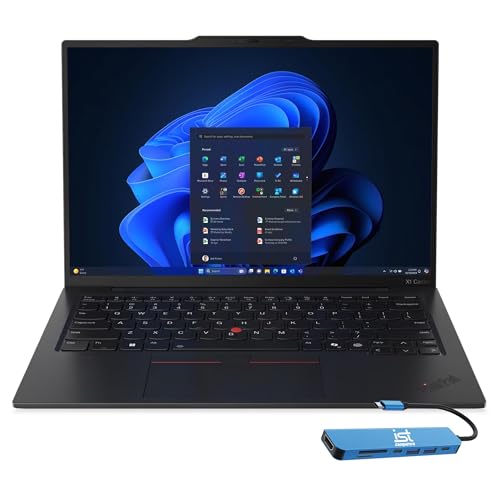
| Lenovo ThinkPad X1 Carbon (Ultra 5) | Executive travel pick | An Ultra 5 X1 Carbon with 16GB of memory, twin Thunderbolt 4 ports, rapid charging, and a listed sixteen-hour battery ambition in Lenovo’s flagship travel body. |
| ASUS ExpertBook B1 15.6″ | Big-screen value anchor | A 15.6-inch ExpertBook whose listing bundles 32GB of memory and a terabyte of storage with RJ45 and HDMI, at the value end of the business class. |
How did we select five business laptops for buyers centred on Windows 10?
Eligibility began with business class in the full sense: professional construction, Windows Pro licensing lineage, vendor enterprise support channels, and the port and docking provisions an established office expects. Consumer laptops were excluded however attractive their prices, because a fleet anchored to a legacy operating system needs driver archives, parts availability, and support documentation that only business lines maintain. The five survivors all come from the ThinkPad, Latitude, EliteBook, and ExpertBook families, whose vendors publish the deep driver libraries legacy planning depends on.
Within that class, machines were favoured for platform breadth. Processors and chipsets with long enterprise driver histories, standard memory and storage configurations that IT staff can service, and physical ports such as RJ45 Ethernet and full-size HDMI reduce the friction of integrating new hardware into an older software estate. Convertible flexibility, screen quality, and travel weight were weighed next, because a laptop bought during an operating-system transition will spend most of its life after that transition, and it must be a good citizen of the future as well as a guest of the past.
Finally, each pick was assessed for the honesty of its listing. Configurations here are stated as their sellers describe them, and buyers managing a Windows 10 dependency should confirm the exact licence, downgrade provisions, and support terms with the vendor or reseller for their region, because those provisions vary. This guide can rank hardware and explain the landscape; the contractual details of any individual purchase belong in writing from the seller, and the guide’s closing sections explain which questions to put there.
What are the realistic options for running Windows 10 on new business hardware?
Start with the landscape as it is. Windows 10 reached the end of mainstream support in October 2025, after which ordinary security updates ceased for most editions. Microsoft offers Extended Security Updates, a paid programme that continues critical security patches for a limited further period, and for many firms that programme is the bridge that makes a planned, orderly migration possible instead of a panicked one. Any business still standardising on Windows 10 should know its ESU position, per device and per year, before it buys hardware, because the bridge has a far end and budgets should see it coming.
Licensing is the second piece of ground truth. Windows 11 Pro licences acquired through certain business channels carry downgrade rights to Windows 10 Pro, subject to the exact terms of the channel and region, which is why this guide insists on written confirmation from the seller. Where downgrade rights apply, a firm can deploy its established Windows 10 image on modern hardware while its application migration proceeds, using the vendor’s driver library for that model. Where they do not, the honest options are ESU-covered existing machines, a tested move to Windows 11, or isolating the legacy application rather than the whole fleet.
That last option deserves more attention than it usually receives. Frequently it is one application, one scanner, one item of lab or workshop equipment that anchors an entire office to an older system. Virtualising that workload, confining it to one maintained machine, or replacing the peripheral can free every other laptop to move forward, and the cost is often lower than the fleet-wide cost of standing still. The five laptops below were chosen to serve either strategy: they are credible citizens of a Windows 10 deployment today where licensing permits, and equally credible foundations for the Windows 11 fleet that follows.
A word on drivers completes the picture. Business vendors maintain model-specific driver archives far longer than consumer lines, and the families represented here are the industry’s deepest. Before committing a fleet, download the target model’s full driver pack for the operating system you intend to run, confirm storage, network, and graphics drivers exist for it, and keep that archive with your deployment image. That single afternoon of verification is the difference between a downgrade that is a procedure and one that is an adventure.
Which five business laptops best serve a Windows 10-centred fleet?

Lenovo ThinkPad T14 (Core i7) — Top pick for legacy-minded fleets
The ThinkPad T14 with a Core i7 takes first place because it is the machine a Windows-10-centred fleet would design for itself. Its listed specification reads like a checklist written by an IT manager with long memory: an Intel Core i7 processor, 16GB of memory, a 512GB drive, a backlit keyboard, a fingerprint reader, Thunderbolt 4, and, increasingly rare and disproportionately valued, an RJ45 Ethernet port for the wired networks that offices, workshops, and secure environments still run on. Nothing about it chases fashion, and everything about it reduces the number of conversations a support desk has to have.
Lenovo’s enterprise ecosystem is the deeper argument. ThinkPad driver archives are among the most complete in the industry, deployment documentation is written for professionals, and parts and docks circulate for years, all of which matters intensely when a fleet’s software estate is older than its hardware. A firm deploying an established image, managing peripherals accumulated over a decade, or supporting users who regard change as a personal affront will find the T14 the least argumentative host for its plans, and the keyboard, still the benchmark for laptop typing, keeps the users themselves on side.
The compromises are the familiar ThinkPad ones. The design is conservative to the point of invisibility, the specification as listed is sensible rather than lavish, and buyers wanting a convertible screen or an OLED panel should look further down this list. None of that dents its position. A top-five for the Windows 10 era should be led by the machine that treats continuity as a feature, and the T14 has built a decades-long reputation on exactly that virtue.
- Processor in listing: Intel Core i7
- Memory and storage in listing: 16GB RAM, 512GB SSD
- Ports listed: Thunderbolt 4, RJ45 Ethernet, full HD display configuration
- Security: fingerprint reader, backlit keyboard
- Operating system listed: Windows 11 Pro
Strengths
- RJ45 Ethernet serves wired estates other laptops abandon
- Deep ThinkPad driver archives suit legacy deployments
- Benchmark keyboard keeps long-session users loyal
Trade-offs
- Conservative design will not excite anyone
- 16GB memory is a floor, not a luxury, for long service
- No convertible or OLED flourish at this specification
Best for: fleets anchored to established software, wired networks, and long support relationships.
Not suited for: executives who want their laptop to double as a tablet or a statement.

Dell Latitude 7450 2-in-1 — Convertible fleet favourite
The Latitude 7450 2-in-1 earns second place by answering the question the T14 does not ask: what if the fleet’s users present, annotate, and sign as much as they type? Its listed configuration pairs an Intel Core Ultra 7 165U with 16GB of memory and a 512GB drive in a 14-inch FHD+ touchscreen body that folds into presentation and tablet modes, and for staff who run meetings from their laptop, review documents with clients, or complete forms standing up, that hinge is a working tool rather than a novelty. Dell’s business support ecosystem, with its deployment services and management tooling, stands behind it in the way legacy-minded buyers require.
Daily details support the pitch. The listed 1080p IR webcam keeps hybrid meetings and Windows Hello sign-ins crisp, Wi-Fi 7 future-proofs the wireless side of a machine bought for years, and Thunderbolt connectivity drives the established Dell docking estates that many offices already own. In laptop mode the keyboard and chassis behave with the sobriety Latitude buyers expect, and the convertible mechanism feels engineered for daily folding rather than occasional showing off, which is the correct priority order for a fleet purchase.
Its limits are those of its form. A 2-in-1 carries more weight and cost than an equivalent clamshell, the U-series processor favours efficiency over sustained heavy lifting, and pen-centric buyers should confirm the exact pen support of the configuration they order. For the mixed fleet, though, where some users’ Windows 10-era applications are forms, signatures, and presentations, the 7450 2-in-1 is the most adaptable machine in this five, and adaptability is what survives transitions.
- Form factor: 14-inch 2-in-1 convertible with FHD+ touchscreen
- Processor in listing: Intel Core Ultra 7 165U
- Memory and storage in listing: 16GB RAM, 512GB SSD
- Camera and wireless listed: 1080p IR webcam, Wi-Fi 7
- Operating system listed: Windows 11 Pro
Strengths
- Convertible body serves presenting, signing, and form-filling roles
- Dell enterprise support and docking estate are deeply established
- Modern webcam and wireless suit hybrid working years
Trade-offs
- Heavier and costlier than an equivalent clamshell
- U-series processor prioritises efficiency over sustained power
- Pen support should be confirmed for the exact configuration
Best for: mixed fleets whose users present, annotate, and travel between meetings all day.
Not suited for: desk-bound power users who will never fold the screen back.

HP EliteBook 840 G11 — Generous fleet specification
The EliteBook 840 G11 takes third place on the strength of a specification that anticipates regret and prevents it. Its listing describes an Intel Core Ultra 7 165H processor with 24GB of memory and a 1TB drive, figures that sit a clear step above the fleet minimums elsewhere in this ranking, and for a laptop expected to serve through an operating-system transition and beyond, that headroom is the difference between a machine that ages gracefully and one that becomes the office complaint. HP wraps it in the EliteBook line’s aluminium professionalism, with a 14-inch FHD+ touchscreen, Thunderbolt 4, and a Copilot key marking its current-generation credentials.
HP’s fleet story complements the hardware. EliteBooks are built for central management, with security features aimed at firms whose compliance obligations outlive any single operating system, and the line’s global service network matters to organisations whose staff travel with their laptops and break them in inconvenient countries. The touchscreen adds the annotation and presentation flexibility some T14 buyers will miss, while the keyboard and port selection keep traditionalists adequately supplied, wired networking via dock or adapter being the one habit to plan for.
Value is the question to interrogate. This specification costs more than the leaner fleet machines here, and a firm buying fifty seats should model whether the memory and storage headroom repays itself in extended service life; in our judgement it usually does, because the commonest reason business laptops are retired early is specification starvation rather than failure. For a smaller fleet or a firm’s senior staff, the G11 is the pick that asks the fewest apologies over the longest period, which is a defensible definition of a top-five business laptop in any operating-system era.
- Processor in listing: Intel Core Ultra 7 165H
- Memory and storage in listing: 24GB RAM, 1TB SSD
- Display: 14-inch FHD+ touchscreen
- Connectivity listed: Thunderbolt 4, Wi-Fi 6, microSD reader
- Operating system listed: Windows 11 Pro
Strengths
- 24GB memory and 1TB storage prevent early specification starvation
- EliteBook security and global service suit compliance-minded firms
- Touchscreen adds presentation flexibility to a fleet machine
Trade-offs
- Higher specification carries a higher fleet price
- Wired networking needs a dock or adapter plan
- Touch panel adds weight over the plainest configurations
Best for: firms buying fewer, better laptops to serve through and beyond a transition.
Not suited for: bulk buyers whose arithmetic only works at the leanest specification.

Lenovo ThinkPad X1 Carbon (Ultra 5) — Executive travel pick
The X1 Carbon in its Ultra 5 configuration represents the executive wing of the Windows-10-era fleet: the machine for the people who carry the firm between airports, clients, and conferences while the T14s hold the office. Its listing pairs an Intel Ultra 5 125U processor with 16GB of DDR5 memory and a 512GB drive in a 14-inch FHD+ anti-glare body, with twin Thunderbolt 4 ports, an IR webcam, rapid charging, and a battery-life claim of up to sixteen hours that, even discounted by real-world scepticism, describes a laptop built to be away from sockets. Weight, or the near-absence of it, is the Carbon’s founding virtue, and frequent travellers feel it in every corridor.
For a fleet in operating-system transition, the Carbon’s role is specific. It is the machine least likely to be resented by the senior staff whose cooperation any migration needs, and its modern platform gives it the longest useful future once the transition completes. Lenovo’s ThinkPad support depth applies here as it does to the T14, and the anti-glare panel and superb keyboard make it a genuine working tool rather than a luxury object, which is the distinction that separates the X1 line from executive toys.
The cautions are price and ports. Carbon money buys portability, not raw specification, so the same budget equips a T14 more generously; and the slim body leans on Thunderbolt docking for wired connections, which suits modern offices and frustrates legacy ones without the dock. A firm should therefore buy Carbons deliberately, for the travellers whose days justify them, rather than fleet-wide. Placed that way, the Ultra 5 configuration is the sweet spot of the line: flagship travel manners without the flagship processor premium.
- Processor in listing: Intel Ultra 5 125U
- Memory and storage in listing: 16GB DDR5 RAM, 512GB SSD
- Display: 14-inch FHD+ anti-glare
- Ports listed: two Thunderbolt 4, IR webcam
- Operating system listed: Windows 11 Pro, rapid charge noted
Strengths
- Featherweight flagship body transforms travel days
- Rapid charging and long battery ambition suit airport life
- ThinkPad keyboard and support depth remain fully present
Trade-offs
- Money buys portability rather than specification
- Wired connections depend on Thunderbolt docks
- Anti-glare FHD+ panel is practical, not spectacular
Best for: executives and consultants whose laptop lives in a carry-on and a boardroom.
Not suited for: desk fleets that would pay for lightness they never lift.

ASUS ExpertBook B1 15.6″ — Big-screen value anchor
The ExpertBook B1 closes the five as the value anchor with a big screen, and its listed specification is startlingly generous for its class: an Intel Core 7 150U processor, 32GB of memory, and a 1TB drive behind a 15.6-inch Full HD display, with Wi-Fi 6, an IR camera, HDMI, and RJ45 Ethernet among its connections. For a small firm whose staff work at desks more than in departure lounges, that combination, memory and storage headroom, a screen that fits a spreadsheet beside a document, and a wired network port, covers the working week with room to spare, and it does so at the gentler end of business-laptop pricing.
ASUS’s ExpertBook line courts exactly the buyer this guide serves: the firm without a large IT department that nevertheless needs business construction, Windows Pro, and durability testing behind its purchases. The bundled wording in the listing should be read carefully, as bundles vary, but the core proposition is clear enough. A 15.6-inch machine also gives ageing eyes and dense applications a kinder canvas than the 14-inch fleet standard, a quality-of-life factor that purchasing spreadsheets rarely capture and users mention constantly.
Its compromises are mobility and cachet. A 15.6-inch laptop is a desk machine that can be carried rather than a travel companion, the processor is an efficiency design rather than a powerhouse, and the ExpertBook badge carries less fleet folklore than ThinkPad or Latitude. None of that matters to the buyer it targets. As the fifth seat in a Windows-10-centred ranking, it is the reminder that value in business laptops means specification where the work is, and on memory, storage, screen, and ports, the B1 spends its money exactly there.
- Processor in listing: Intel Core 7 150U
- Memory and storage in listing: 32GB RAM, 1TB SSD
- Display: 15.6-inch FHD at 1920 by 1080
- Ports listed: HDMI, RJ45 Ethernet, IR camera
- Operating system listed: Windows 11 Pro, bundle noted in listing
Strengths
- 32GB and 1TB specification embarrasses pricier fleet machines
- Large screen suits spreadsheets and side-by-side documents
- RJ45 and HDMI serve established office estates directly
Trade-offs
- Size and weight make it a desk machine first
- Efficiency processor, not a sustained-load powerhouse
- Bundle contents should be confirmed in the listing
Best for: small firms equipping desks with generous specification at a gentle price.
Not suited for: frequent travellers, for whom the X1 Carbon exists.
Is there an honourable mention for buyers facing the other way?
Lenovo ThinkPad X1 Carbon Gen 13 Aura — Honourable mention: the future-facing flagship
One machine deserves mention outside the five for buyers whose Windows 10 chapter is closing rather than continuing. The X1 Carbon Gen 13 Aura Edition, listed with an Ultra 7 258V processor, 32GB of memory, a terabyte of storage, a 2.8K OLED display, and Copilot+ credentials, is the laptop to buy when the migration is done and the firm wants its flagship travellers equipped for the longest possible future. It makes no concessions to legacy estates, and that is precisely its honesty: it is the destination machine, included so readers standing at the other end of the transition can see where the road leads and what the finest current answer looks like.
Best for: firms whose transition is complete and whose travellers deserve the flagship.
Not suited for: anyone whose software estate still needs the continuity the five above provide.
How should a firm plan its move away from Windows 10 without chaos?
Inventory before ideology. List every application the firm actually runs, mark which are confirmed for the newer system, which are untested, and which are genuinely blocked, because in most firms the blocked list is dramatically shorter than feared and the untested list is where the work hides. Test the untested against a single pilot machine, one of the five above serves well, and involve the staff who use each application daily, since they find the printing quirk, the macro failure, and the scanner sulk that no checklist anticipates.
Sequence the migration by risk rather than by department. Move the standard office workloads first, where success is predictable and confidence compounds, and leave the blocked application for a dedicated solution: an ESU-covered machine, a virtualised instance, a vendor upgrade, or a peripheral replacement, chosen on cost rather than habit. Keep the legacy environment isolated and documented while it survives, with its own backup and access rules, because a shrinking legacy estate is a security surface that deserves more attention as it ages, not less.
Buy hardware on the transition’s timetable, not the panic market’s. Machines bought in a rush during a support deadline carry deadline prices and whatever specification was in stock; machines bought to a plan, like the five ranked here, arrive configured, imaged, and warranted as a fleet. Stagger replacements so that no future deadline can hold the whole estate hostage again, and record each laptop’s purchase date, warranty, and intended retirement in one place, because the firms that suffered least at this transition are the ones that could answer those questions from a spreadsheet.
Communicate like it matters, because to staff it does. An operating-system change rearranges the furniture of people’s working days, and the firms that fare best explain the why, train on the differences that actually bite, and schedule changes away from the business’s own peak deadlines. The technology of migration is the easy half; the five laptops above will run either world competently. The other half is a calm plan, honestly communicated, and it is available to any firm willing to start it a season before necessity starts it for them.
How do the five fleet laptops compare for a transition?
The five are compared here on the qualities a transition-era fleet actually lives with: specification headroom, ports for established estates, travel weight, and the role each machine plays when the operating system underneath it eventually changes.
| Pick | Standout quality | Main compromise | Choose it if |
|---|---|---|---|
| Lenovo ThinkPad T14 (Core i7) | Ports, keyboard, driver depth | Conservative specification and styling | Your fleet values continuity above all |
| Dell Latitude 7450 2-in-1 | Convertible adaptability and Dell support | Costs more than its clamshell equivalent | Your users present and annotate constantly |
| HP EliteBook 840 G11 | 24GB memory and 1TB storage headroom | Fleet price reflects the specification | You buy fewer laptops to keep longer |
| Lenovo ThinkPad X1 Carbon (Ultra 5) | Flagship lightness and battery ambition | Portability premium, dock-dependent wiring | Your senior staff live in transit |
| ASUS ExpertBook B1 15.6″ | 32GB, 1TB, big screen, gentle price | Desk-bound size and weight | Your desks need specification more than style |
How do you verify a business laptop listing before a fleet purchase?
Read the listing as a contract draft rather than an advertisement. Confirm the exact processor, memory, storage, display, and operating-system edition, because business models are sold in dozens of configurations under one name and fleet consistency dies in that ambiguity. Confirm the warranty’s type and duration in writing, whether service is on-site or return-to-base, and the seller’s position on licence and downgrade provisions for your region, since those are the terms a legacy-centred deployment will actually exercise.
Then order one unit before the fleet, always. Image it, join it to your environment, connect it to the oldest peripheral it must serve, and run the application that motivated the purchase through a full working day in the hands of its intended user. A single pilot laptop converts every assumption in the buying process into evidence while the cost of being wrong is still one return. Fleets bought without a pilot are gambles wearing a purchase order.
Finally, archive the machine’s support materials at purchase: the full driver pack for the operating systems you may run, the recovery process, the warranty documentation, and the configuration record. Store them with the deployment image rather than in someone’s email. The firms that handle transitions calmly are not luckier than others; they are simply the ones whose future selves can find the files their present selves had the discipline to keep.
What mistakes do Windows 10 holdouts make when buying laptops?
Hunting for a literally new Windows 10 laptop is the first mistake, because that product no longer exists in the business channel, and time spent hunting it is time not spent on the licensing, ESU, and compatibility work that actually protects the firm. Sellers offering improbable old-stock promises deserve particular scepticism. The second mistake is the mirror image: panic-buying whatever is available at a deadline, at deadline prices, in mismatched configurations that the support desk will curse for five years.
Under-specifying memory and storage is the third error, and transition-era machines suffer it worst because they are expected to serve on both sides of a migration. Sixteen gigabytes is a floor for a short life, not a plan for a long one; the picks above with larger configurations exist because specification starvation, not failure, retires most business laptops. The fourth mistake is treating the operating system as the whole problem while ignoring peripherals and drivers, which are where migrations actually snag: the label printer, the scanner, the dongle-licensed application that nobody has thought about since it was installed.
The fifth mistake is silence. Firms that announce a migration as a surprise teach their staff to fear the next one, and shadow workarounds flourish accordingly. A short explanation, a pilot group, a training session aimed at the differences that bite, and a schedule that respects the business’s own deadlines convert a dreaded upheaval into a forgettable Tuesday, which is the highest praise any infrastructure change can earn.
How do ports, keyboards, and service networks decide a business laptop’s real value?
A business laptop’s specification sheet is a promise, but its ports are a biography. The presence of RJ45 Ethernet on the T14 and the ExpertBook B1 in this ranking tells a story about the estates those machines expect to join: wired offices, secure rooms, industrial sites, and the long tail of networked equipment that has never heard of a dongle. HDMI tells a similar story about meeting rooms whose projectors predate wireless casting. Fleets in transition should inventory their rooms and peripherals before their processors, because a laptop that connects to everything the firm already owns is worth more than a faster one that begins every meeting with an adapter negotiation.
Keyboards are the second biography, written in hours. A fleet’s staff will type millions of words on these machines, and the difference between a keyboard that disappears under the fingers and one that reminds the typist of its existence hourly is a real productivity figure wearing no numbers. This is the quiet reason ThinkPads anchor so many fleets and why the T14 leads this five: its keyboard is not a preference but an institution, and institutions are what transition-era purchasing is for. Test typing on any candidate for ten uninterrupted minutes before a fleet order; the verdict will be unanimous and correct.
Service networks form the third biography, and they are read only in emergencies. A vendor’s business support is a geography as much as a promise: where the engineers are, how parts move, whether a travelling employee’s broken laptop can be revived in the city where it broke. Dell, HP, and Lenovo all maintain global business apparatus of genuine depth, and ASUS’s ExpertBook support has grown around its small-business heartland. A firm with travelling staff should weight that geography as heavily as any processor, because a laptop awaiting a part on another continent is not a laptop at all for the duration.
Security hardware deserves its own paragraph in any era, and doubly in one where machines outlive the operating system they arrived with. Fingerprint readers, infrared cameras, privacy screens, and hardware-backed encryption travel with the laptop across every software change, protecting the firm’s data through migrations, resales, and the long demotion to a spare machine. The picks above carry these features as business-line birthrights, and buyers tempted by a cheaper consumer alternative should price equivalent protection honestly, because it is rarely available at any price once the purchase is made.
There is a sustainability argument hiding inside the fleet decision as well. Business laptops are the most repairable, longest-supported computers in the industry, with parts, batteries, and documentation circulating for years, and a fleet that buys them, maintains them, and retires them on a staggered schedule extracts far more work per machine than a churn of consumer purchases. The transition framing of this guide strengthens the point: a well-bought business laptop is not consumed by an operating-system change, it is merely re-imaged by one, and that resilience is the deepest sense in which the five above are the right answer to a Windows 10 question.
Finally, give the users a voice in the process, because fleets fail socially before they fail technically. A short pilot with the staff who type, present, travel, and administer will surface the port that matters, the weight that resents, and the screen that strains, while there is still time to adjust the order between the five finalists. The machines in this ranking are close enough in virtue that the deciding evidence should come from the firm’s own desks rather than from any reviewer’s table, and a purchasing process that ends with staff feeling consulted will be repaid at every subsequent change the firm has to make.
That, in the end, is the thread connecting every section of this guide. The operating system in the search has retired, the typo in it has been forgiven, and what remains is the permanent work of business computing: sound machines, honest licensing, patient planning, and respect for the people who will open these laptops on ten thousand ordinary mornings. Buy for that, and the specific five above will not steer any firm wrong.
A note on peripherals belongs in any transition plan, because laptops rarely migrate alone. Docking stations, monitor arms, label printers, and scanners all carry their own driver stories, and the business machines in this ranking were favoured partly for the maturity of the ecosystems around them. Before the fleet order, connect the pilot unit to the oldest peripheral it must serve and print, scan, and dock with it; the five minutes that takes has saved more migrations than any specification comparison ever written.
There is also a human archive to maintain through a transition: the small knowledge of where things are in the old system that lives in people’s heads and habits. Firms that document their own workflows before changing the platform discover that half the training writes itself, and that the new environment can be arranged to honour the habits worth keeping. The laptops above will run whichever world they are given; the wisdom is in deciding, deliberately, what each world should contain.
One document will repay its creation at every future transition, and almost no small firm has it: a single page per laptop model recording its configuration, warranty expiry, licence position, driver archive location, and intended retirement year. An hour spent writing those pages for the machines in this purchase converts the next migration from archaeology into administration. The firms that glided through the present transition were not richer or luckier; they were simply the ones whose records let them act early, while everyone else was still counting what they owned.
Image one machine completely, document every step of that imaging, and only then touch the rest of the fleet, because a documented build can be repeated by whoever is on duty while an improvised one belongs to whoever happened to be present.
Name the laptops, literally, with an asset label on the lid and a record in the fleet page, because ‘the Dell in accounts’ is not an identity when a warranty call asks for one.
Keep one laptop of the fleet’s standard configuration unassigned as a hot spare, and a migration, a breakage, or a new starter becomes an inconvenience measured in minutes rather than a week measured in apologies.
Teach staff the two-minute report: what changed, when it changed, and what the machine was doing, because support quality is decided less by the help desk’s brilliance than by the precision of the first description it receives.
Schedule the fleet’s battery and storage checks alongside the firm’s existing rhythms, the quarterly accounts or the seasonal stocktake, so that maintenance inherits a calendar instead of competing with one.
A laptop bag chosen for the actual commute, rain, stairs, bicycle, or building sites, protects the purchase more faithfully than any extended warranty sold at a checkout.
When a senior member of staff resists a new machine, lend them the pilot unit for a week rather than arguing, because a keyboard under real fingers converts more sceptics than a presentation ever has.
Record which docks, monitors, and printers each desk uses on the same fleet page as the laptops themselves, because the next transition will ask those questions first and will not accept archaeology as an answer.
The pilot programme deserves one more level of detail, because it is where transition plans either become evidence or remain opinions. Choose pilot users deliberately: one enthusiast, one sceptic, one heavy user of the firm’s oldest application, and one person whose work is mostly meetings and travel. Give each the same candidate machine for two full weeks, collect their complaints in writing without defending the purchase, and read those complaints as the fleet’s future support tickets arriving early and cheap. A candidate that survives that panel will survive the firm; one that generates a theme, a port, a keyboard grievance, a fan complaint, should be adjusted before fifty units repeat the lesson.
Licence documentation is the pilot’s paper twin. For every model deployed, record the licence channel, the downgrade position confirmed in writing, the ESU enrolment where it applies, and the date each of those arrangements expires. That register, kept beside the fleet page recommended earlier, converts the next audit, renewal, or deadline from a research project into a reading exercise. Firms discover too late that operating-system rights are perishable knowledge, held by whoever placed one order years ago; the register is how that knowledge becomes the firm’s property instead of an employee’s memory.
Peripheral strategy can quietly liberate an entire migration. Audit the devices attached to the fleet, the printers, scanners, label writers, and specialist instruments, and price replacing the oldest blockers against the cost of holding the whole estate back for them. Frequently one elderly peripheral is the true anchor, and its replacement, or its isolation on a single maintained machine, releases dozens of laptops to move forward on schedule. The five laptops in this ranking were chosen partly for the maturity of the ecosystems around them, but no ecosystem can repeal the arithmetic of a peripheral whose driver died with an earlier decade.
Close the purchase the way professionals close projects: with a review. Ninety days after deployment, compare the fleet’s actual support tickets, battery complaints, and user verdicts against the pilot’s predictions, and write down what the firm learned about its own habits. That page of institutional honesty is the real deliverable of the whole exercise, because operating systems will retire again, and the firm that documented this transition will meet the next one with a method instead of a memory of panic.
Change management has a literature of its own, and its central finding applies to laptop fleets without translation: people accept change they were warned about, resent change that surprises them, and sabotage, usually unconsciously, change that humiliates them. A migration plan that announces itself a season early, that trains on the three differences staff will actually meet in the first week, and that keeps a friendly human available for the first fortnight, will outperform a technically superior plan imposed overnight. The laptops ranked above are deliberately unexciting machines, and that is a change-management virtue, because the hardware should be the calmest part of any transition the firm undertakes.
Budget holders should also hear the argument for buying the warranty and the dock in the same order as the laptops, stated plainly. Accessories bought later arrive mismatched, unwarrantied as a system, and expensed in the irritating drip of small approvals, while a fleet bought whole arrives as a working environment whose parts were tested together. The five machines above all belong to vendors who sell that wholeness professionally. It costs a little more on the day and a great deal less across the life, which is the same arithmetic this guide has applied to memory, to storage, and to support, because it is the arithmetic business computing always eventually teaches.
One more constituency deserves a voice in the fleet decision: the future recruit. A firm that hands a new starter a clean, capable, well-kept business laptop communicates its standards before a word of induction is spoken, while a drawer machine with a previous employee’s stickers communicates something else entirely. The machines in this ranking, bought on a staggered cycle and maintained on the record this guide recommends, keep that first impression permanently available. It is a soft benefit with hard consequences for retention, and it belongs in the business case beside the processors and the ports.
Documentation, finally, is the gift the present firm gives the future one. Every decision in this purchase, why these five, why this configuration, why this licence position, should be written in the fleet record in sentences a stranger could act on. Operating systems will retire again on somebody else’s watch, and the difference between a firm that repeats this exercise calmly and one that relives it as an emergency is nothing more exotic than whether the reasoning was written down while it was still obvious.
There is a temptation, at the end of a long procurement, to treat the decision as finished when the order is placed, and it should be resisted for exactly one week. That is the week when the pilot unit can still be exchanged, when the image can still be corrected cheaply, and when the fleet record can still be written from fresh memory rather than reconstructed from invoices. Spend that week deliberately and the following four years become administration; skip it, and the same issues return individually, at retail prices, wearing the disguise of unrelated problems.
A firm that has read this far has already done the hardest part of the work, which is replacing a search for a retired operating system with a plan for living machines, honest licences, and patient timing. The rest is execution, and execution, unlike nostalgia, compounds in the firm’s favour every single quarter.
Write the fleet page tonight, while the reasoning is still warm, and the next person to face this decision, perhaps yourself in four years, will inherit a method instead of a mystery, which is the most durable asset any purchasing process can leave behind.
Keep that page with the invoices, review it whenever a laptop joins or leaves the fleet, and let it grow into the short, factual history of how the firm equips its people, because institutions are built from exactly such unglamorous continuities, maintained on purpose.
Final Recommendation
Name a single default and it is the ThinkPad T14 with a Core i7, the machine whose ports, keyboard, and driver depth make it the natural home for a fleet living through an operating-system transition, with the Latitude 7450 2-in-1 for adaptable users, the EliteBook 840 G11 for headroom, the X1 Carbon for the travellers, and the ExpertBook B1 for desks that need specification at a gentle price. The honourable mention points the other way, toward the firms already free to buy purely for the future.
The typo in the search that brought you here is easily forgiven and quietly corrected, but the thinking behind it deserves one last kindness: stop shopping for an operating system that has retired, and start shopping, as this ranking has, for business laptops strong enough to carry your firm through the change, because the right machine makes the transition a project with an end date instead of a problem without one.
Frequently Asked Questions
Can I still buy a new laptop with Windows 10 installed?
Not through normal business channels. Current business laptops ship with Windows 11 Pro, as every listing in this guide states. The realistic routes are licence downgrade provisions where they apply, Extended Security Updates for existing machines, or a planned migration, each of which this guide’s planning sections address.
What are Extended Security Updates and should my firm buy them?
They are Microsoft’s paid programme continuing critical security updates for Windows 10 for a limited period after mainstream support ended. Firms with a genuinely blocked application often use them as a bridge while migration completes. Price them per device and per year, and treat the programme’s end as a firm deadline in your plan.
Do Windows 11 Pro licences include downgrade rights?
Through certain business channels they can, subject to the channel’s and region’s exact terms. Because those terms vary and matter enormously to a legacy deployment, obtain written confirmation from your vendor or reseller for the specific machines and licences you are buying rather than relying on general statements.
Which of the five is best for a small firm with no IT department?
The ExpertBook B1 for desks, on specification and price, or the ThinkPad T14 where Lenovo’s support ecosystem and driver depth will substitute for in-house expertise. Either way, buy one pilot unit first and confirm your key application behaves before equipping everyone.
How much memory should a transition-era business laptop have?
Treat 16GB as the minimum for a short service life and prefer 24GB or 32GB, as several picks here offer, for a machine expected to serve through a migration and years beyond it. Storage of 512GB is a floor; a terabyte removes a whole category of housekeeping.
Is it safe to keep running Windows 10 without extended updates?
It carries growing risk, because newly discovered vulnerabilities will not be patched through ordinary channels. Machines in that position should be isolated from sensitive work, kept off unnecessary network exposure, and scheduled for replacement or ESU coverage as a priority rather than an afterthought.
Related Guides
Keep exploring with business laptop fleet buying guides and windows migration planning for small firms and thinkpad and latitude compared.
Related guides
- Best 13 Inch Business Laptops: The Honest 13–14 Inch Ultraportable Shortlist
- Best Affordable Business Laptops Quadro Buyers Can Still Justify: Mobile Workstations With Professional Graphics on a Sensible Budget
- Best 17 Inch Windows Business Laptops: The Workstation Class That Replaced Them
- Best Affordable Business Laptops: Total Cost, Durability and Business Warranty Without the Premium Price
[…] Keep researching with our companion guides to larger business machines, mobile workstations and the wider laptop range: best 15 inch business laptops best affordable business laptops best 17 inch windows business laptops You may also want our guide to best Windows 10 business laptops. […]