What's inside
- Where to buy
- Key Takeaways
- Quick Picks
- How did we rank basic phones when their cameras are deliberately modest?
- What should you honestly expect from a two to five megapixel camera?
- Which basic phones pair real simplicity with a usable camera?
- How do you take the best possible photograph with a basic phone?
- How do these basic phones compare once the network fits?
- How do you match a basic phone to the right person and network?
- What mistakes do buyers make when choosing a basic phone with a camera?
- How do basic phones serve the people smartphones leave behind?
- Final Recommendation
- Frequently Asked Questions
- Related Guides
As an Amazon Associate I earn from qualifying purchases. This post may contain affiliate links at no extra cost to you.
gizmoverdict.com is reader-supported. When you buy through links on our site, we may earn an affiliate commission.
Where to buy
Pick a name below to open its listing, and adjust one expectation before anything else: a basic phone’s camera is a witness, not an artist. Readers searching for the best basic phones camera usually want a simple handset, often a flip phone, that can still capture the moments and evidence daily life produces: a grandchild’s visit, a leaking pipe for the landlord, a whiteboard before it is wiped, a number plate after a parking-lot nudge. Cameras in this class typically offer only a few megapixels, and this guide will not pretend otherwise. What it will do is rank the basic phones whose cameras are genuinely usable, whose carriers actually support them, and whose simplicity survives contact with real owners.
Four of the picks are linked from our verified pool of feature phones: two Nokias and two TCLs, each tied to particular networks or prepaid ecosystems that must be matched to the buyer before anything else matters. Two further picks are discussed as prose-only alternatives, well-known basic models worth seeking out through carriers and retailers, included so readers whose networks exclude the linked four still leave with a complete picture of the class. Every pick is judged as a whole phone first, calls, buttons, battery, hearing support, and as a camera second, because that is the order in which basic phones succeed or fail.
The camera discussion itself will be refreshingly unglamorous. At two to five megapixels, a basic phone photograph is for remembering, documenting, and sharing small on a screen, not for printing large or cropping hard. Within that honest frame, real differences exist: some of these cameras focus more willingly, some handle indoor light less badly, some make it easy to send the picture to a family member, and some bury the photograph in menus until the moment’s value has evaporated. Those practical differences, not pixel bragging, decide the order below.
Key Takeaways
- Basic phone cameras run at roughly two to five megapixels: expect documentation and memories at screen size, not prints or heavy cropping.
- Carrier fit decides everything in this class, because each linked pick belongs to specific networks or prepaid services that must match the buyer.
- The Nokia 2780 Flip is the most flexible linked pick, with KaiOS smarts, broad carrier support as listed, and the easiest photo sharing of the flip phones here.
- TCL’s Flip Pro and Classic serve Verizon and AT&T customers respectively with big-button simplicity and cameras adequate for everyday evidence.
- A basic phone that will not be carried is useless, so hinge feel, button size, and battery life outrank camera details in any sensible purchase.
Quick Picks
| Pick | Badge | Why it earns its place |
|---|---|---|
| Nokia 2780 Flip | Most flexible basic camera phone | An unlocked KaiOS flip listed for Verizon, AT&T, and T-Mobile, with the easiest route from taking a photograph to actually sharing it. |
| TCL Flip Pro (Verizon) | Best for Verizon households | A Verizon basic flip in slate gray with large-key simplicity and a camera suited to everyday evidence for customers already on that network. |
| TCL Classic 4058R (AT&T) | Best for AT&T customers | An AT&T 4G LTE flip with 8GB of storage in its listing, offering the Classic line’s big-button formula to that network’s basic-phone buyers. |
| Nokia 2760 Flip (Tracfone) | Prepaid simplicity champion | A Tracfone prepaid Nokia flip with 4GB in its listing, aimed at the very lightest users whose phone exists for calls, messages, and the occasional photograph. |
| Nokia 225 4G | Prose-only bar-phone alternative | A candybar basic phone worth seeking through retailers, for buyers who prefer a one-piece handset to a flip and need only the simplest camera. |
| Alcatel SMARTFLIP | Prose-only carrier flip option | A carrier flip known for large keys, a KaiOS environment in many versions, and an external display, worth asking your carrier about as an alternative to the linked flips. |
How did we rank basic phones when their cameras are deliberately modest?
The ranking began with carrier reality, because a feature phone that cannot join the buyer’s network is not a phone at all. Each linked pick’s network situation, as stated in its listing, is treated as part of the product: broad unlocked support, a single-carrier model, or a prepaid handset tied to a specific service. Readers should start by eliminating picks their network excludes, then compare what remains, and this guide orders the discussion to make that elimination easy rather than hiding it in fine print.
Camera judgement in this class uses a deliberately humble test set: a face in indoor light, a document or noticeboard, an outdoor scene, and the practical question of whether the resulting photograph can be sent to someone without a tutorial. Resolution differences between two and five megapixels matter less at this scale than focus willingness, shutter simplicity, and how the phone handles the journey from camera to message. A basic phone that photographs adequately and shares effortlessly beats a marginally sharper one whose pictures stay trapped inside it.
The final filter was the ownership experience of the people who actually use these phones. Button size and labelling, screen readability in sunlight, call volume and hearing-aid compatibility considerations, charging simplicity, and battery life measured in days rather than hours all carried real weight. Many basic phones are bought for parents, grandparents, and workers in rough environments, and a ranking that ignored those hands and workplaces in favour of camera minutiae would fail its readers completely.
What should you honestly expect from a two to five megapixel camera?
Set the scene correctly and a basic phone camera performs honourably. In daylight outdoors, colours are recognisable, faces are identifiable, and a scene reads clearly when viewed on a phone or computer screen at ordinary sizes. A photograph of a garden, a dog, a house for sale, or a family group on a porch will carry the memory it was taken to carry. This is the class of photography these cameras were designed for, and judged inside it, the better models here are genuinely fit for purpose rather than merely forgiven.
Move indoors and the compromises arrive in a predictable order. Small sensors and simple lenses gather little light, so interiors soften, colours dull, and any movement in the subject smears. Flash units on basic phones are weak and close-range, useful for a document on a desk rather than a room full of people. The practical technique is old-fashioned: get closer, hold still, favour the brightest part of the room, and take two photographs where one might do. Owners who learn those four habits extract results that surprise people who only read the megapixel figure.
Zoom, in any meaningful sense, does not exist here. Digital zoom on a tiny sensor merely enlarges the middle of an already small image, so the correct technique is the photographer’s feet: walk closer, or accept the wide view and identify details verbally when sharing. Cropping later obeys the same arithmetic; a two-megapixel photograph has nothing to spare. None of this makes the cameras useless, any more than a notebook is useless because it is not a typewriter, but it defines the honest contract: these cameras record, remember, and provide evidence, and within that contract they serve millions of owners perfectly well.
Sharing deserves a final word, because a photograph’s value often depends on reaching someone. The KaiOS-based Nokia picks can use familiar messaging routes over 4G data or Wi-Fi, while simpler carrier flips typically send pictures by MMS, which compresses them further and occasionally requires the recipient’s patience. Buyers whose main purpose is sending photographs to family should weight sharing ease heavily, and it is a significant reason the Nokia 2780 leads this ranking: its camera is modest, but its photographs can actually leave the phone without a grandchild’s remote assistance.
Which basic phones pair real simplicity with a usable camera?

Nokia 2780 Flip — Most flexible basic camera phone
The Nokia 2780 Flip leads this ranking because it solves the basic phone’s two hardest problems at once: it works across the major networks as an unlocked handset, as its listing states, and its KaiOS software gives its modest camera somewhere useful to send photographs. KaiOS brings a recognisable app environment, including messaging options and an app store of essentials, to a phone that still opens, closes, and answers calls with the physical certainty flip-phone loyalists refuse to surrender. For families buying for a parent, that combination of familiarity and capability is worth more than any specification in this class.
The camera itself is a small-sensor unit in the few-megapixel class typical of these phones, and its results follow the honest pattern described earlier: bright, legible photographs outdoors, softer and grainier work indoors, and no zoom worth the name. What elevates it is the workflow around the lens. The screen is comparatively generous for reviewing a shot, the menus are navigable by someone who did not grow up with smartphones, and sharing over Wi-Fi or 4G avoids the MMS compression lottery that afflicts simpler flips. A photograph of a grandchild that actually reaches the family chat is a better photograph than a technically finer one stranded in a menu.
As a phone, the 2780 covers the fundamentals that decide satisfaction: clear calls, a readable display, physical keys with actual travel, and battery life measured in days under the light use these handsets typically see. Its KaiOS smarts do make it the most complex device in this guide, and a buyer seeking absolute minimalism may prefer the carrier TCLs below. For most families, though, the balance is right: simple enough to be trusted, capable enough to share, and network-flexible enough to buy without a carrier negotiation.
- Listing: unlocked, for Verizon, AT&T, and T-Mobile as described
- Software: KaiOS with app essentials and Wi-Fi sharing routes
- Camera: few-megapixel class basic unit with flash assistance
- Form: flip phone with physical keypad
- Colour in listing: Blue
Strengths
- Broad unlocked carrier support removes the biggest buying obstacle
- KaiOS makes sharing photographs genuinely achievable
- Readable screen helps reviewing shots before sending
Trade-offs
- Most complex software in this basic-phone group
- Camera remains a daylight-first tool despite the smarts
- KaiOS app selection is a village, not a city
Best for: families buying a parent a simple phone that can still send photographs to everyone.
Not suited for: buyers who want the absolute minimum of software between them and a phone call.

TCL Flip Pro (Verizon) — Best for Verizon households
The TCL Flip Pro is the straightforward answer for a Verizon household that needs a simple phone with a camera and no complications beyond that sentence. It is a carrier flip in the classic mould: open to answer, close to hang up, big physical keys, a clear earpiece, and menus that assume nothing about their owner. The listing ties it to Verizon plainly, which in this class is a virtue rather than a limitation, because carrier-sold basic phones arrive provisioned, supported, and returnable through channels the buyer already knows.
Its camera belongs to the honest few-megapixel class and should be bought for documentation rather than artistry. Insurance photographs after a fender scrape, a picture of a delivery left at the wrong door, a snap of a grandchild across a diner table in decent light: this is the camera’s working territory, and it covers it. Indoor results soften and the flash is a close-range helper, yet the shutter is simple enough that an owner who fears technology will actually use it, which is the first and most important camera specification on any basic phone.
The rest of the ownership story is reassuringly dull. Battery life stretches across days of light use, the slate gray shell shrugs off the scuffs of pockets and work bags, and Verizon’s support apparatus stands behind the handset for the families who value a shop to walk into. Buyers outside Verizon should not attempt to bend this phone to their network; its pick status is explicitly for that carrier’s customers, who will find in it the least dramatic route to a simple phone that can still take a picture when a picture is needed.
- Network: Verizon, as listed
- Form: basic flip phone with physical keypad
- Camera: few-megapixel class documentation unit
- Colour in listing: Slate Gray
- Character: carrier-provisioned simplicity
Strengths
- Verizon provisioning and support simplify family purchases
- Large-key flip format suits owners who reject smartphones
- Camera is simple enough to actually be used
Trade-offs
- Locked to Verizon’s world by design
- Indoor photography softens quickly
- No smart sharing routes beyond carrier messaging
Best for: Verizon customers equipping a parent, a worker, or themselves with uncomplicated simplicity.
Not suited for: anyone on another network, however attractive the price appears.

TCL Classic 4058R (AT&T) — Best for AT&T customers
The TCL Classic 4058R performs the same service for AT&T that its sibling performs for Verizon, and its listing adds one detail worth noticing: 8GB of storage, which in feature-phone terms is roomy. Photographs from a few-megapixel camera are small files, so that space holds a genuinely large archive of family pictures and evidence shots before housekeeping is required, and the phone’s 4G LTE connection keeps it valid on AT&T’s modern network rather than stranded on closing legacy bands. For an AT&T household, this is the low-drama purchase.
The Classic formula itself is proven and unpretentious: a flip body, a keypad with buttons sized for real fingers, a legible screen, and software that confines itself to calls, messages, a camera, and the handful of tools a basic phone should carry. The camera follows the class pattern, competent in daylight, humble after dark, and most valuable as a documenting tool: the meter reading, the prescription label, the notice on the community board, the visitor at the door. Owners consistently report that basic cameras earn their keep through such errands far more than through anything resembling photography as a hobby.
Purchasing notes are brief but important. The listing describes an AT&T-oriented unlocked flip, so buyers should still confirm their exact plan and SIM arrangements suit the handset, particularly on prepaid arrangements. Beyond that check, the Classic asks little of anyone: charge it occasionally, open it to talk, close it to stop. In a category where complexity is the enemy, that restraint is the product, and AT&T customers who value it will find this the natural pick.
- Network: AT&T 4G LTE orientation, as listed
- Storage in listing: 8GB
- Form: flip phone with large physical keys
- Camera: few-megapixel class documentation unit
- Model: TCL Classic 4058R
Strengths
- Roomy storage by feature-phone standards holds big photo archives
- 4G LTE keeps it valid on the modern AT&T network
- Large keys and plain menus suit its intended owners perfectly
Trade-offs
- AT&T orientation limits its audience by design
- Camera is a daylight documenting tool, nothing more
- Sharing photographs relies on carrier messaging routes
Best for: AT&T customers who want a simple flip whose pictures have somewhere to live.
Not suited for: shoppers on other networks or anyone expecting smartphone photography.
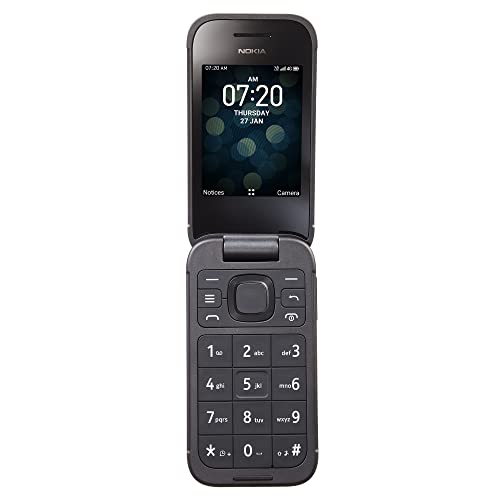
Nokia 2760 Flip (Tracfone) — Prepaid simplicity champion
The Nokia 2760 Flip, sold through Tracfone as its listing describes, is the pick for the lightest imaginable use: the phone in the kitchen drawer that goes to the shops, the handset for a relative who wants to be reachable on their own terms, the prepaid device whose owner measures usage in minutes per week. Prepaid economics suit that life exactly, with no contract gravity and costs that match a trickle of calls, and Nokia’s flip hardware gives the arrangement a sturdiness and familiarity that flimsy alternatives lack.
Its camera is the most modest in this ranking, a small unit whose photographs are best understood as visual notes. A picture message to show which product to buy, a snap of a parked car’s position, a face across a café table in good light: these it can do, and the 4GB of listed storage, while tiny by smartphone standards, holds a respectable number of such small files. Expecting more from it would be a category error, and this guide places it fourth precisely so that readers buy it for its real virtues, cheap, simple, prepaid reachability, with the camera as a welcome extra.
Buyers should understand the Tracfone frame before purchasing: the phone is a prepaid feature phone tied to that service’s plans and activation, which suits its intended owners and frustrates anyone hoping to use it as a general unlocked handset. Within the frame, ownership is serene: days of standby, a hinge that answers and ends calls mechanically, and keys a thumb can find without looking. For the household that needs exactly one simple, cheap, camera-carrying phone on prepaid terms, the search ends here.
- Service: Tracfone prepaid, as listed
- Storage in listing: 4GB
- Form: compact flip phone, black
- Camera: basic visual-note class unit
- Character: minimal cost, minimal commitment
Strengths
- Prepaid terms match the lightest users perfectly
- Nokia flip hardware feels sturdy and familiar
- Camera covers visual notes and simple evidence
Trade-offs
- Tied to Tracfone service and activation
- Most modest camera in this ranking
- Storage fills if photographs are never cleared
Best for: prepaid households needing a cheap, simple, camera-carrying lifeline phone.
Not suited for: anyone wanting an unlocked handset or regular photo sharing.
Nokia 225 4G — Prose-only bar-phone alternative
Not every basic-phone buyer wants a hinge, and the Nokia 225 4G represents the one-piece alternative: a slim bar phone with a physical keypad, a small colour screen, and a basic rear camera for visual notes. Models in this line have circulated widely through retailers and carriers, which is why it appears here as a prose-only suggestion to look for through your own network or a trusted shop rather than as a linked listing. Its appeal is durability and simplicity in a body with no moving parts to loosen, sized for a pocket or a handbag’s smallest compartment.
The camera is the simplest in this entire guide, a very small unit intended for identification-grade photographs: who was there, what the sign said, where the car was parked. Buyers should hold it to that standard and no higher. What the phone returns for that humility is stamina and clarity of purpose: long standby, an interface a new owner learns in an afternoon, and in many versions an FM radio and a torch, the two features basic-phone owners consistently rank above almost everything else manufacturers advertise.
Purchasing advice for prose-only picks is necessarily general: confirm the exact version’s network bands with your carrier, since basic phones are sold in regional variants, and buy from a seller whose return policy covers a compatibility surprise. Chosen carefully, a bar phone like this suits the owner who finds flips fiddly, wants a phone that is simply there, and regards the camera as an occasional notebook. It will never be the best camera in this guide, and for its intended owner that fact will never once matter.
- Form: one-piece bar phone with physical keypad
- Camera: minimal visual-note unit
- Software: basic feature-phone interface
- Character: no hinge, pocket-sized, long standby
- Availability note: seek through carriers and retailers; versions vary by region
Strengths
- No hinge to wear, and the slimmest carry in this guide
- Interface learned in an afternoon, remembered for years
- Torch and radio traditions of the class serve owners daily
Trade-offs
- Simplest camera here, strictly for visual notes
- Regional variants demand a carrier compatibility check
- Tiny screen makes reviewing photographs a squint
Best for: buyers who dislike flips and want a phone that is simply, durably there.
Not suited for: anyone who shares photographs often or reviews them on the phone.
Alcatel SMARTFLIP — Prose-only carrier flip option
The Alcatel SMARTFLIP earns its prose-only mention as the alternative flip that many carrier shops have stocked for exactly the buyers this guide serves. Its formula emphasises accessibility: large, well-spaced keys, a clear internal screen, an external display that shows who is calling before the phone is opened, and in many versions a KaiOS environment that brings familiar essentials such as maps and messaging within reach of a flip phone. That external screen sounds like a luxury until a phone is bought for someone who screens calls by sight, at which point it becomes the feature the whole purchase turns on.
Its camera sits in the same few-megapixel territory as the linked TCLs, with the same honest contract: daylight documentation, family moments at screen size, and indoor results that reward stillness and proximity. The KaiOS versions share photographs more gracefully than the simplest flips, which lifts the camera’s practical value beyond its sensor, echoing the logic that put the Nokia 2780 at the head of this ranking. Buyers should confirm which software version a given unit carries, because carrier stock has varied across production runs.
As with the other prose-only pick, treat this as a model to request and verify rather than a listing to click: ask your carrier or a reputable retailer for current stock, confirm network fit, and inspect the keys and screens in hand if possible, since the buyers of these phones judge them by touch more than by text. For a household whose carrier offers it, the SMARTFLIP’s accessibility touches make it a legitimate rival to the linked flips, and its inclusion here ensures readers are not left thinking the class contains only four phones.
- Form: flip phone with external caller display
- Keys: large, widely spaced, accessibility-led
- Software: KaiOS in many versions; confirm per unit
- Camera: few-megapixel class documentation unit
- Availability note: carrier and retailer stock varies; verify before travelling
Strengths
- External display lets owners screen calls without opening
- Large keys and clear screens lead the class for accessibility
- KaiOS versions share photographs more gracefully
Trade-offs
- Versions vary, so software must be confirmed per unit
- Camera remains firmly in documentation territory
- Carrier stock is inconsistent between regions
Best for: accessibility-first buyers whose carrier stocks it and who screen calls by sight.
Not suited for: shoppers who need a guaranteed specification without an in-store check.
How do you take the best possible photograph with a basic phone?
Light is the whole game at this level, so play it deliberately. Photograph people facing a window or standing in open shade rather than with a bright window behind them, which turns faces into silhouettes a small sensor cannot rescue. Outdoors, keep the sun behind you and the subject in front, the oldest advice in photography, and step out of harsh midday glare into the edge of shade when a portrait matters. Indoors, move the subject toward the room’s brightest lamp rather than trusting the phone’s weak flash across a distance it cannot cross.
Stillness is the second discipline. A basic phone’s shutter and processing are unhurried, so brace the phone against a doorframe, a table edge, or your own chest, press gently, and wait a heartbeat before lowering it. Take the important photograph twice; storage is cheap at these file sizes, and the second attempt is frequently the sharp one because the photographer’s hand has settled. For documents and labels, fill the frame, keep the phone parallel to the page, and check the result before leaving, because a retake costs seconds and a return journey costs an afternoon.
Sending the photograph is a skill of its own. On KaiOS phones, Wi-Fi sharing preserves the most quality and avoids messaging size limits; on simpler flips, picture messaging shrinks files, so frame the subject large and central so the compressed result still reads clearly. If a photograph truly matters, a medical concern, damage after an incident, keep the phone itself safe rather than relying on the sent copy, because the original file on the handset is the best evidence the camera produced.
Finally, keep the little lens clean and the battery boring. A basic phone lives in pockets and coat sleeves, and its tiny lens fogs with lint and grease that a quick wipe removes. Charge the phone on a routine, Sunday evening, say, rather than in emergencies, because these handsets are bought to be ready. A clean lens, a charged battery, a bright room, and a steady hand: that is the complete technique of basic-phone photography, and owners who master it consistently produce the photographs their families actually needed.
How do these basic phones compare once the network fits?
Choose from this table by network first and camera second, reversing the instinct smartphone shopping teaches. Every camera here documents daily life adequately in daylight; the phones differ in whose network they join, how their photographs escape, and how kindly they treat the hands that hold them.
| Pick | Standout quality | Main compromise | Choose it if |
|---|---|---|---|
| Nokia 2780 Flip | Unlocked flexibility and KaiOS sharing | Most software of the group | Your family needs one flip that fits most networks |
| TCL Flip Pro (Verizon) | Verizon provisioning and support | Verizon customers only | You are on Verizon and want zero setup drama |
| TCL Classic 4058R (AT&T) | Roomy 8GB storage for photos | AT&T orientation | You are on AT&T and keep many pictures |
| Nokia 2760 Flip (Tracfone) | Prepaid cost with Nokia sturdiness | Tracfone tie-in, modest camera | Your usage is a trickle on prepaid terms |
| Nokia 225 4G | Slim bar body, no hinge | Simplest camera in the guide | You dislike flips and want a pocket notebook phone |
| Alcatel SMARTFLIP | External display and large keys | Version and stock vary | Accessibility touches matter most to the owner |
How do you match a basic phone to the right person and network?
Begin with the network the household already uses, because family plans and shared accounts make carrier fit a financial question as much as a technical one. List the linked picks your network admits, then check the survivor against the owner’s hands: can they read the screen in daylight, press the keys without hunting, hear the earpiece at their usual volume, and open a flip one-handed if a flip it is? Ten minutes of such testing in a shop predicts satisfaction more reliably than any review, including this one.
Then rehearse the camera with the actual owner, not a substitute. Have them take a photograph of you, find it again in the gallery, and send it to a family member, because those three actions are the camera’s entire job description. If any step requires your narration, choose the pick whose flow they managed, or accept that photographs will be taken but never shared, and set expectations accordingly. A basic phone succeeds when its owner operates it alone at midnight without anxiety.
Finish with the unglamorous arrangements that make these phones beloved: programme the important numbers into speed dial, write the charging routine on the fridge if routines help, confirm the voicemail is set up, and store one family contact as the emergency entry. Basic phones are infrastructure for people’s lives, often for the people least inclined to troubleshoot, and the half hour spent arranging them properly at purchase is repaid every week they simply work.
What mistakes do buyers make when choosing a basic phone with a camera?
Expecting smartphone photography is the first and cruellest mistake, because it guarantees disappointment with a product performing exactly as designed. A basic phone camera documents; it does not delight. Buyers who internalise that sentence buy happily, while buyers who secretly hope the few-megapixel figure is modesty return the phone within a week. Read the camera sections above as promises, and hold the phones to those promises rather than to a flagship’s brochure.
Buying the wrong network’s phone is the second mistake, and in this class it is uniquely easy because the handsets look identical across carriers. A Verizon flip in an AT&T household is a paperweight with a camera. Check the listing’s network wording, check it again at checkout, and treat prose-only alternatives as models to verify with your carrier in person. The third mistake is ignoring the owner’s hands and ears: small keys, a dim screen, or a quiet earpiece will defeat a technically suitable phone faster than any camera limitation.
The fourth mistake is neglecting the photograph’s journey. Families buy a camera phone imagining pictures flowing to grandchildren, then discover the handset’s sharing route is beyond its owner. Rehearse sending before the return window closes. A related fifth mistake is forgetting the charger ecosystem: many basic phones still use older connectors or proprietary arrangements in some markets, so confirm what is in the box and buy a spare cable at purchase, while they are easy to find, rather than during a crisis years later.
How do basic phones serve the people smartphones leave behind?
Start with the kitchen-table truth that drives this entire category: a large number of people do not want a smartphone, and their reasons are coherent rather than quaint. They want a phone that is a phone, that answers when opened and ends when closed, that holds its charge through a week of errands, that cannot be broken by an update, an account password, or a grandchild’s well-meant reorganisation of its home screen. The camera on such a phone is not a compromise feature; it is the one modern capability this audience has genuinely adopted, because a photograph of a grandchild or a leaking valve needs no tutorial to justify itself.
For older owners especially, the physical design of these handsets is a form of respect. Buttons that can be felt rather than merely seen, screens that show one thing at a time in type large enough to read, and earpieces built for voices rather than media all acknowledge hands, eyes, and ears as they actually are. The linked picks above come from the mainstream of that design tradition, and the camera controls on each follow the same philosophy: point, press, and the photograph exists. When technology writers dismiss that simplicity, they are usually describing a phone they would not buy for a person they have never had to support over the telephone at midnight.
The support burden is worth naming plainly, because it shapes real purchases. Every smartphone in a family quietly appoints a relative as its help desk, and the questions never end, because the device keeps changing. A basic phone ends that appointment. Its menus this year are its menus next year, its charger is its charger, and the family’s technical conversations can return to being conversations. The camera slightly reopens the door, a photograph must occasionally be found or sent, which is why this guide weighted sharing ease so heavily, yet even that task stays bounded in a way smartphone troubleshooting never does.
Workers form the second great constituency for these phones, and their reasoning is economic rather than nostalgic. Building sites, farms, workshops, delivery rounds, and fishing boats destroy expensive glass rectangles with industrial efficiency, while a flip phone in a belt pouch survives seasons of the same treatment and can be replaced, if the worst happens, for the price of a smartphone’s screen protector and case. The camera in that context is a tool of record: the delivery photographed, the damage documented, the serial number captured legibly enough for the office. Judged by whether the business could read what it sent, the cameras above perform professional work daily.
There is also a growing constituency of the deliberately disconnected, younger buyers who keep a smartphone’s obligations at arm’s length with a basic phone for weekends, evenings, or entire lifestyles. For them the camera’s modesty is almost a feature: a photograph taken on a flip phone is a memory rather than content, freed from the economics of posting. Whether that movement endures hardly matters for this guide’s purpose, except that it has kept manufacturers making these handsets and carriers supporting them, which benefits every other constituency in this section.
Underneath all of these stories sits an infrastructure point that buyers should verify rather than assume. Basic phones live or die by network generation: a handset built for retired 2G or 3G networks is a ornament, however charming, which is why every linked pick here is a 4G device matched to a living network. When shopping the prose-only alternatives or any market-stall bargain, ask the generation question before the camera question, because a phone that cannot join a network cannot take a photograph that matters, or make the call that matters more.
The category’s future is therefore brighter than its reputation. As long as grandparents, glaziers, shepherds, and the happily disconnected need telephones, manufacturers will build simple handsets, and those handsets will carry small cameras that keep quietly improving at the tasks this guide has described. Buy the network first, the hands second, and the camera third, and a basic phone will repay its modest price with the rarest service modern technology offers: it will simply be there, charged, simple, and ready, year after year.
One use case deserves explicit blessing, because it motivates many purchases in this class: the jobsite and workshop phone. A basic flip that can photograph a serial plate, a delivery note, or damage before a repair begins, while surviving dust, gloves, and drops that would retire a smartphone, is a professional tool in the fullest sense. The linked TCLs and the Tracfone Nokia all fit that life, and their cameras, judged by whether the office could read the photograph they sent, perform exactly the work required of them.
Hearing support is the other quiet specification families should ask about in a shop, since many basic phones are bought for owners with hearing aids. Ask the carrier about compatibility grades for the exact model, test the earpiece volume with the intended owner, and remember that a phone whose calls cannot be heard clearly has failed at its first job regardless of its camera. The models in this guide are mainstream carrier offerings, which is precisely why such questions can be answered before purchase rather than discovered after it.
A practical ritual completes any basic-phone purchase for a relative: the Sunday test. A week after handing the phone over, call at an ordinary moment and ask them to take a photograph of something nearby and send it while you talk them through nothing at all. If the picture arrives, the purchase has succeeded in every way that counts. If it does not, the remaining return window is the time to swap for the pick whose menus their fingers understood, and no specification in this guide outranks the evidence of that one small, successful photograph.
Programme the answering habit as carefully as the phone itself: agree which family member the owner calls first in any confusion, and put that number on the first speed-dial key where a thumb can find it without spectacles.
A basic phone carried in a handbag benefits from its own small pocket, because keys, coins, and lipstick conspire against tiny lenses and screens, and a camera kept clean is a camera whose photographs stay legible.
Label the charger with the owner’s name in any household with several generations of cables, because the right charger found quickly is the difference between a phone that lives on the sideboard and one that dies in a drawer.
Practise the torch together as well as the camera, since the two buttons are neighbours in most owners’ minds and the torch, used nightly on stairs and keyholes, may quietly become the most valued feature of the entire handset.
For owners who text rarely, a short printed card with the three message steps they actually use, taped inside a kitchen cupboard, outperforms any manual ever shipped in a phone box.
Check the ring volume in the room where the phone will actually live, with the television on and the kettle boiling, because a ringtone tested in silence is a promise made under false conditions.
A spare pre-charged battery is rarely an option in modern basic phones, so the household routine, one charging evening a week, is the true spare, and routines are more reliable than accessories.
When the phone eventually retires, wipe it, keep its charger with it, and pass it on as the household’s emergency handset, because a basic phone’s second life in a drawer has rescued more family situations than any application ever written.
Gift-giving season exposes every weakness in basic-phone buying, because these handsets are so often presents from adult children to parents, wrapped with love and configured with none. The kindest version of that gift arrives already alive: charged, activated, stocked with family numbers, its camera tested, its voicemail greeting recorded by a familiar voice, and its charger installed beside the chair where it will live. The unkind version arrives as a box and a promise to set it up later, a later that competes with the journey home and usually loses. Anyone buying from this guide for someone else should budget the setup hour as part of the price, because for the recipient it is most of the product.
Community knowledge is an underused resource in this category. The best intelligence about which basic phone suits a particular town, valley, or housing estate is held by the people already using them there, because coverage on the ground obeys geography more than maps. Ask at the shop, the club, the church hall, or the yard which handset actually holds a signal in the places the owner will stand, and weight that testimony heavily. A camera phone that cannot connect at the owner’s own kitchen table has failed before its camera is ever discussed, and local knowledge is the only specification sheet that records that fact.
There is a dignity question embedded in this market that buyers should handle gently. A basic phone chosen for a parent can feel, to the parent, like a verdict on their competence, and the framing of the gift matters as much as its specification. Presenting the handset as the phone that does what telephones are for, that outlasts, out-simplifies, and out-hears the glass slabs everyone else complains about, is not spin; it is the truth of this guide’s findings, and it lets the recipient receive simplicity as a choice rather than a concession. The camera helps here too, because it is the one feature that lets the gift give something back immediately, a photograph of the family, taken by its newest photographer.
Plan the ending at the beginning, as unfestive as that sounds. Record where the phone was bought, which network and plan it belongs to, and who in the family holds those details, on paper kept with household documents. Basic phones are replaced rarely and urgently, usually after a loss or a failure, and the household that can answer those three questions in one minute replaces the phone in an afternoon. The models above will serve for years; the paper will serve on the one day when years of service suddenly need reconstructing.
Coverage folklore deserves one more paragraph because it decides real purchases in this class. In many districts the basic phone that works is a known local fact, passed between neighbours with more confidence than any coverage map earns, and that folklore exists because basic phones, with their modest radios and forgiving expectations, expose network differences honestly. A smartphone can disguise a weak signal behind Wi-Fi calling and cached content; a flip phone simply shows its bars and tells the truth. Asking locally which handset holds its signal at the farm, the estate, or the far end of the village is therefore not superstition but the most direct product research available for this category.
The photograph album of a basic phone has a charm worth defending before this guide closes. Unfiltered, unedited, occasionally crooked, and dated by nothing more than the day itself, those small images accumulate into a record of a life that looks the way memory feels. Families who transfer them occasionally to a computer, into a folder named simply with the owner’s name and the year, are building an archive of genuine documentary value, the everyday made permanent by the humblest cameras in this entire catalogue. Treat the little files kindly; they will outlast several generations of far more impressive devices.
Keep the receipt, the box, and the network details together until the phone’s first month has passed without a single unanswered question, because that month is when a basic phone either becomes part of the household’s furniture or reveals itself as the wrong fit, and the difference is almost always discovered in ordinary use rather than in any specification.
That is the whole philosophy of this category in one sentence, and it is why the humblest cameras in this guide will still be taking honest photographs long after far grander devices have been replaced, forgotten, and quietly recycled.
Final Recommendation
Match the network first and the choice nearly makes itself: the Nokia 2780 Flip for unlocked flexibility and the easiest photo sharing, the TCL Flip Pro for Verizon households, the TCL Classic for AT&T customers who will keep many pictures, and the Tracfone Nokia 2760 for the lightest prepaid lives, with the two prose-only alternatives ready for buyers who prefer a bar phone or whose carrier stocks the accessibility-led SMARTFLIP. Every one of them will photograph a birthday, a document, and a leaking pipe with equal willingness, provided the light is decent and the photographer’s expectations are set where this guide has tried to set them.
A basic phone’s camera will never be the reason its owner loves it, and that is precisely the point worth carrying away: buy the phone for its calls, its keys, and its kindness to the person holding it, and let the camera be what it honestly is, a faithful little witness that is there, charged and ready, on the day a photograph suddenly matters.
Frequently Asked Questions
How good are basic phone cameras, really?
They are documentation tools of roughly two to five megapixels. Outdoors in daylight they produce clear, recognisable photographs for screens and messages; indoors they soften, and they offer no useful zoom or cropping headroom. Judged as witnesses rather than artists, the better models here are genuinely fit for purpose.
Which basic phone is easiest for sending photos to family?
The Nokia 2780 Flip, because its KaiOS software and Wi-Fi support give photographs a graceful route off the phone. KaiOS versions of the Alcatel SMARTFLIP share a similar advantage, while the simplest carrier flips rely on picture messaging, which works but compresses images.
Can I use any of these phones on any network?
No, and this is the class’s most important buying rule. The linked TCLs are tied to Verizon and AT&T respectively, the Nokia 2760 to Tracfone prepaid, and only the Nokia 2780 is listed as unlocked across the major networks. Always match the phone to the household’s carrier first.
Will a basic phone camera work for insurance or landlord evidence?
Yes, that is one of its best uses. Photograph damage, readings, and labels in good light, fill the frame, take each shot twice, and keep the phone itself safe, because the original file on the handset is the clearest copy. Add a dated note alongside the images for completeness.
How long do these phones last between charges?
Under the light use they are designed for, typically days rather than hours, with standby stretching far longer. Camera use, poor signal, and ageing batteries shorten that, so a weekly charging routine keeps any of them ready without thought.
Should I buy a flip or a bar phone for an older relative?
Let their hands decide. Flips answer and end calls mechanically and protect their keys in a pocket, which many owners love; bar phones are slimmer with nothing to open, which others prefer. Rehearse the camera and a phone call with the actual owner before committing.
Related Guides
Keep exploring with simple phones for seniors compared and prepaid phone buying guides and flip phone camera tips.
Related guides
- Best 3 Camera Cell Phones: Six Triple Systems Where Every Lens Earns Its Place
- Best 10MP Camera Phones: Why the Honest Answer Is a Simple, Modern Camera
- Best Bargain Smart Phones With Camera: Real Photographs Without the Flagship Bill
- Best Affordable Phones With Good Camera: Six Budget Phones That Actually Photograph Well