What's inside
- Where to buy
- Key Takeaways
- Quick Picks
- How did we choose affordable phones for buyers still quoting 16 megapixels?
- Why did 16 megapixels stop being the number that matters?
- Which affordable phones photograph well beyond the old 16MP line?
- How do you get better photographs from an affordable phone without spending more?
- How do these camera phones compare in the hand?
- How do you check a camera phone listing before you buy it?
- What mistakes do camera-phone buyers make when they shop by megapixels?
- How do sensors, lenses, and software each shape an affordable camera phone’s pictures?
- Final Recommendation
- Frequently Asked Questions
- Related Guides
As an Amazon Associate I earn from qualifying purchases. This post may contain affiliate links at no extra cost to you.
gizmoverdict.com is reader-supported. When you buy through links on our site, we may earn an affiliate commission.
Where to buy
Use the link on a phone’s name to reach its listing, and then do something counterintuitive: stop counting megapixels. People searching for the best affordable smart phones with 16 mp camera are usually working from an older specification sheet, a hand-me-down requirement, or a memory of when 16 megapixels marked the boundary between a toy camera and a real one. That boundary moved years ago. Sixteen megapixels was a flagship figure in the middle of the last decade; today even the cheapest phones in this guide carry main cameras far beyond it, and the honest question has changed from how many pixels a cheap phone has to how good its pictures actually look.
This guide therefore treats the 16MP figure the way it deserves to be treated: as a floor from another era, not a target. Every phone ranked below clears it easily on its main camera, most by a factor of three, yet megapixels alone will not be used to rank them, because pixel count is one of the weakest predictors of photograph quality a buyer can consult. Sensor size, lens quality, image processing, and plain software maturity decide whether a cheap phone’s pictures look lively or muddy, and those are the qualities this ranking weighs, phone by phone, at prices that stay firmly affordable.
The intended reader is practical. Perhaps you photograph family gatherings, market stalls, rental properties, school events, or the dog doing something indefensible, and you want those pictures to look good on a phone screen and respectable when shared, without paying flagship money for a camera system you will never fully use. Perhaps a workplace form literally asks for a camera of at least 16 megapixels, and you need a phone that satisfies the form while serving you well. Either way, the six phones below were chosen for dependable everyday photography, sane prices, and ownership without surprises.
Key Takeaways
- Sixteen megapixels is a dated floor, not a modern target: every phone here exceeds it comfortably, so judge them on processing, lenses, and low-light behaviour instead of the number.
- The Google Pixel 7a is the strongest pure camera in this group because Google’s image processing extracts more from modest hardware than any rival at the price.
- Motorola’s Moto G Power 2025 and Samsung’s Galaxy A16 5G show how far affordable cameras have come, delivering bright, shareable results without any specification drama.
- Front cameras matter more than the headline figure for many buyers, since video calls and selfies now outnumber rear-camera shots in plenty of households.
- A renewed flagship-class phone such as the Galaxy A25’s rivals can out-photograph a new budget phone, provided its battery and listing condition are checked carefully.
Quick Picks
| Pick | Badge | Why it earns its place |
|---|---|---|
| Google Pixel 7a | Best camera processing | Google’s software turns this affordable Pixel into the most reliable point-and-shoot in the group, especially once the light turns unkind. |
| Samsung Galaxy A16 5G | Best long-term value | A current, affordable Galaxy with a large AMOLED screen for enjoying photographs, expandable storage for keeping them, and support that outlasts most rivals. |
| Motorola Moto G Power 2025 | Best battery for shooting days | A 50MP-class main camera as listed, a battery built for long days out, and Motorola’s clean software make this the event-day workhorse of the group. |
| Samsung Galaxy A15 5G | Lowest-cost sensible camera | A renewed-listed Galaxy that keeps the essential camera experience, a bright display, and expandable storage at the gentlest price in this ranking. |
| Google Pixel 9a | Newest affordable Pixel camera | The listed renewed 9a brings Google’s current affordable camera generation, a 48MP AI camera per its listing, and 8GB of memory to buyers who want the latest processing. |
| TCL 50 XL 5G (T-Mobile) | Big-screen budget shooter | A T-Mobile-only TCL with a 6.78-inch 120Hz display, a listed 50MP camera, and a large battery, built for buyers who view and share photographs constantly. |
How did we choose affordable phones for buyers still quoting 16 megapixels?
The first decision was to honour the spirit of the search rather than its letter. Nobody actually wants exactly 16 megapixels; they want a cheap phone whose camera will not embarrass them. So the shortlist began with affordable phones whose main cameras clear the old figure by a wide margin, then ranked them by the things that determine real photographs: how the phone handles a dim restaurant, a bright beach, a moving child, and a face, because those four scenes expose more truth than any specification table.
Processing maturity carried unusual weight in this ranking. Two phones with similar sensors can produce wildly different photographs, and the manufacturers with a decade of computational photography behind them tend to win at affordable prices, where hardware budgets are thin and software must do the heavy lifting. Night modes, portrait rendering, and the simple reliability of pressing the shutter and getting a usable picture were treated as first-order qualities, not features to be listed and forgotten.
Ownership basics formed the final filter, because a camera phone is still a phone. Battery endurance across a day of shooting, storage headroom for photographs and video, update support that keeps the camera app improving, and honest notes about listing conditions, including renewed stock, all shaped the order below. A phone that photographs beautifully but dies before the evening event ends is not an affordable camera phone; it is a liability with a lens.
Why did 16 megapixels stop being the number that matters?
A megapixel is simply a million picture elements, and for a while the industry’s marketing treated the count as a score. More pixels meant a bigger number on the box, and buyers reasonably assumed a bigger number meant a better camera. The physics were never that cooperative. Cramming more, smaller pixels onto a small sensor can actually harm low-light performance, because each pixel gathers less light, and the resulting file is larger without being visibly better on any screen a normal person owns. Print a photograph at family-album size or view it on a phone, and the difference between 16 and 50 megapixels mostly evaporates.
What replaced pixel counting as the real contest is computation. Modern phones take several exposures in the instant around a shutter press, merge them to recover shadow and highlight detail, identify faces and skies, and apply sharpening and colour decisions learned from enormous image datasets. That invisible labour is why a current affordable phone embarrasses a dedicated camera from fifteen years ago that boasted a higher pixel count. The photograph is no longer just recorded; it is assembled, and the quality of the assembly matters more than the raw dimensions of the parts.
There is also a quieter point about where photographs live now. They are viewed on phone screens, shared through messaging apps that compress them, and occasionally printed small. In that world, colour that looks true, skin tones that flatter, focus that lands where intended, and a shutter that fires without lag are the qualities people actually praise when they say a phone takes good pictures. None of those qualities appears in a megapixel figure, which is why this guide mentions the old number mainly to retire it politely.
None of this means resolution is worthless. Extra pixels help when cropping into a scene, photographing documents, or capturing a distant sign, and the phones below offer plenty. It means resolution should be the last specification checked rather than the first, after processing reputation, lens behaviour, and the simple question of whether owners still like their photographs a year later. Shoppers who internalise that order will consistently buy better camera phones for less money than shoppers who lead with the biggest number on the box.
Which affordable phones photograph well beyond the old 16MP line?
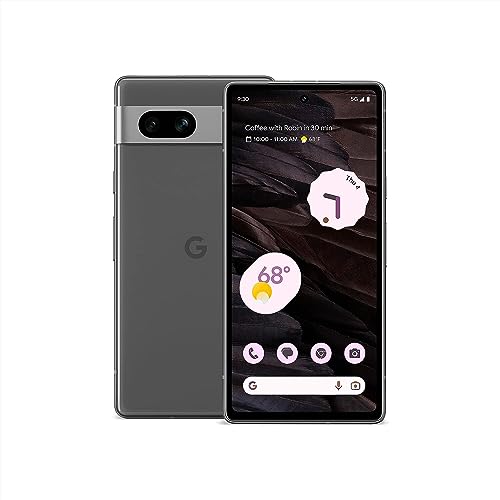
Google Pixel 7a — Best camera processing
The Pixel 7a is what happens when a company decides the camera software is the product. Its main camera hardware is respectable rather than spectacular, yet the photographs it produces routinely embarrass more expensive hardware, because Google’s processing handles the difficult moments, mixed indoor light, backlit faces, dusk skies, with a consistency that lets the photographer stop thinking about settings entirely. For the buyer upgrading from an old 16MP-era phone, the jump will feel less like a new camera and more like a new understanding of what their photographs were supposed to look like all along.
That reliability extends to the moments other cheap phones fumble. Children and pets move, and the 7a’s shutter behaviour and processing pipeline forgive more of that movement than most affordable rivals. Night photography, the traditional humiliation of budget cameras, becomes genuinely usable: street scenes keep their atmosphere instead of dissolving into noise, and indoor gatherings retain faces rather than smears. The front camera holds up its end for video calls and selfies with natural skin rendering that avoids the waxy smoothing cheaper phones apply by default.
As a phone rather than a camera, the 7a remains easy to recommend within its limits. It is compact by modern standards, its software support from Google is among the longest in this group, and its size suits one-handed photography at events where the other hand holds a drink, a programme, or a small person’s hand. Storage is not expandable, so heavy video shooters should manage their libraries deliberately, and charging is leisurely rather than rapid. Neither flaw dents its central claim: at an affordable price, this is the camera in the guide most likely to make an ordinary Tuesday photograph look considered.
- Main camera: comfortably beyond the 16MP class, with Google computational processing
- Front camera: suited to video calls and natural-looking selfies
- Storage in listing: 128GB, not expandable
- Software: Google Pixel Android with long update support
- Character: compact body, deliberate charging pace
Strengths
- Processing rescues difficult light that defeats other affordable cameras
- Consistent results let beginners simply point and trust the phone
- Long software support keeps camera features improving over time
Trade-offs
- Fixed storage punishes anyone who shoots lots of long video
- Charging speed trails several rivals in this ranking
- Compact screen feels small to buyers coming from large phones
Best for: anyone whose priority is photographs that look good without effort, skill, or editing afterwards.
Not suited for: heavy video shooters who need expandable storage and rapid top-ups.

Samsung Galaxy A16 5G — Best long-term value
The Galaxy A16 5G approaches the camera question from the ownership end. Its main camera sits far beyond the old 16-megapixel line and produces bright, pleasing photographs in the conditions most people actually shoot in: daylight, family interiors, school halls, holiday streets. Samsung’s processing favours vivid colour that looks cheerful on the phone’s own large AMOLED display, which is also where most owners will view their pictures, so the pairing of camera and screen is more coherent than a specification comparison suggests.
Where the A16 quietly outclasses rivals is in what happens after the photograph. Expandable storage means a cheap memory card absorbs years of pictures and video without the monthly anxiety of a filling phone, and Samsung’s extended update commitment for this class keeps the camera app and the phone’s security maintained long after similarly priced rivals are abandoned. For a buyer keeping a phone three or four years, which is most buyers at this price, those two facts are worth more than a marginal difference in any single photograph.
The compromises are the familiar affordable ones. Low-light photography is serviceable rather than magical, the ultrawide camera is a daylight tool, and the processor prefers a steady pace to a hurried one when the gallery is full of fresh video. None of that prevents the A16 from being the ranking’s most sensible all-round answer for a family buyer: a big, handsome screen, a camera that handles the family archive with confidence, and a support horizon that respects the purchase.
- Display: large AMOLED panel suited to photo viewing
- Main camera: multi-lens setup far beyond the 16MP class
- Storage: expandable by memory card
- Connectivity: 5G with US version availability as listed
- Software: Samsung Android with extended update commitment for its class
Strengths
- Expandable storage ends photo-library anxiety for years
- Large AMOLED screen flatters the photographs the camera takes
- Update support outlasts most phones at this level
Trade-offs
- Night photography is adequate rather than outstanding
- Ultrawide camera prefers daylight and static scenes
- Performance is steady rather than swift under heavy loads
Best for: family buyers who keep phones for years and photograph everything on them.
Not suited for: enthusiasts who judge a camera phone purely by its night mode.

Motorola Moto G Power 2025 — Best battery for shooting days
The Moto G Power 2025 understands a truth the specification wars ignore: the best camera at six in the evening is the one whose phone is still alive. Motorola’s Power line is built around endurance, and for photographers whose shooting happens at all-day events, festivals, matches, site visits, and family excursions, that endurance is a camera feature in its own right. The listed 50MP camera specification places it far beyond the dated threshold behind this search, and its daylight results are crisp, colourful, and entirely ready for sharing without apology.
Motorola’s software restraint helps the photography more than expected. The camera app opens quickly, the modes are where a hurried user guesses they will be, and the processing avoids the over-sharpened, over-saturated look that makes some affordable photographs age badly. Portraits separate subjects cleanly in good light, documents photograph legibly for work, and the phone’s generous storage configuration in this listing leaves room for the video clips that accumulate whenever a day goes well.
The honest limits are low light and longevity of support. Night results soften and grain in ways the Pixel in this guide handles better, and Motorola’s update commitments at this level are shorter than Samsung’s or Google’s, which matters to a buyer planning a long ownership. Set against those, the value case is straightforward: a big battery, a capable camera, clean software, and an affordable price is a combination aimed squarely at people who use a phone hard all day and charge it without thinking at night.
- Main camera listed: 50MP class
- Memory and storage in listing: 8GB RAM, 128GB
- Battery character: endurance-focused Power line design
- Software: near-stock Motorola Android experience
- Build note: Leaf Green finish in the listed configuration
Strengths
- Battery endurance covers full event days of shooting
- Clean, fast camera app suits hurried, one-handed use
- Daylight photographs are crisp and ready to share
Trade-offs
- Night photography softens sooner than the Pixel rival
- Update commitment is shorter than Samsung or Google offer
- Large body is a handful for smaller hands
Best for: event-goers, field workers, and travellers who shoot all day between charges.
Not suited for: night owls who photograph dim interiors more than daylight scenes.

Samsung Galaxy A15 5G — Lowest-cost sensible camera
The Galaxy A15 5G is the budget conscience of this guide, the phone for a buyer whose camera needs are real but modest and whose budget is genuinely tight. Its main camera, like every pick here, operates far beyond the old 16-megapixel benchmark, and in daylight it produces the bright, friendly photographs that made Samsung’s A-series the default recommendation for sensible buyers. Family pictures, property photographs, market and menu snaps, and the documentation of everyday life all come out looking the way their subjects hoped.
The renewed status of this listing is part of its value story and should be handled with open eyes. Renewed purchasing trades a lower price for the need to read grading, battery, and return terms carefully, and buyers who do that homework routinely end up with a great deal of phone for the money. What they receive is a handset with a bright display for reviewing shots, expandable storage for keeping them, and Samsung’s familiar camera app, whose scene handling helps inexperienced photographers more than its spec sheet suggests.
Expectations should stay calibrated. The A15’s processor takes a breath between tasks, its low-light photography is the weakest in this ranking, and video stabilisation is best treated as a walking-pace feature. Yet there is a large, honourable category of photographic life, birthdays in daylight, holidays, school plays from the third row, that this phone covers completely, and covering the real need at the lowest sensible price is a legitimate definition of best that this guide is happy to defend.
- Listing status: renewed, international version as described
- Main camera: far beyond the 16MP class
- Storage: expandable by memory card
- Display: bright panel suited to outdoor review
- Memory and storage in listing: 128GB configuration
Strengths
- Gentlest price among the sensible cameras in this guide
- Expandable storage suits years of family photographs
- Familiar Samsung camera app helps inexperienced shooters
Trade-offs
- Renewed listing requires careful reading of condition terms
- Low-light results are the softest in this ranking
- Processor pace shows when juggling camera and other apps
Best for: tight budgets with everyday daylight photography needs.
Not suited for: anyone photographing evening events as a primary use.

Google Pixel 9a — Newest affordable Pixel camera
If the Pixel 7a in this guide is the proven camera bargain, the Pixel 9a is its newer expression, and its listing advertises a 48MP AI camera with 8GB of memory in a 128GB configuration. Google’s affordable line has settled into a dependable rhythm: each generation inherits the processing intelligence of the flagships, applies it to sensible hardware, and produces photographs whose colour, dynamic range, and skin tones punch far above the price. For a buyer who wants the most current version of that formula without flagship spending, the 9a is the natural address.
The practical gains over older affordable phones show up in awkward light. Shop interiors with mixed bulbs, faces against bright windows, and evening streets all emerge balanced rather than blown out or buried, and the phone’s night capability turns casual evening photography from a gamble into a habit. Video benefits from the same steadiness of processing, and the front camera keeps video calls looking like the participants rather than their approximations. Because this listing is renewed, the usual condition checks apply, and buyers should weigh them against the discount the renewed route provides.
Living with the 9a holds few surprises, which is praise. Google’s software support stretches years ahead, the body is manageable in one hand, and the camera’s consistency means the gallery fills with keepers rather than experiments. Storage remains fixed, so committed video shooters should curate as they go, and the charging pace will not thrill anyone in a hurry. As the newest affordable answer to a very old specification question, though, it demonstrates how completely the megapixel era has been superseded by the processing era.
- Main camera listed: 48MP AI camera
- Listing status: renewed configuration
- Memory and storage in listing: 8GB RAM, 128GB
- Software: Google Pixel Android with long support horizon
- Front camera: suited to calls and selfies with natural rendering
Strengths
- Most current Google processing in this price class
- Awkward mixed light handled with unusual composure
- Long software support protects the purchase for years
Trade-offs
- Renewed listing means condition homework is required
- Fixed storage limits heavy video habits
- Charging speed is unhurried by current standards
Best for: buyers who want the latest affordable Pixel camera thinking at a renewed price.
Not suited for: shoppers who insist on brand-new stock with expandable storage.

TCL 50 XL 5G (T-Mobile) — Big-screen budget shooter
The TCL 50 XL 5G closes the ranking as the big-screen option, and its proposition begins with how photographs are experienced rather than how they are captured. A 6.78-inch FHD+ display refreshing at 120Hz makes reviewing, editing, and showing pictures a pleasure that smaller, duller panels cannot match, and for buyers whose phone is primarily a window onto family photographs and shared albums, that screen is a daily dividend. The listed 50MP camera and 5010mAh battery complete a specification that reads generously for the price, provided the buyer lives inside its one firm boundary.
That boundary is the network: this is a T-Mobile-only handset, as its listing states plainly, and it suits T-Mobile and compatible customers while being simply unavailable as an option for everyone else. Within that boundary, the camera performs as a modern affordable unit should, with bright daylight results, serviceable portraits, and processing that favours punchy colour for social sharing. TCL’s display expertise shows in outdoor visibility, which matters when framing a shot in hard sunlight, a small practical advantage that spec-led comparisons miss.
The trade-offs are those of its class and carrier. Low-light photography is honest rather than impressive, the software support horizon is shorter than the Samsung and Google entries here, and the large body that makes viewing pleasurable makes pockets work harder. For a T-Mobile customer who wants the biggest, brightest photographic window their budget allows, though, the 50 XL is a coherent and likeable answer, and a fitting final proof that the old 16-megapixel question now has many affordable answers far beyond it.
- Network: T-Mobile only, as listed
- Display: 6.78-inch FHD+ at 120Hz
- Main camera listed: 50MP
- Battery listed: 5010mAh class
- Finish in listing: Slate Gray
Strengths
- Huge, smooth display transforms photo reviewing and sharing
- Generous battery supports long shooting and viewing days
- Strong daylight camera results for its price class
Trade-offs
- T-Mobile exclusivity excludes other carriers entirely
- Night photography is the weakest part of its camera
- Shorter update horizon than Samsung or Google rivals
Best for: T-Mobile customers who live in their photo gallery and value screen size.
Not suited for: anyone on another carrier, for whom this phone is simply not an option.
How do you get better photographs from an affordable phone without spending more?
The cheapest camera upgrade available to any phone owner is light awareness. Affordable sensors are at their best when light is plentiful and at their most fragile when it is scarce, so small habits pay outsized dividends: face windows rather than turning your back to them, step into shade at midday instead of squinting into glare, and treat evening photography as a deliberate act, holding the phone still and letting the night mode finish its work rather than snatching at the moment. These habits close more of the gap to expensive phones than any accessory.
Clean the lens. It sounds insultingly simple, yet a phone that lives in pockets and hands carries a film of grease that scatters light, softens contrast, and manufactures the haze owners blame on cheap hardware. A two-second wipe on a shirt before an important photograph is the highest-value maintenance in all of mobile photography, and it costs nothing. Follow it with a tap on the subject to set focus and exposure where the story is, rather than where the phone guessed, and most affordable cameras suddenly look a class more expensive.
Learn the two or three modes your phone actually has. Portrait mode for people in decent light, night mode after dark, and the main camera for everything else covers nearly all of life; the panorama, beauty, and novelty modes exist mostly to fill a menu. Turn off aggressive beauty filtering if your phone applies it, because skin rendered as plastic ages terribly, and shoot at the camera’s default resolution rather than its maximum, since the default is where the processing pipeline does its cleverest merging work.
Finally, manage the library like it matters, because on affordable phones it does. A nearly full phone slows down, and a slow phone misses photographs. Offload favourites to a computer or cloud album monthly, keep a margin of free storage, and let the phone’s own organisation tools group faces and places so the archive stays findable. The reward is a camera that is ready in the moment, which, far more than any pixel figure, is what separates the phones whose owners love their photographs from the phones whose owners apologise for them.
How do these camera phones compare in the hand?
Compare these phones by the photographs you actually take rather than by their headline numbers, which are uniformly far beyond the threshold in the search that led here. The meaningful differences are processing character, battery endurance, storage philosophy, and how long each maker will keep the phone current.
| Pick | Standout quality | Main compromise | Choose it if |
|---|---|---|---|
| Google Pixel 7a | Processing that rescues difficult light | Fixed storage, slow charging | You want the most reliable photographs per press |
| Samsung Galaxy A16 5G | Expandable storage and long support | Night results merely serviceable | You keep phones for years and shoot everything |
| Motorola Moto G Power 2025 | Battery for all-day shooting | Shorter update commitment | Your photography happens at long events |
| Samsung Galaxy A15 5G | Lowest sensible price, expandable storage | Renewed listing, softest night shots | Your budget is tight and your scenes are bright |
| Google Pixel 9a | Newest Google camera generation | Renewed listing, fixed storage | You want current processing at a discount |
| TCL 50 XL 5G (T-Mobile) | Largest, smoothest viewing screen | T-Mobile only, modest night camera | You live on T-Mobile and in your gallery |
How do you check a camera phone listing before you buy it?
Read the listing the way an insurer reads a claim: looking for what is specified, what is vague, and what is missing. Confirm the exact model and storage configuration, because affordable phones are sold in several variants under one name and camera hardware occasionally differs between them. Note whether the listing is new or renewed, which carrier it suits, and whether the seller’s description of condition, battery, and included accessories matches the price being asked. Two minutes of this reading prevents most of the disappointment in budget phone buying.
Then verify the camera claims against the manufacturer’s own specification page for that exact model, a step that takes moments and settles arguments permanently. Listings occasionally inherit descriptions from sibling models, and the manufacturer’s page is the ground truth for sensor configuration, front camera capability, and video features. If the listing and the manufacturer disagree, believe the manufacturer and price the phone accordingly, or choose a different listing whose paperwork is in order.
When the phone arrives, test the camera before anything else, while returns are effortless. Photograph a face indoors, a bright window scene, a document, and a dim room; check focus speed, colour, and whether the night mode engages and delivers. Inspect the lens for scratches on renewed stock, confirm the front camera is clean for calls, and shoot a short video while walking to judge stabilisation. A phone that passes those ten minutes will almost certainly serve its photographic life honourably.
What mistakes do camera-phone buyers make when they shop by megapixels?
Leading with the pixel count is the original mistake, and it persists because the number is easy to compare while quality is not. A buyer who chooses the highest megapixel figure in a price bracket routinely ends up with the weakest processing, the smallest sensor budget, and photographs that look worse than a lower-count rival’s. The manufacturers know this, which is why the number is printed largest. Read it last, after processing reputation, and the entire market rearranges itself into better order.
Forgetting the front camera is the second error, and a modern one. For many households the front camera now takes more photographs and carries more video calls than the rear array, yet buyers compare rear specifications exhaustively and never ask how they will look on a call with their grandchildren. Every pick in this guide was checked for a competent front camera, but buyers shopping alone should make that check themselves, because no rear-camera excellence compensates for looking like a watercolour on every call.
The third mistake is buying storage as an afterthought. Photographs and especially video consume space relentlessly, and a cheap phone filled to the brim slows down, refuses updates, and starts deleting the owner’s patience along with their burst shots. Either choose expandable storage, as the Samsung entries here offer, or budget the discipline of regular offloading into the purchase. The fourth mistake is ignoring update support: camera software improves through updates, and a phone abandoned by its maker photographs at its worst on the day it is bought and never improves, while supported rivals quietly get better in your pocket.
How do sensors, lenses, and software each shape an affordable camera phone’s pictures?
Think of a phone photograph as the product of three budgets spent in sequence. The lens gathers light and decides how much of the scene arrives sharp; the sensor converts that light into data and decides how much noise comes with it; the software interprets the data and decides what the picture finally looks like. Affordable phones economise on all three, yet they economise unevenly, and that unevenness is why two phones with similar headline cameras produce such different galleries. A buyer who learns to ask where a phone spent its budget will predict its photographs far better than a buyer comparing megapixel figures.
The lens is the budget shoppers most often forget. A wider aperture drinks more light, which is why the same sensor can look competent in one phone and helpless in another after dark, and why portrait backgrounds soften pleasingly on some models and stay stubbornly sharp on others. Lens quality also decides the edges of the frame, where cheap optics smear detail that the centre keeps. None of this appears in marketing, yet it explains the lived difference between the picks above: their sensors are cousins, while their lenses and the processing behind them are what separate a keeper from a near miss.
Sensors reward size over count, a sentence worth memorising in this category. A larger sensor with fewer, bigger pixels usually outperforms a smaller sensor boasting a higher number, particularly once light fades, because each pixel gathers enough light to describe the scene rather than guess at it. Affordable phones increasingly use pixel-binning, merging neighbouring pixels to imitate that larger-pixel behaviour, which is another reason the headline figure misleads: a camera advertised at a high count often photographs at a quarter of it, deliberately, and is better for doing so.
Software is where the modern contest is actually decided, and its fingerprints are everywhere in the picks above. Google’s processing leads this group because the company treats the photograph as a computation first and a capture second, merging exposures and applying learned colour decisions that rescue scenes other phones abandon. Samsung leans toward vivid immediacy that flatters screens and social sharing, while Motorola’s restraint produces files that age gracefully. None of these philosophies is wrong; they are tastes, implemented in code, and choosing between them is closer to choosing a film stock than to choosing a specification.
Video draws on all three budgets at once and adds a fourth: stabilisation. Affordable phones now record respectable everyday video, yet the difference between a clip that feels calm and one that feels seasick is the quality of the stabilisation and the processing behind it. Travellers and families should test video while walking, because that is how it will be used, and should expect the phones with the strongest stills processing to lead here too. The camera that thinks fastest usually films steadiest, an unglamorous correlation that holds across this entire price class.
There is a final, unfashionable factor: the camera app itself. A shutter that fires when pressed, a gallery that opens without hesitation, and modes arranged where a hurried thumb expects them decide whether photographs get taken at all. Some of the most technically capable affordable cameras lose their owners’ affection to a slow interface, while humbler phones become beloved because they are always ready. When you test a candidate in a shop, open the camera from the lock screen and take three photographs quickly; that small pantomime predicts a year of ownership better than any demonstration the salesperson offers.
All of which returns to the number that started this guide with a kind of affection. Sixteen megapixels was an honest milestone in its decade, a point where phone cameras became real cameras, and the affection people still feel for the figure is understandable. What the intervening years changed is not the value of resolution but its rank: it now sits fourth or fifth in the list of things that decide a photograph, behind light, lens, sensor, and software. Buy in that order, and any of the six phones above will feel less like a compromise and more like what it is, a small miracle of computation that happens to make calls.
Video deserves a paragraph of its own, because many buyers discover after purchase that they shoot more of it than stills. Affordable phones now record competent everyday video, yet stabilisation quality varies sharply between models, and the honest expectation is smooth footage at a walking pace rather than running after a child across a park. If video of family sport or travel is central to the purchase, weight the picks with the steadiest processing reputations, and remember that a few seconds of deliberate, slower panning will flatter any phone in this class far more than its specification sheet will.
One more quiet factor separates satisfying camera phones from frustrating ones: shutter responsiveness. A camera that opens instantly and fires when pressed captures the expression that existed; a camera that hesitates captures the one that replaced it. This quality rarely appears in listings, yet it shapes owner happiness daily, and it is a large part of why the processing-led phones in this ranking earn their positions ahead of rivals whose paper specifications look similar.
One habit separates the galleries of satisfied owners from everyone else’s, and it has nothing to do with the phone: reviewing photographs on a larger screen occasionally. Flaws invisible on the handset, soft focus, tilted horizons, a thumb’s edge in the corner, announce themselves on a tablet or computer while there is still time to adjust technique. A monthly ten minutes with the month’s pictures teaches more about a camera’s character than a specification sheet ever will, and it turns an affordable phone from an appliance into an instrument its owner actually understands.
A protective case with a raised lip around the camera lenses is the cheapest photographic accessory ever sold, because a scratched lens softens every picture for the rest of the phone’s life and no software can argue with physics.
Photograph the same scene with the standard and the high-resolution modes before deciding which to use daily, because on many affordable phones the standard mode’s merged output looks better in ordinary light than the headline figure suggests.
Keep the camera’s grid lines switched on for a month and horizons will straighten themselves almost without thought, a small compositional discipline that makes family photographs look quietly professional.
Faces deserve the tap: touching the screen on the subject’s face before shooting tells the phone where exposure and focus matter, and it rescues more portraits than any editing application installed afterwards.
Back up the gallery before a holiday rather than after it, so the phone begins the trip with space to spare and the owner is not deleting photographs of the first day to make room for the second.
When photographing children, crouch to their height and let the camera meet their world at its own level; affordable phones reward that change of angle more than any change of settings in their menus.
A photograph of a document is a small contract with the future: fill the frame, square the page, check the smallest line of text is legible, and only then put the paper away.
Share photographs at the size the recipient needs rather than the size the phone offers, because a grandparent opening a message on an old tablet is better served by a clear, modest file than by a masterpiece that never finishes downloading.
Trade-in and upgrade timing is the quiet economics of the affordable camera phone. Makers revise these models annually, and the outgoing generation’s price falls precisely when its replacement is announced, which makes the season around a launch the rational moment to buy the phone that was reviewed all year. The picks above include exactly such seasoned models, whose cameras have been tested by millions of owners and whose flaws are documented rather than rumoured. A buyer who values certainty over novelty will consistently find the best affordable camera phone one generation behind the headlines, wearing a discount the launch created.
There is a household division of labour worth considering before purchase. In many families one person becomes the designated photographer by enthusiasm rather than election, and the family archive’s quality depends on that person’s phone alone. Equipping the archivist with the strongest camera in this guide, and the rest of the household with the longest-support or largest-battery picks, produces a better collective result than spreading the same money evenly. It is an unfashionable strategy and an effective one, because photographs are shared goods while battery life and storage are private ones.
Accessories can close part of the gap to expensive phones for very little money. A small tripod or a phone grip transforms night and group photography on any of these handsets, a clip-on light flatters video calls, and a case with a lens lip protects the optics that decide everything. None of these objects costs much beside the phone itself, and together they address the affordable camera’s real weaknesses, stability, light, and survival, more directly than a model upgrade one tier higher would. Buy the phone for its processing, then spend the small change on its circumstances.
Finally, remember that the camera you keep is the camera that matters, and affordable phones are kept or discarded on the evidence of their first month. Set the new phone’s camera up properly in the first week, learn its night mode before the first evening event, move the old gallery across completely, and take it through one real occasion while the return window is open. A phone that survives that apprenticeship becomes the family camera for years; one that disappoints should go back while going back is free, because affection for a camera phone rarely grows after a poor first month.
Weather changes camera phones more than reviewers admit. Cold drains batteries and slows screens, rain makes touch controls mutinous, and bright coastal light defeats displays that looked generous in a shop. The phones in this guide are mainstream devices with mainstream tolerances, and the traveller’s habits matter more than the model: keep the phone warm in an inside pocket in winter, learn the hardware shutter shortcut where one exists, and shade the screen with your own shadow when framing at noon. A camera’s specification is written for a laboratory; its photographs are taken in the world, and the gap between those places is filled by the owner’s small preparations.
Grandparents are the hidden design brief behind half the photographs these phones will ever take, both as subjects and as photographers. As subjects they deserve processing that respects faces rather than smoothing them into porcelain, which is where the Pixel entries here earn their affection. As photographers they deserve a camera application that opens fast, focuses without negotiation, and forgives a slower press, qualities that never appear in advertisements and decide everything in a kitchen at a birthday. When choosing between near-equal picks for a family, choose the one whose camera your least technical relative operated successfully in the shop, because that test predicts the archive better than any benchmark.
The last photographic habit worth importing from expensive cameras costs nothing: shoot the scene twice, once as it presents itself and once after stepping two paces closer. Affordable phones reward proximity disproportionately, because their lenses and sensors are at their best in the near field, and the closer frame is very often the one that survives the year’s editing. It is a small discipline, easily forgotten in the moment, and it explains why two owners of the identical phone can produce galleries of entirely different quality across the same family events.
Hold the finalists to one last, homely test before ordering: hand the phone to the person who will receive your photographs most often and let them judge the pictures blind, without names or prices attached. The camera that wins that small, honest contest is very often the right purchase, because photographs exist to be looked at, and the looking, in the end, is the only specification that cannot be argued with.
Buy the phone on a weekday morning, set it up the same evening, and photograph something that matters before the week is out, because a camera phone judged quickly and honestly is a purchase settled, and settled purchases are the ones households actually enjoy.
Then put the box away, keep the receipt somewhere findable, and let the phone get on with the unglamorous, honourable work of recording a family’s ordinary days, which is, after all, the work this entire guide has been about from its first paragraph to this one.
Final Recommendation
Start with the Pixel 7a if photographs are the point of the purchase, because its processing delivers the most dependable results in this group at an affordable price, and consider the Pixel 9a if you want that same philosophy in its newest form at a renewed discount. Choose the Galaxy A16 5G for the longest, calmest ownership, the Moto G Power 2025 for days that outlast ordinary batteries, the Galaxy A15 5G when the budget is the binding constraint, and the TCL 50 XL if you are on T-Mobile and live on a big screen.
The specification that started this search belonged to another decade’s flagship phones, and the most useful thing a modern buyer can do with it is smile, note that every serious affordable phone now clears it several times over, and spend their attention instead on processing, light, and the small habits that make any camera, at any price, take photographs worth keeping.
Frequently Asked Questions
Do I still need to look for exactly 16 megapixels?
No. That figure described flagship cameras around a decade ago, and every credible affordable phone today exceeds it by a wide margin. Treat it as a minimum from an old checklist rather than a target, and judge phones by processing quality, low-light behaviour, and owner satisfaction instead.
Why do phones with fewer megapixels sometimes take better pictures?
Because photograph quality depends on sensor size, lens quality, and especially image processing. Phones that merge multiple exposures and apply mature computational photography produce cleaner, better-balanced images than a high pixel count on modest hardware with weak software.
Which of these phones is best after dark?
The two Google Pixels lead this group at night, with the 7a the proven bargain and the 9a its newer counterpart. Samsung and Motorola entries here handle evening scenes adequately, but their results soften and grain sooner once light becomes genuinely scarce.
Is a renewed phone a safe way to buy a better camera?
It can be an excellent route, provided the listing’s grading, battery description, and return terms are read carefully and the seller is reputable. Renewed stock is how several picks in this guide reach their prices, and the checks take only a few minutes.
How much storage do photographs really need?
Photographs alone are modest, but video is voracious, and a busy family shooter can fill 128GB within a couple of years. Expandable storage, as on the Samsung picks here, removes the worry entirely; otherwise plan regular offloading to a computer or cloud album.
What single habit improves cheap-phone photographs most?
Wiping the lens before important shots. Pocket grease scatters light and softens every image, and removing it costs two seconds. After that, facing your subject toward the light and holding still for night mode deliver the largest improvements.
Related Guides
Keep exploring with affordable camera phones compared and budget phone photography tips and renewed phone buying checks.
Related guides
- Best Basic Phones Camera Buyers Can Trust: Flip Phones and Simple Handsets That Still Take a Photograph
- Best 3 Camera Cell Phones: Six Triple Systems Where Every Lens Earns Its Place
- Best 10MP Camera Phones: Why the Honest Answer Is a Simple, Modern Camera
- Best Bargain Smart Phones With Camera: Real Photographs Without the Flagship Bill