What's inside
- Key Takeaways
- Quick Picks
- How Did We Choose These Picks?
- Why Is There No New 4K Laptop at This Price?
- How Do the Routes Compare Side by Side?
- How Should You Shop a Discontinued Class Without Getting Burned?
- What Mistakes Do Buyers Make at This Budget?
- How Long Can a Discontinued Flagship Realistically Serve?
- What Should You Do in the First 48 Hours With a Survivor?
- How Does This Budget Tier Look From the Seller’s Side of the Table?
- How Should Different Buyers Rank the Three Real Routes?
- What Happens to This Tier Next?
- How Should You Decide Between the Survivors on a Single Evening’s Research?
- What About Refurbished Channels Beyond the Linked Listings?
- How Should You Talk Yourself Out of the Wrong Purchase Here?
- A Closing Word for the Reader Who Came for a Bargain and Found a Lesson
- A Pocket Rule to Take Away
- Final Recommendation
- Frequently Asked Questions
- Related Guides
As an Amazon Associate I earn from qualifying purchases. This post may contain affiliate links at no extra cost to you.
gizmoverdict.com is reader-supported. When you buy through links on our site, we may earn an affiliate commission.
Where to buy: Three of the routes below carry links to surviving listings for discontinued flagships; the other three are prose-only discussions, kept link-free deliberately. Whatever you open in this category, start with the condition statement, the seller’s name, and the panel’s native resolution, in that order, since few markets punish a skim-reader as reliably as this one.
This guide begins with the sentence its keyword does not want to hear: a new 4K laptop under $800 does not exist. Not from Dell, not from ASUS, not from anyone, not this year. The best 4k laptops under 800, as a living category of current products, is empty, and any guide that fills it with cheerful current models is quietly redefining 4K to mean whatever it needs to mean. What genuinely exists at this budget is more interesting than the fiction: a small residue of discontinued OLED flagships whose panels were built for four-figure machines, a near-4K modern alternative that many buyers will honestly prefer, and a completely different route, an external 4K monitor, that delivers more pixels per unit of money than any laptop in this article.
The three linked picks share a biography. Each is a former flagship with a true 3840 by 2160 OLED panel, the MSI Creator 15, the ASUS ZenBook Flip S 13, and the Dell XPS 15 7590, built between 2019 and 2021 and still listed while stock and channels last. Their processors belong to their eras, their batteries have lived lives, and their prices drift with remaining supply rather than with any manufacturer’s list. What has not diminished is the reason anyone searches this keyword: the screens. A UHD OLED from the flagship years still shows colour and contrast that a new budget laptop cannot approach, because panel quality was the entire point of those machines.
The three prose-only entries complete the honest map. A current 3K OLED gaming-creator laptop shows what “nearly 4K” buys in a modern machine. The XPS 7590’s i9 flagship variant illustrates how the same retired nameplate stratifies as stock thins. And the external-monitor route, the pragmatic champion of this whole category, gets its own full discussion, because for a great many readers it is the correct answer wearing an unexpected shape.
Budget language in this guide stays at the level of tiers and trade-offs, never attached as a price tag to an individual machine, because discontinued stock pricing moves with sellers and seasons. What can be said stably is the shape of the choice: at this budget you are always trading among panel truth, platform youth, and condition certainty, and you may pick, realistically, two of the three. The sections below exist to help you choose which two, knowingly.
Key Takeaways
- There is no new 4K laptop at this budget tier; the three linked picks are discontinued flagships from 2019 to 2021 whose UHD OLED panels remain their entire appeal.
- True 4K means a 3840 by 2160 panel; listings at this price advertising 4K with FHD+ or QHD+ resolutions are borrowing the word, and the resolution line exposes them.
- The ZenBook Flip S 13 is the size exception: a 13.3-inch 4K UHD OLED convertible from the 11th-generation Intel era, with a full terabyte of storage.
- A modern 3K OLED machine at 2880 by 1800 is the honest near-4K alternative, trading a measure of resolution for a current platform and support.
- Pairing an affordable laptop with an external 4K monitor is the most practical route to a real 4K workspace at this budget for desk-based buyers.
Quick Picks
| Pick | Badge | Why it earns its place |
|---|---|---|
| MSI Creator 15 | Youngest true-4K survivor, 2021 | Eleventh-generation silicon, a GeForce RTX 3060, and a colour-complete UHD OLED make this the least dated route to a genuine 4K panel anywhere near this tier. |
| ASUS ZenBook Flip S 13 | Smallest true 4K, convertible | A 13.3-inch 4K UHD OLED touch panel in a flip body, with 16 gigabytes of memory and a terabyte of storage from the 11th-generation era. |
| Dell XPS 15 7590 | The classic, 2019 | The era’s defining 4K laptop, InfinityEdge touch panel and a terabyte of storage, for buyers who accept its generation knowingly. |
| ASUS ROG Zephyrus G14 with 3K OLED | Prose-only: the modern near-4K answer | Its 2880 by 1800 OLED is not 4K and does not pretend otherwise here; in exchange it offers a current platform and modern performance. |
| Dell XPS 15 7590 with Core i9 | Prose-only: flagship variant, thinning stock | The maximal 2019 configuration exists in the same channels, but availability shifts too much for a standing link to serve readers honestly. |
| An external 4K monitor pairing | Prose-only: the pragmatic champion | A capable affordable laptop plus a desktop 4K display delivers a true 4K workspace with current hardware where you sit at a desk. |
How Did We Choose These Picks?
The methodology for this guide was mostly subtraction. We required a genuine 3840 by 2160 panel, verified at the resolution line of each listing, and that requirement dissolved the apparent market: modern machines at this budget carry FHD, FHD+, or QHD+ panels whatever their headlines claim, and the only true-4K laptops the budget can reach are the discontinued flagships whose remaining listings persist. Rather than pretend otherwise, we built the guide around that residue and judged the survivors on panel quality, platform youth within their discontinued context, and configuration completeness.
The prose-only tier was chosen to represent the three honest alternatives a real buyer weighs. The near-4K modern machine answers the reader who values youth over the last increment of resolution. The flagship XPS variant answers the reader hunting the strongest version of a retired nameplate. The external monitor answers the reader whose work happens at a desk and whose real requirement is a 4K workspace, not a 4K laptop as a matter of doctrine. Each is discussed with its trade-offs in the open, and none carries a link, because the point of the tier is judgement rather than transaction.
Condition literacy runs through the whole selection. Discontinued stock arrives through varied channels, sometimes new-old-stock, sometimes marketplace sellers, occasionally renewed under the same nameplate. We therefore treated every pick’s review as incomplete without its condition cautions, and the mistakes section teaches the checks that protect a buyer in this market. A guide to a discontinued class that skips condition is not a guide; it is an advertisement for disappointment.
Why Is There No New 4K Laptop at This Price?
Panels are the most expensive component in a creator laptop, and a true UHD OLED panel remains a flagship component with flagship economics. Manufacturers place such panels where the whole machine’s price can carry them, in creator and premium lines whose other components, processors, graphics, memory, chassis, are specified to match. A hypothetical new laptop built around a genuine 4K OLED but priced for this budget would need to economise everywhere else so severely that no maker wants its badge on the result. The market’s silence on the concept is not a conspiracy; it is arithmetic.
Resolution economics push the same direction from below. At mainstream laptop sizes, QHD+ and 3K-class panels deliver most of the perceived sharpness of UHD at a fraction of the panel cost and power draw, which is why the modern near-4K machines discussed later in this guide exist and sell well. The gap between “looks wonderfully sharp” and “is literally 3840 by 2160” is real but narrow, and manufacturers have decided, with their customers’ wallets agreeing, that the narrow gap belongs to the flagship tier.
The discontinued flagships slip through this arithmetic by accident of timing. Their panels were paid for by flagship budgets in 2019, 2020, and 2021; the machines’ remaining listings are priced by stock clearance and channel dynamics rather than by component cost. That is the entire opportunity in this category, and also its entire risk: you are buying yesterday’s flagship economics at today’s budget tier, with yesterday’s platform and an uncertain condition as the consideration. Readers who understand that sentence understand this guide.
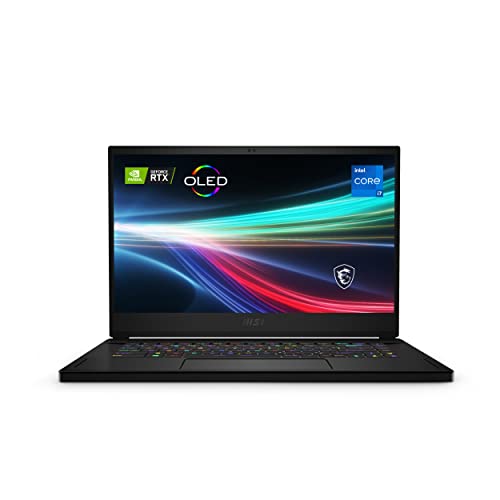
MSI Creator 15 — Youngest true-4K survivor, 2021
Within a discontinued class, youth is relative, and the Creator 15 is the youngster here: a 2021 flagship carrying an 11th-generation Core i7-11800H and a GeForce RTX 3060 behind its 15.6-inch UHD OLED panel with full DCI-P3 coverage. That combination matters for a budget buyer because it stretches the machine’s useful software life furthest. The RTX 3060 remains a working creative card, the processor is two generations newer than the XPS below, and Thunderbolt 4 keeps the docking and storage story compatible with peripherals bought today. If a reader wants genuine 4K at this tier with the least generational compromise available, this is the listing to study first.
The panel carries the familiar flagship virtues: OLED contrast that makes dark scenes legible, colour coverage that photo and video work can trust, and the sheer pixel density that makes text and detail at 15.6 inches feel carved rather than rendered. Sixteen gigabytes of memory serves editing and design workloads of moderate scale, while the 512-gigabyte drive is the configuration’s tight figure, best paired with an external drive habit from the start. The listing’s Windows 10 heritage is part of the purchase conversation, as with every survivor in this guide.
Condition discipline applies with full force. Confirm what state the machine is sold in, who is selling it, and what returns protection stands behind it, and test the panel and battery promptly on arrival. Bought with those checks performed, the Creator 15 is the strongest argument that this strange, discontinued category can still serve a careful buyer well.
- Panel: UHD OLED at 15.6 inches, full DCI-P3 coverage
- Storage: 512GB NVMe SSD
- Memory: 16GB
- Graphics: NVIDIA GeForce RTX 3060
- Chip and platform: Intel Core i7-11800H (11th generation), Thunderbolt 4, Windows 10
Strengths
- The newest platform among the true-4K survivors, with graphics that still work for a living.
- A full DCI-P3 UHD OLED panel delivers colour this budget cannot otherwise buy.
- Thunderbolt 4 keeps modern docks and fast storage fully usable.
Trade-offs
- Discontinued status means condition and channel checks are part of the purchase.
- The 512-gigabyte drive needs external help for media libraries.
- Its software runway, while the longest here, is finite compared with any current machine.
Best for: colour-focused buyers who want genuine 4K at this tier with the freshest surviving platform. Not suited for: buyers who need a new machine’s warranty story or a long support horizon.
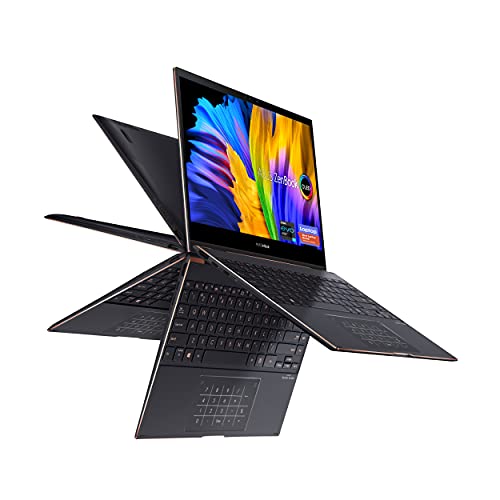
ASUS ZenBook Flip S 13 — Smallest true 4K, convertible
The Flip S 13 is the eccentric of the trio, and its eccentricity is size: a 13.3-inch 4K UHD OLED touch panel in an ultra-slim convertible body, a combination no current lineup attempts. Built around an 11th-generation Core i7-1165G7 with Iris Xe graphics, 16 gigabytes of memory, and a full terabyte of storage, it was ASUS’s jewel-box flagship of its era, the machine for executives and creators who wanted a gallery-quality screen in a handbag-sized computer. The flip hinge turns it into a presentation and annotation surface, and the OLED panel makes everything it shows look expensive, because when it launched, it was.
Its working character differs from the other survivors in ways a buyer should savour rather than stumble into. Iris Xe integrated graphics suit photo work, design, writing, and media beautifully and suit heavy video timelines or gaming hardly at all; this is a colour and portability instrument, not a render engine. The terabyte of storage, double the Creator 15’s figure, flatters the machine’s role as a self-contained travelling library. Jade Black finish and the era’s premium fit complete a laptop that still turns heads in meetings, which for some professional lives is a feature with a revenue line attached.
The cautions are the class’s cautions, sharpened by the form factor. A slim discontinued convertible concentrates its battery and hinge as the components to inspect, and its support story belongs to its era. For the buyer whose priority is a genuine 4K OLED in the smallest, most elegant surviving package, no other listing in this guide competes. For the buyer who needs graphics muscle, the Creator 15 stands one section above, wearing its priorities just as openly.
- Display: 13.3-inch 4K UHD OLED touch, convertible
- Processor: Intel Core i7-1165G7, 11th generation
- Graphics: Intel Iris Xe
- Memory: 16GB
- Storage: 1TB SSD, Thunderbolt 4, Windows 10 Pro, Jade Black
Strengths
- A true 4K OLED in a 13.3-inch convertible body is a combination the current market does not offer at all.
- A terabyte of storage makes it the most self-contained traveller among the survivors.
- Premium design and touch presentation suit client-facing professional work.
Trade-offs
- Integrated graphics cap video and 3D ambitions well below the Creator 15.
- The slim convertible’s battery and hinge deserve prompt inspection on arrival.
- Its era’s support horizon applies in full.
Best for: mobile professionals and photo-led creators who prize the smallest genuine 4K OLED package. Not suited for: video editors with heavy timelines, gamers, or buyers needing discrete graphics.

Dell XPS 15 7590 — The classic, 2019
The XPS 15 7590 is the reason this category has a memory at all. In 2019 its formula, a 15.6-inch 4K UHD InfinityEdge touch panel, a 9th-generation Core i7-9750H, a GTX 1650, 16 gigabytes of memory, and a terabyte of storage inside Dell’s aluminium-and-carbon flagship design, was close to the definition of a creator laptop. The listing persists because the definition lingered in buyers’ minds long after production ended. Approached honestly, the machine offers exactly what it offered then, minus seven years of platform progress: a beautiful 4K touch canvas in the class’s most admired body.
What a 2026 buyer receives deserves precise language. The panel remains the experience, with the InfinityEdge presentation that made bezels unfashionable across the industry. The terabyte of storage remains genuinely useful. The processor and graphics are period instruments, adequate for photo editing, design, documents, and moderate media work within period expectations, and increasingly distant from modern gaming or heavy video demands. Windows-era software considerations and battery condition on surviving stock are not footnotes; they are the purchase.
This linked listing states its configuration plainly, which in this market is a virtue to reward. The same nameplate also moves through renewed channels and in an i9 variant discussed below, so keep the columns separate in your mind: this is the specified i7 configuration through its standing listing. Buyers who want the classic and can verify its condition are buying a piece of the format’s history that still works for its living. Buyers who need a modern machine should let the prose-only alternatives redirect them without hard feelings.
- Panel: InfinityEdge touch, 15.6 inches at 4K UHD
- Storage: 1TB SSD
- Graphics: NVIDIA GTX 1650 with 4GB GDDR5
- Memory: 16GB
- Chip and era: Intel Core i7-9750H, a 9th-generation part
Strengths
- The defining design of the 4K 15-inch era, with a touch panel modern lineups omit.
- A terabyte of internal storage serves photo and project libraries without immediate help.
- A plainly stated configuration in a market segment that often blurs them.
Trade-offs
- Ninth-generation performance is the oldest platform among the linked picks.
- Battery condition on surviving stock varies and must be tested early.
- The nameplate’s renewed and variant traffic demands careful listing comparison.
Best for: devotees of the classic XPS formula who buy its panel and design knowingly. Not suited for: modern performance seekers, or buyers who cannot verify condition within a returns window.
ASUS ROG Zephyrus G14 with 3K OLED — Prose-only: the modern near-4K answer
This entry carries no link and makes a confession in its title: the Zephyrus G14’s OLED panel runs at 2880 by 1800, which is a 3K-class resolution, not 4K. We include it because a large share of readers searching this keyword want two things that pull apart, a strikingly sharp OLED screen and a modern machine at a reachable tier, and this laptop is what the current market actually offers at their intersection. The honest comparison is pixel arithmetic: 2880 by 1800 holds roughly five million pixels against UHD’s eight million, and at 14 inches the perceived sharpness gap narrows further, while the OLED colour and contrast that made the discontinued flagships desirable are fully present.
What the near-4K route buys in exchange for those missing pixels is everything the survivors cannot offer: a current platform with years of software runway, modern graphics for editing and gaming, a live warranty and support story, and battery behaviour from this decade. For a student, a young creator, or anyone whose laptop is a primary tool rather than a connoisseur’s instrument, that exchange is frequently the correct one, and a guide that hid it to protect its own keyword would be serving itself instead of its reader.
We keep it prose-only for a principled reason: this is a guide to 4K laptops, and linking a 3K machine as though it belonged would repeat the exact borrowing this article criticises in other listings. Consider it seriously, buy it with its real resolution understood, and it may be the most satisfying purchase described on this page. Just let the decision be yours, made with the numbers visible.
- Display class: OLED at 2880 by 1800, a 3K-class panel, not 4K
- Format: 14-inch creator-gaming laptop, current generation
- Platform: modern processor and graphics with current support
- Role in this guide: the honest near-4K alternative to discontinued flagships
- Buying note: compare perceived sharpness at its size, not headline labels
Strengths
- OLED colour and contrast match the flagship experience readers actually remember.
- A current platform brings modern performance, support, and software runway.
- At 14 inches, the sharpness difference from true 4K is smaller than the pixel count suggests.
Trade-offs
- It is not 4K; pixel-critical work at native UHD resolution is beyond its panel.
- Its pricing floats with the current market rather than clearance dynamics.
- Gaming-led design language may not suit every professional setting.
Best for: buyers who want OLED brilliance and a modern machine more than literal UHD. Not suited for: buyers whose work requires a true 3840 by 2160 internal panel.
Dell XPS 15 7590 with Core i9 — Prose-only: flagship variant, thinning stock
The i9 configuration of the XPS 7590 was the maximal form of the classic: the eight-core i9-9980HK at the top of Intel’s 9th-generation mobile range, 32 gigabytes of memory, a terabyte of storage, and the same 4K InfinityEdge presentation as its i7 sibling linked above. In its day it was the specification buyers chose when the budget conversation had already been won. Today it survives in the same channels as the rest of the retired class, but with stock thin enough and listings variable enough that a standing recommendation would mislead more than it helped, which is why this entry discusses the variant without linking it.
The variant’s interest for a budget reader is stratification. As discontinued stock thins, the maximal configurations often surface through specialist sellers and renewed channels at unpredictable moments, and a prepared buyer who knows the specification can recognise a fairly offered example when one appears. The knowledge to carry is the configuration itself, i9-9980HK, 32 gigabytes, a terabyte, and the discipline to verify each element, plus battery and panel condition, before nostalgia converts into payment.
Nothing about the variant repeals the class’s rules. It is a 2019 flagship, with a 2019 platform’s horizons, and its extra memory and processor peak improve period workloads rather than modernising the machine. Treat it as the connoisseur’s version of the linked i7 car, rewarding to find in verified condition, and never a reason to skip the checks this guide keeps repeating.
- Configuration: Core i9-9980HK, 9th generation flagship
- Memory and storage: 32GB and 1TB in the maximal build
- Panel: the model’s 4K UHD InfinityEdge display
- Availability: thin and variable across channels
- Buying note: verify every configuration element and the unit’s condition individually
Strengths
- The fullest original specification of the class’s most loved model.
- Thirty-two gigabytes of memory remains useful for photo and design workloads.
- Knowledge of the variant lets prepared buyers recognise a fair example quickly.
Trade-offs
- Availability is too unstable for a standing linked recommendation.
- Platform age and condition variables apply exactly as with its sibling.
- Maximal period specifications do not translate into modern performance.
Best for: informed hunters who know the configuration and can verify a unit on appearance. Not suited for: buyers who need a predictable, immediately orderable machine.
An External 4K Monitor Pairing — Prose-only: the pragmatic champion
The final entry is not a laptop at all, and for desk-based readers it may be the most useful paragraph in this guide. A capable, affordable current laptop, the kind this budget buys well, paired with a desktop 4K monitor delivers a genuine 3840 by 2160 workspace with modern hardware, a live support story, and a screen far larger than any laptop panel. Photo editors gain a grading canvas with room for palettes and timelines; writers and researchers gain document space that changes how work feels; and the laptop remains a portable, current machine when it leaves the desk. Judged by pixels honestly delivered per unit of budget, this route beats every laptop in the article.
The pairing’s logic deserves the same rigour as any pick. The laptop should carry a port that drives the monitor at full resolution and refresh, which modern USB-C and HDMI outputs handle as routine. The monitor should be chosen on panel quality and colour behaviour rather than on the 4K badge alone, because desktop monitors repeat the laptop market’s habit of borrowing glory words. Cables and a simple dock complete a setup whose total capability, current silicon plus a large true-4K screen, exceeds what any single discontinued laptop offers a desk worker.
Its limits are equally plain: the 4K experience lives at the desk and travels nowhere. Readers whose work happens in cafés, studios, and client offices need the pixels in the lid, and for them the survivors above remain the honest options. But readers who asked this keyword a question their desk could answer should notice that the best 4K workspace at this budget might never have been a laptop, and that noticing it is worth the whole article.
- Concept: current affordable laptop plus a desktop 4K monitor
- Panel: true 3840 by 2160 at desktop sizes, chosen on colour behaviour
- Connection: USB-C or HDMI output at full resolution from the laptop
- Role in this guide: the highest-value route to a real 4K workspace at this budget
- Buying note: budget the cable or dock as part of the setup
Strengths
- Delivers genuine 4K with current, supported laptop hardware.
- A large desktop canvas transforms editing, design, and document work.
- The laptop stays modern and portable when away from the desk.
Trade-offs
- The 4K screen does not travel; mobile work uses the laptop’s own lesser panel.
- Monitor quality varies, and the panel checks in this guide apply there too.
- Desk space and a cable setup are part of the commitment.
Best for: desk-based buyers who want a true 4K workspace and a modern laptop together. Not suited for: mobile creators who need 4K inside the lid wherever they work.
How Do the Routes Compare Side by Side?
| Route | Panel truth | Platform | Core trade |
|---|---|---|---|
| MSI Creator 15 | True 4K UHD OLED | 2021, RTX 3060 | Freshest survivor; condition checks apply |
| ZenBook Flip S 13 | True 4K UHD OLED, 13.3-inch | 2020 era, Iris Xe | Smallest and most elegant; integrated graphics |
| XPS 15 7590 i7 | True 4K UHD touch | 2019, GTX 1650 | The classic design; oldest platform |
| Zephyrus G14 3K OLED | 2880 by 1800, not 4K | Current | Modern machine; resolution is 3K-class |
| XPS 15 7590 i9 variant | True 4K UHD | 2019 flagship build | Maximal specification; unstable availability |
| External 4K monitor pairing | True 4K at the desk | Current laptop | Best value workspace; 4K does not travel |
The table is this guide in miniature. Three routes deliver a genuine UHD panel inside a laptop, all of them discontinued; two routes deliver modern hardware, one by accepting 3K and one by moving 4K to the desk. There is no sixth column where a new 4K laptop under this budget appears, and any table elsewhere that shows one should be read with the resolution checks from our companion guide open beside it.
How Should You Shop a Discontinued Class Without Getting Burned?
Condition is the first discipline. Establish what state the machine is sold in, new-old-stock, seller-refurbished, renewed, or used, and let that word govern your expectations and your price sense. Name the seller to yourself, and find the returns window, before any specification is allowed to impress you, because in this market that window is not a courtesy; it is your inspection period, and it should be used as one, with panel uniformity, battery endurance, fan behaviour, and every port tested in the first days.
Specification verification is the second discipline. Confirm the processor generation, graphics, memory, and storage in the listing’s own lines, and confirm the panel’s native resolution as 3840 by 2160, because this category attracts borrowed language more than any other in this batch of guides. Cross-check the model against the manufacturer’s archived specifications when anything feels vague. A seller who cannot support those checks has answered your question about the transaction.
Expectation setting is the third discipline, and it is the one that converts a risky purchase into a satisfying one. A discontinued flagship bought for its panel, with period performance expected and condition verified, delights its owner for years. The same machine bought as a supposed modern bargain disappoints within a month. The hardware is identical in both stories; the difference is the honesty of the frame around it, which is why this guide has insisted on frames from its first paragraph.
What Mistakes Do Buyers Make at This Budget?
The signature mistake is believing a current listing that promises a new 4K laptop at this tier, then discovering the FHD+ or QHD+ resolution line after delivery. The second mistake is the connoisseur’s mirror error: finding a genuine survivor and then expecting modern performance from it, as though a great panel could repeal its processor’s birth year. The third mistake is skipping condition work, treating a discontinued, channel-dependent purchase with the casualness appropriate to a new machine with a manufacturer’s warranty.
A fourth mistake is dismissing the alternatives this guide raises. Buyers who refuse the 3K machine on principle and refuse the monitor route on doctrine sometimes end with the worst option of all: a borrowed-word listing that is neither truly 4K nor modern. Principles are valuable in proportion to the honesty they protect, and here the honest options include two that do not fit the keyword neatly. Choose the trade you understand, and the budget will have been spent rather than merely lost.
How Long Can a Discontinued Flagship Realistically Serve?
The service question deserves arithmetic rather than vibes. A survivor bought today enters a software world that will keep moving: operating systems will advance, applications will raise their floors, and browsers will grow heavier in the background of everything. The Creator 15’s 2021 platform has the longest remaining runway of the linked trio, the Flip S shares its generation with integrated graphics that age more gently for light work, and the 2019 XPS stands closest to its ceilings. For the work these machines were bought to do, photo editing in established tools, design, writing, media, and review, a realistic planning horizon is measured in a few good years rather than in the decade a new flagship might promise, and the purchase makes sense when the panel’s value is extracted inside that horizon.
Owners extend the horizon with habits rather than hope. Keeping the operating system and applications at versions the platform handles gracefully, resisting the urge to chase every feature release, preserves the responsiveness the machine had on arrival. Storage discipline matters disproportionately on ageing hardware, because a nearly full drive slows everything it touches. Battery care, moderate charge habits and desk power for long sessions, protects the component with the least remaining life. None of this is heroic; it is the ordinary stewardship that separates a survivor that delights for years from one that becomes a complaint by spring.
The exit should be planned with the same calm. A discontinued flagship eventually becomes the household’s best second screen, a dedicated machine for a single beloved task, or a trade toward the 16-inch successor whose arrival this guide has never hidden. Owners who sketch that path at purchase extract the full value of the format’s last generation without ever pretending it was something else, which is, in the end, the only terms on which this category should be bought at all.
What Should You Do in the First 48 Hours With a Survivor?
Treat arrival as an inspection that happens to involve a beautiful object. Before personalising anything, verify the machine against its listing: configuration in the system settings, panel resolution confirmed at 3840 by 2160, ports and keyboard and webcam exercised, and the battery put through one honest working session away from the charger. Photograph the panel displaying dark, bright, and saturated test images, because uniformity questions are far easier to raise inside a returns window with evidence than outside one with regrets. Only after the hardware acquits itself should accounts, software, and data move in.
The second day belongs to calibration of expectations, which in practice means calibration of everything else too. Set the display brightness you will actually work at, compare a familiar photograph or film scene against a screen you trust, and learn how this panel leans before your first important deadline teaches you. Install the applications you truly use, in versions suited to the platform’s generation, and open your largest real project rather than a sample file. A survivor that handles your heaviest existing work with composure will handle next year’s, because personal workloads grow more slowly than marketing suggests.
Finish the 48 hours with the unglamorous paperwork of a good purchase: the listing saved, the receipt filed, the returns deadline written where you will see it, and a backup routine started before the machine holds anything irreplaceable. Discontinued hardware rewards owners who behave like archivists for two days and like artists thereafter. The panel will repay the diligence every time it lights, which, if the checks went well, will be often and for years.
How Does This Budget Tier Look From the Seller’s Side of the Table?
Understanding why these listings exist sharpens a buyer’s judgement about them. Discontinued flagships reach this tier through several honest channels: manufacturers clearing final production, retailers moving display and warehouse stock, distributors emptying a line when its successor lands. Each channel leaves traces in a listing, in the seller’s identity, in the condition language, in how completely the configuration is stated, and a buyer who reads those traces can usually tell a clearance story from a careless one. The three linked machines earned their places partly on presentation: their listings state the clearance story without decoration.
The same market also contains its opportunists, and their listings share a dialect worth learning: resolution language that dissolves under scrutiny, configurations described by family name rather than by figure, condition categories stretched like warm toffee, and photography borrowed from launch materials rather than taken of the actual model. None of this requires cynicism to navigate; it requires the checks this guide repeats, applied without embarrassment. A careful buyer in a discontinued market is not being difficult. They are being the market’s quality control, one transaction at a time.
There is a final, almost affectionate point to make about this tier. The machines in it were somebody’s flagships, engineered without the compromises that define ordinary budget laptops, and their survival into this price territory is a small market accident that knowledgeable buyers are entitled to enjoy. Enjoy it with verification, enjoy it with realistic horizons, and the accident becomes what the best purchases always are: the right thing, at the right moment, bought with open eyes.
How Should Different Buyers Rank the Three Real Routes?
A photography student with two years of coursework ahead should rank the routes by panel and runway together: the Creator 15 first for its younger platform and colour-complete screen, the monitor pairing a close second if their work is desk-based, and the Flip S where portability rules their days. Their software is current and will stay current, which quietly penalises the oldest survivor, and their eye is being trained right now, which rewards the best panel they can honestly obtain. A hobbyist returning to creative work after years away should invert part of that order: the monitor pairing first, because a modern laptop forgives rusty habits and the big screen makes relearning a pleasure, with a survivor as the connoisseur’s alternative once their eye knows what it is asking for.
A working professional whose income touches the machine should be the most conservative reader of this guide. Condition risk and platform horizons are business risks in their diary, and the honest recommendation tilts toward modern hardware: the 3K OLED route for mobility, the monitor pairing for a desk practice, and a survivor only as a deliberate second machine whose panel serves a specific purpose, proofing, presenting, or travelling light into client rooms. Professionals buy certainty because their clients are buying it from them, and this budget tier, honestly described, sells almost everything except certainty.
A gift buyer, finally, should leave the survivor market to its enthusiasts. A laptop given should arrive with its story already settled, warranty alive, condition guaranteed by the channel rather than by inspection, and on those terms the modern routes win without a contest. The discontinued flagships in this guide are wonderful purchases for the person who chooses them with this article open; they are poor surprises for a person who opens them with a ribbon. Matching the route to the reader, rather than to the keyword, is the whole method of this page, and it is why three of its six entries carry no link at all.
What Happens to This Tier Next?
Markets like this one do not refill. The survivors’ listings will thin as stock clears and channels empty, the Flip S and the XPS nameplates will pass from commerce into pure second-hand circulation, and the Creator 15 will follow them in its turn. Readers meeting this guide late in that process should apply its framework more strictly, not less: the fewer the listings, the more each one deserves cross-examination, and the more the modern routes, 3K OLED inside the lid, true 4K on the desk, deserve their status as the default answers. Nothing in that future embarrasses the guide’s linked picks; they were always described as a residue, valuable precisely because it is finite.
The likelier long-term story is that the phrase in this keyword quietly changes meaning in the wider market, as sellers stretch 4K to cover whatever sharp panel the season offers, and buyers who learned the resolution check here will keep their money safe through every redefinition. That may be this article’s most durable service. Products retire, listings vanish, and a reader who can find a native resolution line and read it without flinching owns a skill that outlasts every machine named above.
How Should You Decide Between the Survivors on a Single Evening’s Research?
Compress this guide into an evening and the method survives the compression. Open the three linked listings and read nothing but the specification lines and the condition language, in that order, writing down processor generation, graphics, memory, storage, and panel resolution for each. The table you produce will already have made half the decision, because the trio separates cleanly once the figures stand naked: the Creator 15 for platform youth and graphics, the Flip S for size and storage, the XPS for the classic design with the oldest silicon. Next, read the seller and returns information with the same attention, and demote any listing whose condition story wobbles. Only then read a review, including the ones above, because judgement formed after evidence is judgement that survives delivery day.
End the evening by interrogating the alternatives with equal honesty. Price the modern near-4K machine you would actually buy, and the monitor pairing you would actually assemble, and set those complete, real options beside the survivor you favour. If the survivor still wins, it wins on panel and format with your eyes open, and you should buy it before its channel changes its mind. If it does not, you have spent an evening converting a keyword’s false promise into a purchase that fits your life, which is the best outcome this category offers anyone.
What About Refurbished Channels Beyond the Linked Listings?
Manufacturer and retailer refurbished programmes deserve a distinct word, because they sit between the standing listings above and the open marketplace in both risk and rigour. A factory-refurbished flagship typically arrives inspected against a checklist, with its battery and panel held to stated standards and a defined warranty behind the claim, and for a buyer who wants a survivor with the condition question professionally narrowed, those programmes are the natural hunting ground. Their stock is even more episodic than the retail channels, appearing in waves after corporate returns and lease cycles, and the prepared buyer treats them as a watchlist rather than a shop: know the configuration you want, know the checks you will run, and let availability come to you.
Open marketplace used listings sit at the far end of the same spectrum and belong to a different temperament entirely. There, the individual unit’s history is the product, photographs of the actual machine replace specification tables, and the buyer’s protection is their own inspection discipline plus whatever platform guarantees apply. This guide does not link into that market and does not need to condemn it; experienced buyers find honest machines there regularly. But a reader who has followed this article’s argument will recognise that the further a channel sits from stated condition standards, the more of the guide’s checklist the buyer personally becomes. Enter that market as its inspector, or shop the calmer channels above it, and either way enter with the resolution line memorised.
How Should You Talk Yourself Out of the Wrong Purchase Here?
Every category has a seductive wrong answer, and this one’s wears a famous nameplate and a borrowed adjective. The rehearsal that protects a buyer is to state, out loud or on paper, the three facts of the machine in front of them: its panel’s true resolution, its platform’s year, and its condition channel. A purchase that survives those three sentences being said plainly is usually a good one, because the survivors in this guide can withstand plain speech about themselves; that is precisely what distinguishes them from the listings this article warns against. A purchase that requires the sentences to stay vague, the resolution implied, the year unmentioned, the condition assumed, is asking to be bought by a less careful person, and the kindest service a guide can perform is to make sure that person is not you.
There is a companion rehearsal for the alternatives, equally worth performing. State the 3K machine’s resolution plainly and notice whether the shortfall actually touches your work; for most readers it does not, and the modern platform then wins on everything else they care about. State the monitor pairing’s immobility plainly and notice whether your working life ever truly leaves the desk; for many it does not, and the pairing then wins by a distance. This category rewards buyers who argue with themselves honestly for one evening, because its products, real and borrowed alike, will be arguing at them for years.
A Closing Word for the Reader Who Came for a Bargain and Found a Lesson
It is possible to leave this page slightly annoyed, and the annoyance is worth examining before it hardens into a purchase made elsewhere in worse faith. The keyword promised a product the market does not make, and this guide declined to counterfeit it. What it offered instead, three genuine flagships with their years printed on them, two honest alternatives, and one route that changes the question, is the complete truth of the category at the time of writing, and a reader who acts on it will own either a magnificent panel with understood limits or a modern machine with understood resolution. Both outcomes age better than the alternative souvenir of this search: a laptop that says 4K on its box and shows something else on its screen, bought from a guide that knew and did not say. We would rather be the page that told you.
A Pocket Rule to Take Away
Three lines of any listing deserve reading before all others in this tier: the panel’s pixel count, the seller’s condition statement, and the returns window that stands behind both. Master those, and the borrowed adjectives fall away by themselves, in any shop and in any year. Every machine and every route in this guide was chosen to survive exactly that reading, which is the only examination this budget category has ever honestly set its buyers.
Final Recommendation
Decide what you are actually buying. If it is a true 4K panel inside the laptop, the Creator 15 is the freshest survivor, the Flip S 13 the most elegant, and the XPS 7590 the classic, each purchased with condition checks performed and generations understood. If it is a modern machine with a brilliant screen, the 3K OLED route will likely make you happier, and if it is a 4K workspace for desk work, the monitor pairing is the smartest money in this entire article. What this budget cannot buy is a new 4K laptop, and a reader who finishes this guide knowing that, and knowing which of the real routes fits their life, has been served better than any fiction could serve them.
Frequently Asked Questions
Does a new 4K laptop under $800 exist?
No. Current laptops at this tier carry FHD, FHD+, QHD+, or 3K-class panels regardless of headline language. The genuine 4K options reachable at this budget are discontinued flagships like the three linked picks, which is why this guide is built around them and around honest alternatives.
How can I spot a listing borrowing the word 4K?
Find the panel’s native resolution in the specifications. True 4K is 3840 by 2160. Resolutions such as 1920 by 1200, 2560 by 1600, or 2880 by 1800 are lesser panels, however sharp, and phrases like “4K-ready” usually describe external monitor output rather than the built-in screen.
Are the discontinued flagships risky to buy?
They carry condition risk rather than design risk: the machines were flagships, but individual units vary in battery health and channel history. The protections are seller identification, a real returns window used as an inspection period, and prompt testing of panel and battery on arrival, all detailed in this guide.
Is a 3K OLED laptop a reasonable alternative?
For many buyers, yes. At 2880 by 1800 in a 14-inch OLED, perceived sharpness approaches 4K while the platform is current and supported. It is not a 4K laptop and should never be sold as one, but as a modern OLED machine it answers much of what readers of this keyword actually want.
Why would I buy a monitor instead of a 4K laptop?
Because the workspace is often the real requirement. A current affordable laptop plus a true 4K desktop monitor delivers more screen, modern hardware, and better value than any discontinued laptop, at the cost of keeping the 4K experience at your desk. Mobile creators should choose a survivor instead.
Which survivor should a photo editor choose?
The Creator 15 for its younger platform and full DCI-P3 UHD OLED, or the Flip S 13 if portability and its terabyte of storage matter more than graphics. Both demand the condition checks described above, and both reward them with colour that this budget cannot otherwise reach.
Related Guides
The wider landscape is covered in best 4k 15 inch laptops for the retired format in depth, best 4k laptops for video editing for the current 16-inch class, and best 2d animation laptops for colour-led machines in a neighbouring craft.
Related guides
- Best 1440p 165Hz Monitors: One Native 165Hz Pick, Three 180Hz Upgrades, an Overclock Headline and a 160Hz Ultrawide
- Best 13×19 Professional Printers
- Best 3rd Party MacBook Chargers: 96W-Class Alternatives, the 100W Cable Rule, and the Apple Benchmark
- Best Built PC: Six Prebuilt Gaming PCs Judged on Parts, Power and Upgrades


