What's inside
- Where to buy
- Key Takeaways
- Quick Picks
- How did we choose affordable phones whose cameras are actually good?
- Which of the best affordable phones with good camera fits your life?
- What can an affordable camera phone actually do after dark?
- How do you take better photos with a budget camera phone?
- How much storage does a camera-first budget buyer need?
- How do affordable phones cope with video?
- What about the front camera — selfies and video calls on a budget?
- How does the screen change the photographs you take?
- Which of these phones should travel with you?
- How long do budget camera phones stay good — and what kills them?
- How do these phones cope with children and pets — the hardest subjects?
- What should you set up on day one to get the best photographs?
- Can you edit photographs properly on a budget phone?
- Comparison table
- What mistakes do affordable camera phone buyers keep making?
- Final Recommendation
- Frequently Asked Questions
- Related Guides
As an Amazon Associate I earn from qualifying purchases. This post may contain affiliate links at no extra cost to you.
gizmoverdict.com is reader-supported. When you buy through links on our site, we may earn an affiliate commission.
Where to buy
Amazon’s US store carries all six phones in this guide, in the configurations their listings name, unlocked for the major carriers. Most of those listings are for renewed phones — units that have been through inspection and grading before resale — which at this end of the market is often precisely how the value is created, and each pick’s section says so plainly along with the checks to run when yours arrives.
The search for the best affordable phones with good camera contains a quiet contradiction that the industry hopes you will not examine: camera quality is the most expensive thing in a phone, and “affordable” is a promise to spend less. For years the honest resolution was disappointment — cheap phones took cheap photographs, and that was that. What changed is where the intelligence lives. The photographs on this page are no longer made primarily by lenses and sensors, which cost money, but by software, which costs money once and then copies for free. That single shift means a well-chosen affordable phone in 2026 can photograph faces, food and night streets at a level that flagship buyers paid a fortune for not long ago — provided you choose the phones whose makers invested in the software, and avoid the ones still selling you lens counts and megapixels instead.
This guide is pitched deliberately below our mid-range camera coverage: this is the tier where every pound is argued over, where the difference between a good buy and a bad one is not features but honesty. Each pick below was chosen because its camera punches through its price — and each section states what the price took away, because at this level something is always taken, and a guide that will not name it is an advertisement.
Key Takeaways
- The Pixel 8a is the camera value of the entire affordable tier: Google’s flagship-grade processing at a renewed price nothing new can answer.
- The Pixel 7a is the same idea one generation deeper — the pick when the budget is the first specification.
- Samsung’s Galaxy A35 5G is the affordable Samsung to buy for photography, with a bright AMOLED screen that flatters everything you shoot outdoors.
- The Galaxy A25 is the floor of the sensible market: a real camera and a proper screen at the lowest price we can recommend with full confidence.
- Motorola’s Moto G Power 2025 pairs an honest 50MP camera with two-day battery life — the traveller’s and worker’s budget pick.
- The Moto G Stylus 2025 adds a big screen and a stylus to the same value formula for note-takers and sketchers alike.
Quick Picks
| Pick | Badge | Why it is here |
|---|---|---|
| Google Pixel 8a | Best Camera per Pound | Photographs that belong to a far pricier class, from the most forgiving camera software in the business. |
| Google Pixel 7a | Best for Tight Budgets | The previous generation of the same idea, cheaper again, with years of support still running. |
| Samsung Galaxy A35 5G | Best Affordable Samsung | A bright AMOLED display, a capable camera and Samsung’s ecosystem at a genuinely accessible price. |
| Samsung Galaxy A25 | Best Budget Floor | The least expensive phone here that still takes a photograph worth keeping. |
| Motorola Moto G Power 2025 | Best Battery and Camera Combo | An honest main camera riding on a battery that outlasts your longest days. |
| Motorola Moto G Stylus 2025 | Best Big-Screen Value | A large display, a capable 50MP camera and a built-in stylus for the price of a ordinary budget phone. |
How did we choose affordable phones whose cameras are actually good?
We started by redefining “good” for this tier, because flagship criteria produce nonsense here. An affordable phone’s camera is good if it handles the photographs its owner will actually take: children and pets in ordinary rooms, faces at gatherings, food, documents, the street at night, the view on the one holiday. It does not need to win zoom contests or shoot cinema. Judged on that catalogue, the decisive factor is processing — how intelligently the phone handles mixed light, skin tones, motion and darkness — and processing is where the field splits brutally. Google’s software is a generation ahead of the budget field; Samsung’s is competent and improving; Motorola’s is honest and basic. The picks are ranked substantially on that axis, because at this price the software is the camera.
The second filter was the honesty of the hardware. Every pick here leads with a main camera worth using; none pads its rear panel with a macro lens and calls itself a triple system. Ultrawides appear where they are real, and their limits are stated. Third came the ownership layer that budget buyers cannot afford to ignore: update support, because a cheap phone abandoned in a year is the most expensive phone of all, and availability of the unlocked US configurations in our verified pool, because a bargain that cannot join your network is not a bargain.
Finally, we priced the compromises openly. At this tier you will give up something — optical zoom everywhere, charging speed in most places, premium materials nearly everywhere. A pick earned its place when what it kept (the camera, the screen, the support) outweighed what it surrendered, for a named kind of buyer. That is the most any affordable guide can honestly do, and it is enough: chosen this way, these six phones take photographs their owners will be genuinely pleased with, which is the entire point of the keyword.
Which of the best affordable phones with good camera fits your life?

Google Pixel 8a — Best Camera per Pound
There is a photograph the Pixel 8a takes that no other phone at its price can: a child, indoors, moving, lit by a window on one side and a lamp on the other — the ordinary disaster scene of family photography — rendered sharp, correctly coloured and alive. That photograph is not made by its lens, which is good, or its sensor, which is fine. It is made by Google’s processing, inherited directly from the flagship line, which reads the scene’s chaos and resolves it with a competence that still feels faintly unfair. Night work extends the same miracle: the 8a’s night mode produces the kind of after-dark photographs that make people ask what camera you used, and the answer — the cheapest serious phone in this guide — never stops being satisfying.
The rest of the phone supports the camera like a good frame supports a picture. The screen is bright and fluid, the software is Google’s clean Android with a long support runway still ahead of it, and the size suits one-handed shooting, which is how most photographs actually happen. The pool listing is a renewed unlocked unit, so the arrival checks apply — battery health, screen, a daylight and a night photograph on day one — but renewed is precisely the mechanism that puts this camera at this price. Buyers who photograph people for a living of memories, rather than landscapes for a gallery, will find the 8a not merely the best value here but one of the best values in the entire phone market.
- Cameras: two rear lenses driven by flagship-line processing, night mode included
- Specification fitted here: 8GB of RAM, 128GB of storage
- Size: compact-mid, easy in one hand
- Networks: 5G, sold unlocked
- Condition: renewed — check battery and cameras in week one
Strengths
- The most capable people-photography at this price, full stop.
- Night mode that embarrasses new phones costing considerably more.
- Long Google support runway — rare and valuable in the affordable tier.
Trade-offs
- No optical zoom; distance work is a well-processed crop.
- Charging is slow by the standards of the Motorolas here.
- Renewed units vary in battery wear — test yours in week one.
Best for: parents, social photographers and anyone whose camera roll is people. Not suited for: zoom shooters or buyers who want a sealed box.
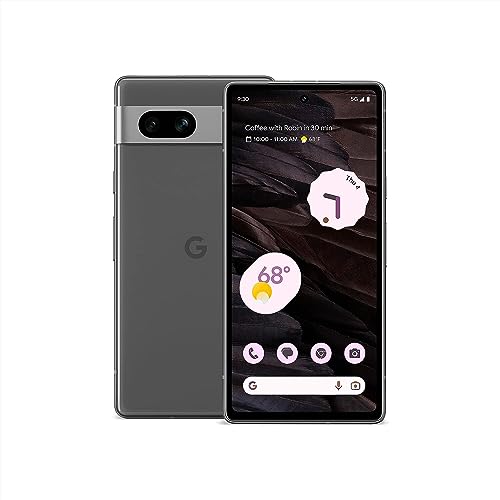
Google Pixel 7a — Best for Tight Budgets
Every generation of Pixel creates the same happy accident a year later: the a-series phone, already the value pick at launch, slides down the renewed market until it becomes the answer to “what is the best camera I can buy for the least money that is still money well spent?” The 7a is that answer now. Its camera runs the previous generation of Google’s processing, which in practice means the same forgiving exposure, the same honest skin tones, a night mode that still shames most new budget phones, and a main camera with optical stabilisation that keeps indoor shots steady. The gap between the 7a and 8a is real but narrow; the gap between the 7a and everything else at its price is a canyon.
As a phone it remains thoroughly likeable: a 90Hz screen, wireless charging that phones at this level almost never offer, water resistance, and clean software with years of Google’s support still running. Our verified pool carries it as the unlocked US version finished in Charcoal. Its compromises are the familiar ones — leisurely charging, an ultrawide a step behind the main camera, a design that prioritises function — and none of them touch the reason it is here. For a student, a first phone, a second phone, or any buyer whose budget is a hard wall rather than a soft preference, the 7a is the wall’s best view: a real camera, honestly bought.
- Cameras: two rear lenses, Google’s processing doing the heavy lifting
- Specification fitted here: 8GB of RAM, 128GB of storage
- Screen: 6.1-inch OLED running at 90Hz
- Networks: 5G; this is the unlocked US version
- Also aboard: wireless charging and a water-resistant body
Strengths
- The cheapest route into genuinely good phone photography.
- Wireless charging and water resistance at a price that usually deletes both.
- Support runway still measured in years, not months.
Trade-offs
- A generation behind the 8a in screen and processing polish.
- Charging speed will test the impatient.
- No telephoto of any kind — plan your compositions accordingly.
Best for: strict budgets that refuse to accept bad photographs. Not suited for: shoppers chasing this year’s model or rapid-charge bragging rights.

Samsung Galaxy A35 5G — Best Affordable Samsung
The A35 is for the buyer who wants to stay inside Samsung’s world — its interface, its ecosystem, its familiarity — without paying flagship tolls, and who photographs the world as it comes. Its camera system is a capable everyday arrangement led by a stabilised main camera that handles daylight, gatherings and social photography with Samsung’s characteristic brightness and colour confidence. What elevates the package is the screen: a large AMOLED display of the kind Samsung makes better than anyone, bright and fluid, which matters to a photographer more than spec sheets admit — because the screen is where every photograph is judged, shared and enjoyed, and a great display makes an honest camera look like a better one.
The ownership case is equally Samsung-flavoured: a support commitment that outlasts most of the affordable field, a big battery for full days of shooting, and a design that borrows the flagship family’s clean lines. The pool listing is a renewed unlocked unit in Awesome Navy. Where the A35 concedes ground is processing sophistication — in the hardest light, a dim room with a moving subject, the Pixels’ software will rescue frames the Samsung lets go — and its ultrawide is a daylight tool rather than a night one. Buyers whose photography is mostly daylight, landscape and life outdoors will never meet those limits; buyers who live in dim restaurants should look at the Pixels first.
- Display: large AMOLED, bright and fluid
- Cameras: triple rear arrangement led by a stabilised main camera
- Storage on this listing: 128GB
- Connectivity: 5G, unlocked
- Listing status: renewed — inspect on arrival
Strengths
- The best screen in this guide — every photograph looks its best on it.
- Samsung’s support commitment and ecosystem at an accessible price.
- Daylight and social photography with confident colour and detail.
Trade-offs
- Low-light processing trails the Pixels’ rescue work noticeably.
- The ultrawide is for daylight; night belongs to the main camera.
- Renewed stock means the standard arrival inspection applies.
Best for: Samsung loyalists and outdoor, daylight photographers on a budget. Not suited for: low-light specialists or Pixel-style processing devotees.

Samsung Galaxy A25 — Best Budget Floor
Every market has a floor below which the product stops being itself, and for camera phones the A25 stands almost exactly on it: the least expensive handset in this guide, and the cheapest phone we can recommend to someone who cares about photographs at all. Its main camera is a genuine instrument — a 50MP-class sensor with stabilisation, behind Samsung’s competent processing — which in daylight and decent indoor light produces photographs that need no apology: family gatherings, holidays, the dog, the garden, all rendered with a clarity that would have flattered a flagship not many years ago. The screen, again a Samsung AMOLED, does the photographs justice when you view them, which at this price is not a given and should not be taken for granted.
Below the floor, the phones stop having guides written about them for good reasons: cameras that cannot focus indoors, screens that wash out in sunlight, support that never existed. The A25 avoids all of that, and its renewed unlocked listing in our pool makes its price lower still. Its limits are the honest physics of its tier — night photography is a suggestion rather than a capability, the ultrawide is basic, performance is adequate rather than eager — but it never lies about them. For a first phone, a phone for a parent, or a camera-phone for a buyer whose budget is genuinely tight, the A25 is where the sensible market begins. Everything cheaper should be bought as a phone first and a camera never.
- Cameras: main camera with stabilisation, plus basic ultrawide
- Display: AMOLED, bright for its class
- Storage on this listing: 128GB
- Connectivity: 5G, unlocked
- Listing status: renewed — inspect on arrival
Strengths
- A real camera and a proper screen at the guide’s lowest price.
- Samsung’s software and support behind a budget purchase.
- Daylight photography that needs no excuses.
Trade-offs
- Night photography is its clear ceiling — plan around light.
- Performance is sufficient, not swift, under heavy multitasking.
- The ultrawide is a fair-weather lens only.
Best for: the tightest budgets that still want photographs worth keeping. Not suited for: night shooters or demanding app users.

Motorola Moto G Power 2025 — Best Battery and Camera Combo
A camera’s most important specification, on the day the battery dies at the golden hour, is the battery. The Moto G Power 2025 is built around that unglamorous truth: a very large battery, an efficient processor and clean, near-stock Android software combine into a phone that photographs for two days where others photograph for one. Its 50MP main camera is honest mid-tier hardware — good in daylight, willing in the evening, outclassed after dark by the Pixels’ processing — but it is attached to the only phone in this guide you can take camping, festival-going or through a double shift without a charging plan, and photographs taken beat photographs specified, every single time.
The rest of the package respects the same philosophy of sufficiency: a large screen for reviewing the day’s shots, storage that does not cramp a growing library, and software without the bloatware that cheapens so many budget phones. The pool listing is the unlocked model made for US networks, in Leaf Green. Motorola’s update commitment is shorter than Google’s or Samsung’s — the one ownership caveat to weigh — and its night photography is the weakest here alongside the A25’s. But for the buyer whose photographic life happens outdoors, on the move, far from sockets, the G Power’s combination of a decent camera and an indecent battery is not a compromise. It is the correct engineering answer to their actual question.
- Battery: sized for two days, the largest here
- Camera: a 50MP main unit for daily shooting
- Specification fitted here: 8GB of RAM, 128GB of storage
- Networks: 5G, unlocked, built for US carriers
- Software: Android kept close to stock, with little added clutter
Strengths
- Battery life that keeps the camera available on day two, not just day one.
- Clean software experience rare in the budget tier.
- Daylight photography well up to social and family standards.
Trade-offs
- Night photography trails the field’s best by a clear margin.
- Update support is shorter than the Samsung and Google picks.
- The big battery makes it a substantial phone in the hand.
Best for: travellers, outdoor workers and anyone whose camera must survive the weekend. Not suited for: night photographers or buyers wanting the longest software support.

Motorola Moto G Stylus 2025 — Best Big-Screen Value
The Moto G Stylus is the budget phone for people whose phone is also a notebook. Its defining extra is in the name: a stylus that lives inside the body, ready for annotating photographs, signing documents, sketching, and taking the kind of handwritten notes that keyboards keep failing to replace. Around that party trick sits a large-screen phone with a capable 50MP main camera — the same honest Motorola photographic formula as the G Power, daylight-strong and evening-willing — and a display big enough that reviewing and lightly editing your photographs on the phone itself becomes a pleasure rather than a squint. For students, field workers, realtors, nurses and inveterate doodlers, it is the most characterful phone in this guide.
The configuration in our pool listing is generous for the tier — memory and storage figures that match phones a class up — and Motorola’s clean software keeps the big screen responsive. The stylus is a passive, precise tool rather than a pressure-sensitive artist’s pen, and photographers should file it under annotation and notes rather than retouching; within that honest boundary it is genuinely useful, and unique here. Night photography and update longevity carry the same Motorola caveats as its sibling above. Buy the Stylus when your phone takes notes as often as photographs, and you will wonder why the combination ever seemed unusual.
- Display: large screen suited to photo review and notes
- Camera: 50MP main camera
- Memory and storage on this listing: 8GB RAM, 256GB storage
- Stylus: built-in, stored in the body
- Connectivity: 5G, unlocked, made for US
Strengths
- A built-in stylus for annotating photos and documents — unique in this guide.
- Large screen and generous storage for a photo library that grows.
- Motorola’s clean software and capable daylight camera.
Trade-offs
- The stylus is for notes and marking up, not pressure-sensitive art.
- Low-light photography is mid-pack at best.
- Update commitment shorter than Google’s and Samsung’s.
Best for: note-takers, students and big-screen lovers on a budget. Not suited for: night photographers or digital artists needing a true pen.
What can an affordable camera phone actually do after dark?
More than it could three years ago, and less than the advertisements imply — the honest answer lives between those poles and depends entirely on which pick you hold. The Pixels genuinely perform after dark: their night modes stack exposures intelligently enough to return a restaurant, a street or a garden with the mood intact and the noise civilised, and for static scenes they rival phones several times their price. The Samsungs manage the lit-evening competently — a bright street, a well-lit room — and fade as the light does. The Motorolas treat night as a suggestion: their photographs after dark are records rather than portraits, fine for remembering, rarely for framing.
The technique that closes the gap costs nothing. Brace the phone — a wall, a table, a friend’s shoulder — and every night mode here improves, because stacking software works best when the frames agree. Photograph toward the light that exists rather than the darkness that does not: the lit doorway, the window seat, the neon sign. And accept the tier’s deepest truth, which is that a moving subject at night — a dancing friend, a running dog — is the one photograph this entire price class still cannot reliably take. If that photograph is your life, the money answer is a Pixel; if it is your exception, any pick here will serve the other ninety-nine evenings.
How do you take better photos with a budget camera phone?
Begin with light, because processing can rescue exposure but not invent illumination. The single most effective habit in this entire guide is turning your subject toward the brightest soft source available — a window, open shade, a doorway — before pressing the shutter; it improves a budget phone’s photograph more than any setting buried in its menus. Second, close the distance with your feet. None of these phones has an optical telephoto worth the name, and digital zoom at this tier is cropping with confidence; two steps forward outperform every zoom slider here.
Third, hold still like you mean it. Stabilisation in this class is real but modest, and the difference between a sharp indoor photograph and a soft one is usually the photographer’s elbows — tuck them, brace against something, exhale, shoot. Fourth, use the tools the software gives you for free: tap to focus on the face, let the night mode engage rather than forcing the flash, and take three frames of anything that moves, because the middle frame of a burst is where budget cameras hide their best work. None of this costs a penny, and together it is worth more than the price difference between the picks in this guide — the cheapest camera upgrade in photography is the photographer.
How much storage does a camera-first budget buyer need?
More than the entry configurations suggest, because a phone bought for its camera fills like a camera. Photographs at modern resolutions, a messaging app’s quietly accumulating media archive, and a handful of video clips from one holiday can consume the apparent headroom of a small storage tier within a year — and a full phone is a slow phone, a phone that refuses updates, a phone that says no at the exact moment a photograph offers itself. Every pick in this guide starts at a storage level we consider the practical floor for a camera-led life, and the Stylus’s larger configuration shows the comfort that headroom buys.
The disciplines that stretch storage are simple and worth adopting from day one. Let the phone back photographs up to the cloud automatically on Wi-Fi, and let it remove the local copies it has safely archived — the feature exists on all six picks and is the difference between a library and a hoard. Record video at the resolution you will actually watch; the largest setting is for screens you may never own. And review the library monthly with the ruthlessness of an editor: of the nine frames of every moment, one is the photograph. Storage anxiety is a choice of habits, and at this tier, habits are cheaper than gigabytes.
How do affordable phones cope with video?
Video is where the affordable tier’s compromises concentrate, because video cannot be rescued by a single clever frame — it is thirty photographs a second, each needing stabilisation, exposure and focus decisions in real time. The honest summary: daylight video from every pick here is genuinely good, smooth enough and sharp enough for family archives and social sharing; the Pixels add the most convincing stabilisation and the most forgiving exposure when you pan from shade to sun; and low-light video is the whole tier’s weak room, where noise arrives early and stays late. A birthday song in a dim restaurant will be watchable on any of these phones and lovely on none, and knowing that in advance is the difference between a satisfied buyer and a disappointed one.
Technique closes much of the gap, as it does everywhere in this guide. Shoot video in shorter clips than instinct suggests — twenty committed seconds beat three wandering minutes, for both the footage and the storage. Keep the phone level and move it like it is full of water: slow pans, no sudden swings, and let subjects move through the frame rather than chasing them with it. For anything with a voice that matters — a grandparent’s story, a child’s performance — get closer instead of zooming, because at this tier the microphone’s reach is shorter than the lens’s and the audio is what the future will actually cry over.
One setting deserves changing on day one: record at the resolution your life will be watched at. The highest settings on budget phones consume storage at a rate their owners rarely budget for and demand processing the tier provides grudgingly, while the standard high-definition setting on all six picks is sharp on every screen most families own. Save the maximum for the one scene a year that deserves it, and let the other three hundred clips be light, shareable and backed up without drama.
What about the front camera — selfies and video calls on a budget?
The front camera is the affordable tier’s most honest component: nobody’s budget front camera is secretly a flagship, and the differences between the picks here are matters of degree rather than kind. In daylight and decent indoor light, all six take selfies and sustain video calls at a standard that will satisfy everyone except the professional streamer. The Pixels process faces the most kindly, as they do at the back; the Samsungs’ bright screens make framing yourself easier outdoors; the Motorolas are serviceable and unadorned. After dark, every front camera here leans on its screen as a light source, and the results are what they are — recognisable, shareable, unglamorous.
The trick this tier underuses is simply turning the phone around. The rear main camera on any pick in this guide outclasses every front camera in it by a wide margin, and for the self-portraits that matter — the trip’s group shot, the milestone, the photograph with a grandparent — framing with the rear camera using a timer, a voice trigger or a companion’s direction produces a different class of image. The front camera is for convenience and calls; the rear camera is for keeping. Budget buyers who learn that single habit own, in effect, a much better selfie camera than they paid for.
For video calls specifically, the hierarchy inverts: the front camera’s quality matters less than light and connection, and a budget phone by a window on decent Wi-Fi will out-present a flagship in a dark room on a weak signal. Spend nothing here. Face the window, raise the phone to eye level on a stack of books, and your affordable phone will hold its own in any meeting or family call on earth.
How does the screen change the photographs you take?
A phone’s screen is its darkroom, its gallery and its judge, and at this tier it quietly shapes the photography as much as the camera does. The Samsungs’ AMOLED displays are the finest here — bright enough to frame a shot confidently in sunlight, rich enough that reviewing the day’s photographs is a pleasure rather than an audit. That confidence changes behaviour: a photographer who can see the frame clearly composes more carefully, catches the closed eyes and the crooked horizon in the moment, and reshoots while reshooting is possible. The Pixels’ screens are a step behind in raw brilliance and a step ahead in colour honesty, which editors prefer; the Motorolas’ larger panels trade finesse for canvas, which reviewers of photos and writers of notes prefer.
Brightness deserves its own emphasis because it is the budget spec that fails outdoors first. A dim screen in summer sun turns framing into guesswork and reviewing into shade-hunting, and it is the complaint we hear most from owners of phones cheaper than this guide’s floor. Every pick here clears the bar, the Samsungs by the widest margin — one more reason the A35 and A25 punch above their camera hardware. When you test an affordable phone in a shop, take it to the window. The screen that survives daylight is the screen your photography will live on.
There is a final, subtler effect: photographs are edited where they are viewed. A screen that flatters will pass photographs a truer screen would send back for adjustment, and a screen that lies about colour will export that lie to every other device. None of the six here lies egregiously, but the habit worth building costs nothing — before sharing the photographs that matter most, glance at them on a second screen, a laptop or a partner’s phone. It takes ten seconds and it is the cheapest colour-calibration in photography.
Which of these phones should travel with you?
Travel rearranges the affordable camera hierarchy around two variables the home test never applies: endurance and replaceability. The Moto G Power 2025 becomes the connoisseur’s travel pick the moment the itinerary leaves the hotel behind — two days of maps, translation and photography per charge is a freedom no camera advantage matches when the alternative is a dead phone in a strange city. The Pixel 8a counters as the photographer’s traveller: the camera that returns the best record of the trip, provided the trip sleeps near a charger, as most trips honestly do. Between those poles the choice is an itinerary question disguised as a phone question, and it deserves to be answered as one.
Replaceability is the budget tier’s secret travel virtue. A phone from this guide, lost or stolen in a foreign city, is a bad day; a flagship in the same misfortune is a bad month, financially and administratively. Travellers who carry a phone from this tier as their main device — or who buy one as a dedicated travel phone and leave the flagship at home — are practising a risk management the industry never advertises. Add the disciplines that make any phone travel well: offline maps downloaded, photographs backing up on hotel Wi-Fi each night, the phone’s location services configured before departure rather than after loss.
And pack the smallest accessory kit in this guide’s world: a pocket power bank for the Pixels on long days, a microfibre cloth for the lens, and nothing else. The affordable camera phone’s whole travel philosophy is lightness — of bag, of budget, of worry — and every pick here honours it. The best travel camera is the one whose loss would not ruin the trip; the second best is the one that takes the finest photographs. This guide, uniquely among our camera guides, lets you choose which of those two sentences is yours.
How long do budget camera phones stay good — and what kills them?
The picks here were chosen to die slowly, and their expected arcs are worth stating plainly. The Pixels and Samsungs, backed by multi-year update commitments, should remain secure, current and photographically improving — camera software updates ride along with system updates — for three to four years of ordinary service. The Motorolas run a shorter official runway and will age correspondingly sooner, though their hardware, battery above all in the G Power’s case, often outlasts their software. In every case the battery is the component that sets the practical lifespan: expect noticeable fade in the third year, and treat a battery replacement, where the model allows it economically, as the mid-life service that resets the phone’s clock.
What actually kills budget phones, in our experience of the category, is rarely the camera. It is storage filling until updates fail, a cracked screen whose replacement costs a third of the phone, or support ending while the hardware still serves — the three deaths this guide’s selection criteria were built to postpone. The buyer’s part of the bargain is modest: keep the storage disciplined, case the phone from day one, and install the updates the maker sends. Do those three things and an affordable phone from this list will take good photographs for years, which converts its price from a compromise into one of the better deals in consumer electronics.
When the end does come, these phones retire gracefully into the second lives our other guides describe — a child’s first camera-phone inside its support window, a household’s spare, a dedicated music and maps device — because a camera this capable does not become useless when it stops being primary. The affordable tier’s final virtue is that its phones are cheap enough to keep and good enough to keep using. Buy once, photograph for years, retire with honours: that is the whole proposition, and at last the cameras are good enough to honour it.
How do these phones cope with children and pets — the hardest subjects?
Ask budget camera owners what they actually photograph and the answer, overwhelmingly, is small fast things that do not pose: toddlers, dogs, cats with agendas. It is the hardest brief in everyday photography — motion, indoor light, no cooperation — and it is where this tier separates most honestly. The Pixels win it, and not narrowly: their processing is built for exactly this chaos, choosing shutter speeds and stacking frames with a bias toward the sharp face over the perfect exposure, and their shutters respond without the lag that turns a leap into a landing. A parent choosing between the 8a and everything else in this guide is really choosing how many of those unrepeatable frames come home sharp.
The Samsungs manage the brief in daylight and outdoors, where their cameras are quick and their colour pleases, and struggle as the room dims and the subject accelerates — the double penalty of slower processing and less aggressive motion handling. The Motorolas are the honest tail here: their cameras take a beat to open and a beat to fire, and with toddlers a beat is a biography. Their owners adapt, as owners do — shooting in bursts, favouring the garden over the living room, accepting the blur as the aesthetic of a childhood honestly recorded — but a buyer choosing primarily for young children should hear the ranking plainly and buy the Pixel their budget reaches.
Whatever the phone, the technique that rescues this subject costs nothing and works on all six: light the room before you photograph in it, because every camera here is twice the camera with the lamps on; shoot in bursts and choose later, since storage is cheaper than moments; and get down to the subject’s eye level, which transforms both the photograph and, often, the subject’s willingness to stay in it. The best budget camera for children is the one in the parent’s hand, held low, in a lit room, firing freely — and of the six hands this guide offers, Google’s is simply the steadiest.
What should you set up on day one to get the best photographs?
An affordable camera phone rewards an hour of configuration out of all proportion to the hour. Start with the camera itself: set the photo size to the camera’s full quality rather than any space-saving default, turn on the grid lines that keep horizons honest, and enable the level if the app offers one. Set the volume button to act as the shutter — a physical-feeling button steadies the phone for the shots that matter — and learn where the night mode lives before the first evening you need it, because menus are no place to explore during a birthday song.
Then secure the library the camera is about to create. Turn on automatic cloud backup over Wi-Fi and confirm it completes a first backup while you watch; a camera phone whose photographs exist in one place is a loss waiting for its moment. Decide the storage discipline from the storage section — video resolution, local-copy removal — while the library is empty and the decisions are free. And fit the case and, if you use one, the screen protector before the first outing: budget phones are dropped at the same rate as flagships and mourned with less insurance.
Finally, take the phone for a deliberate first walk and shoot your own street in your own light, reviewing the results at home at full size. That hour teaches you your specific phone’s character — where its camera is brave, where it is timid, how its colours lean — better than any review, including this one. Every camera in this guide has a personality; the owners who learn theirs in week one take the best photographs in year three, on hardware that cost less than their neighbours’ and embarrasses it regularly.
Can you edit photographs properly on a budget phone?
Yes — and the editing gap between tiers is smaller than the shooting gap, because editing is patient work that even modest processors handle gracefully. Every pick here runs the major editing apps competently: cropping, exposure and colour correction, the removal of small distractions, and the filters that social photography runs on. The Pixels hold an edge in their built-in tools, whose automated suggestions — brighten this face, straighten that horizon, lift this shadow — are the same software intelligence that powers their cameras, applied after the fact. The Samsungs’ gallery editor is capable and quick; the Motorolas’ larger Stylus screen makes fine adjustments less fiddly, with the stylus earning its keep on precise selections.
The discipline of editing on any phone is restraint, and budget files reward it doubly because they carry less spare detail to sacrifice. Lift shadows gently rather than heroically, warm a scene by degrees, and resist the sharpening slider entirely — affordable cameras already sharpen assertively, and more turns faces to lace. Edit the photograph you took toward the moment you remember, in small moves, and stop when it looks like the day it was. The best editors in this tier are not the ones with the most tools; they are the ones whose photographs still look like photographs.
Comparison table
| Pick | Camera character | Night ability | Support outlook | Choose it if… |
|---|---|---|---|---|
| Google Pixel 8a | Processing-led, people-first | Best in guide | Long | Photographs of people are your priority. |
| Google Pixel 7a | Same idea, prior generation | Very good | Long, running | The budget is the first specification. |
| Samsung Galaxy A35 5G | Bright, confident, daylight-strong | Moderate | Long for class | You live in Samsung’s world and shoot outdoors. |
| Samsung Galaxy A25 | Honest entry camera | Limited | Moderate | You want the floor of the sensible market. |
| Moto G Power 2025 | Capable daylight main camera | Limited | Moderate | The camera must survive two-day adventures. |
| Moto G Stylus 2025 | Capable main camera, big canvas | Limited | Moderate | Your phone is a notebook as much as a camera. |
What mistakes do affordable camera phone buyers keep making?
Believing the megapixel number is the founding error of this tier. A large count on a small, cheap sensor, behind a basic lens, with weak processing, produces large disappointing files; a modest count behind Google’s software produces the photographs in this guide’s Pixel sections. Megapixels measure the size of the canvas, not the quality of the painting, and at budget prices the painting is software. Read for the maker of the processing before you read the size of the sensor, and most bad purchases in this category become impossible.
Counting lenses is the same error wearing a different hat. A macro lens of toy resolution is not a camera upgrade; it is a line in an advertisement, and the phones that lean on it are telling you their main camera cannot carry the pitch alone. Judge the main camera, ask what the ultrawide honestly does, and let the lens count fall where it may.
The third mistake is buying the camera and forgetting the phone: the storage that fills, the updates that end, the battery that fades with no replacement path. An affordable phone is a two-to-four-year relationship, and the picks above were chosen as relationships — supported, storaged, serviceable — not as spec-sheet moments. And the final mistake is skipping the renewed inspection: at this tier the renewed discount is the whole value strategy, and the week-one checks are its premium. Pay it, and the strategy is sound.
Final Recommendation
Buy the Pixel 8a if photography is the point of the phone — it is the finest camera value in the affordable tier by a distance that is not really arguable — and the Pixel 7a if the budget must go lower without giving the photography up. Choose the Galaxy A35 for Samsung’s screen and ecosystem, the A25 when the budget is a wall and the wall is low, the Moto G Power when the camera must keep working on the second day of the trip, and the Moto G Stylus when the phone doubles as your notebook. What unites the six is the discovery this tier finally offers: good photographs are no longer a luxury good, provided you buy the software and not the slogan. Set the phone up properly in its first week, learn its character on your own street, keep its library backed up and its storage breathing, and the affordable camera in your pocket will quietly outperform the expensive cameras of the recent past — which is not a bad epitaph for the entire category, and not a bad reason to stop apologising for a sensible purchase.
Frequently Asked Questions
Can an affordable phone really take good night photos?
The Pixels in this guide genuinely can — their night modes are inherited from flagship software and handle dim rooms and night streets with real skill. The rest of the tier manages lit evenings respectably and true darkness modestly. Brace the phone, shoot toward the light that exists, and even the budget picks will surprise you; expect moving subjects at night to remain the class’s honest limit.
Why do the Pixel phones out-photograph rivals with more lenses?
Because modern phone photography is primarily computation. Google’s software makes better decisions about exposure, colour, skin and noise from one good lens than basic software makes from three ordinary ones. Lens counts photograph well in advertisements; processing photographs well in life, and at this price the processing is the product.
Is a renewed phone a safe way to buy an affordable camera phone?
It is the strategy this whole tier runs on — renewed is how flagship cameras reach affordable prices. Buy from listings with clear return windows, then test in the first week: battery health, both cameras in daylight and darkness, charging, and the screen. A unit that passes will serve for years; a unit that fails goes back, which is what the window is for.
How long will an affordable phone stay usable?
The picks here were chosen partly on support: the Pixels and Samsungs carry multi-year update commitments that keep them secure and current well beyond the budget norm, while the Motorolas run shorter but reasonable runways. A supported affordable phone should serve three to four years comfortably; an unsupported one is a false economy at any price.
Do I need a separate camera if I buy one of these phones?
For everyday photography — family, travel, food, the street — no: the picks here, the Pixels especially, cover that catalogue to a standard that satisfies most people completely. A dedicated camera still wins for serious zoom, deliberate low-light craft and the pleasure of the instrument itself, which is a different purchase for a different desire, covered in our compact camera guides.
Related Guides
Exploring the camera tiers around this one? Our best affordable camera mid range phones guide covers the step up, the best 3 camera cell phones roundup examines true triple systems, and the best bargain smart phones with camera list hunts the deepest discounts that still take a photograph worth keeping. You may also want our guide to best compact travel cameras.
Related guides
- Best Basic Phones Camera Buyers Can Trust: Flip Phones and Simple Handsets That Still Take a Photograph
- Best 3 Camera Cell Phones: Six Triple Systems Where Every Lens Earns Its Place
- Best 10MP Camera Phones: Why the Honest Answer Is a Simple, Modern Camera
- Best Bargain Smart Phones With Camera: Real Photographs Without the Flagship Bill


[…] hunting on a different budget? The best affordable phones with good camera guide covers the value tier where processing does the heavy lifting, our best 5g camera phones […]