What's inside
- Key Takeaways
- Quick Picks
- How Did We Choose These AMD Picks?
- What Separates RDNA 4 From RDNA 3 for a Buyer?
- How Much VRAM Do You Actually Need?
- How Do You Prepare a PC for a Card Like These?
- Which Resolution Is Each Tier Really For?
- What About Ray Tracing and Upscaling on AMD Cards?
- How Do the Six AMD Cards Compare at a Glance?
- What Mistakes Do AMD Card Buyers Keep Making?
- Final Recommendation
- Frequently Asked Questions
- Related Guides
As an Amazon Associate I earn from qualifying purchases. This post may contain affiliate links at no extra cost to you.
gizmoverdict.com is reader-supported. When you buy through links on our site, we may earn an affiliate commission.
Where to buy: Every card below is an AMD Radeon model verified in this site’s product pool, from board partners including PowerColor, ASRock, Sapphire and XFX. Memory sizes are stated per listing — read them carefully, because two cards in this guide share a name and differ in VRAM.
The best AMD graphics cards currently divide into two generations living side by side, and understanding that split is the whole key to buying well. The newer RDNA 4 family — the Radeon RX 9070 series and RX 9060 XT — brings AMD’s latest architecture, improved ray tracing and the newest upscaling generation. The RDNA 3 family beneath it — the RX 7900 XT, RX 7800 XT and their relatives — remains on sale, often keenly priced, with generous memory configurations that still make sense for high-resolution gaming. Neither generation is a mistake; they are answers at different budgets, and this guide ranks six cards across both.
Every pick here is a partner card. AMD sells its designs through board partners — Sapphire, PowerColor, XFX, ASRock, Gigabyte, ASUS and others — who build the coolers, set the clocks and stand behind the warranty. The silicon inside two cards with the same GPU name is the same; what differs is the cooling, the noise, the size, the factory overclock and the support behind the box. That is why this guide spends real words on which partner built each card, not just which GPU sits inside it.
A note on what this guide does not do: it does not rank these cards against the other brand’s range. That comparison has its place, and buyers cross-shopping the two ecosystems should read widely; but the reader who has arrived at the best AMD graphics cards has usually made the ecosystem decision already — for the driver model, the monitor’s sync technology, the price structure or simple preference — and is owed a guide that spends its whole length inside that decision, on the tiers and partners and memory figures where the remaining money is won or lost. Cross-brand verdicts would dilute exactly the detail that decides this purchase.
Two naming traps deserve flagging before the picks. The RX 9070 GRE in this list is not the RX 9070 XT — GRE is a distinct, lower tier with 12GB of memory against the XT’s 16GB, and the guide treats it as its own card. And the RX 9060 XT exists in both 8GB and 16GB forms under the same name; the pick here is the 16GB XFX model, chosen deliberately, and the buying guide explains why that memory decision matters more than most clock-speed differences.
Key Takeaways
- RDNA 4 cards — RX 9070 XT and RX 9060 XT — are the current generation, with the strongest ray tracing AMD has shipped.
- The RX 9070 XT at 16GB is the performance pick of this pool; three partner versions appear, differing in cooler and clock.
- The RX 9070 GRE is a separate, lower tier from the XT, with 12GB — do not let the shared “9070” name blur the two.
- For the RX 9060 XT, the 16GB version is the one to buy for longevity; the name alone does not tell you the memory.
- RDNA 3’s RX 7900 XT still offers the most memory here at 20GB, which suits high-resolution texture-heavy gaming.
- Partner choice decides noise, size and warranty experience more than it decides frame rates.
Quick Picks
| Pick | Badge | Why it earns its place |
|---|---|---|
| PowerColor Hellhound RX 9070 XT | Best AMD card overall | PowerColor’s premium Hellhound treatment of the RX 9070 XT, with 16GB and an enthusiast-grade cooler. |
| PowerColor Reaper RX 9070 XT | Cleanest 9070 XT value | The same flagship RDNA 4 silicon in PowerColor’s simpler Reaper design, for buyers who skip the extras. |
| ASRock RX 9070 XT Challenger | Best specified Challenger | Triple-fan cooling and a stated 2970 MHz boost clock on ASRock’s Challenger edition of the 9070 XT. |
| Sapphire Pulse RX 7900 XT | Most memory in the guide | RDNA 3’s high-end card with 20GB of GDDR6 from Sapphire, AMD’s longest-serving premium partner. |
| Sapphire Pulse RX 9070 GRE | The step-down RDNA 4 option | A 12GB RDNA 4 card below the XT tier — a different GPU from the 9070 XT, priced and judged as such. |
| XFX Swift RX 9060 XT 16GB | Best mainstream AMD pick | The RX 9060 XT in its 16GB form with a triple-fan XFX cooler — the memory configuration to choose. |
How Did We Choose These AMD Picks?
The pool defined the field: AMD Radeon cards only, verified through this site’s product system, spanning RDNA 4 at the top and RDNA 3 where it still earns its keep. Within that field, ranking weighed the GPU tier first — an RX 9070 XT outranks an RX 9070 GRE outranks an RX 9060 XT, because architecture and compute are what frame rates are made of — then memory configuration, because VRAM decides how long a card stays comfortable as games grow, then the partner execution: cooler size, stated boost clocks where listings provide them, and the partner’s track record with Radeon cards specifically.
Two disciplines governed the writing. First, no invented performance figures: this guide compares tiers, memory and design in words a buyer can verify against listings, rather than decorating the page with frame-rate numbers measured on unknown systems. Second, no borrowed glory: claims attached to one card were not transferred to another, the GRE was never described with the XT’s attributes, and the 9060 XT pick’s 16GB was never allowed to blur into the 8GB version that shares its name. Naming precision is a buying tool in this market, and the guide treats it as one.
Availability thinking also shaped the final six. Graphics cards live in a market where individual models drift in and out of stock and pricing swings with supply; a guide that stakes everything on one partner’s version of a tier fails its reader the week that version vanishes. Three distinct 9070 XT executions appear here for exactly that reason — the tier is the recommendation, the partner is the preference, and a reader who finds one of the three unavailable has lost nothing by taking another. The same logic puts two Sapphire Pulse cards at different tiers: the partner’s consistency lets the tier comparison stay clean.
Cards were left out when they duplicated a tier without adding a decision. The pool’s RX 7800 XT models, for example, are fine cards that live in this site’s aftermarket guide, where the partner comparison is the subject; here, the six slots were spent covering the widest spread of AMD decisions a buyer actually faces, from the mainstream 9060 XT to the 20GB flagship of the previous generation.
What Separates RDNA 4 From RDNA 3 for a Buyer?
Architecture generations in graphics cards are easy to overstate and easy to dismiss, so here is the buyer’s version. RDNA 4, inside the RX 9070 and RX 9060 families, is AMD’s newer design: its strengths show most clearly in ray-traced lighting, where AMD historically trailed, and in the latest generation of AMD’s upscaling, which uses machine learning to reconstruct a higher-resolution image from a lower-resolution render. In traditional rasterised gaming the generational gap is narrower, which is precisely why the RDNA 3 cards below remain rational purchases when priced keenly.
Memory is the second axis, and it cuts across generations. The RX 7900 XT’s 20GB is the largest pool of VRAM in this guide; the 9070 XT’s 16GB is the current flagship’s allocation; the GRE’s 12GB and the 9060 XT’s 16GB-or-8GB split define the mainstream. VRAM pressure comes from texture quality, resolution and ray tracing combined, and it grows over a card’s life as games are built for newer hardware. A card bought today should be judged against the games of its third year, not its first month — which is why this guide consistently favours the larger memory configuration wherever a name offers two.
There is a third axis worth one paragraph: driver and software experience, the part of ownership that happens weekly rather than at purchase. AMD’s current driver package bundles performance monitoring, recording and streaming tools, per-game profiles and the upscaling controls in one application, and its stability across a generation is part of what a buyer is purchasing. This guide will not pretend one brand’s software is flawless and the other’s hopeless — both ecosystems have good and bad months — but a buyer moving to AMD for the first time should budget one evening for learning the new control panel’s geography, after which the card becomes what it should be: invisible infrastructure under the games.
Power and size complete the practical picture. These are full-size desktop cards: they need a case with room, a power supply with the right connectors and honest wattage headroom, and airflow that does not treat the GPU as an afterthought. The exact requirements differ by model and partner, and the listing for the specific card you choose is the authority — check it before ordering, because a card that does not fit or cannot be fed is not a bargain at any price.

PowerColor Hellhound RX 9070 XT — Best AMD card overall
The Hellhound is PowerColor’s enthusiast line, and on the RX 9070 XT it produces the card this guide would choose first from the entire AMD pool. The GPU is AMD’s current flagship silicon — RDNA 4, 16GB of GDDR6 — and the Hellhound treatment wraps it in the kind of cooler that lets the silicon sustain its clocks quietly: a large multi-fan design from a partner whose reputation was built almost entirely on Radeon cards. When a partner specialises, the details tend to be right, and PowerColor’s Hellhound range has been the connoisseur’s Radeon choice for several generations.
Who is it for? The player building around a high-refresh 1440p monitor, or stepping into 4K with upscaling doing its share of the work — the workload the 9070 XT was designed for. Sixteen gigabytes of memory gives texture-heavy games room to breathe, RDNA 4’s improved ray tracing keeps the lighting features usable rather than decorative, and the Hellhound’s cooling means the card delivers its performance without announcing itself across the room. In a quiet case, at night, that last quality stops being a luxury and becomes the experience.
Consider the ownership rhythm of a card like this. A flagship bought at the start of its generation typically anchors a machine through several years of releases, and the Hellhound’s contribution to that longevity is thermal: a cooler that holds temperatures comfortably gives the silicon an easier life across thousands of gaming hours, and gives its owner the option of a gentle manual overclock later, when the card’s second wind matters more than its warranty purity. None of that appears in a specification table, yet it is exactly what the premium over the Reaper purchases — margin, held in reserve, in metal and fan bearings.
The honest caveats are about class, not about this card. It is a large, power-hungry flagship component that needs a suitable case and supply, and it sits at the top of AMD’s range — buyers whose monitors and games do not reach its level will find the same satisfaction further down this list for less. Flagships are for systems that can use them. In a system that can, this is the AMD card to build around.
- GPU: AMD Radeon RX 9070 XT, RDNA 4
- Memory: 16GB GDDR6
- Partner line: PowerColor Hellhound
- Cooling: Large multi-fan enthusiast design
- Class: High-end desktop gaming card
Strengths
- Current AMD flagship silicon with 16GB
- Enthusiast cooler from a Radeon-specialist partner
- RDNA 4 ray tracing and upscaling generation
Trade-offs
- Demands a capable power supply and a roomy case
- More card than a 1080p monitor can use
- Premium partner line over the simpler Reaper below
Best for: High-refresh 1440p and upscaled 4K gaming in a system built to feed it.
Not suited for: Small cases, weak power supplies, or 1080p screens that cannot use its headroom.

PowerColor Reaper RX 9070 XT — Cleanest 9070 XT value
If the Hellhound is PowerColor dressing the flagship for the ball, the Reaper is the same flagship in work clothes. The GPU and memory are identical — RX 9070 XT, RDNA 4, 16GB GDDR6 — and the Reaper line’s proposition is that everything beyond the silicon is kept simple: a functional cooler, a restrained design, and a price that reflects the absence of ceremony. For buyers who believe, correctly, that frame rates come from silicon rather than shrouds, this is the rational 9070 XT.
There is a type of builder this card seems designed by and for: the one who has watched a graphics card’s price decompose and refuses to fund the portion that buys illumination. That builder’s machine is usually a closed case under a desk, where the Reaper’s restraint costs literally nothing in experience, and the saving migrates to the parts that do show — a better monitor, a larger SSD, the games themselves. The Reaper exists because PowerColor understands that segment of its own audience, and its continued presence in the line, generation after generation, suggests the segment is larger than the lighting industry would prefer.
The practical differences from the Hellhound are thermal headroom and acoustics under sustained load, and they are matters of degree rather than kind. A simpler cooler may run the card a little warmer or a little more audibly during a long session; the card’s performance identity — its tier, its memory, its architecture — is unchanged. Buyers with good case airflow will never notice the difference. Buyers building in a compact or quiet-focused case should weigh the Hellhound’s cooler as a genuine feature rather than a decoration.
There is also a build-logistics argument for the Reaper: simpler partner designs tend toward standard dimensions and straightforward power arrangements, which eases installation in ordinary mid-tower cases. Check the specific listing’s stated dimensions and connector requirements, as with every card here, but the Reaper’s design philosophy points toward compatibility. It is the flagship for people who read specification sheets instead of admiring renders, and there are more of those buyers than marketing departments assume.
- GPU: AMD Radeon RX 9070 XT, RDNA 4
- Memory: 16GB GDDR6
- Partner line: PowerColor Reaper
- Cooling: Straightforward multi-fan design
- Class: High-end desktop gaming card
Strengths
- Identical silicon and memory to the flagship picks
- Simple design keeps the price honest
- PowerColor’s Radeon specialisation behind it
Trade-offs
- Cooler less elaborate than the Hellhound’s
- Minimal aesthetic extras
- Still a large, demanding flagship card
Best for: Buyers who want 9070 XT performance without paying for presentation.
Not suited for: Silence-obsessed builds, where the Hellhound’s cooler earns its premium.

ASRock RX 9070 XT Challenger — Best specified Challenger
ASRock arrived in graphics cards later than the other partners in this guide and has spent the years since being agreeably direct about specifications — and this Challenger listing is a good example, stating its case in numbers: RX 9070 XT with 16GB, a boost clock of 2970 MHz, triple-fan cooling, PCIe 5.0, DisplayPort 2.1a and HDMI 2.1b outputs, and an 800W power-supply recommendation. A buyer can plan a build around that paragraph without visiting a single other page, which is how listings ought to behave.
ASRock’s background is motherboards, and it shows in the way this card is presented: as a component in a system, with its interfaces and power expectations declared up front rather than discovered in a manual. Builders assembling an ASRock motherboard and Challenger card from the same ecosystem also gain the small, real convenience of unified software control for the machine’s lighting and monitoring. None of that changes the silicon’s behaviour, but builds are systems, and a partner that thinks in systems earns its place in a guide that keeps insisting the card is only half the product.
The Challenger is ASRock’s mainstream partner line, positioned by design rather than by lighting, and the triple-fan cooler is the substantive point: three fans across a long card move air quietly at lower individual speeds, which suits the sustained loads of high-resolution gaming. The factory overclock implied by the boost figure gives the card a small performance nudge over reference-clock designs, of the size that partner cards trade in — real, modest, and no substitute for choosing the right GPU tier in the first place, which the buyer of a 9070 XT has already done.
That 800W recommendation deserves respect rather than negotiation. It is the partner’s own statement of the system this card expects around it, and a build that ignores it in favour of a smaller, older power supply is gambling the whole machine’s stability on a saving that makes no sense against the card’s class. Treat the figure as part of the product. With the supply, case and airflow to honour it, the Challenger is a thoroughly specified route into the same flagship silicon as the PowerColor pair, from the pool’s most plainly spoken listing.
- GPU: AMD Radeon RX 9070 XT, RDNA 4
- Memory: 16GB GDDR6
- Boost clock: 2970 MHz, per listing
- Cooling: Triple-fan Challenger design
- Outputs: DisplayPort 2.1a, HDMI 2.1b; PCIe 5.0
- Stated PSU guidance: 800W, per listing
Strengths
- Full specification stated in the listing, including PSU guidance
- Triple-fan cooling and a factory boost clock
- Current-generation outputs for high-refresh displays
Trade-offs
- Long triple-fan card needs case clearance
- 800W-class power supply expected
- Challenger line is function-first in appearance
Best for: Builders who plan from specifications and want flagship RDNA 4 with everything declared.
Not suited for: Compact cases or builds around a modest existing power supply.

Sapphire Pulse RX 7900 XT — Most memory in the guide
The RX 7900 XT is the previous generation’s high-end card, and the Sapphire Pulse version of it holds one record in this guide that no RDNA 4 pick takes away: 20GB of GDDR6, the largest memory allocation here. For gaming, that surplus shows its value at high resolutions with maximum texture settings, and in the longevity ledger — a card with memory to spare ages gracefully, because games’ appetites grow in one direction only. Sapphire, meanwhile, is the partner most synonymous with Radeon itself, and the Pulse is its sensible-shoes line: capable cooling, no theatrical extras.
Creators should look at this card with different eyes from gamers. Video timelines, 3D viewports and GPU-accelerated effects all draw on the same memory pool, and a 20GB allocation lets a card hold a game’s worth of assets and a workstation’s worth of textures without the swapping that turns scrubbing into waiting. The 7900 XT’s second career as a creator card is a genuine part of its value at this point in its life, and Sapphire’s Pulse execution — conservative clocks, serious cooling, no fragile ornamentation — suits a machine that works weekdays and plays weekends.
Positioning this card honestly requires holding two truths at once. In raw rasterised gaming at high resolutions, it remains a powerful card that will drive demanding games beautifully. In ray tracing and in the newest upscaling generation, the RDNA 4 cards above it hold the architectural advantage, and buyers who prize those features specifically should buy the newer silicon. The 7900 XT’s case rests on memory, raster strength and whatever pricing the market currently puts on last generation’s flagship tier — a case that wins outright for a certain kind of player.
That player is easy to recognise: high-resolution monitor, texture settings pinned to maximum, a library weighted toward games that reward memory, and a healthy scepticism toward paying flagship-launch prices. For them the Pulse is the connoisseur’s leftover — yesterday’s top tier, built by the safest pair of hands in the Radeon world, with the biggest memory pool in the room. Builds should still respect its class: a full-size card with full-size power and cooling requirements, as its listing describes.
- GPU: AMD Radeon RX 7900 XT, RDNA 3
- Memory: 20GB GDDR6
- Partner line: Sapphire Pulse
- Model: 11323-02-20G
- Class: High-end desktop gaming card
Strengths
- 20GB of memory — the most in this guide
- Sapphire’s Pulse line is a byword for sound Radeon design
- Strong high-resolution raster performance
Trade-offs
- Previous-generation architecture for ray tracing and upscaling
- Large card with flagship-class power needs
- Value depends on how keenly the market prices it
Best for: High-resolution players who prize memory headroom and raster strength.
Not suited for: Buyers whose priority is the newest ray tracing and upscaling features.
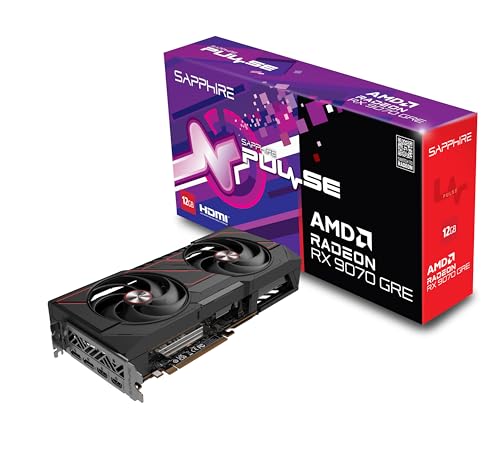
Sapphire Pulse RX 9070 GRE — The step-down RDNA 4 option
Read this pick’s name carefully, because this guide insists on it: the RX 9070 GRE is not an RX 9070 XT. The GRE is a distinct GPU tier below the XT — Sapphire’s listing describes a Pulse gaming card with 12GB of GDDR6 on the RDNA 4 architecture — and it exists to give the current generation a lower rung: newer architecture and features than RDNA 3, at a step down in raw capability and memory from the flagship above. Judged as itself, it is a sensible card. Judged as a discounted XT, it would be a misunderstanding, and the distinction is the single most important sentence in this section.
The GRE designation has an unusual history — the letters originally marked a special edition for a specific market before becoming a wider tier — and that history explains why the name confuses: it sounds like a trim level of the 9070 rather than a separate product. Buyers owe it to themselves to ignore the letters entirely and shop the card as what the listing says it is: a 12GB RDNA 4 GPU from Sapphire’s Pulse line, positioned between the 9060 XT and the 9070 XT. Read that way, the card needs no apology and creates no confusion; it is simply the middle rung of the current ladder, with the middle rung’s honest compromises.
What does the GRE buyer get? The RDNA 4 generation’s improvements in ray tracing and upscaling, a modern 12GB memory allocation suited to 1440p gaming, and Sapphire’s Pulse execution — the same design philosophy as the 7900 XT above it, applied to a smaller card. For a player upgrading from several generations back, on a 1440p monitor, the GRE lands in the productive middle: a clear generational leap, without paying for flagship headroom their monitor cannot display.
The comparison that matters is against the 9060 XT 16GB below. The GRE offers the stronger GPU tier; the 9060 XT 16GB offers more memory. Games today lean on the GPU first, which favours the GRE for current titles, while the memory gap argues for the XFX card over a longer ownership horizon. Either reasoning is respectable; what is not respectable is choosing the GRE believing it to be an XT variant, and a buyer who has read this far will not make that error.
- GPU: AMD Radeon RX 9070 GRE, RDNA 4 — distinct from the RX 9070 XT
- Memory: 12GB GDDR6
- Partner line: Sapphire Pulse
- Model: 11354-01-20G
- Class: Upper-mainstream desktop gaming card
Strengths
- Current RDNA 4 architecture below the flagship price tier
- Sapphire Pulse build quality and cooling philosophy
- 12GB suits 1440p gaming well
Trade-offs
- A clear step below the 9070 XT in capability and memory
- Less VRAM than the cheaper-named 9060 XT 16GB
- The GRE name invites confusion — buy it as its own tier
Best for: 1440p players who want RDNA 4 features without flagship pricing.
Not suited for: Anyone who believes they are buying a 9070 XT — they are not.

XFX Swift RX 9060 XT 16GB — Best mainstream AMD pick
The mainstream is where most gaming PCs actually live, and the RX 9060 XT is AMD’s current mainstream GPU — which makes the choice of version the most consequential decision in this entire guide. The name covers two memory configurations, 8GB and 16GB, and this pick is unambiguously the 16GB: XFX’s Swift triple-fan gaming edition, listing its 16GB of GDDR6 in its own title. Eight gigabytes is a constraint modern games increasingly lean against at 1440p; sixteen is headroom. Same name, different ownership experience, and the guide’s recommendation is the larger memory every time the budget allows the step.
The buyer’s scenario here is the most common in PC gaming: a machine built to a sensible total budget, expected to play everything released during its life without drama. That expectation is precisely what the 16GB configuration underwrites. The 8GB version of this GPU will play today’s games at today’s settings and begin negotiating with tomorrow’s; the 16GB version simply plays them, and the difference in purchase price is small against the difference in the card’s comfortable lifespan. If this guide’s memory argument persuades you anywhere, let it be here, at the tier where the step up costs least and lasts longest.
XFX’s execution suits the card’s role. The Swift line is the company’s straightforward gaming design, and the triple-fan cooler on this model is generous for the class — mainstream cards with serious cooling run their clocks consistently and their fans slowly, which is the combination that makes a PC pleasant to sit beside. The outputs follow the current pattern stated in the listing, HDMI and dual DisplayPort, covering multi-monitor desks without adapters.
As a gaming proposition, the 9060 XT 16GB is the 1080p high-refresh and 1440p card of the current AMD range: esports titles will fly, demanding games will run well with sensible settings and upscaling where available, and the memory pool means texture settings do not need apologising for. For the buyer building a balanced machine — sensible CPU, this card, a good monitor — it is the pick in this guide most likely to be simply right, and its mainstream power requirements are kind to ordinary power supplies in a way the flagships are not.
- GPU: AMD Radeon RX 9060 XT, RDNA 4
- Memory: 16GB GDDR6 — the configuration to choose
- Partner line: XFX Swift, triple-fan gaming edition
- Outputs: HDMI, 2x DisplayPort, per listing
- Class: Mainstream desktop gaming card
Strengths
- 16GB of memory at the mainstream tier
- Triple-fan cooler is generous for the class
- Current architecture with mainstream power demands
Trade-offs
- Not a 4K flagship — set resolution expectations by tier
- The same GPU name exists in an 8GB version; verify before buying anywhere
- Triple-fan length still needs a case check
Best for: Balanced 1080p high-refresh and 1440p builds that should stay comfortable for years.
Not suited for: Buyers targeting high-end 4K without upscaling compromises.
How Much VRAM Do You Actually Need?
VRAM is consumed by textures, frame buffers, ray-tracing structures and the game’s general working set, and consumption scales with resolution and texture quality above all. At 1080p with sensible settings, even the 8GB configuration of a card like the 9060 XT copes today; at 1440p with maximum textures, several current games press past 8GB and the symptom is not a crash but a quiet degradation — textures arriving late, detail dialled back by the engine, stutters in the busiest scenes. At 4K the pressure multiplies again, which is why the high end of this guide starts at 16GB and peaks at the 7900 XT’s 20GB.
The forward-looking point matters more than today’s table. Games are built against the hardware of their release year, and a card is typically owned across four or five release years. Memory that is merely adequate at purchase becomes the binding constraint long before the GPU’s arithmetic does, because arithmetic shortfalls can be softened with settings and upscaling while a memory shortfall degrades the image itself. That asymmetry is the entire argument for the 16GB 9060 XT over its 8GB twin, and for respecting the GRE’s 12GB as a 1440p allocation rather than a 4K one.
One more pressure deserves naming, because it arrives disguised as a settings menu: texture streaming in open-world games. Large worlds load their surface detail continuously as the player moves, and a memory pool with headroom lets the engine keep that detail resident rather than fetching it in visible waves. Players describe the symptom as textures “popping in” during fast travel or driving, and they often blame the game; frequently the budget being spent is VRAM. It is one more reason the memory column of this guide’s table is not a spec-sheet formality but a description of how the game world will actually look in motion.
Productivity deserves a footnote: video editing, 3D work and local AI experimentation all consume VRAM in their own ways, and creators routinely discover that the memory figure they skimmed past in a gaming guide is the specification their software cares about most. If the card will work as well as play, weight the memory column of the comparison table accordingly.
How Do You Prepare a PC for a Card Like These?
Start with the power supply, because it is the component most often inherited without thought. Check its wattage against the card listing’s recommendation — ASRock’s 800W guidance for its Challenger is the most explicit here, but every flagship-class card expects a quality supply with headroom — and confirm it offers the power connectors the card requires, natively rather than through adapters. A supply that was adequate for a five-year-old mainstream card is not automatically adequate for a modern flagship, and instability under gaming load is the classic symptom of pretending otherwise.
Then measure the case. Triple-fan partner cards are long, and flagship coolers are thick; the listing’s dimensions against your case’s GPU clearance, with the front fans or radiator accounted for, is a two-minute check that prevents the most avoidable return in PC building. Airflow follows: a card of this class exhausts serious heat into the case, and a case that can move that heat out — intake at the front, exhaust at the rear and top — keeps clocks high and fans slow.
One more preparation step separates smooth upgrades from haunted ones: update the motherboard’s BIOS if the system is old enough that a current-generation card might not be recognised, and confirm the board’s PCIe slot arrangement leaves the card’s thick cooler clear of anything installed beneath it. These are five-minute verifications on a manufacturer’s page, and they belong to the same family as measuring the case — the family of checks that are trivial before the card arrives and miserable after. PC building rewards the buyer who reads two specification sheets in advance more reliably than any other virtue.
Software preparation is the last step. Remove the previous graphics driver cleanly before installing the new card’s, particularly when changing GPU brands, and install the current AMD driver for the new card before judging anything. Set the monitor to its actual refresh rate in the operating system — a startling number of powerful cards spend their lives driving fast monitors at default settings — and confirm the display cable is plugged into the graphics card rather than the motherboard, the oldest joke in PC support, which remains funny only because it remains common.
Which Resolution Is Each Tier Really For?
Match the card to the monitor, because the monitor is the window the card must fill. At 1080p, every card in this guide is comfortable, and the contest is about refresh rate: esports players chasing very high frame rates will use even a 9070 XT’s headroom, while a 60Hz 1080p screen makes the 9060 XT 16GB the rational ceiling. At 1440p — the current sweet spot of PC gaming — the 9060 XT 16GB and the GRE handle demanding games with sensible settings and upscaling, and the 9070 XT plays with the settings ceiling lifted. At 4K, the flagship tier earns its money: the 9070 XT with upscaling, and the 7900 XT leaning on its memory for texture-heavy titles.
Refresh rate deserves its own sentence inside the resolution question, because a 1440p monitor at a high refresh rate is a heavier demand than a 4K screen at sixty — the card must produce not just more pixels but more frames. Players choosing between the GRE and the 9070 XT for the same 1440p panel are often really choosing between frame-rate ambitions: the GRE for a smooth sixty-to-ninety in demanding titles, the XT for the player whose monitor and reflexes ask for everything beyond that. Naming the ambition honestly is worth more than any single specification in this guide.
The mismatch errors run in both directions. A flagship feeding a small, slow monitor wastes its purchase every day it operates. A mainstream card feeding a large 4K display produces the opposite misery — a beautiful screen displaying compromised settings. Buyers planning a monitor upgrade within the card’s life should buy for the incoming monitor, since cards and monitors age on similar clocks; buyers keeping their screen should let the screen, not the marketing, set the tier.
What About Ray Tracing and Upscaling on AMD Cards?
Ray tracing renders lighting by simulating light itself, and it is the most expensive visual feature in modern games. AMD’s RDNA 4 generation narrowed the historical gap in this discipline considerably, which is why the 9070-series cards in this guide can be recommended for players who use those settings, while the RDNA 3 card’s case rests elsewhere. The honest framing is workload-specific: a player who enables ray tracing in every supported title belongs on the newest architecture; a player who prefers maximum frame rates with traditional lighting loses little on the older one.
Frame generation, the third member of the modern feature family, deserves a mention for completeness: it inserts constructed frames between rendered ones to raise the displayed frame rate, at the cost of some latency and occasional visual artefacts. It is a smoothing technology rather than a performance one — most valuable when the underlying rendered rate is already healthy — and its availability follows the same generational lines as the upscaling discussed here. Buyers comparing feature lists should weight it below the fundamentals of tier and memory, where this guide has kept the emphasis throughout.
Upscaling is the companion technology: the card renders at a lower resolution and reconstructs the target resolution, trading a small amount of image purity for a large amount of performance. AMD’s latest generation of the technology, shipping with RDNA 4, uses machine learning and is a material part of how the 9070 and 9060 cards reach their higher-resolution ambitions. When this guide says a card handles 4K “with upscaling,” that phrase is doing real work and should be read as a description of the intended experience, not as a footnote of shame — at its current quality, upscaled play is how most high-resolution gaming on any brand is actually enjoyed.
How Do the Six AMD Cards Compare at a Glance?
| Pick | GPU | Memory | Generation | Choose it when |
|---|---|---|---|---|
| PowerColor Hellhound RX 9070 XT | RX 9070 XT | 16GB GDDR6 | RDNA 4 | You want the flagship with the enthusiast cooler |
| PowerColor Reaper RX 9070 XT | RX 9070 XT | 16GB GDDR6 | RDNA 4 | You want the flagship silicon, simply presented |
| ASRock RX 9070 XT Challenger | RX 9070 XT | 16GB GDDR6 | RDNA 4 | You plan from stated specifications |
| Sapphire Pulse RX 7900 XT | RX 7900 XT | 20GB GDDR6 | RDNA 3 | Memory headroom leads your priorities |
| Sapphire Pulse RX 9070 GRE | RX 9070 GRE | 12GB GDDR6 | RDNA 4 | You want current architecture a tier down |
| XFX Swift RX 9060 XT 16GB | RX 9060 XT | 16GB GDDR6 | RDNA 4 | You are building the balanced mainstream machine |
Read the memory column against the resolution section above and the table becomes a planning tool rather than a catalogue. Sixteen gigabytes appears at three different tiers, which proves the guide’s recurring point from the other direction: memory alone does not set performance, and tier alone does not set longevity. The two numbers together — GPU tier for today’s frame rates, memory for tomorrow’s comfort — are the smallest complete description of a graphics card purchase, and every pick here was chosen to make a defensible pairing of the two.
Three rows of this table carry the same GPU name, and that is the table’s lesson: at the flagship tier, the decision is about the partner — cooler philosophy, stated clocks, design temperament — because the silicon is shared. The other three rows are tier decisions, where the GPU itself changes. Buyers who identify which kind of decision they are making rarely make the wrong one.
What Mistakes Do AMD Card Buyers Keep Making?
Before the mistakes, one habit prevents most of them: slow down at the listing. Graphics cards are the most name-dense products in computing — GPU, tier suffix, memory, partner, partner line, clock edition — and every element of that chain is a place where a hurried buyer can purchase a different card from the one intended. The listings linked in this guide carry their full identities in their titles; thirty seconds spent reading one in full is the highest-value half-minute in the entire purchase.
The expensive mistake is name-blindness: buying an RX 9060 XT without checking which memory configuration is in the box, or reading RX 9070 GRE as a variant of the XT. Both errors are encouraged by naming conventions that hide the difference in plain sight, and both are prevented by the habit this guide has repeated — read the full listing title, including the memory figure, before money moves. The second mistake is tier-skipping in the wrong direction: paying flagship money to drive a modest monitor, where the card’s headroom will never be displayed, while the monitor that would have transformed the experience goes unbought.
A sixth mistake is buying for the game of the month. A card purchased to maximise one current title at one current setting will be judged, across its life, by hundreds of hours of everything else; the tier-and-memory logic in this guide exists because it generalises, while a single game’s benchmark does not. Relatedly, buyers should be wary of judging any of these cards by a single review’s chart recorded with settings no player would choose — the sustainable question is never “which card won a chart” but “which tier, with how much memory, built by which partner, fits my monitor and my next four years.”
The third mistake is inherited-power-supply optimism, covered above and worth repeating because it causes more instability than any defective card. The fourth is judging a card by launch-window reviews of a different partner’s model and assuming the cooler, noise and dimensions transfer; they do not, and the partner is half the product. The fifth is ignoring the used-market confusion between similarly named cards — a risk avoided entirely by buying the verified listings this guide links, with the model in the title where it belongs.
Final Recommendation
If a single sentence must carry the guide: buy the highest RDNA 4 tier your monitor can use, in the largest memory configuration its name offers, from the partner whose cooler suits your case.
For the strongest AMD system in this pool, choose a 9070 XT and pick your partner by temperament: the PowerColor Hellhound for the enthusiast cooler, the Reaper for the same silicon plainly priced, the ASRock Challenger for the fully declared specification. For memory-led high-resolution value, the Sapphire Pulse RX 7900 XT’s 20GB remains a distinctive proposition. A tier down, the Sapphire Pulse RX 9070 GRE brings RDNA 4 to 1440p as its own honest tier — and for the mainstream build most people are actually assembling, the XFX Swift RX 9060 XT in its 16GB form is this guide’s most broadly right answer.
One closing thought on timing. Graphics generations turn over on a rhythm of roughly two years, which means any card in this guide will be “last generation” for most of its working life — including the flagships. Buyers who internalise that stop chasing the calendar and start shopping the pairing of tier and memory, which ages at the speed of games rather than the speed of product launches. Every pick here was chosen to still make sense on the far side of that turnover, and the 16GB-and-above memory figures running through the list are the reason why.
Whichever card leaves with you, verify the memory figure in its title, feed it the power supply its class expects, and pair it with a monitor that can show what it renders. An AMD card chosen by tier, memory and partner — in that order — is a card that will still feel correctly bought in its third year, which is the only verdict that matters.
Frequently Asked Questions
Is the RX 9070 GRE the same as the RX 9070 XT?
No. The GRE is a separate, lower GPU tier with 12GB of memory, sitting below the XT’s 16GB flagship specification. The practical test when shopping anywhere: if the listing’s full title does not contain the letters XT immediately after 9070, you are looking at the GRE, and its price should be judged against the GRE tier in this guide rather than against the flagship. They share part of a name and the RDNA 4 architecture, and nothing else should be assumed to transfer between them.
Should I buy the 8GB or 16GB RX 9060 XT?
The 16GB, as listed in this guide’s XFX pick, whenever the budget allows. The narrow exception is the pure esports build at 1080p with competitive settings, where textures are deliberately minimised and frames are everything; even there, the 16GB card’s resale and upgrade path argue for it, and the exception closes a little more with every game release. The GPU is the same, but the memory decides how texture quality and resolution scale over the card’s life, and 8GB is already pressed by demanding games at 1440p. Verify the figure in any listing’s title before buying.
Is RDNA 3 still worth buying next to RDNA 4?
For rasterised gaming with generous memory — the RX 7900 XT’s 20GB case — yes, particularly when priced as a previous flagship should be. The pattern repeats every generation: the outgoing flagship, discounted, competes with the incoming mid-range at similar money, offering more memory and raw raster strength against newer features. Neither side of that trade is the wrong one; it is the defining judgement call of graphics-card shopping, and it should be made by the features you actually enable rather than by the calendar. For ray tracing and the newest upscaling, RDNA 4 holds the architectural edge, and buyers who prize those should buy the newer cards.
Does the board partner really matter if the GPU is the same?
It matters for everything except the silicon: cooler size and noise, factory clocks, card dimensions, power connectors and the warranty experience. A useful way to hold the idea: the GPU decides what the card can do on its best day, and the partner decides what it is like to live with on every day — how loudly it works, how much of the case it occupies, and who answers when something goes wrong in year two. Frame rates between partners of the same GPU sit close together; living with the card does not, which is why this guide names the partner in every pick.
What power supply do these cards need?
It varies by model, and the listing is the authority — ASRock states 800W guidance for its Challenger, while the mainstream 9060 XT is far less demanding. Treat the stated figure as a system recommendation rather than the card’s own draw: it assumes a full machine around the card, with headroom for the brief power excursions modern GPUs produce, which is why a nominally sufficient older supply can still trip under a flagship’s transients. Check the specific card’s stated recommendation and connector requirements, and prefer a quality supply with headroom over a bare-minimum unit.
Will these cards fit my case?
Check the listing’s dimensions against your case’s stated GPU clearance, accounting for front-mounted fans or radiators. Length is the figure that usually binds, but thickness decides whether the slot below the card remains usable, and height — including the power cables’ bend above the card — decides whether the side panel closes without pressing on the connectors. Triple-fan partner cards are long, and flagship coolers occupy more than two slots of thickness on some designs; two minutes with both specification sheets prevents the commonest build-day disappointment.
Related Guides
A graphics card is one decision inside a whole build, and these guides cover its closest neighbours: Best Affordable Gaming PC Cases for the enclosure that must fit and cool the card, and Best 2 TB SSDs: NVMe Flagships, Honest Value Picks and the SATA Drive That Still Matters for the storage that keeps game libraries from crowding the system drive. For the library overflow itself, see Best 2.5 SSDs: Six SATA Drives to Wake Up an Old Laptop or Desktop.
Related guides
- Best 1440p 165Hz Monitors: One Native 165Hz Pick, Three 180Hz Upgrades, an Overclock Headline and a 160Hz Ultrawide
- Best 13×19 Professional Printers
- Best 3rd Party MacBook Chargers: 96W-Class Alternatives, the 100W Cable Rule, and the Apple Benchmark
- Best Built PC: Six Prebuilt Gaming PCs Judged on Parts, Power and Upgrades


